
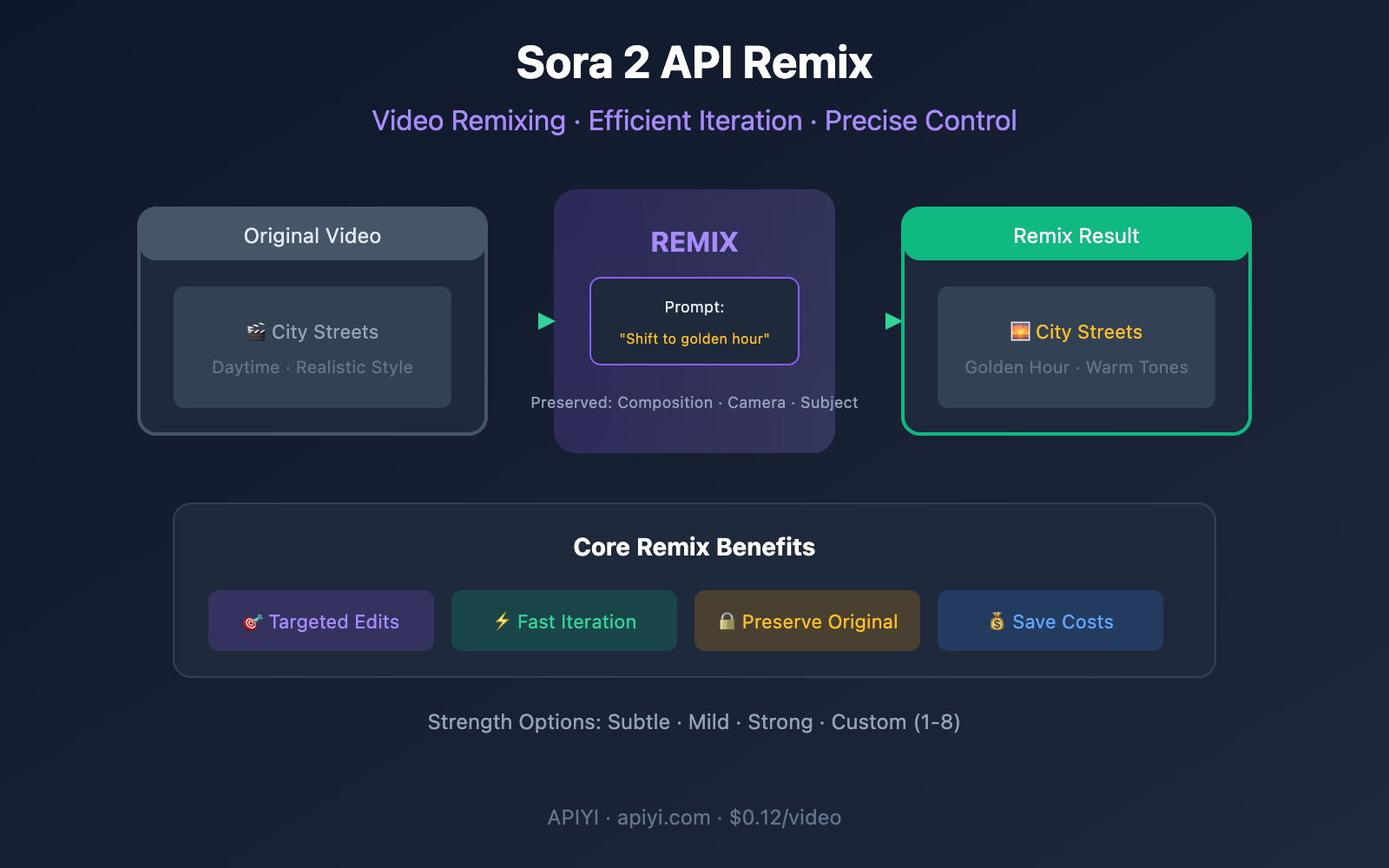
Core Value: Sora 2 API's Remix feature lets you make targeted modifications to finished videos without starting from scratch. The system preserves your original video's structure, coherence, and composition while applying only the changes you specify—this is key to efficient video iteration.
Sora 2 API Remix Feature Overview
What is Sora 2 Remix
Remix is Sora 2's video remixing capability that allows you to make targeted adjustments to existing videos without regenerating everything from scratch.
| Feature | Description |
|---|---|
| Preserve Original Structure | Inherits composition, camera movement, and coherence from the original |
| Targeted Modifications | Changes only the elements you specify |
| Reduce Surprises | Avoids unpredictability from complete regeneration |
| Rapid Iteration | Fine-tune based on already good results |
In the official words:
"Remix lets you take an existing video and make targeted adjustments without regenerating everything from scratch."
How Sora 2 Remix Works
When you call the Remix API, the system:
- Reads the original video's
video_id - Analyzes the original video's structure, style, and content
- Makes targeted modifications based on your new prompt
- Generates a new video that preserves the original characteristics
# Official API call example
curl -X POST "https://api.openai.com/v1/videos/<previous_video_id>/remix" \
  -H "Authorization: Bearer $OPENAI_API_KEY" \
  -H "Content-Type: application/json" \
  -d '{
    "prompt": "Shift the color palette to teal, sand, and rust, with a warm backlight."
  }'
The Core Value of Sora 2 Remix
Why Remix is Crucial for Video Creation
| Pain Point | Traditional Approach | Remix Solution |
|---|---|---|
| Unhappy with colors | Regenerate, camera movement might change | Only change colors, keep camera movement |
| Want to change background | Complete regeneration, characters might change | Only swap background, characters stay consistent |
| Adjust lighting | Multiple attempts, uncontrollable results | Precise adjustment, other elements unchanged |
| Fine-tune details | Waste computing power and time | Efficient iteration, controllable costs |
Three Major Use Cases for Remix
Scenario 1: Color Tone and Atmosphere Adjustment
Original video: Daytime city street scene
Remix prompt: "Shift to golden hour lighting with warm orange tones"
Result: Same street scene, but transformed to dusk warm tones
Scenario 2: Style Transformation
Original video: Realistic forest scene
Remix prompt: "Transform to Studio Ghibli anime style"
Result: Same composition, but transformed to Ghibli animation style
Scenario 3: Element Replacement
Original video: Car driving on highway
Remix prompt: "Replace the car with a vintage motorcycle"
Result: Same highway and camera movement, but subject changed to vintage motorcycle
Sora 2 Remix Strength Settings Explained
Four Remix Strength Levels
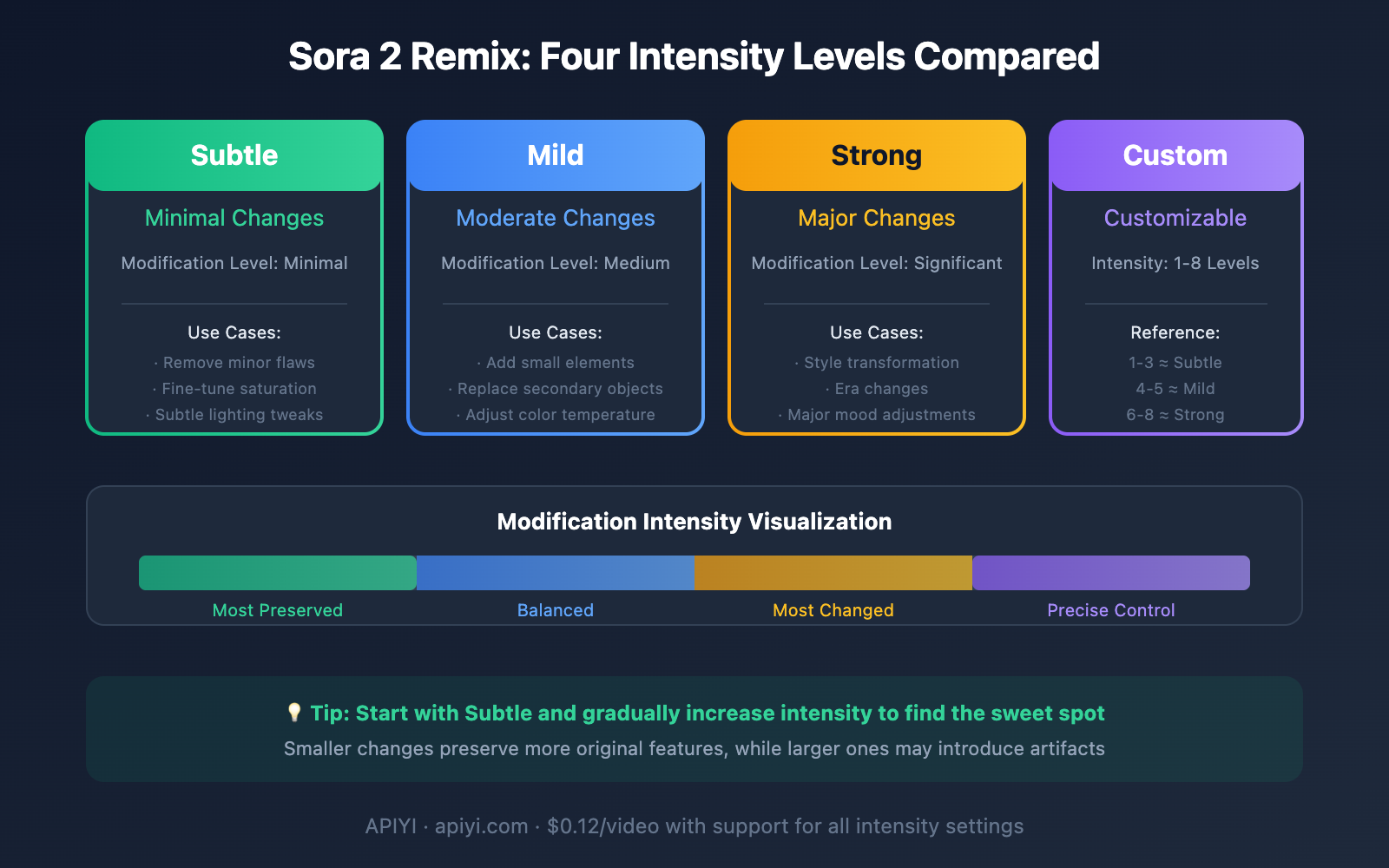
Sora 2 Remix offers four strength settings, giving you precise control over the extent of modifications:
| Strength Level | English Name | Modification Range | Use Cases |
|---|---|---|---|
| Subtle | Subtle | Minimal | Remove small objects, fine-tune details |
| Mild | Mild | Medium | Add elements, slight style adjustments |
| Strong | Strong | Substantial | Overall style transformation, major overhauls |
| Custom | Custom | 1-8 scale | Precise control over modification degree |
Usage Recommendations for Each Strength Level
Subtle
- Remove small imperfections from the frame
- Fine-tune color saturation
- Minor lighting and shadow adjustments
Mild
- Add a few trees or small elements
- Replace secondary objects in the background
- Adjust overall color temperature
Strong
- Transform from realistic to animated style
- Change modern scenes to vintage settings
- Dramatically alter scene atmosphere
Custom
- Strength 1-3: Close to Subtle
- Strength 4-5: Close to Mild
- Strength 6-8: Close to Strong
🎯 Usage Tip: The official recommendation is to make one clear modification per Remix. The more focused your changes, the better it'll preserve the original video's characteristics, and the lower the risk of artifacts showing up.
Sora 2 API Remix Usage Guide
API Endpoint Overview
| Endpoint | Method | Description |
|---|---|---|
/v1/videos/{video_id}/remix |
POST | Remix a specified video |
Python Usage Example
import openai

# Access Sora 2 Remix via APIYI
client = openai.OpenAI(
    api_key="your_api_key",
    base_url="https://vip.apiyi.com/v1"
)

# Step 1: Generate the original video
original_response = client.chat.completions.create(
    model="sora-2",
    messages=[{
        "role": "user",
        "content": "A woman walking through a forest, cinematic lighting"
    }]
)

# Get the original video ID
original_video_id = original_response.id

# Step 2: Iterate using Remix
remix_response = client.post(
    f"/v1/videos/{original_video_id}/remix",
    json={
        "prompt": "Change to autumn colors with golden leaves falling"
    }
)
Using Remix via APIYI
import requests

# APIYI Sora 2 Remix call
headers = {
    "Authorization": "Bearer your_apiyi_key",
    "Content-Type": "application/json"
}

# Remix request
remix_data = {
    "prompt": "Shift the color palette to teal, sand, and rust, with a warm backlight."
}

response = requests.post(
    f"https://vip.apiyi.com/v1/videos/{video_id}/remix",
    headers=headers,
    json=remix_data
)

print(response.json())
💡 Integration Tip: APIYI (apiyi.com) supports the complete Sora 2 API functionality, including Remix. At $0.12 per generation, it's perfect for efficient video iteration workflows.
Sora 2 Remix Best Practices
Official Usage Guidelines
OpenAI has provided clear recommendations for using the Remix feature:
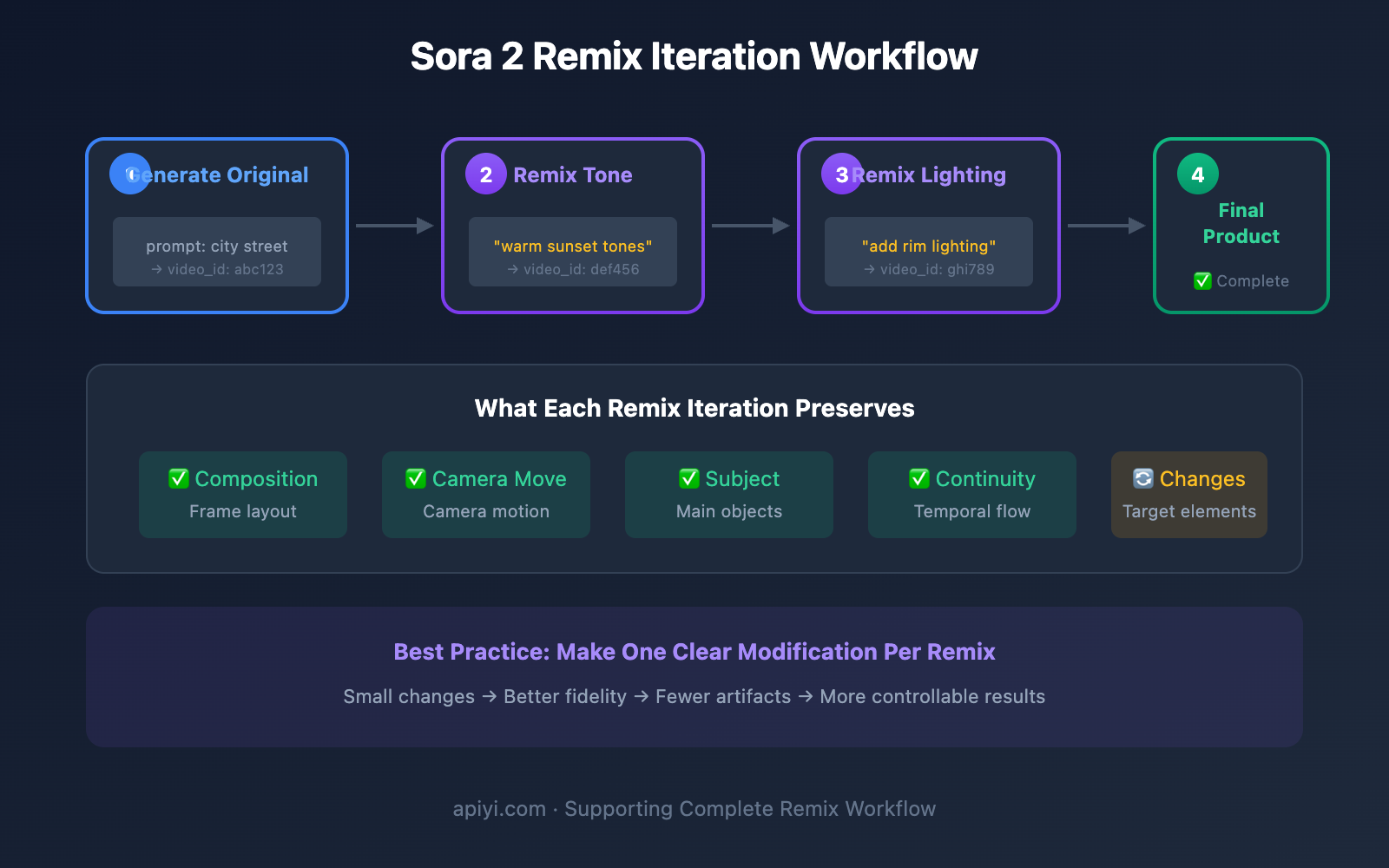
"This works best when you make a single, well-defined change because smaller, focused edits preserve more of the original fidelity and reduce the risk of introducing artifacts."
Here's what that means in practice:
| Principle | Explanation |
|---|---|
| Single Change | Make one clear modification at a time |
| Focused Edits | The smaller the change, the better the results |
| Preserve Original | Let the system maintain as much of the original as possible |
| Reduce Artifacts | Small changes minimize the risk of introducing flaws |
Efficient Iteration Workflow
Recommended Remix workflow:
Round 1: Generate base video
    ↓
Round 2: Remix to adjust color tone
    ↓
Round 3: Remix to fine-tune lighting
    ↓
Round 4: Remix to optimize details
    ↓
Final result
What NOT to do:
❌ Change multiple elements in one Remix
❌ Use Strong intensity for minor adjustments
❌ Make frequent large-scale modifications to the same video
Common Remix Prompt Templates
| Modification Type | Prompt Example |
|---|---|
| Color Adjustment | "Shift the color palette to warm sunset tones" |
| Lighting Changes | "Add dramatic rim lighting from the left" |
| Style Conversion | "Transform to watercolor painting style" |
| Weather Changes | "Add gentle snowfall to the scene" |
| Time Changes | "Change from daytime to moonlit night" |
| Element Replacement | "Replace the bicycle with a vintage car" |
Sora 2 Remix vs Other Features
Sora 2 API's Five Main Endpoints
| Endpoint | Function | Use Case |
|---|---|---|
| Create | Generate video from text/image | Creating new videos |
| Extend | Lengthen video duration | Need longer content |
| Remix | Make targeted modifications | Iterative refinement |
| Storyboard | Multi-segment stitching | Complex narratives |
| Loop | Create looping videos | Background footage |
Remix vs Re-generation
| Comparison | Remix | Re-generation |
|---|---|---|
| Structure Preservation | ✅ Fully preserved | ❌ May change |
| Camera Movement | ✅ Stays the same | ❌ May differ |
| Subject Stability | ✅ Highly consistent | ❌ May vary |
| Controllability | ✅ Precise control | ❌ Random results |
| Iteration Efficiency | ✅ Efficient | ❌ Inefficient |
| Cost | ✅ Cost-effective | ❌ Accumulates |
Real-World Use Cases for Sora 2 Remix
Case 1: Product Video Color Grading
Scenario: E-commerce product videos that need to adapt to different platform visual styles
# Original video: Product showcase
original_prompt = "Product rotating on white background, soft lighting"

# Remix 1: Adapt to TikTok's warm tones
remix_1 = "Shift to warm, energetic orange and coral tones"

# Remix 2: Adapt to Xiaohongshu's fresh style
remix_2 = "Change to soft pastel pink and mint green palette"

# Remix 3: Adapt to Bilibili's tech aesthetic
remix_3 = "Transform to cool blue tech aesthetic with subtle glow"
Case 2: Brand Video Iteration
Scenario: Testing different visual effects while maintaining the overall tone
| Iteration | Remix Content | Result |
|---|---|---|
| V1 | Original generation | Base version |
| V2 | Add lens flare | More cinematic |
| V3 | Adjust to warm tones | More approachable |
| V4 | Increase depth of field | More professional |
Case 3: Animation Style Exploration
Scenario: Exploring different animation styles for the same scene
Base video: City street in live-action style

Remix A: "Transform to Pixar 3D animation style"
Remix B: "Convert to Japanese anime style"
Remix C: "Change to watercolor illustration style"
Remix D: "Apply cyberpunk neon aesthetic"
Sora 2 Remix FAQ
Q1: Does Remix cost extra?
Remix is billed per new video generated, same as regular generation:
- Sora 2 Standard: $0.10/second
- Sora 2 Pro: $0.30-0.50/second
- API Easy: $0.12/video (per-generation pricing)
Q2: Can Remix change video duration?
Remix is primarily for content modification and doesn't change video duration. If you need to extend it, please use the Extend endpoint.
Q3: Can I do multiple consecutive Remixes?
Yes, but we'd recommend:
- Making one change at a time
- Building on versions you're happy with
- Saving important intermediate versions
Q4: What if my Remix doesn't turn out well?
If you're not satisfied with the Remix result:
- Try lowering the intensity level
- Simplify your prompt description
- Break it down into multiple smaller modifications
Summary: The Core Value of Sora 2 Remix
Why Remix is Key to Efficient Iteration
| Core Advantage | Explanation |
|---|---|
| Preserve Good Results | Don't discard parts you're already happy with |
| Precise Control | Only change what you want to change |
| Lower Risk | Avoid the uncertainty of complete regeneration |
| Save Costs | Reduce ineffective trial-and-error spending |
| Boost Efficiency | Quickly converge to satisfying results |
Remix Best Practices Recap
- Make one clear modification at a time
- Choose the appropriate strength level
- Save important intermediate versions
- Use clear and specific prompts
🎯 Recommended Solution: Use Sora 2 API through APIYI apiyi.com, which supports full Remix functionality. At $0.12/video with pay-per-use pricing, you can confidently iterate through multiple rounds of optimization to craft the perfect video.
References:
- OpenAI Sora API Documentation: platform.openai.com/docs/guides/video-generation
- OpenAI API Reference: platform.openai.com/docs/api-reference/videos
- Sora Help Center: help.openai.com


