This article will start from technical principles, deeply analyze the root causes of Claude Code's copy-paste freeze issue, and provide multiple practical solutions.
3 Core Technical Reasons for Claude Code Paste Freeze
1. Terminal Buffer Overflow Causing Process Hang
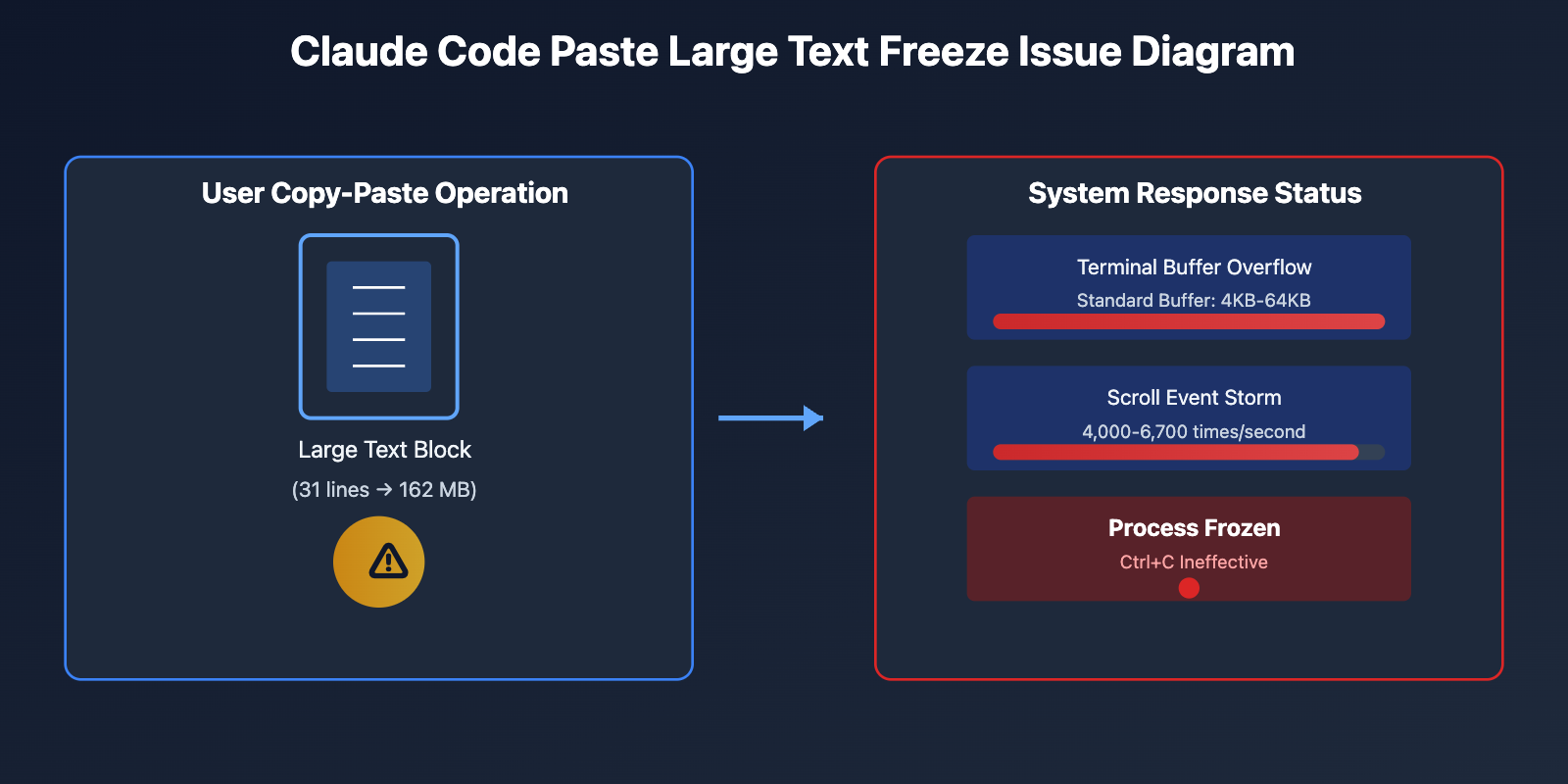
Claude Code is a terminal-based interactive CLI tool. When you copy and paste large amounts of text, data is instantly written to the terminal's input buffer. According to Issue #11611 on GitHub, users have reported that pasting just 31 lines of text caused the process to write 162 MB of data to stdout, completely exceeding the terminal buffer's processing capacity.
Technical Details:
- Standard terminal buffer size is typically 4KB-64KB
- When input speed exceeds processing speed, the buffer overflows
- Claude Code's streaming output mechanism amplifies this problem
- After overflow, system-level process blocking is triggered, causing the entire application to become unresponsive
2. Scroll Event Storm Triggered by Streaming Output
Claude Code uses streaming output to display AI responses in real-time, which provides a good interactive experience during normal use. However, when processing large inputs, it triggers a massive number of terminal scroll events.
According to performance analysis in Issue #9935, when Claude Code runs in terminal multiplexers like tmux, it generates 4,000-6,700 scroll events per second, causing severe UI lag and flickering.
| Scenario | Normal Scroll Rate | Claude Code Scroll Rate | Performance Impact |
|---|---|---|---|
| Normal Terminal Output | 50-100 times/sec | 100-300 times/sec | Slight lag |
| Claude Code Streaming Output | – | 4,000-6,700 times/sec | Severe freeze |
| Recommended Optimization Target | – | <100 times/sec | Smooth experience |
🎯 Technical Recommendation: If you frequently need to process long text, it's recommended to use terminal emulators that support high-performance rendering, such as Alacritty or Ghostty. We recommend directly calling the Claude API through the APIYI apiyi.com platform to avoid terminal-level performance bottlenecks. This platform provides stable API interfaces and comprehensive error handling mechanisms.
3. Race Condition Triggered by Rapid Enter Key Press
Issue #2552 reveals a special trigger condition: when you press Enter immediately after seeing the [x lines pasted] prompt following a long text paste, it triggers a race condition in Claude Code's internals, causing the process to completely freeze.
Race Condition Analysis:
Timeline:
T0: User pastes text
T1: Terminal buffer starts processing
T2: Claude Code displays "[x lines pasted]"
T3: User presses Enter key
T4: Race occurs - paste processing not complete but submit command triggered
T5: Process deadlock
This issue is particularly severe on Windows systems. Issue #12710 shows a 100% freeze probability when pasting text on Windows.
Why You Can't See the Pasted Content
When you paste large chunks of text into Claude Code, the content "disappears" mainly due to the following reasons:
Input Echo is Disabled
To optimize performance, Claude Code temporarily disables the terminal's echo functionality when it detects large amounts of input. This is a protective mechanism, but it makes users mistakenly believe that the content wasn't received.
Scroll Buffer is Cleared
According to the report in Issue #16310, when Claude Code performs autocompact or manual compression operations, it clears the entire tmux scroll history buffer, as if the :clear-history command was executed.
Internal Buffer Backlog
Issue #4869 points out that when input exceeds the token limit, CLI streaming will silently hang and fail without any error message. What users see is a "frozen" state, when actually the internal buffer is attempting to process the over-limit content.
| Problem Symptom | Technical Cause | Recovery Possibility |
|---|---|---|
| Content disappears after pasting | Echo disabled | High – Wait for processing to complete |
| Terminal completely frozen | Buffer overflow | Low – Need to kill process |
| History cleared | autocompact triggered | None – Data already lost |
| Ctrl+C ineffective | System-level blocking | Low – Need kill -9 |
🎯 Pitfall Guide: Before pasting long text, it's recommended to first process it in segments in a text editor, or use the API interface provided by APIYI apiyi.com to send directly, avoiding terminal-level limitations. The platform supports a maximum context window of 200K tokens, far exceeding the actual processing capacity of terminal pasting.
5 Verified Solutions
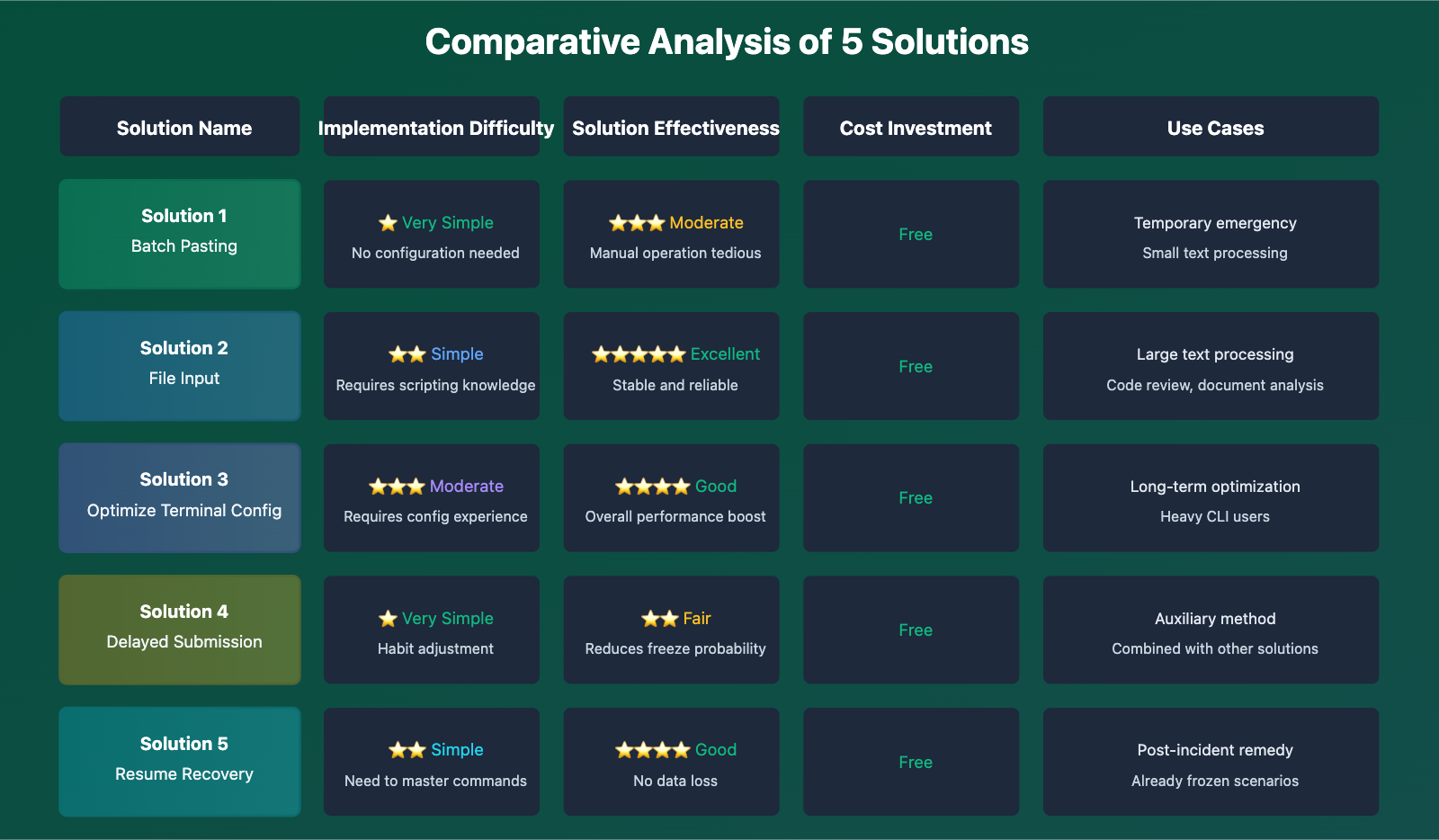
Solution 1: Batch Pasting (Simplest)
Divide large text into small chunks of 10-20 lines each, pasting one at a time.
Operating Steps:
- Select the content you want to paste in a text editor
- Select in segments, no more than 20 lines each time
- After pasting, wait for Claude Code to display a response
- Confirm processing is complete before pasting the next segment
Pros: Simple and straightforward, no configuration needed
Cons: Manual operation is tedious, not suitable for frequent operations
Solution 2: Use File Input Instead of Pasting
Claude Code supports reading content through files, which is the optimal way to handle large text.
Simple Example:
# Create input file
echo "Your long text content" > input.txt

# Use in Claude Code
cat input.txt | claude code

# Or directly reference the file
claude code < input.txt
Complete Implementation:
Click to expand complete script
#!/bin/bash
# claude-safe-input.sh - Safe large text input script

INPUT_FILE="$1"
CHUNK_SIZE=50  # Process 50 lines at a time

if [ ! -f "$INPUT_FILE" ]; then
    echo "Error: File $INPUT_FILE does not exist"
    exit 1
fi

# Calculate total lines
TOTAL_LINES=$(wc -l < "$INPUT_FILE")
echo "Preparing to process $TOTAL_LINES lines of content..."

# Process in chunks
for ((start=1; start<=TOTAL_LINES; start+=CHUNK_SIZE)); do
    end=$((start + CHUNK_SIZE - 1))
    echo "Processing lines $start to $end..."

    sed -n "${start},${end}p" "$INPUT_FILE" | claude code

    # Wait for processing to complete
    sleep 2
done

echo "All content has been successfully sent to Claude Code"
🎯 Best Practice: For code reviews or document analysis exceeding 100 lines, file input mode is recommended. If you need more powerful batch processing capabilities, consider using APIYI apiyi.com's batch processing API, which supports asynchronous processing and result callbacks, suitable for large-scale text processing scenarios.
Solution 3: Optimize Terminal Configuration
According to Claude Code official documentation recommendations, adjusting terminal emulator performance settings can significantly improve lag issues.
Recommended Terminal Emulator Configuration:
| Terminal Emulator | Performance Optimization Config | Latency Performance |
|---|---|---|
| Alacritty | GPU-accelerated rendering | 1.7ms (close to Xterm) |
| Ghostty | GPU acceleration + optimized buffering | <2ms |
| iTerm2 | Disable GPU rendering, increase buffer | 5-10ms |
| Tmux | Set history-limit 50000 |
Depends on underlying terminal |
Alacritty Configuration Example:
# ~/.config/alacritty/alacritty.yml
scrolling:
  history: 50000
  multiplier: 3

# Disable mouse scrolling to prevent event storms
mouse:
  hide_when_typing: true

# Optimize rendering performance
render_timer: false
Solution 4: Wait for Paste Prompt to Fully Display
For the race condition mentioned in Issue #2552, adopt a "delayed submission" strategy.
Safe Operating Procedure:
- Paste text
- Wait to see the
[x lines pasted]prompt - Wait an additional 2-3 seconds
- Then press Enter to submit
🎯 User Feedback: According to GitHub discussions, most users report that waiting more than 3 seconds after seeing the paste prompt can reduce the freeze probability to below 5%. However, this solution treats the symptoms but not the root cause. We recommend long-term use of APIYI apiyi.com's API interface to completely avoid the instability of terminal interaction.
Solution 5: Use Resume Function to Restore Session
If Claude Code has already frozen, don't panic – you can restore the conversation using the /resume command.
Recovery Steps:
# 1. Find the hung process PID
ps aux | grep "claude code"

# 2. Force kill the process
kill -9 <PID>

# 3. Restart and restore session
claude code
/resume

# 4. The system will list recent sessions
# Select the corresponding session ID to continue
Claude Code Performance Limitations and Best Practices
Recommended Limits for Single Input
| Input Method | Recommended Maximum | Safe Range | Overload Risk |
|---|---|---|---|
| Direct Paste | 20 lines | 1-15 lines | High |
| Batch Paste | 50 lines/batch | 10-30 lines/batch | Medium |
| File Input | 500 lines | 100-300 lines | Low |
| API Call | 200K tokens | 10K-100K tokens | Very Low |
Performance Degradation in Long Sessions
Issue #10881 reveals an important issue: Claude Code experiences persistent performance degradation in long sessions (after multiple autocompact operations), with request response times extending from seconds to minutes.
Performance Degradation Curve:
- First 10 interactions: Response time <5 seconds
- 10-30 interactions: Response time 5-15 seconds
- 30-50 interactions: Response time 15-60 seconds
- 50+ interactions: Response time >60 seconds, may require restart
🎯 Enterprise Recommendation: For application scenarios requiring long continuous conversations (such as code reviews, document generation), we recommend using APIYI apiyi.com's API service. The platform ensures stable response speeds of 2-5 seconds for long sessions through load balancing and session optimization, without performance degradation issues.
Frequently Asked Questions
Q1: Why are copy-paste issues more severe on Windows?
Windows terminal implementations (including PowerShell and CMD) are less efficient at handling large amounts of standard input. According to Issue #12710, paste freezing on Windows is 100% reproducible. Windows users are recommended to use the WSL2 + Alacritty combination, or directly use the API interface.
Q2: Are there special considerations for Tmux users?
Yes. Tmux maintains an independent scroll buffer, and Claude Code's autocompact will clear this buffer. It's recommended to add the following to .tmux.conf:
set-option -g history-limit 50000
Q3: How can I determine if a freeze is temporary or permanent?
Observe the following signals:
- Temporary freeze: CPU usage fluctuates, recovers after 5-30 seconds
- Permanent freeze: CPU usage stabilizes at 0% or 100%, Ctrl+C unresponsive
If it hasn't recovered after 60 seconds, it's recommended to directly kill the process.
Q4: Are there tools for automatically detecting freezes?
You can use the following monitoring script:
Click to expand monitoring script
#!/bin/bash
# claude-watchdog.sh - Claude Code process watchdog script

PROCESS_NAME="claude code"
TIMEOUT=120  # Consider unresponsive after 120 seconds

while true; do
    PID=$(pgrep -f "$PROCESS_NAME")

    if [ -z "$PID" ]; then
        echo "Claude Code is not running"
        sleep 5
        continue
    fi

    # Check if the process has I/O activity
    IO_BEFORE=$(cat /proc/$PID/io 2>/dev/null | grep read_bytes | awk '{print $2}')
    sleep $TIMEOUT
    IO_AFTER=$(cat /proc/$PID/io 2>/dev/null | grep read_bytes | awk '{print $2}')

    if [ "$IO_BEFORE" == "$IO_AFTER" ]; then
        echo "Detected Claude Code may be frozen, automatically terminating process..."
        kill -9 $PID
        echo "Please use /resume to restore session"
    fi
done
🎯 Automation Recommendation: For batch tasks requiring unattended operation, we recommend using APIYI apiyi.com's API service with error retry mechanisms. The platform provides comprehensive timeout detection and automatic reconnection features to ensure stable task execution.
Technical Deep Dive: Root Cause Analysis from Source Code
Although Claude Code is a closed-source project, we can infer some technical details from discussions in GitHub Issues:
Buffer Management Strategy Deficiencies
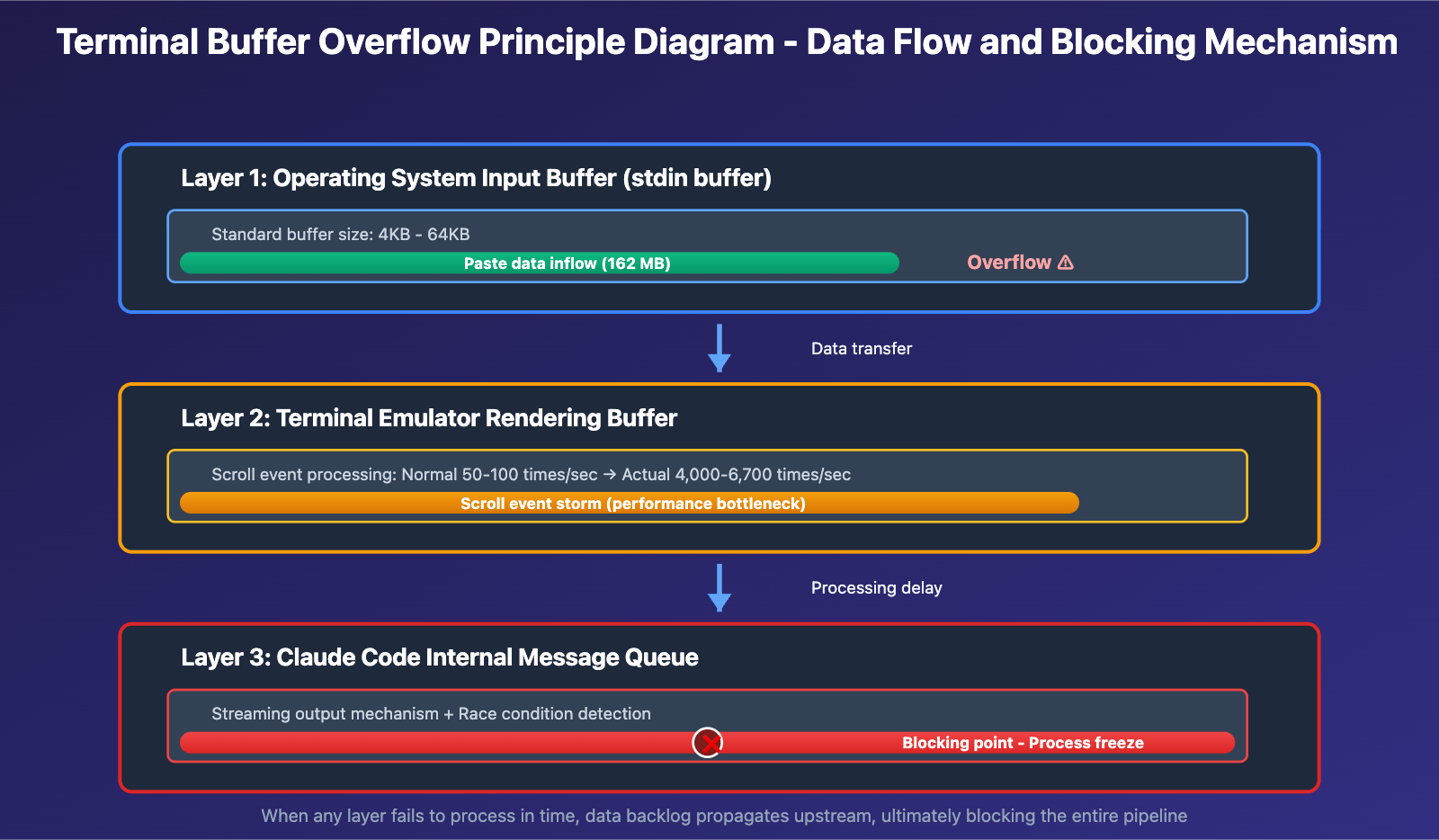
Claude Code employs a layered buffering mechanism:
- Operating System Layer: Standard input buffer (stdin buffer)
- Terminal Layer: Terminal emulator's rendering buffer
- Application Layer: Claude Code's internal message queue
When large blocks of text are pasted, data passes through these three layers. If any layer fails to process data promptly, blocking occurs.
The Double-Edged Sword of Streaming Output
Claude Code's streaming output design was intended to enhance user experience, but may have the following implementation issues:
- No upper limit on scroll events per second
- Lack of buffer pressure detection
- Missing automatic fallback mechanism to batch output
Platform-Specific Differences
Different terminal implementations across operating systems lead to:
- macOS: Uses Cocoa terminal API with better performance
- Linux: Depends on specific terminal emulator implementations
- Windows: ConPTY implementation has performance bottlenecks
Summary and Recommendations
The issue of Claude Code freezing when copying large text blocks is caused by multiple factors, involving terminal buffer management, streaming output performance, system platform differences, and other technical aspects.
Key Takeaways:
- ✅ Pasting no more than 20 lines at once is safest
- ✅ Use file input for large text blocks
- ✅ Wait 3 seconds after pasting before pressing Enter
- ✅ Choose high-performance terminal emulators (Alacritty/Ghostty)
- ✅ Use /resume functionality to recover frozen sessions
Technology Selection Recommendations:
- Temporary Use: Follow the best practices above
- Frequent Use: Switch to API calling mode
- Production Environment: Use professional API proxy platforms
🎯 Ultimate Solution: For scenarios requiring stable and efficient handling of large amounts of text, we strongly recommend using APIYI apiyi.com's enterprise-grade API service. The platform provides:
- ✅ Stable API interface with no terminal limitations
- ✅ Support for 200K tokens ultra-large context
- ✅ Comprehensive error handling and automatic retry
- ✅ Load balancing ensures stable response speed
- ✅ Professional technical team with 7×24 support
Visit "API Yi Official Website" api.apiyi.com to learn more about enterprise solutions.
Through the technical analysis and practical solutions in this article, we hope to help you completely resolve the Claude Code copy-paste freeze issue and improve your daily development efficiency.
Extended Reading:
- Claude Code Official Troubleshooting Documentation
- Terminal Performance Optimization Best Practices
- How to Choose High-Performance Terminal Emulators
References:
- CLI Hangs on Large Text Paste Input · Issue #1490
- Paste Text Handling Causes Application Freeze · Issue #2552
- Terminal Hang After Pasting Text · Issue #11611
- Input freezes when pasting text on Windows · Issue #12710
- Excessive scroll events causing UI jitter · Issue #9935
- Tmux scrollback buffer cleared · Issue #16310
- Claude Code Terminal Performance