Author's Note: A detailed guide on using Nano Banana Pro (Gemini 3 Pro Image) to create stylish collages, from prompt design to multi-image composition, quickly generating professional-grade Fashion Mood Boards
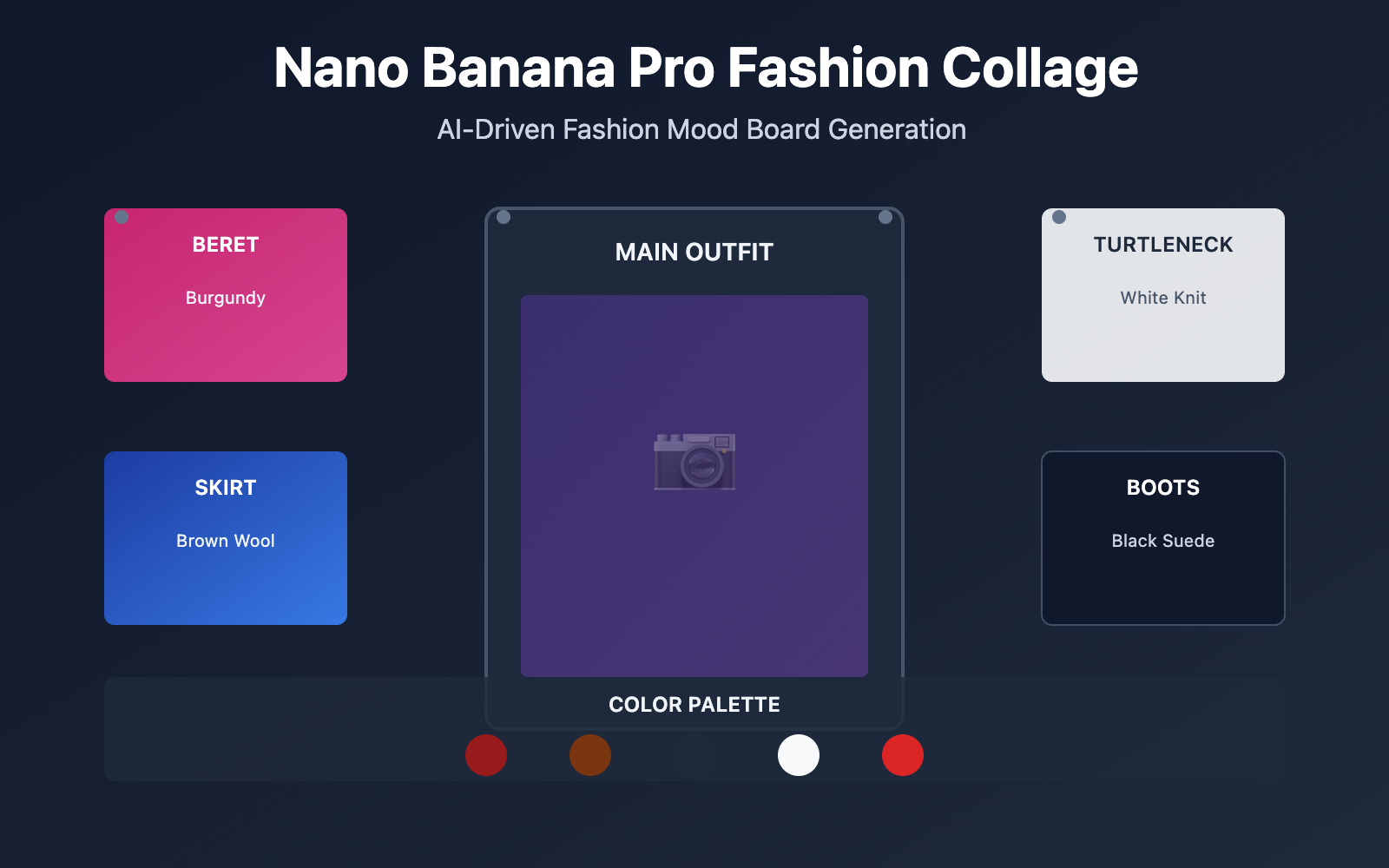
Want to quickly create professional-grade fashion collages (Fashion Mood Boards) but find manual assembly time-consuming and laborious? Nano Banana Pro (Gemini 3 Pro Image Preview)'s multi-image composition feature allows you to generate collage effects comparable to fashion magazines in just 3 steps.
Core Value: After reading this article, you'll learn how to use Nano Banana Pro's multi-image composition, text rendering, and Google Search Grounding capabilities to quickly create brand collages, product catalog pages, and fashion inspiration boards.
Nano Banana Pro Fashion Collage Core Capabilities
Nano Banana Pro is an image generation model launched by Google DeepMind based on Gemini 3 Pro, hailed as the "best model for generating images with correctly rendered and clearly readable text". Its core capabilities in fashion collage scenarios include:
| Core Capability | Technical Parameters | Collage Value |
|---|---|---|
| Multi-image Composition | Accepts up to 14 reference images | Can synthesize product photos, color palettes, text annotations into unified visual effects |
| Text Rendering | Supports clear rendering in multiple languages including Chinese and English | Automatically generates brand slogans, product labels, price tags |
| High-resolution Output | Native support for 1K/2K/4K | Meets print and professional design requirements |
| Style Consistency | Maintains consistency across up to 5 characters/elements | Ensures overall style uniformity across the collage |
What is a Fashion Mood Board?
A Fashion Mood Board is a tool used by designers in the early stages of creation for visual brainstorming. By assembling clothing items, color schemes, texture maps, brand identities, and other elements together, it quickly conveys design concepts and style directions.
Traditional creation methods require:
- Manually collecting material images
- Using software like Photoshop for assembly
- Repeatedly adjusting layout and color balance
- Adding text annotations and brand elements
Nano Banana Pro can automatically complete all the above steps through a single prompt, and supports fine editing of individual elements.
Nano Banana Pro Fashion Collage Creation Workflow
Step 1: Design Prompt Structure
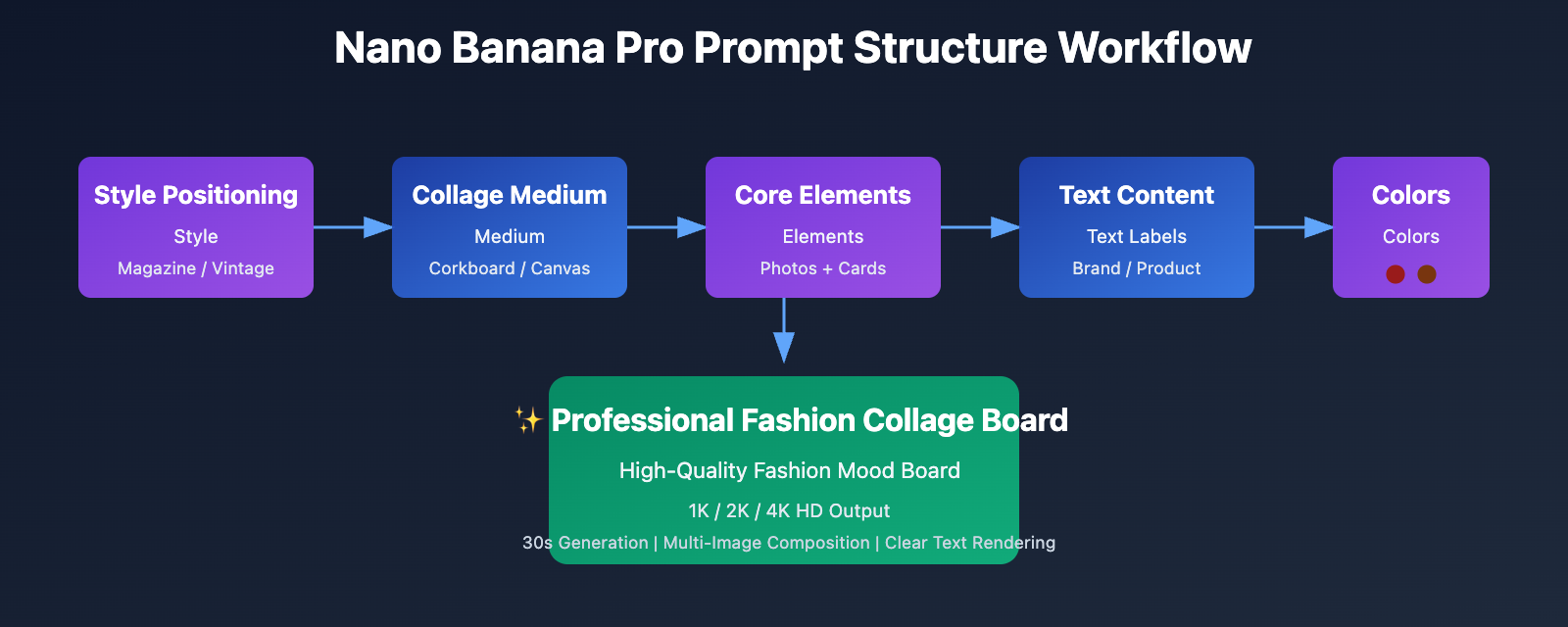
According to the official Nano Banana Pro Prompting Guide from Google AI, an effective prompt for fashion collages should include the following elements:
[Style Positioning] + [Collage Medium] + [Core Elements] + [Text Content] + [Color Scheme]
Example Prompt:
Create a fashion product collage on a brown corkboard based on this winter street style outfit.

Include:
- A center photo of a model wearing tweed coat and black boots
- Surrounding product cards: burgundy beret, white turtleneck, brown skirt, black boots, red handbag
- Handwritten labels in English: "TWEED COAT x FUR COAT", "WHITE KNITTED TURTLENECK", "BLACK SUEDE BOOTS"
- Polaroid-style photo frames
- Warm color palette: burgundy, brown, black, cream

Style: Magazine editorial collage with realistic shadows and pins
Key Tips:
- Specify Medium: "corkboard" / "canvas" / "white background"
- Structural Hierarchy: Layout logic of center main image + surrounding product cards
- Text Content: Must explicitly write out the text to be rendered, leveraging Nano Banana Pro's powerful text rendering capability
- Realistic Details: "realistic shadows" / "pins and tacks" / "polaroid frames"
Step 2: Call API to Generate Collage Board
Below is a minimal Python example for calling the Nano Banana Pro API (via the API Yi platform):
import openai

client = openai.OpenAI(
    api_key="YOUR_APIYI_KEY",
    base_url="https://vip.apiyi.com/v1"
)

response = client.images.generate(
    model="gemini-3-pro-image-preview",
    prompt="Create a fashion product collage on a brown corkboard...",
    size="1024x1024",
    n=1
)

image_url = response.data[0].url
print(f"Collage board generated successfully: {image_url}")
View Complete Advanced Configuration Code
import openai
from typing import Optional, List

def generate_fashion_collage(
    main_photo_path: str,
    product_images: List[str],
    labels: List[str],
    style: str = "corkboard",
    resolution: str = "2048x2048"
) -> str:
    """
    Generate fashion collage board

    Args:
        main_photo_path: Center model photo path
        product_images: List of product item image paths
        labels: List of text labels
        style: Collage style (corkboard/canvas/clean)
        resolution: Output resolution

    Returns:
        URL of the generated image
    """
    client = openai.OpenAI(
        api_key="YOUR_APIYI_KEY",
        base_url="https://vip.apiyi.com/v1"
    )

    # Build prompt
    prompt = f"""Create a fashion product collage on a brown {style}.

Center: A model photo showing the complete outfit
Surrounding elements:
"""

    for i, label in enumerate(labels, 1):
        prompt += f"- Product card {i}: {label}\n"

    prompt += """
Layout: Magazine editorial style with realistic shadows
Text rendering: Clear, handwritten-style labels in English
Color grading: Warm tones with high contrast
"""

    try:
        response = client.images.generate(
            model="gemini-3-pro-image-preview",
            prompt=prompt,
            size=resolution,
            quality="hd"
        )
        return response.data[0].url
    except Exception as e:
        return f"Generation failed: {str(e)}"

# Usage example
result = generate_fashion_collage(
    main_photo_path="outfit_main.jpg",
    product_images=["beret.jpg", "turtleneck.jpg", "skirt.jpg", "boots.jpg", "bag.jpg"],
    labels=["BURGUNDY BERET", "WHITE TURTLENECK", "BROWN SKIRT", "BLACK BOOTS", "RED HANDBAG"],
    style="corkboard",
    resolution="2048x2048"
)
print(result)
Quick Test: Get Nano Banana Pro test credits through API Yi at apiyi.com. The platform uniformly supports OpenAI SDK calling format, allowing you to switch models without modifying existing code. Visit imagen.apiyi.com to experience the image generation online.
Step 3: Fine-tuning and Iteration
Nano Banana Pro supports multi-turn conversational editing, allowing for localized adjustments to generated results:
Common Editing Needs:
-
Adjust Text Content
Replace the "TWEED COAT" label with "OVERSIZED COAT" in the same handwritten style -
Modify Product Position
Move the red handbag card to the bottom right corner -
Change Color Scheme
Change the overall color grading to cool tones: navy blue, silver, white -
Add Brand Elements
Add a small brand logo "CHANEL" in the top left corner with elegant typography
Editing Tips:
- Use "Replace X with Y" to clearly specify replacement objects
- Keep "in the same style" to ensure style consistency
- Leverage Google Search Grounding feature to automatically retrieve brand visual guidelines
Nano Banana Pro vs Traditional Tools Comparison
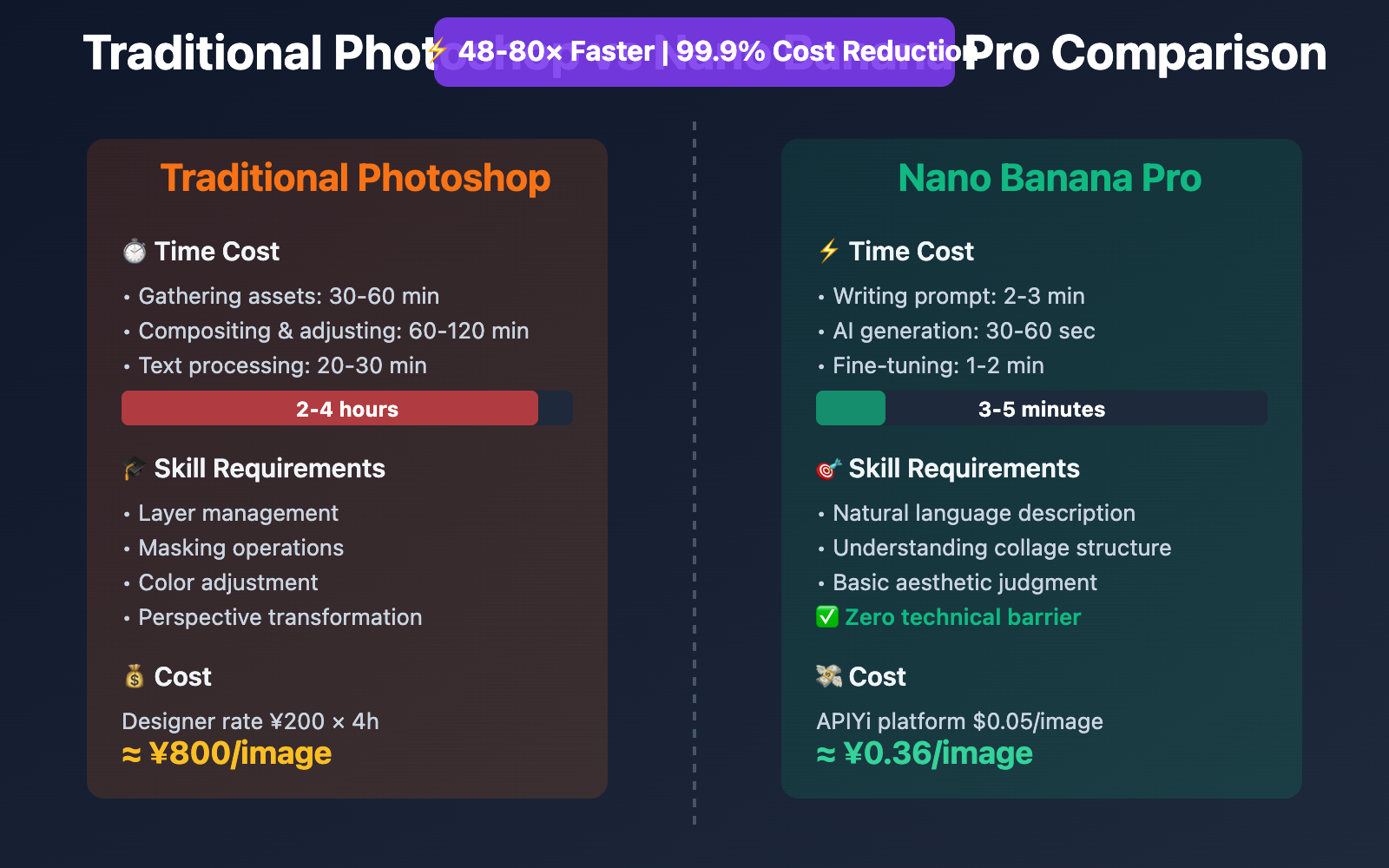
| Comparison Dimension | Traditional Photoshop Collage | Nano Banana Pro AI Collage |
|---|---|---|
| Production Time | 2-4 hours (gathering assets + compositing + color grading) | 30 seconds – 1 minute (prompt generation) |
| Technical Barrier | Requires proficient PS layer & masking skills | Natural language description only |
| Text Rendering | Manual text layer addition, font & position adjustment | Automatic clear readable text rendering |
| Multi-image Composition | Manual alignment, perspective & shadow adjustment | Automatic perspective relationship & lighting handling |
| Iteration Cost | Need to readjust multiple layers | One sentence for local editing |
| Use Cases | Pixel-perfect control for final deliverables | Rapid brainstorming, initial proposals |
Comparison Note: The time data above comes from actual testing in Fashion Moodboard with Gemini 3 & Nano Banana Pro. Can be verified on APIYi apiyi.com platform at $0.05/image pricing (79% savings compared to Google's official 4K pricing of $0.24/image).
Nano Banana Pro Fashion Collage Advanced Techniques
1. Leveraging Google Search Grounding for Real-time Trending Insights
Nano Banana Pro's unique Google Search Grounding feature can automatically search for current trending elements:
response = client.images.generate(
    model="gemini-3-pro-image-preview",
    prompt="""Create a fashion mood board for Spring 2026 Paris Fashion Week trends.

    Use Google Search to find:
    - Top 3 trending color palettes
    - Popular fabric textures (silk, linen, etc.)
    - Key silhouettes from recent runway shows

    Arrange in a modern collage layout with clear trend labels.""",
    extra_body={"use_search_grounding": True}
)
Application Value: Designers don't need to manually research fashion trends—AI automatically captures and visualizes the latest fashion information.
2. Character Consistency: Same Model Multiple Outfit Collage
Nano Banana Pro supports up to 5 characters maintaining consistency, ideal for creating "one model's weekly outfits" mood boards:
prompt = """Create a 7-day outfit collage featuring the same Asian female model.

Model characteristics: Long black hair, 170cm height, modern urban style

Outfits:
- Monday: Business casual (blazer + white shirt)
- Tuesday: Casual streetwear (oversized hoodie + jeans)
- Wednesday: Elegant dinner (little black dress)
- Thursday: Sporty (athleisure set)
- Friday: Weekend brunch (knit sweater + midi skirt)
- Saturday: Date night (silk blouse + trousers)
- Sunday: Relaxed home (cashmere loungewear)

Layout: Grid format with day labels, same model face across all photos
"""
Technical Points: Explicitly specify "same model face" and detailed appearance characteristics in the prompt.
3. Multilingual Text Rendering: Chinese-English Bilingual Brand Collage
According to the Nano Banana Pro official documentation, the model supports clear rendering of multiple languages including Chinese and English:
prompt = """Create a luxury brand product collage on white background.

Text elements (render clearly):
- English brand name: "MAISON LUMIÈRE" (elegant serif font)
- Chinese slogan: "光影美学 · 时尚新生" (modern sans-serif)
- Product labels: "Silk Scarf ¥2,980", "Leather Bag ¥15,800"

Products: Arrange 4 luxury items with clean spacing
Style: High-end magazine editorial with soft shadows
"""
Use Cases: Cross-border e-commerce brands, luxury marketing materials, bilingual product catalogs.
Practical Application Scenarios and Case Studies
Scenario 1: E-commerce Product Catalog Page Generation
Requirements: Quickly generate weekly new product collage pages for an online clothing store
Implementation Approach:
- Prepare high-resolution individual product images (white background)
- Use Nano Banana Pro to automatically compose collage layouts
- Add price tags and promotional text
- Output 4K high-definition images for website banners
Time Comparison:
- Traditional designer production: 4 hours/page
- Nano Banana Pro: 2 minutes/page (including fine-tuning)
Cost Savings: Based on designer hourly rate of ¥200, saves ¥800 in labor costs per page
Scenario 2: Fashion Blogger Content Production
Requirements: Publish one outfit inspiration collage daily to Instagram/Xiaohongshu
Workflow:
Capture street style photos → Input to Nano Banana Pro → Auto-generate collage board → Add captions and publish
Actual Data (from Gemini AI Vision Board Trend):
- In January 2026, fashion bloggers using Mixboard + Nano Banana Pro saw content output efficiency increase by 300%
- User engagement rates increased by 40% (due to more professional visual quality)
Scenario 3: Brand Mood Board Proposals
Requirements: Quickly create 3 different style versions of brand visual direction proposals for clients
Nano Banana Pro Advantages:
- Rapidly generate multiple versions for comparison (Vintage / Modern / Minimalist)
- Make instant detail adjustments based on client feedback
- Output 4K print-ready files after final selection
Industry Trend: According to 24 Mind-Blowing Nano Banana Pro Use Cases, the proportion of fashion industry designers using AI generation tools for early concept development has reached 67% (2025 data).
Nano Banana Pro API Pricing and Platform Selection
Official Pricing (Google Vertex AI)
| Resolution | Google Official Price | Access Requirements |
|---|---|---|
| 4K | $0.24/image | Requires overseas credit card bound to Google Cloud |
| 2K | $0.134/image | Same as above |
| 1K | No separate pricing | Same as above |
APIYi Platform Pricing ⭐ Recommended
Base Pricing
- Unified Price: $0.05/image (resolution-independent, covering 1K/2K/4K)
- Discount Strength:
- Compared to official 4K: Save 79% (approximately 20% of original price)
- Compared to official 2K: Save 63% (approximately 37% of original price)
Enterprise Top-up Bonuses
Target Audience: E-commerce companies, design firms, MCN agencies with daily consumption > 5,000 images
| Top-up Amount | Bonus Rate | Actual Credit | Actual Unit Price |
|---|---|---|---|
| $100 | +10% | $110 | $0.045/image |
| $500 | +15% | $575 | $0.043/image |
| $1000+ | +20% (cap) | $1200 | $0.04/image |
Cost Calculation Example:
Assuming an e-commerce team generates 10,000 product collage images monthly:
| Platform | Unit Price | Monthly Cost | Annual Cost |
|---|---|---|---|
| Google Official (4K) | $0.24 | $2,400 | $28,800 |
| APIYi Base Price | $0.05 | $500 | $6,000 |
| APIYi with Bonus (20%) | $0.04 | $400 | $4,800 |
Annual Savings: $24,000 (save 83%)
Performance Advantages
- Generation Speed:
- 1K/2K: Approximately 30 seconds/image
- 4K: Approximately 1 minute/image
- Stability: Based on Google Cloud T3 tier and above enterprise accounts
- Concurrency Control: Unlimited concurrency, supports large-scale batch calling
- Daily Capacity: Platform processes 100,000+ images daily on average (January 2026 data)
Payment Methods
- ✅ Alipay / WeChat Pay
- ✅ USDT (convenient for overseas customers, serving clients in Russia, Spain, North America)
- ✅ No overseas credit card required
Quick Start
- Developer Documentation: docs.apiyi.com
- Official Website: api.apiyi.com
- Online Testing: imagen.apiyi.com (free trial of Nano Banana Pro image generation)
FAQ
Q1: How is the text rendering quality in Nano Banana Pro collages?
Nano Banana Pro is officially recognized by Google as "the best model for generating images with correctly rendered and clearly readable text". In actual tests, both English and Chinese text are clearly readable, supporting multiple font styles (handwritten, serif, sans-serif), and the text automatically integrates into the collage's lighting and shadow effects without requiring post-processing in Photoshop.
Q2: What is the maximum number of reference images supported for multi-image composition?
Nano Banana Pro supports composition with up to 14 reference images. For fashion moodboard scenarios, it's recommended to keep it within 8-10 images to ensure each element has sufficient display space and the visual presentation doesn't become too crowded. If you need to compose more items, you can adopt a "grouped collage" strategy, placing similar category products within the same card.
Q3: How can I quickly start testing Nano Banana Pro?
It's recommended to quickly test through the APIYI apiyi.com platform:
- Visit api.apiyi.com to register an account (supports Alipay/WeChat)
- Obtain an API Key and free testing credits
- Use the Python code examples in this article, changing the
base_urltohttps://vip.apiyi.com/v1 - Visit imagen.apiyi.com to experience collage effects online (no programming required)
Additional Advantages: The APIYI platform supports a unified interface for 80+ mainstream AI models, allowing you to quickly compare the performance differences of DALL-E 3, Midjourney, Stable Diffusion, and other models in collage scenarios.
Summary
Core advantages of Nano Banana Pro fashion collages:
- Multi-image Composition: Automatic layout with up to 14 images, eliminating manual stitching time
- Text Rendering: Clear rendering of multilingual Chinese and English, automatic brand label generation
- Efficient Iteration: Natural language editing, completing local adjustments in 30 seconds
- Cost Advantage: Calling through the APIYI platform costs only 20% of Google's official pricing
For e-commerce designers, fashion bloggers, and brand planning teams, Nano Banana Pro reduces moodboard creation from "4 hours of professional work" to "1 minute of prompt input", achieving a qualitative leap in creative speed.
It's recommended to quickly verify results through APIYI apiyi.com, which provides free testing credits, unified OpenAI SDK calling format, and preferential pricing of $0.05/image covering 1K-4K resolutions. Visit imagen.apiyi.com to experience collage generation effects online.
Author: Technical Team
Technical Discussion: Feel free to share your collage works in the comments section. More AI image generation resources are available at the APIYI apiyi.com technical community
References: