Claude Code forgets what you changed the last time you used it whenever you close and reopen it. That’s why many people install claude-mem, which has 100,000 GitHub stars. You can install it, but don’t just hit Enter through the installer. As of October 2026, the v15 installer selects the hosted CMEM Pro observer by default. After a 30-day trial, it costs $30/month. To avoid a monthly fee, add --provider claude during installation, or switch the observer to use your own key afterward.
This isn’t a sales pitch claiming that installing it gives you permanent memory. Below, I distinguish between official claims, a third-party single case, my own tests, and what’s still unknown. All figures were checked on 2026-10-30.
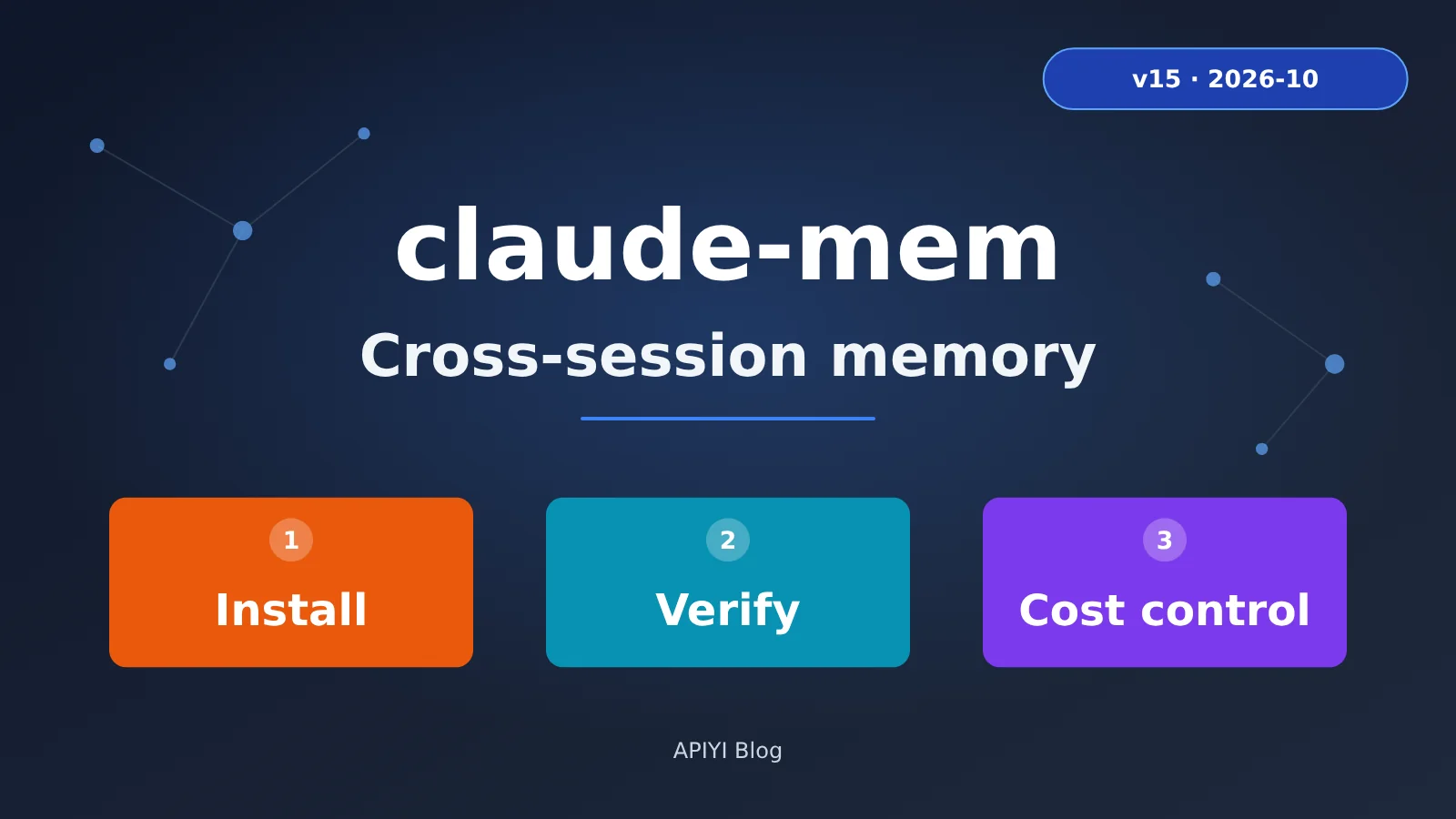
claude-mem at a Glance
Here’s a quick overview to help you decide whether to keep reading.
| Key point | Details | What it means for you |
|---|---|---|
| Popularity | GitHub thedotmack/claude-mem: 105,017 stars, Apache-2.0 license (GitHub API reading, 2026-10-30) |
Stars reflect popularity, not necessarily how well it works for you |
| Version | The latest npm and GitHub release versions are both 15.6.0 (2026-10-29), but the README badge says 15.7.0 | Trust the npm version, not the badge |
| Paid by default | The installer selects CMEM Pro by default: $30/month after a 30-day trial | Choose another route if you don’t want a subscription |
| No monthly fee | Use --provider claude with your own Claude plan, or switch to your own key after installation |
Usage comes out of your plan allowance or API balance |
| Not entirely local | The observer model reads the contents of your tool calls | Think carefully before using it with sensitive repositories |
📷 Screenshot placeholder: GitHub repository homepage (
thedotmack/claude-mem), showing the star count and latest release
What does claude-mem actually remember?
In short, claude-mem is a memory layer that runs on your machine—not a new chat model or a cloud notebook. It captures what happened during a session, compresses and stores it, then feeds it back to Claude when you start another session.
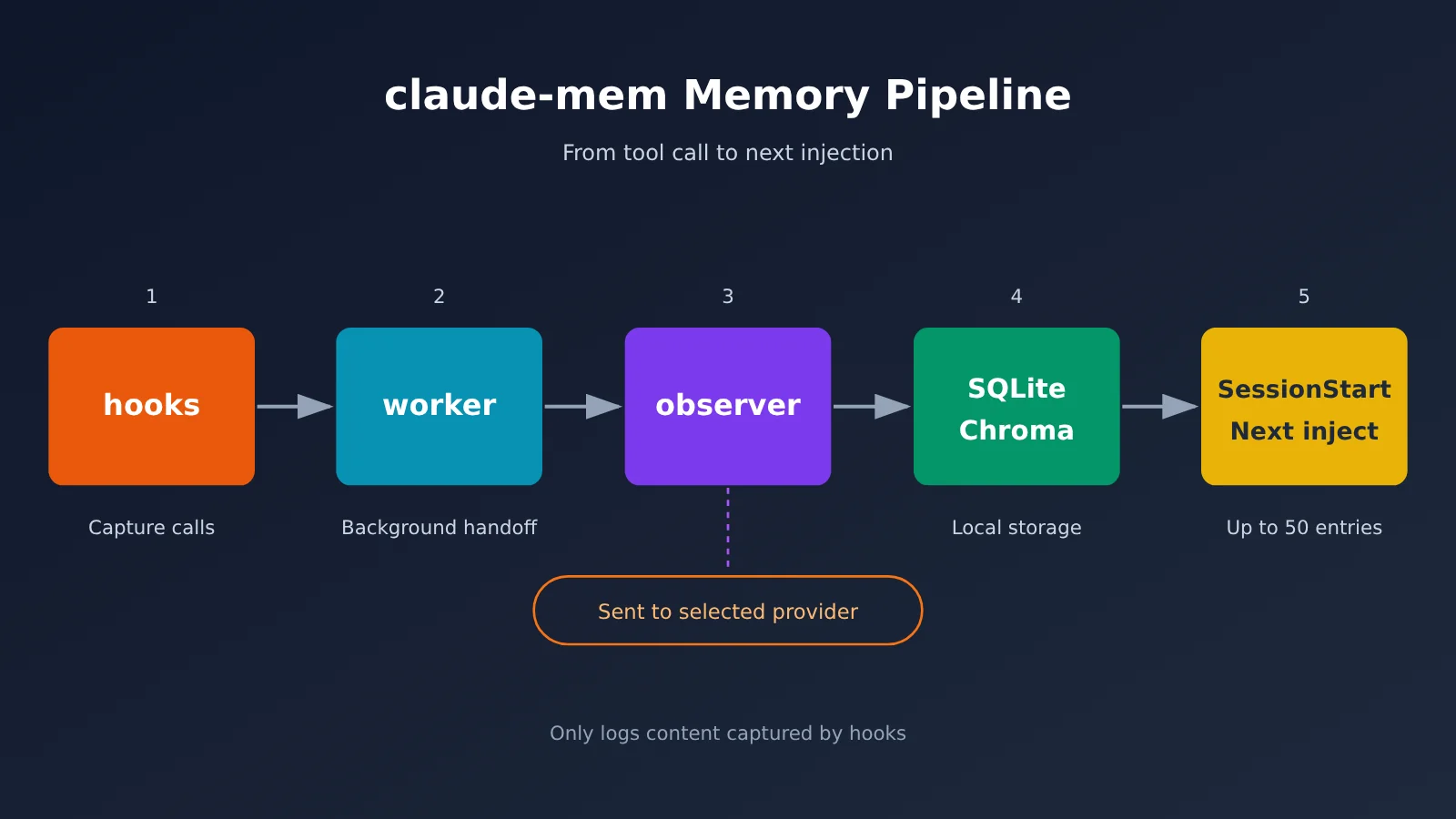
The pipeline has five stages:
- Hooks (lifecycle hooks): Claude Code triggers events when a session starts, a prompt is submitted, a tool is called, and a session stops or ends. claude-mem attaches hooks at these points.
- Worker: A local HTTP service running on Bun that receives hook events. The default port is
37700 + (uid % 100), so it isn’t necessarily 37700. - Observer: The worker sends raw tool calls to a model, which compresses them into structured observations.
- Observations: Each record includes a type, title, narrative, and relevant files. Records are written to
~/.claude-mem/claude-mem.db(SQLite), while the vector index lives in~/.claude-mem/chroma/(Chroma is a vector database used for semantic search). - Injection at the next SessionStart: When a new session starts, recent relevant observations for the current project are automatically injected, up to 50 by default. Claude can also retrieve older memories as needed through three layers of MCP tools:
search→timeline→get_observations.
Keep in mind that it only records what the hooks capture. Ideas you have outside a session and discussions that don’t involve tool calls won’t automatically make it into the database. Claude Code’s native memory (MEMORY.md) and claude-mem are also separate systems: they run in parallel by default and aren’t the same thing.
3 requirements before installing claude-mem
If you don’t meet all three, hold off on installing:
- Claude Code ≥ 2.1.139: Earlier versions ignore the hook’s
args, causing it to silently stop recording—a particularly tricky issue to troubleshoot. Runclaude --versionfirst. If your version is too old, runclaude update. - Node 20+: The npm package specifies
^20.19.0 || >=22.12.0. Check your version withnode -v. The installer automatically installs Bun (≥1.1.31) and uv. In one independent test on Ubuntu 26.04, Bun, uv, and Chroma together used about 1.2 GB of disk space. - You’re comfortable with the observer seeing tool-call content: Whichever route you choose, your tool calls, prompts, and material used to generate summaries will be sent to your chosen observer provider. If your repository contains secrets, customer data, or unpublished code, don’t enable it yet.
Windows users don’t need Git Bash for hooks, but you’ll need to restart your terminal or IDE after installation for the updated PATH to take effect.
Which of the 3 claude-mem installation routes should you choose?
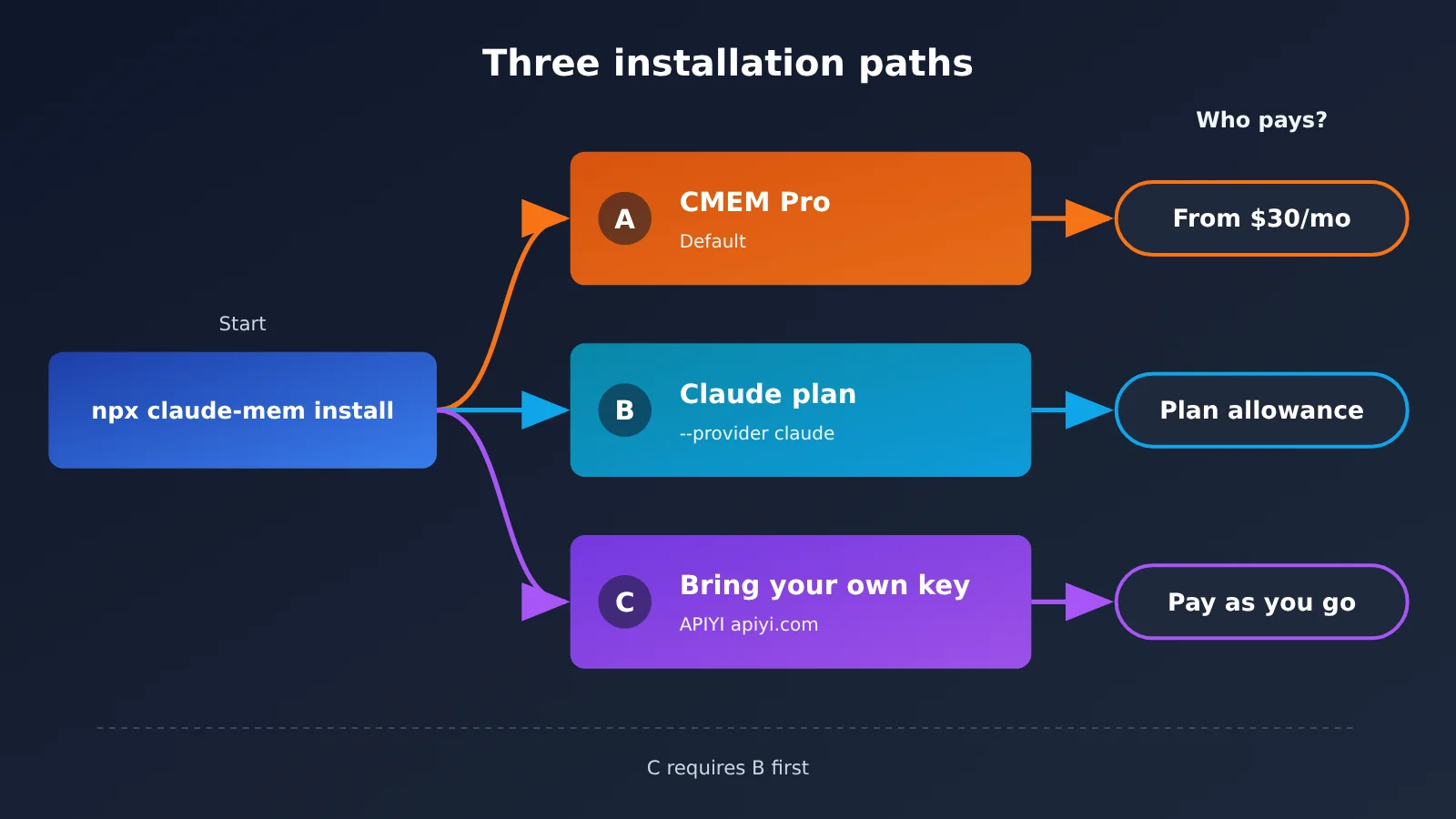
| Route | Need a cmem account? | How you pay | Who receives the content | Best for |
|---|---|---|---|---|
| A: Default CMEM Pro | Yes; the trial also requires a card | From $30/month, with a 30-day trial | cmem.ai’s hosted observer | Users who don’t want to configure a key or need cloud sync across machines |
B: --provider claude |
No | Uses your Claude subscription allowance | Anthropic | Existing Claude subscribers |
| C: Install via B, then switch to your own key | No | Billed based on provider usage | Your configured endpoint, such as APIYI apiyi.com | Users who want to control costs or already have API credit |
The plugin marketplace is another entry point, covered separately below as route C’. For the third route, you must start with B: openai-compatible isn’t an option for the installer’s --provider flag, so you can only switch to it by manually editing the settings after installation.
Option A: Default CMEM Pro (claude-mem installer default)
- Run
npx claude-mem install. - What you’ll see: First, the installer preselects detected agents and installs the runtime. Next, it prints an
XXXX-XXXXdevice code and opens your browser for OAuth authorization—make sure you complete the login step. Finally, CMEM Pro is selected by default as the memory provider. Selecting it opens a checkout or trial page. - Terms to watch out for (checked against the official pricing page on October 30, 2026):
- The trial requires a credit or debit card; prepaid cards aren’t accepted.
- Billing starts when the trial ends or the included usage is exhausted, whichever comes first.
- Auto-upgrade settings may move your subscription from Pro to Heavy ($70/month) or Max ($100/month). Many tutorials only say “no card required” and leave this out.
- How to tell it worked: After installation, the installer prints Version, Plugin dir, IDEs, Account, Cloud sync, and Worker URL. Then run the five checks below.
Option B: Install claude-mem with --provider claude and no monthly fee
- Run
npx claude-mem install --provider claude. - If you only want one memory system, use
npx claude-mem install --provider claude --disable-auto-memoryinstead. This option writesCLAUDE_CODE_DISABLE_AUTO_MEMORY=1, disabling Claude Code’s native auto-memory. - What you’ll see:
Skipping claude-mem login: --provider claude runs memory on your own Anthropic plan.,Cloud sync: OFF (local), andAuto-memory: left enabled(if you didn’t add the disable option). The installer will also ask you to choose an observer model. Choose Haiku, not Opus. - How to tell it worked: No cmem login or payment page appeared during installation, and
npx claude-mem doctorshows check marks for every check.
In the source code, only the claude and host providers work without a login. A third-party test found that --provider openrouter stops at Waiting for OAuth login in the browser…. So if you want to use a third-party key, install using option B first, then change the configuration.
Route C’: Claude Code Plugin Marketplace
- In Claude Code, enter
/plugin marketplace add thedotmack/claude-mem. - Enter
/plugin install claude-mem, then restart Claude Code. - What to expect: The launcher may still be compiling during your first session, so you might not see any memories. To avoid this gap, run
npx claude-mem install --provider claudeonce. - Don’t use
npm install -g claude-mem: It only installs the SDK library. It doesn’t register hooks or start the worker, and it can mask the real launcher.
How to Verify Your claude-mem Installation: 5 Checks
First, remember that your first session is a collection session: there’s no history to inject yet. You’ll see memories starting with the second session. If you expect it to remember you during the first session, you might mistakenly think the installation failed.
| # | Check | Command / Action | Passing result |
|---|---|---|---|
| 1 | doctor | npx claude-mem doctor |
Bun, uv, Plugin, Hook launcher, Worker, Claude Code version (2.1.139+), and Chroma all show ✓ |
| 2 | status | npx claude-mem status |
The worker is healthy and a port number is displayed |
| 3 | viewer | Open http://127.0.0.1:<PORT>/ in your browser; memories are at /viewer |
The page opens, and entries appear after you’ve run a session |
| 4 | sqlite count | sqlite3 ~/.claude-mem/claude-mem.db "select count(*) from observations;" |
The returned value is greater than 0 after the first session ends |
| 5 | context inject | curl "http://127.0.0.1:<PORT>/api/context/inject?project=<project-name>" |
The response contains the memories that will be injected into the next session |
You can find the port in CLAUDE_MEM_WORKER_PORT in ~/.claude-mem/settings.json, or check it with curl http://127.0.0.1:<PORT>/api/health. The Hook launcher line is the most common trouble spot in the doctor output. If you see not on PATH or is not the claude-mem hook launcher, fix that before checking the other items.
📷 Screenshot placeholder, to be added during editing: worker viewer page (
/viewer, showing the observation list)
claude-mem Costs: The Official “96% Savings” vs. a Third-Party “+4,226 Tokens”
Both numbers are valid, but they measure different things and shouldn’t be mixed up.
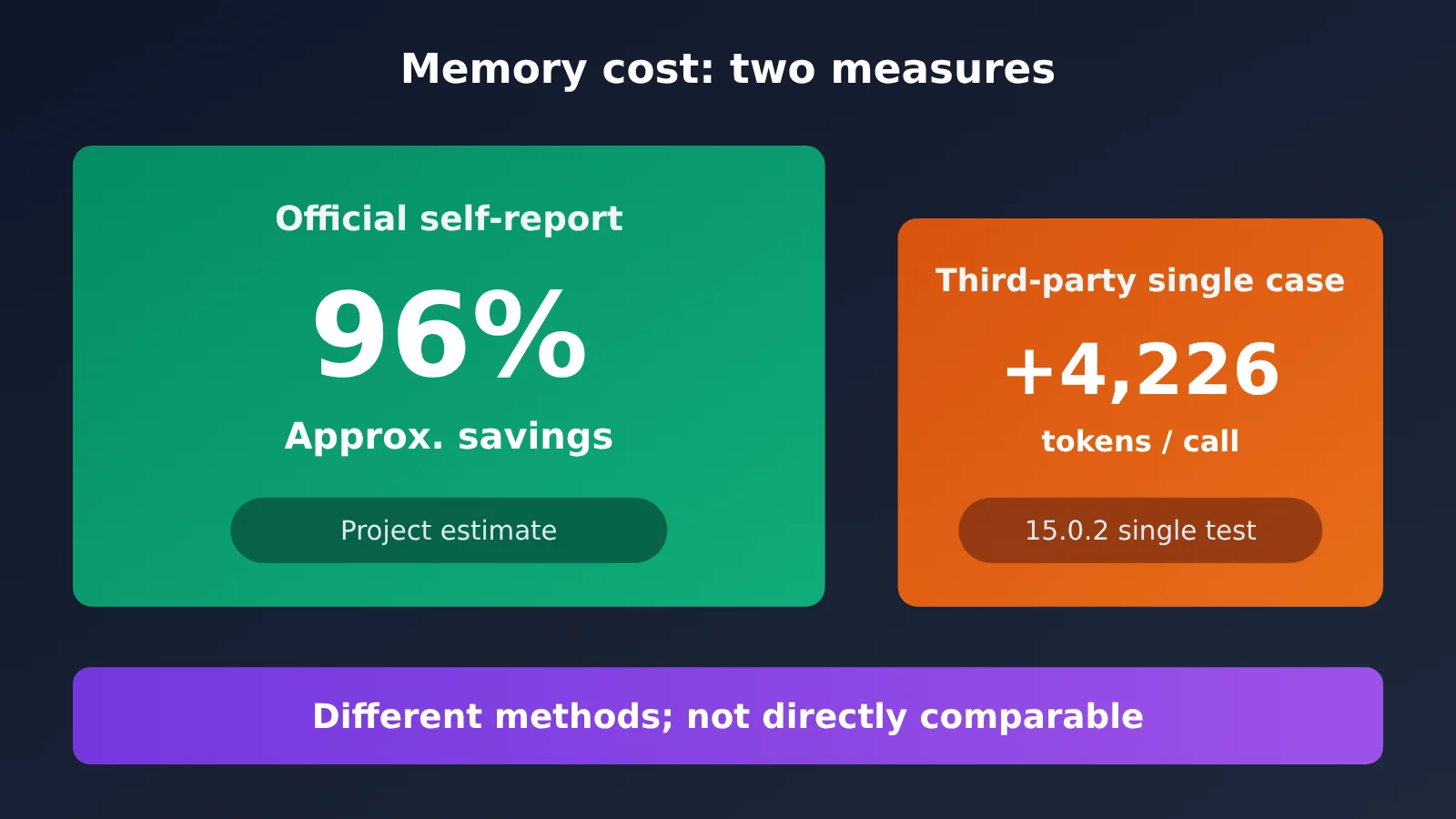
- Official project estimate: Four observations use about 1,093 tokens, compared with 26,447 tokens for the original workload—hence the claim of “about 96% savings.” The project also says its three-layer MCP search is “about 10 times more efficient than injecting everything.” These are the project’s own estimates, not a third-party audit.
- Third-party single test (ComputingForGeeks, 2026-10-24, claude-mem 15.0.2, Sonnet via OpenRouter): For the same prompt, “Reply with the single word ready,” input usage was 28,489 tokens with claude-mem disabled. With it enabled, input usage rose to 32,715 tokens even with an empty memory—an increase of 4,226 tokens (about 14.8%) and $0.010 in cost. This was one test on one machine and one project; it doesn’t predict your bill.
Here’s the takeaway: “Savings” means the memory itself is more compact than the original records; “extra” means each session carries additional fixed overhead. The busier the project and the more entries injected, the greater the overhead. In issues #618 and #2469 from the first half of 2026, users reported that tokens were being consumed quickly. Those reports reflect older versions, not necessarily the experience with 15.6.0, but they show that memory has never been free.
5 claude-mem Cost-Control Settings
CLAUDE_MEM_CONTEXT_OBSERVATIONS: The default is 50. Lower it to 10–20 to reduce how much context gets injected.CLAUDE_MEM_SEMANTIC_INJECT: Keep the defaultfalse. Enabling it adds relevant memories to every prompt.CLAUDE_MEM_SESSION_START_INCLUDE_ALL_SOURCES: Keep the defaultfalse. Otherwise, memories from all hosts will be injected.CLAUDE_MEM_DISABLE_TOOL_HOOKS=1: Disables tool-call-level observations and keeps only session-level summaries, saving tokens and process overhead.CLAUDE_MEM_OPENAI_COMPAT_OBSERVATION_BATCH_SIZE: The default is 1. Increase it gradually if events start to pile up; don’t set it to 32 right away.
Cost Comparison for the Three Options
| Option | Billing | Price (USD) | Best for |
|---|---|---|---|
| CMEM Pro | Subscription | $30/month, 30-day trial (Heavy $70, Max $100) | Heavy users who need cloud sync |
| Claude subscription | Uses subscription allowance | No separate charge, but competes with coding for your allowance | Existing Claude subscribers |
APIYI claude-haiku-5-5 |
Pay-as-you-go | Input $0.1 / output $0.5 / cache reads $0.01 per million tokens (per request ≤100,000 tokens; above 100,000 tokens, input is $0.5/1M under tiered pricing) | Light and moderate users |
Pricing comes from the APIYI apiyi.com pricing table (page updated October 27, 2026, at 14:50 UTC+8). Check the platform’s model list for current models and prices, and the console for actual charges. For reference, on the same platform, claude-haiku-4-5-20251001 costs $1 for input / $5 for output / $0.1 for cache reads, claude-sonnet-5-5 costs $2 / $10 / $0.1, and claude-opus-5-5 costs $4 / $20 / $0.2, respectively, per million tokens. The observer handles frequent, small, structured tasks, so a Haiku-class model is enough. Pay-as-you-go works well for light and moderate use; heavy users should calculate their costs based on a week of actual usage and compare that with $30/month.
Switch the claude-mem observer to APIYI
Here’s the full setup for Route C. It’s a good fit for developers in China who already have API credits and don’t want a separate subscription for memory. APIYI supports top-ups in RMB and bills at a fixed exchange rate of 1:7, according to its official pricing page.
- First, install using Route B:
npx claude-mem install --provider claude. - Open
~/.claude-mem/settings.jsonand add four keys: "CLAUDE_MEM_PROVIDER": "openai-compatible""CLAUDE_MEM_OPENAI_COMPAT_BASE_URL": "https://api.apiyi.com/v1""CLAUDE_MEM_OPENAI_COMPAT_MODEL": "claude-haiku-5-5""CLAUDE_MEM_OPENAI_COMPAT_API_KEY": "sk-your-APIYI-key"- If you don’t want to store the key in plain text in settings, put it in
~/.claude-mem/.envinstead:OPENAI_COMPAT_API_KEY=sk-your-APIYI-key(directory permissions0700, file permissions0600). - Run
npx claude-mem restart. Credentials are read only when the worker starts, so the change won’t take effect until you restart it. - How to verify it worked:
npx claude-mem doctorshows the provider as openai-compatible. The next observation generated in a new session appears in the viewer.
There are two pitfalls to watch out for. First, the base URL must include /v1 and must not have a trailing slash. Otherwise, the resulting double slash can cause a 404. For the differences between the three base URLs, see: help.apiyi.com/apiyi-base-url-v1-claude-gemini-endpoint-config-guide.html. Second, if any one of the four keys is missing, claude-mem silently falls back to the Claude route. Everything may look normal, but usage will be charged against your subscription.
API test results (tested with an APIYI key on 2026-10-30):
GET /v1/modelsreturned 200 with 259 models, includingclaude-haiku-5-5.POST /v1/chat/completionsusingclaude-haiku-5-5withresponse_format: {type: "json_object"}returned 200 in about 2.0 seconds, with valid JSON and usage of 59 tokens.- Adding the
reasoning: {enabled: false}field that claude-mem sends also returned 200, with no 400 error. - Anthropic’s native
/v1/messagesendpoint also returned 200.
What this does—and doesn’t—prove: These tests only confirm that the APIYI endpoint accepts the request formats claude-mem needs. I didn’t run the full claude-mem observation workflow locally, so passing the API tests doesn’t mean the entire plugin workflow has been verified.
🚀 Quick-start tip: Create a separate key in the APIYI apiyi.com console just for claude-mem. After a week, you can check that key’s usage and see whether pay-as-you-go is cheaper than a subscription. If you also plan to connect Claude Code itself, see: help.apiyi.com/claude-code-apiyi-integration-tutorial.html.
claude-mem privacy: what stays local and what leaves your machine
Local storage (all under ~/.claude-mem/, with the location configurable via CLAUDE_MEM_DATA_DIR): claude-mem.db (sessions, observations, summaries, and prompts), the chroma/ vector index, logs/, settings.json, and media-v1/, the screenshot directory, which is disabled by default.
What leaves your machine:
- Observer calls: Tool call contents, prompts, and material used to generate summaries are sent to your chosen provider. If you choose Anthropic, they go to Anthropic; if you choose CMEM, they go to cmem.ai; if you choose APIYI, they go to APIYI.
- Telemetry is enabled by default: Data is sent to PostHog using a random installation UUID, and sensitive information is redacted from error messages. To disable it, run
npx claude-mem telemetry disableor setDO_NOT_TRACK=1. The installer also asks about it at the end. - Cloud sync requires opt-in: It’s disabled by default. When enabled, it uploads observations, session summaries, and full prompt text to cmem.ai.
Controls you can use:
- Content wrapped in
<private>...</private>is stripped out at the hook layer and never enters the database. - Automatic redaction is disabled by default. Set
CLAUDE_MEM_REDACT_ENABLED=trueto enable 16 built-in secret patterns (AWS, GitHub PATs, OpenAI/Anthropic keys, JWTs, PEM, and more). You can also setCLAUDE_MEM_REDACT_GENERIC_ENABLED=trueto add three generic patterns. Don’t assume it redacts sensitive information for you by default.
claude-mem Troubleshooting Guide
| Symptom | Cause | Fix |
|---|---|---|
Every hook reports Executable not found in $PATH: "claude-mem" |
The launcher isn’t in PATH | Run npx claude-mem install to reinstall, then restart your terminal, IDE, and Claude Code |
The session displays memory hooks are not active |
The launcher isn’t active | Follow the steps above, then run npx claude-mem doctor and check the Hook launcher line |
| Nothing is recorded, and no error appears | Claude Code is older than 2.1.139 | Run claude update |
The claude-mem command is shadowed by another program |
You previously ran npm install -g claude-mem |
Run which -a claude-mem to locate it, then run npm uninstall -g claude-mem |
| The viewer won’t open | The port isn’t 37700, or the worker isn’t running | Check the port in settings, then run curl http://127.0.0.1:<PORT>/health |
| The port is in use | Another process is using it | Set export CLAUDE_MEM_WORKER_PORT=38000, then restart the worker |
| A custom endpoint returns 404 | The base URL is incorrect | Use /v1 for OpenAI-compatible endpoints and the root domain for native Anthropic endpoints; make sure the model ID appears in /v1/models |
| Requests still go to Claude after configuring a third-party key | Not all four keys are configured, causing a silent fallback | Complete the settings and run npx claude-mem restart |
| Observations are empty or truncated | A smaller model isn’t following the JSON structure, or the output limit was reached | Increase CLAUDE_MEM_OBSERVER_MAX_OUTPUT_TOKENS (default: 4096), or switch to a more reliable model |
| Repeated timeouts | Streaming requests are abandoned after 90 seconds without a token | Increase CLAUDE_MEM_LLM_STREAM_IDLE_TIMEOUT_MS, or switch to a smaller model |
| The hook keeps killing the worker | Plugin and worker versions don’t match (#3857, #3940; fixed) | Run npx claude-mem update; if needed, run npx claude-mem@latest install |
| Two memory systems conflict | Native auto-memory and claude-mem are running together | Add --disable-auto-memory when reinstalling |
claude-mem Risks and Account Suspensions: Use at Your Own Risk
Please read this section before installing.
- Community project, no endorsement: claude-mem is a community open-source project, not an official APIYI product. APIYI doesn’t endorse it or provide an SLA.
- Data sent externally: Tool call content is sent to your chosen observer. Don’t enable it yet for repositories containing keys, customer data, or unpublished code.
- Usage costs: It can consume a lot of tokens or plan quota. Try it on a small project for a week and check your bill before deciding.
- Risk controls and rate limits: Frequently triggered hooks, shared accounts, and API proxy service keys can all trigger platform risk controls or rate limits. Try it with a separate key, a secondary account, and a single project. You accept responsibility for the consequences. This article only confirms that the APIYI interface passed hands-on testing; it doesn’t guarantee you won’t be rate-limited.
- Uninstallation leaves files behind: After
npx claude-mem uninstall,~/.claude-memremains, including its database and any saved keys. You’ll need to manually runrm -rf ~/.claude-mem. Third-party testing also found that~/.bunand~/.cache/uvtake up about 1.1 GB; if no other projects use them, you can delete those too.
claude-mem FAQ
Q1: Do 100,000 stars mean claude-mem is definitely good?
No. Stars only reflect popularity. You’ll need to evaluate token costs, privacy boundaries, and the release cycle yourself. There’s also been no independent audit of whether the star growth is inflated.
Q2: Is claude-mem the same as Claude Code’s built-in memory?
No. Native memory uses MEMORY.md, while claude-mem is a separate system of hooks and a database. By default, both run in parallel. If you only want one, add `–disable-auto-memory` during installation.
Q3: Will it have memories after the first session?
No. The first session collects and compresses information; it’s injected starting with the second session. Use verification item 4 (sqlite count) and item 5 (context inject) to confirm.
Q4: Can I use claude-mem without adding a card or subscribing?
Yes. Install with `–provider claude` to use your Claude plan quota. Alternatively, after installation, switch the observer to a pay-as-you-go key from APIYI at apiyi.com. You’ll be billed for the tokens you actually use, and new users can try it with a free testing allowance.
Q5: What model should I use for the observer?
Use a Haiku-class model, such as `claude-haiku-5-5`. Observations are frequent, small, structured tasks. A flagship model like Opus is expensive and may spend too much of its output budget on reasoning.
Q6: Can I use only local models?
Yes. Point `openai-compatible` to Ollama, LM Studio, or vLLM. However, the smaller model must reliably produce the observation JSON structure, or you’ll get empty records.
Q7: How do I enable Chinese observations?
Set `”CLAUDE_MEM_MODE”: “code–zh”` in settings. It’s a built-in mode, so there’s nothing else to install. Then restart Claude Code.
claude-mem Key Takeaways
- How it works: Hooks capture tool calls, which an observer compresses and stores in SQLite. The stored memories are injected into the next session.
- Default gotcha: The v15 installer preselects CMEM Pro. The trial requires a credit card, and it costs $30/month afterward.
- No monthly fee: Install with
--provider claude, then update the settings to use your own key if needed. - Cost: The official claim is “96% savings,” while one third-party test reported “+4,226 tokens.” They measure different things.
- Privacy: The observer sends content to an external service, and telemetry is enabled by default. Redaction and cloud sync both need to be enabled manually.
- Getting started: Create a separate key at APIYI apiyi.com, run
claude-haiku-5-5on a pay-as-you-go basis for a week, then assess the cost.
Summary: Who Should—and Shouldn’t—Install claude-mem for Cross-Session Memory
Three types of people who should install it:
- People who maintain the same project over time and frequently close and restart Claude Code sessions.
- People who often need to answer questions like “Why did we change this last time?” or “How did we finally fix that bug?”
- People who are willing to spend 10 minutes on setup and are comfortable with the observer reading tool-call content.
Three types of people who shouldn’t install it:
- People who only run one-off scripts and don’t need project continuity. CLAUDE.md and your own notes are cheaper.
- People whose code or data can’t leave their machine or a specified compliance region.
- People using machines with limited disk space or CPU resources, and those expecting it to “get smarter immediately after installation.”
If you decide to install it, the safest path is: Route B → five-point verification → reduce the number of injected memories → change the observer if needed. To check observer costs with pay-as-you-go pricing, you can use free credits at APIYI apiyi.com to run a small project first.
📚 References
- claude-mem GitHub repository: Source code, releases, and issues
- Link:
github.com/thedotmack/claude-mem -
Notes: Star count, versions, and issue records including #618, #2469, #3857, and #3940
-
Official claude-mem documentation: Installation, configuration, and troubleshooting
- Link:
docs.claude-mem.ai/installation -
Notes: System requirements, default settings, and openai-compatible provider configuration
-
CMEM pricing page: CMEM Pro / Heavy / Max terms
- Link:
cmem.ai/pricing -
Notes: 30-day trial, card requirements, and when billing begins (checked 2026-10-30)
-
ComputingForGeeks independent test: Version 15.0.2 installation and token overhead
- Link:
computingforgeeks.com/claude-mem-claude-code -
Notes: Source of the +4,226 tokens single-instance measurement (2026-10-24)
-
APIYI model documentation: Model and pricing list
- Link:
docs.apiyi.com/models - Notes: Refer to the platform’s model list for current models and pricing
Author: APIYI Technical Team
Technical support: If you run into endpoint or model issues during configuration, contact us through the APIYI website homepage. For more integration guidance, visit the documentation center at docs.apiyi.com.