Author’s note: Modern image models are much less dependent on “negative prompt libraries.” This article breaks down three types of negative prompts, explains which ones to remove and which to keep, and offers practical prompting principles.
Many teams still append a long string of negative prompts to requests when calling AI image generation APIs, such as bad anatomy, extra fingers, low quality, blurry, watermark. This approach dates back to the early days of Stable Diffusion, when almost everyone copied it. As image models with stronger language understanding become more common, the role of negative prompts is being reassessed: they haven’t disappeared, but their place and how we write them have changed.
This isn’t a clickbait claim that “negative prompts are dead.” On the one hand, OpenAI’s current image prompting guide still recommends specifying exclusions, such as no extra text, logos, or watermarks. On the other hand, in real-world customer requests, we’ve observed that removing the fixed string of prompts at the end actually makes image generation more consistent across the same set of requests. These two things aren’t contradictory.
Key takeaway: In 3 minutes, learn how much negative prompts still matter for AI image generation, which prompts to remove, and which constraints you should keep.
Negative Prompt Essentials at a Glance
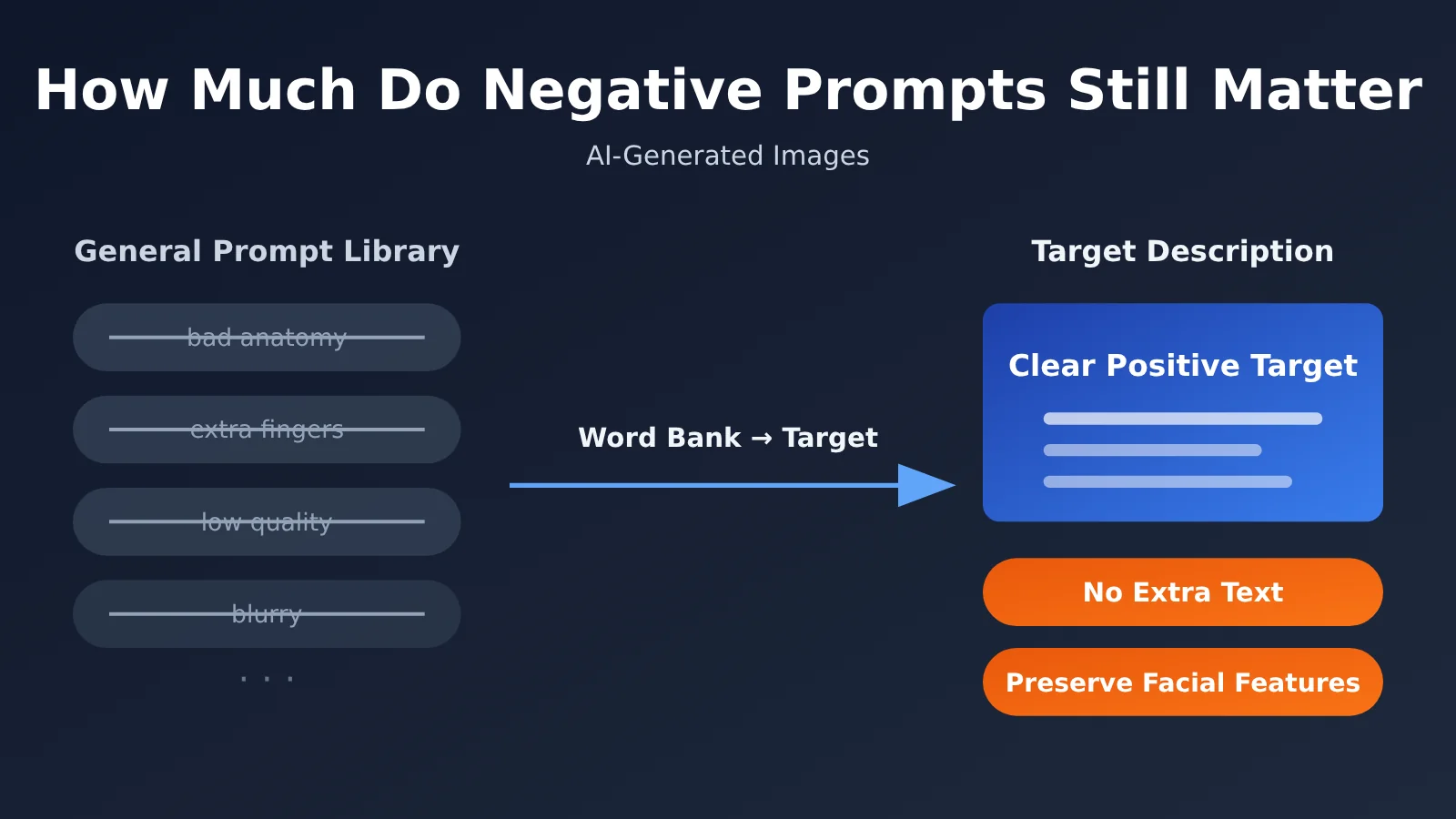
Here’s a table summarizing the key takeaways. “Negative prompt” is a broad term that actually covers at least three different things, and they shouldn’t all be evaluated the same way.
| Item | Details |
|---|---|
| Topic | Negative prompts used for AI-generated images |
| Key shift | Modern image models rely less on “negative prompt libraries,” putting more emphasis on clear descriptions of what you want |
| What still works | Explicit delivery constraints and exclusions, such as “no extra text” and “don’t change the person’s facial features” |
| What to use with caution | The API’s dedicated negative_prompt parameter; its effectiveness depends on the specific model and API |
| Official guidance | OpenAI’s image prompting guide still recommends specifying exclusions and what must remain unchanged during edits |
| Who this affects | Developers and design teams working on e-commerce images, marketing assets, and image editing |
Why Negative Prompts Were Once “Required”
Early diffusion models had limited text-encoding capabilities and struggled to understand complex sentences. In that context, using the negative_prompt parameter alongside guidance mechanisms to push features like “low quality” and “extra fingers” in the opposite direction could noticeably improve images. Over time, the community developed a set of general-purpose negative prompts that people began attaching to every request by default.
The problem is that these techniques were developed for specific model architectures. When models evolve to better understand language and interpret complete sentences directly, strings of stacked noun phrases may not only lose their original effect—they may also introduce distracting information.
What Negative Prompts Are Really For Today
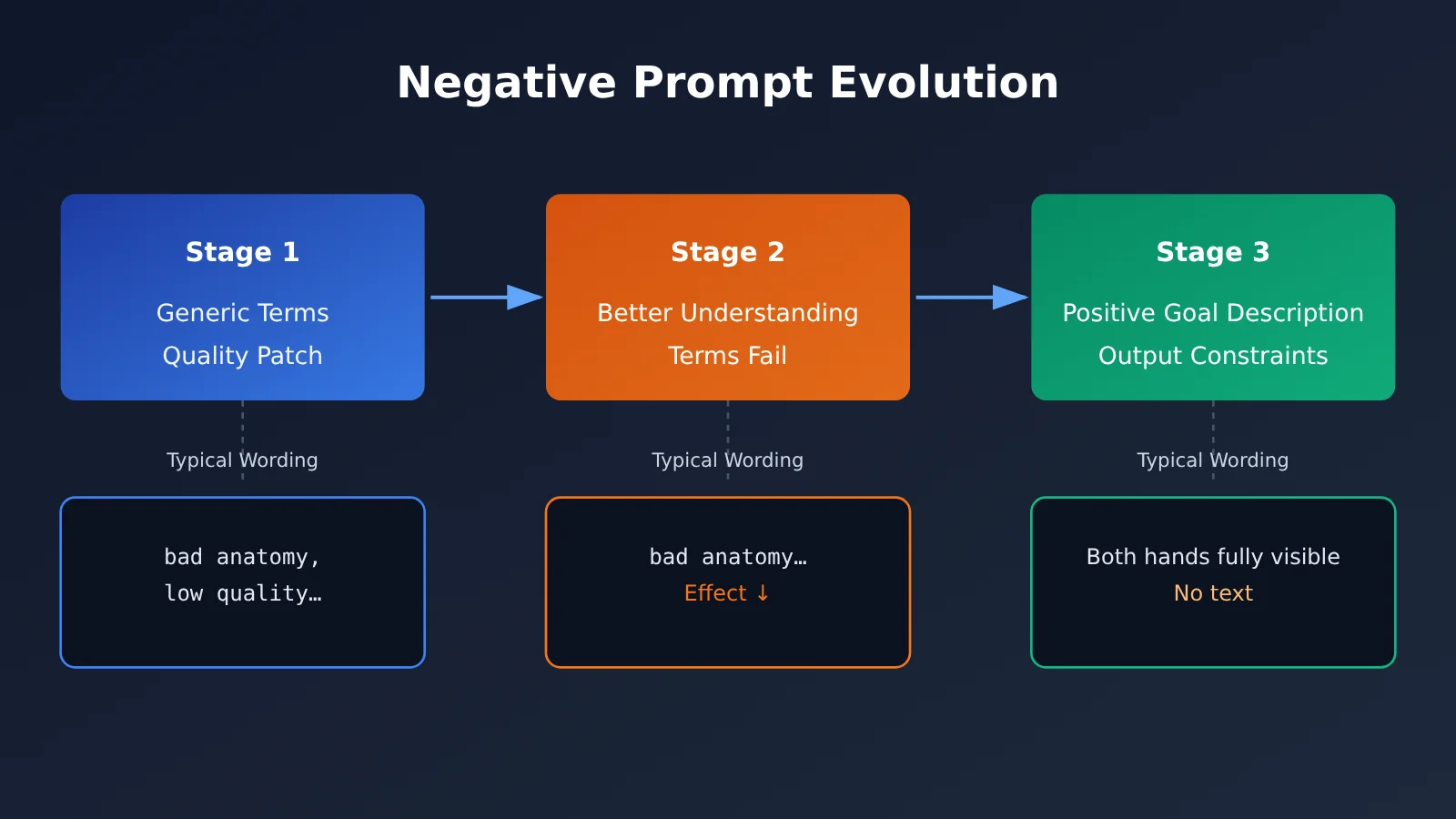
A more accurate way to put it is: Negative prompts have shifted from “quality patches” to “delivery constraints.” You no longer need to tell the model “don’t make it look bad,” but you still need to tell it “don’t include text in the image” or “keep the product label unchanged.” Models already handle the former by default; they can’t guess the latter.
The Core Takeaway: 3 Types of Negative Prompts
Before discussing whether negative prompts are useful, we need to distinguish between their different forms. The table below is the most important guide for making that decision.
| Type | Typical wording | Current assessment | Recommended approach |
|---|---|---|---|
| Long, generic word strings | bad anatomy, extra fingers, low quality… |
Don’t include by default | Decide whether to keep them based on actual results; start by removing them |
| Explicit exclusions | “No extra text,” “Don’t change the person’s facial features” | Still useful | Use for editing tasks and precise deliverables |
API-specific negative_prompt parameter |
Pass negative content in a separate field | Depends on the model and API | Use only with models that explicitly support it; don’t apply it across models |
Generic Negative Word Strings: Why You Should Remove Them by Default
The biggest problem with generic word strings is that they’re added indiscriminately. Whether you’re generating a landscape, a product, or a portrait, the prompt comes with dozens of terms about anatomical flaws and image-quality issues. For models with strong comprehension, these words don’t add any new information about what you want. They can also distract the model or even conflict with the positive description.
We ran a comparison using a set of customer requests: with the same positive description, the results were less consistent when the word string was appended at the end. Removing it produced better results. It’s important to note that this test only shows that “this word string reduced the consistency of this set of requests.” It doesn’t prove that all negative prompts are useless, or that the model misread those words as positive requirements. Also, image generation models and platform safety filters work differently, so whether certain words in the string trigger a safety review is a separate factor to investigate.
Explicit Exclusions: Why You Still Need to Include Them
No matter how smart a model is, it won’t automatically know the boundaries of your deliverable. Is text allowed in the image? Can the person’s identity be changed? Does the label on the product packaging need to stay exactly the same? These are business constraints, not matters of aesthetic judgment.
OpenAI’s image prompting guide is clear on this point: it recommends specifying exclusions, such as extra text, logos, and watermarks. For image editing, you should also explain what needs to remain unchanged. These limited, specific, and verifiable exclusions are still an important part of a high-quality prompt.
The negative_prompt Parameter: Don’t Apply It Across Models
Some open-source diffusion models and image APIs provide a separate negative_prompt field, and it does have a real effect on those models. But not every model provides this parameter. For example, OpenAI’s image API doesn’t have a separate negative prompt field, so exclusions need to be written directly into the prompt. Newer models that use different inference methods also vary in how well they support negative parameters.
So when switching between models, one of the most common mistakes is copying negative parameters tuned for Model A straight over to Model B. The right approach is to first check whether the model and API support them, then decide how to write your prompt.
🎯 Technical recommendation: If your business needs to switch between multiple image models, consider using APIYI apiyi.com to run comparative tests with the same API key and a unified interface. Differences in how the same prompt performs across models are often more convincing than any rule of thumb.
Negative Prompt Rewrite Example: From a Word Bank to a Target Description
Now that we’ve covered the theory, let’s look at a specific rewrite. With models that have strong language understanding, it’s usually better to start by clearly describing the result you want.
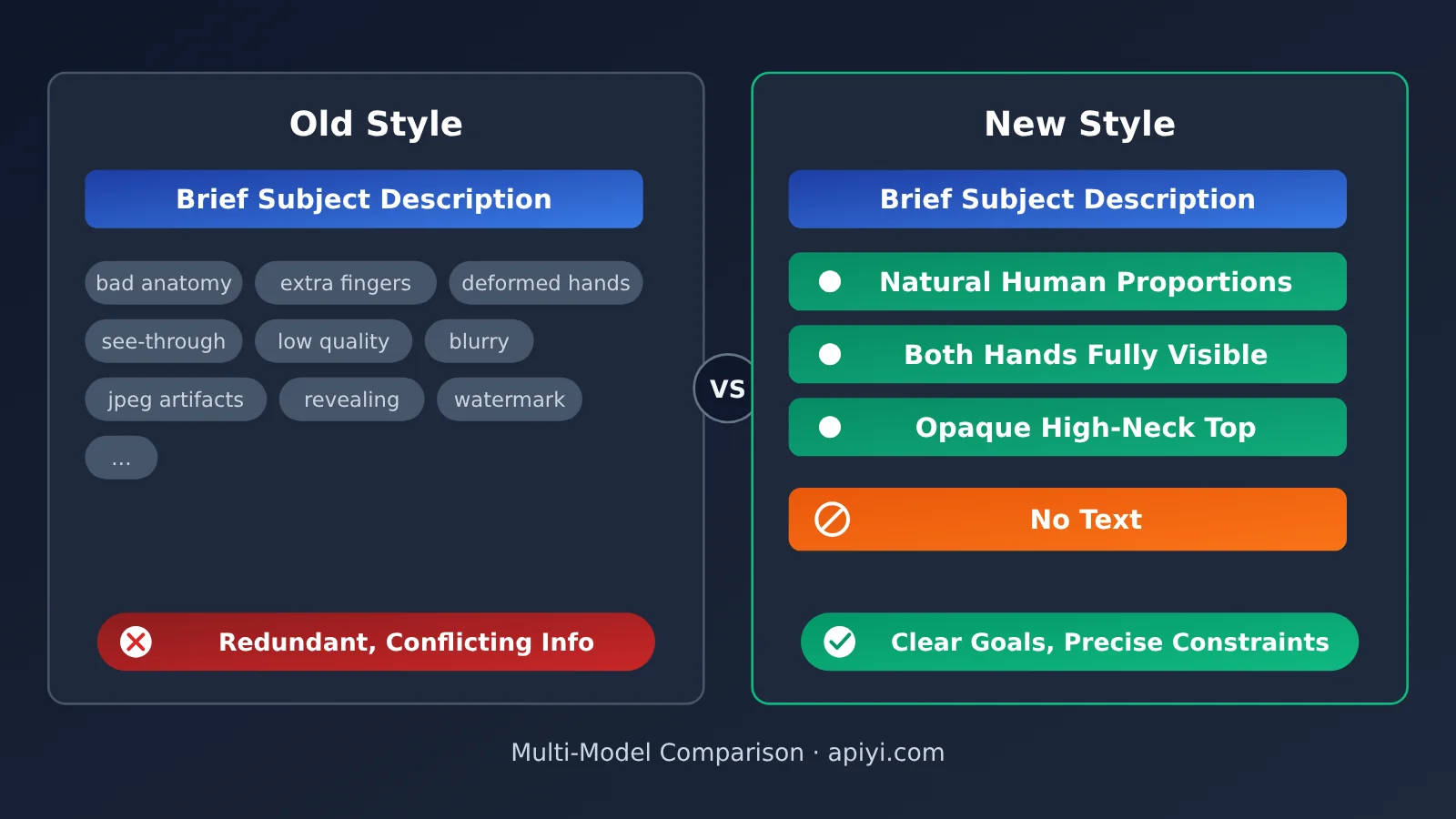
| Dimension | Old approach (negative prompt word bank) | New approach (target description + a few constraints) |
|---|---|---|
| Anatomy | bad anatomy, extra fingers, deformed hands |
Natural body proportions, with both hands fully visible |
| Clothing | see-through, revealing, transparent |
An opaque white turtleneck |
| Image quality | low quality, blurry, jpeg artifacts |
Usually not needed; if necessary, describe the target style and lighting |
| Output constraints | Often omitted | No text, logos, or watermarks anywhere in the image |
| Editing task | Often omitted | Keep the person’s facial features and hairstyle unchanged; change only the background |
The benefit of this rewrite is that it makes the request clearer and reduces the chance of conflicting instructions. “An opaque white turtleneck” covers several clothing-related prohibitions from the old approach while giving the model a concrete goal it can follow. That said, positive descriptions aren’t guaranteed to work better in every situation—they simply make it easier to express a consistent request.
Minimal Example: Calling an Image Model with Negative Prompts
Here’s the simplest way to generate an image with an OpenAI-compatible API. Just include the exclusions directly in the prompt:
from openai import OpenAI

client = OpenAI(
    api_key="YOUR_API_KEY",
    base_url="https://api.apiyi.com/v1"  # APIYI unified endpoint
)

prompt = (
    "A young woman standing in a light gray photography studio, natural body proportions, both hands fully visible,"
    "wearing an opaque white turtleneck, soft side lighting, commercial portrait style."
    "No text, logos, or watermarks anywhere in the image."
)

result = client.images.generate(model="gpt-image-1", prompt=prompt, size="1024x1024")
print(result.data[0].b64_json[:80])
View the complete implementation (with optional exclusion constraints)
import base64
from typing import List, Optional
from openai import OpenAI

client = OpenAI(
    api_key="YOUR_API_KEY",
    base_url="https://api.apiyi.com/v1"  # Use one key to call image models from multiple providers
)

def build_prompt(goal: str, constraints: Optional[List[str]] = None) -> str:
    """
    Describe the goal in full first, then add a few targeted exclusion constraints.
    Add constraints only after a specific issue appears; don't automatically include an entire library of negative prompts.
    """
    prompt = goal.strip()
    if constraints:
        prompt += " Constraints:" + ";".join(constraints) + "."
    return prompt

def generate_image(goal: str,
                   constraints: Optional[List[str]] = None,
                   model: str = "gpt-image-1",
                   output: str = "output.png") -> str:
    prompt = build_prompt(goal, constraints)
    try:
        result = client.images.generate(model=model, prompt=prompt, size="1024x1024")
        with open(output, "wb") as f:
            f.write(base64.b64decode(result.data[0].b64_json))
        return output
    except Exception as e:
        return f"Error: {e}"

# First pass: describe only the goal
goal = ("E-commerce product image: a bottle of white skincare lotion on a light wood-grain countertop,"
        "with the label clearly readable, soft natural light, minimalist style.")
print(generate_image(goal, output="v1.png"))

# Second pass: if extra decorative text appears, add a targeted constraint
print(generate_image(goal,
                     constraints=["Do not add any text or watermarks beyond the original label on the bottle"],
                     output="v2.png"))
🚀 Get started quickly: APIYI at apiyi.com offers an OpenAI-compatible API, with free testing credits for new users. Replace
api_keyin the code above with your key to compare the actual image-generation results with and without a library of negative prompts.
Analyzing the Impact of Changes to Negative Prompts
Impact on Developers
- Prompt templates need to be restructured: Many projects hard-code generic negative prompt strings. Consider switching to a “target description + optional constraint list” structure, with constraints configured for each use case.
- Handle model-specific compatibility separately: Whether the
negative_promptparameter works depends on the model. Your wrapper shouldn’t assume every model supports it; instead, map prompt formats to each model’s capabilities. - Troubleshooting takes a different approach: When image generation goes wrong, first check whether the positive description is clear and free of contradictions, rather than adding more terms to the negative prompt library.
- Review false positives separately: When a request is blocked, distinguish between a model interpretation issue and a safety review trigger. Long negative prompt strings can sometimes introduce unnecessary risk.
Impact on the Industry
- Prompt engineering is shifting from “magic words” to “requirements documents”: Writing prompts is increasingly like writing a clear delivery brief, with an emphasis on goals, boundaries, and what must stay unchanged.
- Editing tasks are more sensitive to constraints: In image editing, “what to keep unchanged” matters more than “what to generate.” Exclusion and preservation requirements are becoming more valuable.
- It’s getting harder to transfer what you’ve learned: Prompting conventions differ more widely across models, so teams need to make decisions based on testing rather than templates circulating in the community.
The table below summarizes recommendations for using negative prompts in different scenarios:
| Application Scenario | Generic Negative Prompt Library | Explicit Exclusion Requirements | Key Focus |
|---|---|---|---|
| Creative posters and concept art | Don’t add by default | Add as needed | Describe style, composition, and mood |
| E-commerce product images | Don’t add by default | Strongly recommended | Preserve labels; avoid extra text |
| Portrait generation | Don’t add by default | Recommended | Clear descriptions of body proportions and clothing |
| Image editing and localized changes | Not applicable | Required | Clearly specify which facial features, identity traits, and elements to preserve |
| Local deployment of open-source diffusion models | Keep if testing shows it works | Recommended | Verify that the negative_prompt parameter is effective |
💡 Recommendation: Image models vary widely in how they respond to negative constraints. Try the same prompts with several leading models on APIYI apiyi.com, then choose a prompt template for your production environment.
Frequently Asked Questions
Q1: What is a negative prompt?
A negative prompt tells an AI image generation model what not to include in an image. It can be provided as a standalone `negative_prompt` parameter or as an exclusion in the main prompt, such as “don’t include any text.” These two approaches work differently and aren’t supported by all the same models.
Q2: Are negative prompts still useful?
Yes, but it depends on the form. Don’t automatically append long strings of generic terms—decide based on testing. Clear delivery constraints and requirements for preserving elements during editing are still very useful. Whether you can use a standalone negative parameter depends on the model.
Q3: Why did the results improve after I removed my negative prompt list?
For models with strong language understanding, stacking negative terms can add redundant information or even conflict with positive descriptions, making the output less consistent. However, a single test only shows that the string of terms didn’t work well with that particular request. It doesn’t mean all negative prompts are ineffective.
Q4: How can I quickly compare how different models respond to negative prompts?
The most direct approach is to run an A/B test with the same prompts across multiple models. With APIYI apiyi.com, you can use a single API key to call several leading image models. The API is compatible with the OpenAI format, and you can switch models by changing only the `model` parameter, making it easy to run comparisons at low cost.
Q5: How should I write exclusions for models like GPT Image?
The OpenAI image API doesn’t have a standalone negative parameter, so include exclusions directly in the prompt. Use complete, natural sentences, such as “Don’t include any text, logos, or watermarks in the image.” New users can claim free testing credits on APIYI apiyi.com and use the sample code in this article to try out different phrasings.
Q6: What are the limitations of this new approach to negative prompts?
Positive descriptions aren’t guaranteed to work better in every situation, and some open-source diffusion models still respond well to standalone negative parameters. Models also don’t follow exclusion instructions 100% of the time, so important deliverables should be reviewed by a person or filtered through multiple generations.
Negative Prompt Key Takeaways
- Its role has changed: Negative prompts have shifted from “quality patches” to clear statements of delivery boundaries.
- Drop the default word bank: Generic negative prompt strings are no longer essential. Keep them only if testing shows they help.
- Keep specific constraints: Requirements like no text, no watermarks, and preserving facial features still matter.
- Parameters depend on the model: Whether the
negative_promptfield works depends on the model and API. - Describe the goal before adding constraints: Start with a complete description of what you want, then add a few exclusions if specific issues arise.
- Let testing decide: Use APIYI at apiyi.com to quickly compare results across models through a unified interface.
Summary
The role of negative prompts in AI image generation comes down to three points:
- Generic negative prompt libraries are becoming less useful: Modern models handle most image quality issues by default, and indiscriminately appending a string of terms may reduce consistency.
- Explicit exclusions still matter: The model doesn’t know your business requirements. Be clear about text, logos, watermarks, and elements that must remain unchanged during editing.
- Model-specific parameters aren’t one-size-fits-all: Check whether the model supports
negative_promptbefore deciding to use it.
In practice, our advice to clients is: Describe your goal fully first. If specific issues arise, add a few targeted exclusions. Don’t attach an entire legacy negative prompt library to every request as a fixed template.
To see how this approach works for your own use case, use APIYI at apiyi.com to quickly compare image generation results across multiple models, then use real-world test data to decide on your prompt template.
📚 References
- OpenAI Image Prompting Guide: Official recommendations for writing image generation prompts
- Link:
developers.openai.com/api/docs/guides/image-prompting -
Notes: Covers how to write exclusions and how to preserve content when editing. It’s the main source of factual information for this article.
-
OpenAI Images API Documentation: Details on parameters for image generation and editing
- Link:
platform.openai.com/docs/api-reference/images -
Notes: Confirms the range of supported parameters, helping determine whether there’s a dedicated negative prompt field.
-
Stable Diffusion Documentation: Common use cases for negative prompt parameters
- Link:
github.com/Stability-AI/stablediffusion - Notes: Explains the origins of the
negative_promptmechanism and is a useful reference for teams running open-source models locally.
Author: APIYI Technical Team
Technical questions: Feel free to contact us via the APIYI homepage. For more information on calling image models, visit the documentation center at docs.apiyi.com.