Early on October 15, many users ran into the same error when sending messages through the ChatGPT website, Codex, or their own scripts: OpenAI model not found. The full message usually read: “The model gpt-5.5 does not exist or you do not have access to it.” The obvious question was: Has GPT-5.5 been retired?
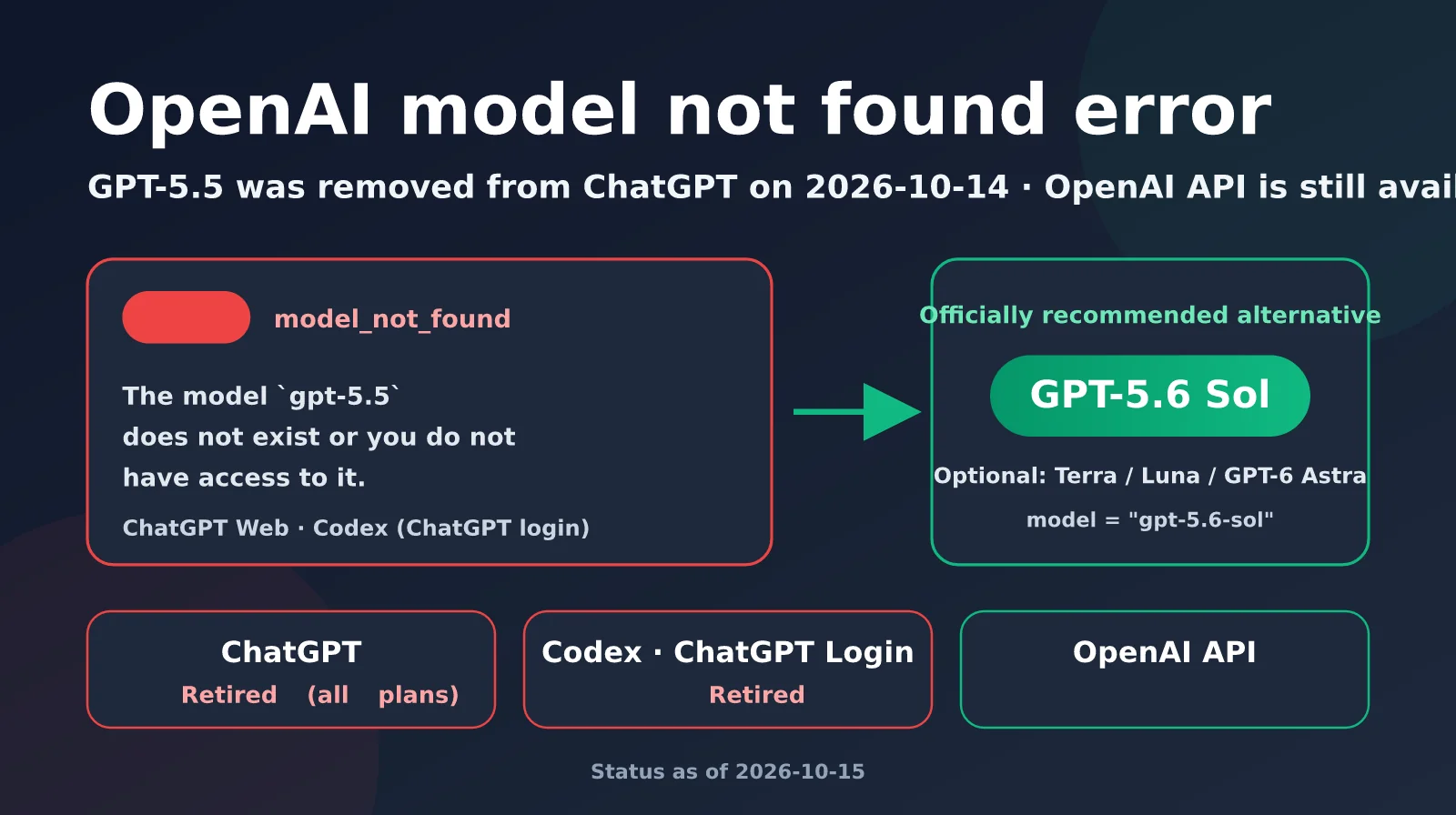
The answer is: yes, but only in some places. According to an announcement OpenAI published on September 15, GPT-5.5 was retired from all ChatGPT, ChatGPT Work, and Codex plans using a ChatGPT account on October 14, 2026. GPT-5.5 accessed through the OpenAI API was not included in the retirement and is still available. This article explains the latest status as of October 15, then walks through how to troubleshoot the model not found error and choose alternatives in ChatGPT, Codex, and the API.
What you’ll get: In five minutes, you’ll be able to identify which kind of model not found error you’re seeing and smoothly migrate your workflow to newer models like GPT-5.6 Sol.
Has GPT-5.5 Been Retired? The Latest as of October 15, 2026
GPT-5.5 launched in ChatGPT on April 23, 2026, and had been one of ChatGPT’s main models. When GPT-4.5 was retired in June, its conversation history was even migrated to GPT-5.5. Just six months later, OpenAI announced that GPT-5.5 would give way to the GPT-5.6 family, released in July, and GPT-6 Astra, launched on September 3. In its announcement, the official ChatGPT account wrote: “On October 14, it’s time to say farewell to GPT-5.5 in ChatGPT, ChatGPT Work, and Codex across all plans.”
It’s important to note that OpenAI’s changelog explicitly says, “This retirement does not apply to the OpenAI API.” As of this article’s publication, OpenAI’s developer documentation lists no API shutdown date for gpt-5.5 on its Deprecations page. Some articles online have incorrectly included GPT-5.5 in the list of models scheduled for mass API retirement on October 23. That batch includes earlier models such as gpt-4-turbo, gpt-4o-2024-05-13, and o1.
| Access method | GPT-5.5 status after October 14 | What you’ll typically see |
|---|---|---|
| ChatGPT website / app | ❌ Retired (all plans) | Disappears from the model picker; new models take over old conversations |
| ChatGPT Work (Business / Enterprise / Edu) | ❌ Retired | Workspace default model and configurations pinned to GPT-5.5 stop working |
| Codex (signed in with a ChatGPT account) | ❌ Retired | Requests return a 404 model not found error |
| Codex (signed in with an API key) | ✅ Not affected by this retirement | Works as usual, subject to your API account permissions |
| OpenAI API | ✅ Still available, with no shutdown date announced | gpt-5.5 works as usual and is billed at API rates |
What Changed Around GPT-5.5’s Retirement
GPT-5.5’s retirement wasn’t an isolated event. Starting September 14, OpenAI also removed the “Instant automatically switches to Thinking” behavior for Plus and Pro users. Users now need to choose their reasoning level in the model picker. Plus users can select Medium and High, while Pro, Business, and Enterprise users can choose any level from Instant through Pro. OpenAI also clarified that asking ChatGPT to “think harder” during a conversation will no longer automatically raise the reasoning level.
ChatGPT’s Thinking levels are currently powered by GPT-5.6 Sol, while Free and Go users who tap the Think button use GPT-5.6 Luna. In other words, even if you never switched models manually, the underlying model you’re chatting with in ChatGPT may have changed after October 14—even if the interface looks the same.
🎯 Migration tip: If your business depends on GPT-5.5’s output style, you can no longer use it through ChatGPT, but it’s still available through the API. We recommend connecting to both
gpt-5.5andgpt-5.6-solthrough APIYI’s OpenAI-compatible interface, running comparison tests with the same prompts, and then deciding how quickly to migrate.
5 Main Reasons for the “OpenAI Model Not Found” Error
When people see a “model not found” error, their first thought is often, “The model was deleted.” But the error itself points to one of only two things: either the model name in the request isn’t available on the current channel, or the account doesn’t have permission to access it. It doesn’t prove that the model has been retired. Before October 14, several reports had already appeared in the Codex GitHub repository about GPT-5.5 returning 404 errors—including Issue #43344, submitted on September 7 and reopened on September 30. The reports involved Windows, macOS, Linux, and multiple subscription tiers, even though GPT-5.5 hadn’t been retired at the time.
When you connect directly to the API, the standard error response looks like this. The code field is model_not_found, and the HTTP status code is 404:
{
  "error": {
    "message": "The model `gpt-5.5` does not exist or you do not have access to it.",
    "type": "invalid_request_error",
    "param": null,
    "code": "model_not_found"
  }
}
Based on discussions in the OpenAI community and cases reported in Codex Issues, OpenAI model not found errors fall into these five categories:
| Cause | How to check | Where it occurs | What to do |
|---|---|---|---|
| 1. The model has been retired from that channel | Request gpt-5.5 in ChatGPT / Codex (with ChatGPT login) after October 14 |
ChatGPT, Codex | Switch to a newer model, such as GPT-5.6 Sol |
| 2. An old model name is hard-coded in your configuration | Search configuration files and scripts for gpt-5.5 |
Custom GPTs, scheduled tasks, config.toml | Replace the model ID wherever it appears |
| 3. The account or channel doesn’t match | Check whether you’re using ChatGPT login or an API key | Codex, third-party clients | Check subscription and API usage limits separately |
4. The base_url points to the wrong endpoint |
Check base_url and the proxy address |
API calls, custom Codex providers | Correct the endpoint or switch to a provider that supports the model |
| 5. A server-side routing issue | Other models work on the same account, and the issue resolves on its own after a while | Codex, API | Record the request ID and try again later |
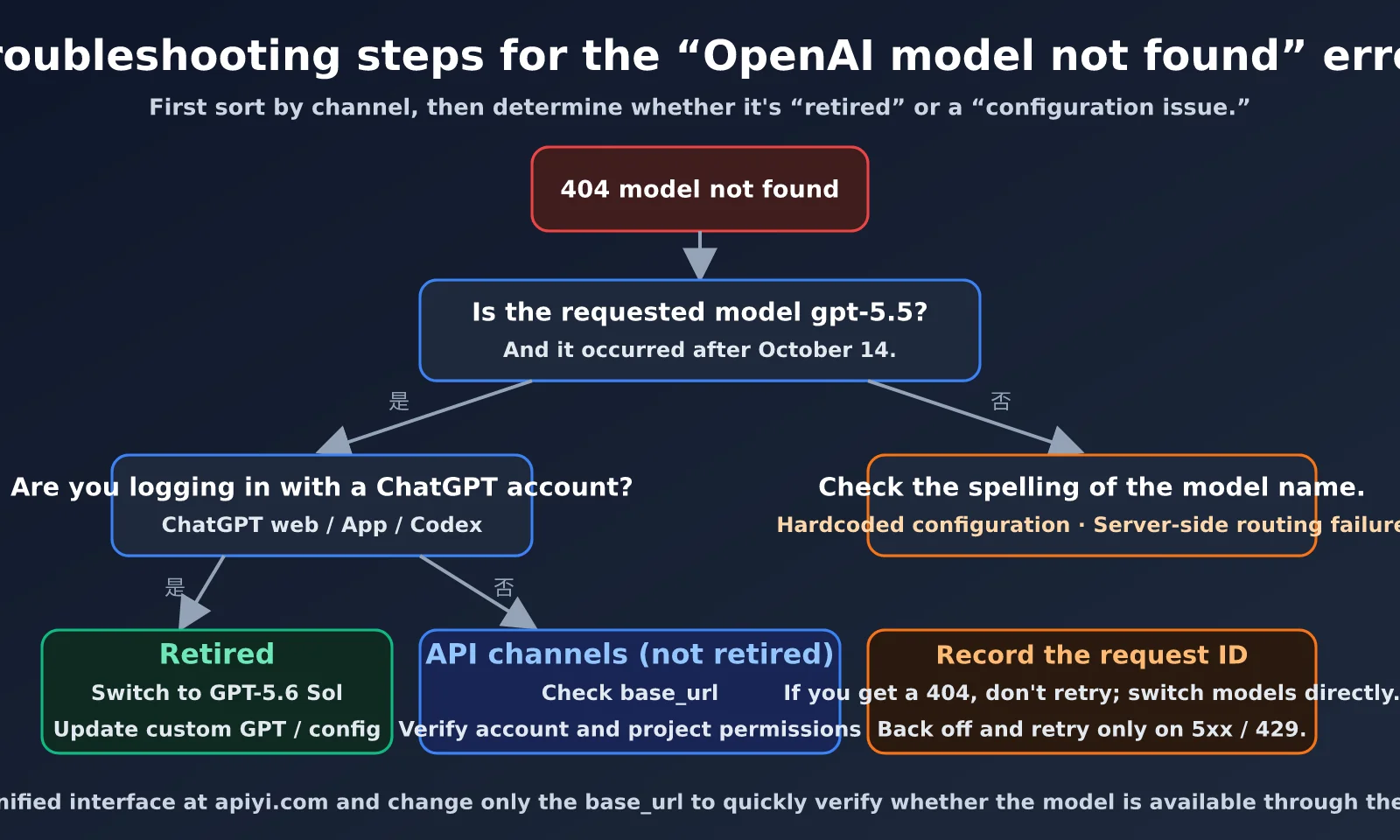
How the “model not found” error relates to GPT-5.5 being retired
The key takeaway from the diagram above is to distinguish between channels first. The same model ID, gpt-5.5, is no longer available on the ChatGPT website or in Codex when using ChatGPT login, but it’s still available through the OpenAI API. So if the error appears in ChatGPT after October 14, retirement is almost certainly the cause. But the same error from the API can’t simply be attributed to retirement; a wrong base_url, account permissions, or project configuration is more likely.
Also keep in mind that Codex’s local cache may still show GPT-5.5 as an available option, even though the server rejects requests for it. “It’s still in the list” doesn’t mean “it still works.” The server’s final response is what matters.
How to Fix the OpenAI “Model Not Found” Error in Different Scenarios
Scenario 1: “Model not found” when sending a message on the ChatGPT website
If you get this error when sending a message on chatgpt.com, the most common cause is that you’re chatting in a context tied to GPT-5.5. Follow these steps in order; the issue usually takes about two minutes to resolve:
- Refresh the page or restart the app: The old page may have cached the pre-retirement model list. Refreshing updates the model picker to the GPT-5.6 series.
- Select a model again in the model picker: Plus users can select Medium or High under Thinking. Free and Go users can use the default model or the Think button.
- Test in a new conversation: If a new conversation works but an old one doesn’t, the issue is likely the old conversation’s model binding. Copy the relevant context into a new conversation and continue there.
- Check custom GPTs and projects: Custom GPTs built on GPT-5.5 and Scheduled Tasks need to be assigned a different model.
- Contact your workspace administrator: If an administrator has set GPT-5.5 as the default model for your ChatGPT Work workspace, they’ll need to change it in the admin settings.
As for what happens to old conversations, third-party reports say that existing GPT-5.5 conversations will be handed over to the new default model, consistent with how GPT-4.5 and GPT-5.2 were handled when they were retired. However, OpenAI hasn’t published an exact mapping for GPT-5.5 conversations. So “the interface looks the same” doesn’t mean “the model hasn’t changed.” If output style matters, it’s a good idea to validate it again.
Scenario 2: How to fix “model not found” in Codex
Codex is the scenario most affected by GPT-5.5’s retirement, because developers often hard-code model names in configuration files and scripts. OpenAI recommends that Codex users signed in with a ChatGPT account switch gpt-5.5 to gpt-5.6-sol. They should also update saved model settings, custom Agents, scheduled tasks, and scripts.
First, search for the old model name across your system. From your project root and user directory, run rg 'gpt-5\.5'. Check ~/.codex/config.toml, CI configurations, development container images, and internal documentation. Next, update the client. According to third-party guides, GPT-5.6 requires Codex CLI 0.144.0 or later, while GPT-6 Astra requires 0.153.0 or later. You can upgrade with npm install -g @openai/codex@latest, then confirm the installed version with codex --version.
# ~/.codex/config.toml — switch to the new model
model = "gpt-5.6-sol"

# If you need to keep using gpt-5.5, switch to the API key channel
# model = "gpt-5.5"
# model_provider = "apiyi"
#
# [model_providers.apiyi]
# name = "APIYI"
# base_url = "https://api.apiyi.com/v1"
# env_key = "APIYI_API_KEY"
# wire_api = "responses"
If you really need to keep using GPT-5.5 in Codex, the only option is to switch to an API key channel. For example, run codex login --with-api-key to sign in with an OpenAI API account, or configure an OpenAI-compatible provider that supports the Responses API, as shown in the commented-out settings above. Make sure the base_url, model ID, and API key all belong to the same provider. Mixing providers is a common cause of 404 errors.
💡 Technical tip: A custom Codex provider must support the Responses API. APIYI at apiyi.com offers an OpenAI-compatible Responses endpoint, letting you switch between models such as
gpt-5.5andgpt-5.6-solwith the same API key, which makes A/B comparisons in Codex easier.
Scenario 3: How to fix “model not found” in API calls
GPT-5.5 hasn’t been retired from the API. If your API request returns “model not found,” check the following: Is the model name spelled correctly—for example, did you accidentally enter gpt5.5 or gpt-5.5-turbo? Does base_url point to an old proxy that supports only a limited set of models? Does the API project restrict which models are available? And does the organization associated with the account have access to the model?
A safer approach is to build fallback behavior into your code. If the preferred model returns model_not_found, automatically switch to a backup model so a change to a single model ID doesn’t interrupt the entire workflow. Here’s a minimal example:
from openai import OpenAI, NotFoundError

client = OpenAI(api_key="YOUR_API_KEY", base_url="https://api.apiyi.com/v1")
MODELS = ["gpt-5.5", "gpt-5.6-sol", "gpt-5.6-terra"]  # Ordered by priority

def chat(prompt: str) -> str:
    for model in MODELS:
        try:
            resp = client.chat.completions.create(
                model=model, messages=[{"role": "user", "content": prompt}]
            )
            return f"[{resp.model}] " + resp.choices[0].message.content
        except NotFoundError as e:  # HTTP 404 / model_not_found
            print(f"{model} is unavailable; switching to the next model: {e}")
    raise RuntimeError("None of the candidate models are available")

print(chat("Explain the model not found error in one sentence"))
View the full code: version with a model availability check
import os
import time
from openai import OpenAI, NotFoundError, APIStatusError

client = OpenAI(
    api_key=os.getenv("APIYI_API_KEY"),
    base_url="https://api.apiyi.com/v1",
)

CANDIDATES = ["gpt-5.5", "gpt-5.6-sol", "gpt-5.6-terra", "gpt-5.6-luna"]


def check_models(candidates: list[str]) -> list[str]:
    """Probe each model at startup and return the available ones."""
    available = []
    for model in candidates:
        try:
            client.chat.completions.create(
                model=model,
                messages=[{"role": "user", "content": "ping"}],
                max_tokens=5,
            )
            available.append(model)
            print(f"✅ {model} is available")
        except NotFoundError:
            print(f"❌ {model} returned model_not_found")
        except APIStatusError as e:
            print(f"⚠️ {model} returned another error: {e.status_code}")
    return available


def chat(prompt: str, models: list[str], retries: int = 2) -> str:
    for model in models:
        for attempt in range(retries):
            try:
                resp = client.chat.completions.create(
                    model=model,
                    messages=[{"role": "user", "content": prompt}],
                )
                return resp.choices[0].message.content
            except NotFoundError:
                break  # Don't retry a 404; switch models instead
            except APIStatusError as e:
                if e.status_code in (429, 500, 502, 503):
                    time.sleep(2 ** attempt)
                    continue
                raise
    raise RuntimeError("None of the candidate models are available")


if __name__ == "__main__":
    usable = check_models(CANDIDATES)
    print(chat("Summarize the impact of GPT-5.5's retirement", usable))
One detail to keep in mind: don’t retry the same model after a 404. A model ID problem won’t go away if you retry; switch to another model instead. Temporary errors such as 429 and 5xx responses are better candidates for exponential backoff. Also, use the model field in the response object to confirm which model handled the request. Don’t ask the model to identify itself: its description of its own version may not be reliable.
🚀 Get started quickly: Sign up at APIYI (apiyi.com) to get test credits, then use the availability-check script above to test which GPT-5.5 and GPT-5.6 models your account can access.
Choosing a Replacement Model After GPT-5.5 Is Retired
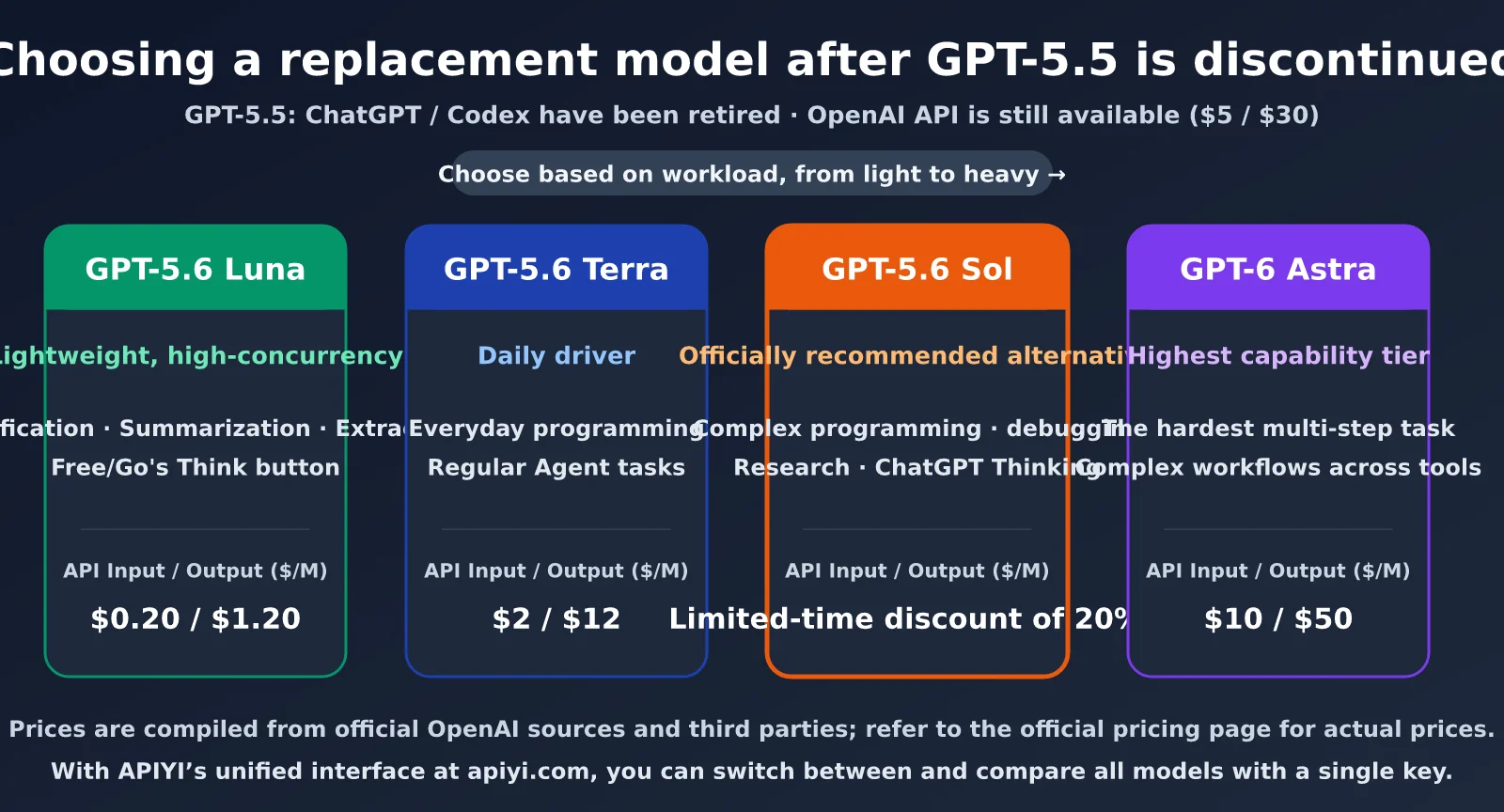
ChatGPT and Codex users will need to choose a new model after GPT-5.5 is retired. OpenAI’s recommended direct replacement is GPT-5.6 Sol. GPT-6 Astra is a more capable option, but it isn’t a mandatory one-to-one replacement. The GPT-5.6 family launched in July 2026, with three tiers: Sol, Terra, and Luna. All three are available through the API.
| Model | Positioning | Best suited for | Reference API pricing (per million input/output tokens) |
|---|---|---|---|
| GPT-5.5 | Previous-generation workhorse (API only) | Existing applications that need to preserve the old output style | $5 / $30 |
| GPT-5.6 Sol | GPT-5.6 flagship; official recommended replacement | Complex coding, debugging, and research tasks | Launch price: $5 / $30; temporary discount of more than 20% starting August 21 |
| GPT-5.6 Terra | Mid-tier | Everyday coding and agent workflows | $2 / $12 |
| GPT-5.6 Luna | Lightweight tier | Simple, repetitive, high-throughput tasks | $0.20 / $1.20 |
| GPT-6 Astra | Higher-capability tier | The most challenging, multistep tasks across tools | Listed at $10 / $50 by third-party sources |
How to Choose a GPT-5.5 Replacement
From a cost perspective, GPT-5.6 Sol’s temporary discount in late August brings its price below GPT-5.5’s, so moving to Sol generally won’t increase costs. If you’ve mainly used GPT-5.5 for everyday coding and routine agent tasks, GPT-5.6 Terra is a better starting point to try: it costs less than half as much as GPT-5.5. For high-throughput classification, summarization, and extraction tasks, you can move straight to Luna, where the cost difference can be as much as 25-fold.
Keep in mind that the pricing data comes from OpenAI’s official page and third-party sources. Sol’s discounted pricing is available for only three months, so check OpenAI’s pricing page for actual billing rates. The most reliable way to choose is to run your own real-world tasks on Terra and Sol, then compare quality, latency, and token usage.
📊 Comparison tip: You can only know how different models perform on your workloads by testing them. We recommend using the APIYI apiyi.com platform to call GPT-5.5, GPT-5.6 Sol, and Terra in turn with the same key, so you can quickly compare quality and cost.
GPT-5.5 Migration Priorities by User Type
| User type | Impact | What you need to do | Recommended timing |
|---|---|---|---|
| Individual ChatGPT users | Low | Refresh the page and select a new model | Immediately |
| Custom GPT builders | Medium | Switch the underlying model to the GPT-5.6 family and test again | This week |
| ChatGPT Work administrators | Medium | Update the workspace’s default model and managed configuration | This week |
| Codex developers (signed in with ChatGPT) | High | Replace all hard-coded gpt-5.5 references and upgrade the CLI |
Immediately |
| API developers | Low | No migration needed for now; monitor the deprecation page and prepare a fallback | As part of your roadmap |
API developers aren’t affected for now, but that doesn’t mean they can ignore the change. Based on the precedent set by GPT-5.2, it was first retired from Codex signed in with ChatGPT on June 2, then phased out of the API in July and August. Retirement on the ChatGPT side often precedes API deprecation. Once OpenAI adds GPT-5.5 to its deprecation page, it will usually provide a transition period. Validating a new model in advance will make the eventual switch much smoother.
There are also reports that OpenAI announced on October 14 that GPT-4o, GPT-4o mini, GPT-4.1, and GPT-4.1 mini will all be removed from the API on January 14, 2027. Developers still using these models should plan their migrations as well.
Frequently Asked Questions About the OpenAI “model not found” Error
Q1: Has GPT-5.5 been completely retired?
No. Starting October 14, GPT-5.5 was retired from ChatGPT, ChatGPT Work, and Codex when signed in with a ChatGPT account. However, the OpenAI API is explicitly excluded from the retirement. As of October 15, the deprecation page also lists no shutdown date for GPT-5.5 in the API. You can still call `gpt-5.5` through OpenAI-compatible interfaces such as APIYI at apiyi.com.
Q2: Will my ChatGPT conversations that used GPT-5.5 disappear?
No. Your chat history will remain, and you can continue old conversations, but the underlying model will be replaced by the new default model. If you get an error when continuing an old conversation, try refreshing the page, selecting a model again, or copying the key context into a new conversation.
Q3: I got a “model not found” error before GPT-5.5 was retired. What caused it?
This is usually a server-side routing or account-permission issue. Since June, several reports in Codex’s GitHub repository have described GPT-5.5 returning a 404 while other models on the same account worked. The issue sometimes resolved itself after a while. If this happens, save the request ID from the error and send it to OpenAI, then temporarily switch to another model.
Q4: What should I do if an API call to gpt-5.5 returns “model not found”?
First, check the model name and `base_url`, then confirm that your API project doesn’t restrict which models you can use. If you’re using a third-party proxy, make sure the provider supports this model. We recommend using APIYI at apiyi.com as a unified interface for cross-checking: changing only the `base_url` in the same code lets you determine whether the issue is with your account configuration or the provider itself.
Q5: Why can’t Plus users find “automatic thinking” anymore?
This was a separate change made on September 14. OpenAI removed the mechanism that automatically switched Plus and Pro users from Instant to Thinking. You now need to select a reasoning level manually in the model picker. Plus users can choose Medium or High. Asking the model to “think harder” during a conversation won’t automatically raise the reasoning level.
Summary
The OpenAI “model not found” error and the retirement of GPT-5.5 are related, but they’re not the same issue. As of October 15, 2026, the situation is: GPT-5.5 was fully retired from ChatGPT, ChatGPT Work, and Codex when signed in with a ChatGPT account on October 14, but GPT-5.5 remains available through the OpenAI API. So if you see an error in ChatGPT, switch to the GPT-5.6 series. If you see one in the API, first check the model name, base_url, and account permissions.
For migration, GPT-5.6 Sol is the official direct replacement; Terra is suited to everyday coding and agent tasks; Luna works well for lightweight tasks at high concurrency; and GPT-6 Astra is best reserved for the most complex, multi-step work. Whichever model you choose, we recommend making the model ID configurable and adding a 404 fallback in your code. That way, when the next model is retired, you’ll only need to change one configuration value.
We recommend using APIYI at apiyi.com to access the full GPT-5.5 and GPT-5.6 model lineup through a unified OpenAI-compatible interface. This lets you keep existing GPT-5.5 integrations running while comparing new models with real-world data and migrating smoothly.
References:
- OpenAI API deprecation page: developers.openai.com/docs/deprecations
- ChatGPT release notes: help.openai.com/en/articles/6825453-chatgpt-release-notes
- OpenAI GPT-5.6 launch page: openai.com/index/gpt-5-6
- Codex GitHub Issue #43344 (GPT-5.5 returns 404): github.com/openai/codex/issues/43344
- OpenAI Developer Community discussion about “model not found”: community.openai.com
Author: APIYI Team | Tracking OpenAI model updates and migration practices. For more tutorials on integrating Large Language Models, visit APIYI at apiyi.com.