On May 4, 2026, Google officially announced on its blog: Event-driven webhooks are now available in Gemini API. Two days later, on May 6 at 10:00 AM (Beijing Time), this email from Google AI Studio hit the inboxes of developers worldwide, marking the full rollout of Gemini API webhooks to all users.
For many teams working on Deep Research, long-form video generation, or large-scale batch inference, this is an "infrastructure-level" update. It’s not a new model or a new parameter, but it fundamentally rewrites how we interact with long-running AI tasks.
This article breaks down the event types, configuration methods, signature verification mechanisms, and starter code for Gemini API webhooks based on official Google blog posts and the Gemini Cookbook. We’ll also discuss what this means for developers in China.
What are Gemini API webhooks: Understanding event-driven webhooks in a nutshell
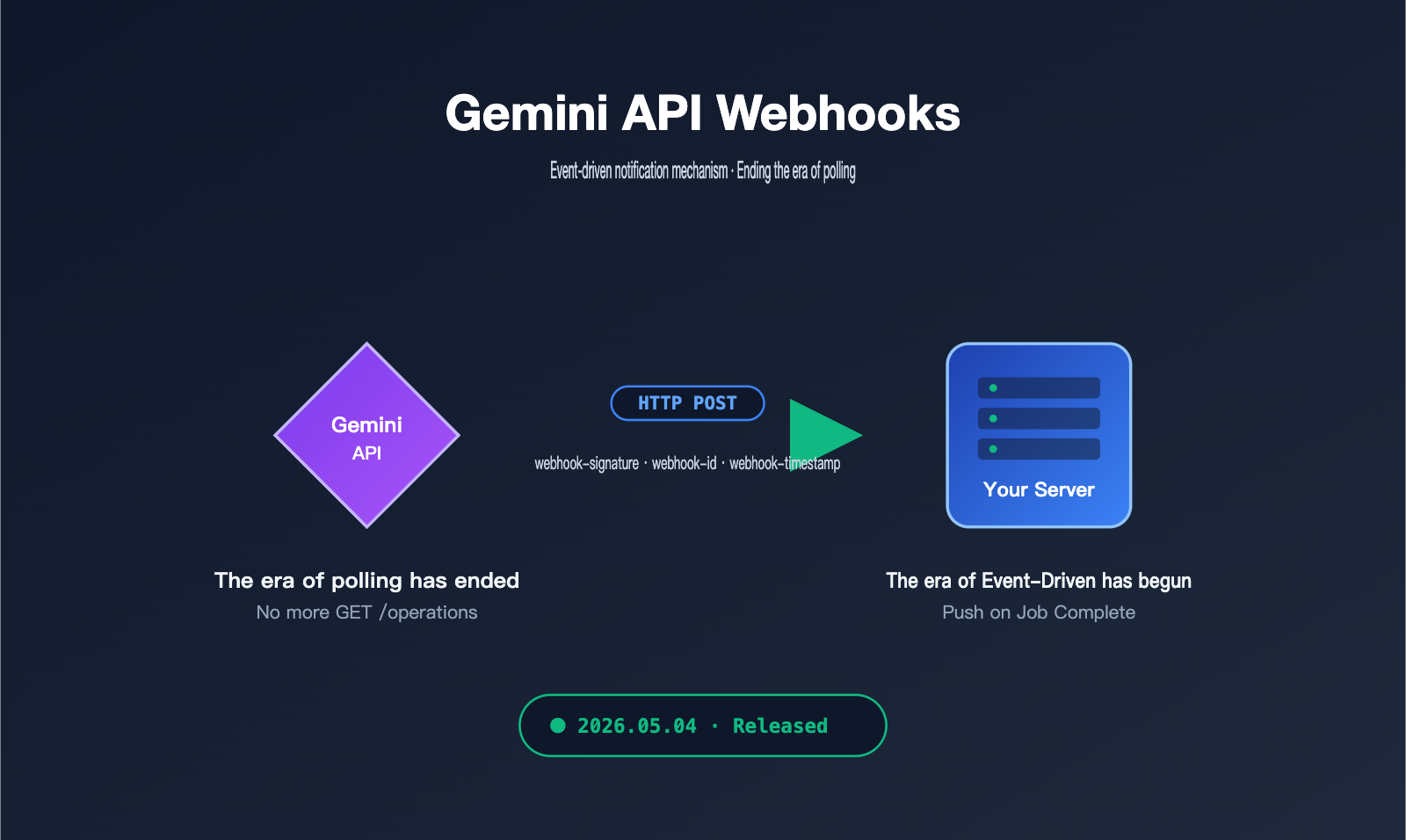
Gemini API webhooks are essentially an event-push mechanism based on HTTP POST. When your submitted batch tasks, video generation tasks, or asynchronous interactions are completed, the Gemini API proactively pushes a signed JSON notification to your pre-registered server address, rather than requiring you to constantly poll for task status using GET requests.
This "reverse invocation" design isn't new in traditional software development, but it's a game-changer for AI inference scenarios. Gemini's current flagship features—Deep Research, Veo long-form video generation, and the Batch API—often take anywhere from several minutes to hours to complete. If you continue to rely on polling, your client has to maintain long connections, timers, and error-recovery logic, which significantly increases operational costs and wastes API quota.
🎯 Quick takeaway: Gemini API webhooks = shifting from "the client repeatedly asking if it's done" to "the server proactively telling you it's done." Developers just need to set up a callback endpoint and wait for the notification. For teams in China using API proxy services like APIYI (apiyi.com) to access Gemini, you can also leverage webhook notifications to reduce polling requests over international links, significantly lowering latency and bandwidth consumption.
Note that Gemini API webhooks push a "thin payload"—it provides the task ID, status, and a pointer to the result file (e.g., output_file_uri), rather than dumping tens of megabytes of video or thousands of lines of batch output directly into the POST body. This is a deliberate design choice that reduces data costs during retries and keeps permission control cleaner.
Why Gemini API Webhooks Have Ended the "Polling Era"
To understand the value of Gemini API webhooks, you first have to understand the cost of polling. Before webhooks were introduced, a typical batch task workflow looked like this: Submit task → Get operation ID → Use setInterval to GET the status every 30 seconds → You can't leave work until the status changes to SUCCEEDED. This flow is fine for a single task, but it quickly falls apart in a production environment.
The table below compares the traditional polling mode with the event-driven webhook mode across several dimensions, which is also a key migration benefit highlighted by Google on their official blog.
| Comparison Dimension | Traditional Polling Mode | Gemini API Event-Driven Webhook |
|---|---|---|
| Notification Latency | Depends on polling interval (typically 10-60s) | Millisecond-level (pushed as soon as the task ends) |
| API Quota Usage | Every poll counts toward read quota | Push is initiated by Google; no client quota consumed |
| Client Complexity | Requires timers, state machines, and error retries | Only needs an HTTP POST endpoint + signature verification |
| Large-scale Concurrency | Significant "polling storms" with thousands of tasks | Pushes arrive independently, easy to scale horizontally |
| Failure Recovery | Client must implement its own | Server-side automatic exponential backoff retries (up to 24h) |
| Suitable Scenarios | Short tasks, low concurrency | Long tasks, high concurrency, agentic pipelines |
As you can see from this table, Gemini API webhooks aren't just about "saving a few lines of polling code." They effectively shift the responsibility of "task orchestration" from the client side to the server side. For teams running agentic workflows, combining webhooks with Cloud Run, Cloud Functions, or local Serverless services makes it possible to achieve a fully asynchronous, zero-long-connection architecture.
💡 Migrating from Polling: If your existing code is built around
GET /operations, migrating to the webhook mode only requires replacing the "polling loop" with an "event callback route." Your business logic remains almost entirely unchanged. When domestic teams access the Gemini API via APIYI (apiyi.com), they can connect the webhook endpoint directly to their own internal network, retaining the advantages of an event-driven architecture while avoiding the instability of cross-border long connections.
Two Ways to Configure Gemini API Webhooks: Static vs. Dynamic
The Gemini API supports two registration methods, catering to "global notifications" and "per-task routing" respectively. Understanding the difference between these two will directly determine your subsequent key management and signature verification strategy.
Static Webhook: Project-Level Global Event Subscription
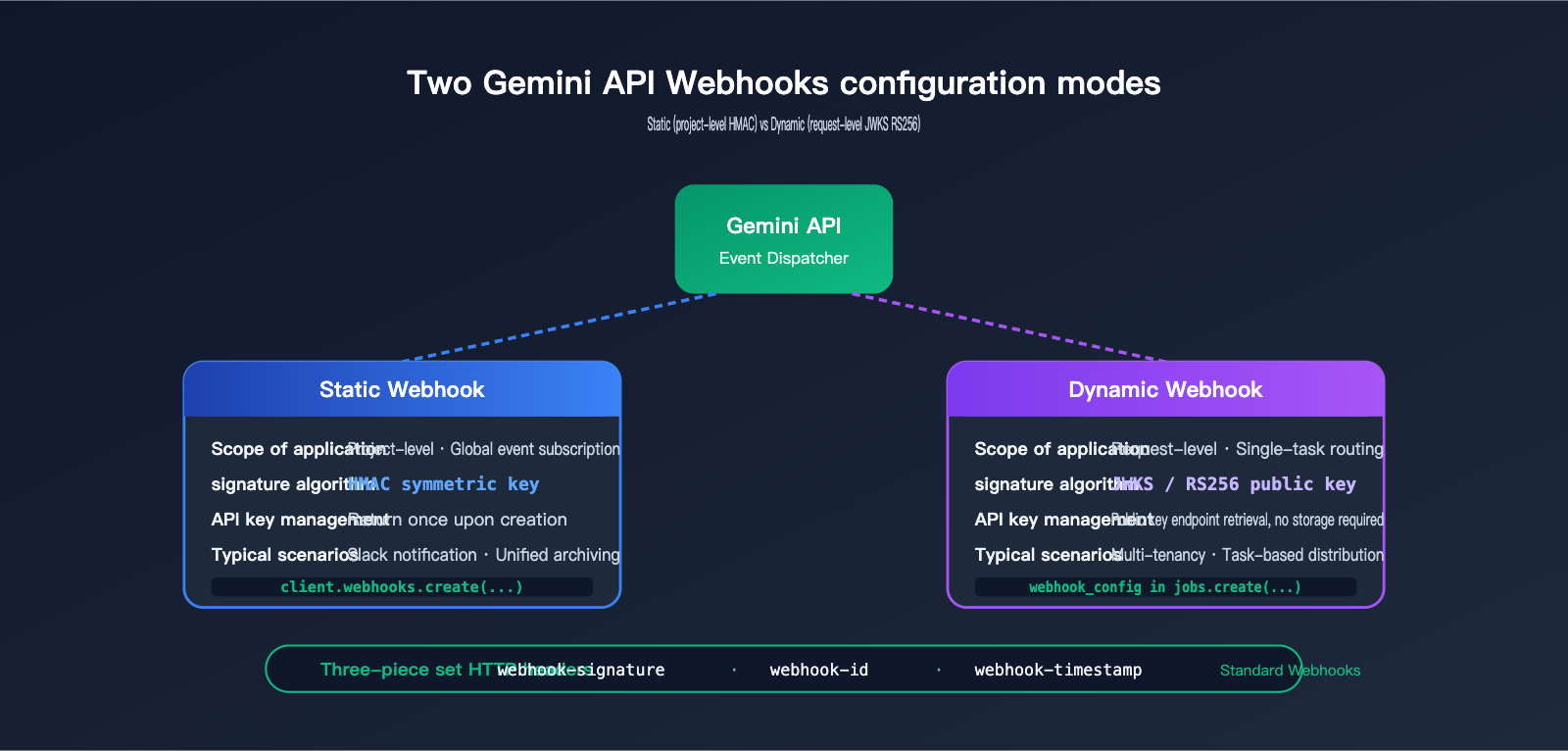
Static Webhooks are registered once via the WebhookService API and apply to all matching events within that project. This is ideal for "broadcast every task completion" scenarios, such as forwarding all batch.succeeded events to a team Slack channel or syncing all video.generated events to your own CMS or object storage.
Regarding the signature mechanism, Static Webhooks use HMAC symmetric keys. Google returns a signing secret upon creation—and only once. You must save it immediately to a secret management service, otherwise, you'll have to delete and recreate it.
Dynamic Webhook: Request-Level Fine-Grained Routing
Dynamic Webhooks offer a more "fine-grained" approach: you specify a URL temporarily in the webhook_config field every time you submit a task, and Google will push the events for that specific task to that address. This is particularly suitable for multi-tenant SaaS scenarios, where tasks from different customers are pushed to different callback endpoints, ensuring clear business isolation.
Dynamic Webhooks also allow you to include a user_metadata field in the configuration (any key-value pair, e.g., {"job_group": "nightly-eval"}), which Google will pass back as-is during the push. This is a very practical design that saves you from maintaining an extra "task-to-business-context" mapping table.
Regarding the signature mechanism, Dynamic Webhooks use JWKS asynchronous public keys (RS256). The public key endpoint is generativelanguage.googleapis.com/.well-known/jwks.json. Your service simply fetches the public key for verification, eliminating the need to store symmetric keys.
| Dimension | Static Webhook | Dynamic Webhook |
|---|---|---|
| Registration | One-time registration via WebhookService API | Specified temporarily in each task request |
| Scope | Entire project | Single task |
| Signature Algorithm | HMAC symmetric key | JWKS / RS256 public key |
| Key Management | Returned once at creation, must be saved | No symmetric key management; fetch from public key endpoint |
| user_metadata | Not supported | Supports arbitrary key-value pass-through |
| Typical Scenarios | Global notifications, Slack integration, unified archiving | Multi-tenant routing, per-task result distribution |
| Recommended For | Unified internal team pipelines | SaaS platforms, public-facing services |
🎯 Recommendation: For unified processing within a single team, prioritize Static Webhooks. For public-facing services or scenarios requiring tenant-based routing, prioritize Dynamic Webhooks. If you are proxying the Gemini API via APIYI (apiyi.com), both modes are natively supported. The signature headers and event payloads are identical to the official ones, so there's no extra barrier to migration.
Gemini API Webhooks Tutorial: Subscription in 5 Lines of Code
Here’s a minimal, ready-to-use code snippet. From creating a static webhook to verifying signatures and receiving events, this guide is designed to get you up and running with a functional loop in under 10 minutes.
Creating a Gemini API Event-Driven Webhook with the Python SDK
from google import genai
import os

client = genai.Client()

webhook = client.webhooks.create(
    subscribed_events=["batch.succeeded", "video.generated"],
    name="prod_global_notify",
    uri="https://your-server.example.com/gemini/webhook",
)

# The signing_secret is returned only once; make sure to persist it immediately
os.environ["WEBHOOK_SIGNING_SECRET"] = webhook.new_signing_secret
This code does two things: first, it registers a global endpoint that listens for batch completion and video generation events; second, it stores the signing key returned by Google into an environment variable. In production, we strongly recommend storing the secret in a Secret Manager, Vault, or a similar service rather than hardcoding it or letting it leak into logs.
Receiving and Verifying with Node.js + Express
import express from "express";
import { Webhook } from "standardwebhooks";

const app = express();
const wh = new Webhook(process.env.WEBHOOK_SIGNING_SECRET);

app.post("/gemini/webhook", express.raw({ type: "*/*" }), (req, res) => {
  try {
    const event = wh.verify(req.body, req.headers);
    console.log("event:", event.type, "data:", event.data);
    res.status(200).send("ok");
  } catch (e) {
    res.status(400).send("invalid signature");
  }
});

app.listen(8080);
Keep a few key points in mind: you must use express.raw to capture the raw byte stream for signature verification, otherwise JSON parsing will corrupt the signature. You must return a 2xx status code within a few seconds; any heavy lifting (like database writes or downstream API calls) should be offloaded to an asynchronous queue. It's also recommended to reject requests with timestamps older than 5 minutes—this is a standard replay protection practice for Webhooks.
🚀 Pro Tip: If your service is deployed in China but your webhook endpoint needs to be accessible by Google, consider exposing the endpoint via an overseas node or a CDN edge node, then proxying back to your internal network. Alternatively, you can use an API proxy service like APIYI (apiyi.com), which supports both Gemini API calls and callback proxying. By routing webhook pushes through the proxy layer before forwarding them to your internal network, you can bypass NAT and SSL complexities.
Overview of Supported Gemini API Webhook Events
Currently, Gemini API webhooks cover status changes for three main categories of long-running tasks. The table below summarizes the events explicitly listed in the official Cookbook.
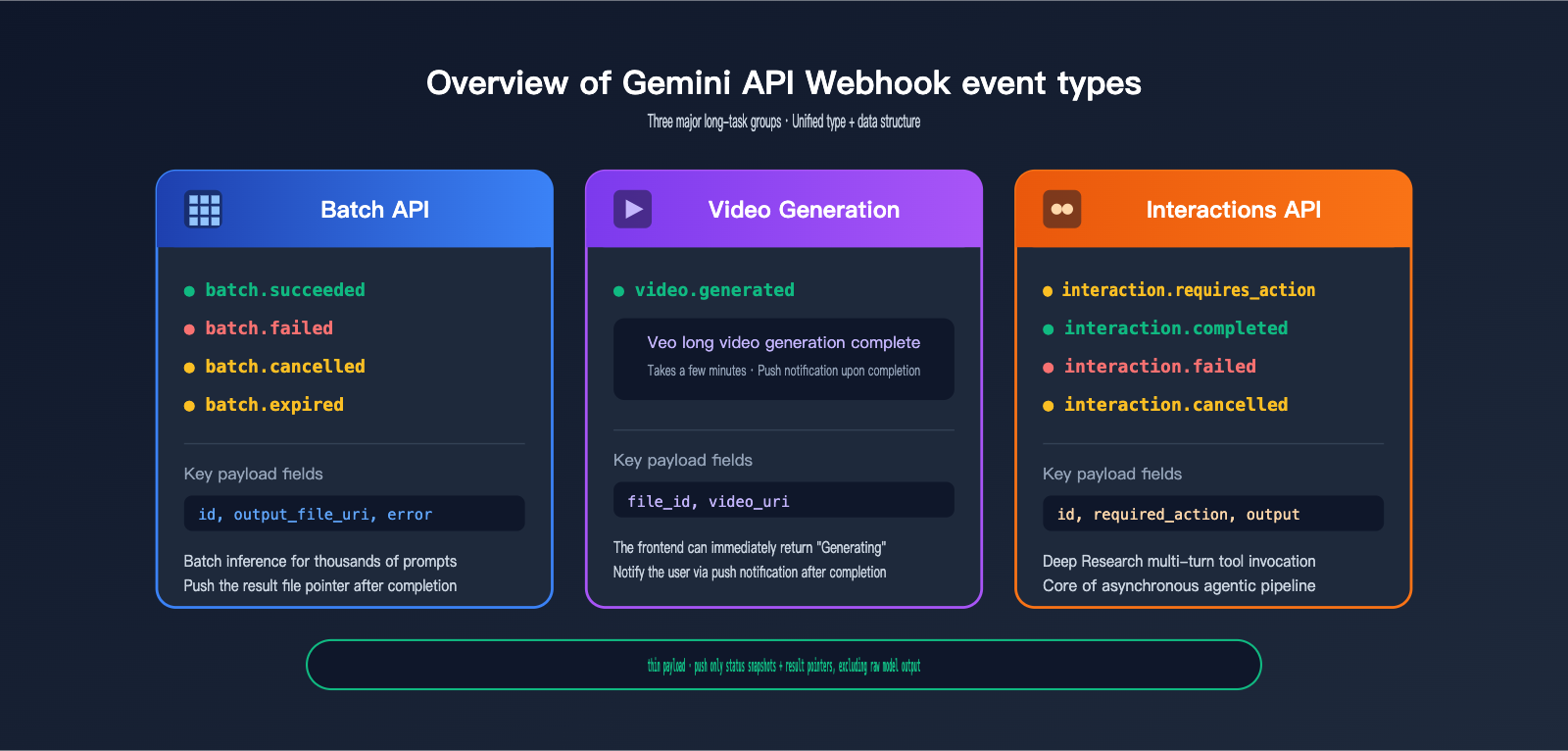
| Event Group | Event Name | Trigger Condition | Key Payload Fields |
|---|---|---|---|
| Batch API | batch.succeeded | Batch task completed successfully | id, output_file_uri |
| Batch API | batch.failed | Batch task failed | id, error |
| Batch API | batch.cancelled | User-initiated cancellation | id |
| Batch API | batch.expired | Batch TTL exceeded | id |
| Video Generation | video.generated | Long video generation complete | file_id, video_uri |
| Interactions API | interaction.requires_action | Tool call response required | id, required_action |
| Interactions API | interaction.completed | Multi-turn async conversation complete | id, output |
| Interactions API | interaction.failed | Failure at any stage | id, error |
| Interactions API | interaction.cancelled | User-initiated cancellation | id |
Every event payload follows a consistent structure: { "type": "batch.succeeded", "data": { "id": "...", "output_file_uri": "gs://..." } }. This "type + data" format is perfect for a switch-based router, allowing you to route different events to their respective business pipelines.
📌 Architecture Tip: When implementing this, we recommend using a single webhook endpoint combined with an internal event bus (like Pub/Sub, Kafka, or Redis Stream) rather than creating separate endpoints for every event type. This aligns with Google's recommended "fast 2xx + asynchronous processing" pattern and makes horizontal scaling much easier. When calling the Gemini Batch API and Veo video generation via APIYI (apiyi.com), the event types are identical to the official ones, so you can reuse the same routing logic directly.
Security Mechanisms and Delivery Guarantees for Gemini API Webhooks
The security design of Gemini API webhooks strictly follows the Standard Webhooks specification, a community-maintained, cross-platform standard for webhook interoperability. This means if you've previously integrated webhooks for services like Stripe, Svix, or Resend, you can reuse your existing code with almost zero friction.
Three Key HTTP Headers
| Header | Purpose | Recommended Usage |
|---|---|---|
| webhook-id | Unique event ID | Use as an idempotency key to prevent duplicate processing |
| webhook-timestamp | Event generation timestamp (seconds) | Reject requests older than 5 minutes to prevent replay attacks |
| webhook-signature | HMAC or JWKS signature | Use the standardwebhooks library for one-click verification |
At-Least-Once Delivery and Retry Strategy
Google explicitly guarantees at-least-once delivery: your endpoint will receive each event at least once, but it may receive it multiple times. Any downstream write operations should be handled idempotently; the preferred approach is to use the webhook-id as a unique key when writing to your database or cache.
If your endpoint returns a non-2xx status code, Google will retry the request repeatedly within a 24-hour window using an exponential backoff strategy. This means that even if your service experiences a brief outage, events won't be lost. However, it also implies that you cannot use "synchronous blocking processing" as a response strategy, as slow responses will be treated as failures.
Signature Key Rotation
Static Webhook HMAC keys support the REVOKE_PREVIOUS_SECRETS_AFTER_H24 mode, allowing you to verify both new and old keys simultaneously for a 24-hour period. This is crucial for canary deployments of keys in production: you can generate a new key, push it to all nodes, confirm that all nodes accept the new key, and then expire the old one to complete a seamless rotation.
🔐 Security Advice: All webhook endpoints should use HTTPS, enforce signature verification, limit request body sizes, and implement timeouts/circuit breakers for slow calls. If you are using APIYI (apiyi.com) to call both the Gemini API and other models, we recommend consolidating all webhook endpoints into a unified "event gateway" service. This allows you to centralize signature verification, deduplication, and routing, while distributing traffic to backend services by model—making compliance auditing and key management much easier.
Core Use Cases for Gemini API Webhooks
Gemini API webhooks aren't intended for every Gemini call—synchronous, millisecond-latency generateContent calls don't need them. Their true value lies in three types of long-running tasks, which are explicitly highlighted in the official documentation.
Deep Research Asynchronous Agents
Deep Research tasks often take anywhere from minutes to hours, involving multiple rounds of searching, tool invocation, and summary synthesis. The interaction.requires_action event in webhooks is a natural fit for this multi-turn workflow. You can receive callbacks at each action node to asynchronously advance to the next step, rather than maintaining a resident process to track the entire session.
Batch API for Large-Scale Inference
The Batch API is Gemini's entry point for processing "thousands or even hundreds of thousands of prompts." After submission, it returns a job ID immediately, and once completed, it notifies you of the output_file_uri via the batch.succeeded event. In this mode, the cost advantage of webhooks is most apparent—traditional polling for thousands of batch jobs would quickly exhaust your API quota.
Long-Form Video Generation (Veo)
Long-form video generation tasks, such as those using Veo, typically take several minutes. From a user experience perspective, you can't keep the frontend spinning indefinitely. Webhooks allow you to submit a task and immediately inform the user that it's "generating," then notify them via your own push system (WebSocket, APNs, SSE) once the process is truly complete.
🎯 Adapting to Local Scenarios: Teams building AI video applications often care about two things: stable access to Gemini Veo and timely completion notifications. Using an API proxy service like APIYI (apiyi.com) solves the former, while the event-driven mechanism of Gemini API webhooks perfectly addresses the latter. Combining the two creates a robust, production-ready pipeline for long-form video generation.
Decision Guide: Should You Switch to Gemini API Webhooks Immediately?
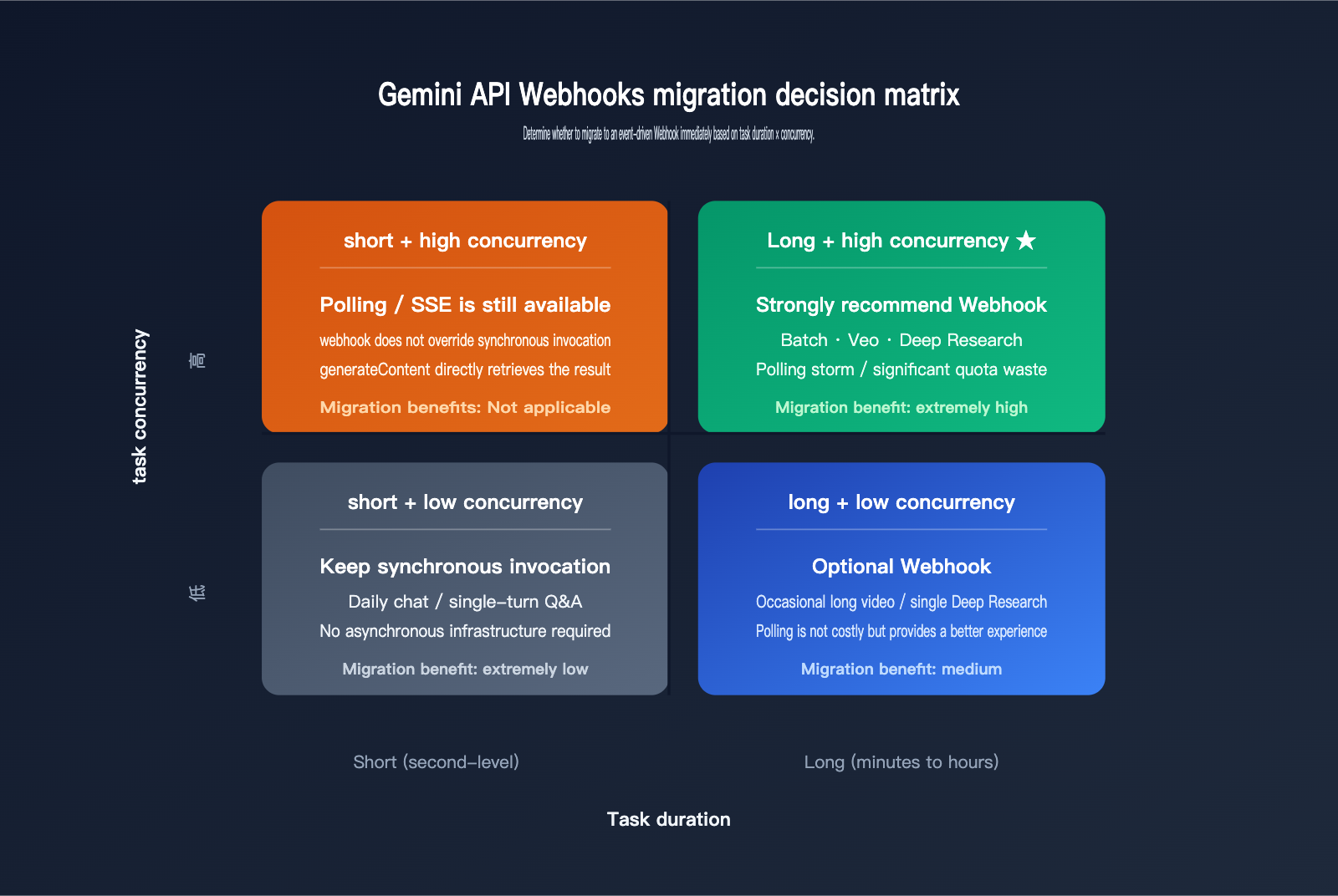
While webhooks generally outperform polling, whether you should migrate immediately depends on your current workload. The decision matrix below will help you quickly determine your best path forward.
| Your Current Situation | Recommended to Migrate to Gemini API Webhooks? |
|---|---|
Primarily using generateContent (synchronous) |
No (webhooks don't cover this) |
| Occasional Batch usage, a few tasks/day | Optional, but minimal benefit |
| High-volume Batch tasks, hundreds+/day | Highly recommended; eliminates polling storms |
| Using Veo for long video generation | Highly recommended; significant UX improvement |
| Building Deep Research / agentic workflows | Highly recommended; essential for async progress |
| Multi-tenant SaaS platform | Highly recommended; perfect for Dynamic Webhook |
💡 Migration Path: You don't need an "all-or-nothing" approach. Start by using webhooks for new features while keeping polling for legacy services, then gradually replace them. Google's two implementation methods coexist, and the client-side
GET /operationsinterface remains valid. If you're also using APIYI (apiyi.com) to call other models, take this opportunity to unify your event bus for all asynchronous tasks, reducing the maintenance overhead of multiple notification systems.
Gemini API Webhooks FAQ
Are Gemini API webhooks charged?
According to the official blog, there is no separate fee for webhook delivery itself. You only pay for the Gemini API tasks you submit (tokens, video generation duration, Batch processing volume). Webhook delivery is initiated by Google and does not consume your API call quota.
Can servers in China receive Gemini API webhooks directly?
Yes, provided your callback endpoint is reachable from Google's network. If your endpoint is deployed entirely within China without a public entry point, Google won't be able to push to it. A common practice is to place the endpoint on an edge node or a gateway accessible internationally, then forward it to your internal network. Alternatively, you can use an API proxy service like APIYI (apiyi.com) that supports webhook relaying to receive the push and forward it to your internal systems.
Will Gemini API webhooks send duplicate notifications? How do I deduplicate?
Yes. Google provides "at-least-once" delivery, meaning any transient network jitter or a 5xx error from your endpoint will trigger a retry. The standard practice is to use the webhook-id from the request header as an idempotency key. Check this against your database or Redis; if it has already been processed, simply return a 2xx status code.
Can Static and Dynamic webhooks be used together?
Yes, and it's recommended. A common pattern is to use a Static Webhook for "global fallback notifications" (e.g., routing all failure events to an alert system) while using Dynamic Webhooks for "dedicated routing" on critical tasks (e.g., pushing video generation results for a specific VIP client directly to their own endpoint).
How should I deploy Gemini API webhooks in production?
The recommended architecture is: HTTPS Gateway → Signature Verification Middleware → Immediate 2xx Response → Message Queue → Backend Worker (async processing). This architecture handles sudden webhook traffic spikes and makes it easier to implement monitoring, replay, and auditing. If you already have an AI gateway based on APIYI (apiyi.com), integrating the webhook endpoint into it will keep your infrastructure much cleaner.
What is the relationship between Gemini API webhooks and Server-Sent Events (SSE)?
They solve different problems. SSE is a long-lived connection "initiated by the client, streaming content from the server," which is ideal for real-time token streaming. Webhooks are short-lived requests "initiated by the server, pushing events across servers," which are perfect for task completion notifications. An agentic application often uses both: the user interaction layer uses SSE, while background long-running tasks use Webhooks.
Summary: The True Significance of Gemini API Event-Driven Webhooks
At first glance, Gemini API webhooks might look like just another engineering convenience, but they actually represent Google’s clear stance on the future of AI applications. Google is signaling that the next wave of mainstream AI isn't just the standard "request-response" chat model; it's about agentic pipelines woven together by Deep Research, long-form video processing, and batch inference. These pipelines inherently require event-driven architectures, and webhooks simply shift this implementation from the developer's side to the platform level.
For developers in China, the launch of Gemini API webhooks carries extra weight: it brings Gemini’s engineering capabilities into alignment with peers like OpenAI and Anthropic, both of which already support similar mechanisms. This means that regardless of which model you choose, the development paradigm for asynchronous tasks is converging. By leveraging a unified gateway like APIYI (apiyi.com), you can consolidate event notifications from Gemini, Claude, and GPT into a single event bus, truly enabling a "swap models, keep the pipeline" workflow.
If you're building long-form video applications, batch content generation, or agentic automation, now is the perfect time to migrate to event-driven webhooks. The technology is mature, official documentation is comprehensive, and community libraries offer one-click integration. The marginal cost of waiting a week versus starting today is virtually zero, while the benefits—eliminating polling, reducing latency, and saving on quotas—are immediate.
📚 Further Reading: The official blog provides background on the release: blog.google; for a complete list of events, payload fields, and SDK examples, check out the Gemini Cookbook: github.com/google-gemini/cookbook; for signature specifications, refer to the Standard Webhooks documentation: standardwebhooks. If you're a developer in China looking for a stable channel for Gemini API model invocation, visit the APIYI official website: apiyi.com.
Author: APIYI Team — Focused on AI Large Language Model API engineering and asynchronous infrastructure. We provide unified API proxy service for Gemini, Claude, and GPT. Learn more at apiyi.com.