Author's Note: A complete workflow for generating AI video storyboards using Nano Banana Pro, covering character consistency locking, shot planning, the optimal 8-14 frame count, and practical tips for connecting to Seedance video generation.
The first step in AI video production isn't jumping straight into video generation—it's creating a storyboard first. Your storyboard determines what each shot captures, how it's framed, and what your characters look like. Without a solid storyboard, subsequent video generation is just shooting in the dark. Nano Banana Pro (gemini-3-pro-image-preview) is currently the best choice for AI video storyboards; its character consistency, text rendering, and conversational editing capabilities perfectly match the needs of storyboard creation.
Core Value: By the end of this article, you'll have mastered a complete AI workflow from character design to storyboard generation and final video production, learning how to efficiently produce professional-grade storyboards with Nano Banana Pro.
Core Essentials for Storyboarding with Nano Banana Pro
| Essential | Description | Value |
|---|---|---|
| Character Sheet First | Generate 2-3 angle character reference sheets first | Locks in consistency |
| 8-14 Frames Ideal | Perfect frame count for 30-45s shorts | Pacing control |
| One Action Per Frame | Express only one clear action per frame | Avoids confusion |
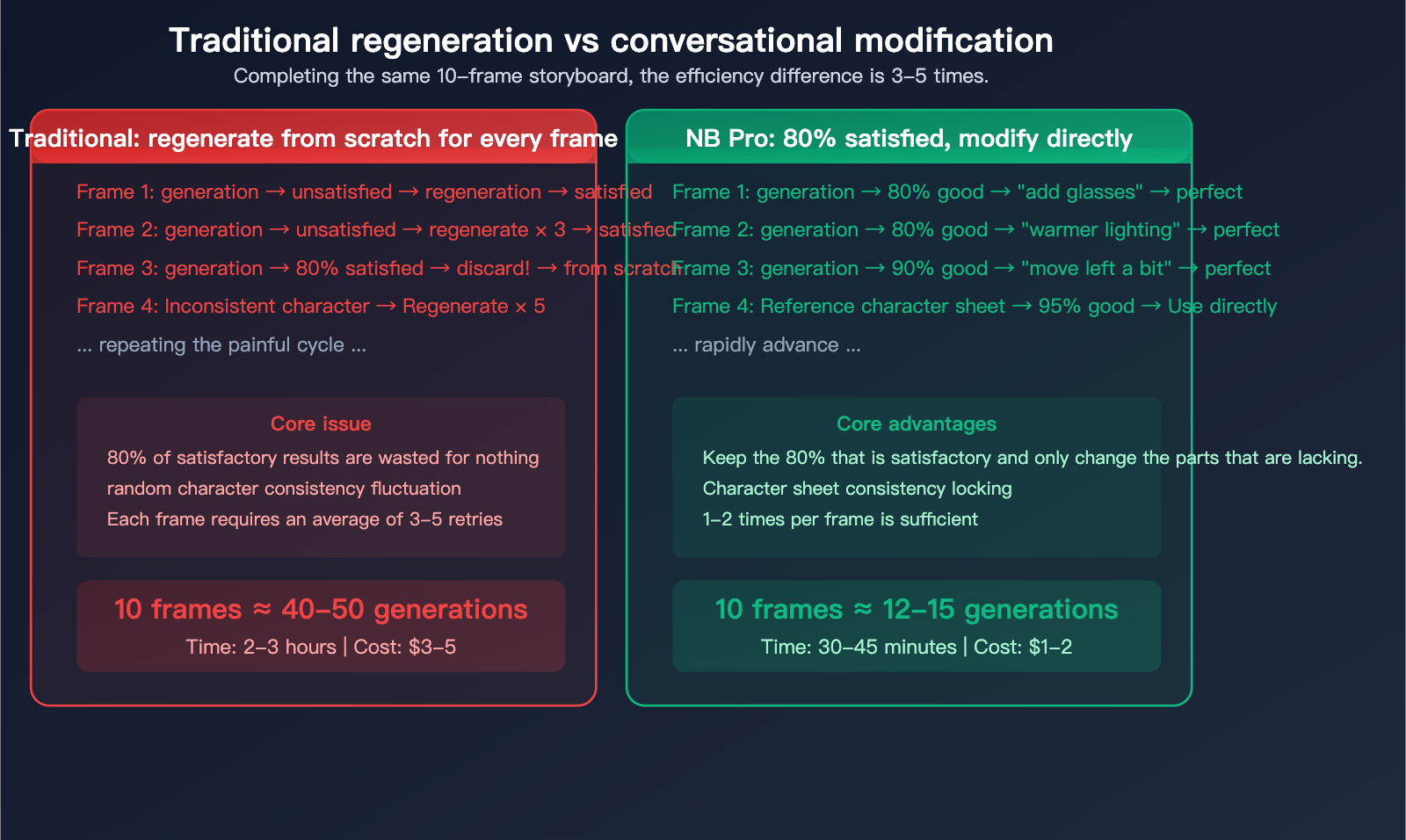
| Conversational Edits | Edit if it's 80% right; don't regenerate | Doubles efficiency |
| Diverse Shots | Alternate between long/medium/close-up/extreme | Visual rhythm |
| Link to Seedance | Use storyboard frames as video start frames | Seamless workflow |
Why Choose Nano Banana Pro for Storyboarding?
Not every image generation model is cut out for storyboarding. Storyboards have some specific requirements:
- Character Consistency: The same character must look identical across different shots.
- Precise Composition Control: You need to lay out the scene exactly as the director intended.
- Iterative Editing: You need to tweak details rather than starting from scratch.
- Text Annotations: You need to add shot descriptions directly onto the storyboard.
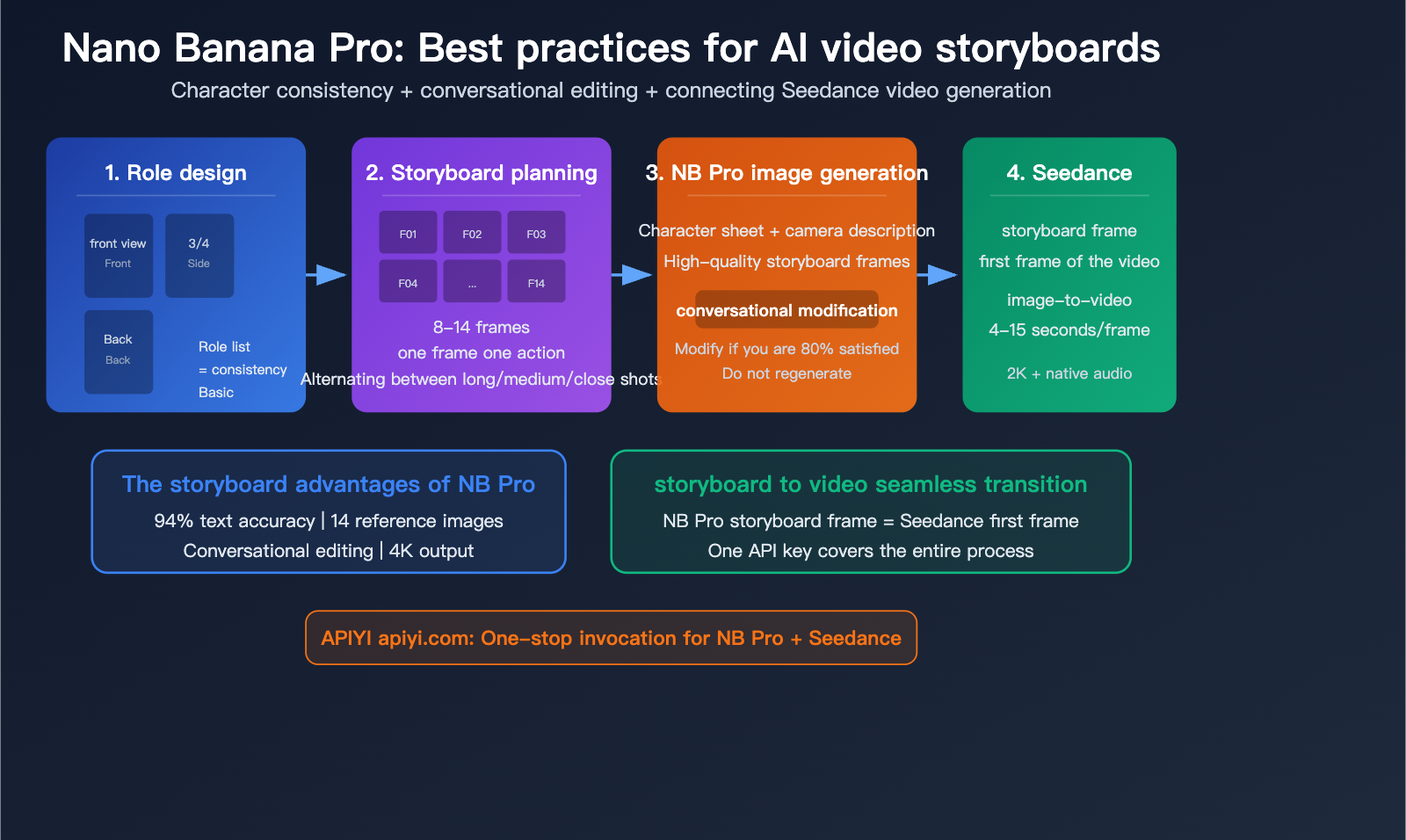
Nano Banana Pro excels in these four areas: 94% text rendering accuracy, support for up to 14 reference images, conversational editing (just tweak it if it's 80% there), and built-in reasoning to ensure logical composition.
Step 1: Create a Character Sheet
A Character Sheet is the Foundation of Consistency
Before generating any storyboard frames, you must create a character sheet. This is the bedrock for ensuring your character looks the same in every frame.
Character Sheet Prompt Template:
Generate a character reference sheet for a young woman
named Mika: short black hair, round glasses, wearing a
navy blue hoodie and white sneakers. Show her from 3
angles: front view, three-quarter view, and back view.
Clean white background, full body, consistent lighting.
Style: modern anime illustration.
Key Elements of a Character Sheet
| Element | Must Include | Description |
|---|---|---|
| Front View | Facial features, expressions | The most important reference |
| 3/4 Side View | Hair layers, side profile | Reference for dynamic shots |
| Back View | Back profile, clothing details | For walking/running shots |
| Clothing Details | Colors, patterns, accessories | Must be consistent in every frame |
| Clean Background | Solid white or gray | Avoids background interference |
Tips for Locking in Character Consistency
Tip 1: Identity Locking Instruction
Add this to your prompt for every frame:
Keep the character's facial features exactly the same
as the reference image. Maintain identical attire and
hairstyle throughout.
Tip 2: Fixed Seed
Using the same random seed helps maintain style consistency:
# Fix the seed when calling via API
response = client.images.generate(
    model="gemini-3-pro-image-preview",
    prompt="...",
    extra_body={"seed": 42}  # Fixed seed
)
Tip 3: Reuse Reference Images
Always upload your character sheet as a reference image when generating each frame. Nano Banana Pro supports up to 14 reference images (6 with high fidelity), ensuring your character stays true to the original design.
🎯 Pro Tip: It's best to generate a separate character sheet for every main character. By using the APIYI (apiyi.com) service to call the Nano Banana Pro API, you can batch-generate character sheets to build a complete visual asset library.
Step 2: Planning the Storyboard Script
Recommended Number of Frames
| Video Length | Recommended Frames | Duration per Frame | Best For |
|---|---|---|---|
| 15-30 seconds | 6-8 frames | 2-4 sec/frame | Social media shorts |
| 30-45 seconds | 8-14 frames | 2-4 sec/frame | Product promos |
| 1-2 minutes | 15-25 frames | 3-5 sec/frame | Brand story videos |
Storyboard Script Template
Write a concise shot description for each frame:
| Frame # | Shot Type | Visual Content | Character Action | Duration |
|---|---|---|---|---|
| F01 | Wide | City skyline at dusk | None | 3s |
| F02 | Medium | Mika walks out of office | Pushes door, looks up | 3s |
| F03 | Close-up | Mika's face | Smiles, wind in hair | 2s |
| F04 | Tracking | Mika walking on street | Walking steadily | 4s |
| … | … | … | … | … |
Rules for Shot Variety
A great storyboard alternates between different shot types to prevent visual fatigue:
| Shot Type | English | Purpose | Suggested Ratio |
|---|---|---|---|
| Wide/Establishing | Wide/Establishing | Establish setting | 15-20% |
| Medium shot | Medium shot | Character + Environment | 30-40% |
| Close-up | Close-up | Face/Hands | 20-25% |
| Extreme close-up | Extreme close-up | Emotion/Details | 10-15% |
| Transition | Transition | Scene change | 5-10% |
💡 Pacing Tip: Avoid using the same shot type consecutively. A classic rhythm is: Wide → Medium → Close-up → Medium → Wide, which creates a natural "breathing" effect.
Step 3: Generating Storyboard Frames with Nano Banana Pro
Prompt Structure for Storyboard Frames
Each frame's prompt should follow this structure:
[Reference Character Sheet] + [Shot Type] + [Visual Description] +
[Character Action] + [Lighting/Atmosphere] + [Style Consistency Instructions]
Storyboard Prompt Examples
F01 – Wide Establishing Shot:
Wide establishing shot of a modern city skyline at
golden hour, warm orange and purple sky, soft ambient
light on glass buildings. Cinematic film style, 16:9
aspect ratio. No characters in frame.
F02 – Medium Shot (Character Entrance):
Reference: [Character Sheet]
Medium shot of Mika pushing open a glass office door,
stepping outside. She looks up at the sky with a slight
smile. Golden hour lighting from the left, soft shadows.
Keep her appearance exactly as the reference: short
black hair, round glasses, navy hoodie. Cinematic style.
F03 – Close-up (Emotional Shot):
Reference: [Character Sheet]
Close-up of Mika's face, looking slightly upward.
Wind gently moves her hair. Warm golden light on her
face, soft bokeh background. Keep facial features
identical to reference. Cinematic, shallow depth of field.
Batch Generation via API
import openai

client = openai.OpenAI(
    api_key="YOUR_API_KEY",
    base_url="https://vip.apiyi.com/v1"
)

# List of storyboard frame prompts
storyboard_frames = [
    "Wide establishing shot of modern city at golden hour...",
    "Medium shot of Mika pushing open office door...",
    "Close-up of Mika's face, wind in her hair...",
    # ... more frames
]

for i, prompt in enumerate(storyboard_frames):
    response = client.images.generate(
        model="gemini-3-pro-image-preview",
        prompt=prompt,
        size="1792x1024",  # 16:9 aspect ratio
        n=1
    )
    print(f"Frame {i+1}: {response.data[0].url}")
🚀 Batch Efficiency: Use the APIYI (apiyi.com) API proxy service to call the Nano Banana Pro API for batch storyboard generation. A single script run can produce all your frames. The platform supports high-concurrency calls, allowing you to complete an 8-14 frame storyboard in just a few minutes.
Step 4: Conversational Iterative Editing
The Unique Advantage of Nano Banana Pro: Edit Directly, Don't Regenerate
This is the biggest efficiency boost when using Nano Banana Pro for storyboarding. When a frame is 80% correct, there's no need to regenerate it from scratch. Instead, you can simply tell the model exactly what to change:
Editing Examples:
# The original frame is generated, but the character is missing their glasses
"Keep everything the same, but add round glasses
to the character's face."

# The lighting isn't warm enough
"Make the lighting warmer, more golden hour feel.
Keep everything else identical."

# The composition needs adjustment
"Move the character slightly to the left, add more
negative space on the right side."
Core Principles for Iterative Editing
| Principle | Description | Example |
|---|---|---|
| One Change at a Time | Modify only one element per iteration | "Change lighting only" instead of "Change lighting + composition + expression" |
| State "Keep Everything Else" | Explicitly tell the model to preserve the rest | "Keep everything else identical" |
| Be Specific, Not Vague | Use precise descriptions rather than feelings | "Move 20% to the left" instead of "Adjust it a bit" |
| Maintain Reference Images | Always include the character sheet with each edit | Ensures modifications don't break consistency |
Step 5: Storyboard Sequencing and Consistency Check
Storyboard Consistency Checklist
Once all frames are generated, arrange them in order and check for the following:
| Check Item | Description | Common Issues |
|---|---|---|
| Face Consistency | Character appearance remains identical across frames | Changes in hairstyle/outfit/glasses |
| Lighting Continuity | Lighting direction is consistent between adjacent frames | Sudden jumps from day to night |
| Color Uniformity | Overall color palette is consistent throughout | Mixing warm and cool tones |
| Action Logic | Actions flow logically between frames | Character suddenly changes position |
| Shot Pacing | Orderly alternation of wide/medium/close-up shots | 5 consecutive close-ups |
Step 6: Storyboard Frame Integration for Seedance Video Generation
Seamless Transition from Storyboard to Video
Once your storyboard is ready, each frame can be used directly as the initial image input for Seedance 2.0 to generate the corresponding video clip:
| Workflow Step | Tool | Description |
|---|---|---|
| Storyboard Frame Generation | Nano Banana Pro | High-quality 4K static storyboard |
| Video Generation | Seedance 2.0 | Image-to-video, 4-15 seconds per frame |
| Video Editing | CapCut / Premiere | Assemble in storyboard order |
| Audio Integration | Seedance Audio | Native audio or post-production dubbing |
Seedance 2.0 Image-to-Video Prompt Template
Animate the provided storyboard frame. Preserve the
character's appearance and composition exactly. Add
[specific motion] with camera [movement type]. Keep
consistent lighting and style throughout. Duration 4
seconds, avoid jitter and identity drift.
Examples of video generation for specific frames:
# F02: Mika walks out of the office building
Animate the provided image. Mika pushes the glass door
open and steps forward. Camera slow push-in. Preserve
her navy hoodie and round glasses. Golden hour lighting,
cinematic. 4 seconds, avoid jitter.

# F03: Close-up smile
Animate the provided image. Subtle wind moves Mika's
hair. She blinks naturally and her smile widens slightly.
Camera fixed, shallow depth of field. 3 seconds,
avoid identity drift.
🎯 Complete Workflow: The combination of Nano Banana Pro (storyboarding) and Seedance 2.0 (video) is currently one of the most powerful setups for AI video production. Through APIYI (apiyi.com), you can access the APIs for both models in one place, using a single API key to cover the entire process from storyboard design to video generation.
FAQ
Q1: What should I do if the character looks different across frames?
There are three key steps: (1) Create a character reference sheet with 2-3 angles first; (2) Upload the reference sheet as a reference image for every frame; (3) Explicitly state "Keep facial features exactly the same as reference" in the prompt for each frame. When calling NB Pro via APIYI (apiyi.com), we recommend using a fixed seed to further enhance face consistency.
Q2: Should I use NB2 or NB Pro for storyboarding?
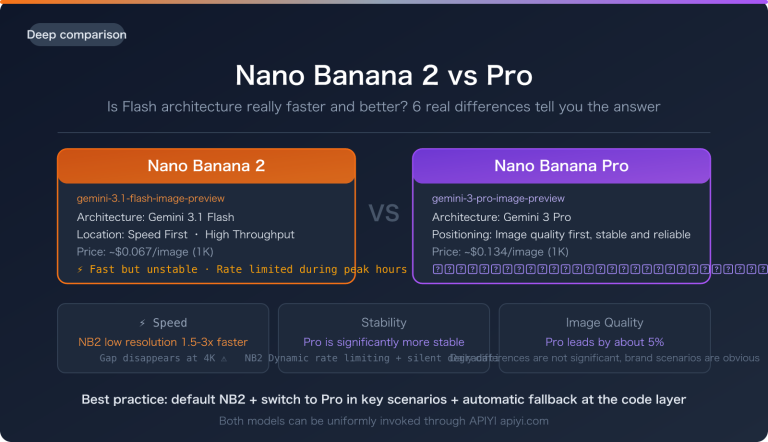
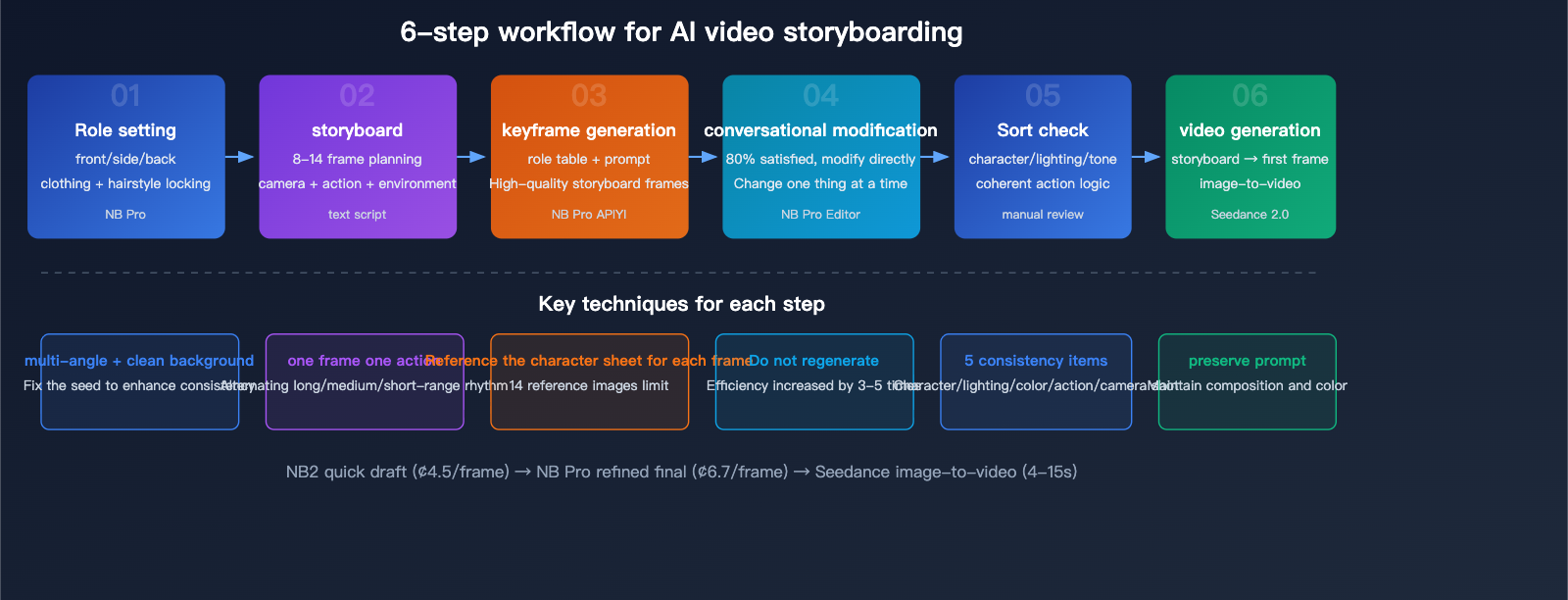
We recommend using NB2 (gemini-3.1-flash-image-preview) for quick drafts and verifying direction (it's 3-5 times faster and 37% cheaper). Once you're satisfied, use NB Pro to generate the final high-quality storyboard frames. This "NB2 draft + Pro final" strategy can save you about 42% in costs. You can easily switch between the two models using a single API key from APIYI (apiyi.com).
Q3: What is the optimal resolution for storyboard images?
We suggest using a 16:9 aspect ratio (1792×1024 or 2048×1152), as the final video is typically 16:9. While NB Pro supports up to 4K output, 2K is sufficient for the storyboarding stage. You can always re-render key frames in 4K with Pro after final confirmation.
Summary
Here are the 6 best practices for using Nano Banana Pro for AI video storyboarding:
- Start with a Character Sheet: A multi-angle character sheet is the foundation for consistency; make sure to reference it in every frame.
- 8-14 Frames is the Sweet Spot: This is the ideal number of frames for a 30-45 second short film. Remember to alternate between long, medium, and close-up shots.
- Iterate Through Conversation: If you're 80% satisfied, just edit the existing result instead of regenerating from scratch. This can boost your efficiency by 3-5 times.
- One Action Per Frame: Keep it simple and clear by expressing only one distinct action per frame.
- Check for Continuity: Once you've arranged your frames, double-check the consistency of the characters, lighting, color tone, and the logic of the movements.
- Seamless Integration with Seedance: Use your storyboard frames as the starting frames for video generation to turn them into dynamic videos with a single click.
We recommend using APIYI (apiyi.com) to access both Nano Banana Pro and Seedance 2.0. With just one API key, you can cover the entire AI video production workflow, from storyboard design to final video generation.
📚 References
-
Nano Banana Pro Prompting Strategy Guide: Official best practices
- Link:
dev.to/googleai/nano-banana-pro-prompting-guide-strategies-1h9n - Note: Covers strategies for character consistency, iterative editing, and prompt structure.
- Link:
-
Nano Banana Pro Storyboard Creation Guide: Specialized tutorial for video storyboarding
- Link:
sider.ai/blog/ai-image/nano-banana-pro-storyboard-creation-guide-for-video - Note: Provides detailed suggestions on frame counts and workflows.
- Link:
-
Seedance 2.0 Prompting Guide: Best practices for video generation
- Link:
volcengine.com/docs/82379/2222480 - Note: Official specifications for video generation prompts.
- Link:
-
10 Golden Rules for Google Nano Banana Pro: Professional asset creation
- Link:
atlabs.ai/blog/master-professional-ai-asset-creation-google-10-golden-rules-for-nano-banana-pro - Note: Includes tips for generating brand assets and maintaining consistency across multiple images.
- Link:
Author: APIYI Technical Team
Technical Discussion: Feel free to share your AI storyboarding experiences in the comments. For more information on integrating AI models, visit the APIYI documentation center at docs.apiyi.com.