Author's Note: A detailed comparison of low-cost access channels for Nano Banana 2 (Gemini 3.1 Flash Image Preview). APIYI platform offers $0.045/image including 4K with unlimited concurrency. Complete code examples and an online test entry are included.
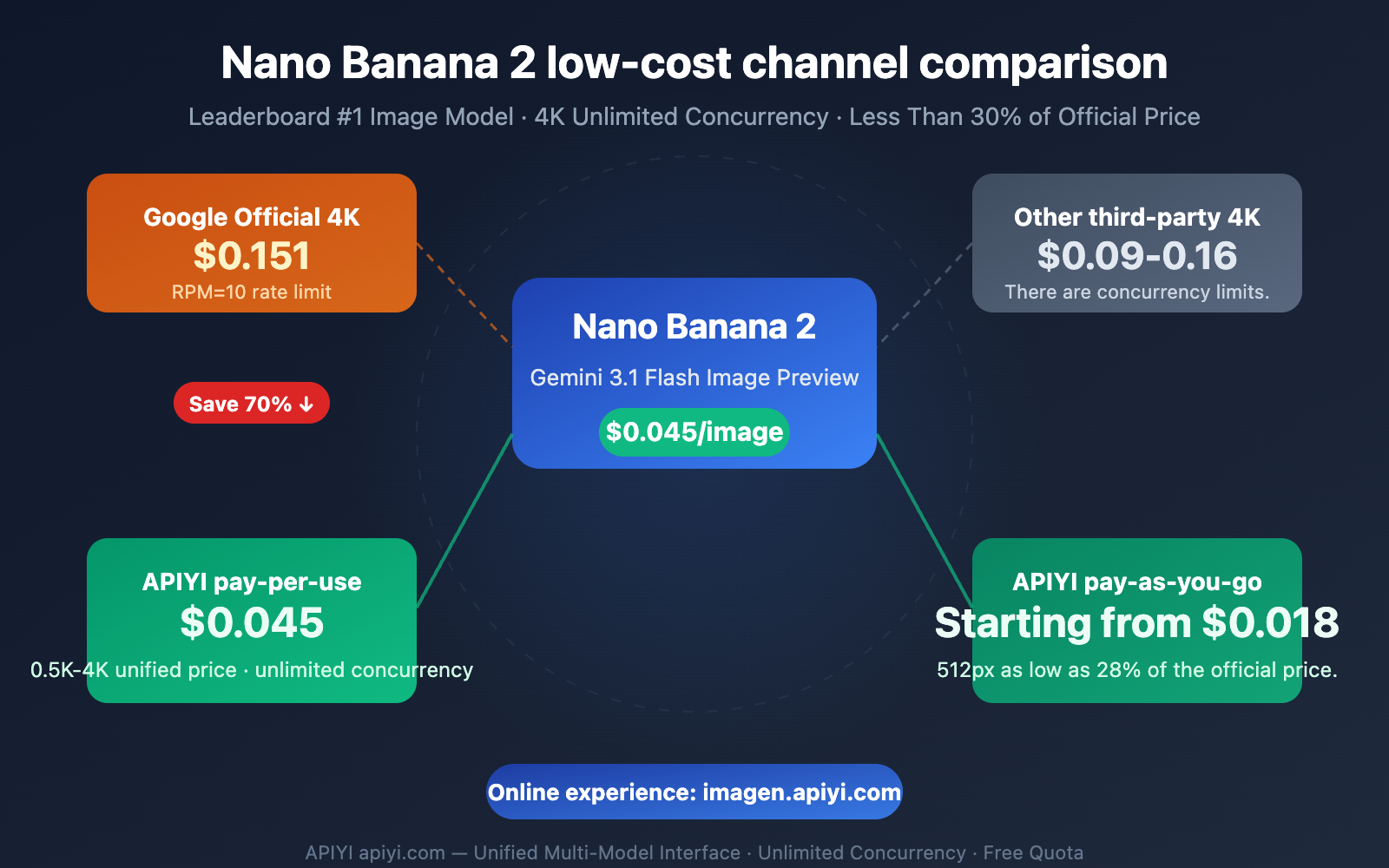
Nano Banana 2 ranks first on the Artificial Analysis text-to-image leaderboard, surpassing DALL-E, Midjourney, and FLUX. However, Google's official 4K image pricing is $0.151/image, combined with the AI Studio free tier's RPM=10 rate limit, makes the actual cost and efficiency for batch usage far from ideal.
After comparing multiple third-party channels, we found that APIYI apiyi.com currently offers the most cost-effective Nano Banana 2 access plan—pay-per-use at $0.045/image regardless of resolution (including 4K), or pay-per-token as low as $0.02-$0.05/image, with unlimited concurrency and no need for a VPN.
Core Value: After reading this article, you'll understand the real price differences across Nano Banana 2 channels, learn how to invoke 4K image generation via APIYI at less than 30% of the official price, and you can directly test the image output online.
Nano Banana 2 Low-Cost Channel Core Information at a Glance
Let's get straight to the point. Here's the core pricing comparison for Nano Banana 2 across different channels:
| Channel | 1K Price | 4K Price | Concurrency Limit | Additional Advantages |
|---|---|---|---|---|
| Google AI Studio | Free (Limited Quota) | Free (Limited Quota) | RPM=10 | Free but strict rate limiting |
| Google Vertex AI | $0.067 | $0.151 | RPM=60 (Requires Approval) | Enterprise-grade, complex setup |
| OpenRouter | ~$0.06 | ~$0.12 | Based on Plan | Multi-model aggregation |
| APIYI Pay-per-Use | $0.045 | $0.045 | Unlimited | 4K same price, simple and direct |
| APIYI Pay-per-Token | ~$0.025 | ~$0.045 | Unlimited | More savings at lower resolutions |
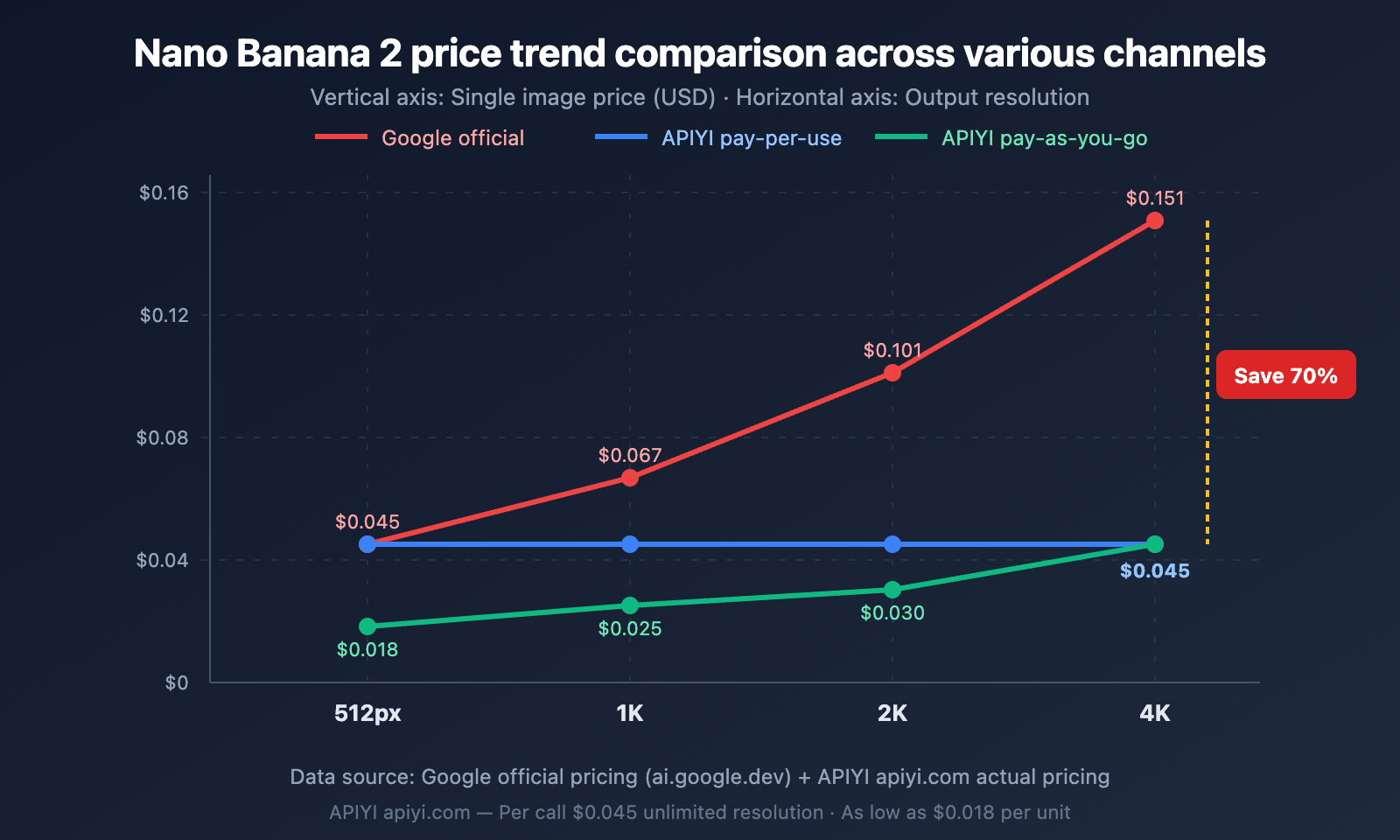
🎯 Key Finding: APIYI's pay-per-use plan is 70% cheaper than Google's official rate for 4K resolution ($0.045 vs $0.151), and it doesn't differentiate by resolution. The pay-per-token option can go as low as $0.018/image for 512px scenarios, which is only 28% of the official price.
Why the Price Difference for Nano Banana 2 Low-Cost Channels is So Large
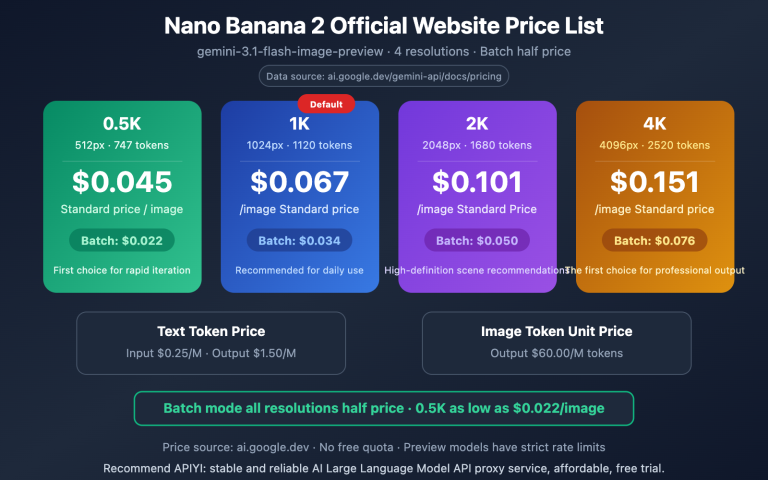
Google's official pricing uses a tiered per-token model—the output token price for images is as high as $60/M Tokens. Higher resolutions consume more tokens, with a 4K image requiring about 2,520 output tokens.
Third-party channels can significantly reduce per-image costs through bulk purchasing and technical optimization. APIYI offers two flexible billing methods:
- Pay-per-Use: $0.045 per call, regardless of resolution (0.5K to 4K same price). Ideal for fixed high-resolution scenarios.
- Pay-per-Token: Input $0.07/M Tokens, Output $16.8/M Tokens, as low as 28% of the official price. Suitable for mixed-resolution scenarios.
Detailed Price Comparison of Nano Banana 2 Across Different Channels
Google Official Pricing for Nano Banana 2 Explained
Google charges based on resolution tiers, with significant differences in Token consumption:
| Resolution | Output Tokens | Standard Price | Batch Price (50% off) |
|---|---|---|---|
| 512px (0.5K) | ~747 | $0.045 | $0.023 |
| 1K (Default) | ~1,120 | $0.067 | $0.034 |
| 2K | ~1,680 | $0.101 | $0.051 |
| 4K | ~2,520 | $0.151 | $0.076 |
Note: While the Batch API is half price, it requires asynchronous processing within 24 hours and isn't suitable for real-time scenarios. Additionally, Thinking Tokens are billed whether they are displayed or not, so the actual cost may be slightly higher than the table above.
APIYI Pricing for Nano Banana 2 Explained
APIYI offers two billing models to cover different usage scenarios:
| Resolution | Google Official | APIYI Per-Call | APIYI Per-Token | Per-Call Savings | Per-Token Savings |
|---|---|---|---|---|---|
| 512px | $0.045 | $0.045 | ~$0.018 | 0% | 60% |
| 1K | $0.067 | $0.045 | ~$0.025 | 33% | 63% |
| 2K | $0.101 | $0.045 | ~$0.030 | 55% | 70% |
| 4K | $0.151 | $0.045 | ~$0.045 | 70% | 70% |
Key advantage of Per-Call billing: A flat rate of $0.045 per call, whether you generate 512px or 4K images. This pricing is highly competitive for scenarios requiring 2K/4K high-resolution output.
Key advantage of Per-Token billing: Lower cost for low-resolution scenarios (512px/1K). If your business primarily uses 1K images, the per-token cost is only $0.025 per image, which is 44% cheaper than the per-call rate.
Horizontal Comparison of Low-Cost Channels for Nano Banana 2
Besides APIYI, there are other third-party channels on the market:
| Channel | 1K Price | 4K Price | Concurrency Limit | No VPN Required | Online Testing |
|---|---|---|---|---|---|
| Google Official | $0.067 | $0.151 | RPM Limit | ❌ | AI Studio |
| Fal AI | $0.08 | $0.16 | Based on Plan | ✅ | Yes |
| OpenRouter | ~$0.06 | ~$0.12 | Based on Plan | ✅ | No |
| APIYI | $0.045 | $0.045 | Unlimited | ✅ | ✅ imagen.apiyi.com |
Getting Started with Nano Banana 2 via APIYI
Experience Nano Banana 2 Online
Before writing any code, you can directly experience Nano Banana 2's image generation capabilities using the online testing tool provided by APIYI:
AI Image Generation Test Address: imagen.apiyi.com
On this page you can:
- Input a prompt directly to generate images, no coding required
- Switch between different resolutions (512px / 1K / 2K / 4K) to compare results
- Test various aspect ratios (14 supported, from 1:1 to 21:9)
- View actual generation time and token consumption
💡 Tip: Test your prompts on imagen.apiyi.com first. Once you're happy with the results, you can then use the API for batch generation. This can save a lot of debugging time.
Nano Banana 2 Minimal APIYI Example
Here's the simplest way to call it—just swap the endpoint and you're good to go:
import requests
import base64

API_KEY = "your-apiyi-api-key"  # Get this from APIYI at apiyi.com
ENDPOINT = "https://api.apiyi.com/v1beta/models/gemini-3.1-flash-image-preview:generateContent"

headers = {
    "Content-Type": "application/json",
    "x-goog-api-key": API_KEY
}

payload = {
    "contents": [{"parts": [{"text": "A golden retriever playing in autumn leaves, warm sunlight, professional photography"}]}],
    "generationConfig": {
        "responseModalities": ["IMAGE"],
        "imageConfig": {"aspectRatio": "16:9", "imageSize": "2K"}
    }
}

response = requests.post(ENDPOINT, headers=headers, json=payload, timeout=120)
result = response.json()

image_data = result["candidates"][0]["content"]["parts"][0]["inlineData"]["data"]
with open("output.png", "wb") as f:
    f.write(base64.b64decode(image_data))
print("Image saved: output.png")
View Complete Batch Generation Code (with concurrency control & error handling)
import requests
import base64
import json
import time
from pathlib import Path
from concurrent.futures import ThreadPoolExecutor, as_completed

class NanoBanana2Client:
    """Nano Banana 2 Batch Generation Client - Based on APIYI's unlimited concurrency"""

    def __init__(self, api_key, max_workers=20):
        self.api_key = api_key
        self.max_workers = max_workers
        self.endpoint = "https://api.apiyi.com/v1beta/models/gemini-3.1-flash-image-preview:generateContent"
        self.headers = {
            "Content-Type": "application/json",
            "x-goog-api-key": api_key
        }

    def generate_single(self, prompt, output_path, size="1K", aspect="1:1", retries=3):
        """Generate a single image"""
        payload = {
            "contents": [{"parts": [{"text": prompt}]}],
            "generationConfig": {
                "responseModalities": ["IMAGE"],
                "imageConfig": {"aspectRatio": aspect, "imageSize": size}
            }
        }
        for attempt in range(retries):
            try:
                resp = requests.post(self.endpoint, headers=self.headers, json=payload, timeout=120)
                if resp.status_code == 200:
                    data = resp.json()
                    img = data["candidates"][0]["content"]["parts"][0]["inlineData"]["data"]
                    Path(output_path).write_bytes(base64.b64decode(img))
                    return {"status": "success", "path": output_path}
                else:
                    if attempt < retries - 1:
                        time.sleep(2 ** attempt)
            except Exception as e:
                if attempt < retries - 1:
                    time.sleep(2 ** attempt)
        return {"status": "failed", "path": output_path}

    def batch_generate(self, tasks):
        """
        Batch generate images concurrently
        tasks: [{"prompt": "...", "output": "path.png", "size": "1K", "aspect": "1:1"}, ...]
        """
        results = []
        with ThreadPoolExecutor(max_workers=self.max_workers) as executor:
            futures = {
                executor.submit(
                    self.generate_single,
                    t["prompt"], t["output"],
                    t.get("size", "1K"), t.get("aspect", "1:1")
                ): t for t in tasks
            }
            for future in as_completed(futures):
                results.append(future.result())
        success = sum(1 for r in results if r["status"] == "success")
        print(f"Complete: {success}/{len(tasks)} images successful")
        return results

# Usage Example
client = NanoBanana2Client("your-apiyi-api-key", max_workers=20)

tasks = [
    {"prompt": "A sunset over mountains, oil painting style", "output": "img_001.png", "size": "2K", "aspect": "16:9"},
    {"prompt": "A cat wearing a space helmet, digital art", "output": "img_002.png", "size": "1K", "aspect": "1:1"},
    {"prompt": "Tokyo street at night, cyberpunk, neon lights", "output": "img_003.png", "size": "4K", "aspect": "21:9"},
]

results = client.batch_generate(tasks)
🚀 Quick Start: Visit APIYI at apiyi.com to register and get your API Key. The platform offers free testing credits and supports various mainstream AI image models, including Nano Banana 2.
Nano Banana 2 Capabilities & Use Cases
Understanding Nano Banana 2's capabilities helps you choose the right resolution and pricing plan.
Nano Banana 2 Core Capabilities
| Capability Dimension | Specific Parameters | Description |
|---|---|---|
| Max Resolution | 4K (4096px) | Exceeds Nano Banana Pro's 2K limit |
| Supported Aspect Ratios | 14 types | 1:1, 1:4, 2:3, 3:4, 4:3, 4:5, 9:16, 16:9, 21:9, etc. |
| Generation Speed | 5-20 seconds | 3-5x faster than Nano Banana Pro |
| Text Rendering | 87% accuracy | Ranked #1 on leaderboards, far ahead of competitors |
| Character Consistency | Up to 5 characters | Supports multi-character scene consistency |
| Object Reference | Up to 14 images | High-fidelity object reproduction |
| Search Enhancement | Google Search Grounding | Real-time search improves real-world accuracy |
| Elo Rating | ~1065-1080 | Ranked #1 on Artificial Analysis leaderboard |
Nano Banana 2 Resolution Use Cases
| Resolution | Typical Use Cases | Recommended Billing | Cost per Image (APIYI) |
|---|---|---|---|
| 512px | Thumbnails, rapid prototyping | Pay-as-you-go | $0.018 |
| 1K | Social media, web graphics | Pay-as-you-go | $0.025 |
| 2K | High-quality displays, product images | Pay-per-call or Pay-as-you-go | $0.030-$0.045 |
| 4K | Print, large-screen displays | Pay-per-call | $0.045 |
Nano Banana 2 vs. Competitor Image Models
| Comparison Point | Nano Banana 2 | Nano Banana Pro | GPT Image (4o) | Flux 1.1 Pro | Imagen 4 |
|---|---|---|---|---|---|
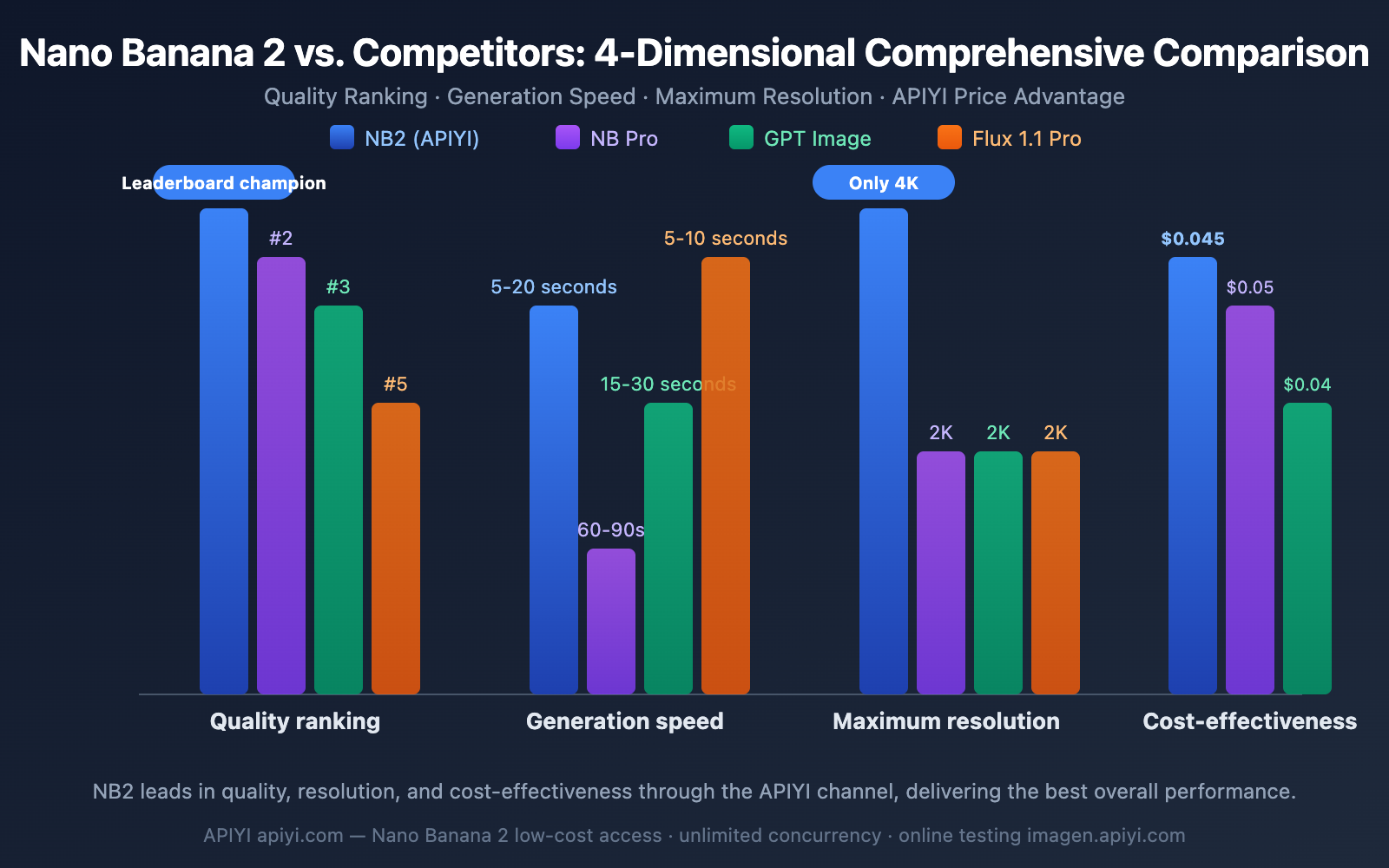
| Leaderboard Rank | #1 | #2 | #3 | #5 | #4 |
| Max Resolution | 4K | 2K | 2K | 2K | 1K |
| Generation Speed | 5-20s | 60-90s | 15-30s | 5-10s | 3-8s |
| Text Rendering | 87% | Best | Good | Average | Good |
| Conversational Editing | ✅ | ✅ | ✅ | ❌ | ❌ |
| Search Enhancement | ✅ | ✅ | ❌ | ❌ | ❌ |
| Official 1K Price | $0.067 | $0.134 | $0.040 | $0.040 | $0.040 |
| APIYI Price | $0.045 | $0.050 | – | – | – |
💰 Cost Advice: Nano Banana 2 ranks #1 in quality, yet through APIYI's pay-per-call plan at apiyi.com, it's only $0.045/image (including 4K), offering far better value than competitors at the same level. For budget-sensitive projects, pay-as-you-go starts as low as $0.018/image (512px), making it the most economical high-quality AI image generation solution currently available.
Nano Banana 2: How to Choose Between Per-Call and Per-Volume Pricing
This is a common dilemma for many developers. Here's the straightforward decision logic:
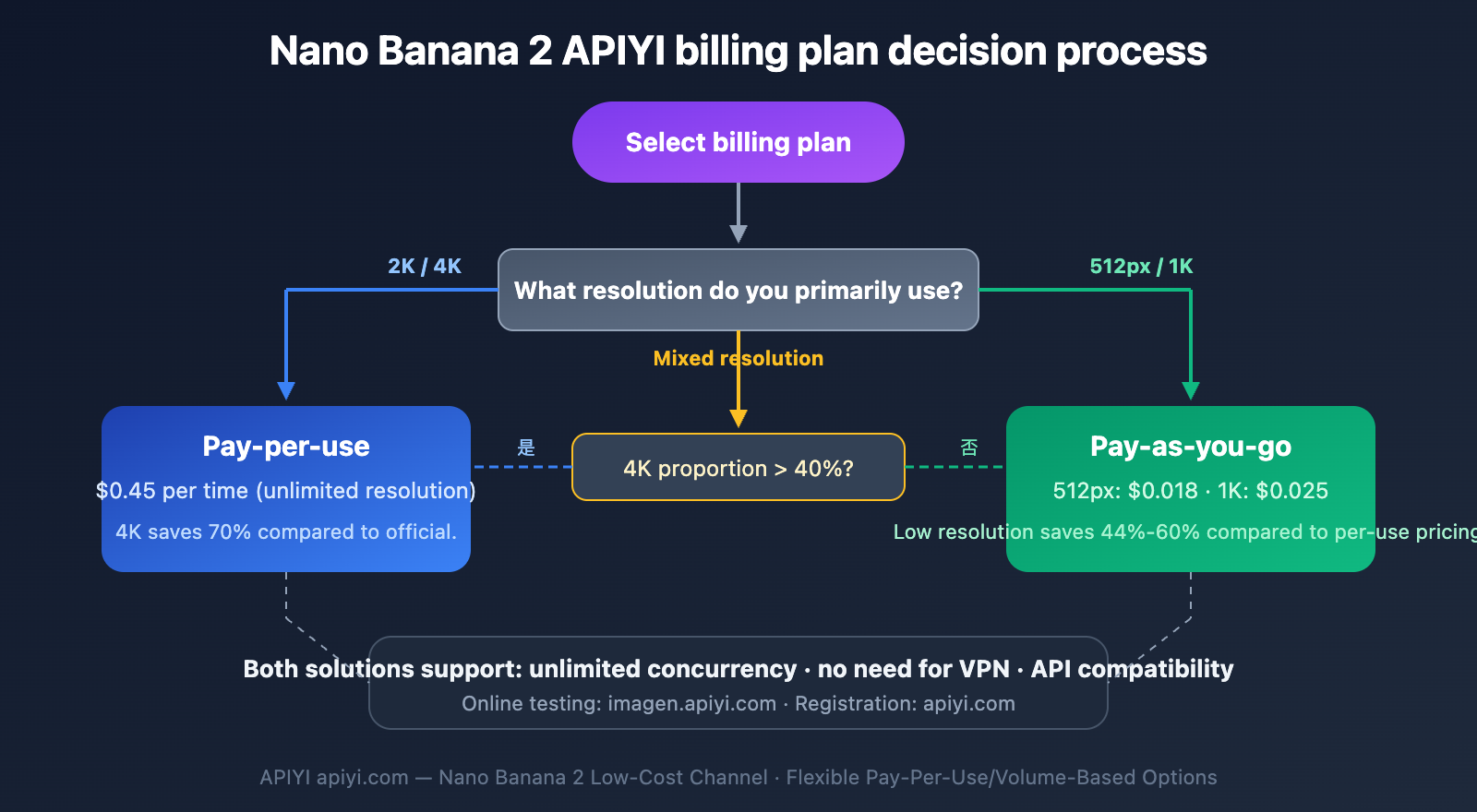
Nano Banana 2 Pricing Decision Tree
Scenario 1: Consistently using 2K/4K high resolution
→ Choose Per-Call pricing ($0.045/call). It's the same price regardless of resolution, saving you 70% on 4K compared to the official rate.
Scenario 2: Primarily using 512px/1K low resolution
→ Choose Per-Volume pricing. It's only $0.018/call for 512px and $0.025/call for 1K, which is 44%-60% cheaper than per-call pricing.
Scenario 3: Mixed resolution usage
→ Calculate the weighted average cost. If 4K usage exceeds 40%, Per-Call is more cost-effective. Otherwise, Per-Volume is better.
Nano Banana 2 Cost Simulation for Both Pricing Models
Assuming 10,000 images generated per month:
| Resolution Distribution | Total Cost (Per-Call) | Total Cost (Per-Volume) | Recommended Plan |
|---|---|---|---|
| 100% × 4K | $450 | ~$450 | Either, Per-Call is simpler |
| 100% × 1K | $450 | ~$250 | Per-Volume saves more |
| 50% 4K + 50% 1K | $450 | ~$350 | Per-Volume saves more |
| 100% × 512px | $450 | ~$180 | Per-Volume is significantly better |
Frequently Asked Questions
Q1: Is the image quality from APIYI’s Nano Banana 2 the same as Google’s official service?
Absolutely identical. APIYI (apiyi.com) directly forwards requests to Google's official model, so the output is exactly the same as calling the Google API directly. You can test the results first on imagen.apiyi.com and compare them with what you get from Google AI Studio.
Q2: What exactly does “unlimited concurrency” mean? How is it different from Google’s RPM limits?
Google AI Studio limits RPM to 10 (maximum 10 requests per minute), and Vertex AI defaults to RPM=60. This means generating 1,000 images in bulk would take at least 100 minutes on AI Studio.
APIYI (apiyi.com) imposes no concurrency limits. You can send 20, 50, or even more parallel requests simultaneously. Your generation speed is then limited only by your network bandwidth and concurrency capabilities. In practice, generating 1,000 1K images with 20 concurrent requests takes about 10-15 minutes.
Q3: How do I choose between Nano Banana 2 and Imagen 4?
These two models serve different purposes:
- Nano Banana 2: Highest quality (ranked #1 on leaderboards), supports 4K, conversational editing, and search enhancement. Ideal for high-quality creative content.
- Imagen 4: Fastest speed (3-8 seconds), fixed pricing (Fast $0.02/Standard $0.04/Ultra $0.06). Best for large-scale, standardized image generation.
If you're after the highest quality, choose Nano Banana 2. If you prioritize speed and cost-efficiency, go for Imagen 4 Fast. Both models are available for invocation through the APIYI (apiyi.com) platform.
Summary
Nano Banana 2 (Gemini 3.1 Flash Image Preview) is currently the top-ranked AI image generation model, but Google's official pricing and rate-limiting strategies make batch usage costs relatively high. The key points are:
- Significant Price Difference: Google's official 4K pricing is $0.151/image, while APIYI's per-call pricing is only $0.045/image, saving you 70%.
- More Flexible Pay-as-You-Go: For low-resolution scenarios, pay-as-you-go can be as low as $0.018/image (512px), which is only 28% of the official price.
- Unlimited Concurrency is Key: The AI Studio RPM=10 limit makes batch tasks nearly impossible; APIYI's unlimited concurrency solves this completely.
- Try Before You Buy: Experience the output quality online via
imagen.apiyi.combefore integrating the API for batch usage.
We recommend getting started quickly with APIYI at apiyi.com—register to get your API Key, and use the code examples in this article to run it. The platform supports various mainstream models including Nano Banana 2, with a unified interface for easy switching and comparison.
📚 References
-
Google AI Official Pricing Page: Gemini API pricing and token calculation explanations.
- Link:
ai.google.dev/gemini-api/docs/pricing - Description: Official token consumption and pricing for each resolution.
- Link:
-
Google Nano Banana 2 Announcement: Official product introduction and technical features.
- Link:
blog.google/innovation-and-ai/technology/ai/nano-banana-2/ - Description: Model capabilities, Elo scores, and application scenarios.
- Link:
-
Artificial Analysis Image Model Leaderboard: Independent third-party quality evaluation.
- Link:
artificialanalysis.ai/text-to-image - Description: Source for the evaluation data showing Nano Banana 2's #1 ranking.
- Link:
-
APIYI Nano Banana 2 Integration Documentation: Complete API parameters and code examples.
- Link:
docs.apiyi.com - Description: Detailed explanations and best practices for per-call/pay-as-you-go billing.
- Link:
-
APIYI AI Image Generation Online Test: Experience Nano Banana 2's output directly without code.
- Link:
imagen.apiyi.com - Description: Supports switching resolutions and aspect ratios to view generation results in real-time.
- Link:
Author: APIYI Technical Team
Technical Discussion: Feel free to discuss your experiences with Nano Banana 2 in the comments. For more technical resources, visit the APIYI documentation center at docs.apiyi.com.