Why Choose APIYI as Your Claude API Proxy for OpenClaw
When choosing an API proxy service, there are several key factors to consider.
Claude API Proxy Comparison
| Key Factors | Anthropic Direct | APIYI (apiyi.com) | Other Proxies |
|---|---|---|---|
| Anthropic Messages Format | ✅ Native Support | ✅ Full Support | ⚠️ Partial Support |
| Tool Use | ✅ Supported | ✅ Stable Support | ⚠️ Potentially Unstable |
| Prompt Caching | ✅ Supported | ✅ Supported | ❌ Most Don't Support |
| Direct Connection (Mainland China) | ❌ Requires VPN | ✅ Direct Access | ✅ Some Support |
| Unified Multi-model Interface | ❌ Claude Only | ✅ Claude + GPT + More | ✅ Partial Support |
| Pay-as-you-go | ✅ Official Pricing | ✅ Flexible Billing | ⚠️ Opaque Pricing |
| OpenClaw Verified | – | ✅ Verified | ⚠️ Unverified |
💰 Cost Optimization: APIYI (apiyi.com) supports the native Anthropic Messages API format. This means when using it with OpenClaw, your requests can benefit from Claude Prompt Caching—cache-hit input tokens cost only 10% of the base price.
3 Core Advantages of APIYI
1. Full Support for Anthropic Native Format
APIYI isn't just a simple OpenAI-to-Claude wrapper; it fully supports the Anthropic Messages API (/v1/messages endpoint), including:
cache_controlparameterstool_use/tool_resultnative tool calling formatsanthropic-versionrequest headers- Extended Thinking
2. Verified with OpenClaw
All configurations in this article are based on actual tests on the APIYI platform, ensuring:
- Stable multi-turn tool calling loops
- Correct passing of
tool_use_idbetween multiple requests - No context loss in long conversation scenarios
3. Unified Multi-model Management
A single API key lets you call various models like Claude, GPT, and DeepSeek. In OpenClaw, you can configure different models for different agents and switch between them flexibly.
OpenClaw Claude API Advanced Configuration Tips
Once you've mastered the basic setup, these tips will help you optimize further.
Tip 1: Configure Different Models for Different Agents
{
  "agents": {
    "list": [
      {
        "id": "tasks",
        "model": "apiyi/claude-opus-4-6",
        "tools": { "profile": "coding" }
      },
      {
        "id": "chat",
        "model": "apiyi/claude-sonnet-4-6-thinking",
        "tools": { "profile": "default" }
      }
    ]
  }
}
- tasks agent: Use Opus 4.6 for complex tasks and code generation.
- chat agent: Use Sonnet 4.6 for daily conversations to keep costs lower.
Tip 2: Leverage Prompt Caching to Reduce Costs
Since APIYI supports the native Anthropic format, OpenClaw's system prompt can be automatically cached. For agents with long system prompts, you'll only pay 10% of the input cost once the cache hits.
Tip 3: Security Precautions
- Don't expose your API key in public Discord channels.
- Keys in
openclaw.jsonare stored in plain text, so ensure your file permissions are set correctly. - If your key is leaked, rotate it immediately in the APIYI (apiyi.com) dashboard.
OpenClaw Claude API Integration FAQ
Q1: Is an API proxy service mandatory for using Claude in OpenClaw?
It's not strictly mandatory, but it's highly recommended for users in mainland China. Connecting directly to the Anthropic API requires an overseas network environment. By using the APIYI (apiyi.com) API proxy service, you can call the API directly while enjoying full support for the Anthropic Messages API.
Q2: Why hasn't OpenClaw's behavior changed after I modified the configuration?
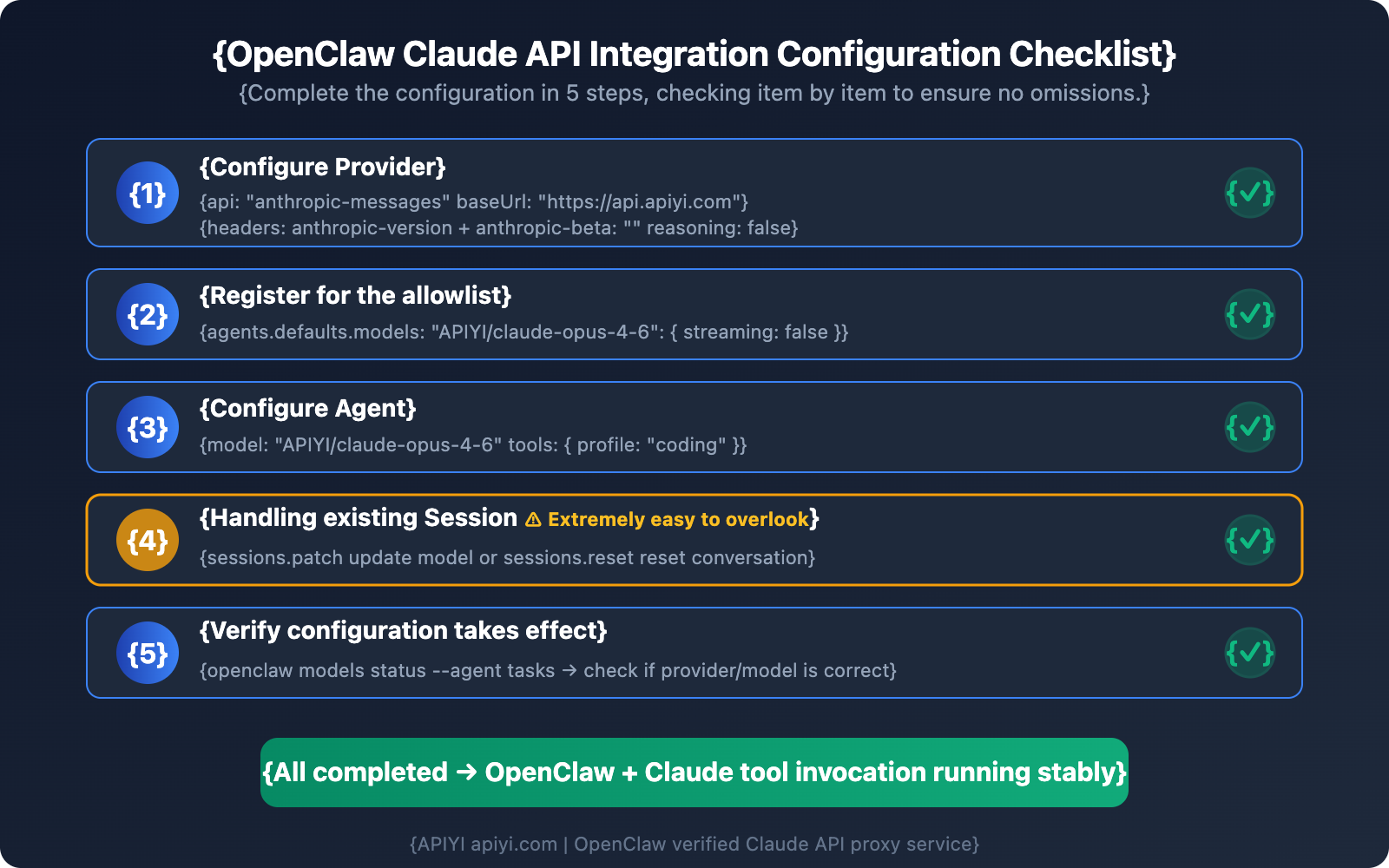
This is the most common issue. 99% of the time, it's because an existing session has cached the old configuration. Use the sessions.patch or sessions.reset commands to update the session, or test your changes in a new channel. Check Step 4 for the specific commands.
Q3: Can I use Claude 3.5's thinking feature in OpenClaw?
Currently, on proxy links, thinking fields (thinking / output_config) might trigger a 400 ValidationException. We recommend setting reasoning: false for now. You can keep an eye on the APIYI (apiyi.com) platform for updates regarding thinking feature support.
Q4: Can I use one APIYI key for multiple OpenClaw Agents?
Yes, you can. APIYI's API keys don't limit the number of concurrent Agents. You can configure the same key for different Agents like tasks, chat, or coder, and you'll be billed based on your actual token usage.
Q5: Is the tool call latency for Claude in OpenClaw normal?
Tool calls involve multiple API request rounds (sending the request → getting tool_use → executing the tool → returning tool_result → getting the final response), so they're typically slower than pure chat. By using APIYI's (apiyi.com) low-latency proxy link, you can keep the latency of each API call within a reasonable range.
Summary: 3 Key Takeaways for Connecting OpenClaw to Claude API
Based on our real-world configuration tests, here are the key points to remember when integrating OpenClaw with the Claude API:
- You must use the
anthropic-messagesformat: Setapi: "anthropic-messages". This is a prerequisite for stable tool calls. Using theopenai-completionsformat will result in 400 errors during multi-round tool calls. - Watch out for 3 common pitfalls: Forgetting
/v1in thebaseUrl, failing to disableanthropic-betaandreasoning, and not clearing existing session caches. - Choose the right proxy provider: APIYI (apiyi.com) fully supports the native Anthropic Messages API. It has been verified through OpenClaw testing, ensuring that both tool calls and Prompt Caching work stably.
We recommend using APIYI (apiyi.com) to quickly complete your OpenClaw and Claude API integration—you can have tool calls up and running in just 5 minutes.
References
-
OpenClaw Official Documentation – Model Providers: Configuration instructions for model providers
- Link:
docs.openclaw.ai/concepts/model-providers
- Link:
-
Anthropic Official Documentation – Messages API: Native Claude API invocation format
- Link:
platform.claude.com/docs/en/api/messages
- Link:
-
Anthropic Official Documentation – OpenAI SDK Compatibility: Limitations of compatibility mode
- Link:
platform.claude.com/docs/en/api/openai-sdk
- Link:
-
OpenClaw GitHub Repository: Open-source code and issue discussions
- Link:
github.com/openclaw/openclaw
- Link:
📝 Author: APIYI Team | APIYI Technical Team, focusing on Large Language Model API integration and technical sharing. Visit apiyi.com for more technical tutorials and API keys.