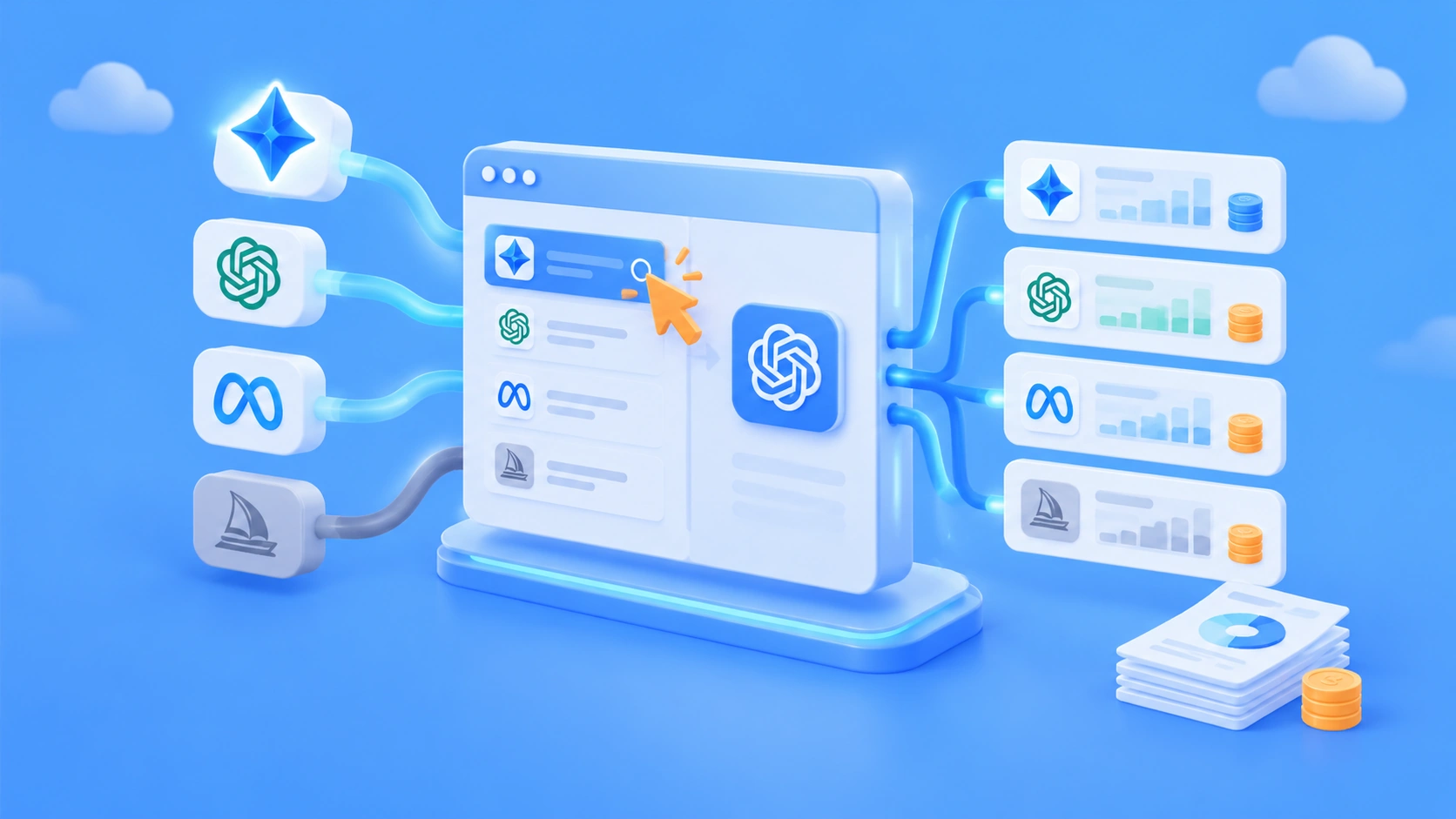
Author’s note: A wave of new models landed in November 2026. This article explains how to switch model IDs through a single entry point, connect through the right endpoint, and keep each channel’s bill separate.
In just the first three weeks of November, Google released three Gemini 4 models back to back: Carbon on November 10, Hydrogen on November 12, and Neon on November 18. New models for image generation, coding, and other areas have also been showing up in the news. For developers who want to try them, the hard part isn’t writing the call code—it’s that every provider has its own SDK, its own authentication, and its own billing rules. This article offers a less painful approach: switch models through one entry point, and view bills by channel.
This is not a promotional list of every new model out there. We’ll keep models that appear in the news separate from models you can actually call on the platform. For example, the MAI Image 2.7 mentioned in the news hasn’t made it onto APIYI’s shelves yet, so this article won’t treat it as a callable model.
The key takeaway: After reading this, you’ll know where to check the model list first, how to decide which model ID to switch to, which endpoint each type of model should use, and how to avoid estimating your entire bill using one model’s unit price. The models and prices mentioned below are based on the model list and pricing API of APIYI apiyi.com as of 2026-11-20.
Key Points for New Model Integration in November
When new models launch in quick succession, the most error-prone steps tend to cluster in three places: treating a news model as an already-listed model, using the wrong endpoint, and estimating all costs with a single unit price. The table below brings these three pitfalls together with the corresponding practices.
| Key point | Description | Value |
|---|---|---|
| Check the model list first | Use the platform’s master model list and pricing API as the source of truth; keep news model names separate from callable model names | Avoid calling a model name straight from a launch event and getting an error |
| Changing models = changing the model ID + verifying the endpoint | Change the model parameter under the same base_url, then confirm whether you’re using chat, messages, responses, or gemini |
You don’t need to write a separate SDK for each vendor |
| Review bills by channel | Record input, output, and cache-read tokens separately for each model and endpoint | Models whose unit prices differ by several times won’t get averaged together, and costs stay traceable |
| Introductory prices have deadlines | Some new models have limited-time introductory prices; after the deadline, the official standard price will change | Estimate next month’s budget in advance so price increases don’t throw off your plans |
Key Details for New Model Integration: News Model ≠ Listed Model
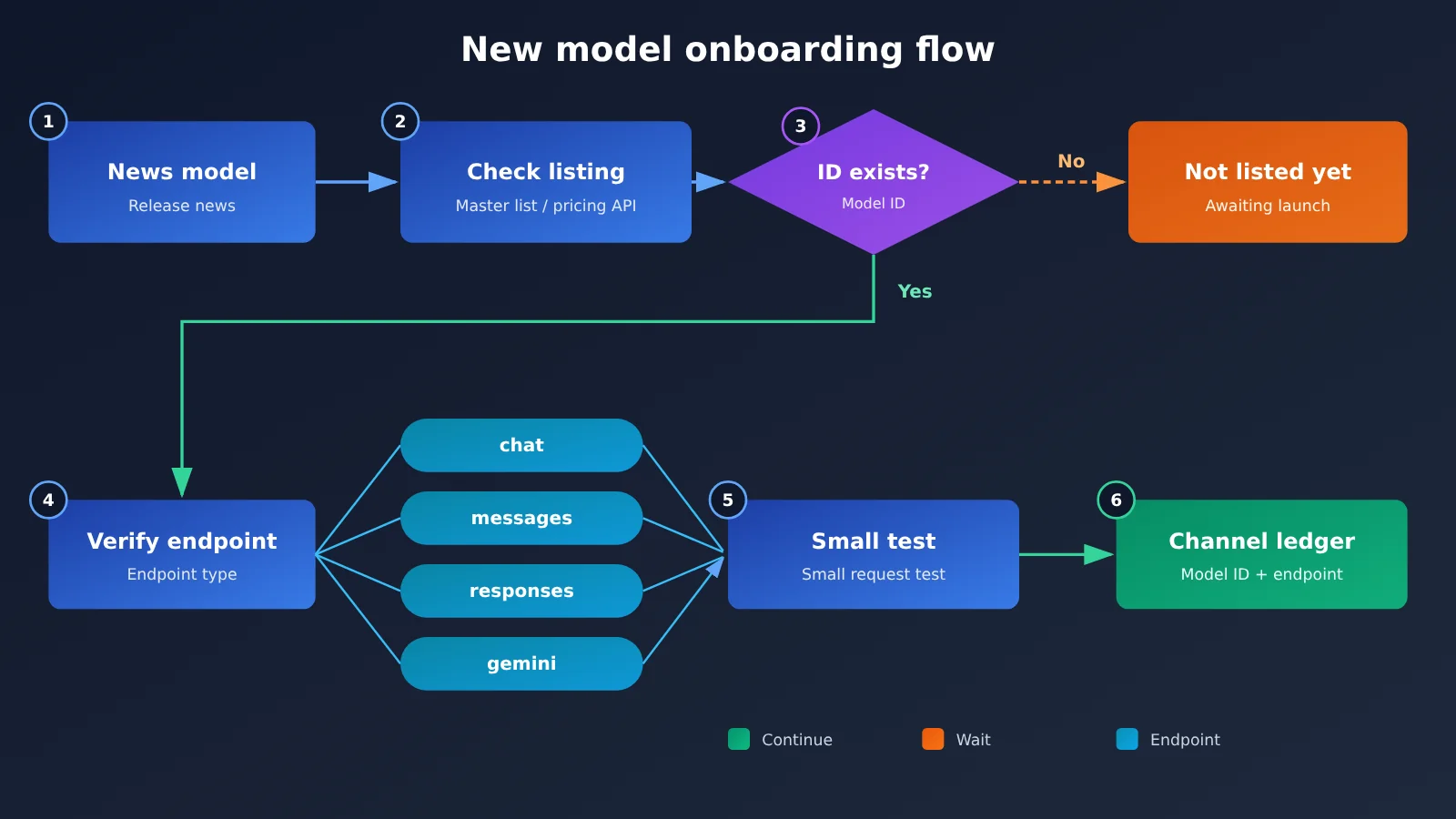
The first step in integration is checking what’s available, not writing code. APIYI’s master model list is at docs.apiyi.com/models.md; the version referenced in this article was updated on 2026-11-19 at 10:59 (UTC+8). There’s also a machine-readable pricing API at https://api.apiyi.com/api/pricing, with the version identifier shell-api-modelmak-v1. The two may not update in sync. For example, gemini-4-neon doesn’t appear in this version of the master list yet, but the pricing API already has complete price fields. So when determining whether a model can be called, it’s best to check both the master list and the pricing API. If either one has a record, confirm with a small test request.
Watch for the reverse case too. MAI Image 2.7 is an image model that appeared in recent news, but APIYI’s current master list and pricing API only include MAI-Image-2.6 and MAI-Image-2.6-Flash, not 2.7. That means MAI Image 2.7 is not yet listed. We’ll list this model as soon as possible; at that point, the model name and price will be based on the platform’s model list. Also, Kling, Muse, and gemini-4-flash-lite currently can’t be found in either the master list or the pricing API, so don’t include them when planning.
November New Models and Their Availability Status
The table below maps each model mentioned in the November news to its actual availability status on 2026-11-20. Only information that can be verified from the source materials is included — no guesswork on anything unconfirmed.
| Model | News info | APIYI availability status (2026-11-20) | Model ID |
|---|---|---|---|
| Gemini 4 Carbon | Released 2026-11-10, aimed at long-running, hard tasks | Available in the master list and the pricing API | gemini-4-carbon |
| Gemini 4 Hydrogen | Released 2026-11-12, a fast everyday tier | Available in the master list and the pricing API | gemini-4-hydrogen |
| Gemini 4 Neon | Released 2026-11-18, mid-range capability | Already in the pricing API, not listed in this version of the master list | gemini-4-neon |
| Gemini 4 Argon | — | Available in the master list | gemini-4-argon |
| MAI Image 2.7 | The image model mentioned in the news | Not listed yet, coming soon | Refer to the platform list |
| MAI Image 2.6 / 2.6 Flash | — | Available, billed per call | MAI-Image-2.6 / MAI-Image-2.6-Flash |
Think of the three Gemini 4 tiers like this: Carbon leans toward long-chain, high-difficulty tasks, Hydrogen optimizes for speed and suits high-frequency everyday calls, and Neon sits between the two. When picking a model, start with the difficulty of your task to choose a tier, then look at price — that’s a safer approach than simply grabbing the cheapest option.
November New Models Quick Start: One Entry Point to Switch Models
Minimal Example: Change Two Parameters to Switch Models
APIYI provides an OpenAI-compatible API. When adding a new model, most of the changes are in just two places: base_url and model. Here’s the minimal setup using the official OpenAI Python SDK:
- Install the SDK:
pip install openai - Create the client:
client = openai.OpenAI(api_key="YOUR_API_KEY", base_url="https://api.apiyi.com/v1") - Send a chat request:
client.chat.completions.create(model="gemini-4-hydrogen", messages=[{"role": "user", "content": "Hello!"}]) - Read the response:
response.choices[0].message.content
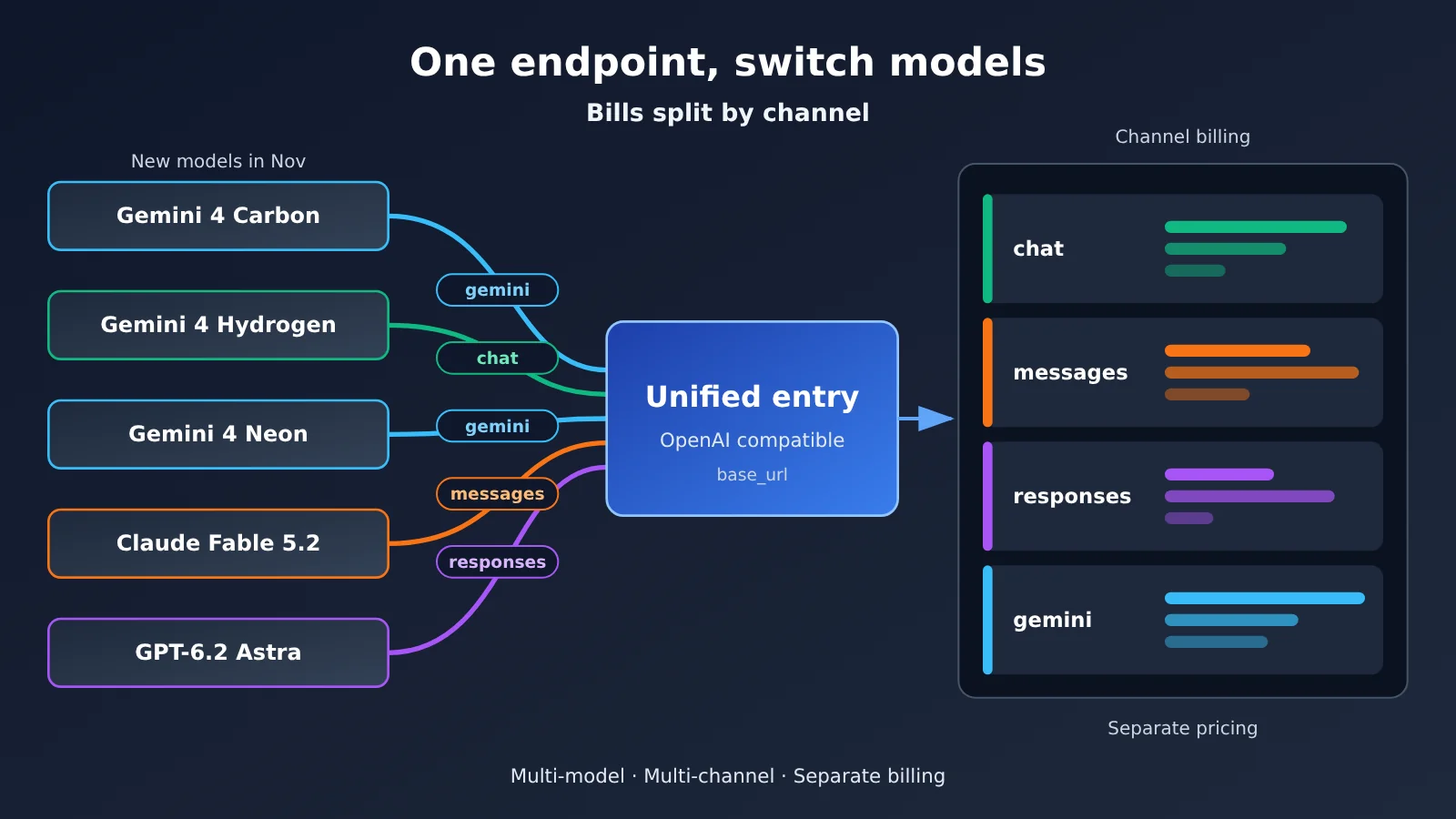
To switch from Hydrogen to Carbon, just change model="gemini-4-hydrogen" to model="gemini-4-carbon". The client, authentication, and message structure all stay the same. That’s what “one entry point to switch models” means: switching models usually means changing the model ID and verifying the endpoint—you don’t need to write a separate SDK for each provider.
See the full integration approach (including endpoint switching and channel accounting)
In a full project, it’s best to put the “model ID → endpoint” mapping in configuration rather than scattering it across the code:
1. Define a `MODEL_ROUTES` config entry where each record has three fields—`model`, `endpoint`, and `price_key`. For example, `gemini-4-neon` maps to `chat`, `claude-fable-5-2` maps to `messages`, and `gpt-6.2-astra` maps to `responses`.
2. Wrap a `call_model(model, prompt)` function: based on the `endpoint`, call `client.chat.completions.create`, `client.responses.create`, or use the Anthropic SDK to make a request in Messages format (same `base_url` as above).
3. After each request returns, read the input, output, and cached tokens from the response’s `usage` field, and write them to a local ledger using `model + endpoint` as the channel key.
4. Once a day, call the pricing API and convert the unit price using `model_ratio`, `completion_ratio`, and `cache_ratio`; then multiply by the token counts in the ledger to get the estimated cost for each channel.
5. When a call fails, log the `model` and the error message. If it says the model doesn’t exist, check the model list first—don’t retry blindly.
That way, when a new model becomes available, you only need to add one line to `MODEL_ROUTES`—your application code stays the same.
🚀 Quick-start tip: Sign up at APIYI apiyi.com and claim the free trial credits for new users. Get the pipeline working end-to-end with an everyday-tier model like Hydrogen, then switch to Neon or Carbon to compare results. You only need one API key for the whole process.
New Model Endpoint Comparison: Don’t Cram Every Model into chat
“One entry point” doesn’t mean “one endpoint.” The text models you can already call each support different endpoints, and this is a step you must verify whenever you switch models:
| Model Family | Model ID Examples | Available Endpoints | Notes |
|---|---|---|---|
| Gemini 4 series | gemini-4-carbon / gemini-4-neon / gemini-4-hydrogen |
chat or gemini | chat is the OpenAI-compatible /v1/chat/completions; gemini uses the native Gemini format—check the platform docs for exact paths |
| Claude Fable 5.2 | claude-fable-5-2 / claude-fable-5-2-thinking |
chat or messages | messages is Anthropic-style /v1/messages |
| GPT-6.2 Astra | gpt-6.2-astra |
responses recommended | Recommended to go through /v1/responses |
| MAI Image 2.6 | MAI-Image-2.6 / MAI-Image-2.6-Flash |
image generation | Billed per call; check the platform docs for invocation details |
In practice, if your team already has a lot of code built around the chat format, Gemini and Claude can keep using the chat endpoint first—that’s the lowest migration cost. When you need vendor-native capabilities, switch over to the gemini or messages endpoints. For GPT-6.2 Astra, it’s better to integrate directly through the responses endpoint—don’t force it into chat just because that’s what you’re used to.
November New Model Bill: A Channel-by-Channel Breakdown
First, Learn to Read the Pricing API
APIYI’s pricing API expresses prices as multipliers. Here’s how the conversion works:
- Input price =
model_ratio × 2(unit: USD per million tokens; whenmodel_ratiois 1, that’s$2 / 1M) - Output price = input price ×
completion_ratio - Cached read price = input price ×
cache_ratio
Take gemini-4-neon as an example. The pricing API reports model_ratio 1.5, completion_ratio 5, and cache_ratio 0.05. Once converted, that gives an input price of $3 / 1M, an output price of $15 / 1M, and a cached read price of $0.15 / 1M — matching Google’s listed pricing. Once you’ve mastered this conversion, you’ll be able to work out unit prices yourself from https://api.apiyi.com/api/pricing as soon as a new model launches, without waiting for an article update.
Price Comparison Across Channels (verified 2026-11-20)
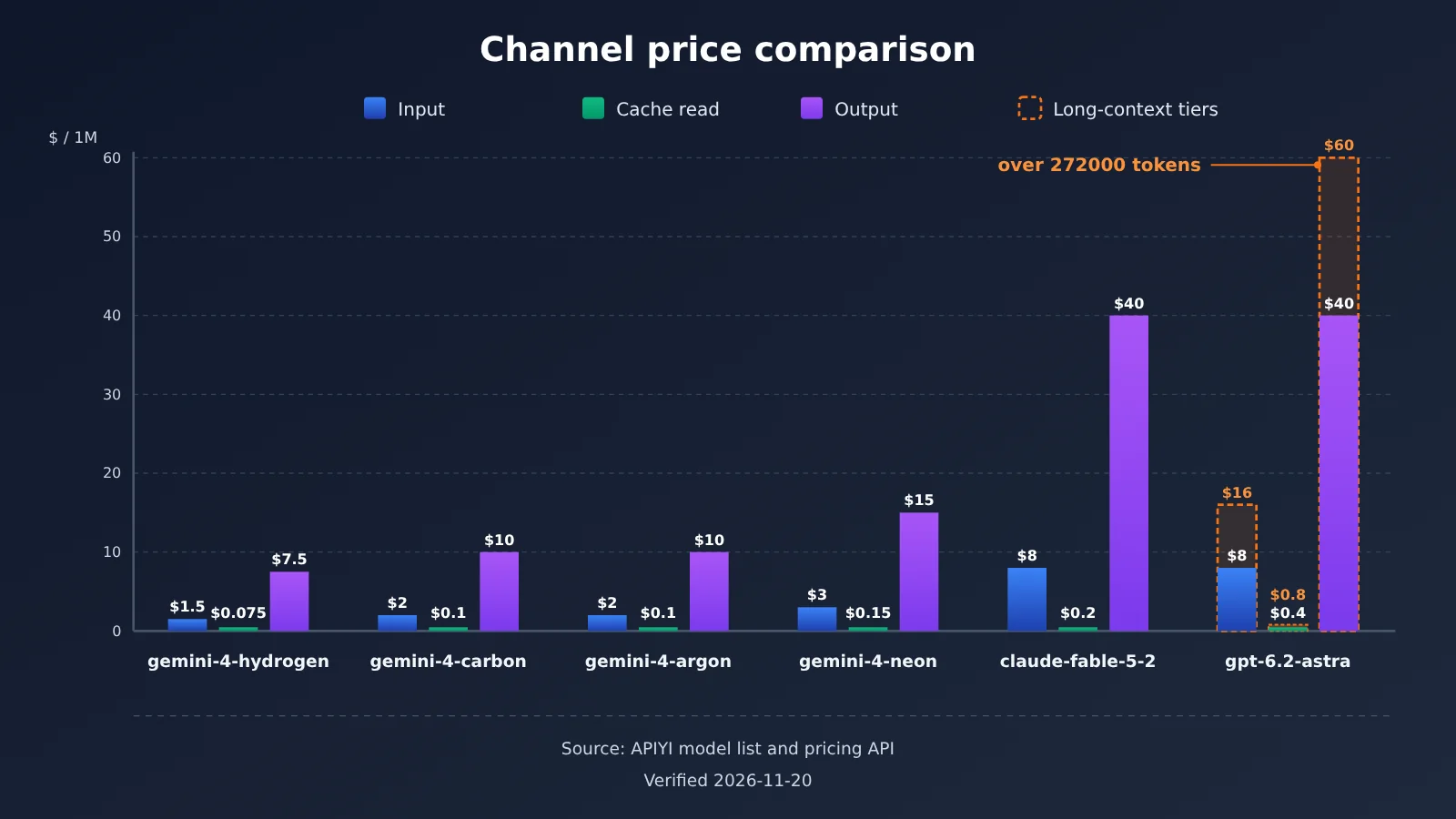
📊 Data source note: The prices in the chart above and the table below come from APIYI apiyi.com’s model master table and pricing API. Verified on 2026-11-20. For future adjustments, use the platform’s live list as the source of truth.
| Channel (Model ID) | Input | Cache read | Output | Notes |
|---|---|---|---|---|
gemini-4-hydrogen |
$1.5 / 1M |
$0.075 / 1M |
$7.5 / 1M |
Everyday fast tier |
gemini-4-carbon |
$2 / 1M |
$0.1 / 1M |
$10 / 1M |
Matches Google’s introductory price through 2026-11-30 |
gemini-4-argon |
$2 / 1M |
$0.1 / 1M |
$10 / 1M |
From the master table |
gemini-4-neon |
$3 / 1M |
$0.15 / 1M |
$15 / 1M |
From the pricing API |
claude-fable-5-2 / -thinking |
$8 / 1M |
$0.2 / 1M |
$40 / 1M |
Both IDs have the same price |
gpt-6.2-astra (first tier) |
$8 / 1M |
$0.4 / 1M |
$40 / 1M |
See below for over 272000 tokens |
MAI-Image-2.6 |
Per call $0.12 |
— | — | Image |
MAI-Image-2.6-Flash |
Per call $0.06 |
— | — | Image |
There are two entries in the table worth calling out separately.
The first is GPT-6.2 Astra’s long-context tier. The master table says that once you exceed 272000 tokens, input becomes $16 / 1M; the pricing API goes further and specifies that over 272000 tokens, output is billed at $60 / 1M and cache reads at $0.8 / 1M. If your workload involves very long contexts, make sure you estimate by tier separately—don’t apply the first-tier price to every request.
The second is Gemini 4 Carbon’s introductory price. The current price matches Google’s introductory price through 2026-11-30. Starting December 1, Google’s standard price is $4 / 1M for input and $20 / 1M for output. Going forward, APIYI’s model list is the source of truth for pricing, so when you budget for December, it’s worth setting aside room for that difference.
Why One Vendor’s Price Can’t Cover Everything
As the table above shows, for the same million output tokens, Hydrogen costs $7.5, while the first tier for Claude Fable 5.2 and GPT-6.2 Astra is $40 — more than five times the difference. If your team runs three or four models at once and only looks at an “average unit price” or one vendor’s pricing, it’s easy to badly underestimate or overestimate costs. A safer approach is to use “model ID + endpoint” as the channel key, record input, output, and cache-read tokens separately for each channel, multiply each by its own unit price, and then add it all up.
Also keep in mind: a unified gateway solves the integration cost, but that doesn’t mean every model is automatically cheaper. In the table above, several Gemini 4 variants are priced the same as Google’s list price. Whether something is a good deal should be checked channel by channel against your actual usage — not lumped together under one blanket judgment.
💰 Cost tip: When comparing options, you can use APIYI apiyi.com to call Hydrogen, Neon, and Carbon with the same batch of test samples, then record token consumption per channel, work out the real per-call cost for each channel, and decide on your primary model.
FAQ
Q1: What do you mean by “one entry point, any model”?
It means all models share the same `base_url` and the same API key. To switch models, you just change the model ID in the `model` parameter and confirm that the model supports the endpoint you’re calling. No separate sign-up for each vendor, no separate SDKs to wire up.
Q2: Can I call a model right after it’s announced in the news?
Not necessarily. Announced doesn’t mean listed. Take 2026-11-20 as an example: MAI Image 2.7 only showed up in news coverage, while APIYI’s catalog had just `MAI-Image-2.6` and `MAI-Image-2.6-Flash`. 2.7 wasn’t listed yet and will be added as soon as possible. Before you integrate, check the master table and the pricing endpoint to make sure the model ID actually exists.
Q3: How should I choose between Gemini 4’s Carbon, Hydrogen, and Neon?
Pick the tier by task difficulty: use Carbon for long-chain, high-difficulty work; Hydrogen for high-frequency everyday calls where speed matters; Neon for anything in between. The three launched on November 10, 12, and 18 respectively, each with its own pricing, so it’s worth comparing them on the same batch of samples before deciding on your primary model.
Q4: I can’t find gemini-4-neon in the master table — does that mean it’s not usable yet?
Don’t go by the master table alone. The 2026-11-19 version of the master table doesn’t include `gemini-4-neon`, but the pricing endpoint already lists full multipliers, which work out to input `$3 / 1M`, output `$15 / 1M`, and cache read `$0.15 / 1M`. The two sources lag behind each other, so trust the pricing endpoint and a small live test.
Q5: How do I quickly call these November models through the API?
Here’s the recommended sequence:
1. Sign up at APIYI (apiyi.com) to get an API key and the free trial credits for new users
2. Check the model master table and the pricing endpoint to confirm your target model ID
3. Set `base_url` to the platform’s OpenAI-compatible address, then pick chat, messages, responses, or gemini using the endpoint mapping table above
4. Send a short test request first, and only wire it into your business once you’ve confirmed it works
Q6: Same Claude Fable 5.2 — does it cost more via chat than via messages?
The reference materials list `claude-fable-5-2` and `claude-fable-5-2-thinking` at the same price: input `$8 / 1M`, cache read `$0.2 / 1M`, output `$40 / 1M`. There’s no endpoint-based pricing in the materials. That said, when you’re tracking costs, it’s still a good idea to include the endpoint as part of the channel key, which makes troubleshooting and later reconciliation easier.
Q7: Is a unified entry point always cheaper than connecting directly to the official API?
You can’t conclude that. The main value of a unified entry point is fewer integrations plus a single place for auth and billing. You still need to check prices channel by channel — for example, `gemini-4-neon` is priced the same as Google’s list price. Whether you actually save depends on the mix of models you use and your volume, so work it out per channel.
Q8: What are the known limitations I should plan around?
There are three main ones. First, some newer models aren’t listed yet — MAI Image 2.7, Kling, Muse, and `gemini-4-flash-lite` currently can’t be found. Second, introductory pricing has deadlines: the Google introductory price for Gemini 4 Carbon runs through November 30. Third, GPT-6.2 Astra switches to tiered pricing once you exceed 272000 tokens. When you hit cases like these, adjust your plan based on the platform’s list first, then go back and change your code.
November’s New Model Integration: Key Takeaways
- Check the shelf before writing code: Rely on the model master list and the pricing endpoint as your source of truth, and keep the models mentioned in the news separate from the ones you can actually call
- Switching models only takes two changes: Change the model ID under the same base_url, then verify the endpoint type
- Match the endpoint to the model: Gemini goes through chat or gemini, Claude goes through chat or messages, and GPT-6.2 Astra is best routed through responses
- Know the multipliers and you can do the pricing math:
model_ratio × 2gives the input unit price; multiply that by the output and cache multipliers - Split your bill by channel: Track costs separately using “model ID + endpoint” as the key, instead of applying one provider’s unit price to everything
- Watch for deadlines and tiers: Carbon’s introductory price and Astra’s 272,000-token tier both affect your budget
- Getting started: Claim free credits with a single key on APIYI, start with the everyday tier, then compare side by side
Summary: November’s model rush — one entry point for swapping models, bills tracked by channel
When new models pile up in November, the key to integration isn’t chasing every news item — it’s setting up a fixed process:
- Cross-check the model list: Look at both the master table and the pricing endpoint. MAI Image 2.7 from the news hasn’t been listed yet, so don’t put it in your launch plan.
- Swap the model ID and verify the endpoint: One base_url handles multiple providers; use the endpoint reference table to pick chat, messages, responses, or gemini.
- Review bills by channel: Calculate tokens and costs separately for each model and each endpoint, and keep an eye on introductory-price deadlines and long-context tiers.
Once the process is locked in, the next time a new model launches you just add one line with the model ID to your config, check the pricing endpoint once, and you’ve covered both integration and cost estimation. We recommend using the free credits for new users on APIYI at apiyi.com to get one channel working first, then gradually add Gemini 4, Claude Fable 5.2, and GPT-6.2 Astra to your comparison.
📚 References
-
Google Official Blog – Gemini 4 Neon Announcement: Overview of the Gemini 4 series models
- Link:
blog.google/innovation-and-ai/models-and-research/gemini-models/introducing-gemini-4-neon - Description: Learn how Carbon, Hydrogen, and Neon are positioned and when they were released
- Link:
-
APIYI Model List and Pricing API: Source for cross-checking model names and prices
- Link: See the “News model names ≠ shelf model names” section in the main text
- Description: The model list and pricing API versions may not be in sync; it’s best to check both
Author: APIYI Technical Team
Technical discussion: Feel free to contact us via the homepage of the APIYI website. For more integration docs, visit the docs.apiyi.com documentation center.