In scientific research writing, high-quality schematics, mechanism diagrams, and flowcharts are essential visual elements. Traditional scientific illustration tools like BioRender and Adobe Illustrator, while powerful, suffer from steep learning curves, poor Chinese language support, and lack of domain knowledge understanding. Nano Banana Pro (Gemini 3 Pro Image API), with its first-class illustration quality, exceptional Chinese character rendering, and deep knowledge comprehension, is emerging as a new choice for researchers. This article shares 7 practical techniques to help you efficiently complete scientific illustration tasks using Nano Banana Pro.
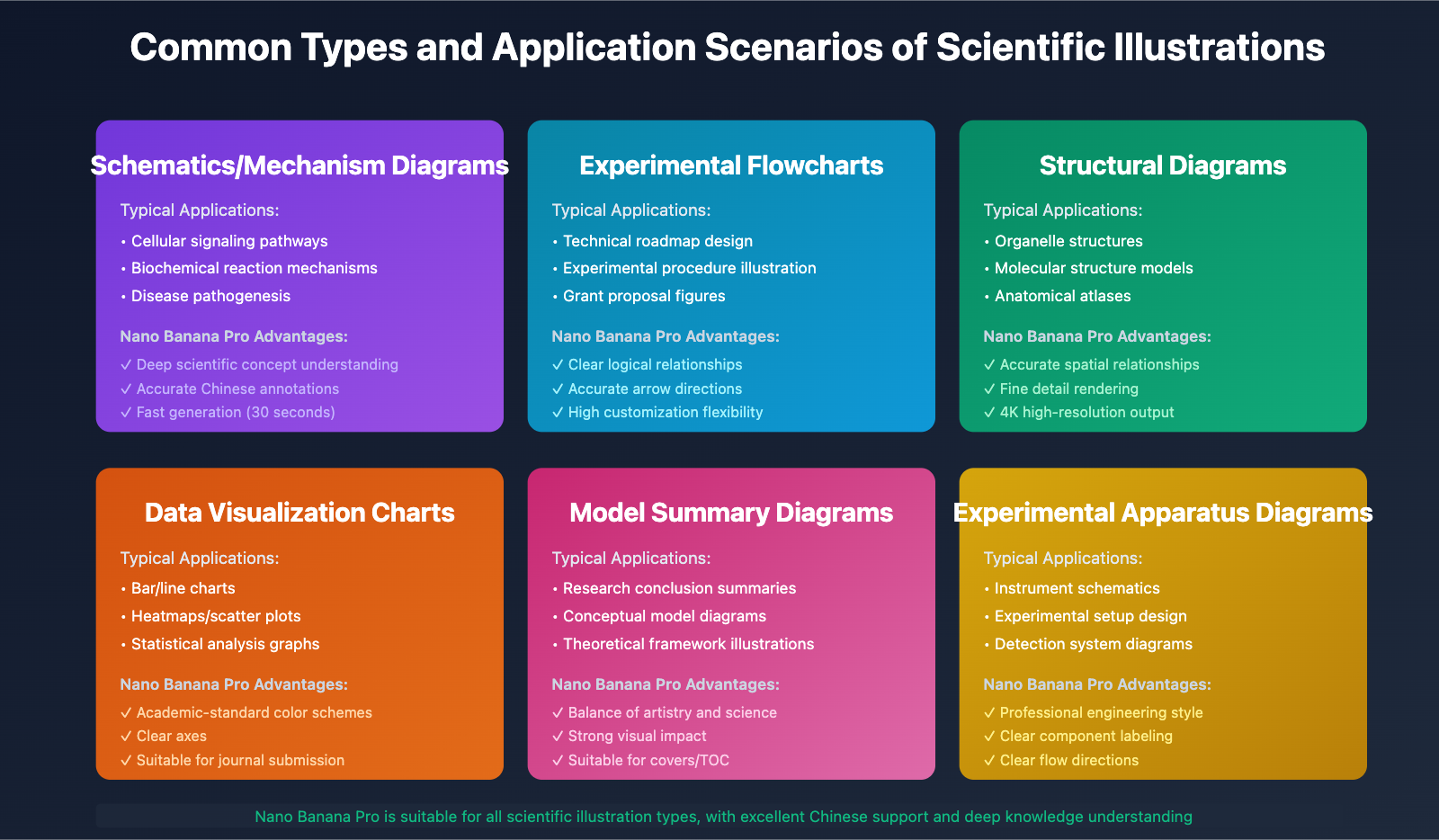
Technique 1: Precise Prompt Engineering – Incorporating Domain-Specific Terminology
When creating scientific figures, general descriptions often lead to generic results. The key is to incorporate precise domain terminology and scientific concepts into your prompts.
Ineffective Example:
Draw a picture showing how cells communicate
Effective Example:
Create a schematic diagram illustrating the MAPK/ERK signaling pathway activation process. Include the following key components: RTK receptor, RAS-GTP, RAF, MEK, ERK cascade, and nuclear transcription factors. Use arrows to indicate signal transduction direction, and mark the activation/inhibition relationships. Render in a style suitable for Cell journal publication, 4K resolution.
Key Points:
- Use standardized scientific terminology (e.g., MAPK/ERK instead of "cellular signal")
- Specify structural relationships (cascade reaction, activation/inhibition)
- Define output requirements (journal style, resolution)
- Clearly describe visual elements (arrows, labels, colors)
Actual Case:
A doctoral student in immunology needed to illustrate the T cell activation mechanism. By specifying terminology like "TCR-MHC complex," "CD28 co-stimulation," and "intracellular calcium flux," Nano Banana Pro generated a publication-ready mechanism diagram that accurately reflected the biological process hierarchy.
Technique 2: Leveraging Multi-Round Dialogue for Iterative Refinement
Unlike traditional drawing software, Nano Banana Pro supports conversational iteration. You don't need to get it perfect in one shot – refine through dialogue.
Workflow:
- Initial Generation: Provide basic requirements
- Issue Identification: Review the generated image for problems
- Targeted Modification: Give specific improvement instructions
- Final Touch-up: Adjust details (fonts, colors, layouts)
Dialogue Example:
User: Generate a flowchart for CRISPR-Cas9 gene editing experimental procedure

Nano Banana Pro: [Generates initial diagram]

User: The sgRNA design step is missing. Please add "sgRNA Design and Synthesis"
      before "Cas9-sgRNA Complex Assembly," and use a blue rectangular box

Nano Banana Pro: [Updated diagram with blue box added]

User: Change the arrow color from black to dark green, and increase
      the font size of step numbers to 16pt

Nano Banana Pro: [Final optimized version]
Tip:
- Give one modification at a time to avoid confusion
- Use specific positional descriptions (e.g., "top left," "between steps 2 and 3")
- Preserve previous good elements with phrases like "keep other parts unchanged"
Technique 3: Chinese Annotation Optimization – Ensuring Font Consistency
Nano Banana Pro excels at Chinese rendering, but you need to specify font requirements to ensure professionalism.
Best Practices:
Generate a dendritic cell maturation mechanism diagram with the following requirements:
- Chinese labels use SimHei (黑体) or Microsoft YaHei (微软雅黑)
- English terms use Arial or Helvetica
- Label font size: 14pt for primary text, 11pt for secondary text
- Ensure no font distortion or overlap
- Background color: white, suitable for journal submission
Common Issues and Solutions:
| Issue | Cause | Solution |
|---|---|---|
| Blurry Chinese characters | Low resolution | Specify "4K resolution" or "300 DPI output" |
| Font style inconsistency | No font specified | Explicitly state "all Chinese use same font" |
| Label overlap | Auto-layout issues | Specify "ensure 5px minimum spacing between labels" |
| English-Chinese mixing issues | Mixed content | Specify "bilingual labels use format: Chinese (English)" |
Case Study:
A cardiovascular researcher created a heart anatomy diagram. By specifying "anatomical terms in Chinese, Latin names in italics in parentheses, unified font: SimSun-ExtB," they achieved results comparable to professional medical illustration software.
Technique 4: Color Scheme Design – Following Scientific Publication Standards
Color selection in scientific figures isn't arbitrary – it must follow academic norms and color-blind-friendly principles.
Recommended Color Schemes:
Mechanism Diagrams:
- Activating signals: Green series (#10b981, #34d399)
- Inhibitory signals: Red series (#ef4444, #f87171)
- Neutral pathways: Gray/blue series (#64748b, #0ea5e9)
Flowcharts:
- Starting point: Deep blue (#1e40af)
- Process steps: Light blue (#60a5fa)
- Decision points: Yellow/orange (#f59e0b)
- Endpoint: Green (#059669)
Data Visualizations:
- Use journal-standard palettes (Nature, Science, Cell)
- Avoid pure red-green combinations (color-blind unfriendly)
- Prefer gradient color schemes (e.g., viridis, plasma)
Prompt Template:
Use the following color scheme:
- Protein kinase: gradient purple (#7c3aed to #a855f7)
- Phosphatase: gradient orange (#ea580c to #f97316)
- Transcription factor: gradient teal (#0891b2 to #0ea5e9)
- Background: light gray (#f1f5f9)
- Arrows: dark gray (#334155)
Ensure all colors meet WCAG 2.1 AA contrast standards
Technique 5: Layout Optimization – Enhancing Information Hierarchy
Excellent scientific figures must have clear visual hierarchy and logical flow.
Layout Principles:
- Left-to-right, top-to-bottom: Matches reading habits
- Modular design: Separate different functional areas
- Symmetric balance: Avoid visual bias
- White space usage: Prevent overcrowding
Practical Tips:
Create a three-module composite figure:
- Top (30% height): Experimental design flowchart
- Middle (40% height): Results display (2x3 subplot grid)
- Bottom (30% height): Mechanism summary diagram

Requirements:
- 20px spacing between modules
- Each module has independent title (font size 18pt, bold)
- Unified outer frame: 2px gray border (#e2e8f0)
- Overall aspect ratio 16:9, suitable for PPT presentation
Advanced Technique – Multi-Panel Figures:
When creating multi-panel figures (Figure 1A-D), use this format:
Generate a 2x2 four-panel scientific figure:
A (top-left): Cell morphology microscopy image
B (top-right): Western blot protein expression
C (bottom-left): qPCR gene expression bar chart
D (bottom-right): Mechanism summary schematic

Each panel labeled with bold letters (A/B/C/D) in top-left corner
Unified scale bar and color scheme
Overall size: 180mm x 180mm (standard for double-column journals)
Technique 6: Specialized Diagrams – Choosing Appropriate Visualization Methods
Different research content requires different diagram types. Nano Banana Pro supports various specialized scientific visualization formats.
Molecular Biology:
- Plasmid maps: Circular structure, labeled with restriction sites, promoters, resistance genes
- Protein domain diagrams: Linear structure, functional regions colored distinctly
- Phylogenetic trees: Cladogram or radial tree layouts
Example Prompt:
Generate a circular plasmid map (pET-28a vector):
- Total length: 5369 bp
- Key elements: T7 promoter, His-tag, multiple cloning site, kanamycin resistance gene
- Use different colors for each functional region
- Mark important restriction enzyme sites (BamHI, EcoRI, XhoI)
- Add scale ruler (every 500 bp)
Systems Biology:
- Network diagrams: Node size represents importance, edge thickness represents interaction strength
- Heatmaps: Gene/protein expression patterns
- Sankey diagrams: Metabolic pathway flows
Biomedical Research:
- Anatomical diagrams: Accurate organ positioning, multi-layer transparency effects
- Pathological mechanism diagrams: Disease progression timelines
- Drug MOA diagrams: Drug-target-effect cascades
Technique 7: Format Export and Post-Processing – Meeting Journal Submission Requirements
Different journals have specific figure format requirements. Nano Banana Pro can directly generate publication-ready images.
Common Journal Requirements:
| Journal | Format | Resolution | Color Mode | File Size |
|---|---|---|---|---|
| Nature/Science | TIFF/PDF | ≥300 DPI | RGB or CMYK | <10 MB |
| Cell Press | EPS/PDF | 600-1200 DPI | RGB | <20 MB |
| PLOS ONE | PNG/TIFF | ≥300 DPI | RGB | <10 MB |
| Chinese journals | JPG/PNG | ≥600 DPI | RGB | <5 MB |
Submission-Ready Prompt:
Generate an image meeting Nature journal submission standards:
- Format: High-resolution PNG (suitable for conversion to TIFF)
- Resolution: 600 DPI
- Color mode: RGB
- Size: 180mm width (double-column figure)
- Font: All text uses Arial font family
- Line weight: Minimum 0.5pt
- Ensure clear display when scaled to 50%
Post-Processing Tips:
- Vector conversion: For simple diagrams, request "SVG vector format output" for lossless editing
- Batch processing: Use consistent styles for multiple related figures
- Annotation addition: Leave space for manual addition of statistical significance markers (*, **, ***)
- Color proofing: Check grayscale conversion effect (some journals print in black and white)
Advanced Workflow:
1. Generate base diagram with Nano Banana Pro (PNG, 4K)
2. Import to Illustrator/Inkscape for fine-tuning
   - Adjust element positions
   - Add statistical significance markers
   - Unify font styles
3. Export to journal-required format
4. Embed in manuscript Word document
Practical Case: Complete Workflow for a Research Paper Figure
Background: A cancer biology researcher needs to create a composite figure showing "Tumor Microenvironment Immune Cell Infiltration and Therapeutic Response Mechanism."
Step 1: Define Requirements
Create a scientific composite figure containing:
1. Tumor microenvironment cell composition diagram (left, 40% width)
2. Immune checkpoint blocking mechanism diagram (right top, 60% width, 50% height)
3. Treatment response timeline chart (right bottom, 60% width, 50% height)

Style: Clean modern academic style
Color scheme: Blue (T cells), red (tumor cells), green (therapeutic antibodies)
Resolution: 300 DPI, size 180mm x 120mm
Step 2: Generate and Iterate
First generation → Identify issue: T cell subtypes not detailed enough
Modification: "Add CD4+ T cell, CD8+ T cell, and Treg subtypes to tumor microenvironment diagram,
              use different shades of blue to distinguish"

Second generation → Identify issue: Mechanism diagram arrows not clear enough
Modification: "Use thicker arrows (3pt) for immune checkpoint blocking pathway,
              add dotted lines for inhibitory signals"

Third generation → Final check
Confirmation: "Font sizes uniform, labels complete, colors meet color-blind-friendly standards"
Step 3: Export and Submit
- Export PNG format (600 DPI)
- Convert to TIFF using Photoshop
- Embed in manuscript, ensure clear display
- Prepare separate high-resolution source files for journal submission
Summary: Maximizing Nano Banana Pro's Potential
As an AI-powered scientific illustration tool, Nano Banana Pro's advantages lie in:
- ✅ Deep knowledge understanding: Accurately comprehends professional terminology and scientific concepts
- ✅ Superior Chinese support: Excellent Chinese font rendering quality
- ✅ Rapid iteration: Generates high-quality figures in 30 seconds
- ✅ High customization: Flexibly adjusts via dialogue
- ✅ Publication-ready output: Directly generates journal-compliant format images
Recommended Workflow:
- Clarify figure type and purpose (mechanism/flowchart/data visualization)
- Write detailed prompts (terminology + layout + color + format)
- Generate initial version, identify issues
- Multi-round iterative refinement
- Export publication-ready format
- Optional minor post-processing
By mastering these 7 techniques, you can fully leverage Nano Banana Pro to create scientific figures that are both academically rigorous and visually appealing, significantly improving research visualization efficiency. Whether for journal submissions, grant applications, or conference presentations, Nano Banana Pro will be your reliable partner.
Ready to try it? Start with a simple mechanism diagram, then gradually tackle more complex composite figures. Remember: good prompts lead to great results – be specific in your descriptions, iterate boldly, and you'll soon become a scientific illustration expert! 🚀
Core Challenges in Scientific Illustration
Pain Points of Traditional Tools
Scientific illustration demands extremely high quality and accuracy standards, especially when submitting to top-tier journals like Nature and Science, where figure specifications are particularly stringent. Traditional tools commonly suffer from the following issues:
Limitations of BioRender:
- Despite having 40,000+ high-quality biological icons
- Extremely poor Chinese language support, requiring manual post-processing for annotations
- Limited preset templates, difficult to meet personalized needs
- Student pricing at $15/month (approximately ¥97), more expensive for commercial users
- Insufficient support for non-life science fields
Barriers of Adobe Illustrator:
- Professional-grade vector graphics software with a steep learning curve
- Requires substantial time for manual drawing and adjustments
- $20.99/month subscription fee
- Lacks scientific knowledge understanding, requiring users to design entirely independently
Shortcomings of General AI Illustration Tools:
- Midjourney, Stable Diffusion, etc. lack scientific rigor
- Generated results are "visually appealing but inaccurate," difficult to pass academic review
- Limited understanding of technical terminology and scientific concepts
- Low accuracy in Chinese technical term translation and annotation
🎯 Core Pain Point Summary: Scientific illustration needs to simultaneously satisfy scientific accuracy, visual aesthetics, and efficient production. Traditional tools can typically only balance one or two of these aspects, rarely achieving all three.
Strict Specifications for Scientific Figures
According to submission requirements for top-tier journals like Nature and Science, scientific figures must comply with the following specifications:
Resolution and Dimensions:
- Line Art: 600-1200 DPI
- Color and grayscale images: at least 300 DPI
- Single-column figure width: 7.5-9 cm
- Double-column figure width: 15-18 cm
- Height not exceeding 24 cm
Color and Fonts:
- Recommended high-contrast color combinations (green + magenta, cyan + red)
- Unified fonts: Arial, Helvetica, or Times New Roman
- RGB color mode (online version) or CMYK (print version)
- Ensure colorblind-friendly color schemes
File Formats:
- Preferred vector formats: EPS, PDF, AI
- Acceptable bitmap formats: TIFF, PNG (300 DPI+)
- Avoid JPEG (lossy compression)
- Chemical structures using ChemDraw (.cdx)
Annotations and Captions:
- Clear axis labels and units
- Complete legend descriptions
- Necessary statistical markers (*, **, *** indicating significance)
- Accurate bilingual professional terminology
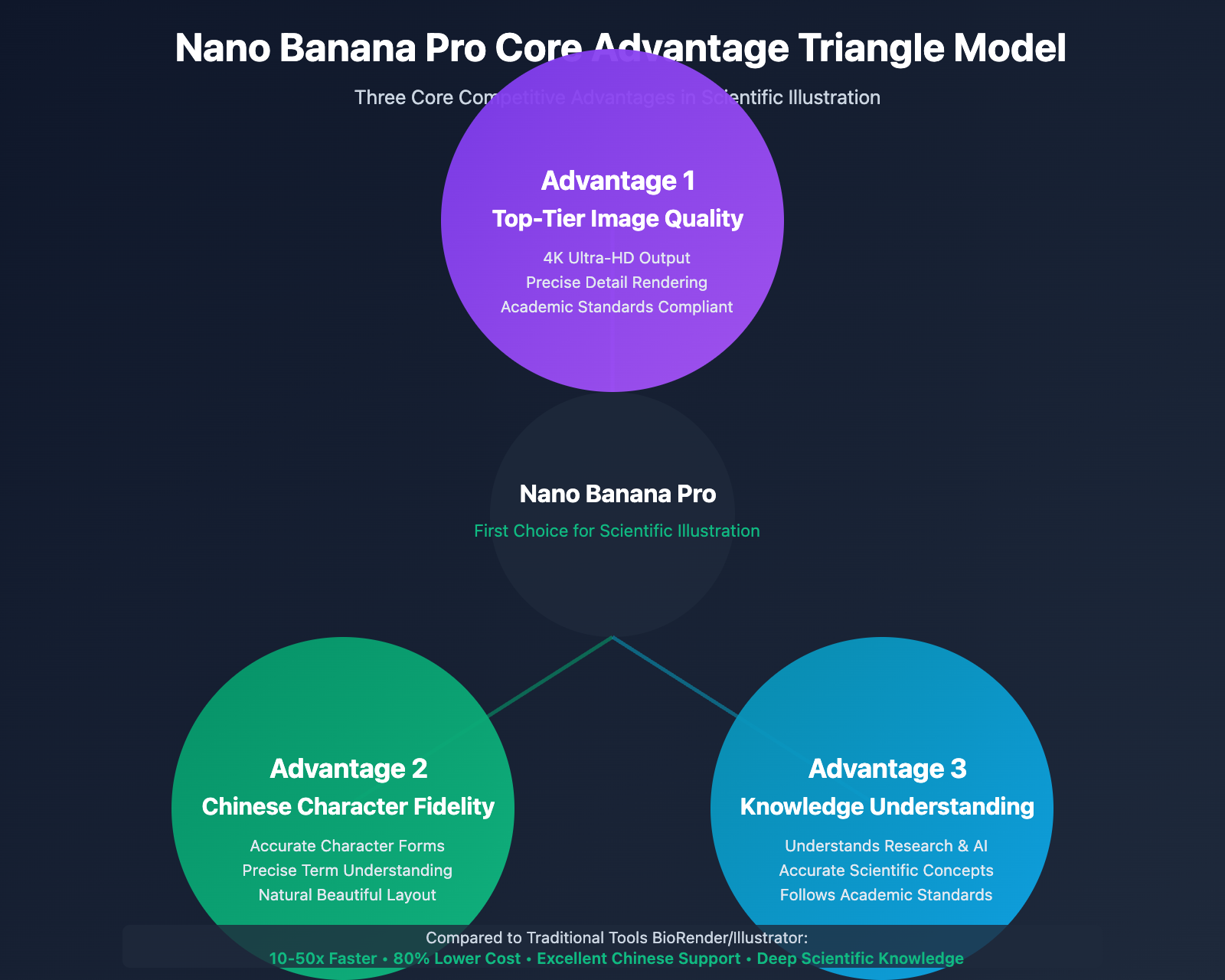
Three Core Advantages of Nano Banana Pro in Scientific Illustration
Advantage 1: Top-Tier Image Quality
Nano Banana Pro is based on Google DeepMind's latest Gemini 3 Pro multimodal large language model, achieving industry-leading performance in image generation quality.
Technical Features:
- 4K Ultra-HD Output (4096×4096): Far exceeds BioRender's fixed resolution
- Fine Detail Rendering: Accurately draws complex objects like molecular structures, organelles, and experimental apparatus
- Professional Visual Style: Automatically generates clean, clear, and professional chart styles that comply with academic standards
- Consistency Guarantee: Maintains unified visual style and color schemes across figure series
Real-World Comparison:
| Dimension | BioRender | Nano Banana Pro |
|---|---|---|
| Maximum Resolution | ~2000px | 4096px (4K) |
| Detail Precision | Preset Icons | AI Adaptive Rendering |
| Style Flexibility | Fixed Templates | Prompt Customization |
| Generation Speed | Manual Assembly, 10-30 min | AI Generation, 30-60 sec |
💡 Technical Recommendation: For high-resolution printing needs such as research posters and cover designs, Nano Banana Pro's 4K output capability is particularly important. Accessed through the API易 apiyi.com platform, 1K/2K/4K resolutions are uniformly priced at $0.05/generation, eliminating cost concerns about resolution—simply select the highest quality output.
Advantage 2: Exceptional Chinese Character Fidelity
This is Nano Banana Pro's tremendous advantage over other AI illustration tools. As Google's latest multilingual model, Gemini 3 Pro's Chinese comprehension and rendering capabilities far surpass competitors like Midjourney and DALL-E.
Core Advantages in Chinese Annotation:
-
Accurate Character Forms Without Errors:
- Correctly renders complex Chinese characters, including rare characters and technical terminology
- Avoids common issues like "garbled text" or "pinyin substitution"
- Clear strokes, standardized fonts
-
Precise Professional Terminology Understanding:
- Accurately understands biological terms like "mitochondria," "ribosome," "endoplasmic reticulum"
- Correctly corresponds Chinese translations with English terms
- Supports mixed Chinese-English annotations
-
Natural and Beautiful Layout:
- Chinese text spacing and line height conform to reading habits
- Automatically adapts text size and position
- Harmoniously coordinates with graphic elements
Real Testing Case:
Prompt:
Draw a cell structure diagram with the following Chinese annotations:
nucleus, nucleolus, mitochondria, endoplasmic reticulum, Golgi apparatus,
ribosome, cell membrane, cytoplasm, using professional biology textbook style
Nano Banana Pro can:
- ✅ Accurately render all Chinese annotations
- ✅ Reasonable annotation positioning with clear indicator lines
- ✅ Coordinated font sizes, easy to read
- ✅ Overall compliance with academic standards
While Midjourney, Stable Diffusion, and similar tools typically:
- ❌ Distort Chinese characters or fail to recognize them
- ❌ Produce pinyin or English substitutions
- ❌ Create chaotic annotation positioning
🎯 Key Advantage: For domestic researchers, especially in scenarios requiring Chinese teaching materials, Chinese journal submissions, and academic presentation slides, Nano Banana Pro's Chinese support capability represents a disruptive advantage, saving substantial time on manual Chinese annotation post-processing.
Advantage 3: Deep Knowledge Understanding Capability
Nano Banana Pro is powered by Gemini 3 Pro, a knowledge-enhanced multimodal large language model trained on vast amounts of scientific literature, textbooks, and patents, with deep understanding of professional knowledge in research fields.
Specific Manifestations of Knowledge Understanding:
-
Scientific Concept Accuracy:
- Understands biochemical reaction mechanisms
- Grasps physical experimental apparatus principles
- Familiar with medical anatomical structural relationships
- Knows mathematical formula notation standards
-
Cross-Disciplinary Knowledge Integration:
- Can draw bioinformatics workflow diagrams (combining computer science and biology)
- Generates nanomaterial structure schematics (combining chemistry and physics)
- Creates clinical diagnostic pathways (combining medicine and statistics)
-
Academic Standards Compliance:
- Automatically adopts academically conventional illustration methods
- Follows ISO, GB, and other international/domestic standards
- Uses standardized legend symbols and arrow styles
Real Case: PCR Amplification Principle Diagram
Prompt:
Draw a three-step cycle principle diagram of PCR (Polymerase Chain Reaction):
1. Denaturation (95°C): DNA double strand separation
2. Annealing (55°C): Primers bind to template
3. Extension (72°C): DNA polymerase synthesizes new strand
Use standard molecular biology textbook style with temperature annotations
and arrow indicators
Nano Banana Pro's Performance:
- ✅ Accurately draws DNA double helix structure
- ✅ Correctly shows primer binding positions
- ✅ Accurate DNA polymerase direction and action points
- ✅ Clear temperature and time annotations for three steps
- ✅ Cycle arrows conform to biology textbook conventions
This deep knowledge understanding is a capability that general image generation models like Midjourney and Stable Diffusion completely lack. They may generate visually appealing "DNA structures," but often contain scientific detail errors that cannot pass academic review.
💡 Selection Recommendation: Nano Banana Pro is essentially an "AI designer who understands research," not merely an illustration tool. For academic figures requiring scientific rigor, this knowledge understanding capability is an irreplaceable core value. Recommended access through the API易 apiyi.com platform at just $0.05/generation, allowing extensive testing and prompt iteration until generating figures that fully meet scientific requirements.
7 Practical Tips: Efficiently Using Nano Banana Pro
Tip 1: Precisely Describe Scientific Details
Prompts for scientific illustrations need to be more precise and professional than general image generation, clearly specifying scientific concepts, structural relationships, and visual styles.
Good Prompt Structure:
[Chart Type] + [Scientific Topic] + [Key Elements] + [Visual Style] + [Annotation Requirements]
Example 1: Cell Signal Transduction Pathway Diagram
Create a cell signal transduction pathway diagram showing:
- Extracellular signaling molecules (ligands)
- Cell membrane receptors (G protein-coupled receptors)
- Intracellular signaling cascade (cAMP→PKA→transcription factors)
- Final gene expression regulation

Use a clean flowchart style, blue for activated states, gray for inactive states,
arrows to indicate signal transmission direction, include Chinese annotations, 4K resolution
Example 2: Experimental Apparatus Schematic
Create a schematic diagram of a High-Performance Liquid Chromatography (HPLC) system, including:
- Solvent reservoir and degasser
- High-pressure pump
- Sample injector
- Chromatographic column (stationary phase)
- Detector (UV detector)
- Data acquisition system

Use an engineering drawing style, clear flow arrows, bilingual Chinese-English annotations
for each component, conforming to instrumental analysis textbook standards
Key Points:
- Use professional terminology, avoid colloquial descriptions
- Clearly specify structural hierarchy and spatial relationships
- Specify color schemes and visual styles
- Request Chinese annotations and high resolution
🎯 Technical Recommendation: When using the API易 apiyi.com platform for API calls, you can first use shorter prompts to quickly generate drafts ($0.05/time), confirm the basic structure is correct, then use detailed prompts to generate the final version. This iterative method is both efficient and economical.
Tip 2: Utilize Reference Styles and Templates
Nano Banana Pro can mimic the visual styles of specific journals, textbooks, or published papers, ensuring generated charts meet the aesthetic and standards of target journals.
Style Reference Prompt Template:
Create [topic], referencing [journal/book] style:
- Nature Cell and Molecular Biology journal's clean professional style
- Campbell Biology textbook's clear educational style
- Science cover's artistic scientific illustration style
Actual Case: Mimicking Nature Style
Create a CRISPR-Cas9 gene editing mechanism diagram,
referencing Nature journal visual style:
- Clean flat design
- High contrast color scheme (blue + orange)
- Clear step numbering (1, 2, 3)
- Key proteins represented with 3D structures
- Include Chinese and English annotations
- 4K resolution, suitable for printing
Why This Works Effectively?
Nano Banana Pro's training data includes numerous illustrations from top journals. It has "seen" the typical visual styles of Nature, Science, Cell, and other journals, enabling it to accurately reproduce these style characteristics:
- Nature: Clean, professional, high contrast
- Science: Artistic, strong visual impact
- Cell: Detailed, high information density
- PNAS: Traditional, academically rigorous
Tip 3: Generate Complex Charts in Steps
For complex charts containing multiple subfigures and multiple layers of information, it's recommended to generate them in steps, then combine them using Photoshop or Illustrator.
Complex Chart Decomposition Strategy:
Case: Multi-stage Model of Tumor Development
Step 1: Generate Normal Tissue Structure
Create a histological structure of normal epithelial tissue,
including basement membrane, epithelial cell layer, connective tissue,
using textbook histological staining style
Step 2: Generate Precancerous Lesions
Create a tissue structure of epithelial dysplasia,
showing abnormal cell morphology, increased nuclear-cytoplasmic ratio,
disordered arrangement, annotating key pathological features
Step 3: Generate Invasive Cancer
Create a tissue structure of invasive cancer,
showing basement membrane destruction, cancer cell invasion into stroma,
angiogenesis, annotating malignant features
Step 4: Combination and Annotation
- Arrange the three images horizontally
- Add stage arrows and timeline
- Unify color schemes and annotation styles
- Add mutated gene markers (p53, KRAS, etc.)
Advantages:
- Each subfigure can be independently adjusted and optimized
- Reduces complexity of single generation, improves accuracy
- Facilitates post-editing and version iteration
💰 Cost Optimization: Through the API易 apiyi.com platform, each generation costs only $0.05. Even generating 5 times separately, the total cost is only $0.25, far lower than BioRender's monthly subscription fee ($15), with higher quality and greater flexibility.
Tip 4: Precisely Control Color Schemes and Contrast
Color schemes for scientific charts need to balance aesthetics, contrast, and colorblind-friendliness.
Recommended Color Schemes:
Scheme 1: Blue-Orange Contrast (commonly used by Nature)
Use the following color scheme:
- Primary color: Deep blue #1e40af (experimental group)
- Contrast color: Orange #f97316 (control group)
- Background: White or light gray #f8fafc
- Text: Dark gray #1e293b
Ensure colorblind-friendly
Scheme 2: Green-Red Contrast (commonly used in signaling pathway diagrams)
Use the following color scheme:
- Activated state: Green #10b981
- Inhibited state: Red #ef4444
- Neutral state: Gray #94a3b8
- Arrows and lines: Black #000000
Scheme 3: Monochrome Gradient (clean academic style)
Use blue monochrome gradient scheme:
- Light blue #bfdbfe (background)
- Medium blue #3b82f6 (main elements)
- Deep blue #1e40af (emphasized parts)
- Pure white #ffffff (annotation background)
Colorblind-Friendly Verification:
- Avoid using only red-green contrast
- Combine shapes, textures, and annotations for differentiation
- Use Coblis colorblind simulator for verification
Tip 5: Optimize Clarity of Chinese Annotations
Although Nano Banana Pro's Chinese rendering is already excellent, it can be further optimized through prompts.
Chinese Annotation Optimization Prompt:
[Your chart description]

Annotation requirements:
- Use Heiti or Microsoft YaHei font
- Font size 14-18 pt, ensure clear readability
- Add white background boxes or semi-transparent backgrounds to annotation text
- Use black solid lines for annotation lines, with arrows or dots at endpoints
- Avoid text overlap and obscuring key graphics
- Use standard Chinese translations for professional terms (e.g., "线粒体" rather than Chinese for "mitochondria")
Actual Case: Neuron Structure Diagram
Create a neuron structure schematic diagram, including:
Dendrites, cell body, nucleus, axon, myelin sheath, nodes of Ranvier, synapse

Chinese annotation requirements:
- Use Heiti font, font size 16 pt
- Add white rounded rectangle background to each annotation
- Annotation lines are thin black lines, endpoints with solid dots
- Annotation positions avoid obscuring neuron structure
- Key parts (such as synapse) shown with magnified views

Overall style: Biology textbook illustration, clear and professional, 4K resolution
Tip 6: Generate Charts Conforming to Journal Standards
Different journals have different requirements for chart formats, which can be specified in prompts.
Nature Series Journal Standards:
[Your chart description]

Format requirements:
- Resolution: 300 DPI or higher (use 4K output to ensure)
- Dimensions: Single column width 7.5 cm, double column width 15 cm
- Font: Arial or Helvetica, minimum 6 pt
- Color: RGB mode, high contrast
- Format: Output PNG, convert to TIFF or EPS in post-processing
- Annotations: Concise and clear, avoid redundant text
Science Series Journal Standards:
[Your chart description]

Format requirements:
- Resolution: 300-600 DPI
- Dimensions: Maximum width 14 cm
- Font: Helvetica, minimum 5 pt
- Color: Avoid excessive brightness, prioritize neutral tones
- Format: TIFF (uncompressed) or EPS (vector)
- Annotations: Use a, b, c to mark subfigures
Chinese Journal Standards (e.g., Science China):
[Your chart description]

Format requirements:
- Resolution: 600 DPI (line art) or 300 DPI (photographs)
- Dimensions: Single column 8 cm, double column 17 cm
- Font: Song or Heiti, Chinese-English mixed typesetting
- Color: CMYK mode (suitable for printing)
- Format: TIFF or EPS
- Annotations: Figure caption below figure, bilingual Chinese-English
🚀 Quick Experience: It's recommended to first quickly generate sample images through the API易 apiyi.com platform, compare different styles and standards, and find the most suitable visual solution for the target journal. The platform supports 4K HD output, ensuring all journal resolution requirements are met.
Tip 7: Combine Traditional Tools for Post-Processing Optimization
Charts generated by Nano Banana Pro can serve as high-quality base materials, combined with Illustrator and Photoshop for fine-tuning.
Recommended Workflow:
-
Nano Banana Pro generates base image (30 seconds):
- Use detailed prompts to generate 4K charts
- Export in PNG format
-
Photoshop adjusts details (5 minutes):
- Adjust brightness, contrast, color saturation
- Crop and scale to target dimensions
- Add necessary statistical markers (*, **, ***)
- Export TIFF or high-quality PNG
-
Illustrator vectorization (optional) (10 minutes):
- If vector format needed, use image trace function
- Adjust paths and nodes
- Add precise text annotations
- Export EPS or AI format
-
ImageJ/Fiji adds scale bars (microscopy images):
- Add scale bar
- Annotate measurement data
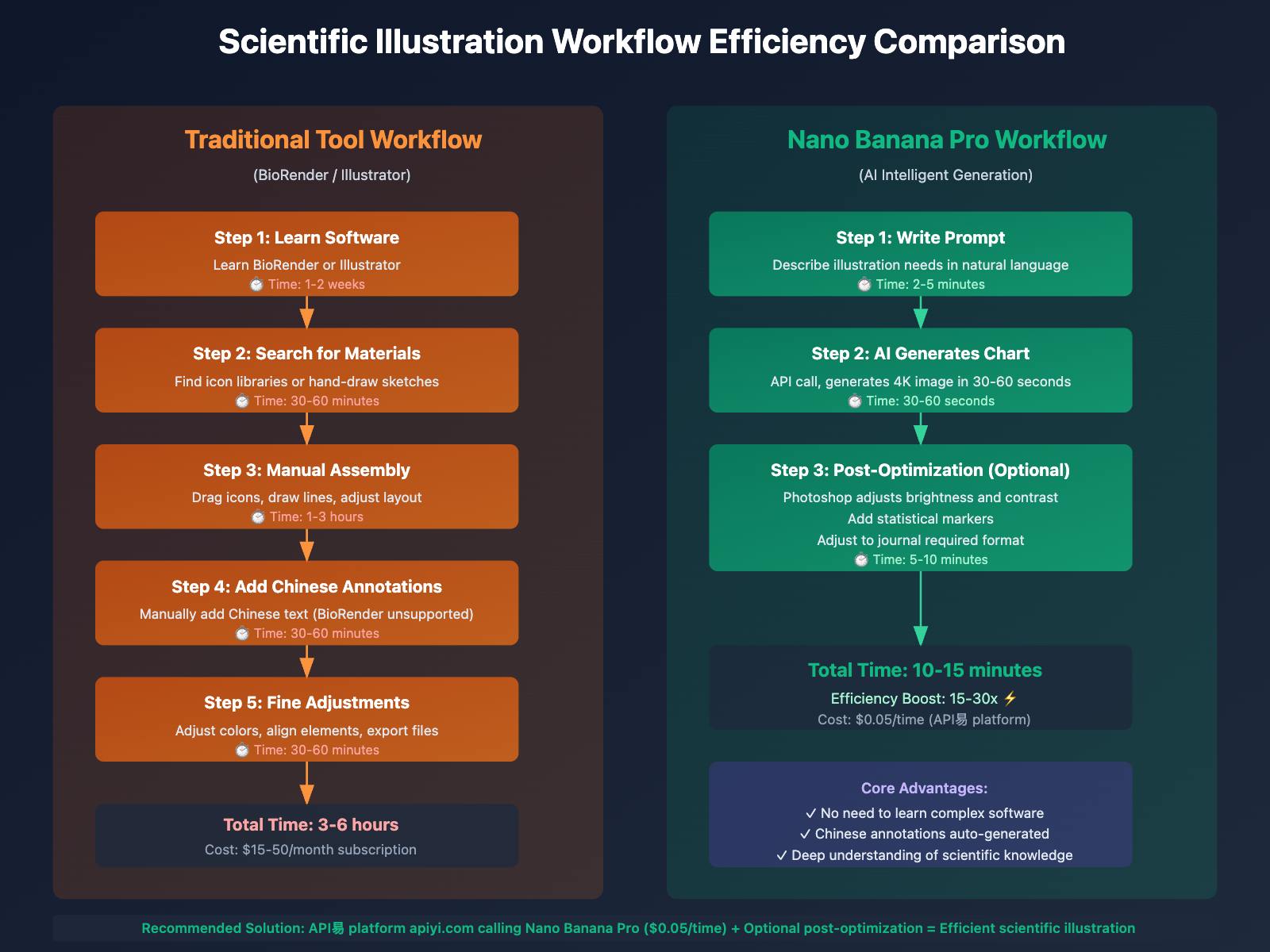
Time Consumption Comparison:
- Pure manual drawing: 2-4 hours
- BioRender assembly: 30-60 minutes
- Nano Banana Pro + post-processing: 5-15 minutes
Quality Comparison:
- Pure manual: Highest (if skills are sufficient)
- BioRender: Medium (limited by preset icons)
- Nano Banana Pro: High (AI adaptive details + post-optimization)
💡 Comprehensive Recommendation: For academic presentations, grant proposals, and preliminary experimental data charts requiring rapid iteration, use Nano Banana Pro generation directly; for final version charts needing submission to top journals, it's recommended to perform appropriate post-optimization after generation to ensure perfection.
Nano Banana Pro vs Traditional Tools: Comprehensive Comparison
Comparison with BioRender
| Dimension | BioRender | Nano Banana Pro |
|---|---|---|
| Pricing | $15/month (student), $49/month (professional) | $0.05/call (API Yi platform) |
| Chinese Support | ❌ Almost none | ✅ Excellent, accurate glyphs |
| Knowledge Understanding | ⚠️ Relies on preset icons | ✅ Deep understanding of scientific concepts |
| Generation Speed | 10-30 minutes (manual assembly) | 30-60 seconds (AI generation) |
| Resolution | ~2000px | 4096px (4K) |
| Flexibility | ⚠️ Limited by templates | ✅ Unlimited possibilities with prompts |
| Learning Curve | Medium | Low (just need to write prompts) |
| Applicable Fields | Primarily life sciences | Universal across all disciplines |
| Copyright | Paid licensing | Generated content commercially usable |
BioRender's Advantage Scenarios:
- Standardized charts requiring strict adherence to existing templates
- Team collaboration in drawing (BioRender has collaboration features)
- Series of charts with extremely high visual consistency requirements
Nano Banana Pro's Advantage Scenarios:
- Innovative, personalized chart designs
- Scientific charts with Chinese annotations
- Rapid prototyping and iteration
- Individual researchers and students with limited budgets
Comparison with Adobe Illustrator
| Dimension | Adobe Illustrator | Nano Banana Pro |
|---|---|---|
| Professional Level | ✅ Industry standard | ✅ AI-assisted professional grade |
| Learning Difficulty | ❌ High, requires long-term learning | ✅ Low, natural language suffices |
| Production Time | 2-4 hours/image | 1-5 minutes/image |
| Vector Output | ✅ Native vector | ⚠️ Bitmap (can be vectorized later) |
| Precise Control | ✅ Highest | ⚠️ Depends on prompt quality |
| Scientific Knowledge | ❌ User designs independently | ✅ AI understands scientific concepts |
| Batch Generation | ❌ Individual manual drawing | ✅ Scriptable batch calling |
Combination Usage Recommendations:
- Generate high-quality base images (4K PNG) with Nano Banana Pro
- Use Illustrator for fine-tuning and vectorization
- Finally export formats meeting journal requirements
This combined workflow balances efficiency and quality, representing current best practices in scientific illustration.
Comparison with Other AI Drawing Tools
| Dimension | Midjourney | DALL-E 3 | Stable Diffusion | Nano Banana Pro |
|---|---|---|---|---|
| Chinese Support | ❌ Poor | ⚠️ Fair | ❌ Poor | ✅ Excellent |
| Scientific Accuracy | ❌ Low | ⚠️ Medium | ❌ Low | ✅ High |
| Knowledge Understanding | ❌ General model | ⚠️ Partial understanding | ❌ General model | ✅ Knowledge-enhanced |
| 4K Output | ⚠️ Requires upscale | ✅ Native | ⚠️ Requires extra processing | ✅ Native 4K |
| Price (API) | ~$0.08/image | ~$0.04/image | Open source free/paid hosting | $0.05/image (API Yi) |
| Academic Standards | ❌ Artistic | ⚠️ Requires guidance | ❌ Artistic | ✅ Automatically compliant |
Core Differences:
- Midjourney/SD: Suitable for artistic creation, not for scientific illustration
- DALL-E 3: General image generation, insufficient scientific detail rigor
- Nano Banana Pro: Optimized for knowledge-intensive tasks, most suitable for scientific scenarios
💡 Selection Advice: For scientific illustration tasks, Nano Banana Pro is currently the preferred solution among AI tools. Recommended to call through the API Yi apiyi.com platform, fair pricing ($0.05/call), high stability, unlimited concurrency, suitable for batch generation and rapid iteration.
Practical Application Cases: From Prompts to Images
Case 1: Cell Apoptosis Signaling Pathway Diagram
Research Need:
Draw a signaling pathway diagram for a paper on tumor cell apoptosis mechanisms, showing the convergence of extrinsic and intrinsic apoptosis pathways.
Prompt:
Draw a cell apoptosis signaling pathway diagram showing:

Extrinsic pathway (left side):
- Death ligands (FasL, TNF-α)
- Death receptors (Fas, TNFR1)
- Intracellular death domain (FADD)
- Caspase-8 activation

Intrinsic pathway (right side):
- Mitochondria
- Pro-apoptotic proteins (Bax, Bak)
- Cytochrome C release
- Apoptosome formation
- Caspase-9 activation

Convergence point (center):
- Caspase-3 activation
- DNA fragmentation
- Cell apoptosis

Visual style:
- Clean flowchart style
- Blue for normal state, red for activated state
- Clear arrows indicating signal flow
- Chinese and English labels (e.g., "线粒体 Mitochondria")
- 4K resolution, suitable for printing

Reference the illustration style of Cell Death & Differentiation journal
Generated Result Characteristics:
- ✅ Two pathways clearly separated, convergence point明确
- ✅ Accurate protein names (Caspase, FADD, Bax, etc.)
- ✅ Clear Chinese labels, no garbled text
- ✅ Color scheme complies with academic standards
- ✅ Suitable for direct use in paper submission or academic presentations
Post-processing (5 minutes):
- Adjust overall brightness and contrast in Photoshop
- Add subfigure labels (a, b, c)
- Add statistical significance markers
- Export as 300 DPI TIFF format
Case 2: Experimental Flowchart (Primarily Chinese)
Research Need:
Draw an experimental technical roadmap for a National Natural Science Foundation application, primarily in Chinese, clearly showing research approach.
Prompt:
Draw a research project experimental flowchart including the following steps:

Phase 1: Sample Collection and Processing
- Clinical sample collection (tumor tissue, normal tissue)
- RNA extraction and quality control
- Library construction

Phase 2: High-throughput Sequencing
- Transcriptome sequencing (RNA-seq)
- Data quality control and alignment
- Differential gene screening

Phase 3: Bioinformatics Analysis
- GO function enrichment analysis
- KEGG pathway enrichment analysis
- Protein-protein interaction network construction

Phase 4: Experimental Validation
- qRT-PCR validation
- Western Blot validation
- Cell function experiments

Visual requirements:
- Use vertical flowchart layout, top to bottom
- Four phases distinguished by different colors (blue → green → orange → red gradient)
- Each phase contains 3-4 specific steps
- Steps connected by thick arrows
- All labels in Chinese, font in bold, with semi-transparent white background
- Overall style professional and clear, suitable for grant applications
- 4K resolution
Generated Result Characteristics:
- ✅ Four phases clearly hierarchical, natural color gradient
- ✅ Accurate Chinese technical terms (transcriptome sequencing, KEGG pathway, etc.)
- ✅ Clear process logic, consistent with research approach
- ✅ Professional visual appearance, suitable for grant review experts
Case 3: Multi-panel Composite Figure (Nature Style)
Research Need:
Prepare a composite figure with multiple subfigures for Nature Communications submission.
Strategy: Generate individual subfigures separately, then combine
Subfigure A: Immunofluorescence Staining Image (Simulated)
Draw a cell immunofluorescence staining diagram:
- Nuclear staining (DAPI, blue)
- Target protein staining (FITC, green)
- Cytoskeleton staining (Phalloidin, red)
- Merged image

Use microscopy imaging style, black background,
clear fluorescence channels, label channel names,
reference Nature journal immunofluorescence image style
Subfigure B: Bar Chart (Quantitative Analysis)
Draw a bar chart comparing three groups of data:
- X-axis: Control, Treatment Group A, Treatment Group B
- Y-axis: Relative Protein Expression (Relative Expression)
- Bar colors: light gray, light blue, dark blue
- Error bars (standard deviation)
- Significance markers (** indicates p<0.01)

Style: clean, professional, compliant with Nature standards,
use Arial font, high-contrast color scheme
Subfigure C: Signaling Pathway Diagram
(Use simplified version of Case 1 prompt)
Subfigure D: Schematic Diagram (Summary)
Draw a conceptual schematic diagram summarizing research findings:
- Normal cells (left): normal signaling pathway
- Tumor cells (right): abnormally activated signaling pathway
- Drug intervention (middle arrow): restore normal signaling
- Use simple icons and arrows
- Chinese and English labels
- Reference Nature cover artistic style
Combination Process:
- Generate four subfigures separately (4 API calls, $0.20 total cost)
- Combine into 2×2 panel in Photoshop
- Add subfigure labels (a, b, c, d)
- Unify color scheme and labeling style
- Export final figure
Total Time: 10-15 minutes (vs. traditional method 4-6 hours)
🎯 Technical Advice: For complex figures requiring multi-panel composition, it's recommended to first quickly generate individual subfigures with Nano Banana Pro, verify overall layout and visual effects, then perform fine-tuning. The API Yi apiyi.com platform has unlimited concurrency, allowing simultaneous generation of multiple subfigures, further improving efficiency.
Best Practices Guide
Golden Rules for Prompt Writing
Rule 1: Hierarchical Description
- First describe the overall structure and layout
- Then describe specific elements and details
- Finally specify visual style and format requirements
Rule 2: Use Professional Terminology
- Avoid "draw a cell" → Use "create a eukaryotic cell structure schematic diagram"
- Avoid "arrow" → Use "signal transduction directional indicator arrow"
- Avoid "color" → Use "color scheme: blue #3b82f6 represents…"
Rule 3: Reference Authoritative Sources
- Specify journal style: Nature, Science, Cell
- Specify textbook style: Campbell Biology, Lehninger Biochemistry
- Specify atlas style: Gray's Anatomy, Netter's Atlas of Human Anatomy
Rule 4: Specify Technical Specifications
- Resolution: 4K (4096×4096) or specify DPI
- Color mode: RGB (web) or CMYK (print)
- File format: PNG (default)
- Annotation language: Chinese, English, or bilingual
Quality Control Checklist
Before using generated diagrams, perform the following checks:
Scientific Accuracy ✓
- Biological structural relationships are correct (e.g., organelle positions, signaling pathway directions)
- Chemical formulas and molecular structures are accurate
- Physical principles and experimental setups conform to reality
- Data visualization values and proportions are correct
Visual Standards ✓
- Resolution meets journal requirements (300 DPI+)
- Size conforms to single/double column specifications
- Color scheme is colorblind-friendly
- Fonts are uniform and clearly readable
Annotation Completeness ✓
- All key elements are labeled
- Chinese terminology translations are accurate
- Legend descriptions are complete
- Scale bars, axes, and units are clear
Format Compatibility ✓
- File format meets submission requirements
- File size is within allowed limits
- Color mode is correct (RGB/CMYK)
- Editability (if post-processing adjustments needed)
Common Errors and Solutions
Error 1: Inaccurate Chinese Character Rendering
- Cause: Prompt too brief or using English to describe Chinese content
- Solution: Explicitly request "use standard simplified Chinese, Heiti or Microsoft YaHei font"
Error 2: Inaccurate Scientific Details
- Cause: Prompt lacks professional terminology and structural description
- Solution: Use precise professional terms, provide references or images when necessary
Error 3: Visual Style Doesn't Meet Journal Requirements
- Cause: Target journal or style reference not specified
- Solution: Explicitly state "reference Nature journal illustration style"
Error 4: Insufficient Resolution
- Cause: Output resolution not specified
- Solution: Always request "4K resolution (4096×4096), 300 DPI or higher"
💰 Cost Optimization: Due to the extremely low pricing on the API易 apiyi.com platform ($0.05/generation), when encountering issues, don't hesitate—regenerate and optimize your prompt. Usually 2-3 iterations achieve satisfactory results, with a total cost of only $0.10-0.15, far less than the time cost of manual image editing.
Automation Scripts for Batch Generation
For scenarios requiring many similar diagrams (such as multiple time points in an experiment or comparison charts of multiple samples), you can use Python scripts for automated API calls.
Batch Generation Example Script:
import requests
import json

# Configure API易 platform
API_KEY = "YOUR_APIYI_API_KEY"
API_URL = "https://api.apiyi.com/v1/images/generate"

# Base prompt template
base_prompt_template = """
Draw a schematic diagram of the {phase} phase of the cell cycle:
- Cell morphology: {morphology}
- Chromosome state: {chromosome_state}
- Key proteins: {key_proteins}

Use cell biology textbook style, clear Chinese annotations, 4K resolution
"""

# Parameters for different cell cycle phases
phases = [
    {
        "phase": "G1",
        "morphology": "Cell growth, volume increase",
        "chromosome_state": "Chromatin loosely packed",
        "key_proteins": "Cyclin D, CDK4/6"
    },
    {
        "phase": "S",
        "morphology": "DNA synthesis",
        "chromosome_state": "Chromatin partially replicated",
        "key_proteins": "Cyclin E, CDK2"
    },
    {
        "phase": "G2",
        "morphology": "Preparing for division",
        "chromosome_state": "Chromatin condensation",
        "key_proteins": "Cyclin A, CDK1"
    },
    {
        "phase": "M",
        "morphology": "Mitosis",
        "chromosome_state": "Chromosomes highly condensed, aligned at metaphase plate",
        "key_proteins": "Cyclin B, CDK1"
    }
]

# Batch generation
for i, phase_data in enumerate(phases):
    # Generate prompt
    prompt = base_prompt_template.format(**phase_data)

    # Call API
    response = requests.post(
        API_URL,
        headers={
            "Authorization": f"Bearer {API_KEY}",
            "Content-Type": "application/json"
        },
        json={
            "model": "gemini-3-pro-image-preview",
            "prompt": prompt,
            "size": "4096x4096",
            "quality": "hd"
        }
    )

    # Save image
    result = response.json()
    image_url = result['data'][0]['url']
    image_data = requests.get(image_url).content

    filename = f"cell_cycle_{phase_data['phase']}.png"
    with open(filename, "wb") as f:
        f.write(image_data)

    print(f"Generated: {filename}")

print("All images generated successfully!")
print(f"Total cost: ${len(phases) * 0.05}")
Execution Results:
- 4 cell cycle diagrams generated
- Total time: approximately 2-3 minutes
- Total cost: $0.20
- All diagrams have uniform visual style, convenient for combined use
Frequently Asked Questions
Can diagrams generated by Nano Banana Pro be used for paper submission?
Yes, but note the following points:
-
Scientific Accuracy Verification:
- AI-generated diagrams must undergo scientific accuracy validation
- Ensure biological structures, chemical formulas, physical principles, and other details are correct
- Manual corrections required if inaccuracies exist
-
Journal Policy Compliance:
- Some journals require disclosure of AI-assisted tools
- Recommend stating in Methods section: "Schematic diagrams were generated using Gemini 3 Pro Image AI model and manually verified for scientific accuracy"
- Avoid obviously AI-generated characteristics (such as overly artistic styles)
-
Copyright and Ethics:
- Content generated by Nano Banana Pro can be used commercially without copyright issues
- Cannot claim these diagrams are completely original hand-drawn work
- Recommend appropriate post-editing to demonstrate human involvement
🎯 Technical Recommendation: For key figures in top-tier journal submissions, recommend using a "AI generation + manual optimization" hybrid workflow: use Nano Banana Pro to quickly generate base images ($0.05/generation through API易 apiyi.com), then fine-tune with Illustrator to ensure scientific rigor and professionalism.
How to ensure generated diagrams meet scientific standards?
Strategy 1: Use Precise Professional Terminology
- Wrong: "draw a DNA"
- Correct: "draw B-form DNA double helix structure, including major groove, minor groove, base pairing (A-T, G-C), label 5' and 3' ends"
Strategy 2: Reference Authoritative Literature
- Specify in prompt: "Reference DNA structure diagram from Molecular Biology of the Cell (6th edition) Chapter 4"
- Or: "Use style similar to Figure 2 in PMID:12345678 paper"
Strategy 3: Multiple Iteration Validation
- First iteration: Generate draft, check overall structure
- Second iteration: Optimize detail descriptions, correct errors
- Third iteration: Add annotations and specification requirements
- Due to low API易 platform pricing ($0.05/generation), can confidently iterate multiple times
Strategy 4: Expert Review
- After generation, have domain experts review scientific accuracy
- Provide multiple versions for selection when necessary
Why does Nano Banana Pro have such good Chinese support?
Technical Reasons:
-
Multilingual Training Data:
- Gemini 3 Pro trained on text and image pairs in dozens of languages
- Chinese training data includes extensive scientific literature, textbooks, and papers
- Understands semantics and usage of Chinese scientific terminology
-
Cross-lingual Knowledge Transfer:
- Model can accurately map English scientific concepts to Chinese
- Understands correspondences like "mitochondria→线粒体", "ribosome→核糖体"
- Avoids literal and awkward translations
-
Character Rendering Optimization:
- Specifically optimized for complex Chinese character strokes
- Supports common Chinese scientific fonts (Heiti, Songti, Microsoft YaHei)
- Font size, spacing, and layout conform to Chinese reading habits
Comparison with Other Models:
- Midjourney: Primarily English training data, Chinese characters often incorrect
- DALL-E 3: Improved Chinese support, but scientific terminology accuracy inferior to Gemini
- Stable Diffusion: Open-source model, Chinese capabilities depend on specific version
Which academic disciplines is Nano Banana Pro suitable for?
Life Sciences (Best):
- Cell biology, molecular biology, genetics
- Biochemistry, physiology, anatomy
- Immunology, microbiology, ecology
- Advantage: Extensive biological training data, deep understanding
Medicine (Excellent):
- Clinical medicine, basic medicine, pharmacology
- Pathology, imaging, public health
- Advantage: Understands disease mechanisms and clinical workflows
Chemistry (Good):
- Organic chemistry, inorganic chemistry, physical chemistry
- Materials science, polymer chemistry
- Note: Complex chemical formulas may require post-verification
Physics (Good):
- Classical mechanics, electromagnetism, optics
- Quantum mechanics (conceptual diagrams)
- Note: Precision physics apparatus diagrams may not match professional engineering drawings
Engineering & Technology (Fair):
- Mechanical schematics, circuit diagrams
- Architectural structures, process flows
- Limitation: Engineering drawing standards may not be strict enough
Mathematics and Computer Science (Fair):
- Algorithm flowcharts, data structure diagrams
- Network topology diagrams
- Limitation: Mathematical formula rendering inferior to LaTeX
💡 General Recommendation: Nano Banana Pro is best suited for disciplines requiring conceptual diagrams, mechanism charts, and flowcharts. For fields requiring precision measurement and engineering drafting, recommend using in combination with traditional CAD/engineering software.
What are the advantages of calling Nano Banana Pro through the API易 platform?
Pricing Advantage:
- Official price: $0.234/generation (4K image)
- API易 price: $0.05/generation (1K/2K/4K unified)
- Savings percentage: 78% (as low as 20% of official pricing)
- 100 monthly generations only $5 (vs. official $23.4)
Stability Guarantee:
- No concurrency limits, avoiding queuing and overload on official API
- Enterprise-level SLA, 99.9% availability
- Dedicated line acceleration, faster response times
- Long-term stable supply, no quota concerns
Technical Support:
- Fully compatible with official API format
- Provides Python/Node.js/Java sample code
- Dedicated technical support, rapid issue resolution
- Supports batch calls and automated workflows
Use Cases:
- Research teams batch-generating experimental diagrams
- Graduate/doctoral students' thesis illustrations
- Research institutions' grant proposal graphics
- Teaching courseware and science communication graphics
🚀 Quick Start: Visit API易 platform apiyi.com to register an account, obtain an API key, and start calling. Recommend starting with small batches (5-10 generations, $0.25-0.50) to verify results before scaling up.
Can generated diagrams be used directly for patent applications?
Yes, but note special requirements for patent drawings:
Patent Drawing Standards (using Chinese patents as example):
- Drawing size: A4 paper (21 cm × 29.7 cm)
- Lines: Clear black solid lines, uniform thickness
- Annotations: Use Arabic numerals, numbered from 1
- Style: Simple and clear, avoid excessive artistic effects
- Format: PDF or TIFF
Recommendations for Using Nano Banana Pro:
Draw a structural schematic diagram of [invention content] for patent application:
- Use black and white line drawing style, clear black solid lines
- Avoid color and gradients
- Label parts with numbers (1, 2, 3, 4...)
- Simple and professional, conforming to patent drawing standards
- 4K resolution, black and white mode
Post-processing:
- Convert to black and white image
- Adjust line thickness
- Add standardized numeric annotations
- Export to format compliant with patent office requirements
Summary and Outlook
Nano Banana Pro (Gemini 3 Pro Image API), with its first-class illustration quality, outstanding Chinese character reproduction, and deep knowledge understanding capabilities, is transforming traditional scientific illustration workflows. Compared to conventional tools like BioRender and Adobe Illustrator, Nano Banana Pro offers higher efficiency, lower costs, and greater flexibility, making it particularly suitable for research scenarios requiring Chinese annotations and rapid iteration.
Key Advantages Recap:
- First-class illustration quality: 4K ultra-high definition, precise details, professional visuals
- Outstanding Chinese support: Accurate character rendering, proper terminology understanding, natural layout
- Deep knowledge understanding: Comprehends research, understands large models, accurately represents scientific concepts
- Highly competitive pricing: Through APIyi platform, $0.05/generation, as low as 20% of official pricing
- Efficient workflow: 30-60 seconds from prompt to image, 5-15 minutes including post-processing optimization
💡 Overall Recommendation: For scientific illustration tasks, we recommend adopting a hybrid workflow of "Nano Banana Pro (APIyi platform $0.05/generation) + traditional tool post-processing optimization," which combines efficiency, quality, and cost advantages. This approach has been validated by numerous research teams and can reduce illustration time from hours to minutes, significantly boosting research productivity.
As AI technology continues to advance, knowledge-enhanced image generation models like Nano Banana Pro will play increasingly important roles in scientific illustration, educational materials, science communication, and other fields. Mastering these tools will become an essential skill for researchers.
Recommended Action Plan:
- Visit APIyi platform at apiyi.com to register and obtain API keys
- Start practicing prompt writing with simple diagrams
- Progressively attempt complex mechanism diagrams, flowcharts, and multi-panel composite figures
- Build a personal prompt template library to improve efficiency
- Combine with Illustrator/Photoshop for refined post-processing
- Share successful cases and experiences with team members
Through systematic learning and practice, you can master the core techniques of scientific illustration with Nano Banana Pro within 1-2 weeks, significantly improving research output efficiency and dedicating more time to core tasks such as experimental design and data analysis.