Author’s note: Let’s run the numbers for a single 30-second vertical video and see whether the segment beyond the 15-second 768P limit is actually worth it.
When you’re producing vertical short videos and e-commerce creative, you’ll often hit a trade-off: MiniMax-H3 is cheaper per second, but on the APIYI channel it only supports 768P and caps each generation at 15 seconds; MAGI-2 can deliver 30 seconds at 1080P in one go, though its per-second price is more than double.
MAGI-2 was released by Sand.ai at 02:09 Beijing time on 2026-11-25, debuting on the Higgsfield platform and its API. The duration, resolution, and $0.08/second price all come from the official launch post. This article is based on official documentation and public pricing calculations; it doesn’t assign an overall score, nor does it treat vendor benchmarks as conclusions.
Core takeaway: After reading this, you’ll know how a 30-second video is put together on each side, how much the generation fees differ, how many rework rounds would change the outcome, and whether the extra spend buys something you’ll actually use.
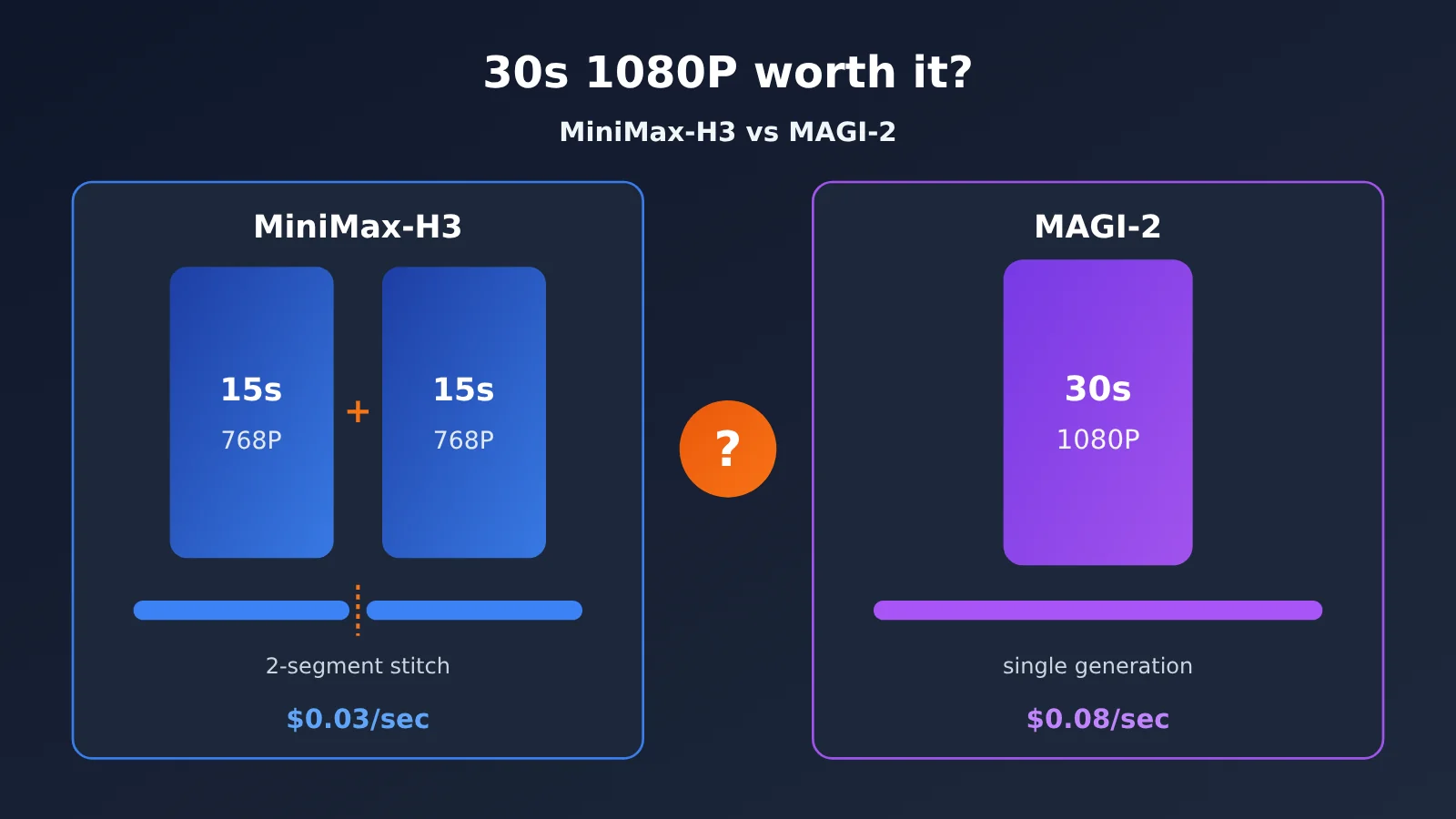
MAGI-2 and MiniMax-H3: the key points
Start with runtime, then worry about delivery resolution. If the final cut is under 15 seconds and 768P will do, H3’s price advantage pays off in full. Only when the deliverable has to be a continuous 30 seconds does MAGI-2 earn its higher price tag.
| Your delivery requirement | Go with | Why |
|---|---|---|
| 4–15 seconds, 768P is acceptable | MiniMax-H3 | Single generation, $0.03/sec on APIYI |
| 30 seconds, but you’re cutting anyway | MiniMax-H3 | Split into two 15-second clips and join them at the cut |
| 30 seconds, continuous action and audio | MAGI-2 | Covers 30 seconds in one pass, one less seam |
| 1080P delivery is a hard requirement | MAGI-2, or a 1080P model available on the platform | H3’s APIYI channel is 768P only |
The “Go with” column isn’t a quality ranking. H3 officially supports up to 2K, ships open weights, and can be self-hosted or called through the API; 768P is the spec of this particular APIYI channel, not the model’s own ceiling.
Testing tip: Grab a real script first and check whether 15 seconds is enough to tell the whole story. APIYI apiyi.com gives new users free trial credits — use them to judge whether H3’s visuals clear your delivery bar.
MAGI-2 vs MiniMax-H3: Five Specs, Compared One by One
| Dimension | MiniMax-H3 (APIYI channel) | MAGI-2 (vendor’s official figures) |
|---|---|---|
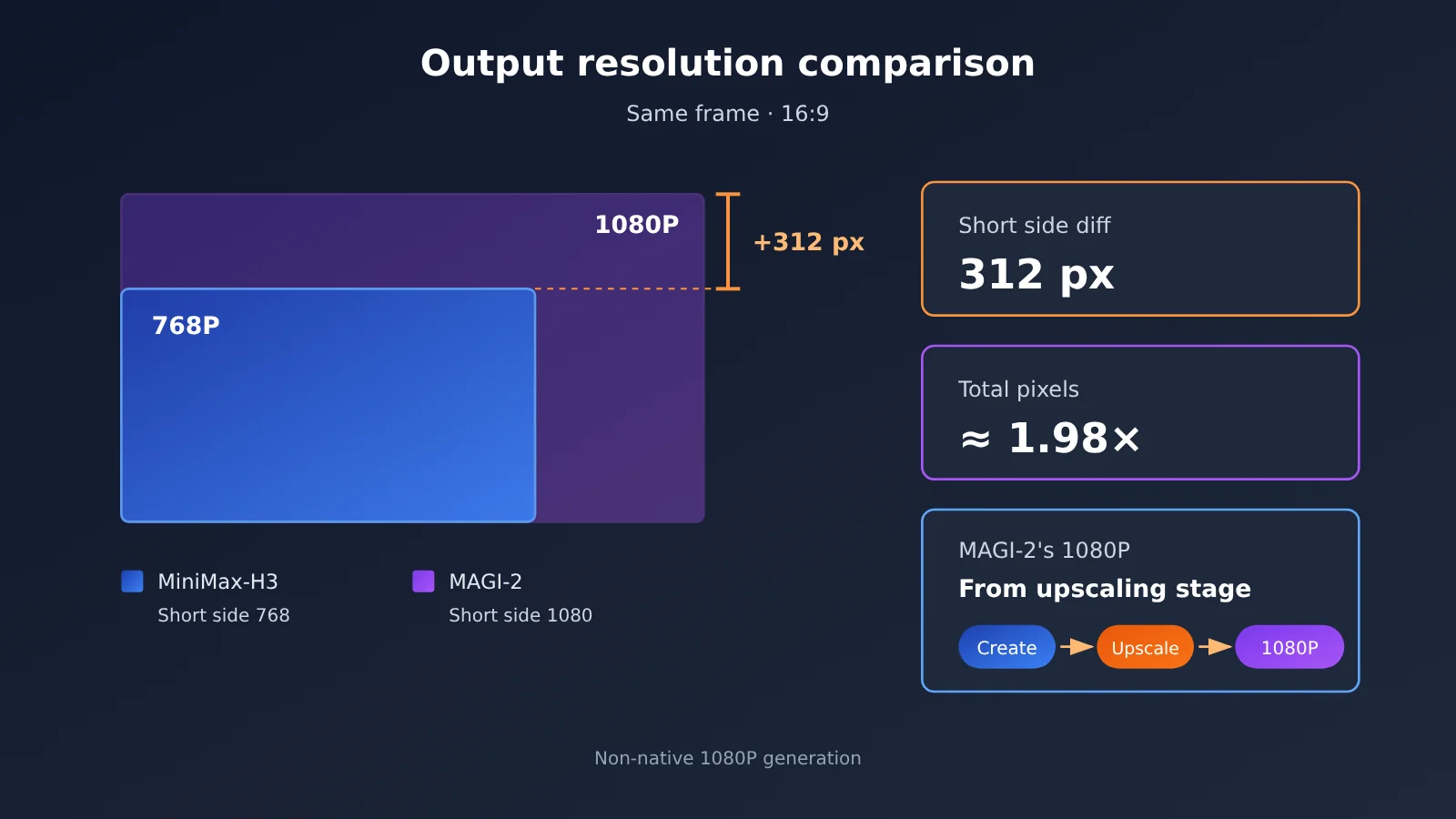
| Resolution | 768P only | Up to 1080p at 25fps, produced by the upscaling stage |
| Duration per generation | 4–15 seconds | Up to 30 seconds |
| Audio | Built-in stereo; the audio track can’t be turned off | A single backbone generates lip-synced dialogue, Foley, ambience, and music |
| Reference assets | Up to 9 images + 3 videos + 3 audio clips | Up to 10 images + 5 videos + 5 audio clips |
| Pricing | $0.03/second on our platform; reference assets cost nothing extra | Launch price $0.08/second |
| Where to use it | APIYI (apiyi.com) and others | Launch channels |
MAGI-2 isn’t listed yet — we’ll get it up as soon as we can. Model IDs and prices are whatever the platform’s model list says.
What MAGI-2’s 1080P Actually Adds
On the short edge, 1080 minus 768 is 312 — the bit people usually round off and call “320 lines.” At the same aspect ratio, that’s about 1.98x the total pixel count. In portrait orientation, those 312 pixels land on the width of the frame, which can affect how legible small print on packaging, product texture, and distant faces are.
That said, Sand.ai’s technical blog states that MAGI-2’s 1080p goes through a latent spatiotemporal upscaler — it’s a product of the upscaling stage, not native 1080p generation. During upscaling the original reference images get re-injected, which the vendor says is meant to improve face consistency for small faces and text clarity in 30-second clips. Whether your footage benefits depends on the shot, though — you can’t judge it from the resolution number alone.
Are MiniMax-H3’s Reference Assets Enough?
H3’s 9 reference images are usually plenty for short videos showing a single product or a single person on camera, and the same endpoint also covers text-to-video and first/last-frame generation. When multiple characters, products, or scenes appear at once, MAGI-2’s 20 asset slots give you more room.
More reference slots don’t automatically mean better consistency. If your video only uses two product shots and one portrait, that difference shouldn’t be a reason to pay more.
Where MAGI-2 and MiniMax-H3 Differ on Sound
Both can carry audio. The real difference shows up at the 30-second length. When H3 stitches segments together you get two separate audio tracks, so the music’s beat, the ambient noise floor, and vocal timbre can all break at the 15-second mark; MAGI-2 covers the whole clip’s audio in a single generation.
If your final cut is going to get a unified soundtrack or post-production voiceover anyway, that advantage shrinks a lot. And while H3’s audio track can’t be turned off in the request, you can still strip it in editing.
How to Put Together a 30-Second Video with MAGI-2 and MiniMax-H3
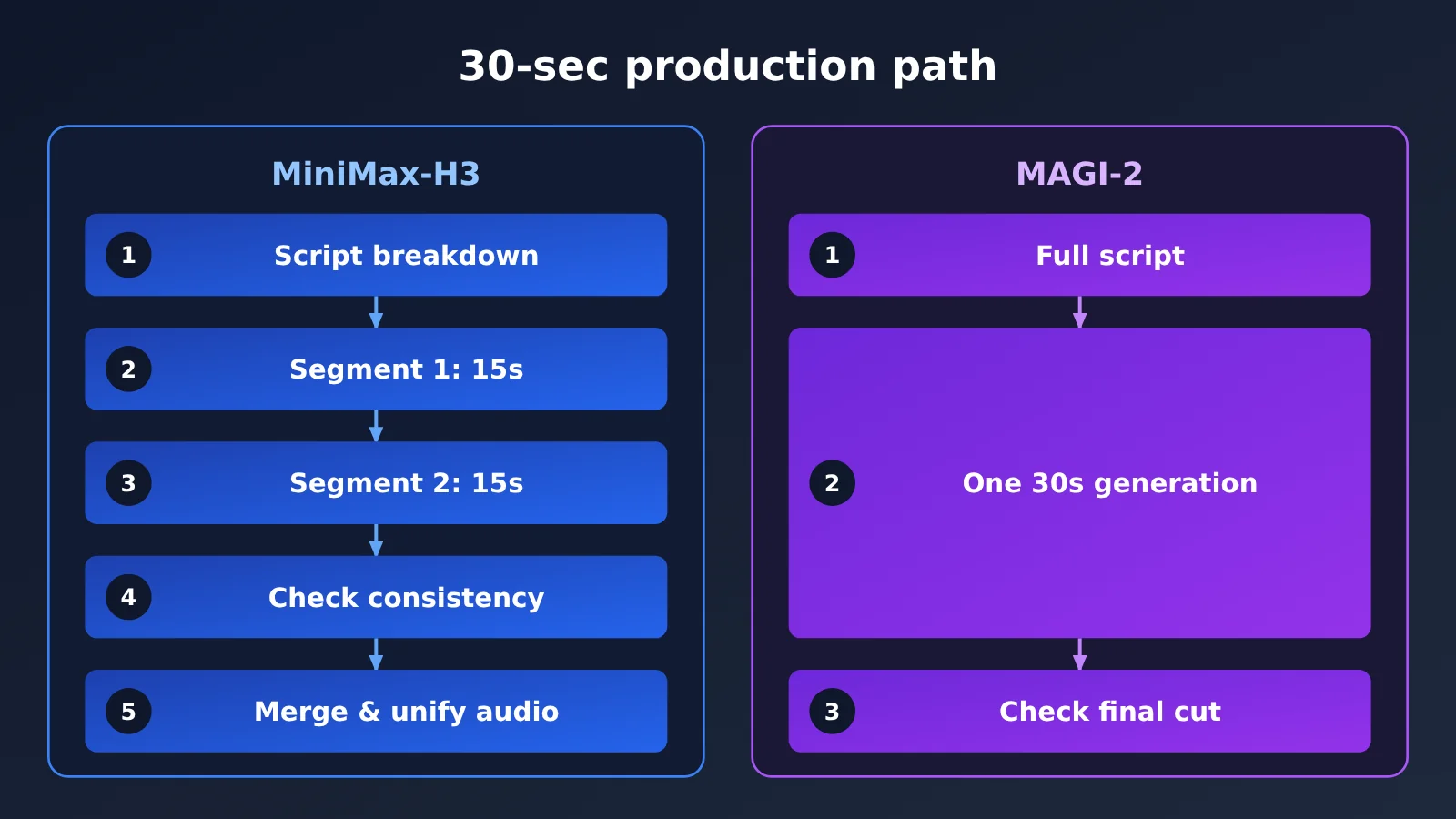
MiniMax-H3: Two 15-Second Segments and a Single Stitch
H3 maxes out at 15 seconds per generation, so a 30-second piece means at least two submissions. The safer approach is to build the cut point into the script instead of letting one continuous action happen to break right at second 15.
- Split the script: The first 15 seconds cover the problem and product reveal; the next 15 cover details and the call to action. Cut at a change in shot size.
- Generate segment one: Lock the character, wardrobe, and product reference images, and get the first segment usable before moving on.
- Generate segment two: Use the same set of reference images. If the action needs to carry over, you can use the last frame of the previous segment for a first/last-frame approach, or use the previous segment as a reference video.
- Check the seam: Compare faces, product color, light direction, and action speed. If something’s off, rerun only the segment that needs fixing.
- Handle audio: Stitch the two visuals together, then unify the music and volume. If necessary, strip the original audio track.
Splitting into two segments has an upside, too: if segment two goes bad, segment one can stay. For e-commerce videos that already move via fast cuts, the seam may not even be an issue.
MAGI-2: One 30-Second Pass in a Single Run
MAGI-2 puts the full 30 seconds into one generation. The official blog says it supports precise timelines and cut-point control — you can specify at which second it cuts to which shot size — and it also supports targeted edits to existing video.
The trade-off is that each failed attempt costs more: a full rerun costs another $2.40. If only part of the result isn’t right, you can consider targeted editing first, but the editing fee wasn’t listed in the release information referenced in this article, so don’t assume it’s free.
The team also acknowledges that extremely fast motion can occasionally have trajectory and continuity issues, and complex soundscapes still leave something to be desired. So “a single submission” doesn’t equal “a single pass.”
How to Calculate the 30-Second Cost of MAGI-2 and MiniMax-H3
MAGI-2, the official list price, and the APIYI site price are three separate ledgers
| Ledger | Unit price | 30-second generation cost | Notes |
|---|---|---|---|
| MAGI-2 per-second price | $0.08/second | $2.40 | Official launch price, one generation |
| H3 vendor API list price | $0.08/second | $2.40 | Converted from the unit price; still requires two segments |
| H3 APIYI site price | $0.03/second | $0.90 | 768P, $0.45 for each of the two segments |
You can’t mix these three rows. In this article, the only comparable official list price you can actually verify is H3’s — for other vendors, we don’t back-calculate list prices from site prices. On 2026-11-24, onvid.ai also listed MAGI-2’s 30-second price at $2.40, based on $0.08/second; the launch partner also cited a $1.44 video, which works out to about 18 seconds at that per-second rate.
When you’re checking model names and prices, go by the model list on APIYI apiyi.com. The endpoint is https://api.apiyi.com/v1 — one token works across every model on the platform. Model IDs are case-sensitive, so write MiniMax-H3, not all lowercase. MAGI-2 isn’t listed yet; we’ll get it up as soon as we can. For model names and prices, always refer to the platform’s model list.
Running MiniMax-H3 a few more times catches up to MAGI-2
When both succeed on the first try, H3 costs $0.90 and MAGI-2 costs $2.40 — a $1.50 difference. What that money buys you is one less stitching pass, one less round of cross-segment consistency checking, and 312 extra pixels on the short side.
| Actual generations | H3 cost | MAGI-2 whole-video generations | MAGI-2 cost |
|---|---|---|---|
| 2 fifteen-second segments, 1 run each | $0.90 | 1 | $2.40 |
| 4 fifteen-second segments total | $1.80 | 2 | $4.80 |
| 5 fifteen-second segments total | $2.25 | 1 | $2.40 |
| 6 fifteen-second segments total | $2.70 | 1 | $2.40 |
This is a cost projection, not a statement about success rates on either side. If MAGI-2 gets it right on the first pass, H3 is still slightly cheaper even at 5 segments and only overtakes at the 6th; if MAGI-2 also needs reruns, the break-even point keeps moving further out.
Then there’s labor. If stitching, color grading, and audio matching take an extra 15 minutes, and your time is worth $6/hour, that comes to exactly $1.50 — which wipes out the first-round difference. For the occasional video, that’s tolerable; for batch delivery, recalculate with your own hourly rate.
MAGI-2 and MiniMax-H3 Scenario Recommendations
When to Choose MiniMax-H3
- Product highlight clips up to 15 seconds: $0.45 per generation, with no need to pay for the unused second half.
- Batch-testing openings: $0.12 for a 4-second clip, great for screening ideas first before making the full version.
- Multi-shot montage: 30 seconds made up of multiple independent shots, so seams can be hidden in normal editing.
- Consistent post-production voiceover: The original audio track will be replaced in the end, so there’s no need to pay extra for continuous audio across the whole segment.
When to Choose MAGI-2
- Continuous talking-head segments: The same person needs to maintain lip-sync, voice, and motion continuity across 30 seconds.
- Continuous action demonstration: For example, from picking up a product to finishing using it—hard cuts in the middle aren’t suitable.
- Many small text elements or small faces: 1080P may deliver clearer details, but you should validate with actual sample footage.
- Reference assets exceed H3’s limit: The higher limit only matters when you genuinely need 10 images, 5 video clips, or 5 audio clips.
Other Comparable Models Currently Available Beyond MAGI-2
If you want to compare 1080P and 30-second options, you don’t have to limit yourself to these two models. The following are all APIYI listed prices. The 30-second cost is prorated from each model’s unit price, except for Seedance, which uses the 30-second price shown on APIYI.
| Model | Key Specs | 30-Second APIYI Cost |
|---|---|---|
oxygen-1.0 |
480p and 768p at the same price, 4–15 seconds per generation, built-in audio track | $0.60, in two segments |
wan3.0-video |
Up to 30 seconds, audio track included by default | $1.764 at 720P, $3.528 at 1080P |
doubao-seedance-2-5-260628 |
4–30 seconds, up to 30 reference images | $8.1761 at 720p |
A single API key can call MiniMax-H3, oxygen-1.0, and wan3.0-video, so you don’t need multiple accounts to compare them—but you’ll still need to confirm each model’s endpoint and parameters separately. Among these, wan3.0-video‘s 1080P price on APIYI is higher than MAGI-2’s launch price, making it suitable for anyone who needs to test 1080P and 30-second output with the same API key right now.
MiniMax-H3 Quick Start: Avoiding Four Call Boundary Pitfalls
Before you call anything, grab a token at APIYI apiyi.com. The general access endpoint is https://api.apiyi.com/v1, but H3 uses a dedicated video path — don’t tack the video path onto /v1.
- Confirm the ID: Enter
MiniMax-H3with the capitalization intact. Don’t swap in the image modelMiniMax-H3-Imageor the text modelMiniMax-M3. - Confirm the endpoint: Use
POST /hailuo/v2/video_generation, not/v1/videos. Onlyoxygen-1.0goes through/v1/videos. - Confirm the specs: Pick 768P and keep the duration between 4 and 15 seconds. A 30-second clip has to be split into two requests — you can’t submit 30 seconds directly.
- Handle the audio track: Don’t pass
generate_audio=false, or you’ll get a 400 back. If you need silence, strip the audio in post. - Deduplicate on your end:
Idempotency-Keydoesn’t take effect. Before submitting, write down your business task number, add a unique constraint combining the task number and segment number, and when the status is unclear, check your records before retrying.
That fifth point is all about cost. H3 bills by request duration, so blindly resending after a network timeout could generate the same 15-second segment twice — an extra $0.45 down the drain. The default group works fine; no separate application needed.
Suggested order: Start by submitting a single 4-second request to verify the path, reference assets, and audio track, then submit two 15-second segments. That way, generation costs during debugging start at $0.12.
MAGI-2 and MiniMax-H3 Decision Guide
Work through these questions in order—you usually won’t need to review every parameter:
- Can the script be cut down to 15 seconds? If so, start with H3.
- Can the part beyond 15 seconds be split into natural shots? If so, use H3 in segments, keeping the flexibility to rerun individual segments.
- Is 1080p a hard requirement from the delivery side? If yes, compare MAGI-2 with the currently available 1080p models; otherwise, validate at 768p first.
- Does manual seam work cost more than $1.50? If it does, MAGI-2’s first-round price difference may pay off, but you also need to factor in its reruns.
When budget is tight, you can use H3 first to validate the script and shots, then hand off only the pieces with high pass rates that truly need a continuous 30 seconds to the long-form model. That way, your 1080p budget goes only to a handful of validated ideas.
MAGI-2 and MiniMax-H3 FAQ
Q1: What is MAGI-2?
MAGI-2 is an AI video model released by Sand.ai. It can generate videos with audio up to 30 seconds and 1080p from text, images, video, and audio. These are the official specifications.
Q2: Is MiniMax-H3 only available for self-deployment?
No. Its weights can be self-deployed, and it can also be accessed directly via API. When using `MiniMax-H3` through APIYI apiyi.com, the default group works, but that channel only supports 768P.
Q3: Can MAGI-2 be invoked through APIYI now?
MAGI-2 isn’t listed yet. We’ll get this model listed as soon as possible; model names and pricing are subject to the platform’s model list. For now, you can use the token for `https://api.apiyi.com/v1` to test the video models currently available, then submit requests to their respective endpoints.
Q4: Is MAGI-2’s 1080P native?
No. According to the official technical blog, 1080p comes from a latent-space spatiotemporal upscaling stage, and the original reference image is re-injected during upscaling. You should validate the image-quality gains against text, faces, and product details.
Q5: How many parameters does MAGI-2’s open-source weights actually have?
Official statements are still inconsistent. The technical blog says 480B total parameters and about 28B active, while the launch post says 400B open-source weights will be released soon; the official team hasn’t explained the discrepancy or provided a timeline or license. orcarouter.ai also flagged this inconsistency on 2026-11-24.
Q6: Does MAGI-2 have third-party benchmarks?
This article doesn’t rely on third-party retests. The official blog self-reports an average Elo of 1150.3 across four tasks on AA Video Arena v2.1, with Preview at 998.5. That number is useful for tracking generational changes within the same family, but it can’t by itself prove that it’s a better fit for your footage than H3.
Q7: What known limitations does MAGI-2 have?
Officially listed limitations include trajectory and continuity issues in extremely fast motion, local motion in medium and long shots of 2D animation being too smooth, and insufficient layering in complex soundscapes. If your script lands squarely in these scenarios, it’s better to validate with short shots first.
MAGI-2 and MiniMax-H3: Key Takeaways
- Duration: H3 maxes out at 15 seconds per run; MAGI-2 at 30 seconds.
- Resolution: The short side differs by 312 pixels; MAGI-2’s 1080p comes from the upscaling stage.
- First-run cost: The 30-second generation fee is $0.90 vs. $2.40.
- Rework threshold: If MAGI-2 passes in one go, H3 only becomes more expensive by the sixth segment.
- Invocation constraints: H3 is only 768p, you can’t turn off the audio track, and duplicate prevention is on you.
- What matters when choosing: If continuity and 1080p are useful to you, the price difference makes sense.
MAGI-2 and MiniMax-H3 Summary
Beyond 15 seconds at 768p, what’s worth paying for is full audio, continuous motion, and a larger output size. If the video already cuts between shots, swaps soundtracks, and plays on a phone in portrait mode, H3’s two-segment approach is usually the better deal. If stitching keeps getting reworked, or the client strictly requires 1080p, then paying the extra $1.50 has a clear justification.
First, run a two-segment script through H3 at APIYI apiyi.com, and record the number of reruns per segment and the stitching labor hours. Then compare those two figures with $2.40. Once you’ve run that math, you’ll have an actionable answer on whether to stretch to 30 seconds at 1080p.
MAGI-2 and MiniMax-H3 References
- Sand.ai technical blog: MAGI-2 specs, the upscaling mechanism, and limitations acknowledged by the official team (November 24, 2026)
- Link:
sand.ai/blog/magi-2
- Link:
- MAGI official launch post: launch pricing, duration, and first-release information
- Link:
x.com/magiai_hq/status/2125290721003680155
- Link:
- Third-party sources: onvid.ai’s pricing summary and orcarouter.ai’s notes on parameter definitions (both dated November 24, 2026)
- Links:
onvid.ai,orcarouter.ai
- Links:
- APIYI model docs: available models and invocation details (checked November 25, 2026)
- Link:
docs.apiyi.com/models
- Link:
Author: APIYI Technical Team
Technical discussion: Feel free to reach out through the APIYI website homepage to talk about video model integration and cost estimation.