Summary: This article shows how, starting from a local input manifest, you can read the complete results from both Batch runs and use
custom_idto identify which records should be ingested, which need a rerun, and which need to be investigated first.
When GPT‑6.2 Sol and Claude Opus 5.5 batches partially fail, in both cases you should check the manifest you saved at submission time, entry by entry, against the custom_ids — and only rerun the entries whose cause is already clear. On the OpenAI side, you need to merge the output file with the error file; on the Claude side, you need to read the entire result stream and then split it by the four result.type values. Results from either provider can arrive out of order, so line numbers can’t be used to correlate business records.
Rerunning is only safe when every expected ID has a clear destination. Generated text still has to pass business validation before it can be ingested; for IDs whose results you can’t find yet, first check the batch, the files, and the download status. If the parameters were wrong, fix the input and produce a new version; if it timed out unprocessed, you can reuse the input version and increment the attempt number.
This article is based on materials verified on 2026-11-25 (Beijing time). Its scope is first-party offline batch processing on OpenAI and Anthropic, and it fits tasks where records are independent of each other — batch classification, structured extraction, document summarization, and so on. The business records and code here are examples; we didn’t run them online. Platform rules come from the official docs linked at the end.
Batch custom_id Reconciliation Knowledge Map
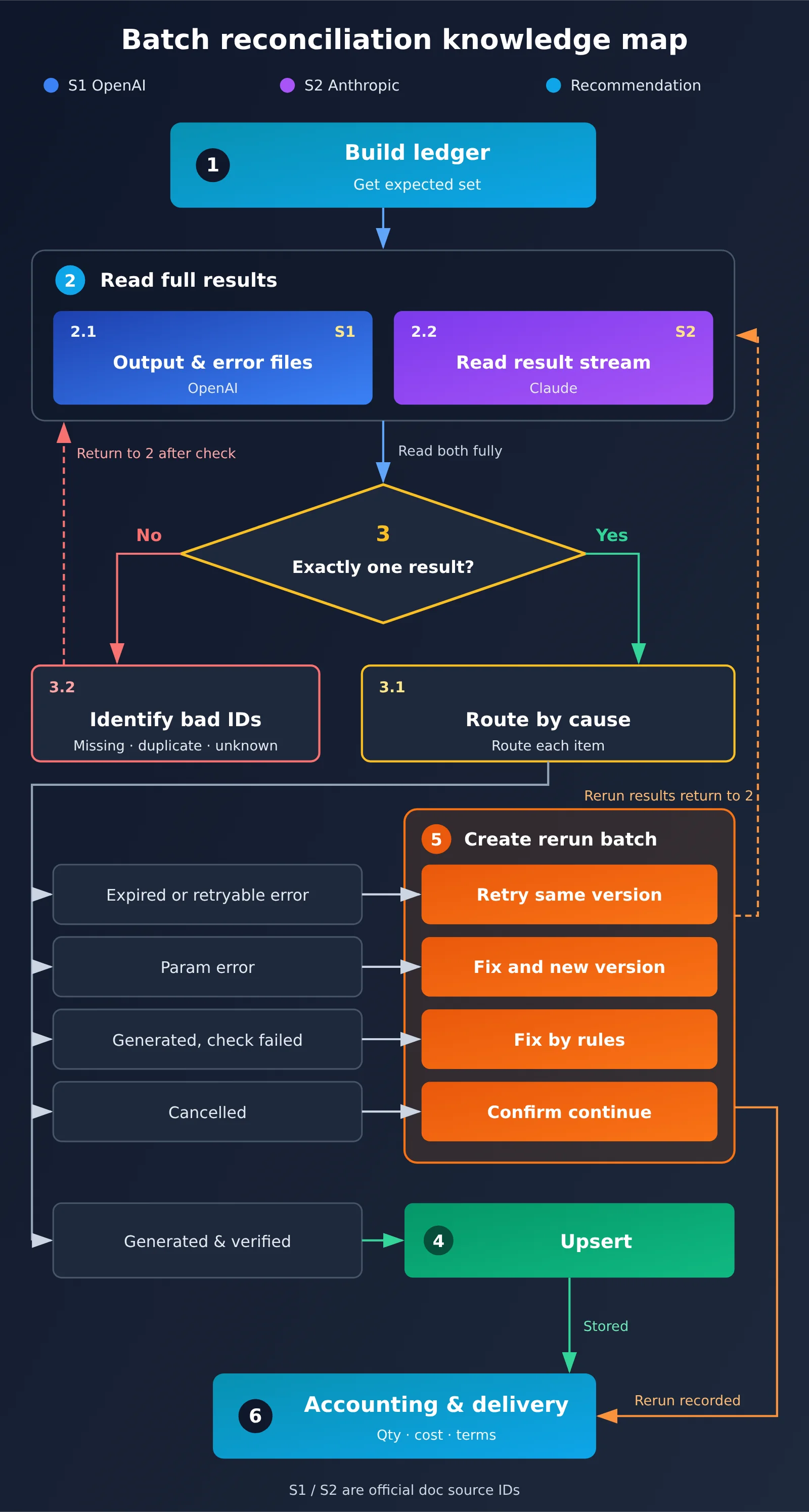
When reading the diagram above, start at “Build the ledger.” Complete results flow into reason-based routing, while anomalous IDs go back to download and batch checks; new results from reruns re-enter reconciliation. Only after both storage and reruns have records can you decide whether delivery is possible.
| No. | Purpose and result | Relationship to subsequent steps |
|---|---|---|
| 1 | Save the submission relationships and get the expected ID set | Provides the reconciliation baseline for 2 and 3 |
| 2 | Read final states and entries from both platforms | Provides attribution evidence for 3 |
| 3 | Route item by item and isolate anomalous data | Determines whether to go to 4 or 5 |
| 4 | Store idempotently and export the various lists | Prevents overwrites caused by repeated downloads |
| 5 | Generate rerun batches and handle creation timeouts | New results return to 2 |
| 6 | Check quantities, cost accounting basis, and delivery conditions | Get the final acceptance result |
For a first-time setup, read from 1 to 6. If you already have failed batches, you can start at 2, but you’ll still need to recover the submission list from 1; if you’re only hitting creation timeouts, take a look at 5.2 first.
To Know: Batch Reconciliation Terms
| Term | Plain explanation |
|---|---|
custom_id |
A correlation ID for a single request, used to trace results back to the submission that produced them |
| Business row key | A stable record identifier in your business system; multiple attempts can share it |
| Input version | A fixed set of inputs and configuration used by one business record |
| Idempotent write | Re-importing the same result still takes effect only once on the business side |
| Terminal state | The state after the platform stops processing — item quality still needs business validation |
1 Build a Batch custom_id Ledger Before You Submit
1.1 Keep Request custom_id Separate From the Business Idempotency Key
Before every submission, record the platform, batch ID, business row key, input version, request digest, attempt number, and custom_id. Fill in the batch ID once creation succeeds, and keep the input file identifier too — that way you can still recover if the creation response gets lost.
For example, item_104_v2_a1 means record 104, second input version, first attempt. For a rerun you’d use item_104_v2_a2; both requests point at the same business row. The request ID is there to locate the execution, while the database enforces a unique constraint on “business row key + input version” so a late-arriving result can’t overwrite output you’ve already accepted.
If two models will process the same record concurrently and each keeps its own result, put the platform or model into the business output key. The code below assumes a single output is accepted per input version — which fits a workflow where one vendor owns the task or you deliberately switch platforms.
1.2 Align the Submission Formats for GPT‑6.2 Sol and Claude Opus 5.5
| Item | OpenAI: GPT‑6.2 Sol | Anthropic: Claude Opus 5.5 |
|---|---|---|
| Model value | gpt-6.2-sol |
claude-opus-5-5 |
| Input | Line-by-line JSONL, uploaded with purpose batch |
A requests array inside JSON |
| Per-item structure | custom_id, method, url, body |
custom_id, params |
| Create endpoint | POST /v1/batches |
POST /v1/messages/batches |
| Item constraints | The row-level /v1/responses must match the batch endpoint |
A batch doesn’t support stream or Fast mode’s speed |
| ID requirements | Unique per line | Unique per item; 1–64 English letters, digits, hyphens, or underscores |
For OpenAI, fill in the current completion window as 24h. The endpoint grid on the model page uses the singular form, but creation and polling should use the plural /v1/batches from the dedicated API reference.[S1][S3] Claude’s results can be downloaded as a stream — that’s a separate matter from requests inside a batch not being allowed to set stream.[S2]
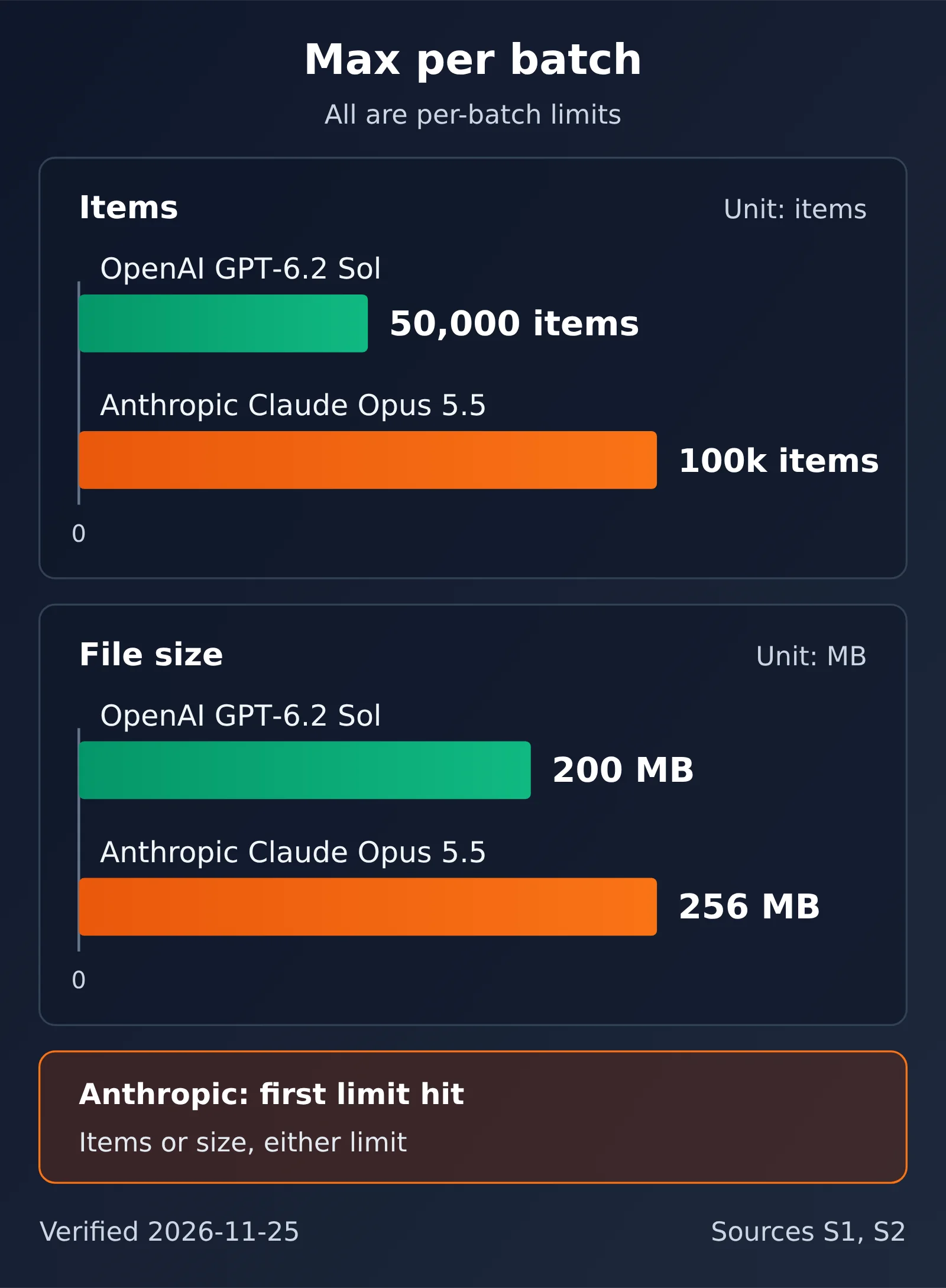
The two subplots compare per-batch capacity: OpenAI allows 50,000 items and 200 MB, while Claude allows 100,000 items or 256 MB. A cross-platform adapter can use short IDs that satisfy Claude’s rules and set separate slice limits for each queue; if you insist on sharing a single slice, you’ll need to satisfy both the smaller item count and the smaller file size. More capacity doesn’t mean any single task runs faster or produces better quality.
2 Fully Reading the Batch Results for GPT‑6.2 Sol and Claude Opus 5.5
2.1 OpenAI Batch: Merging Output and Error Files
An OpenAI batch object’s status can end up in completed, expired, cancelled, or failed. Once the batch has stopped, check output_file_id and error_file_id, download every file that has a value, and then parse them line by line. If batch input validation failed, use the batch object’s error details to locate the offending input lines.
The output line’s response.status_code and response.body give you the HTTP result and the model body, and you also need to check the body status of the corresponding endpoint. Expired entries show up in the error file with error.code: "batch_expired", but requests that did complete can still be recovered from the output file. A cancelled batch may also hold partial results, so don’t skip the download just because you see cancelled. [S1]
2.2 Claude Batch: Reading the Four Kinds of Item Results
Once a Claude batch’s processing_status is ended, you can use results_url, or read results line by line with the official SDK in the same workspace by batch ID. Each item’s result.type has one of four values: succeeded, errored, canceled, expired.
A successful item carries result.message, and downstream still needs to check stop_reason, the content blocks, and its own data constraints. If the message stopped because of max_tokens, or is missing required fields, it may have been generated successfully yet still not qualify as a valid business result. Errored items are attributed via result.error.error.type, and for invalid_request_error you should fix the parameters first. [S2]
2.3 Retention Periods for Batch Results
| Platform | Retention period start | Default or fixed period | Adjustable range |
|---|---|---|---|
| OpenAI output and error files | File creation time | 30 days by default | output_expires_after can be set to 1 hour–30 days |
| Claude batch results | The batch’s created_at |
Downloadable for 29 days | This document does not disclose an adjustment method |
After downloading and validating, handle the short-term working copy according to your data management requirements. If you can’t find a file, check in order whether it has expired, whether you’re looking in the wrong workspace, and whether you’ve missed the other file — don’t mistake a download problem for the model not having run.
3 Route failed items with Batch custom_id
3.1 Choose rerun actions based on evidence
| Evidence | Reconciliation classification | Next step |
|---|---|---|
| Body text generated and business validation passed | Ingested | Lock the current input version |
OpenAI batch_expired or Claude expired |
Expired, pending rerun | Reuse the input version and create a new attempt |
| Confirmed retryable service error | Service error, pending rerun | Retry a controlled number of times |
| Invalid parameters | Pending correction | Fix and create a new input version |
| Body text generated but business validation failed | Pending business handling | Decide whether to change the prompt, output budget, or handle it manually |
| Item canceled | Pending confirmation | Confirm with the business side before deciding whether to rerun |
| Missing, duplicate, contradictory, or unexplainable | Pending investigation | Check the source files, counts, and batches |
The two platforms describe expiration differently. Claude’s expired explicitly means the request was not delivered to the model within 24 hours, while canceled means it was not delivered before cancellation. When handling OpenAI, rely on the actual output and error files; don’t apply Claude’s item semantics directly.
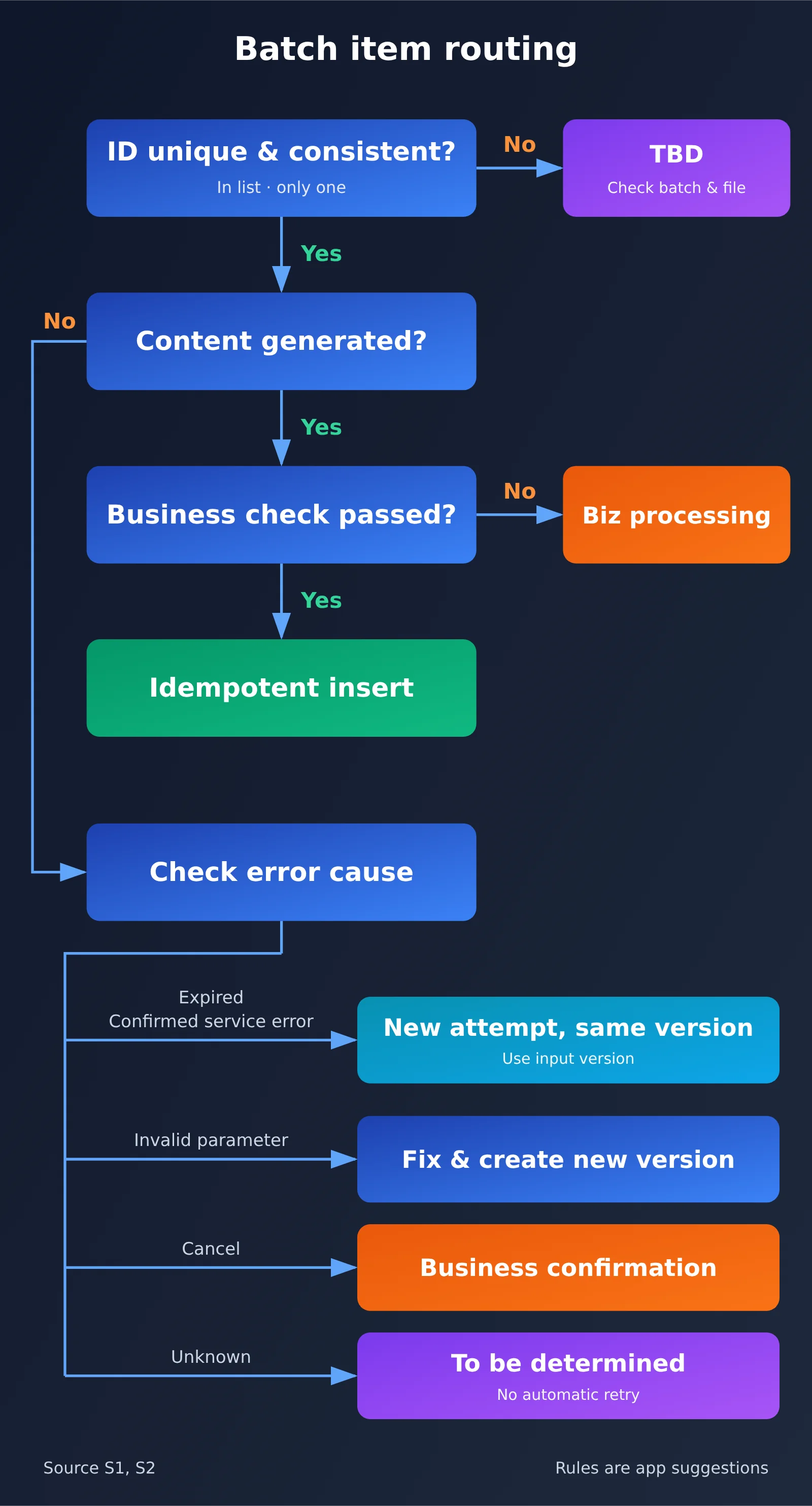
The routing diagram separates “whether it was generated” and “whether it passed validation” into two decisions. Only expiration and confirmed retryable service errors can directly form a new attempt with the same version; parameter errors should be fixed first, and unknown errors should be investigated first.
3.2 Reconciliation example with six Batch records
Suppose the manifest has six fictitious records, and the processing results are as follows:
- Records one and two generate body text and pass validation; write them to the business table and lock the current version.
- Record three is not processed because the window ended; keep the input version and generate a new
custom_id. - Record four returns invalid parameters; after fixing the configuration, create a new version and re-enter the queue.
- Record five generates body text but is missing key fields; save the failure reason and decide whether to fix the prompt or increase the output budget.
- Record six exists in the ledger but is not found in the results; check the job, file counts, batch it belongs to, and download status.
This reconciliation yields “2 accepted, 3 routed, 1 pending investigation,” for a total of six records. Until record six is investigated, keep it on the exception list to prevent resubmitting a task that is already complete but was missed during import.
4 Idempotently Import Batch Results and Generate a Manifest
4.1 Verify custom_id with Python
The minimal offline example below uses SQLite and runs in an environment without an API key. It commits item state and business output in a single transaction, and unknown errors stay in unresolved. The example assumes the input is a batch of results that were fully read and successfully parsed; production code should also log the raw lines that failed to parse separately.
import json
import sqlite3
from collections import defaultdict

SCHEMA = """
CREATE TABLE attempts (
    platform TEXT, batch_id TEXT, custom_id TEXT,
    row_key TEXT, input_version INTEGER,
    state TEXT DEFAULT 'submitted', reason TEXT,
    PRIMARY KEY (platform, batch_id, custom_id)
);
CREATE TABLE outputs (
    row_key TEXT, input_version INTEGER, payload TEXT,
    PRIMARY KEY (row_key, input_version)
);
"""

# Fill in the confirmed retryable types per the current official error docs and business policy
RETRYABLE_CODES = set()


def classify(platform, row):
    if platform == "openai":
        error = row.get("error") or {}
        if error:
            code = error.get("code", "unknown_error")
            if code == "batch_expired" or code in RETRYABLE_CODES:
                return "retry", code, None
            return "unresolved", code, None
        response = row.get("response") or {}
        status = response.get("status_code")
        if status == 200:
            return "generated", "", response.get("body")
        if status == 400:
            return "fix_input", "http_400", None  # apply policy
        return "unresolved", f"http_{status}", None

    if platform == "claude":
        result = row.get("result") or {}
        kind = result.get("type")
        if kind == "succeeded":
            return "generated", "", result.get("message")
        if kind == "expired":
            return "retry", kind, None
        if kind == "canceled":
            return "needs_decision", kind, None
        if kind == "errored":
            outer = result.get("error") or {}
            code = (outer.get("error") or {}).get("type", "unknown_error")
            if code == "invalid_request_error":
                return "fix_input", code, None
            if code in RETRYABLE_CODES:
                return "retry", code, None
            return "unresolved", code, None
        return "unresolved", "unknown_result", None

    raise ValueError(f"unsupported platform: {platform}")


def reconcile(db, platform, batch_id, rows, validate):
    grouped, anomalies = defaultdict(list), []
    expected = {
        cid: (row_key, version, state)
        for cid, row_key, version, state in db.execute(
            "SELECT custom_id,row_key,input_version,state FROM attempts "
            "WHERE platform=? AND batch_id=?", (platform, batch_id))
    }
    for row in rows:
        cid = row.get("custom_id")
        if cid in expected:
            grouped[cid].append(row)
        else:
            anomalies.append((cid, "unknown_id"))

    with db:  # commit output together with import state
        for cid, (row_key, version, old_state) in expected.items():
            group = grouped.get(cid, [])
            if len(group) > 1:
                anomalies.append((cid, "duplicate_id"))
            if old_state not in ("submitted", "unresolved"):
                continue  # keep the existing conclusion on repeated loads
            if len(group) != 1:
                state = "unresolved"
                reason = "missing_result" if not group else "duplicate_id"
                payload = None
            else:
                state, reason, payload = classify(platform, group[0])
            if state == "generated":
                if validate(platform, payload):
                    cur = db.execute(
                        "INSERT OR IGNORE INTO outputs VALUES (?,?,?)",
                        (row_key, version,
                         json.dumps(payload, ensure_ascii=False)))
                    state = "accepted" if cur.rowcount else "already_done"
                else:
                    state, reason = "needs_review", "validation_failed"
            db.execute(
                "UPDATE attempts SET state=?, reason=? "
                "WHERE platform=? AND batch_id=? AND custom_id=?",
                (state, reason, platform, batch_id, cid))
    return anomalies


def validate(platform, payload):
    if not payload:
        return False
    if platform == "openai":
        return payload.get("status") == "completed"
    return (payload.get("stop_reason") == "end_turn"
            and bool(payload.get("content")))
In real use, extend validate with your own field, type, and content constraints. Merge the two JSONL files before the OpenAI call; for Claude, you can convert the result stream into a dictionary of the same shape and pass it in. For large files, load them in batches through a staging table instead of putting everything in memory like the example does.
4.2 Validate Idempotency with a Simulated Batch
You can append the following code after the example. It loads the four results from both providers twice—in reverse or shuffled order—and expects two successful outputs, one expired item to retry, and one item whose parameters need fixing.
db = sqlite3.connect(":memory:")
db.executescript(SCHEMA)

openai_rows = [
    {"custom_id": "item_2_v1_a1", "error": {"code": "batch_expired"}},
    {"custom_id": "item_1_v1_a1", "response": {
        "status_code": 200, "body": {"status": "completed"}}},
]
claude_rows = [
    {"custom_id": "item_4_v1_a1", "result": {
        "type": "errored", "error": {
            "error": {"type": "invalid_request_error"}}}},
    {"custom_id": "item_3_v1_a1", "result": {
        "type": "succeeded", "message": {
            "stop_reason": "end_turn",
            "content": [{"type": "text", "text": "ok"}]}}},
]

for n, platform in [(1, "openai"), (2, "openai"),
                    (3, "claude"), (4, "claude")]:
    db.execute(
        "INSERT INTO attempts(platform,batch_id,custom_id,row_key,"
        "input_version) VALUES (?,?,?,?,?)",
        (platform, f"{platform}_b1", f"item_{n}_v1_a1", f"item_{n}", 1))
db.commit()

for _ in range(2):
    assert reconcile(db, "openai", "openai_b1", openai_rows, validate) == []
    assert reconcile(db, "claude", "claude_b1", claude_rows, validate) == []

states = dict(db.execute("SELECT custom_id,state FROM attempts"))
assert states == {
    "item_1_v1_a1": "accepted", "item_2_v1_a1": "retry",
    "item_3_v1_a1": "accepted", "item_4_v1_a1": "fix_input",
}
assert db.execute("SELECT COUNT(*) FROM outputs").fetchone()[0] == 2
The manifest generator then reads the retry entries and assigns them incrementing attempt numbers; fix_input entries wait for a new input version. When creating backfill records, also enforce a unique constraint on “business row key + input version + attempt number” so two scheduler processes can’t create duplicate entries.
5 Creating a Batch Backfill to Prevent Duplicate Submissions
5.1 Split Backfill Batches by Platform Limits
Beyond per-batch capacity, OpenAI also has a queued input token quota calculated per model, as well as a limit of up to 2,000 batches created per hour. Batches share that quota with background requests that use a 2-hour or 8-hour completion window, while the regular standard tier uses a separate set of limits. [S1] So when splitting backfill batches, you need to consider both the item count and the current queued input volume, along with your business deadline.
It’s a good idea to queue items with parameter errors separately from items approaching their deadline. For the former, first validate the configuration with a small set of corrected inputs; for the latter, submit gradually based on remaining quota, leaving time to retrieve results and handle exceptions. Save the batch ID for every new batch, and link the original failed items to the new attempt.
5.2 Check First After a Batch Creation Timeout
A client-side timeout could mean the request failed, or it could mean the platform accepted the job but the response was lost. First check against the saved input file identifier, job record, or project batch list, and confirm the status before deciding whether to create a replacement. Setting a single active execution record for the same input manifest can prevent automatic retries from concurrently creating two batches.
If OpenAI returns an input validation failure, fix the file format or the parameters on the affected line; entries already recorded in the ledger remain protected. Claude’s documentation states that a single failed item doesn’t affect the other items in the batch, so there’s no need to resubmit the entire manifest because of one errored item. [S1][S2]
6 Batch Acceptance: custom_id Reconciliation and Delivery
First check that every submitted ID falls into one of three categories — accepted, triaged, or pending investigation — and that the three counts add up to the number of submissions. Then cross-check OpenAI’s request_counts or Claude’s final-state results to catch unknown IDs, duplicate IDs, and records that failed to parse. After reloading the same file, the business output count should stay unchanged.
| Metric | OpenAI | Claude |
|---|---|---|
| Batch pricing | The model docs specify 50% of Standard pricing | This material doesn’t cover a price comparison for Claude Opus 5.5 |
| Completed items after expiry | Items that ran successfully are still billed | Check against per-item results |
| Results officially listed as not billed | This material doesn’t cover a category-by-category comparison | errored, expired, and canceled items that never reached the model |
Costs are tallied from the platform’s actual usage, while the business success count is tallied from outputs that pass validation. Items that generate successfully but fail validation will make these two numbers diverge, so keep them stored separately.
Finally, treat “can be re-run” and “can be partially delivered” as two independent judgments. When partial delivery is allowed, export the accepted records along with the lists of items to re-run, items still awaiting processing, and items pending investigation; when the whole batch must be complete, preserve the completed progress and close out the job only after the remaining items are filled in.
Sources (verification date: 2026-11-25)
- [S1] OpenAI Batch API:
developers.openai.com/api/docs/guides/batch - [S2] Claude Batch processing:
platform.claude.com/docs/en/build-with-claude/batch-processing - [S3] GPT‑6.2 Sol model documentation:
developers.openai.com/api/docs/models/gpt-6.2-sol