Summary: When you extend an existing product-screenshot integration to short videos, how do the requests for LongCat 2.5 and DeepSeek V4.1 Flash need to change, how do the limits affect your sending strategy, and how do you validate missed detections from frame sampling?
Conclusion first: For the screenshot step, both providers can share the same pattern — put a text block and an image_url block in the user message’s content array. The image URL can be either a public image address or a Base64 Data URL with the correct MIME type. Short videos need to be handled separately. The official LongCat-2.5 documentation provides a video_url content block, but it only accepts publicly accessible video URLs. DeepSeek’s Vision guide only defines image content blocks, so the approach in this article is to decode the video into time-ordered static frames on the application side and send them as images to deepseek-flash. This is an engineering workaround described in this article; the vendor does not claim it as a video capability. Three conditions determine how reliable the approach is: whether the asset URL can be legitimately read by the provider, whether the image count and byte size hit the limits, and whether the frame-sampling interval covers targets that appear only briefly.
The facts below were verified as of 2026-11-25 (Beijing time), scoped to media input in both vendors’ Chat Completions.
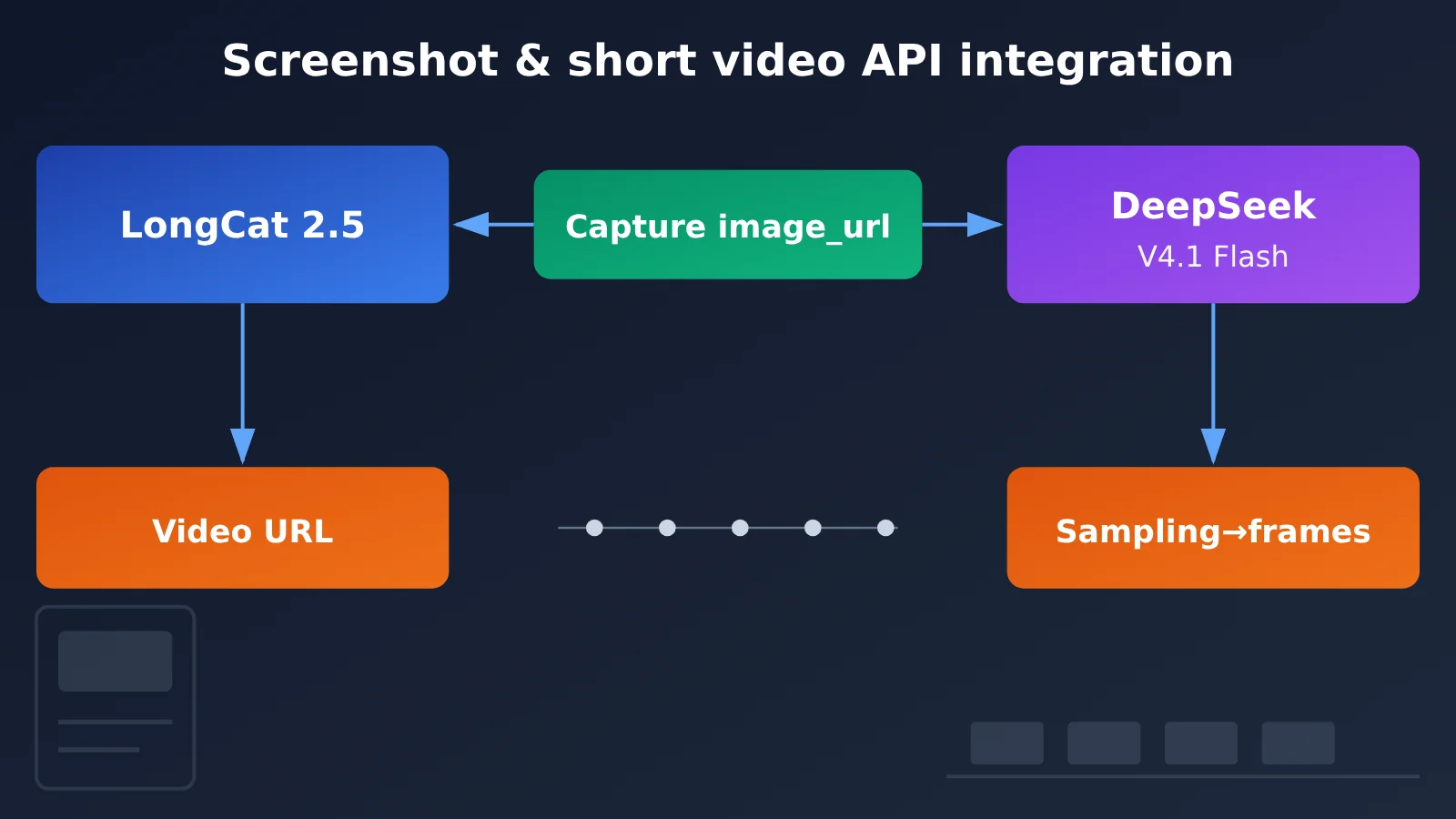
Knowledge Map: LongCat 2.5 vs DeepSeek V4.1 Flash Media Input Overview
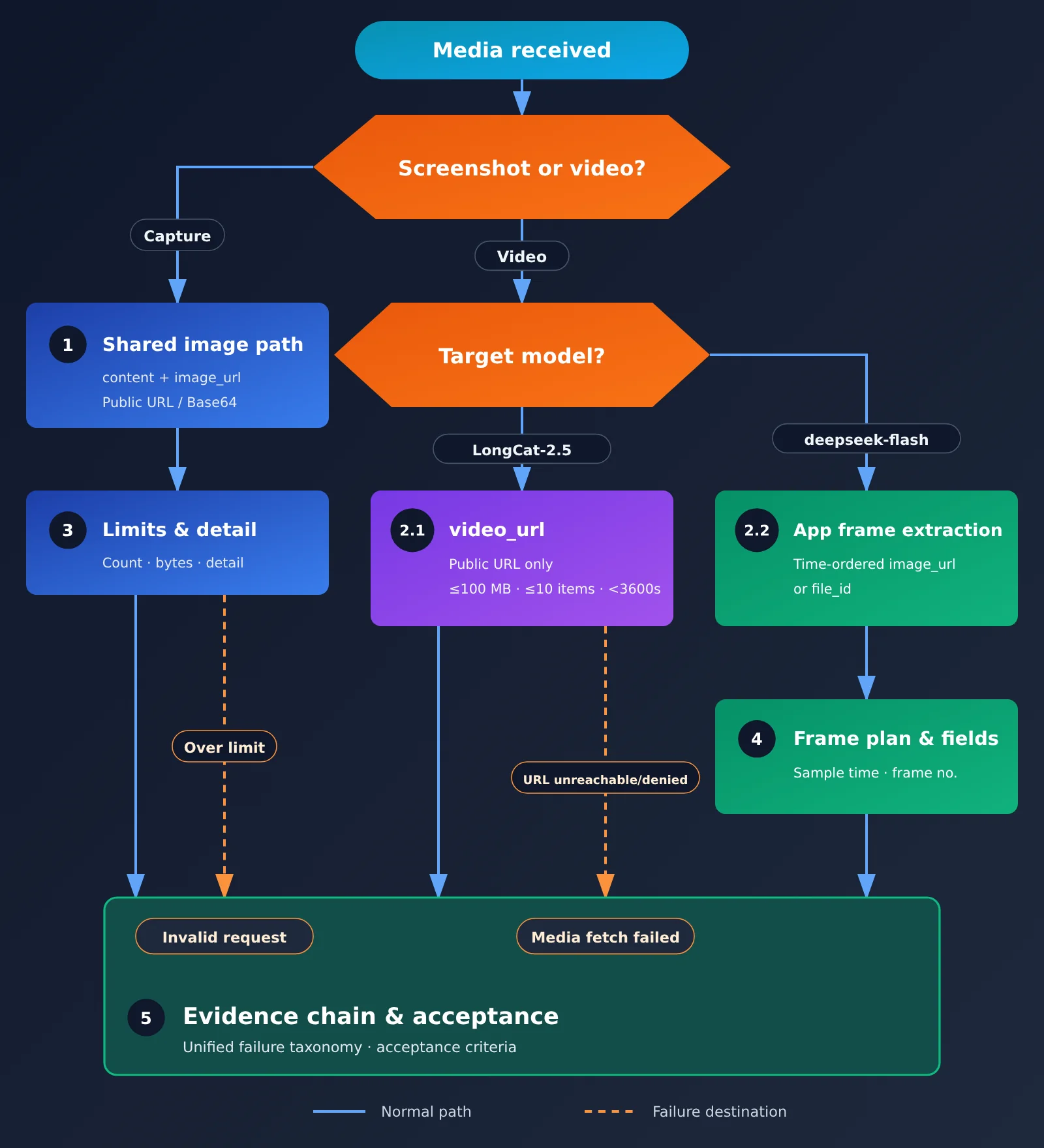
Diagram notes: Screenshots and videos split at the entry point. Screenshots share node 1 across both vendors, then move on to node 3 to handle limits. Videos split by model into nodes 2.1 and 2.2, and the DeepSeek side additionally passes through the frame-extraction plan in node 4. All three paths ultimately converge at node 5, where acceptance is done using the same evidence and failure classification scheme.
Index: Reading Order for Integrating LongCat 2.5 and DeepSeek V4.1 Flash
- 1 Shared screenshot path is the starting point; the later video approaches all build on this content-part structure.
- 2 Two routes for video input explain LongCat’s
video_urland DeepSeek’s frame-sampling alternative, respectively. If you’re integrating only one provider, you can read just the relevant subsection. - 3 Limits and detail policy determine how many images you can send at once, whether you need to compress them or switch to file references; the number of sampled frames is also constrained by it.
- 4 Frame sampling plan and output fields solve the time-alignment problem on the DeepSeek path and also provide traceable evidence IDs for Section 5.
- 5 Evidence chain, failure diagnosis, and acceptance testing are used for pre-launch checks and ultimately produce a set of measurement definitions that can distinguish “source material issues,” “frame sampling issues,” and “adaptation issues.”
To Know: Understanding Media Field Terminology for LongCat 2.5 and DeepSeek V4.1 Flash
| Term | Brief explanation |
|---|---|
| Content part | A single element in the content array, such as text, image_url, video_url, or file |
| Base64 Data URL | An inline image in the form data:image/png;base64,…; the MIME type must match the actual file |
file_id |
The file reference returned after uploading to the DeepSeek Files API; suitable for images you reuse or a single large image |
detail |
The precision option for DeepSeek image_url, with values low, high, original, and auto |
| Frame sampling plan | A list of sampling timestamps determined by the client; it is the sole source of frame timestamps |
| PTS | Presentation time of a frame. For variable-frame-rate video, align by PTS; you can’t calculate it by multiplying the frame index by a fixed interval |
1. The shared screenshot approach for LongCat 2.5 and DeepSeek V4.1 Flash
1.1 The content array: the common shape of a screenshot request
Both original vendors support sending screenshots with the same message structure: text goes in {"type":"text","text":"…"}, and images go in {"type":"image_url","image_url":{"url":"…"}}. If your adapter layer used to treat the user’s content as a string, messages that carry images need to become a content-block list, so that each image and the question it belongs to reach the model in the same message. Splitting the image and the question into two separate messages is a mistake that’s easy to make during migration.
1.2 Endpoints and model names for LongCat 2.5 and DeepSeek V4.1 Flash
| Item | LongCat 2.5 | DeepSeek V4.1 Flash |
|---|---|---|
| Endpoint | https://api.longcat.chat/openai/v1/chat/completions |
https://api.deepseek.com/chat/completions |
| Model field | LongCat-2.5 |
deepseek-flash (currently maps to DeepSeek-V4.1-Flash-1017) |
| Screenshot content block | image_url (public URL or Base64) |
image_url (external link or Base64), plus file + file_id |
| Video content block | video_url |
Not defined in the Vision guide; this article uses frame extraction instead |
Table note: input_image in the DeepSeek Responses API is a different request shape. Both examples in this article use the Chat Completions messages format consistently.
Below is the screenshot request shared by both vendors. This code is only meant for product images you have the right to handle:
import base64, os
from openai import OpenAI

def to_data_url(path: str, mime: str = "image/png") -> str:
    with open(path, "rb") as f:
        return f"data:{mime};base64," + base64.b64encode(f.read()).decode()

PROVIDERS = {
    "longcat": dict(base_url="https://api.longcat.chat/openai/v1",
                    key=os.environ["LONGCAT_API_KEY"], model="LongCat-2.5"),
    "deepseek": dict(base_url="https://api.deepseek.com",
                     key=os.environ["DEEPSEEK_API_KEY"], model="deepseek-flash"),
}

def ask_screenshot(provider: str, image_path: str, question: str) -> str:
    p = PROVIDERS[provider]
    client = OpenAI(api_key=p["key"], base_url=p["base_url"])
    resp = client.chat.completions.create(
        model=p["model"],
        messages=[{"role": "user", "content": [
            {"type": "text", "text": question},
            {"type": "image_url", "image_url": {"url": to_data_url(image_path)}},
        ]}],
    )
    return resp.choices[0].message.content

print(ask_screenshot("deepseek", "sku_001.png", "检查图片中是否有无法辨认的标签"))
2. LongCat 2.5 video URLs and DeepSeek V4.1 Flash frame extraction: two paths for short videos
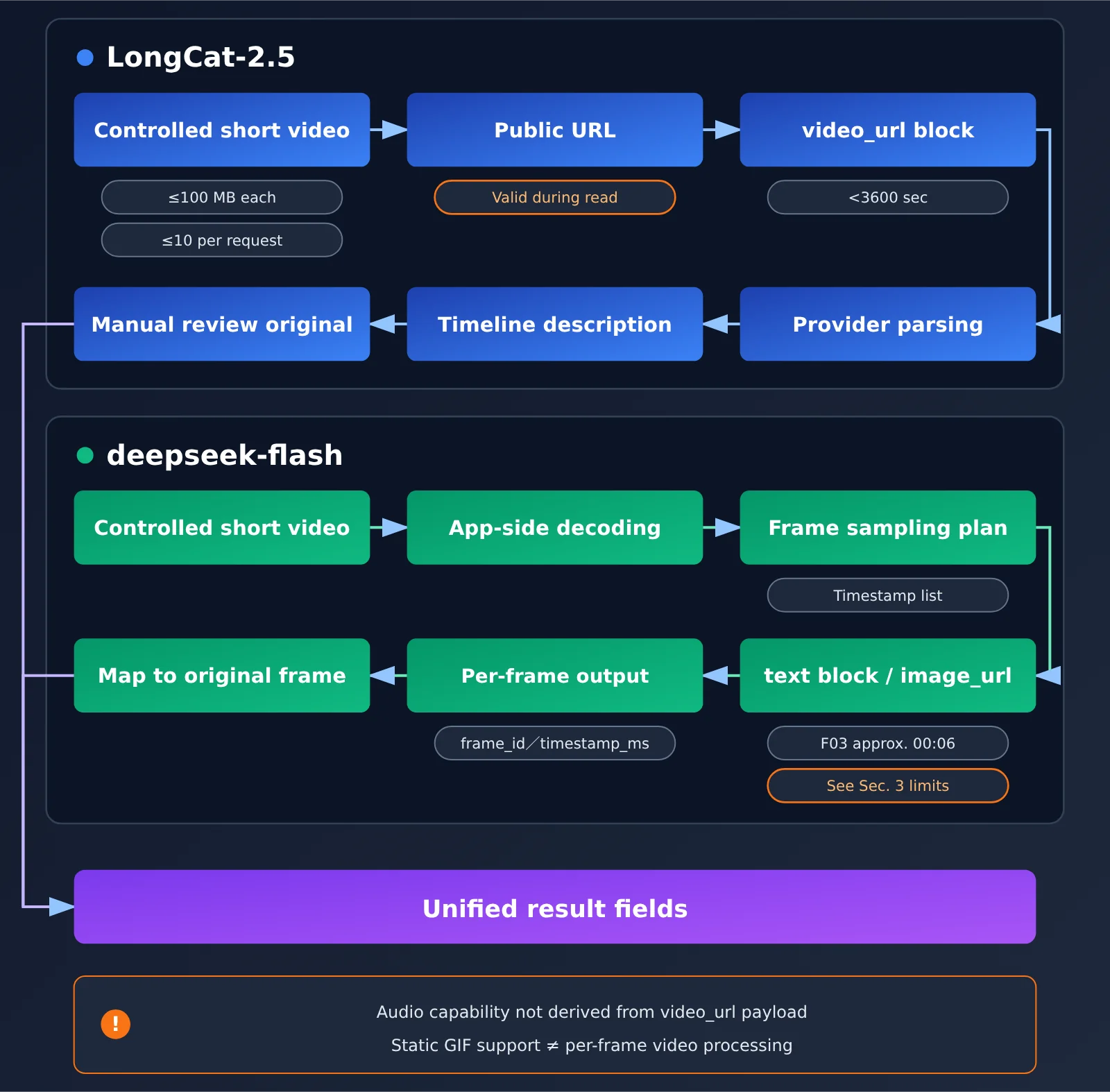
Diagram notes: on the LongCat side, the vendor reads the video, so the key checks are the URL’s reachability and the scope of authorization. On the DeepSeek side, the application itself decides which moments to look at, so the key question is whether the frame extraction plan covers the time range in which the target appears. The two paths output different sources of evidence, and Section 5 handles each of them separately.
2.1 How LongCat 2.5 accepts video_url
LongCat’s documentation specifies the video content block in Chat Completions as {"type":"video_url","video_url":{"url":"https://example.com/video.mp4"}}. Videos must be publicly accessible URLs; the server reads and parses the asset. The URL must point directly to a video file—login-protected links, web preview page URLs, and local file paths won’t work. Use a controlled test asset that can legally be made available for the provider to read, and make sure the URL stays valid long enough to cover the entire request queueing and server-side read process.
| Video item | LongCat 2.5 | DeepSeek V4.1 Flash (frame extraction approach in this article) |
|---|---|---|
| Input format | Publicly accessible video URL | Static frames generated on the client side (image_url or file_id) |
| Per file | ≤100 MB | Not applicable; counted against per-image limits |
| Count per request | ≤10 videos | Subject to the image count limit, see Section 3 |
| Duration | Each clip <3600 seconds | Coverage determined by the frame extraction plan |
| Audio | Not derived from this payload | Static frames contain no audio |
| Temporal alignment | Model description; exact alignment not confirmed in the docs | Comes from the client-side frame extraction plan |
The example request can ask the model to locate “what appears in the frame.” What the documentation confirms is how visual assets and the video URL are passed; neither audio understanding nor frame-accurate temporal alignment can be inferred from this payload.
client = OpenAI(api_key=os.environ["LONGCAT_API_KEY"],
                base_url="https://api.longcat.chat/openai/v1")
resp = client.chat.completions.create(
    model="LongCat-2.5",
    messages=[{"role": "user", "content": [
        {"type": "text", "text": "按时间顺序描述画面中商品标签出现的位置,并说明是否可读。"},
        {"type": "video_url", "video_url": {"url": "https://example.com/video.mp4"}},
    ]}],
)
print(resp.choices[0].message.content)
2.2 DeepSeek V4.1 Flash’s Frame-Extraction Alternative Path
DeepSeek Vision offers three kinds of image input for the current Flash: image_url external links, image_url Base64, and uploading through the Files API and then writing {"type":"file","file_id":"file-api-…"} into the content array. The supported formats are JPEG, PNG, GIF, and WebP, identified by the file’s actual content. The vendor guide only defines image content blocks, so decoding video into time-ordered static images and sending them is an engineering inference made in this article. Support for the static GIF format also doesn’t mean the API will process video frame by frame.
3. Image Limits and Small-Text Strategy for LongCat 2.5 and DeepSeek V4.1 Flash
3.1 Limit Comparison Table
| Limit item | LongCat 2.5 | DeepSeek V4.1 Flash |
|---|---|---|
| Images per request | ≤100 images | ≤600 images |
| Bytes per image | ≤10 MB | Base64 or external link ≤32 MiB; Files API ≤64 MiB |
| Pixel dimensions | Length and width each ≤5120 px; total area ≤5,242,880 px; document minimum 200 px; original aspect ratio ≤200:1 | Single side ≤8192 px; from 15 images onward, the single-side cap drops to 4096 px |
| Request body | Not listed within the reference materials | ≤48 MiB |
| Total images | Not listed within the reference materials | ≤64 MiB without file_id; up to 200 MiB with file_id |
| External link length | Not listed within the reference materials | ≤8192 characters |
| Format | PNG, JPG/JPEG, WebP, GIF | JPEG, PNG, GIF, WebP (identified by content) |
Table note: units keep the MB versus MiB distinction as stated by the vendors. Image byte limits and HTTP request body limits are two different measures, and Base64 encoding also makes the request body larger. When you’re close to the limits, you can consider reducing the number of frames, compressing the images, or switching to the link or file reference each vendor allows.
These limits directly shape your frame-extraction strategy. Take DeepSeek as an example: once the frame count reaches 15, the single-side cap drops from 8192 px to 4096 px. So high-resolution footage needs to be scaled down first, and then the frame count decided. LongCat video via URL doesn’t consume the image quota, but a single screenshot’s cap is 10 MB, so oversized screenshots need to be compressed ahead of time.
3.2 DeepSeek V4.1 Flash’s detail Setting and Small-Text Handling
image_url.detail supports four values: low, high, original, and auto. low first downsizes the image to 512×512, which suits budget-sensitive scenarios where you don’t need to read small text. As the guide currently puts it, the other options preserve the original image input, and the model’s image pipeline then still auto-scales according to its rules. Image tokens are counted per image into the input, so duplicate frames directly add to your usage.
For small text on product packaging, you can send a localized crop separately while keeping the original image as a positional reference. Before each image, use text to explain which shot or region it corresponds to, for example “F03 detail: lower-left ingredient list.”
4. DeepSeek V4.1 Flash Frame Sampling Plan and Output Fields (Also Applies to LongCat 2.5 Batch Screenshots)
4.1 How to Choose Frame Sampling Timestamps
The original video, sampling timestamps, and generated image list are all kept on the controlled application side. Below, we use a 12-second product demo as a constructed example (not measured data): first list a start point, several fixed-interval points, and points near the end, then add extra samples around shot changes or places where the target appears briefly. For variable-frame-rate footage, align to presentation time (PTS). If the footage has rotation, check whether orientation metadata is correctly applied during extraction. Near-duplicate frames that recur in the same region can be deduplicated before sending them to the model, while preserving the time ranges those frames cover.
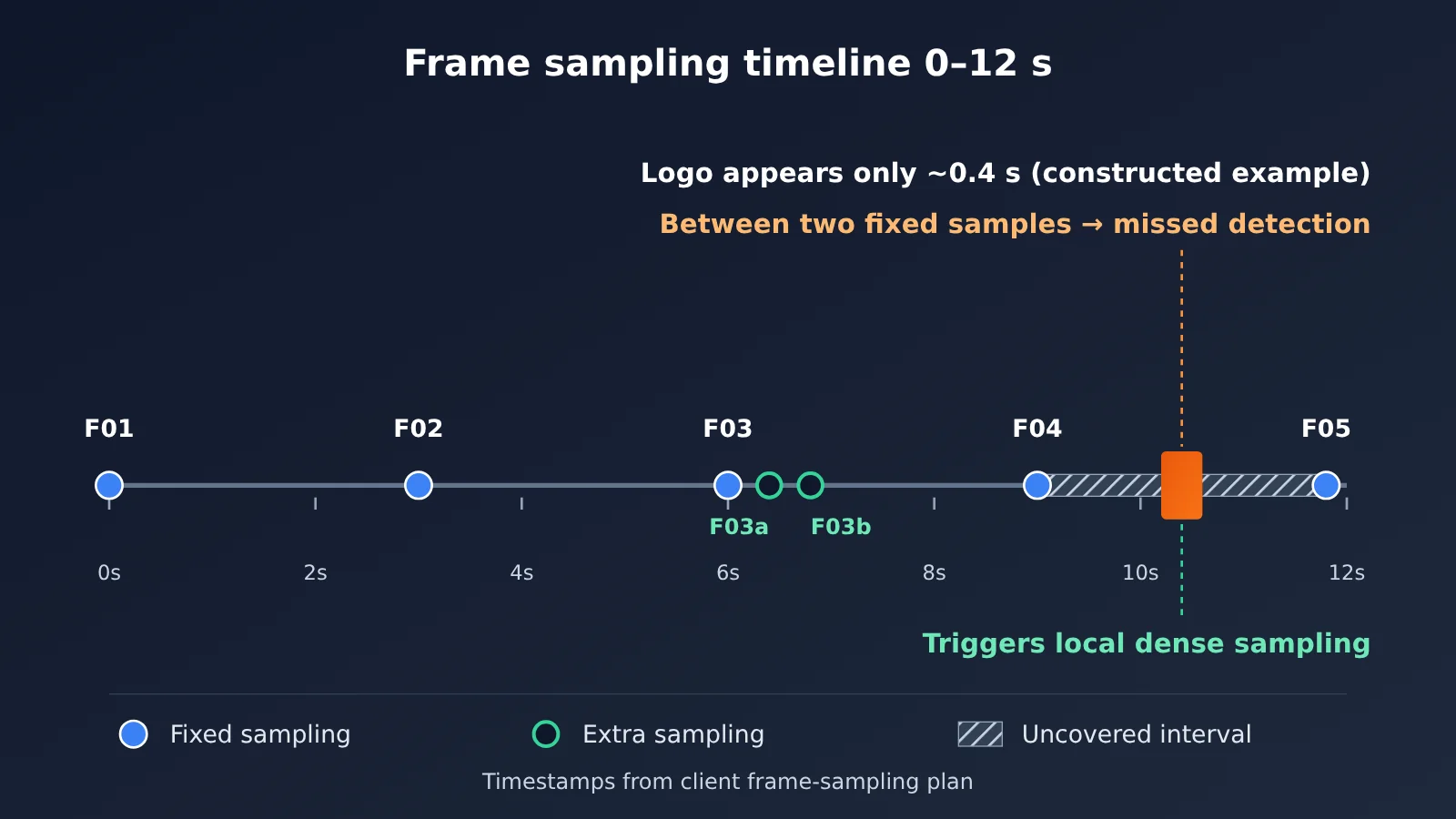
Diagram note: if a logo happens to fall exactly between two fixed sampling points, sampling only at fixed intervals won’t catch it. This constructed example can serve as a false-negative counterexample for deciding when to perform a second round of locally denser sampling.
4.2 Generating frame sequences with FFmpeg
For a first-pass screening, you can use FFmpeg’s fps filter to sample on a fixed clock. When you need to check every frame against the original one by one, use showinfo to read metadata such as each frame’s presentation time. The example below grabs a still at each timestamp in the extraction plan and binds the client-side timestamp to the image:
import subprocess, base64

PLAN_MS = [0, 3000, 6000, 6400, 6800, 9000, 11800]   # Constructed example

def extract(video: str, ms: int, out: str):
    subprocess.run(["ffmpeg", "-y", "-ss", f"{ms/1000:.3f}", "-i", video,
                    "-frames:v", "1", "-vf", "scale='min(2048,iw)':-2", out],
                   check=True, capture_output=True)

def build_content(video: str, task: str):
    parts = [{"type": "text", "text": task +
              "。逐帧输出 JSON 数组,字段为 frame_id、timestamp_ms、finding、visibility。"}]
    for i, ms in enumerate(PLAN_MS, 1):
        fid, path = f"F{i:02d}", f"/tmp/f{i:02d}.jpg"
        extract(video, ms, path)
        with open(path, "rb") as f:
            url = "data:image/jpeg;base64," + base64.b64encode(f.read()).decode()
        parts.append({"type": "text", "text": f"{fid},约 {ms} ms"})
        parts.append({"type": "image_url", "image_url": {"url": url, "detail": "high"}})
    return parts
Just pass whatever build_content(...) returns as the content for the DeepSeek client from Section 1.2. Each text block sits right next to its image block — for example, a label like “F03, about 00:06, check the packaging text” is followed immediately by F03’s image_url.
4.3 Output Fields and Uncovered Ranges
Each observation item the model returns must include four fields: frame_id, timestamp_ms, finding, and visibility. timestamp_ms follows the frame extraction plan, so the application can map it back to the exact image for verification. Ranges that weren’t sampled can only be labeled “no sampling coverage” — never “nothing found.”
5. Evidence Chain, Failure Diagnosis, and Acceptance for LongCat 2.5 and DeepSeek V4.1 Flash
5.1 The Two Paths Draw Evidence From Different Sources
For the image path, evidence traces back to a specific screenshot and point in time. The LongCat video URL path gives you the model’s description of the timeline, and anything disputed has to be confirmed by an independent review against the original footage. If a review item genuinely depends on audio, it should go through a separate authorized audio workflow, and the evidence type must be clearly marked for the reviewer. The log only needs the local asset ID and time range — authorized URLs and full Base64 blobs don’t belong in it.
5.2 Interpretation States and Failure Layering
| Status | How it’s determined | What to do |
|---|---|---|
| Media can’t be fetched | URL unreachable, expired, requires login, or insufficient authorization | Check link lifecycle and authorization scope |
| Invalid request | MIME mismatch, dimensions or item count over limit, request body too large | Check the limits in Section 3, compress, or reduce frame count |
| Succeeded but evidence insufficient | A response came back, but it doesn’t cover the critical moment | Add observation points in the critical time range |
| Can’t see clearly | Overexposed, occluded, text too small | Re-shoot the material, or send a cropped region |
| Interpreted | There’s a locatable evidence ID | Move on to business rule validation |
These states need to be counted separately from single-item generation failures. That way the owner can tell where the problem actually is: material that needs re-shooting, frame extraction that needs to be denser, or API adaptation that needs fixing.
5.3 Acceptance Material: Three Sets Plus Three Cases
- Clear static screenshots: confirm both screenshot payload formats map correctly to the result fields.
- Readable product information lasting several seconds: confirm both paths’ output can point back to the evidence location in the media.
- Information that falls between two fixed sampling points: use locatable original frames to show exactly which segments the static frame extraction plan misses.
- Error cases: a file with the wrong MIME type, an expired address, and an image at the pixel limit — to verify the adapter routes errors into the correct categories.
These local cases mainly check error classification and evidence chain completeness. The model’s actual interpretation performance needs separately prepared labeled samples to evaluate. During batch processing, assign a unique ID to every asset and every set of derived frames, so the same asset doesn’t get reviewed twice after a video is re-uploaded. Screenshots that can’t produce an externally readable link can be passed inline if the platform supports it, or as an uploaded file path. The final test: pick any disputed result at random and see whether the reviewer can get back to the original footage using only the evidence ID, and confirm that the segment they’re looking at matches the asset version used at call time. If that works, this integration is ready to ship.
References
- LongCat Vision Understanding Docs: Image and video content blocks, Video Limits
- Link:
longcat.ai/platform/docs/image-video-understanding
- Link:
- DeepSeek Vision Guide: image_url, file_id, detail, and limits
- Link:
api-docs.deepseek.com/guides/vision/
- Link:
- DeepSeek First Call: Request endpoint and model name
- Link:
api-docs.deepseek.com/en/
- Link:
- FFmpeg Filters Documentation: fps and showinfo filters
- Link:
ffmpeg.org/ffmpeg-filters.html
- Link: