
Author’s note: This review is for readers who already have a Large Language Model API key and enjoy management simulation and cultivation-themed games. It covers three ways to run the sim, how to connect the models, roughly how many tokens a day burns, and what to do when NPCs go off the rails.
What if every cultivator in a cultivation world were driven by a Large Language Model? They’d cultivate on their own, make enemies, take on masters, go into seclusion, and face tribulations—while you can only watch as the “Heavenly Dao,” or casually send down a tribulation. The open-source project cultivation-world-simulator does exactly that, and players keep asking one question: If you run an all-LLM simulation for a day, what does the bill actually come to?
This isn’t a game guide, and it’s not a plot spoiler. This article covers just three things: how to get this AI cultivation simulator running, how to fill in the model API configuration, and the daily cost calculated from NPC count and number of turns. All repository data cited here is self-reported by the repository; cost figures are estimates calculated from public unit pricing, and the pricing data is dated 2026-11-27.
Key takeaway: After reading, you’ll be able to choose a running mode, configure the models, and have a rough idea of how much a day will cost before you start.
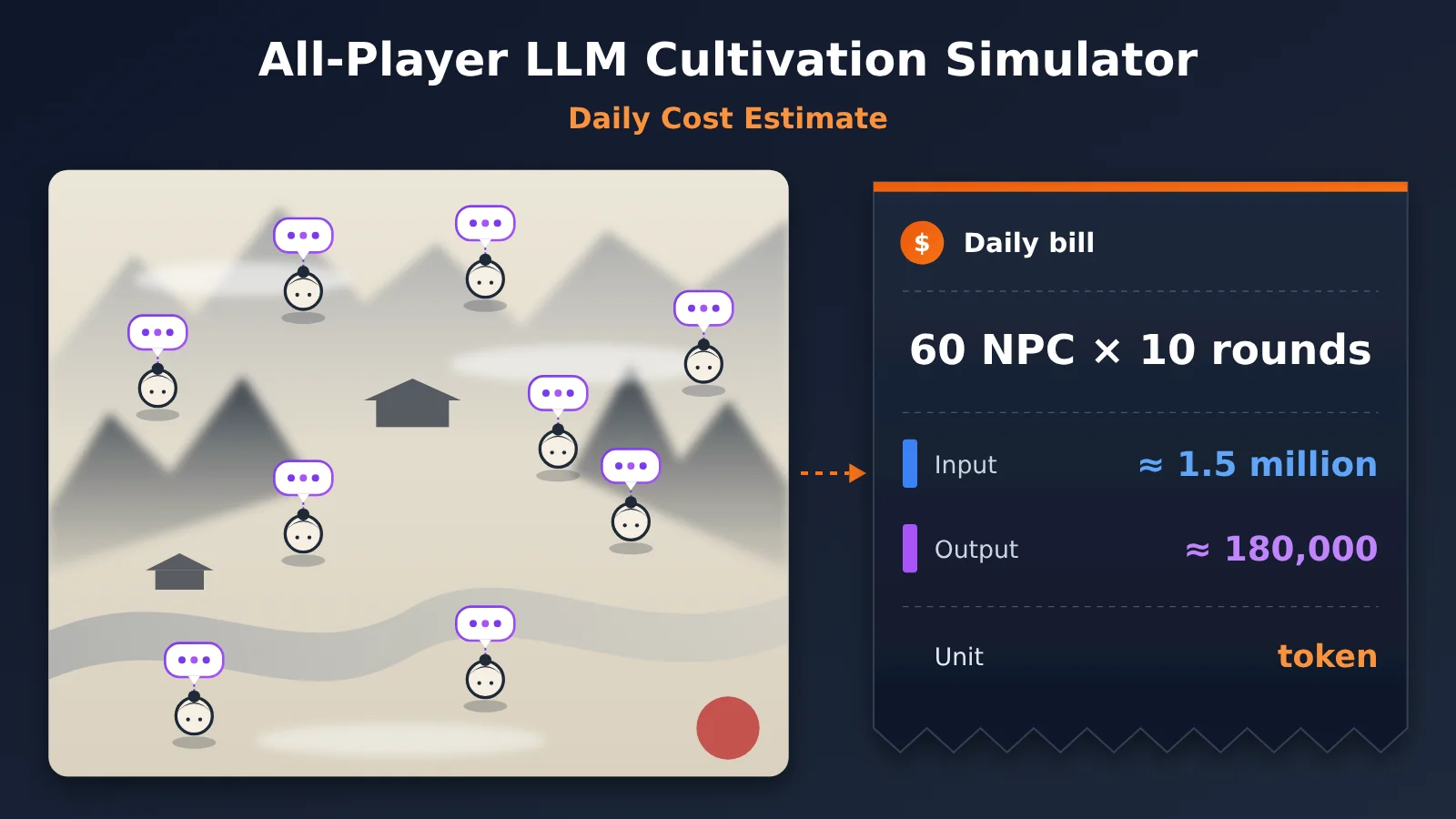
Cultivation Simulator Full-LLM Review: The Bottom Line First
Let’s start with the verdict. Judging by the repo’s design, this cultivation simulator is more of an “observation sandbox” than a level-based game with clear goals. The fun comes from emergence: the repo stresses that there’s no pre-written script — sect wars, the righteous-vs-demonic conflict, and the fall of prodigies are all derived from the world’s logic. Players who enjoy watching an ant farm or RimWorld-style story generation will get hooked. If you’re after a clear main quest and progression feedback, it may leave you at a loss.
On the billing side: estimating 60 NPCs at 10 turns a day, a cheap flash-tier model runs under $1 per day. What’s genuinely scary is what happens after you scale up. Costs rise linearly with NPC count, turn density, and memory length — and once you turn on “thinking” for every character, the bill multiplies several times over.
| Review dimension | Verdict | Basis |
|---|---|---|
| Is it fun? | Suits observer-type players who love emergent stories | The repo says it itself: no pre-written script, plot derived from world logic |
| Onboarding difficulty | Low for the desktop version, moderate for source deployment | Free install via Epic; source build needs Python 3.10+ and Node.js 18+ |
| Model integration | Both presets and custom endpoints supported | Settings page presets DeepSeek / MiniMax / Ollama |
| Cost per day | Roughly $0.24–$1.80 per day in the baseline scenario (estimate) | 60 NPCs × 10 turns, calculated at 2026-11-27 pricing |
| Risk of going off the rails | Rules provide a safety net, but long runs still get repetitive | Spirit roots, cultivation realms, lifespan and other rules constrain divergence |
Cultivation Simulator: The LLM Core That Runs Every Character
Every NPC Is an Independent Agent
The repo bills itself as an “AI-driven cultivation world simulator.” Each cultivator is a separate agent that observes its surroundings and makes its own decisions. You play the Heavenly Dao — you can just watch and do nothing, or intervene directly, say by dropping a heavenly tribulation on someone or rewiring a cultivator’s mind. That design means every NPC can trigger one or more model invocations per turn, which is exactly where the token bill comes from.
Reining In the Model With Cultivation Rules
Let a Large Language Model freestyle and you’ll quickly get absurd scenes like “a Qi Refining cultivator shatters stars with one punch.” This project’s answer is to put an entire cultivation rulebook underneath: spiritual roots, cultivation realms, techniques, personality, sects, pills, weapons, martial arts tournaments, auctions, lifespan — all of it forms one system, and the model can only act inside what the rules allow. Using rules to constrain AI hallucination and drift is the single most useful idea here for other developers.
On top of that, the repo also lists multi-language support, macOS support, save/load, and BGM and sound effects. Save/load is genuinely useful for cost control: once you’ve played out a worldline you like, save it, and you don’t have to burn tokens from scratch every time.
Interfaces Left Open for External Agents
The less common touch: the project exposes a set of HTTP endpoints so you can point another agent at the world to observe or manipulate it:
- Read-only queries:
/api/v1/query/runtime/status,/api/v1/query/world/state,/api/v1/query/events,/api/v1/query/detail - Controlled writes:
/api/v1/command/*, e.g.POST /api/v1/command/game/start
The read-only endpoints suit summary bots like a “Heavenly Dao Daily,” while the write endpoints let outside programs start a run or intervene for you. One caveat: the external agent calls models too, so it racks up token costs as well.
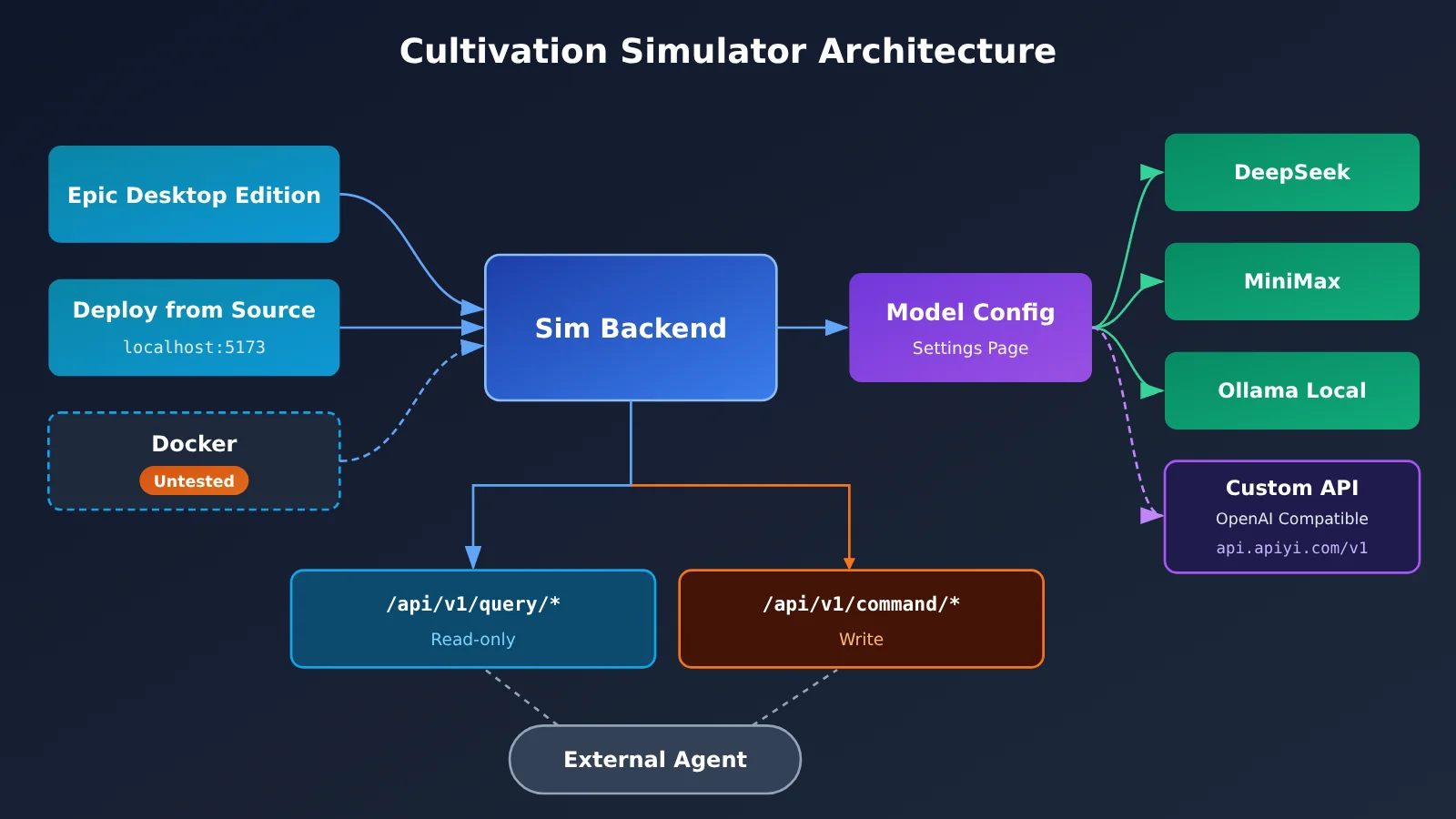
Cultivation Simulator: Three Run Options Compared
| Run option | Environment requirements | Setup cost | Who it’s for | Things to note |
|---|---|---|---|---|
| Epic desktop version | Install Epic Games Store | Lowest, free to get | Just want to play, don’t want to touch the command line | After launching, confirm the model configuration using the prompts on the settings page |
| Source code deployment | Python 3.10+, Node.js 18+ | Moderate | Want to modify rules, inspect logs, connect external agents | Frontend usually runs at http://localhost:5173 |
| One-click Docker deployment | Docker environment | Lowest in theory | Have a server, want to leave it running long-term | The repo labels it “untested”; if something breaks, you’ll have to troubleshoot it yourself |
The choice is simple: pick the Epic desktop version if you just want to play around; pick source code deployment if you want to track costs precisely, tune prompts, or connect external agents. The Docker option looks like less hassle, but the repo itself labels it untested, so don’t make it your first choice.
Cultivation Simulator Model Configuration: Presets and Custom Endpoints
The settings page offers three model presets: DeepSeek, MiniMax, and Ollama. The first two are cloud APIs, while Ollama runs locally. Local models don’t cost tokens, but running inference for 60 NPCs concurrently puts real demands on your GPU—if it’s slow, you’ll feel it directly as turn lag.
If you want to use a model outside the presets, or use a single key to switch between multiple models, choose “Custom LLM Endpoint.” As long as the server is OpenAI-compatible, you’ll generally need to fill in three fields (check the settings page for the exact field names):
- Base URL: for example, APIYI’s OpenAI-compatible endpoint
https://api.apiyi.com/v1 - API key: a key created in the apiyi.com console
- Model ID: for example,
deepseek-v4.1-flash,MiniMax-M3,gemini-3.8-flash,qwen3.8-flash
The benefit of this setup is that the protocol stays consistent. For example, you can first use qwen3.8-flash for cheap long-running sessions, then switch to gemini-3.8-flash to compare story quality. You only need to change the model ID; the Base URL and key stay the same.
🎯 Configuration tip: An all-LLM setup essentially means “every turn costs tokens.” Before switching models, verify that the model name and protocol match. APIYI apiyi.com lets you cover DeepSeek, MiniMax, Gemini, Qwen, and other models with a single key over an OpenAI-compatible protocol—great for comparing performance and cost across different models on the same save file.
Cultivation Simulator Quick Start: Step-by-Step Acceptance for Source Deployment
Here’s a source-code deployment walkthrough, with acceptance criteria at every step. If any step doesn’t pass, don’t move on.
- Check your environment: run
python --versionandnode --version.- Pass criteria: Python 3.10 or higher, Node.js 18 or higher.
- Get the repository: clone
4thfever/cultivation-world-simulatorlocally.- Pass criteria: you can see
requirements.txtand thewebdirectory in the root folder.
- Pass criteria: you can see
- Install backend dependencies: run
pip install -r requirements.txt.- Pass criteria: no red errors when installation finishes. Working inside a virtual environment is recommended.
- Install frontend dependencies: run
cd web, thennpm install.- Pass criteria: a
node_modulesfolder appears underweb.
- Pass criteria: a
- Start the dev service: go back to the root directory and run
python src/server/main.py --dev.- Pass criteria: the terminal doesn’t exit abnormally, and your browser can open
http://localhost:5173.
- Pass criteria: the terminal doesn’t exit abnormally, and your browser can open
- Configure a model: open the settings page, pick a preset or enter a custom endpoint — for example, Base URL
https://api.apiyi.com/v1and model IDqwen3.8-flash.- Pass criteria: after saving, start a new game. On the first turn you should see NPCs generating action descriptions — not errors or blank output.
- Confirm runtime status through the API: visit
/api/v1/query/runtime/status.- Pass criteria: it returns runtime status information. Then check
/api/v1/query/events— you should see events accumulating.
- Pass criteria: it returns runtime status information. Then check
🚀 Quick Start: For your first game, use the cheapest flash-tier model with just a few NPCs and run a handful of turns. Once you’ve confirmed the whole chain works, scale up. Sign up at APIYI apiyi.com to claim free trial credits for new users — enough to walk through all 7 steps above.
Cultivation Simulator Full-Cast LLM Test Data: How Much Does It Actually Cost per Day?
Unit Price Table (Data as of 2026-11-27)
The prices below come from the APIYI model pricing page (docs.apiyi.com/models) and are in USD per 1M tokens:
| Model ID | Input | Output | Cache Read | Notes |
|---|---|---|---|---|
deepseek-v4.1-flash |
$0.3 | $1.2 | $0.006 | Extremely low cache-read price |
MiniMax-M3 |
$0.3 | $1.2 | $0.06 | Input is $0.3 for 0–524,288 tokens, then $0.6 after that |
gemini-3.8-flash |
$0.75 | $3.75 | $0.075 | Highest unit price |
qwen3.8-flash |
$0.114 | $0.3876 | $0.01425 | Lowest unit price |
A single NPC request usually only contains a few thousand tokens—well below MiniMax-M3’s 524,288-token tier threshold. You only trigger the higher-tier price when you let memory grow indefinitely and a single context exceeds that threshold.
Baseline Scenario Estimates
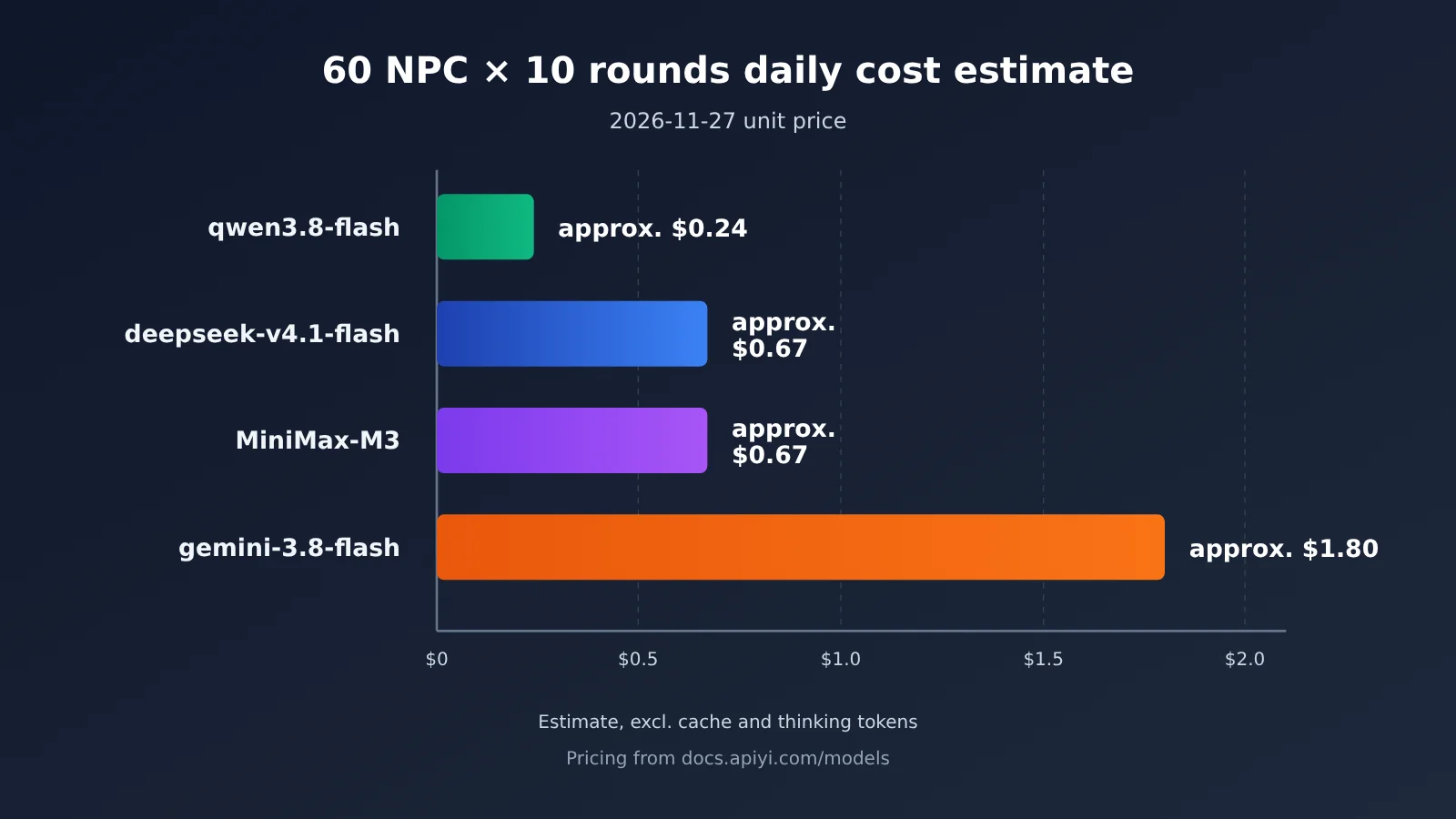
Estimation assumptions: 60 NPCs, 10 turns per day, with each NPC consuming 2,500 input tokens and 300 output tokens per turn. That adds up to about 1.5 million input tokens and 180,000 output tokens per day. The table below uses linear extrapolation and does not account for cache hits or thinking tokens; all figures are estimates:
| Scenario (estimate) | Daily input / output | deepseek-v4.1-flash | MiniMax-M3 | gemini-3.8-flash | qwen3.8-flash |
|---|---|---|---|---|---|
| 20 NPCs × 10 turns | 500K / 60K | approx. $0.22 | approx. $0.22 | approx. $0.60 | approx. $0.08 |
| 60 NPCs × 10 turns (baseline) | 1.5M / 180K | approx. $0.67 | approx. $0.67 | approx. $1.80 | approx. $0.24 |
| 120 NPCs × 10 turns | 3M / 360K | approx. $1.33 | approx. $1.33 | approx. $3.60 | approx. $0.48 |
| 60 NPCs × 30 turns | 4.5M / 540K | approx. $2.00 | approx. $2.00 | approx. $5.40 | approx. $0.72 |
The conclusion is much milder than the headline: in the baseline scenario, even the most expensive gemini-3.8-flash costs less than $2 per day. What really makes the bill scary is the stacking of three multipliers: the number of NPCs, turn density, and memory length per NPC. If memory grows from 2,500 tokens to 10,000 tokens, and turns are increased to 30, the input volume for the same 60 NPCs becomes 12 times the baseline.
How Much Can Cache Reads Save?
The cache-read rate is one to two orders of magnitude lower than regular input—for deepseek-v4.1-flash, for example, it’s $0.006 versus $0.3. If prefixes like each NPC’s system prompt and world rules stay stable, then in theory some of the input can be billed at the cache-read rate. Whether a cache hit actually happens depends on prompt structure and server-side policy. Don’t assume a ratio upfront—go by the actual bill.
💰 Cost optimization: The most effective way to cut costs isn’t switching to the cheapest model—it’s concentrating “reasoning” on the key characters. Use
qwen3.8-flashfor ordinary cultivators, and save the stronger models for plot-critical roles like sect leaders and prodigies. In the apiyi.com dashboard, you can view usage details by model, see exactly how many tokens each model burned, and then decide how to allocate them.
When Does the Cultivation Simulator Spin Out of Control?
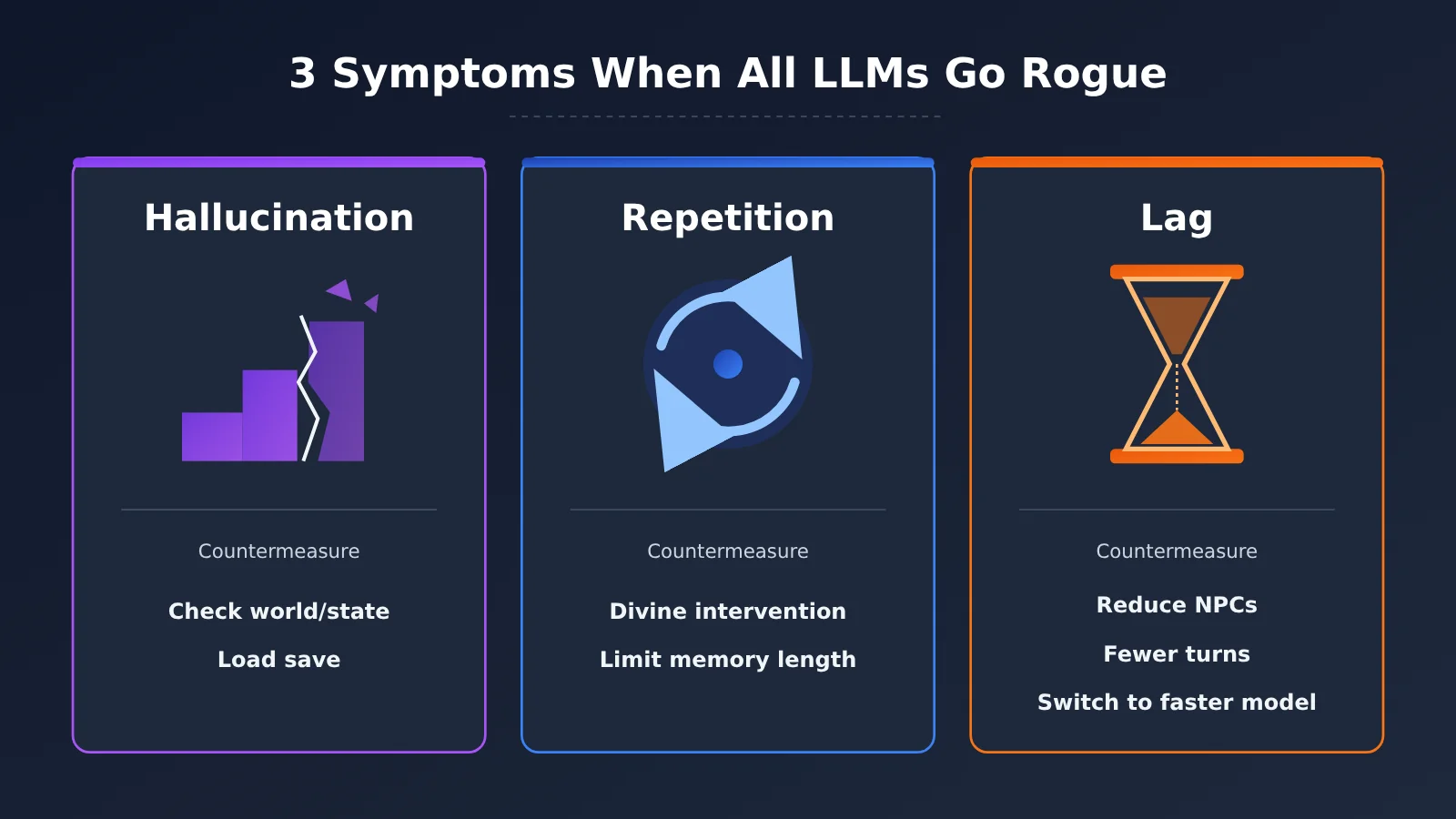
A world where every NPC is powered by an LLM is bound to hit trouble once it runs long enough. Here’s a breakdown of the symptoms, in three categories.
Hallucinations: When Cultivators Do Things Outside the Rules
Typical signs: a character skips whole cultivation realms, a treasure that never existed suddenly appears, or a character who already died starts talking again. The project uses a rules base to constrain drift, but rules can only limit what the model can choose — they can’t guarantee the model’s narration stays on track. The fix: favor models that follow instructions more reliably, and periodically verify world state through /api/v1/query/world/state; if something looks off, load a save.
Repetition: NPCs Stuck in Looping Dialogue
After a long run, plenty of NPCs start repeatedly going into seclusion and repeating the same line. The usual cause is memory that’s too long and too homogeneous — the model gets led astray by its own past output. You can break the deadlock with heavenly intervention, like dropping a tribulation on the world or tweaking a character’s mind settings, to inject new variables.
Lag: Turns Get Slower and Slower
The more NPCs you have, the more requests each turn has to send, and any single slow request drags the whole round of simulation. This is especially noticeable with local Ollama. The fix: cut down the NPC count, lower the turn frequency, or switch to a faster cloud flash model.
Cultivation Simulator Troubleshooting Cheat Sheet
| Symptom | Likely Cause | Fix |
|---|---|---|
| NPCs take no action after starting a new game | Model config wasn’t saved, or the Key is invalid | Go back to Settings and confirm; test the same Key from another client |
Returns 401 |
Wrong or expired API key | Regenerate the Key — careful not to copy extra spaces |
Returns 404 or says the model doesn’t exist |
Model ID typo, or Base URL missing /v1 |
Cross-check the model name against the pricing page; set Base URL to https://api.apiyi.com/v1 |
Returns 429 |
Rate limited due to high concurrency | Reduce NPC count or lower turn frequency |
localhost:5173 won’t open |
Frontend not started, or port already in use | Check whether npm install succeeded; look at the terminal for the actual port |
| Turns get slower and the bill keeps climbing | Memory keeps growing | Save and start a new world, or shorten character memory |
| Docker fails to start | The repo marks this approach as untested | Switch to source-code deployment |
Pros and Cons of an All-LLM Cultivation Simulator
Strengths
- Emergent storylines that actually feel real: there’s no script, and every run follows a different worldline — perfect for starting over again and again.
- Clear rule-based constraints: boxing the LLM inside a cultivation system is far more controllable than pure chat-style NPCs.
- Flexible model integration: on top of the three presets, it also supports custom OpenAI-compatible endpoints.
- Open query and command APIs: easy to extend, and easy to hook into external agents.
Limitations
- Cost scales linearly with size: more NPCs, denser turns, and longer memories all push the bill up. The fix is tiered model configuration plus capping memory length.
- Long runs repeat and drift: players need to step in periodically or reload a save.
- The Docker path is untested: if you want to leave it running long-term, you’re on your own.
- Observation-style gameplay has a barrier to entry: there are no explicit goals, so it isn’t for players who want strong feedback.
FAQ
Q1: What is the cultivation-world-simulator?
It’s an open-source, AI-driven cultivation world simulator, hosted at 4thfever/cultivation-world-simulator. The repo reports 2,159 stars, with the most recent commit on 2026-08-16. Each cultivator is an independent agent, and the player takes on the role of the Heavenly Dao.
Q2: Every NPC has memory — won’t that send costs out of control?
Costs do scale linearly, but the baseline scenario isn’t that dramatic. Assuming 60 NPCs and 10 turns, a flash-tier model runs roughly $0.24–$1.80 per day. The longer the memory, the more input tokens each request carries — that’s the variable to watch most closely.
Q3: Which of the three model presets should I choose?
If you want zero token cost and have a good enough GPU, go with Ollama. If you want hassle-free cloud quality, pick DeepSeek or MiniMax. At the 2026-11-27 pricing, the two have identical input and output prices, but DeepSeek’s cache-read price is lower.
Q4: Which models can the custom endpoint connect to?
Any model works, as long as the server is compatible with the OpenAI protocol. With the APIYI apiyi.com endpoint, a single key lets you switch between `deepseek-v4.1-flash`, `MiniMax-M3`, `gemini-3.8-flash`, and `qwen3.8-flash`, which makes it easy to compare story quality and spend on the same save.
Q5: How do I try it out cheaply first?
Start with around 20 NPCs and `qwen3.8-flash` for a few turns, confirm the pipeline works and the story reads well, then scale up gradually. New users can claim free trial credits at apiyi.com to get through this step, so there’s no need to top up right away.
Q6: Can I observe the world programmatically?
Yes. The project provides read-only endpoints such as `/api/v1/query/events` and write endpoints under `/api/v1/command/*`, which are well suited to automated daily reports or scheduled interventions. Keep in mind that external agents calling models on their own will consume extra tokens.
Q7: What are the known shortcomings of this approach?
Three main ones: repetition and drift after long runs, costs that scale linearly as you grow the scale, and Docker deployment that hasn’t been tested. The repo’s rule system suppresses most absurd behavior, but it can’t eliminate hallucination entirely.
All-LLM Cultivation Simulator: Key Takeaways
- Gameplay positioning: An observational cultivation sandbox with fully emergent storytelling, where the player takes on the role of the Heavenly Dao.
- Three ways to run it: Want to play? Use the Epic desktop version. Want to mod it? Deploy from source. Docker hasn’t been tested.
- Model setup: Three presets plus a custom OpenAI-compatible endpoint — just fill in the Base URL, API key, and model ID.
- Baseline bill: 60 NPCs × 10 turns comes to roughly $0.24–$1.80 per day (estimate).
- Cost multipliers: NPC count, turn density, and memory length multiply together and scale linearly.
- Key to cutting costs: Reserve “thinking” for the key characters, and give ordinary NPCs a cheap flash model.
- Getting started: Use a single APIYI (apiyi.com) key to compare the cost of several models side by side.
Conclusion: Is an All-LLM Cultivation Simulator Worth Running?
This cultivation simulator answers the question “what is it like to live in a world where every NPC is an LLM?”: the story really does grow on its own, and the rule system keeps the large models from flying off in every direction. As for the bill, at baseline scale it usually comes out to around $1 a day — what you really need to watch out for is the multiplier effect from scale and memory length.
When you shouldn’t use this setup:
- You want a clear main storyline, goals, and progression feedback rather than watching a world evolve on its own;
- You plan to run hundreds of NPCs at high frequency over long sessions and you don’t habitually monitor your budget;
- You only have a small local GPU but want to drive a crowd of NPCs with Ollama — the stuttering will seriously hurt the experience;
- You need stable, reproducible results, whereas emergent storytelling is inherently non-reproducible.
If none of the above applies to you, start small: set the model Base URL to https://api.apiyi.com/v1, verify the connection with a low-cost model first, then allocate models by character importance, and adjust as you play by checking your usage breakdown.
📚 References
-
GitHub – cultivation-world-simulator: Project source code and deployment instructions
- Link:
github.com/4thfever/cultivation-world-simulator - Description: The three run methods, model presets, and external APIs are all subject to the repository documentation.
- Link:
-
APIYI Model Pricing Page: Source of the unit prices in this article (data date 2026-11-27)
- Link:
docs.apiyi.com/models - Description: You can look up the input, output, and cached read unit prices for each model.
- Link:
Author: APIYI Technical Team
Technical Discussion: Feel free to contact us through the APIYI official website homepage. For more integration documentation, visit the docs.apiyi.com documentation center.