Author’s note: This article breaks down the three-layer structure of Hermes Agent’s multi-model delegation, explains how plugins, skills, and MCP divide responsibilities, and outlines how to connect APIYI as a custom provider and split models and costs by role.
You probably already have several model subscriptions and a string of API keys. Yet when running long tasks, you’re still switching between tabs: planning goes to one model, coding to another, and finally a cheaper model handles summaries. Hermes Agent’s multi-model delegation mechanism exists to turn this manual division of labor into automated orchestration.
This isn’t another feature-list rewrite. This article answers only three questions: at which layer Hermes delegation actually happens; what plugins, skills, and MCP each govern; and how to put models at different tiers into the same workflow using a unified OpenAI-compatible API. Any descriptions of Hermes’s own behavior here are based on what the official docs say.
Core value: By the end of this article, you’ll know that multi-model delegation isn’t about having the strongest model take over every step — it’s about using just enough of a model for each step.
Core Points of Hermes Agent’s Multi-Model Delegation Mechanism
Hermes Agent is an open-source AI agent framework from Nous Research, released under the MIT license. As described in the official docs, it’s a long-running service you can deploy to a server — not something that only lives inside a chat window. It ships with a messaging gateway covering 20+ platforms, including CLI, Telegram, Discord, Slack, Feishu, DingTalk, and WeCom. On top of that, it offers a skills system, persistent memory, cron jobs, and sub-agent delegation.
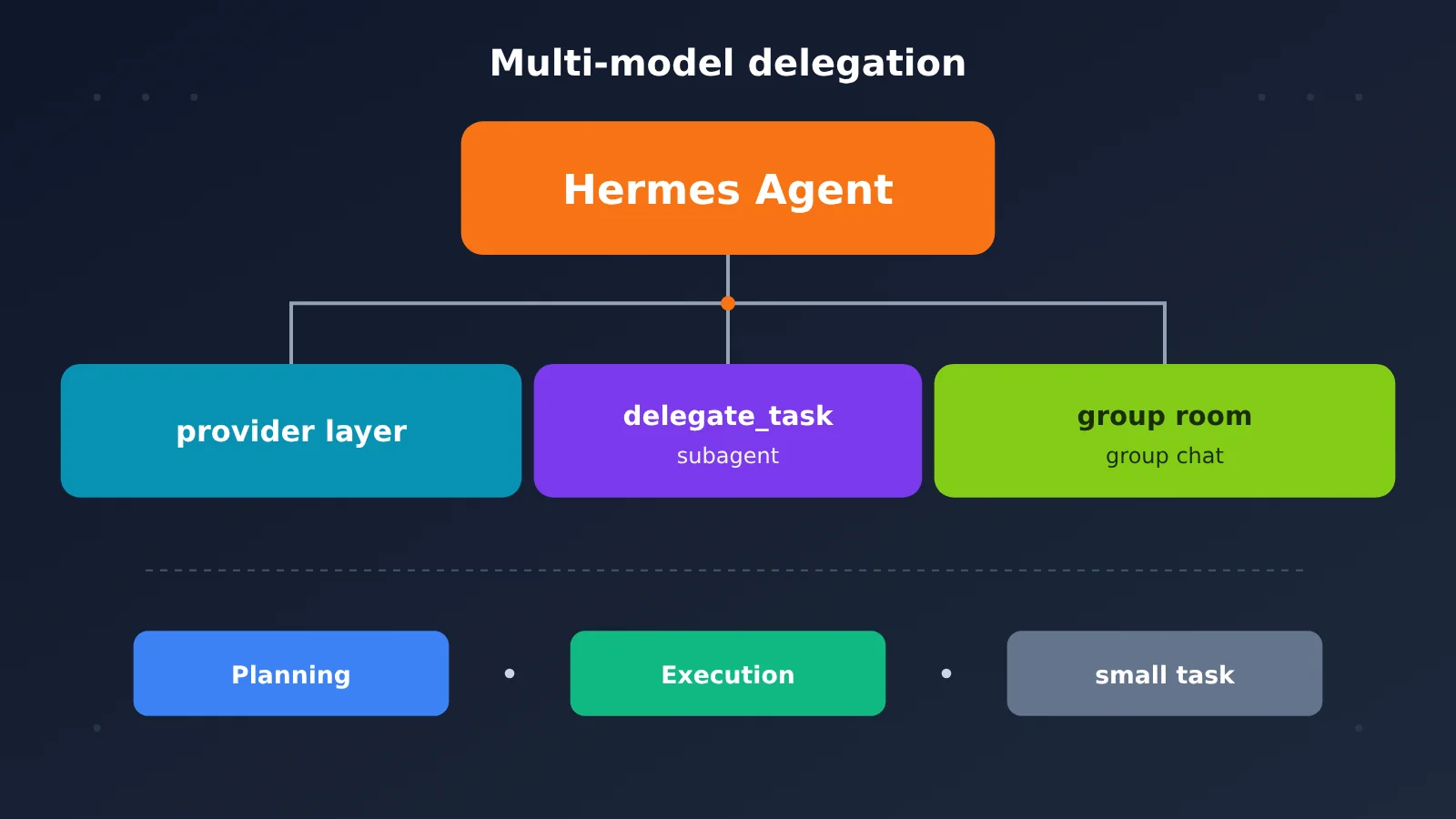
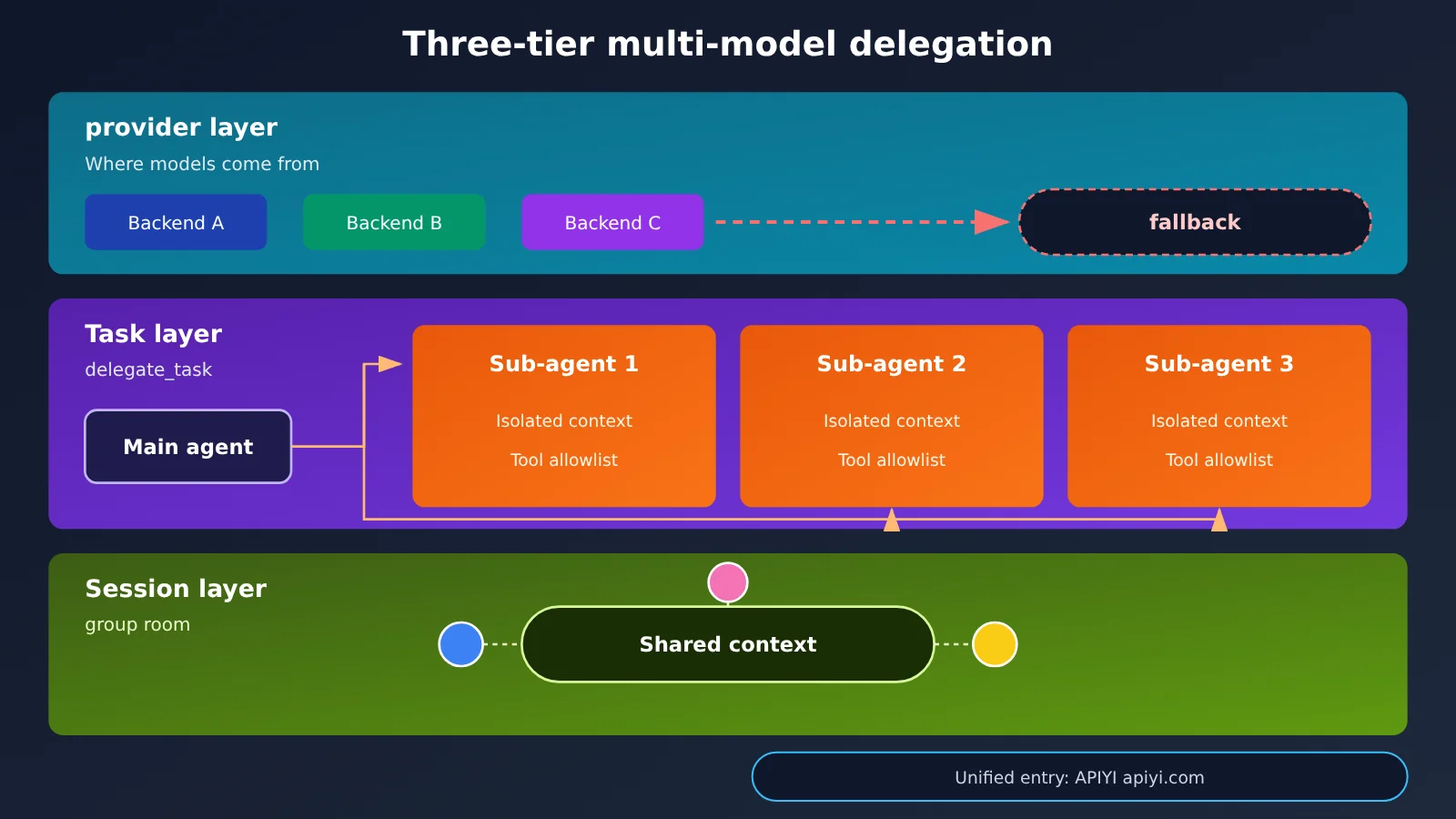
When it comes to multi-model setups, the word “delegation” is what confuses people most. Based on the official docs and how the community breaks it down, it actually maps to three distinct layers, each answering a different question:
| Layer | Core mechanism | Question it answers | Typical use |
|---|---|---|---|
| provider layer | Connect multiple model backends at once, with fallback support | Where does this model come from? | Primary and backup models, separate models for auxiliary tasks |
| task layer | The delegate_task tool spawns sub-agents |
Who should handle this? | Handing subtasks to a more suitable model or worker |
| session layer | Group room collaboration | Several participants looking at the same context | Multiple bots bound to different models, discussing together |
Hermes Agent multi-model delegation: the provider layer
According to the official docs, the provider layer can connect to OpenRouter, Nous Portal, OpenAI, Anthropic, Google, z.ai, Kimi, and MiniMax all at once, plus locally running Ollama and vLLM. This layer only decides where models come from — it has nothing to do with task splitting. Its other key trick is fallback providers: when the primary model errors out, it automatically switches to a backup provider, and auxiliary workloads like vision, context compression, and title generation can each have their own fallback configured separately.
That matters a lot for long-running tasks. Once a single model gets rate-limited or times out, the whole chain grinds to a halt. With fallback in place, the most common outcome is that the task keeps going on a different backend instead of just dying.
Hermes Agent multi-model delegation: the delegate_task sub-agent
The task layer is where the real “division of labor” happens. As the official docs put it: the delegate_task tool hands a subtask to a more suitable model or sub-agent, and each sub-agent gets its own context, a restricted tool set, and its own terminal session. By default, up to 3 sub-agents run concurrently, and that number is configurable.
“Independent context” is the key to understanding cost. The main agent doesn’t have to shove tens of thousands of tokens of history into a sub-agent — the sub-agent only receives the information it needs to finish this task, then hands back the result. As for which model a sub-agent is actually bound to and how the parameter names are spelled, go by the official delegate_task documentation; this article won’t guess at the field names.
Group Room Chat in Hermes Agent’s Multi-Model Delegation
The session layer’s group room lets multiple bots collaborate inside the same conversation, and each bot can be bound to a different model. It’s a good fit for scenarios that need multi-perspective review — for example, having one model draft a plan while another model pokes holes in it. One thing to watch: in a group room, every bot reads through the shared context, so token consumption multiplies with the number of bots.
How Plugins, Skills, and MCP Split the Work in Hermes Agent’s Multi-Model Delegation
After browsing the plugin catalog, plenty of people lump plugins, skills, MCP, and sub-agents together. In reality, they sit on completely different axes:
| Concept | What it really is | What it provides | Highlights from the official docs |
|---|---|---|---|
| Skills | Capability manuals | Tell the model how to complete a certain kind of task | Compatible with the agentskills.io standard |
| Plugins | Capability manuals plus prebuilt combinations | Capability packs for delegation, creation, connectors, automation, and more | Officially described as thousands of entries, plus blueprints preset templates |
| MCP | Tool interface | Real hands-on capabilities such as terminal, files, and browser | Supports stdio and SSE, with per-server tool filtering |
| Sub-agents | An extra worker | Independent context, independent terminal session | 3 concurrent by default, configurable |
Put simply, skills and plugins answer “can it do the job,” MCP answers “does it have hands to do the job,” and sub-agents answer “who does the job.” MCP doesn’t provide model capability, so no matter how many MCP servers you hook up, they can’t replace the model choice at the provider layer.
Hermes Agent Multi-Model Delegation Quickstart: Wiring Up a Custom Provider
The official providers doc says it plainly: Hermes can talk to any OpenAI-compatible endpoint, as long as that endpoint implements /v1/chat/completions. That means you can plug an aggregation platform in as a custom provider and cover multiple models with a single key, instead of configuring every vendor separately.
Below, using APIYI as the example, we’ll walk through two ways to connect. One caveat up front: APIYI and Hermes don’t have any official, dedicated integration—what we’re using here is Hermes’s generic OpenAI-compatible channel.
Option 1: Configure the Hermes Agent provider interactively
- Run
hermes modelin your terminal. - Pick
Custom endpoint (self-hosted / VLLM / etc.)from the list. - Fill in the base URL
https://api.apiyi.com/v1, your API Key, and the model name—for examplegemini-4-hydrogen.
Interactive setup is a good fit for getting the flow working the first time. Once you’ve filled everything in, open the config file to confirm what was written; from then on, it’s easier to make adjustments directly in the file.
Option 2: Edit config.yaml by hand
According to the official docs, manual configuration lives in the model section of ~/.hermes/config.yaml. Here’s each line, level by level:
- Start with
model:as the beginning of the model configuration section. - Indent one level and write
default: gemini-4-hydrogento set the default model name. - At the same level, write
provider: customto declare this a custom OpenAI-compatible endpoint. - At the same level, write
base_url: https://api.apiyi.com/v1, which is APIYI’s unified API address. - At the same level, write
api_key: sk-your-key. If you’d rather not put the key in the file in plaintext, usekey_envinstead, pointing it at the name of an environment variable that holds the key.
There’s one migration trap worth flagging: the official docs state that the old environment variable LLM_MODEL has been removed, and config.yaml is now the single source of truth for models and endpoints. If you were used to switching models via environment variables in older versions, you’ll need to migrate that configuration into this file after upgrading.
Two Things to Confirm on the APIYI Side
Once Hermes is configured, if requests still come back saying the model is unavailable, it’s usually a token setting issue on the platform side. Check these two points:
- Model whitelist: confirm the model you want to call has been added to that token’s whitelist.
- Token group: confirm the token’s group can access that model—most text models work fine in the Default group.
🚀 Quickstart tip: Start by creating a token on APIYI apiyi.com and getting the default model working with a new user’s free trial quota, then gradually assign different models to sub-agents and auxiliary tasks. Since the platform is an OpenAI-compatible interface, switching models only means changing the model name in the request—no changes needed to the provider config on the Hermes side.
Cost Breakdown for Hermes Agent Multi-Model Delegation: Three Roles, Three Model Tiers
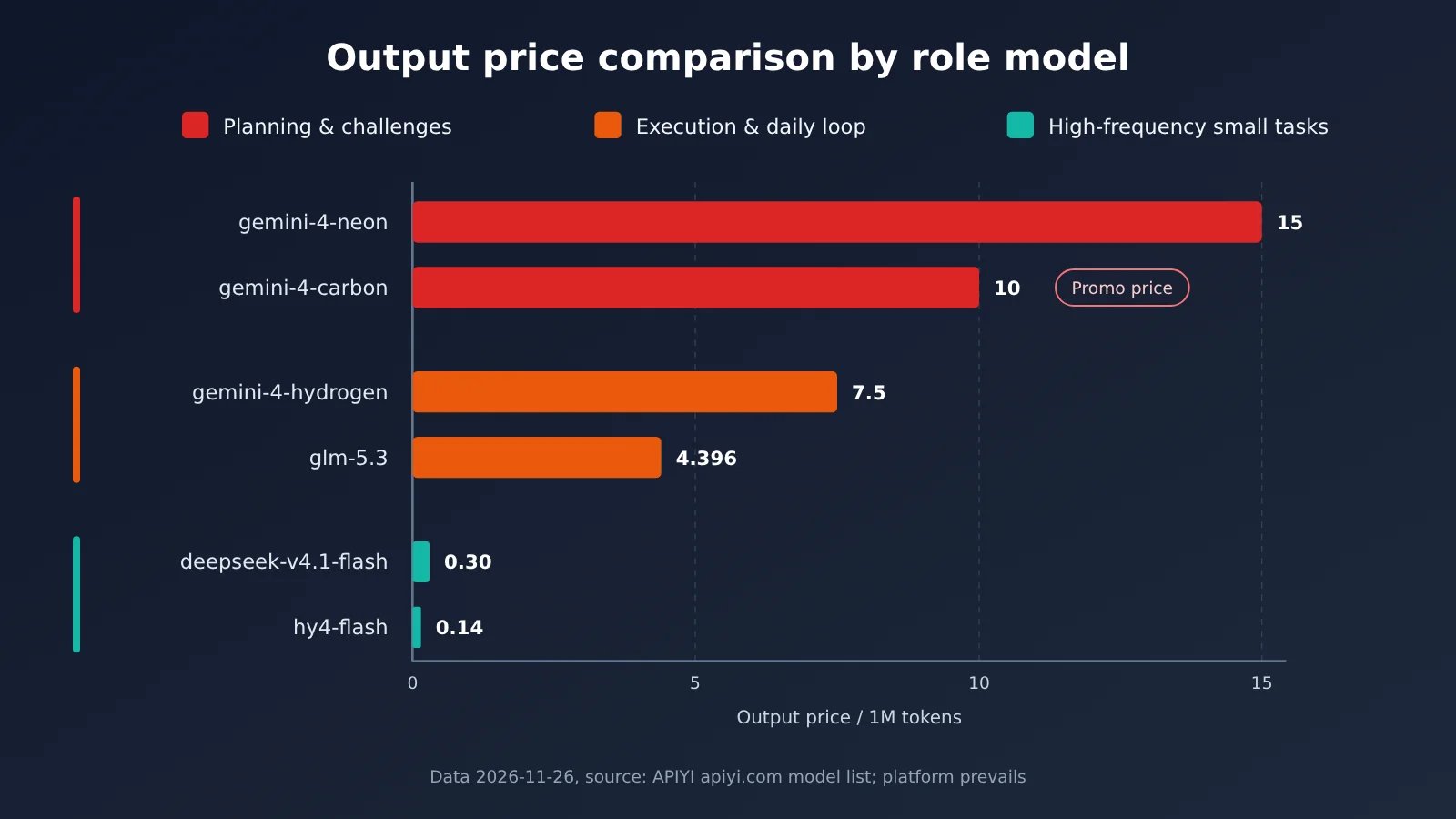
The most immediate benefit of using multiple models isn’t that it’s “smarter”—it’s that costs stay under control. Every sub-agent burns tokens, and running three sub-agents concurrently means three context windows are being billed at the same time. So the sensible approach is to split by role: give planning and hard problems to a strong model, use a mid-tier model for the everyday execution loop, and hand high-frequency small tasks like classification, summarization, and titles to lightweight models.
The prices below come from APIYI’s price list as of 2026-11-26, per 1M tokens. For specific models and prices, refer to the platform’s model list:
| Role | Model | Input | Output | Cache read | Notes |
|---|---|---|---|---|---|
| Planning and hard problems | gemini-4-neon | 3 | 15 | 0.15 | Strong reasoning tier |
| Planning and hard problems | gemini-4-carbon | 2 | 10 | 0.1 | Limited-time price through 11-30; from 12-01 it’s 4 / 20 |
| Execution and daily loop | gemini-4-hydrogen | 1.5 | 7.5 | 0.075 | Good default model |
| Execution and daily loop | glm-5.3 | 1.4 | 4.396 | 0.259 | Lower output price |
| High-frequency small tasks | deepseek-v4.1-flash | 0.07 | 0.30 | 0.006 | Classification, summarization |
| High-frequency small tasks | hy4-flash | 0.04 | 0.14 | 0.0014 | Titles, tagging |
The reference material only lists the cache-read price; whether cache writes are billed separately and at what rate should be confirmed one by one in the platform’s model list. Also, gemini-4-carbon’s limited-time price ends on 11-30. If your planning role depends on it, it’s worth budgeting ahead for what happens after 12-01.
Use API Key Accounting to See What Each Layer of Hermes Agent Costs
Once you’ve split the roles, you still need to know which layer the money is going to. A practical approach is to create a separate API key in the APIYI apiyi.com dashboard for “orchestration,” “execution,” and “small tasks,” then plug them into Hermes’s main model config, sub-agent config, and auxiliary task config respectively. A single platform API key can cover all models, while invocation logs are separated by API key—so at month-end reconciliation, you can clearly see what each layer consumed.
This setup also gives you a smooth migration path: first run the whole workflow with every role on the cheap tier, then see which part’s quality is holding things back and upgrade only that one. Compared with having the strongest model handle everything from day one, this gradual upgrade approach makes it easier to find the cost-performance sweet spot.
When Is Hermes Agent Multi-Model Delegation Worth Using
Just because a feature is available doesn’t mean it’s worth using in every scenario. The test is actually pretty simple: does the task itself need to be divided up?
| Scenario Type | Worth It? | Why |
|---|---|---|
| Tasks with clear phase differences (plan first, then execute) | Yes | Different phases have very different reasoning requirements |
| Lots of small, repetitive requests | Yes | Lightweight models can significantly reduce per-request cost |
| A single-model failure would stall the whole pipeline | Yes | Fallback keeps the pipeline running |
| One-off tasks or pure Q&A | No | Spinning up multiple sub-agents just adds complexity |
| Scenarios with no tool calls | No | The sub-agents’ independent terminals and toolsets won’t come into play |
Even when a scenario is worth it, there are three kinds of risk you need to guard against in advance. First, parallel sub-agents amplify token consumption. With three sub-agents running at once, your bill can quietly double. Second, in a group room, every bot reads through the context, so the more bots there are, the more expensive it gets. Third, when the delegation chain gets too long, errors propagate layer by layer; when something goes wrong, it’s hard to identify which layer caused it.
So before you enable delegation, set a tool allowlist and a budget cap for each sub-agent, and try to keep delegation depth to one or two levels. Combined with the role-based token allocation mentioned earlier, if consumption at a particular layer is abnormal, you can quickly trace it to the specific step.
FAQ
Q1: What is multi-model delegation in Hermes Agent?
According to the official documentation, it means Hermes distributes work to different models at three levels: the provider layer decides where models come from and how fallback switching works, `delegate_task` hands subtasks to sub-agents with their own independent context, and group room lets multiple bots bound to different models collaborate within the same session.
Q2: What’s the difference between a delegate_task sub-agent and a group room?
A sub-agent has its own independent context and only handles the portion of the task assigned to it, which makes it good for splitting up execution. Multiple bots in a group room share the same context, which makes it good for multi-perspective discussion. The former saves more tokens; the latter is better suited to review and debate, but every bot has to read through the context once.
Q3: Can MCP replace multi-model configuration?
No. In the official documentation, MCP provides real tool capabilities such as terminal, file, and browser access, supports stdio and SSE, and can filter tools per server. It solves “what operations can be performed,” while model selection is still handled by the provider layer.
Q4: How do I connect APIYI to Hermes Agent?
Run `hermes model` and select Custom endpoint, or in `~/.hermes/config.yaml` set `provider` to `custom` and `base_url` to `https://api.apiyi.com/v1`. You can create the API key in the APIYI apiyi.com dashboard — after registering you get free trial credits to verify that the configuration is correct.
Q5: The configuration looks right, but it says the model is unavailable. What should I do?
Check two things first: whether the model is on the token whitelist, and whether the token group can access that model — most text models work fine in the Default group. If both of those are okay, then verify that the model name spelling in `config.yaml` matches the platform’s model list.
Q6: What are the known limitations of multi-model delegation?
There are three main ones: running sub-agents in parallel amplifies token consumption; every bot in a group room reads the context repeatedly; and long delegation chains make errors hard to trace. The way to handle it is to set tool whitelists and budget caps, control delegation depth, and track spending per role with separate tokens.
Hermes Agent Multi-Model Delegation: Key Takeaways
- Three-layer structure: providers manage model sources,
delegate_taskmanages work division, and group rooms manage shared sessions. - Clear division of labor: skills and plugins are the instruction manual, MCP is the tool interface, and subagents are independent workers.
- Universal integration: according to the official docs, any endpoint that implements
/v1/chat/completionscan be wired in as a custom provider. - Pick a tier per role: a strong model for planning, a mid-tier model for execution, a lightweight model for small tasks — each step gets just enough.
- Token separation: one token each for orchestration, execution, and small tasks, so you can check spend layer by layer.
- Set boundaries first: tool allowlists, budget caps, and delegation depth all need to be defined before you turn anything on.
- Getting-started path: use APIYI’s unified interface to get a cheap tier working first, then upgrade each step one by one.
Summary: Which Layer Should You Connect First for Hermes Agent Multi-Model Delegation
If you can only do one thing first, start with the provider layer. Wire up one OpenAI-compatible endpoint as a custom provider, and set your default model and fallback. It’s the smallest change, but it immediately fixes the problem of a single-model failure stalling the whole chain — and it gives you a unified model entry point for the work division that comes later.
Second, enable delegate_task. Only split off subtasks that differ clearly by stage, and give each subagent a tool allowlist and a budget. Leave group rooms for last. Use them only when you genuinely need multi-perspective review, because of the three layers, it’s the one most likely to send token consumption out of control.
The goal of multi-model delegation has never been to put the strongest model on every step — it’s to give each step exactly the tier it needs. I’d recommend going through APIYI at apiyi.com so one key covers models across tiers, split tokens by role, and get things running on the cheap tier before upgrading step by step.
📚 References
-
Hermes Agent Official Documentation: framework overview, feature list, and FAQ
- Link:
hermes-agent.nousresearch.com/docs - Note: the official word on capabilities like the message gateway, skills, memory, and subagents
- Link:
-
Hermes Agent Providers Documentation: custom endpoint integration guide
- Link:
hermes-agent.nousresearch.com/docs/integrations/providers - Note: custom providers, how to write
config.yaml, andLLM_MODELmigration notes
- Link:
-
Hermes Agent Provider Runtime Developer Documentation: how providers actually run
- Link:
hermes-agent.nousresearch.com/docs/developer-guide/provider-runtime - Note: great if you want to dig into fallback and provider-switching logic
- Link:
-
MindStudio Blog: a breakdown of Hermes Agent plugins and the delegation mechanism (2026-11-26)
- Link:
mindstudio.ai/blog/hermes-agent-plugins-delegation - Note: the community’s take on the three-layer delegation structure and plugin directory
- Link:
-
APIYI Model List and Token Grouping Notes: pricing and token configuration
- Link:
docs.apiyi.com/models.md - Note: treat this as the source of truth for models and pricing; for token grouping questions, check the FAQ on the same site
- Link:
Author: APIYI Technical Team
Technical discussion: Feel free to reach us through the APIYI homepage at apiyi.com. For more integration resources, head over to the docs.apiyi.com documentation center.