
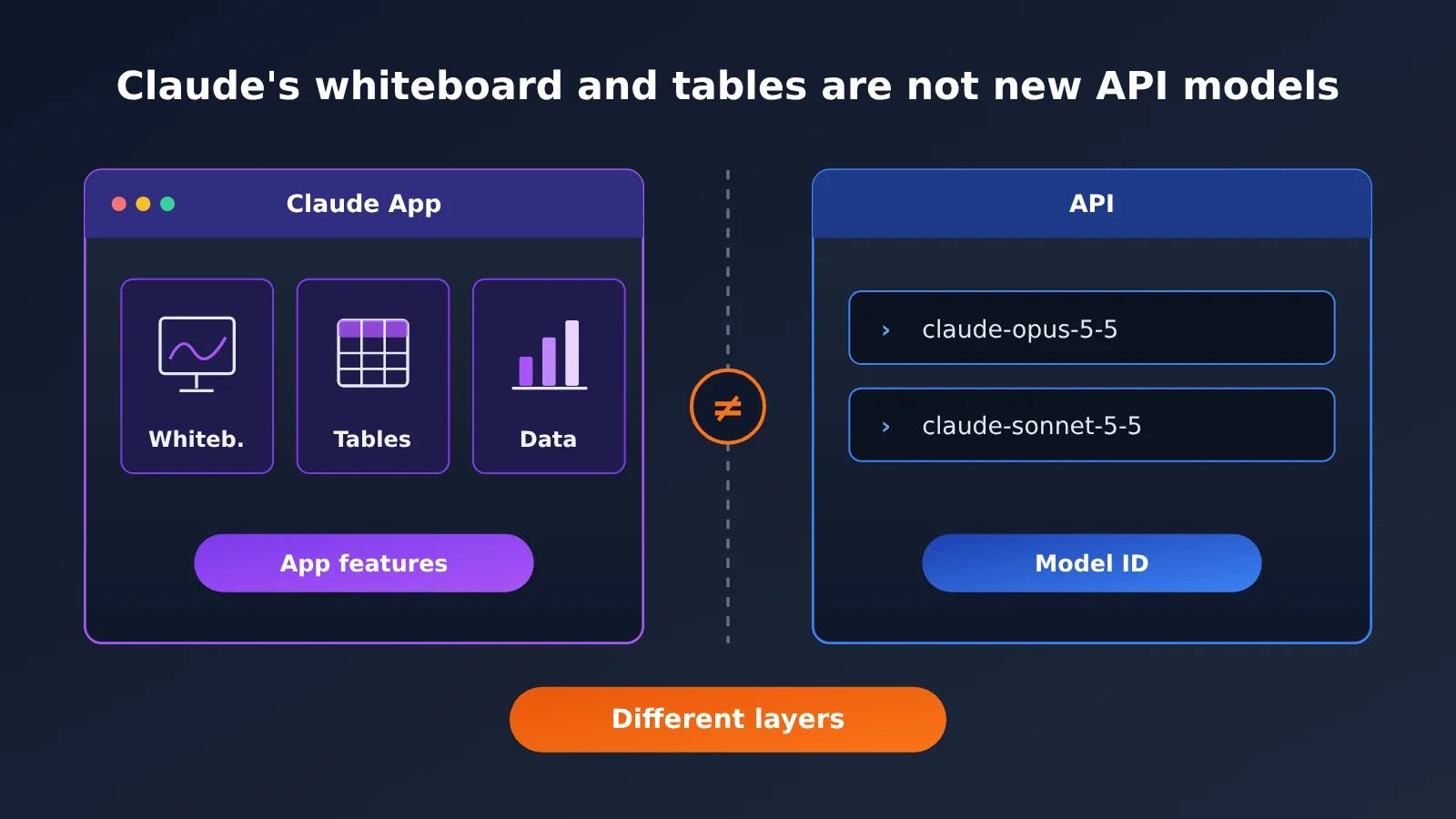
Author’s note: Claude Whiteboards, Claude Sheets, and Claude Data are features inside the Claude app, not new API models. If you call Claude through the API, your model IDs and integration method stay the same.
On November 10, 2026, Anthropic launched two beta features, Claude Whiteboards and Claude Sheets, and moved Claude Dashboards to general availability under a new name: Claude Data. After the announcement, some developers went looking for claude-whiteboards or claude-sheets in the model list, hoping to call them the same way they call Opus or Sonnet.
Short answer: Claude Whiteboards and Claude Sheets are not new API models. All three names are product features in the paid Claude app, available on web, desktop, and mobile, and none of them has a model ID. This article covers what was actually released, how it relates to the Claude API, and how to pick a model when you’re making calls.
What you’ll get: In about 3 minutes, you’ll know what Whiteboards, Sheets, and Data actually are, so you don’t end up putting an app feature name into an API request as a model ID.
Claude Whiteboards and Sheets: Key Facts at a Glance
Let’s start with what the official announcement actually confirms. The table below is based on the reference material and leaves out speculation:
| Item | Details |
|---|---|
| Release date | November 10, 2026 |
| Publisher | Anthropic |
| New beta features | Claude Whiteboards, Claude Sheets |
| Graduated and renamed | Claude Dashboards is now generally available and renamed Claude Data |
| Target users | Paid Claude app users |
| Supported platforms | Web, desktop, mobile |
| Default state on Enterprise | Whiteboards and Sheets are off by default; Claude Data is on by default starting November 19, 2026 |
| Is it an API model? | No, none of the three is an invocable model ID |
What Claude Whiteboards, Sheets, and Data Actually Are
Judging by the names and the release channel, all three belong to the interaction layer of the Claude app. Whiteboards and Sheets are new workspace formats, and they’re currently in beta. Claude Data evolved from the old Dashboards feature and got a new name now that it’s graduated. All of them run inside Anthropic’s own Claude app, and the app decides how the interface looks, how data is organized, and which model gets called behind the scenes.
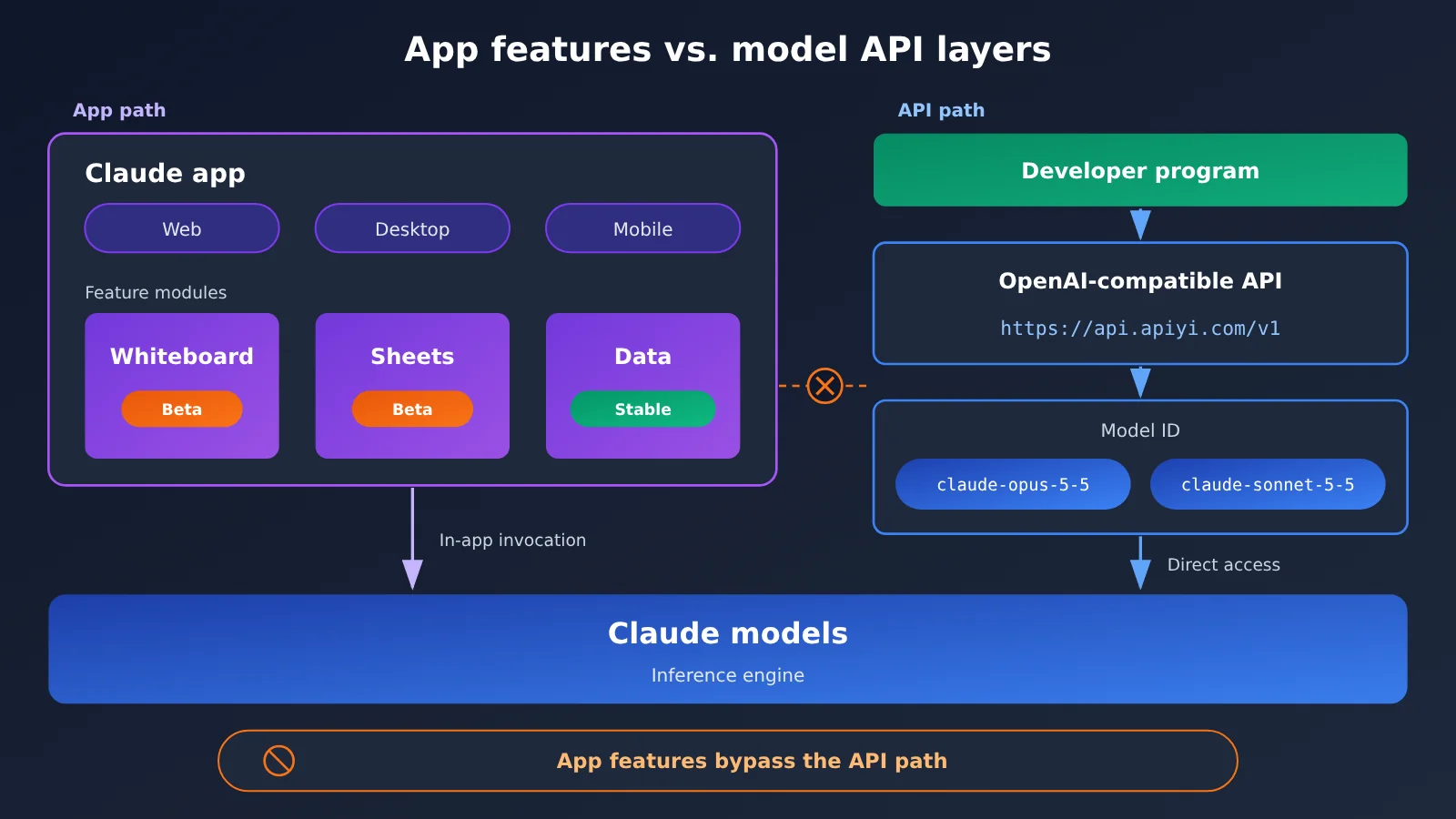
It helps to separate two layers here: app features and models. A model is the inference engine that takes input and produces output, and you call it through a model ID. An app feature is a product interface and workflow built on top of a model. Whiteboards, Sheets, and Data fall into the second category. That’s why the official announcement doesn’t assign them any API model IDs, and why the API’s model list won’t suddenly grow three new names.
Enterprise Toggle Rules for Whiteboards and Sheets
Admins should pay attention to the default settings on Enterprise. Since Whiteboards and Sheets are still in beta, they’re off by default for Enterprise, and an admin has to decide whether to turn them on. Claude Data has graduated, so it’s on by default for Enterprise starting November 19, 2026. If your team has compliance requirements around data handling features, it’s worth reviewing your organization’s policy before that date.
One more thing: these toggles live in the Claude app’s admin console. They’re a separate set of configurations from API keys, model permissions, and usage quotas. Turning Whiteboards on or off won’t affect your program’s ability to call Claude text models.
Why Claude’s Whiteboards and Sheets Aren’t New API Models
Whenever Anthropic releases a new model, developers usually head straight to the model list to look for the matching ID. That’s a perfectly good habit. But this time the product names all follow a “Claude + noun” pattern, so they look a lot like new models, and it’s easy to get confused. The table below compares the two kinds of names:
| Comparison | App features (Whiteboards / Sheets / Data) | API models (e.g., claude-opus-5-5) |
|---|---|---|
| Where it lives | The Claude app on web, desktop, and mobile | The model list in the model API |
| How you use it | Click through the app interface | Put the model ID in the model field of your request |
| How you get access | A paid Claude app subscription | Pay-as-you-go calls with an API key |
| Enterprise controls | Toggles in the app admin console | Key and quota management on the API side |
Can it go in the model parameter? |
No | Yes |
| Available channels | The official Anthropic Claude app | The official API, and model API platforms like APIYI (apiyi.com) |
As the table shows, the only thing the two have in common is that there’s a Claude model behind both. App features add an interface and interactions on top of the model’s capabilities, while a model API only gives you the model’s raw input and output. So Claude’s whiteboards and sheets aren’t new API models, and they won’t show up in any price list that’s priced by model ID.
What Happens If You Use a Feature Name as a Model ID
If you put claude-whiteboards, claude-sheets, or claude-data in the model field of a request, the API can’t find that model. You’ll typically get an error along the lines of “model does not exist” or “model not supported.” That’s not a network or permissions problem. The name itself is just wrong. When troubleshooting, first check that the model field contains a model ID that actually exists in the price list, then look at your other settings.
Claude Text Models Still Use the Same Model IDs
This release doesn’t change how you invoke Claude text models. If you call Claude through APIYI, keep filling in the model ID according to the platform’s price list, for example claude-opus-5-5 or claude-sonnet-5-5. Whiteboards, Sheets, and Data aren’t in APIYI’s priced model IDs, because APIYI provides a model API, not these features inside the Claude app.
Beyond Claude Whiteboards and Sheets: A Quick Start for API Calls
Since those three features can’t be called through the API, what developers really need is a correct model invocation setup. APIYI uses an OpenAI-compatible interface, so you can connect with the OpenAI SDK by changing just two parameters. The table below lists the key parameters you’ll need when calling Claude text models:
| Parameter | What to enter | Notes |
|---|---|---|
base_url |
https://api.apiyi.com/v1 |
The OpenAI-compatible endpoint for APIYI (apiyi.com) |
api_key |
Your API key | Create one in the APIYI console |
model |
claude-sonnet-5-5 or claude-opus-5-5 |
Use the model ID from the pricing list |
messages |
Array of conversation messages | Same format as OpenAI Chat Completions |
| Don’t use | claude-whiteboards / claude-sheets / claude-data |
These are app feature names, not model IDs |
If you’re using the Python OpenAI SDK, just pass base_url="https://api.apiyi.com/v1" and api_key="YOUR_API_KEY" when you initialize the client, then call client.chat.completions.create(model="claude-sonnet-5-5", messages=[...]). If your project can already call Claude, you won’t need to change anything after this release.
If you want your app to offer something like “spreadsheet cleanup” or a “data dashboard,” the right approach is to build it yourself: use a text model to generate structured data (such as JSON or CSV), then hand it off to your own frontend or table component to render. This way, the capability comes from the model itself, while you control the interface and the data flow. It has nothing to do with the Sheets and Data features in the Claude app.
🚀 Quick start: If you want to use Claude’s text capabilities in your own product, you can sign up at APIYI (apiyi.com) and claim free test credits as a new user. With a single API key, you can switch between Claude, OpenAI, Gemini, and other leading models. Billing is pay-as-you-go, which makes it a good fit for running a small-scale trial before you decide which model to use.
Impact Analysis of the Claude Whiteboard and Spreadsheet Launch
What It Means for Claude App Users
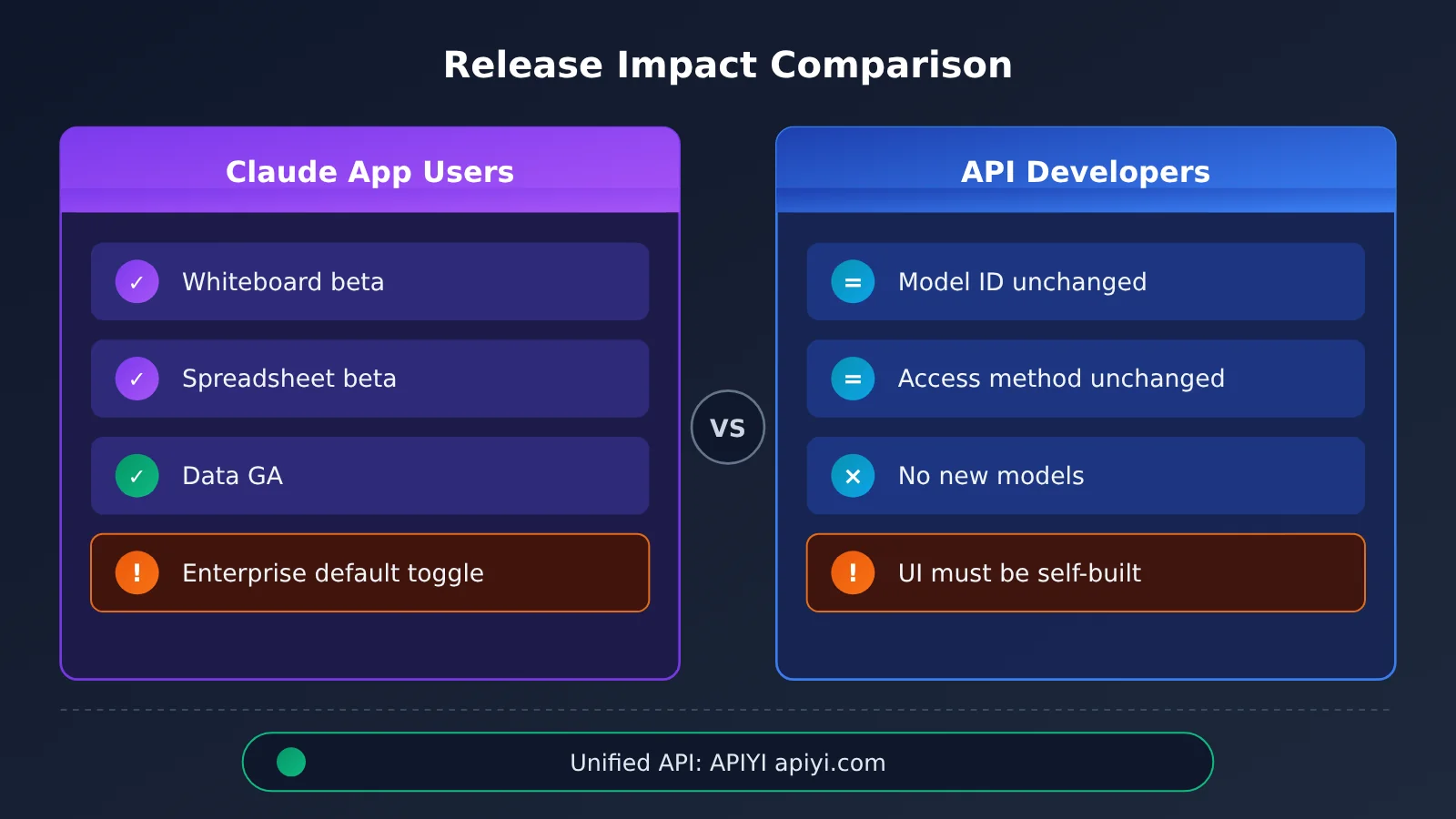
If you’re a paying Claude app user, this release gives you a new workspace right away. Whiteboard and Spreadsheet are both in beta for now, so features and the overall experience may still change. It’s best to try them out in non-critical scenarios first. Claude Data is already generally available, so if you used Dashboards before, the main adjustment is getting used to the new name.
Enterprise users should pay close attention to the differences in default settings. Whiteboard and Spreadsheet are off by default, while Data is on by default starting November 19. That means Enterprise admins may need to confirm before that date that it fits your internal data policies. All three features work on web, desktop, and mobile, so you’ll want to factor in your cross-device access policies as well.
What It Means for API Developers
If you integrate Claude through the API, this release has almost no direct impact on you. The key points are:
- Model IDs don’t change: You still call Claude text models with existing IDs like claude-opus-5-5 and claude-sonnet-5-5, so there’s no need to change your code.
- No new callable models: Claude’s Whiteboard and Spreadsheet aren’t new API models, so there’s nothing to look for in the model list and nothing to wait for.
- You build the interface yourself: If you want whiteboard- or spreadsheet-style interactions in your own product, you’ll need to build the front end on top of the model’s output.
- One more thing to check when debugging: If you hit a “model not found” error, first check whether the model field accidentally contains a feature name.
What It Means for Model Selection
Application-layer releases like this show, indirectly, that the same model can power many different product forms. For developers, that means picking a model based on the task itself: try the Opus series first for complex reasoning and long-document analysis, try the Sonnet series first for everyday conversation and batch processing, then adjust based on results and cost.
| Development Need | Suggested Approach | Example Model ID |
|---|---|---|
| Structured data extraction | Have the model output JSON, then write it to a spreadsheet programmatically | claude-sonnet-5-5 |
| Complex analysis and long-form reasoning | Try the more capable model first | claude-opus-5-5 |
| Written interpretation of dashboards | Aggregate the data in code, then have the model generate the commentary | claude-sonnet-5-5 |
| Want to use the Whiteboard or Spreadsheet interface directly | Use the paid Claude app, not the API | No model ID involved |
💡 Tip: Results and costs for the same task can differ across Claude models, so we recommend running a small-sample comparison on your own real data. With APIYI (apiyi.com), you only need to change the model field to switch models, which makes side-by-side comparison easy.
Frequently Asked Questions (FAQ)
Q1: Are Claude Whiteboards and Claude Sheets new API models?
No. They’re beta features in the Claude app, which Anthropic released on November 10, 2026. They’re available to paid Claude app users on web, desktop, and mobile, and there’s no corresponding API model ID.
Q2: What’s the difference between Claude Data and the old Claude Dashboards?
Claude Data is the former Claude Dashboards, now generally available and renamed. It’s also an app feature, not a model. For Enterprise plans, Claude Data is turned on by default starting November 19, 2026, while Whiteboards and Sheets are turned off by default.
Q3: Can I put claude-sheets in the model parameter to call the spreadsheet feature?
No. The model parameter only accepts model IDs, so entering a feature name will typically return an error like “model not found.” To call Claude text models, use the IDs from the price list, such as claude-sonnet-5-5 or claude-opus-5-5.
Q4: Can APIYI call Claude’s Whiteboards, Sheets, or Data?
No. APIYI provides Large Language Model APIs, meaning you call the text capabilities of Claude, OpenAI, Gemini, and other models by model ID. It doesn’t offer the interface features inside the Claude app. If you need the model’s capabilities, you can call Claude text models through APIYI (apiyi.com) using the OpenAI-compatible interface. If you want the Whiteboards or Sheets interface itself, you’ll need a paid Claude app plan.
Q5: Do I need to change my Claude API code after this release?
No. Model IDs, endpoints, and request formats haven’t changed because of this release. Projects already using Claude through APIYI (apiyi.com) will keep running as usual. For new projects, just set base_url to `https://api.apiyi.com/v1` and use a Claude model ID from the price list for the model parameter.
Q6: How can I build something spreadsheet-like in my own product?
The idea is “the model handles the content, your code handles the interface.” Have a Claude text model output structured data in an agreed format, then render it as a table or board with your own front-end components. Keep in mind that Whiteboards and Sheets are still in beta, so if you want to borrow from their interaction design, the features may change later.
Claude Whiteboards and Sheets Aren’t New API Models: Key Takeaways
- What launched: On November 10, 2026, Anthropic rolled out Whiteboards and Sheets in beta. Dashboards graduated from beta and was renamed Data.
- What they are: All three are features of the paid Claude app, available on web, desktop, and mobile.
- Not models: Claude’s Whiteboards and Sheets aren’t new API models, so you can’t put them in the
modelparameter. - Enterprise toggles: Whiteboards and Sheets are off by default. Claude Data is on by default starting November 19.
- API calls stay the same: For text models, you still use the existing IDs like claude-opus-5-5 and claude-sonnet-5-5.
- How to get started: Use APIYI (apiyi.com) to call Claude text models through an OpenAI-compatible interface with a single key.
Summary
Here’s what you need to know about Claude’s Whiteboards and Sheets:
- Naming: Claude Whiteboards, Claude Sheets, and Claude Data are features of the Claude app, not API models. You won’t find any of these names in the model list.
- Who they’re for: The people using these features directly are paid Claude app users. Enterprise admins should keep an eye on the default toggle for each feature.
- Impact on developers: If you use the API, your model IDs and integration approach don’t change. If you want a similar interface, you’ll need to build it yourself on top of model output.
If you just want to try the new Whiteboards or Sheets interface, use the paid Claude app. If you need to call Claude’s text capabilities from your code, keep using the model IDs from the price list. We recommend APIYI (apiyi.com), which lets you call Claude and other leading models with a single API key. New users can start with the free credits to test things out, then decide which model fits production.
📚 References
- Anthropic Official Announcement: Claude Sheets, Whiteboards, and Data: The original release notes for this feature launch
- Link:
claude.com/resources/articles/sheets-whiteboards-data -
Notes: Covers the release date, beta status, the Dashboards-to-Data rename, and the default on/off setting for Enterprise plans
-
APIYI Pricing and Model List: Where to look up the model IDs you can invoke
- Link:
apiyi.com - Notes: Confirms model IDs such as claude-opus-5-5 and claude-sonnet-5-5, so you don’t accidentally put an app feature name in the model parameter
Author: APIYI Technical Team
Technical Discussion: If you run into issues choosing a model ID or integrating with the API, reach out to us through the APIYI homepage at apiyi.com. For more integration guides, check out the docs center at docs.apiyi.com