Author’s note: A spec breakdown of MiniMax H3-Image: roughly 16MP native output, 6-step distillation, and up to 16 reference images. This article separates what the documentation states from what MiniMax claims about itself, and covers the key API points, the open-source license boundaries, and the current listing status on APIYI.
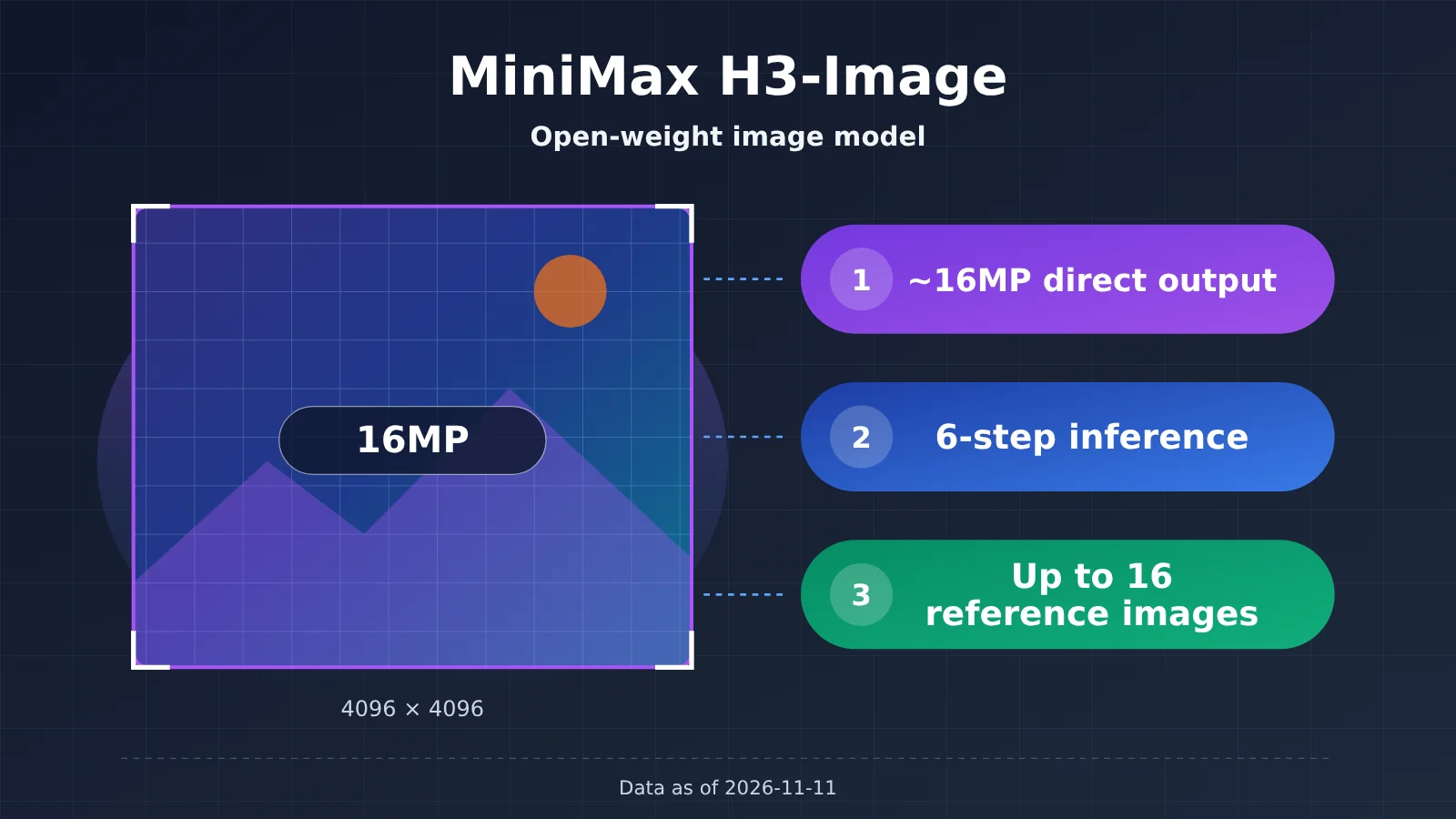
On 2026-11-10, MiniMax announced MiniMax H3-Image through its official X account. It’s an open-weight image generation and editing model, and generation and editing share the same checkpoint. It has three headline features: roughly 16MP native output with no upscaler, distillation down to 6 inference steps, and support for up to 16 reference images. As of 2026-11-11, this model isn’t in the APIYI (apiyi.com) model list yet, so integration details and pricing will have to wait until it’s listed.
This isn’t a rehash of the announcement post. Every number below is labeled with its source. Specs stated in the model card and API docs are marked “documented.” Promotional figures from official benchmarks, the official blog, and the official account are marked “self-reported.” Anything we can’t confirm yet gets its own section.
What you’ll get: After reading, you’ll have a capability-boundary table for MiniMax H3-Image covering resolution, step count, reference images, open-source scope, and whether you can call it on APIYI right now. You can use it to decide whether the model belongs on your image API shortlist.
MiniMax H3-Image at a Glance
Here’s the release info condensed into one table. The “Source” column matters, because every judgment later on rests on it.
| Item | Details | Source |
|---|---|---|
| Release time | 2026-11-10 15:40 UTC, posted by the official X account @MiniMax_AI | Official account |
| Publisher | MiniMax | Official account |
| Model type | Image generation and editing, a single checkpoint, open weights | Documentation (model card) |
| Model IDs | MiniMax-H3-Image, MiniMax-H3-Image-Highspeed |
Documentation (API docs) |
| Access points | MiniMax API, MiniMax Code, Hailuo AI | Official account |
| License | MiniMax-H3-Image Community License, with regional restrictions | Documentation (model card) |
| APIYI status | Not listed yet. We’ll add this model as soon as we can; model names and pricing are subject to the platform’s model list. | APIYI model list, 2026-11-11 |
The announcement post is titled “4K image generation in 10 seconds.” The “4K in 10 seconds” claim is self-reported by MiniMax. It’s marketing language from the official account, not an API SLA. The API docs say the server may take up to 600 seconds to respond, so base your timeout and queueing design on 600 seconds, not 10.
MiniMax H3-Image Specs, Sources, and Open Questions
This section answers one question: which numbers can go straight into a technical proposal, and which should only be treated as reference. The table below breaks things down into three columns: Spec / Source / Still Unclear.
| Spec | Source | Still Unclear |
|---|---|---|
| About 16MP direct output, from 4096×4096 (1:1) to 6272×2688 (21:9), no upscaler involved | Documented (model card) | Detail fidelity across different aspect ratios hasn’t been independently evaluated |
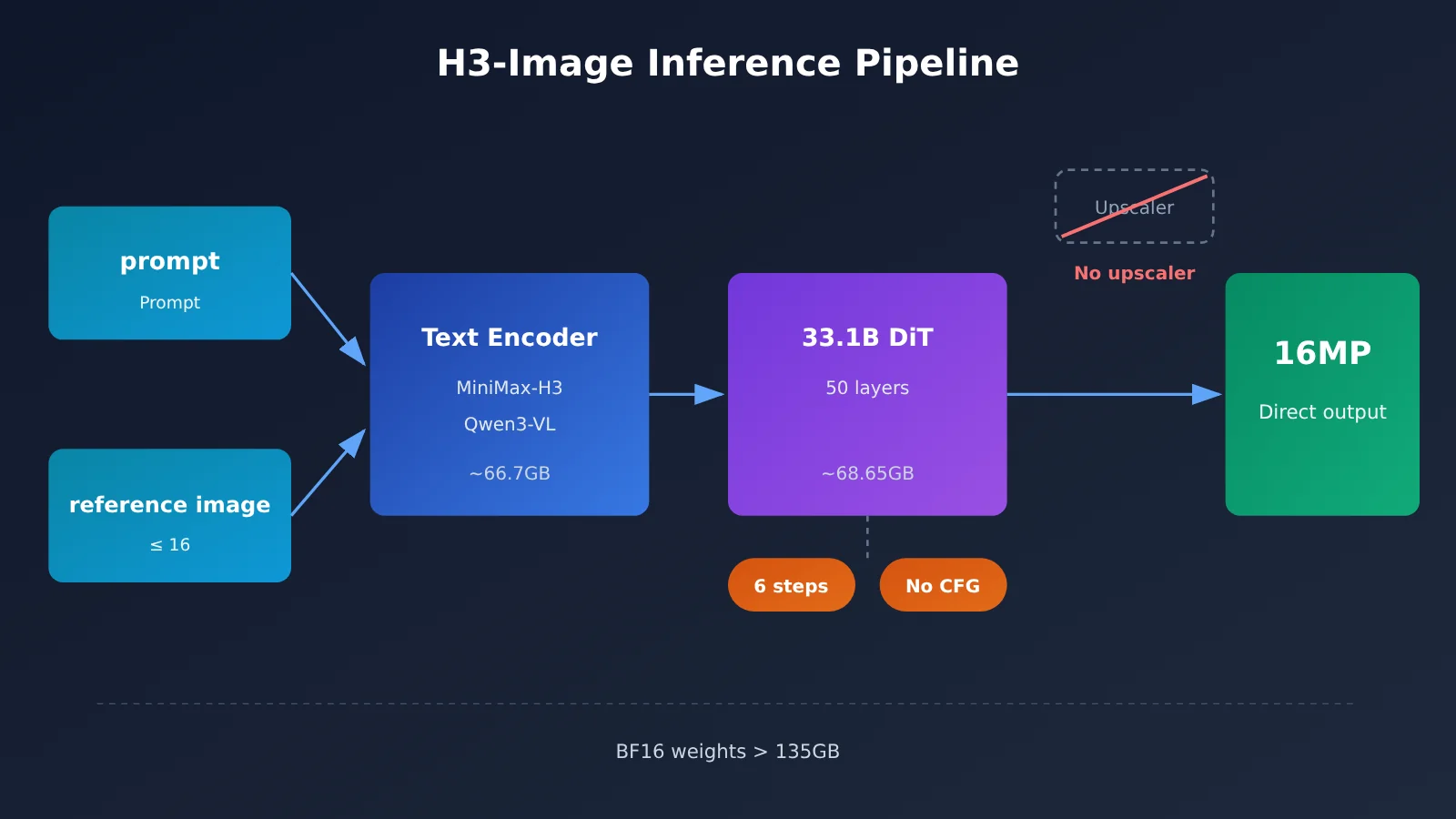
| Distilled to 6 steps (6 NFE), no classifier-free guidance | Documented (model card) | No third-party data on how stable 6 steps are for complex compositions |
| DiT with 33.1B parameters, 50 layers, BF16 | Documented (model card) | No official word on quantized versions or minimum VRAM requirements |
| Up to 16 reference images | Self-reported by the vendor (model card, official account) | How consistency changes as the number of reference images grows |
| Strongest instruction following among open-source models | Self-reported by the vendor (model card) | No independent leaderboard scores, so there’s no way to cross-check it |
| 4K in 10 seconds | Self-reported by the vendor (official account) | Not an API guarantee; the API timeout is 600 seconds |
| Highspeed and standard versions share the same parameter limits | Documented (API docs) | The docs don’t give actual numbers for the speed difference between the two |
The takeaway from this table: the hard specs for MiniMax H3-Image (resolution range, step count, parameter count) are backed by documentation, so they’re fairly reliable. The claims that deserve a question mark are things like “strongest instruction following” and “4K in 10 seconds.” Right now those come only from the vendor itself, with no independent verification.
MiniMax H3-Image 16MP Direct Output: Choosing a Size
“16MP direct output” means the model generates at native resolution in a single pass. It doesn’t produce a small image first and then run a super-resolution model to upscale it. According to the model card, its effective working range is roughly 4MP to 20MP, with the best results around 16MP. Below are the common 16MP sizes listed in the model card. For portrait images, just swap the width and height.
| Aspect Ratio | Landscape Size | Pixel Count (approx.) |
|---|---|---|
| 1:1 | 4096×4096 | 16.8MP |
| 4:3 | 4736×3552 | 16.8MP |
| 3:2 | 5024×3360 | 16.9MP |
| 16:9 | 5472×3072 | 16.8MP |
| 21:9 | 6272×2688 | 16.9MP |
These sizes work well for scenarios that need a large canvas, like print materials, banner posters, and long e-commerce images, since you can skip a super-resolution post-processing step. The trade-off is larger files per image, so factor storage and transfer costs into your pipeline early.
What the 6-Step Distillation Means for MiniMax H3-Image
The model card states that MiniMax H3-Image is distilled down to 6 steps (6 NFE) and doesn’t use classifier-free guidance. Skipping the unconditional branch computation and cutting the step count to 6 is the technical foundation behind its claim of generating large images quickly.
This design also comes with a direct limitation: the step count and guidance scale are essentially fixed. Per the documentation, for local inference num_inference_steps can only be 6 or omitted, guidance_scale can only be 1 or omitted, and negative_prompt is rejected outright. If you’re used to controlling output by adding more steps, tuning CFG, or writing negative prompts, you’ll need to shift your control levers to the positive prompt and reference images.
MiniMax H3-Image: Reference Images and Unified Generation and Editing
Generation and editing share the same checkpoint, and that comes straight from the documentation. For integrators, maintaining one model covers both text-to-image and image editing, so you don’t need to deploy separate weights for editing tasks. The limit of up to 16 reference images is self-reported by the vendor, and it suits tasks like multi-character consistency, multi-product compositions, and stitching together brand elements. That said, there’s no third-party data yet on whether consistency holds up as you add more reference images.
The model card also mentions an optional prompt expansion model, MiniMax-H3-Image-PE, which expands short prompts into fuller descriptions. It’s an optional component, and inference runs fine without it.
MiniMax H3-Image API and Deployment Notes
The API docs split text-to-image and editing into two separate paths. The points below are listed in the order you’re most likely to trip over them during integration, and all of them come from the documentation:
- Text-to-image path:
POST /v1/images/generations - Editing path:
/v1/images/edits, a separate endpoint from text-to-image - Model IDs:
MiniMax-H3-ImageandMiniMax-H3-Image-Highspeed, both with the same parameter limits - Count
n: 1 to 10 - Size
size: when you passWIDTHxHEIGHT, the area must be between 655,360 and 20,000,000 pixels, and the aspect ratio must be between 1:3 and 3:1 - Size omitted or
auto: the default area is 4K;1K,2K, and4Kmap to target areas of 1024×1024, 2048×2048, and 4096×4096 respectively - Prompt enhancement: on by default; if you set
disable_prompt_enhancedtotrue, you must specify the aspect ratio yourself - Output format:
png,jpeg,webp, withjpegas the default - Server-side wait limit: 600 seconds
If you’re deploying locally, work out your VRAM and disk budget carefully. The DiT in the model repository is about 68.65GB. The text encoder comes from MiniMax-H3 and is based on Qwen3-VL. It isn’t in the same repository, and it takes up roughly 66.7GB on its own. Put together, the BF16 weights exceed 135GB.
Where the MiniMax H3-Image License Draws the Line
“Open-weight” doesn’t mean you can use it commercially however you like. MiniMax H3-Image is released under the MiniMax-H3-Image Community License, dated 2026-11-10. The license states that its scope is the Applicable Territory, which means there are geographic restrictions. Any use outside the license’s scope requires additional written authorization, and you can apply through the license page in the MiniMax platform console.
So if your team plans to self-host the weights in a commercial product, read the license clause by clause first and confirm that both your region and your use case fall within the authorized scope. When you’re not sure, go through the additional authorization process rather than assuming that “open source means commercially usable.”
Can You Call MiniMax H3-Image on APIYI Right Now?
Short answer: not yet. On 2026-11-11, we checked the model docs and pricing endpoint on APIYI (apiyi.com). The MiniMax-H3 video model is live on the platform, but MiniMax-H3-Image and MiniMax-H3-Image-Highspeed aren’t.
The table below puts the MiniMax H3-Image models next to the neighboring image models you can already call on the platform. One thing to be clear about: the models that are already live are independent models. They aren’t replacements or aliases for MiniMax H3-Image.
| Model | APIYI Status | Billing | Input Price | Output Price | Cache Read Price |
|---|---|---|---|---|---|
MiniMax-H3-Image |
Not yet available | — | — | — | — |
MiniMax-H3-Image-Highspeed |
Not yet available | — | — | — | — |
| Seedream 5.5 | Not yet available | — | — | — | — |
| MiniMax-H3 (video) | Available | Per second | — | $0.03 / second | No cache read price |
gemini-nano-banana-2.1 |
Available | Per call | — | $0.045 / call | No cache read price |
gpt-image-2.6-flare |
Available | Usage-based | Text $5, image $8 | $30 | Text $1.25, image $2 |
gpt-image-2.6-sunburst |
Available | Usage-based | Text $5, image $8 | $30 | Text $1.25, image $2 |
For usage-based models, prices are per million tokens. Data is as of 2026-11-11. MiniMax-H3-Image, MiniMax-H3-Image-Highspeed, and Seedream 5.5 aren’t available yet, and we’ll add this model as soon as we can. Model availability and pricing are subject to the platform’s model list, and the same goes for the models that are already live. MiniMax’s official pricing for H3-Image is outside the scope of the reference material for this article, so we’re not listing any specific figures here, which also means there’s no cache read price to report.
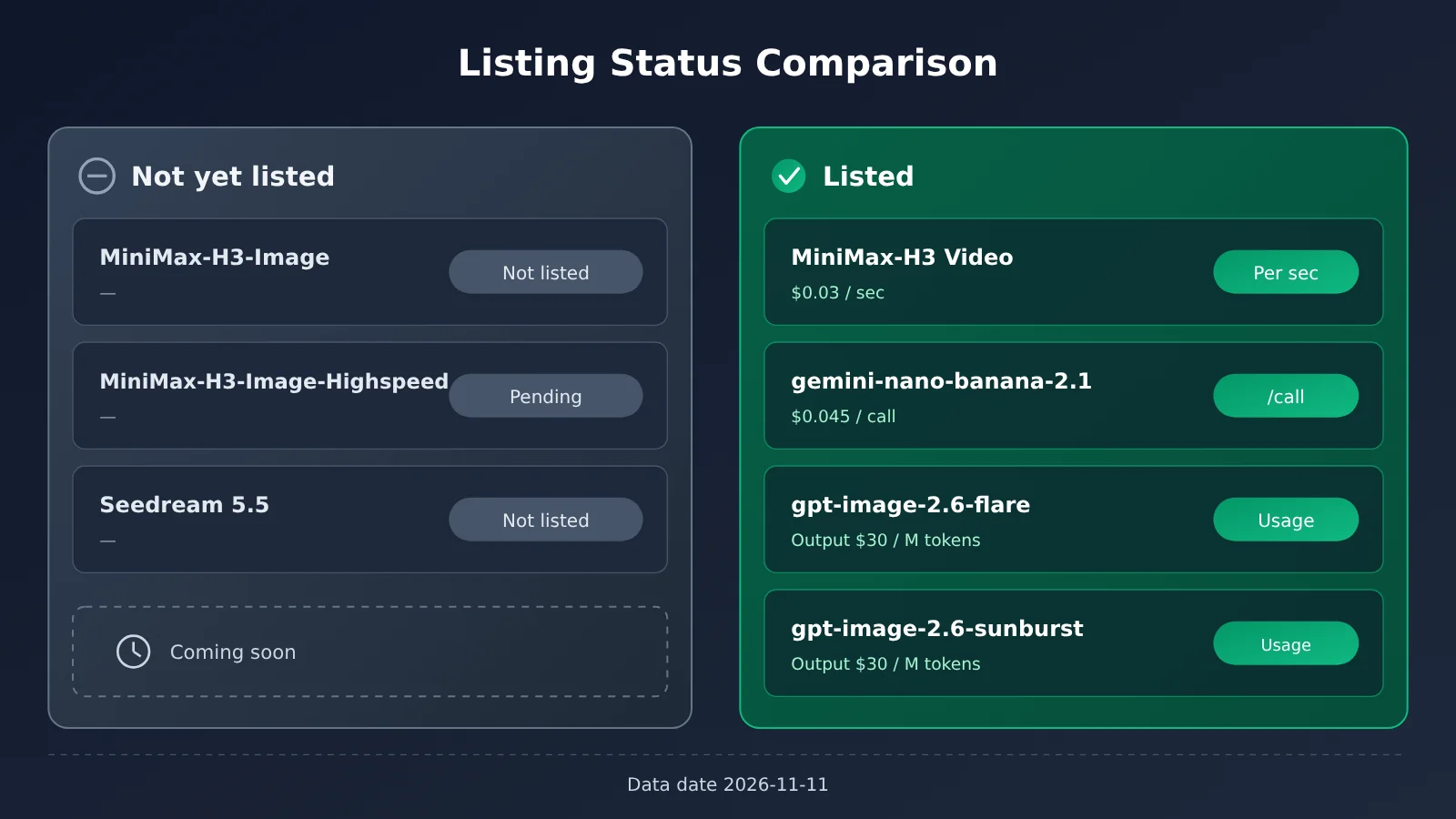
The status and prices in the chart above come from the APIYI (apiyi.com) pricing endpoint, as of 2026-11-11. On Google’s side, the latest image model by this article’s reckoning is Nano Banana 2.1, which maps to the platform model gemini-nano-banana-2.1.
🚀 Integration tip: If your image pipeline needs to be up and running now, you can start by wiring up the call chain with the image models that are already live on the platform. They use an OpenAI-compatible interface, with
base_urlset tohttps://api.apiyi.com/v1. Once MiniMax H3-Image goes live, you should usually only need to swap the model ID and adjust thesizeparameter to match its size rules. The pipeline itself won’t need a rewrite.
MiniMax H3-Image Integration Troubleshooting: Three Things to Know
All three of these come from the API docs, and they’re the spots where people most often get tripped up when integrating MiniMax H3-Image:
- Don’t blindly retry after a timeout: Requests aren’t idempotent. If your client times out, the server may still be generating the image and charging you for it. Retry, and you’ll get another image and another charge. The docs recommend setting
max_retriesto0when you use the OpenAI SDK, and raising the client timeout high enough to cover the server’s 600-second wait limit. After a timeout, check your billing and task records first, then decide whether to resend. - Error code
2068is a plan-tier problem: It means your current plan tier doesn’t support the model. It isn’t a bad parameter or a service outage, so changing the request body won’t fix it. You’ll need to upgrade your plan or switch to a supported model. negative_promptand custom step counts get rejected: According to the docs,num_inference_stepscan only be 6 or omitted,guidance_scalecan only be 1 or omitted, andnegative_promptis rejected outright. If you’re migrating call code from other diffusion models, strip these parameters out first.
What MiniMax H3-Image Means for Developers and the Industry
Impact on Developers
- Large formats no longer depend on upscaling: Native output at around 16MP lets you drop the two-stage “generate small, then upscale” pipeline, which means one less model to maintain.
- You’ll need a new way to control output: Steps, CFG, and negative prompts are all locked down, so control comes mainly from positive prompts, reference images, and aspect ratio parameters. Your existing prompt templates will need a rewrite.
- Timeout and billing strategies need to change: Non-idempotent requests plus a 600-second wait limit call for a “long timeout + no automatic retries + reconciliation” approach on the client side.
- Self-hosting isn’t a low bar: The BF16 weights are over 135GB, and the license has regional restrictions, so for small and mid-sized teams the more realistic path is the API. If your team already runs an image pipeline on APIYI (apiyi.com), switching models under the same API key once it’s listed will cost you the least effort.
Impact on the Industry
- The spec ceiling for open-weight image models just went up: A 33.1B-parameter DiT paired with native 16MP output gives open-weight models a more direct option for large-format work.
- Expect the “open source” vs. “commercially usable” distinction to come up more often: A community license plus regional restrictions shows that, even in open-source Large Language Model releases, the license terms are now part of the selection process. You can’t just go by the “open-weight” label.
- Marketing numbers and API commitments need to be read separately: “4K in 10 seconds” and a “600-second timeout” exist side by side. That’s a reminder to treat the API docs as the source of truth and the marketing figures as a rough reference only.
FAQ
Q1: What is MiniMax H3-Image?
MiniMax H3-Image is an open-weight image model that MiniMax released on 2026-11-10. Generation and editing share a single checkpoint. According to the docs, it can output roughly 16MP directly and is distilled down to 6 steps. The claim of up to 16 reference images is officially self-reported.
Q2: Does MiniMax H3-Image really produce 4K in 10 seconds?
That’s the official account’s claim. It’s self-reported, not an API guarantee. The API docs set the server-side wait limit at 600 seconds, so you should design your system around 600 seconds.
Q3: MiniMax H3-Image is open source. Can I use it commercially right away?
Not necessarily. It’s released under the MiniMax-H3-Image Community License, and its scope is limited to the Applicable Territory. If you fall outside that scope, you’ll need to request additional written authorization through the license page on the MiniMax platform. Check the license terms clause by clause before any commercial use.
Q4: How do I call MiniMax H3-Image through APIYI?
As of 2026-11-11, it isn’t available yet. We’ll add the model as soon as we can, and the model name and pricing will follow the platform’s model list. Once it’s live, you can call it on APIYI (apiyi.com) with the same API key, using an OpenAI-compatible interface. Until then, you can build out your invocation pipeline with the image models that are already available on the platform.
Q5: How do I choose between MiniMax-H3-Image and MiniMax-H3-Image-Highspeed?
The docs say both have the same parameter limits. Going by the name, Highspeed leans toward speed, but the docs don’t give any concrete numbers on speed or quality differences. Once both are available, I’d suggest running your own prompts against each and deciding from there.
Q6: What are the known limitations of MiniMax H3-Image?
– The step count is fixed at 6, the guidance scale is fixed at 1, and negative prompts aren’t supported.
– Requests aren’t idempotent, so retrying after a timeout may result in duplicate charges.
– Error code `2068` means your plan tier doesn’t support this model.
– The self-hosted weights total more than 135GB, and the license has territorial restrictions.
– The “best instruction following” claim is officially self-reported only, with no independent leaderboard score behind it.
MiniMax H3-Image Key Takeaways
- Type: An open-weight image model that uses a single checkpoint for both generation and editing.
- Resolution: Roughly 16MP native output, from 4096×4096 up to 6272×2688, with no upscaler involved.
- Inference steps: Distilled down to 6 steps with no CFG. Neither the step count nor the guidance scale is adjustable.
- Reference images: Up to 16 per request. This figure is self-reported by the vendor, so consistency still needs third-party verification.
- API notes: Generation and editing use two separate paths, the timeout is 600 seconds, and requests are not idempotent.
- Open-source limits: The community license has geographic restrictions, and any additional commercial use requires written authorization.
- Availability: APIYI hasn’t listed it yet. Check the platform’s model list for the model ID and pricing.
Summary
Here are the key points on MiniMax H3-Image:
- The hard specs are solid: Roughly 16MP native output, 6-step distillation, and the 33.1B DiT are all backed by the model card, so you can put them straight into your selection table.
- Discount the marketing numbers: “4K in 10 seconds” and “best instruction following” are vendor self-reports. For API timeouts, go with 600 seconds.
- Three integration pitfalls: Don’t blindly retry on timeouts,
2068is a plan-tier issue, and bothnegative_promptand changing the step count will get rejected. - Open source has limits: The community license comes with geographic restrictions, so check the terms before using it commercially.
If you need large-format image generation with multiple reference images, MiniMax H3-Image is worth putting on your shortlist. But I’d suggest running a round of retesting against the docs, using the capability boundary table in this article, before you make a final call. To track when it goes live, keep an eye on the model list at APIYI (apiyi.com). Until then, you can get your pipeline running with image models that are already listed.
📚 References
- MiniMax’s Official X Post: MiniMax H3-Image launch announcement
- Link:
x.com/MiniMax_AI/status/2120179737695826420 -
Note: The source of claims like “4K in 10 seconds” and “16 reference images.” These are self-reported by MiniMax.
-
Hugging Face Model Card: MiniMax-H3-Image weights and specs
- Link:
huggingface.co/MiniMaxAI/MiniMax-H3-Image -
Note: Resolution, step count, parameter count, common sizes, and the community license
-
MiniMax Image Generation API Docs: H3 text-to-image API reference
- Link:
platform.minimax.io/docs/api-reference/image-generation-h3-generations -
Note: Model ID,
sizerules, timeouts, idempotency, and error code2068 -
MiniMax Additional License Request: Written authorization beyond the community license
- Link:
platform.minimax.io/console/license -
Note: Where to apply if your use goes beyond the Applicable Territory
-
APIYI Model List: Available models and listing status on the platform
- Link:
docs.apiyi.com/models - Note: The source we used to verify the listing status and pricing in this article, with data as of 2026-11-11
Author: APIYI Technical Team
Technical discussion: If you have questions about integrating image models, feel free to contact us on the APIYI homepage. Models and pricing are subject to the platform’s model list.