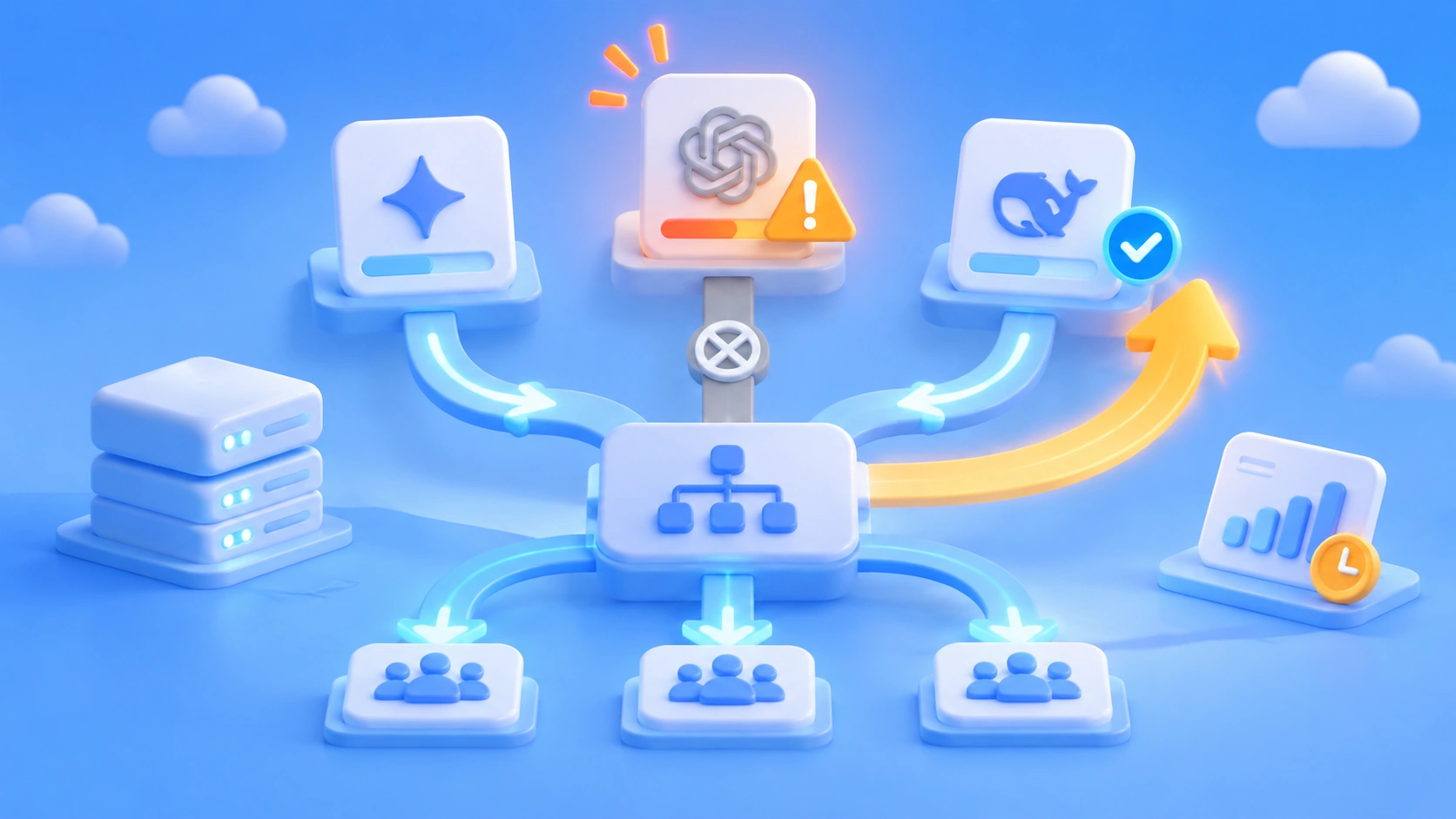
Author’s note: Quota exhaustion, rate limits, and timeouts are predictable on the day a new model launches. This article covers five design considerations—model tiers, fallback mappings, priority queues, off-peak scheduling, and monitoring and budgets—plus a launch-day capacity checklist.
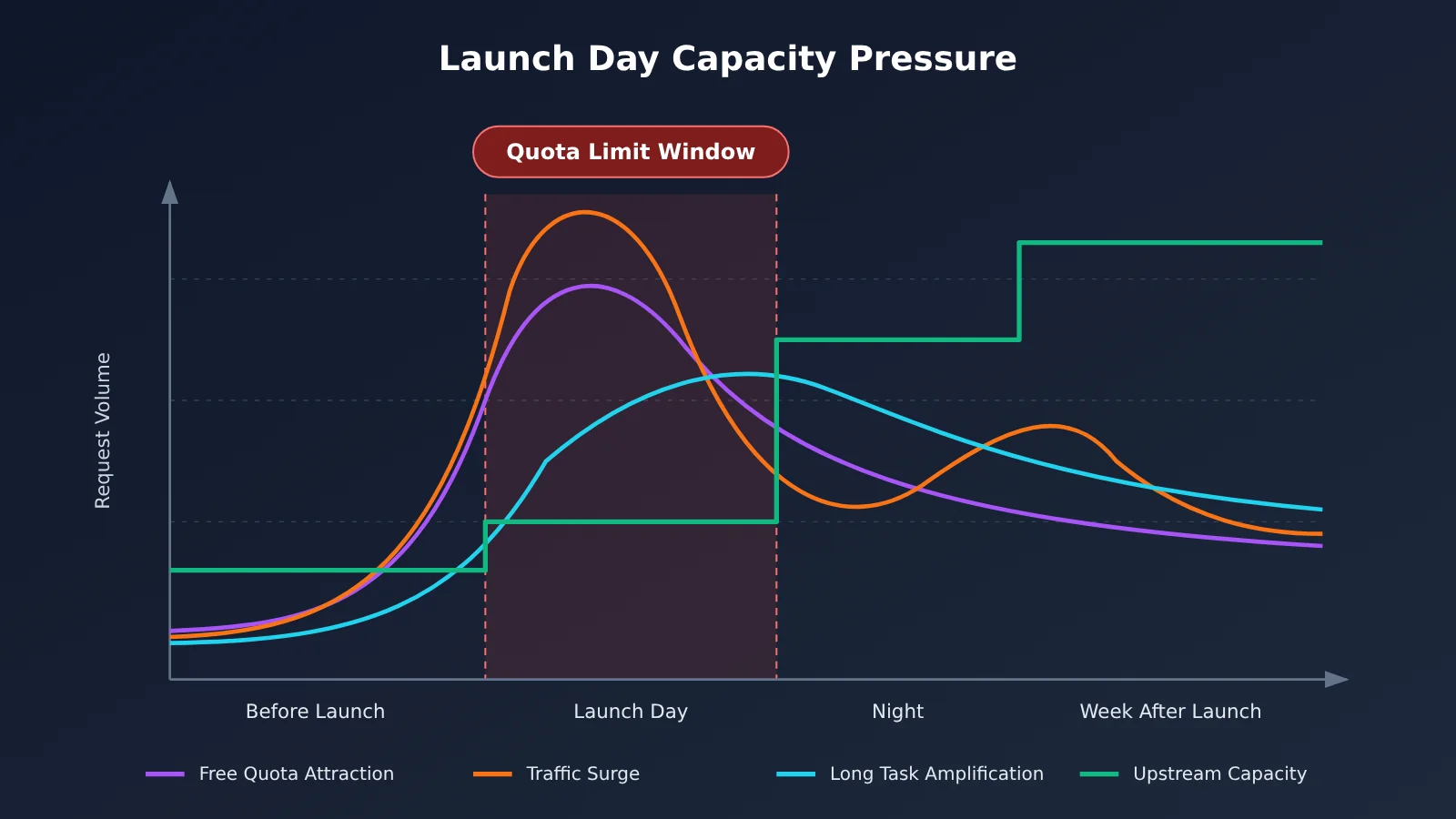
Here’s the bottom line: Hitting quota limits as soon as a new model launches isn’t an accident—it’s part of the product cycle. Free quotas attract a flood of people eager to try the model, launch-day traffic is highly concentrated, and upstream providers need time to scale. Together, those factors make capacity constraints almost inevitable. What application teams should do is design multi-model switching and off-peak scheduling before launch, rather than retrying over and over once 429 errors appear.
This isn’t an article about “adding a few more retries.” Retries can smooth over brief disruptions, but they can’t fix exhausted quotas or an overloaded provider. Launch-day resilience isn’t about how many times you retry; it’s about the tiers and queues you’ve designed in advance. By the end of this article, you’ll have a practical approach to launch-day capacity planning: model tiers, fallback mappings, priority queues, off-peak scheduling, and monitoring and budgets. You’ll also know when to switch models, when to queue requests, and when to stop.
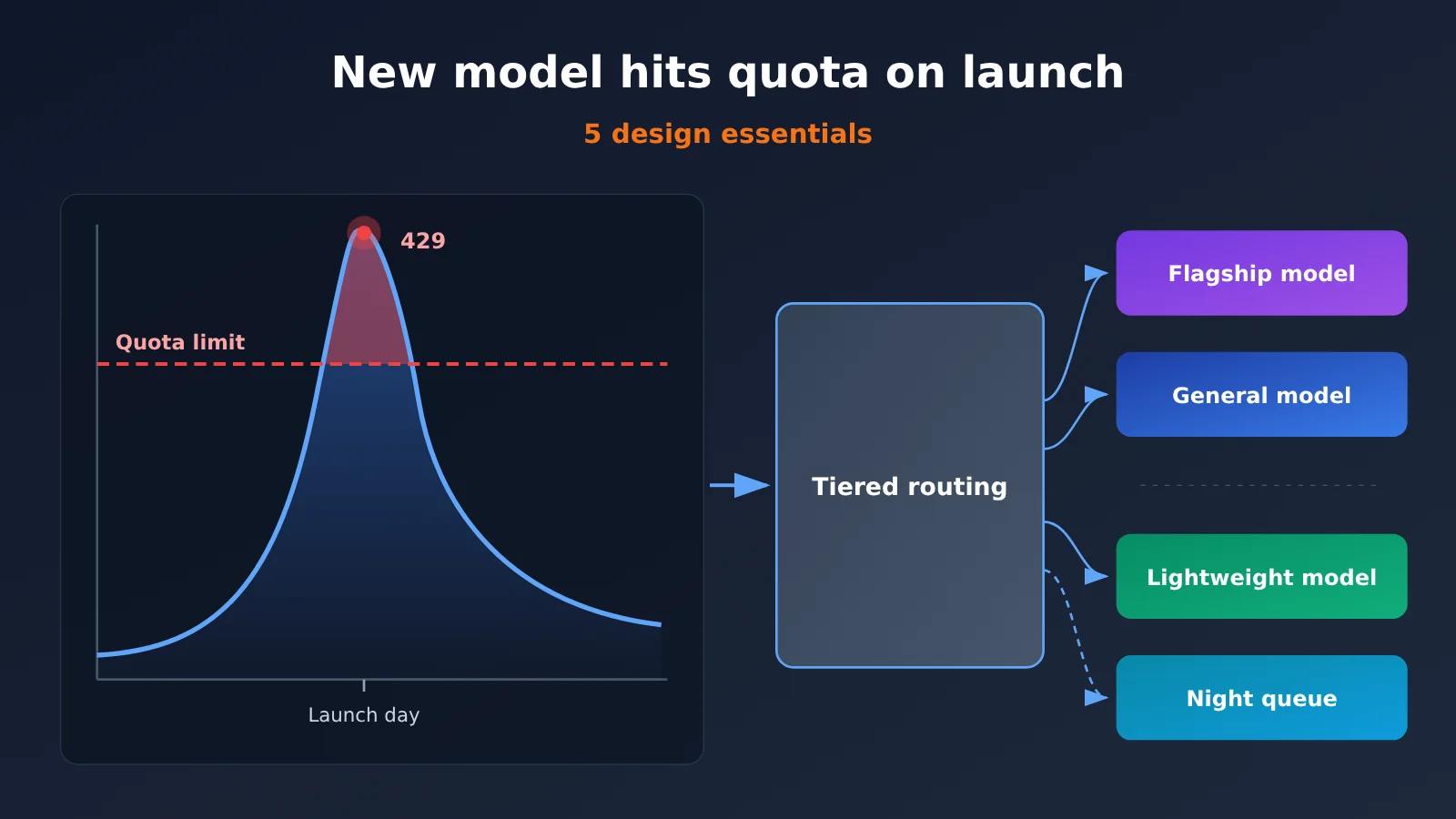
Why New Models Hit Usage Limits on Launch Day
The takeaway: Launch-day usage limits result from a sudden surge in demand combined with delays in scaling supply. Applications should treat this as a predictable event and design for it.
A recent example is Tencent Hy4. According to Tencent’s public statements, Hy4 debuted on WorkBuddy on November 4. Many users hit their usage limits on the first day, after which Tencent expanded its inference cluster tenfold and increased the free usage allowance. Tencent advised users who hit the limit to switch to Hy3 or move non-urgent tasks to the evening. It also extended Hy3’s limited-time free access until November 15 at 23:59.
It’s important to note that this incident happened at the WorkBuddy product level and involved usage allowances for end users. It shouldn’t be treated as equivalent to API rate limiting. Product allowances are usually calculated by account or membership tier, while API limits govern rate and concurrency by key, organization, or model. The triggers and remedies are different. Even so, the broader pattern applies: when a new model launches, demand can flood in over a very short period.
The scale of demand is also growing rapidly. On November 4, DeepSeek reported that Harness had approximately 1.54 million daily active users and consumed around 92 trillion tokens per day. These figures are self-reported, not independently audited. They’re useful for understanding the order of magnitude, but shouldn’t be used as precise inputs for capacity planning. Still, they show that token consumption in agent applications has grown far beyond that of ordinary chat.
Four Reasons New Models Hit Usage Limits
| Cause | What happens | Impact on applications |
|---|---|---|
| Free or trial allowances | New models often come with trial allowances that attract many users at once | Allowances run out quickly, resulting in 402 or 429 errors |
| Concentrated traffic | Launch-day, promotional, and weekday daytime traffic overlap | Peaks can reach 3-10 times normal traffic |
| Long-running tasks | Multi-turn agent workflows, tool calls, and long contexts | Individual requests use more tokens and occupy inference resources for longer |
| Delayed upstream scaling | Expanding an inference cluster takes time | 5xx errors, queues, timeouts, and even fluctuations in output quality |
Of these four factors, the only ones applications can directly control are the shape and scheduling of their own requests. Rather than hoping the upstream provider can handle the load, it’s better to prepare ways to route and buffer traffic on your side.
Five Types of Capacity Problems With New Models
The takeaway: hitting a limit isn’t just one kind of error. There are five distinct capacity problems, and each needs a different response.
Many teams route every failure through the same retry logic. That’s exactly how launch-day incidents get worse. Retrying when your quota is exhausted will keep failing, while aggressive retries during upstream overload can make congestion worse. The table below breaks down the five problem types to help you design the right handling for each one.
| Problem | Typical status codes | Cause | Response |
|---|---|---|---|
| Quota exhausted | 402, 429 |
Free quota, trial quota, or account balance has run out | Stop retrying; switch to a fallback model or prompt the user to add funds or quota |
| Rate or concurrency limit | 429, often with Retry-After |
RPM, TPM, or concurrency limit exceeded for a single key or model | Wait according to Retry-After; switch models or queue the request if the wait exceeds your threshold |
| Insufficient upstream capacity | 500, 502, 503, 529 |
Inference cluster overload or a localized failure | Retry a few times with exponential backoff, then switch to a fallback model after consecutive failures |
| Long-running tasks tying up capacity | Timeouts, dropped connections | Multi-turn Agent workflows, tool calls, or long contexts make individual requests too heavy | Break up tasks, limit context, and give long-running tasks a separate concurrency pool |
| Concentrated peak traffic | A mix of 429 and 5xx |
Traffic spikes overlap during daytime hours, launch days, or events | Use a priority queue and schedule work outside peak hours; defer non-urgent tasks |
Two details in the table are worth highlighting. First, 429 is ambiguous: it can mean either a rate limit or an exhausted quota. Check the error message in the response body and Retry-After to tell them apart. Second, an overload code like 529 means the upstream service is temporarily unable to serve requests. In that case, reducing request frequency is more effective than retrying faster.
Once you’ve distinguished the error codes, you can put the five design points that follow into practice: when to switch models, when to queue requests, and when to stop altogether.
5 Design Considerations for Multi-Model Switching and Off-Peak Scheduling
In short, these five design considerations answer five questions: which model to use, which model to switch to, who goes first, when to run, and how much it costs. Miss any one of them, and the gap will show up on release day.
Design Consideration 1: Model Tiers
How to implement it: Divide models into flagship, general-purpose, and lightweight tiers based on capability and cost. Then map business tasks to those tiers by priority and difficulty. Use flagship models for complex reasoning and critical code generation; general-purpose models for everyday Q&A, summaries, and rewrites; and lightweight models for simple tasks such as classification, extraction, and intent recognition. When a new model launches, usually send it only a portion of flagship-tier traffic rather than replacing the existing model entirely.
When to use it: Tiering is a standard configuration, not something you activate only during an outage. It determines the default destination for each task category under normal conditions; on release day, you adjust the traffic proportions.
How to validate it: Use a fixed evaluation set for each tier and track pass rate, P95 latency, and token cost per task. Confirm that quality doesn’t noticeably decline when lightweight models handle simple tasks.
In practice, the biggest obstacle to tiering is often the need for another SDK and key for every provider you add. With an aggregation platform like APIYI at apiyi.com, you can access models from multiple providers, including OpenAI, Claude, and Gemini, with a single key. The interface is compatible with the OpenAI format, so you only need to change the model name when assigning tiers—not maintain separate authentication and clients for each one.
Design Consideration 2: Fallback Model Mapping
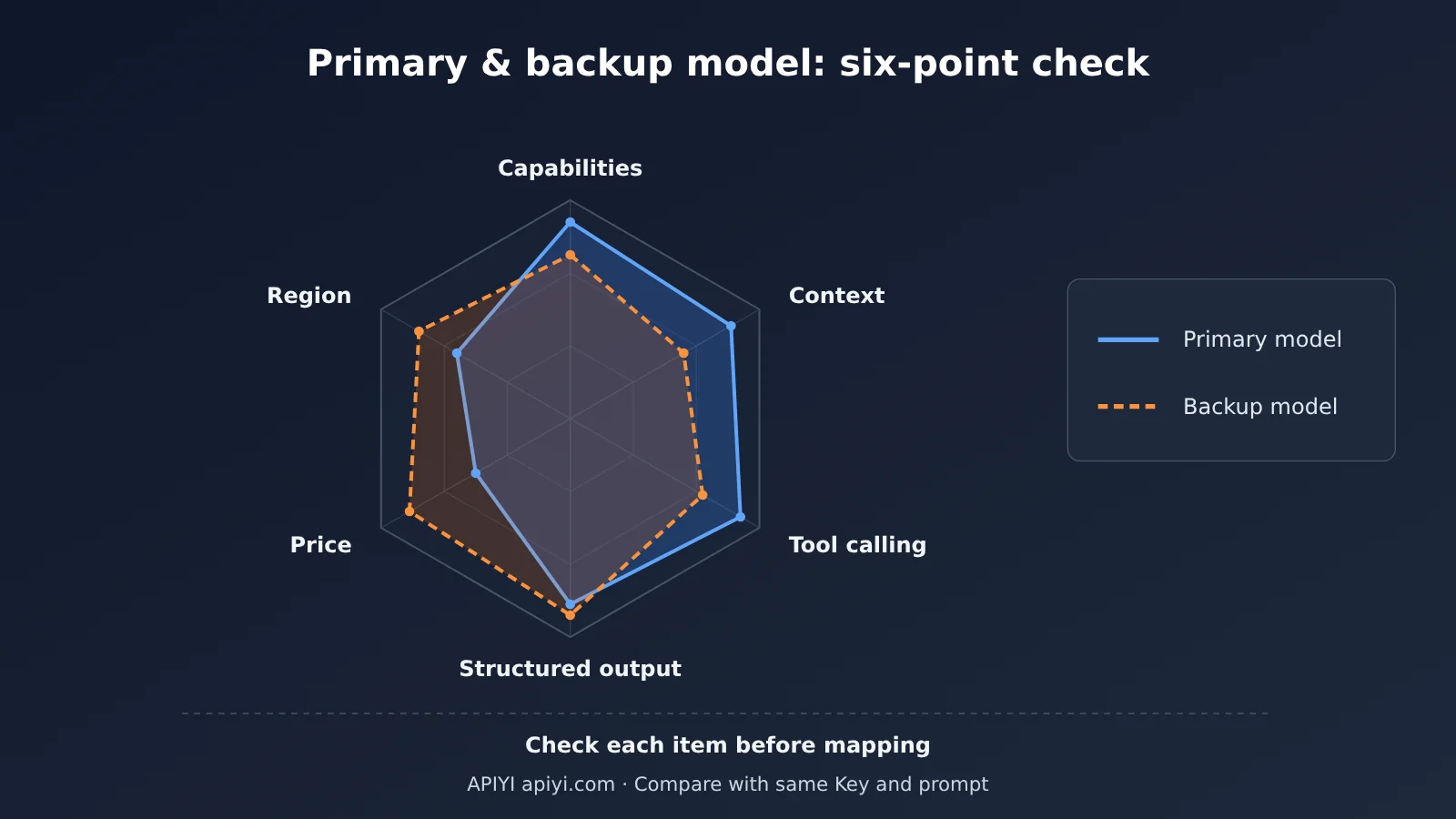
How to do it: Assign at least one fallback model to each primary model. Check each mapping against six criteria: capability level, context length, tool-calling support, structured output capabilities, price, and regional availability. Tool calling and structured output are the easiest to overlook. If the fallback model doesn’t support the same function-calling format, the Agent will stop working as soon as you switch.
When to trigger a switch: Define specific rules, such as two consecutive 5xx responses, a 429 with a Retry-After value longer than the task can tolerate, P95 latency staying above twice the baseline, or an explicit response indicating that the quota is exhausted. Don’t switch on every failure—that would trigger excessive switching in response to occasional glitches.
How to validate it: Run the same set of questions through both the primary and fallback models. Compare their pass rates, structured output validation rates, and tool-call success rates. Choose a different fallback if the gap exceeds what your business can tolerate.
| Tier | Suitable tasks | Primary model | Fallback model | Switch condition |
|---|---|---|---|---|
| Flagship | Complex reasoning, critical code, Agent planning | Newly released flagship model | Previous-generation flagship or a comparable model from another provider | Two consecutive 5xx responses; 429 with Retry-After exceeding 30 seconds |
| General-purpose | Q&A, summaries, rewriting, report generation | Main general-purpose model | Comparable general-purpose model from another provider | P95 latency exceeds twice the baseline for 5 minutes |
| Lightweight | Classification, extraction, routing, intent recognition | Lightweight model | Lightweight model from another provider | 5xx rate exceeds 5%; quota exhausted |
| Batch processing | Offline analysis, data labeling, evaluation | Any available low-cost model | No switch; defer the task | No immediate switch; add to the overnight queue |
| Available platforms | Unified access across all tiers above | APIYI apiyi.com, official provider APIs | Same as primary | Refer to the console and documentation |
The thresholds in the table are examples. Adjust them to your own business baselines.
💡 Fallback tip: If you don’t want to maintain all the switching logic in your application, you can also use platform-side capabilities. APIYI apiyi.com describes its platform as using multi-node deployment, intelligent routing, automatic fallback, and load balancing, which can help absorb some of the load during partial upstream failures. Refer to the official documentation for specific trigger conditions and switching rules. It’s still a good idea to maintain your own fallback mappings in the application as a safety net.
Design Principle 3: Priority Queues
How to implement it: Split requests into three priority tiers: paid or urgent tasks, internal tasks, and batch tasks. Route urgent tasks directly to the primary model. Route internal tasks to a fallback model when the primary model is busy. Put batch tasks in a queue. Set a maximum concurrency limit, maximum queue time, and timeout fallback policy for each queue to prevent a long-running task from consuming the entire concurrency pool.
When it kicks in: The queues take effect when the primary model’s 429 rate or queue length exceeds a threshold. Low-priority requests then stop competing for the primary model’s concurrency slots.
How to verify it: Make the queues observable. At a minimum, track queue length, average wait time, and abandonment rate. During load testing, deliberately trigger rate limiting on the primary model. Confirm that urgent task latency stays stable and low-priority tasks are queued rather than failing.
There’s one hard rule: don’t automatically retry non-idempotent requests. For actions like placing orders, sending messages, writing to a database, or calling paid external tools, check the status after a failure to confirm whether the previous attempt took effect before deciding to resend. You can generate idempotency keys for these requests so the server can deduplicate them. Automatically retrying every error is a common cause of duplicate charges and writes on launch day.
Design Principle 4: Off-Peak Scheduling
How to do it: Identify latency-tolerant tasks, such as offline reports, batch summaries, data labeling, and regression evaluations, and run them overnight or during off-peak hours. When users hit the Hy4 limit, Tencent recommends moving non-urgent tasks to the evening. The same idea applies to API calls.
When to trigger it: You can use two triggers together. The first is a time window: run batch jobs at a fixed time during off-peak hours. The second is load: automatically delay the batch queue when the daytime 429 rate or P95 latency exceeds its threshold.
How to verify it: Check whether request volume during daytime peaks has dropped and whether the completion and retry rates for overnight jobs are within acceptable ranges. Failed off-peak jobs can be retried, but they must still follow idempotency principles.
Design Principle 5: Monitoring and Budgets
How to do it: Break down usage by API key, model, and task type instead of looking only at totals. Overall usage may look steady while token consumption for a particular agent task has doubled. You won’t spot that without a breakdown. Set a temporary budget and alerts for launch day. You can relax alert thresholds somewhat, but keep the budget cap in place.
When to trigger it: Alert rules should cover four signals: a spike in the 429 rate, a spike in the 5xx rate, token usage for a single task exceeding its baseline, and daily spending exceeding a set percentage of the budget.
How to verify it: Run a low-traffic test before launch to confirm that the dashboard breaks down usage correctly and alerts arrive within the expected time.
| Metric | Dimensions to watch | Notes |
|---|---|---|
429 rate |
API key, model | Distinguish rate-limit errors from quota exhaustion |
5xx rate |
Model | Determine whether the upstream service is overloaded and trigger a switch |
| P95 latency | Model, task type | Track long-running tasks separately so they don’t inflate the overall baseline |
| Queue length and wait time | Priority queue | Watch for backlogs of low-priority tasks |
| Tokens/task, cost/task | Task type | Multi-turn agent interactions and tool calls can significantly increase both |
| Switch count and fallback success rate | Primary-backup mapping | Check whether the backup model is actually handling the traffic |
You can use platform tools to track costs. The APIYI console at apiyi.com provides model lists, usage, billing, and log queries. On launch day, you can use it to check actual consumption by API key and model, then combine that with your own task-level instrumentation to see both how much you spent and where it went.
For capacity planning, estimate peak QPS using daily active users, request volume, and average token usage, then apply a multiplier for multi-turn agent interactions and tool calls. Launch-day peaks may be 3–10 times normal levels, so consider reserving 30%–50% spare capacity or having a backup model ready to switch to at any time. Estimating capacity based only on chat scenarios will significantly understate the consumption caused by long contexts and tool calls.
Quick Start: How to Validate Fallback When Switching Models
Bottom line: if you haven’t tested your fallback path, you don’t really have one. Validate it before release.
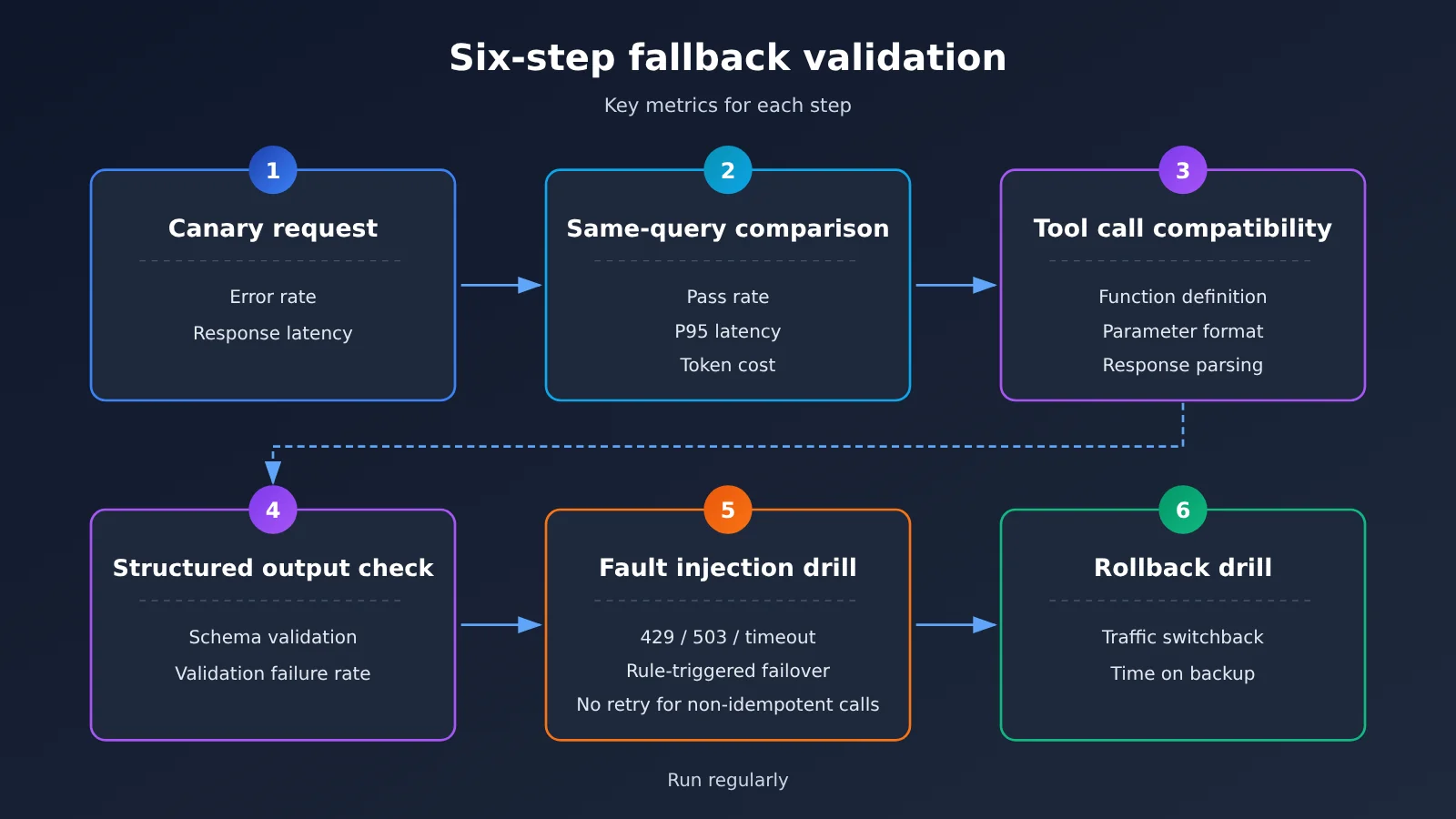
The integration changes are straightforward. If you’re already using an OpenAI-compatible SDK, set base_url to https://api.apiyi.com/v1 and replace api_key with the key provided by the platform. You can then switch between the primary and backup models by changing the model parameter, without adding a new client. The part that takes time is validation. Here’s a recommended sequence:
- Canary requests: Send a small amount of real traffic to the backup model and monitor error rates and latency.
- Side-by-side comparison: Run the same evaluation set against both models, then compare pass rates, P95 latency, and token costs.
- Tool-calling compatibility: Check each function definition, argument format, and response parser to make sure they work with the backup model.
- Structured output validation: Validate JSON output against its schema and record the validation failure rate.
- Fault injection drill: Simulate
429,503, and timeout errors. Confirm that switching follows your rules and that non-idempotent requests aren’t automatically retried. - Rollback drill: Once the primary model recovers, confirm that traffic switches back as expected and doesn’t stay on the backup model for too long.
Run fallback drills regularly, not just once before release. Upstream models get updated, and your prompts and tool definitions change too. A mapping you validated three months ago may no longer work today.
🚀 Quick start: Register at APIYI apiyi.com and claim free test credits. Use the same key to run a side-by-side comparison of your primary and backup models before deciding on your release-day mapping. Check the console and documentation for current pricing and model availability.
Frequently Asked Questions (FAQ)
The takeaway: Most launch-day questions come down to identifying the error first, then deciding whether to switch, queue, or stop.
Q1: Should you set application-side rate limits before a new model launches?
Yes. Setting maximum concurrency and priority queues on the application side gives you more control than waiting for upstream `429` rate limits. You can decide which users and tasks get priority, while upstream rate limits won’t account for your business priorities. You can set the threshold based on your usual peak usage multiplied by an estimated growth factor.
Q2: Should you switch models immediately when you get a 429?
Not necessarily. Check `Retry-After` first. If the wait is acceptable for the task, wait and retry. If it exceeds your threshold, or the response explicitly says your quota is exhausted, switch to a backup model. When you use one key to access models from multiple providers through APIYI apiyi.com, switching only requires changing the model name. That lets you set more granular thresholds rather than switching everything over as soon as you see a `429`.
Q3: How should you queue non-urgent tasks?
Give non-urgent tasks a separate queue and concurrency pool, and set a maximum queue time. When a task times out, don’t discard it; defer it until nighttime or an off-peak period. Monitor queue length, wait time, and abandonment rate. Failed tasks can be retried, but you must check the status of non-idempotent tasks first.
Q4: Can automatic fallback reduce output quality?
It can, so compare models on the same tasks before enabling fallback and make sure the quality gap is acceptable for your business. APIYI apiyi.com states that it supports automatic fallback and load balancing, but check the official documentation for switching rules and use your own evaluation set to verify any differences in results. For quality-sensitive tasks, it’s better to queue and wait for the primary model than to fall back immediately.
Q5: How can you tell whether you’ve exhausted a product quota or hit an API rate limit?
Look at where it appears and what it’s measured against. Product quotas apply within end-user applications—for example, the Hy4 quota in WorkBuddy. They’re calculated per account and usually appear as a message in the interface. API rate limits appear in API responses as `429` errors and may include `Retry-After`. They’re calculated per key, organization, or model. For the former, switch models within the product or wait for the quota to reset. For the latter, use backoff, queuing, and fallback mappings.
Key Takeaways: Multi-Model Switching and Off-Peak Scheduling
The bottom line: Release-day stability depends on model tiers, queues, and budgets you’ve put in place ahead of time.
- Capacity constraints are predictable: Hitting quota limits on a new model’s release day is part of the product cycle. Plan for it.
- Classify errors:
402,429,5xx, and timeouts each need their own handling path. Don’t retry them all the same way. - Tier before switching: Map tasks to flagship, general-purpose, and lightweight tiers, and route only some traffic to the new model initially.
- Check fallback mappings: Verify capabilities, context, tool calling, structured output, pricing, and region support.
- Stop on non-idempotent requests: Check the status after a failure before deciding whether to resend.
- Shift work off-peak: Move delay-tolerant tasks to nighttime and reserve daytime concurrency for urgent work.
- Break down monitoring by dimension: Use APIYI apiyi.com usage logs to check actual consumption by Key and model.
Summary and Release-Day Capacity Checklist
The bottom line: Release-day success isn’t about how many times you retry. It’s about the model tiers and queues you’ve prepared in advance.
When a new model hits quota limits as soon as it launches, it’s usually due to a combination of free quotas, concentrated traffic, long-running tasks, and upstream capacity scaling that hasn’t caught up. On the application side, you can use model tiers to choose default routes, fallback mappings to prepare alternatives, priority queues to protect critical tasks, off-peak scheduling to smooth out demand, and monitoring and budgets to keep risks and costs visible and under control. The checklist below covers actions to take before and on release day and can be used directly in a launch review.
| Stage | Check | Completion criteria |
|---|---|---|
| Before release | Validate primary and fallback models | Both models pass same-task comparisons, tool-calling tests, and structured-output validation |
| Before release | Distinguish error codes | 402, 429, 500, 503, 529, and timeouts each have a separate handling path |
| Before release | Stop on non-idempotent requests | Automatic retries are disabled for write operations and paid tool calls; check status first after a failure |
| Before release | Priority queue | Three priority levels are configured, with maximum concurrency, maximum queue time, and timeout fallback |
| Before release | Off-peak task list | Batch tasks that can wait until nighttime are listed, with load-based trigger rules configured |
| Before release | Drills | Fault injection, switchover, and rollback drills are completed and results recorded |
| Release day | Monitoring | Track 429 rate, 5xx rate, P95 latency, and queue length by Key, model, and task |
| Release day | Budget | Set a temporary budget and alerts; relax thresholds while keeping a cap |
| Release day | Switchover monitoring | Watch the number of switchovers and the fallback success rate; switch back as planned once the primary model recovers |
| Release day | Business notifications | Notify business stakeholders in advance about possible delays and the scope of degraded service |
If you’re preparing for the next model release, consider using APIYI apiyi.com to test both your primary and fallback models with a single Key. Then use the console’s usage logs to set a budget and work through this checklist item by item.
📚 References
In short, these resources can help you verify model integration methods and platform capabilities. For specific parameters, consult the latest official documentation.
- APIYI Documentation Center: Model lists, API documentation, usage, and billing
- Link:
docs.apiyi.com -
Details: Check available models, OpenAI-compatible API usage, and automatic fallback guidance
-
OpenAI API Error Codes: What rate-limit errors like
429mean and how to handle them - Link:
platform.openai.com/docs/guides/error-codes -
Details: Understand the difference between rate limits and exhausted quotas
-
Anthropic API Errors: How to handle errors, including overload errors
- Link:
docs.anthropic.com/en/api/errors - Details: Learn what the
529overload error means
Author: APIYI Technical Team
Technical discussions: Contact us through the APIYI homepage, or visit the documentation center at docs.apiyi.com for more integration resources.