Author’s note: Using Prose’s public “AI is an editor, not a ghostwriter” approach as a case study, this article breaks down a complete design framework for AI editing—from locating and displaying changes to accepting them individually, rolling them back, and confirming them with a human.
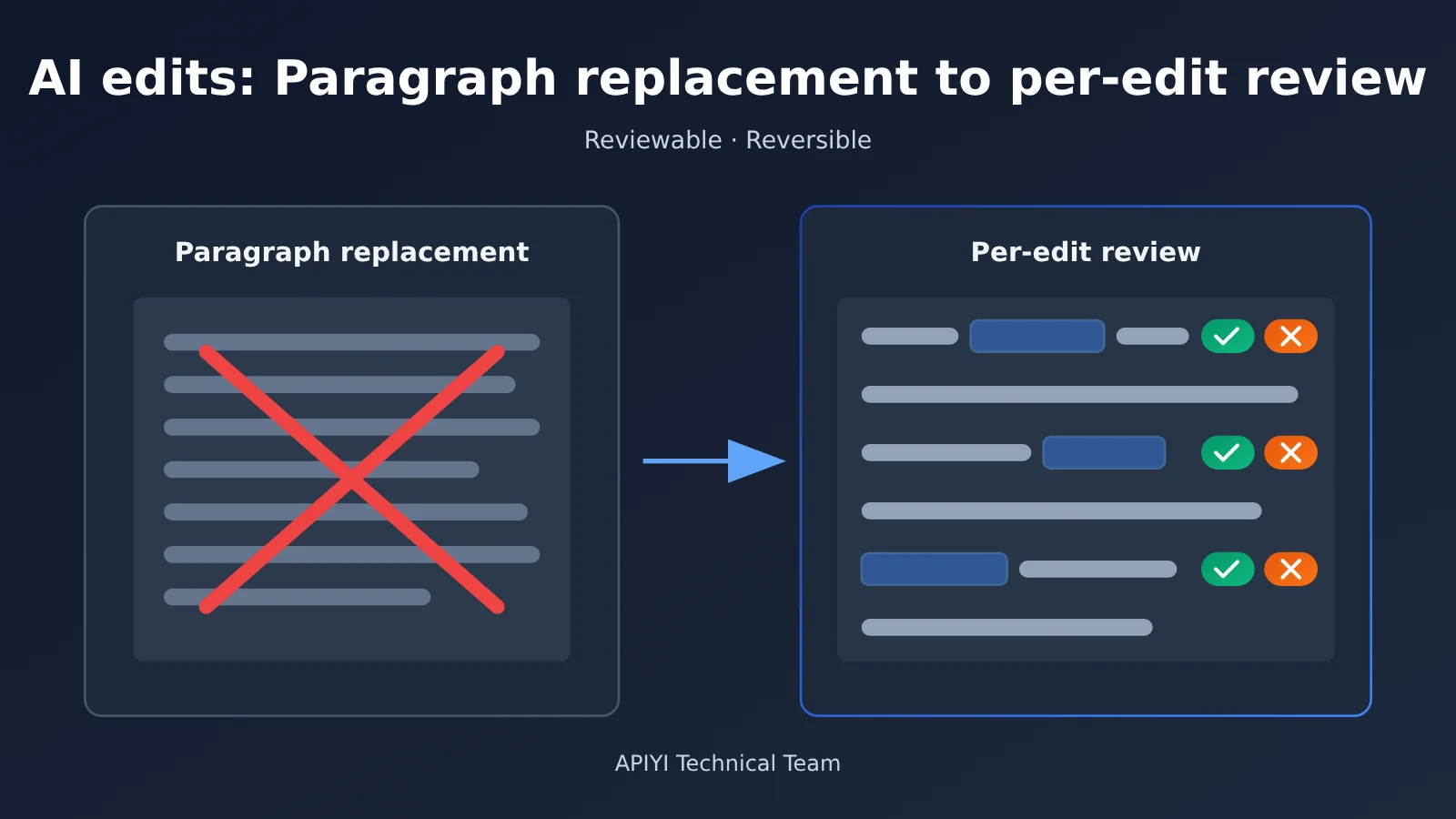
Ask AI to polish a passage, and it’ll often rewrite the whole thing. The result may read more smoothly, but you’re left comparing it word by word to see what was deleted, whether citation markers are still there, and whether any key data has changed. This article offers a practical interaction and engineering framework for reviewing AI edits individually and rolling them back—one you can take straight into prototyping.
This isn’t another beginner’s guide to building a writing tool by plugging in a Large Language Model. We’ll look at both product design and engineering to explain why replacing entire passages falls short in professional writing, and what problems individual edit review needs to solve.
What you’ll get: A framework for designing AI editing interactions, covering edit locations, diff displays, individual accept-or-reject decisions, rollbacks, and when human confirmation is needed, plus an actionable implementation checklist.
Key Principles for Reviewing AI Edits One Change at a Time
Before getting into the design, let’s look at a public example. A developer on V2EX shared Prose, a desktop tool for long-form writing. Its design principles are straightforward: “AI is an editor, not a ghostwriter” and “only what you can verify counts.” The first means AI edits the draft, but the user must approve each change. The second means changes must be visible as diffs, and references must link to their original sources.
The developer describes the editing feature this way: AI edits the file directly in the editor, marks each change separately, and lets users accept or reject changes one by one. Users can also roll back an acceptance if they make a mistake. Before making changes, the AI locates the relevant section and edits only the necessary sentences—it won’t rewrite an entire chapter just to change one word. Prose’s specific technical implementation hasn’t been made public, so the rest of this article presents a general design framework based on those principles, not a reconstruction of its internals.
| Principle | Description | User benefit |
|---|---|---|
| Locate before editing | The model finds the relevant sections and sentences before generating changes | An entire chapter won’t be rewritten over one word |
| Treat changes as independent units | Each edit is a structured object with an ID | Users can review changes individually instead of accepting everything |
| Visualize differences | Show the original and revised text with word-level or sentence-level diffs | Users can see what was added or removed at a glance |
| Accept or reject each change | Each change is reviewed independently | Users retain final control |
| Support rollback | Use an operation log and version snapshots | Users can recover from mistaken acceptances |
| Require human confirmation at key boundaries | Confirm before writing to external libraries or making bulk changes | Prevents AI from making unauthorized changes to user assets |
Why AI Editing Shouldn’t Replace Entire Passages
The problem with replacing an entire passage isn’t necessarily that the model writes poorly. It’s that the full cost of reviewing the change falls on the user. If the original is 300 words and the revision is 320, the user has to perform a full diff mentally to check whether any key arguments were lost. In professional writing such as papers, reports, and contracts, a quietly deleted qualifier or an incorrectly changed citation number like [3] can cause real problems.
The reference material also points out the current situation: browser-based chat tools return a new passage, leaving users to compare it by eye. Many AI features built into document editors replace the entire selection, with few offering a way to review changes one at a time. That’s the gap this approach fills: it replaces “I have to trust that the AI edited it correctly” with “I can check what the AI changed.”
The Trust Model Behind Reviewing Changes Individually
At its core, reviewing changes individually redefines the responsibilities of the human and the model. The model finds issues and proposes changes, the user makes the final decision, and the system records every decision and makes it reversible. This division makes AI more like an editor who leaves annotations than a ghostwriter who delivers a finished draft.
Once this trust model is established, many design decisions become easier. For example, should all changes be accepted by default? The answer is clear: the default should be “pending review,” not “applied.”
Getting Started with Auditable AI Editing
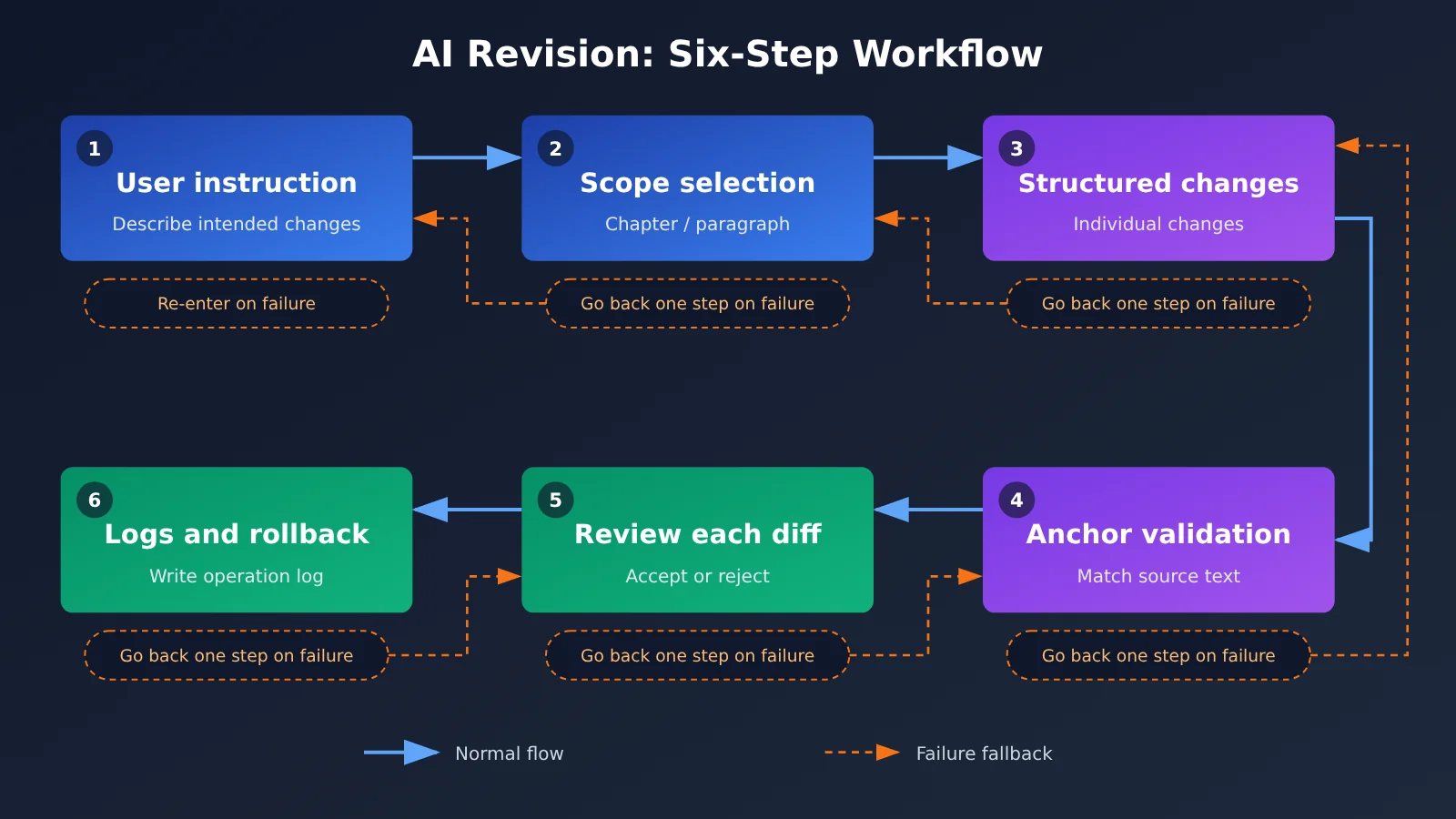
The six steps below follow the actual development sequence for an AI editing feature whose changes can be reviewed and rolled back. To make the approach easier to apply across different tech stacks, we’ll use field definitions and checklists rather than specific code.
Step 1: Identify the Scope of the AI Edit
The first step isn’t asking the model to edit—it’s asking it to find what needs editing. If a user says, “Make the argument in Chapter 3 more rigorous,” the system should first have the model identify the paragraphs that need changes. If necessary, ask the user to confirm the scope before moving on to the rewrite. This has two benefits: it narrows the context, making the model less likely to change unrelated content, and it lets the user correct the direction early.
For long documents, you can first split the document by heading to create a chapter index. Then, have the model use the index and the user’s instructions to return a list of target paragraph IDs. Pass only the original text of those paragraphs to the rewrite step.
Step 2: Structure AI Revisions as Individual Changes
This is the technical core of the approach. Instead of asking the model to return the full revised text, have it return a list of changes, each representing one independent edit. Here’s a recommended field structure:
| Field | Meaning | Design considerations |
|---|---|---|
id |
Unique change identifier | Generated by the system for review and rollback tracking |
anchor_text |
Original text to replace | Must appear verbatim in the original |
context_before / context_after |
Short passages before and after the anchor | Used to disambiguate repeated text |
replacement |
Replacement text | An empty value indicates deletion |
reason |
Reason for the change | A one-sentence explanation shown to the user |
category |
Type of change | Such as grammar, wording, logic, or facts; used for filtering |
One key decision here is to use a quote from the original text as the anchor, rather than a character offset. Models aren’t reliable at calculating character positions, but they’re much more consistent at reproducing a passage. Once the system receives anchor_text, it looks for an exact match in the original. Zero matches means the model reproduced the text incorrectly; multiple matches require context to identify the right one.
Step 3: Validate Anchors and Handle AI Revision Failures
Model-generated changes shouldn’t appear in the document without validation. At a minimum, check the following:
- Anchor uniqueness:
anchor_textand its context must appear exactly once in the original. Otherwise, mark the change as “requires manual placement.” - Non-overlapping changes: The anchor ranges of two changes must not overlap. If they do, merge them or discard the later one.
- Protected content: If citation markers such as
[1], numbers, proper nouns, or formulas disappear or change in a replacement, highlight them with an additional warning. - Extent of the change: If a single edit replaces too much text, flag it as “close to a rewrite” so the user can pay extra attention.
Changes that fail validation don’t have to be discarded. Instead, display them as “suggestion” cards in the sidebar for the user to handle manually. That’s more consistent with the principle that a change only counts if it can be verified, rather than silently swallowing errors.
Step 4: Displaying AI Edit Differences
How you display differences determines how efficiently users can review them. Three common approaches are inline strikethrough and highlighting, side-by-side comparison, and sidebar annotation cards. For sentence-level polishing, an inline word-level diff is the most intuitive. For paragraph restructuring, a side-by-side comparison is clearer. For logical changes that need an explanation, annotation cards work better.
A practical approach is to use inline diffs as the primary view, with a small label next to each change that shows its reason on hover. You can also provide filters such as “Show factual changes only” and “Show wording changes only,” so users can review changes by priority.
Step 5: Accepting, Rejecting, and Rolling Back AI Edits
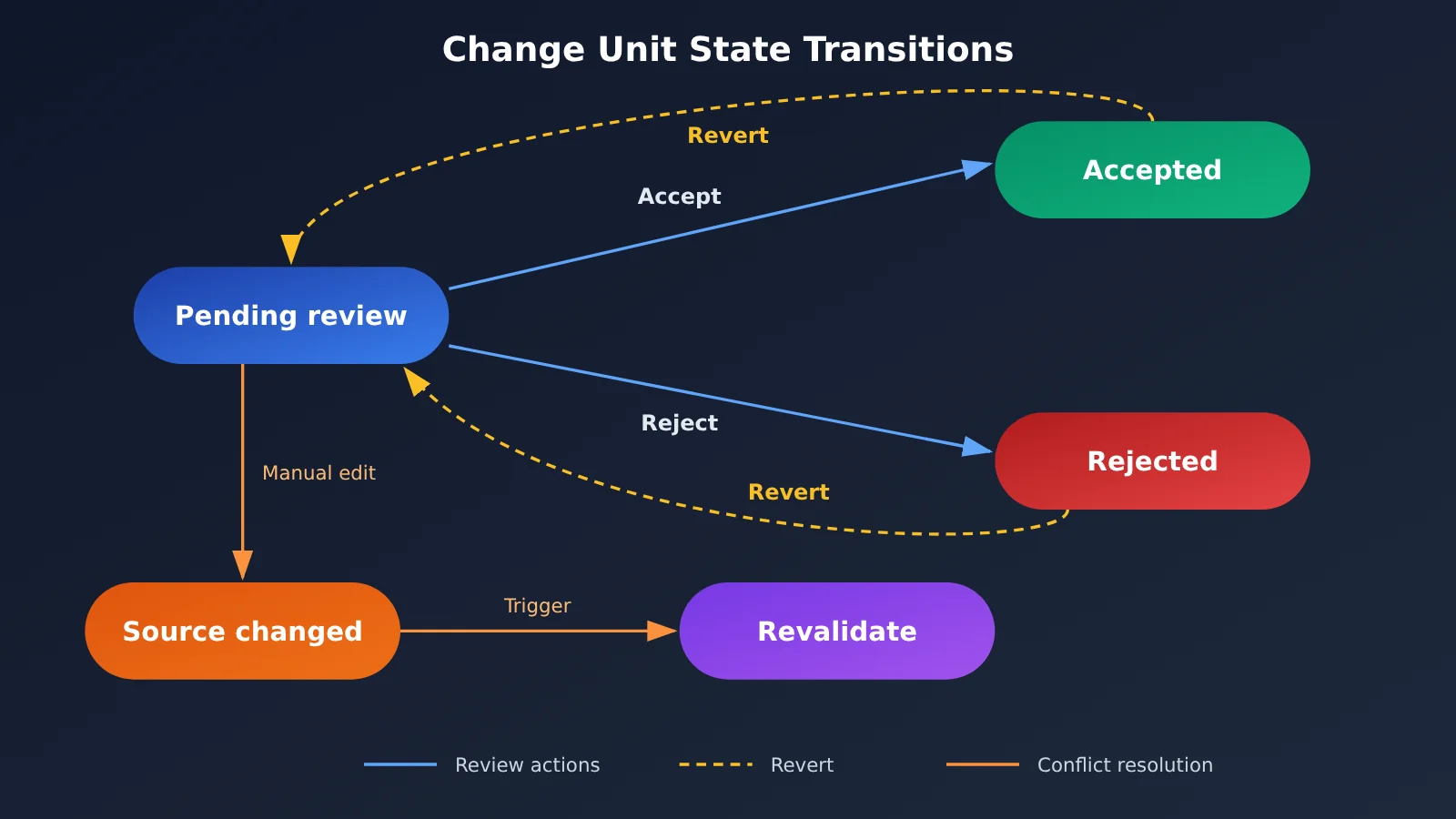
Each change should have one of three states: pending review, accepted, or rejected. Both acceptance and rejection should be recorded in an operation log, along with the change ID, timestamp, and text before and after the operation. Rollback works by reversing the log: users can undo a single change or restore the complete snapshot from before an AI editing session.
There’s an easily overlooked case to handle: a user may manually edit the document during review. That can invalidate the anchors for changes that haven’t yet been reviewed. The system should revalidate them and mark affected items as “Original text has changed” rather than forcing them through.
Step Six: When AI Edits Require Human Confirmation
Not every action needs the same level of confirmation. In Prose, newly discovered references are saved to Zotero only after the user approves them. Changes to notes in a connected Obsidian vault also go through a diff review, with each change confirmed individually. This establishes a clear boundary: any action that writes to a user’s existing assets requires explicit confirmation.
You can categorize actions by risk: review single-sentence edits in the editor individually; confirm the scope before making bulk changes across sections; use a separate confirmation dialog before writing to an external reference library or note repository; and require a second confirmation before deleting an entire passage.
🚀 Prototype tip: If you’re testing whether a “structured change list” is viable, you can build a minimal prototype using an OpenAI-compatible chat completions interface on APIYI apiyi.com. The platform provides a unified interface for invoking multiple models, so you can quickly switch models while using the same prompts and validation logic to compare how accurately they produce anchors. Check the APIYI documentation center for the current endpoint and parameters.
Comparing AI Editing Interaction Approaches
| Approach | Key feature | Best for | Main trade-off |
|---|---|---|---|
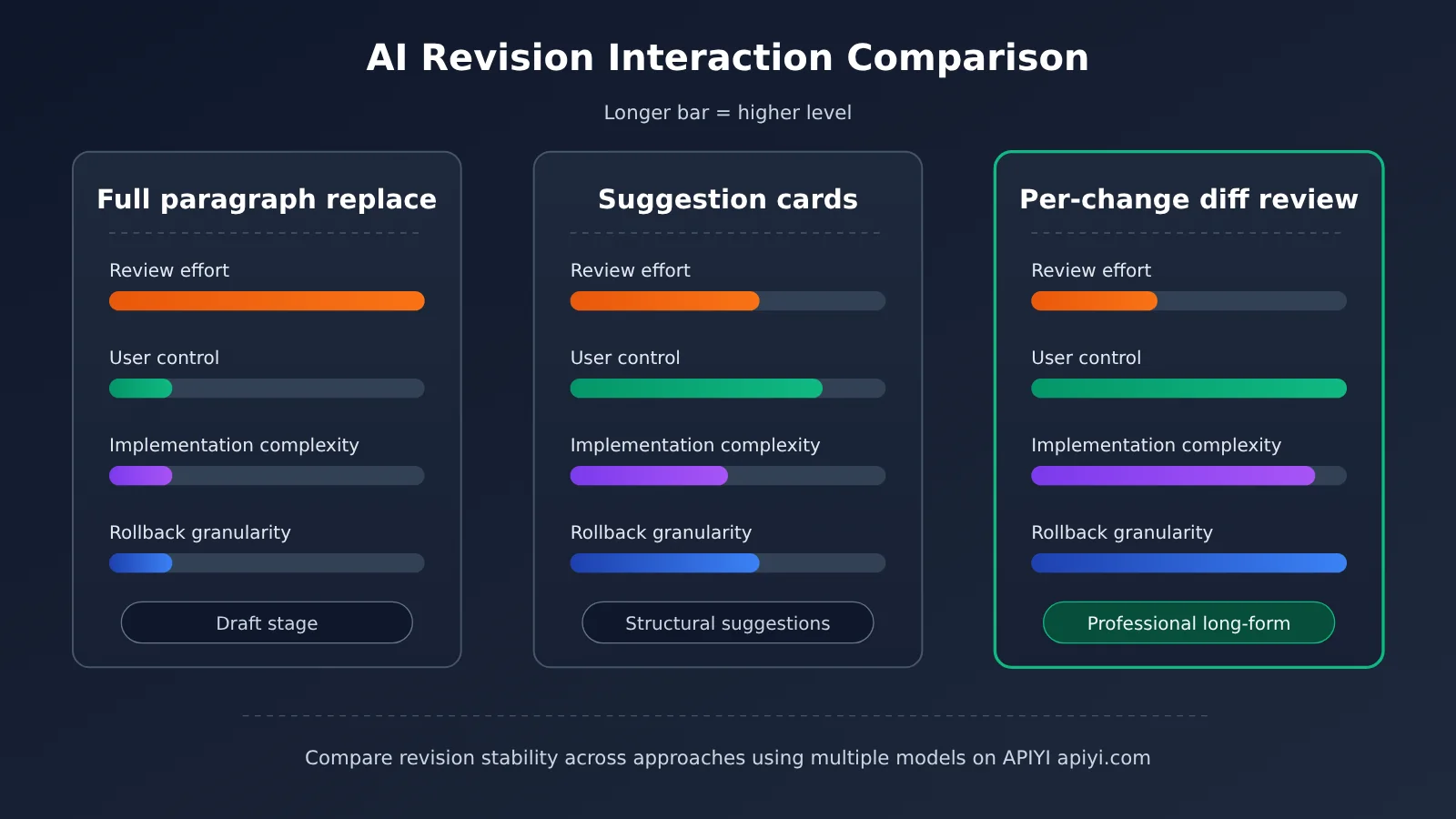
| Full-passage replacement | Replaces the selected text directly with new text | Drafts, short texts, and low-risk content | The entire review burden falls on the user |
| Suggestion cards | Lists suggestions in a sidebar for the user to apply manually | Logical or structural suggestions that need an explanation | Users have to make the edits themselves, which is less efficient |
| Per-change diff review | Highlights each change independently for individual acceptance or rejection | Professional long-form writing, such as papers, reports, and manuscripts | Requires structured output, anchor validation, and logs |
| Hybrid approach | Uses diffs for sentence-level edits and cards for structural suggestions | Most mature writing products | More complex interaction design and state management |
Comparing AI Editing Approaches
Whole-passage replacement: Replacing an entire passage has the lowest implementation cost and requires almost no extra engineering. But it leaves all the verification to the user, who can easily miss deleted qualifiers or citations in professional writing. Reviewing each change as a diff makes text easier to verify before delivery.
Suggestion cards: Suggestion cards excel at explaining issues that can’t be fixed with a single replacement, such as “the argument in this paragraph doesn’t hold up.” But they don’t edit the text directly, so the user has to do the writing. For polishing focused on wording and grammar, reviewing each change as a diff is still the safer choice.
In practice, a hybrid approach is often the most useful. Prose’s publicly available “Little P” assistant asks one question at a time, probing research questions and arguments from the perspective of a mentor or reviewer. That kind of output naturally lends itself to cards, while sentence-level polishing can be handled through diff review.
What to Evaluate When Comparing Models for AI Editing
A change-by-change review workflow depends heavily on how well the model follows instructions. Public data on outcomes such as edit accuracy and user acceptance rates is currently limited, so we won’t offer a specific ranking. Instead, here are the dimensions to test during prototyping:
| Evaluation dimension | What to test | Why it matters | Testing platform |
|---|---|---|---|
| Anchor reproduction accuracy | Whether anchor_text matches the source text exactly |
Determines whether changes can be applied | Switch between models on APIYI apiyi.com |
| Structured output stability | Whether the model consistently returns a valid change-list format | Determines the parsing failure rate | Check official documentation to confirm support |
| Edit restraint | Whether the model changes only what needs changing | Determines the review workload | Compare models using a fixed test set |
| Protected content preservation | Whether citation numbers or other figures are changed by mistake | Determines professional credibility | Design test passages containing citations |
| Reason quality | Whether reason is specific and understandable |
Determines how quickly users can review changes | Evaluate samples manually |
💡 Selection tip: Support for structured output, tool calling, and other capabilities varies by model. Check each model’s official documentation and test it yourself. With APIYI’s unified interface, you can run the same test passages through multiple models, record the anchor match failure rate and the number of unintended changes to protected content, then choose your primary model.
AI Editing Implementation Checklist
Here’s a pre-launch checklist that condenses the six steps above into items you can check off one by one:
| Stage | Check | Pass criteria |
|---|---|---|
| Scope | Is the target passage identified before rewriting? | Visible to and correctable by the user |
| Structured output | Are changes returned as a list? | Each item includes an anchor, replacement, and rationale |
| Anchor validation | Are anchors checked for uniqueness and overlap? | Failed items become suggestions rather than being silently discarded |
| Protected content | Are citations, numbers, and formulas monitored? | Changes trigger a prominent warning |
| Diff display | Are word-level or sentence-level diffs supported? | Both deletions and additions are distinguishable |
| Review actions | Can changes be accepted or rejected individually? | Bulk actions are also available, but not the default |
| Rollback | Are there operation logs and snapshots? | Individual changes can be undone, or the entire edit rolled back |
| Concurrent editing | Are manual edits handled during review? | Invalidated changes are revalidated |
| Confirmation boundary | Is writing to an external library confirmed separately? | Nothing is written to disk before confirmation |
The two items most likely to get cut are “concurrent editing” and “protected content” because they rarely come up in demos. But real users often make manual edits while reviewing, and models commonly alter citation numbers along the way. It’s worth including both from the prototype stage.
🎯 Technical tip: When validating your prototype, prepare a “tricky test set” containing citation numbers, numbers, and repeated sentences. Then use APIYI apiyi.com to call several candidate models in turn and run the checklist validations. This helps you understand the limits of each model’s reliability for localized rewrites before building the production frontend.
AI Editing FAQ
Q1: What is change-by-change review in AI editing?
Change-by-change review means the AI breaks its edits into individual changes instead of replacing an entire passage. Each difference is highlighted separately, so users can accept or reject changes one by one and roll them back later. The key is that every edit can be checked and reversed.
Q2: How does change-by-change review differ from replacing an entire passage?
Replacing an entire passage is the simplest approach to implement, but users can only accept or discard it as a whole and have to compare the text by eye. Change-by-change review requires structured output and anchor validation, so it takes more engineering work. In return, it gives users precise control over each edit, making it better suited to deliverables such as papers and reports.
Q3: Why use quotes from the original text instead of character positions to locate AI edits?
Large Language Models aren’t reliable at calculating character offsets, and even a small error can cause an edit to be applied in the wrong place. Having the model reproduce a passage and then matching it exactly in code is much more reliable. Surrounding context can also help distinguish repeated passages. Failed matches are easy to identify and can be handed off for manual review.
Q4: What are the best use cases for change-by-change AI editing review?
It’s particularly useful for:
– **Academic writing**: Making sure citation numbers and data aren’t changed accidentally during editing
– **Business reports**: Reviewing conclusions sentence by sentence, since subtle wording changes can affect their meaning
– **Books and novels**: Letting authors preserve their personal style and accept only selected suggestions
– **Note library maintenance**: Confirming each change when AI reads and writes to a personal knowledge base
Q5: How can you quickly build an AI editing prototype to test the approach?
Start with a minimal test using an API platform that supports multiple models:
1. Register at APIYI apiyi.com and get an API key
2. Follow the interface instructions in the documentation center to send a request to the OpenAI-compatible chat completions endpoint
3. Ask the model to return a list of changes using the fields designed in this article, then validate the anchors in code
APIYI provides a unified interface for invoking multiple leading models, so you can quickly switch models and compare results using the same prototype. Check each model’s official documentation and test it yourself to see how well it supports structured output.
Q6: What if a user manually edits the document halfway through a review?
The anchors for unreviewed changes may no longer be valid. The system should revalidate the anchors for all pending changes, keep those that still match, and mark failed matches as “original text has changed.” The user can then decide whether to regenerate them, rather than having the old changes forcibly applied.
Q7: How can you control AI editing test costs when comparing multiple models?
Start with a small, challenging, fixed test set—for example, a dozen or so passages containing citations, numbers, and repeated sentences—instead of testing an entire long document right away. Use APIYI’s unified interface to call multiple models in batches and record only key metrics, such as anchor match rate and the number of incorrect edits. This lets you shortlist models at a relatively low cost.
Q8: What are the known limitations of change-by-change review for AI editing?
There are a few limitations to keep in mind. First, the approach depends on the model consistently producing structured output, with a fallback needed when parsing fails. Second, it isn’t well suited to major structural reorganizations; suggestion cards are a better fit for those. Third, the industry currently lacks public data on acceptance rates and accuracy, so you’ll need to validate the results in your own prototype. Prose’s author also acknowledges that some aspects of Word format round-tripping still don’t work well, showing how many engineering challenges remain across the full writing workflow.
Key Takeaways for Designing Reviewable AI Edits
- Core principle: AI edits should be suggestions that can be checked individually, not ghostwritten replacements for entire passages.
- Find before editing: Locate the relevant sections and paragraphs first to narrow the scope of changes and context.
- Structure each change: Make each change an independent unit containing an anchor in the original text, replacement text, and a rationale.
- Validation is essential: Check anchor uniqueness, overlapping changes, and protected content before displaying edits.
- Reversibility is non-negotiable: Use operation logs and snapshots to support undoing individual changes and rolling back the entire edit.
- Confirmation tiers: Actions that write to external reference libraries or note repositories must be confirmed separately.
- Prototype validation: Use APIYI’s unified multi-model interface to test how reliably different models perform local rewrites.
Summary
The key takeaways for designing an AI revision experience:
- Trust model: AI proposes changes, users decide, and the system records changes and ensures they’re reversible.
- Engineering essentials: A structured list of changes and validation against anchors in the original text are prerequisites for reviewing edits one by one.
- Interaction trade-offs: Use diffs for sentence-level edits and suggestion cards for structural issues. A hybrid approach is the most practical.
- Confirmation boundaries: The closer a write operation gets to modifying a user’s existing assets, the stronger the confirmation should be.
Prose’s publicly stated principles—“AI is an editor, not a ghostwriter” and “Only what can be verified counts”—point to a clear direction for AI writing products: put user control at the center of the design instead of chasing one-click generation. As a next step, use the checklist in this article to build a minimal prototype and test the model’s limits with real text.
We recommend using APIYI at apiyi.com to build your prototype and compare multiple models. Run the same test set across them to find the best approach for targeted rewrites.
📚 References
- V2EX – Built Prose for my girlfriend: an easy-to-use, professional AI agent for long-form writing: The design principles and features shared by Prose’s creator
- Link:
v2ex.com/t/1254240 -
Notes: Covers four design principles, including “AI is an editor, not a ghostwriter,” along with features such as diff-based revisions, literature search, and Zotero and Obsidian integrations
-
Prose official website: A desktop AI tool for long-form writing
- Link:
prose-ai.cn - Notes: Try the edit-by-edit review experience firsthand as a reference for product design
Author: APIYI Technical Team
Technical discussions: Contact us through the APIYI homepage. For more API resources, visit the documentation center at docs.apiyi.com.