Author’s note: Starting with the principle “ask a person only when deleting data, spending money, or changing direction,” this article breaks down three dimensions for setting human decision boundaries in Agent automation systems, designing approval channels, and dividing verification work with CI.
When an Agent goes from “chatting with you” to “working for you,” the hardest part often isn’t getting it running—it’s figuring out when it needs to stop. Add too many approval checkpoints, and automation becomes a series of manual confirmations. Add too few, and one accidental deletion or runaway expense could wipe out months of productivity gains. This article offers a reusable approach to setting human decision boundaries around one question: When should an Agent stop and ask a person?
This isn’t a vague discussion about how “AI is dangerous, so be careful.” We start with a real system that’s been publicly shared: content creator Kazike built an Agent automation system over nearly a year, and it asks him to make the call through Feishu cards only for three types of critical decisions: deleting data, spending money, and changing direction. We turn that principle into a set of decision criteria and add an approach to designing approval channels.
The takeaway: By the end, you’ll know how to decide which actions an Agent can perform autonomously, which require human confirmation, and how to design an approval channel that manages risk without disrupting automation.
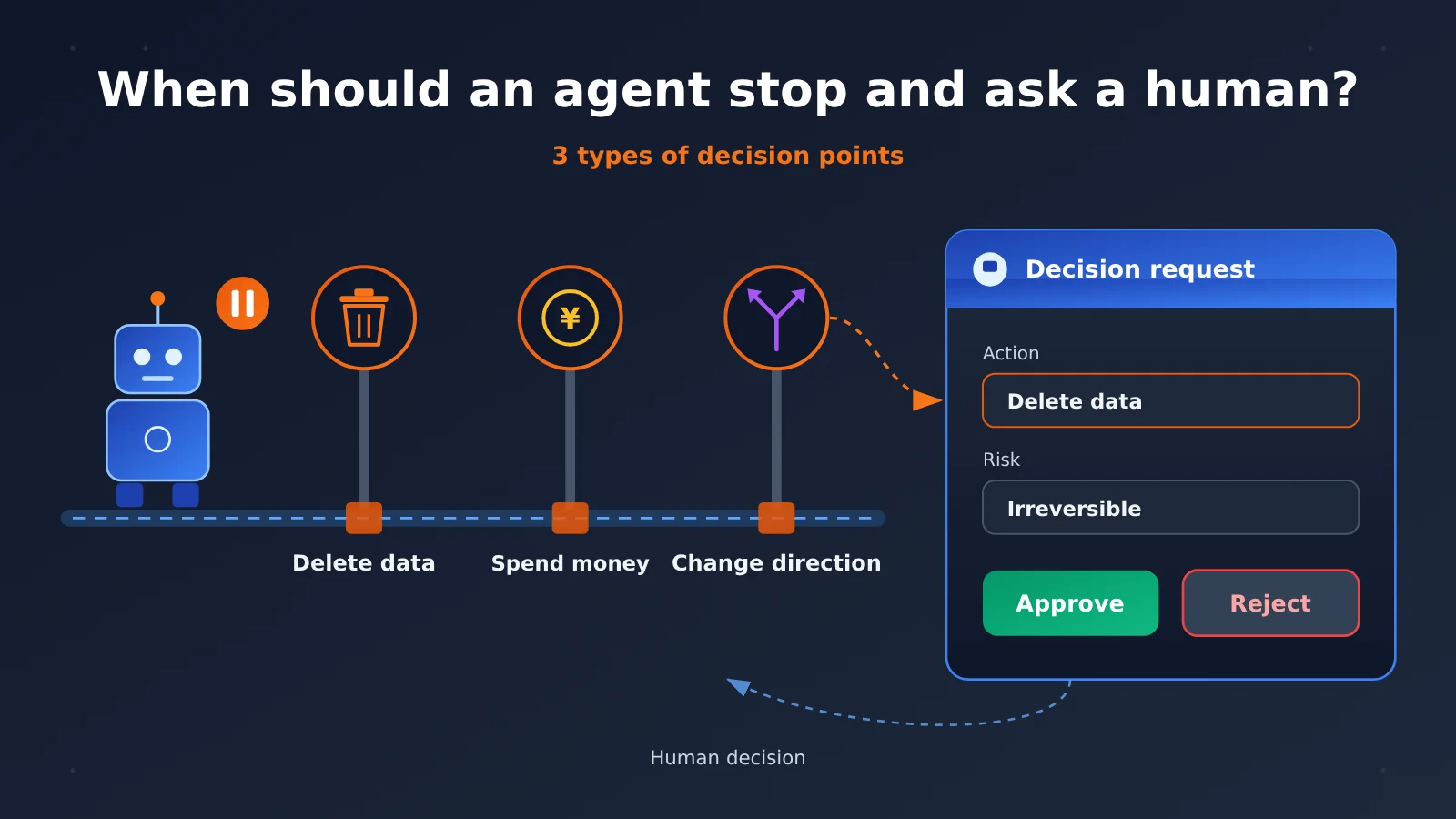
When Should an Agent Stop and Ask a Human? Three Key Decision Points
Kazik’s system gives a restrained answer: humans step in at just three points. The table below maps each decision point to the underlying risk.
| Decision point | Typical actions | Underlying risk | Why a human is needed |
|---|---|---|---|
| Delete data | Clean up database records, delete files, overwrite historical versions | Irreversibility | Once executed, rollback can be extremely costly or even impossible |
| Spend money | Call paid services, purchase resources, consume model credits in bulk | Outflow of funds | Real costs are involved, and loops can amplify them |
| Change direction | Adjust content topics, change product strategy, rewrite established rules | Impact on goals | An Agent lacks the full business context and value judgment needed |
Where the Human Decision Boundary Sits in the Four-Layer Architecture
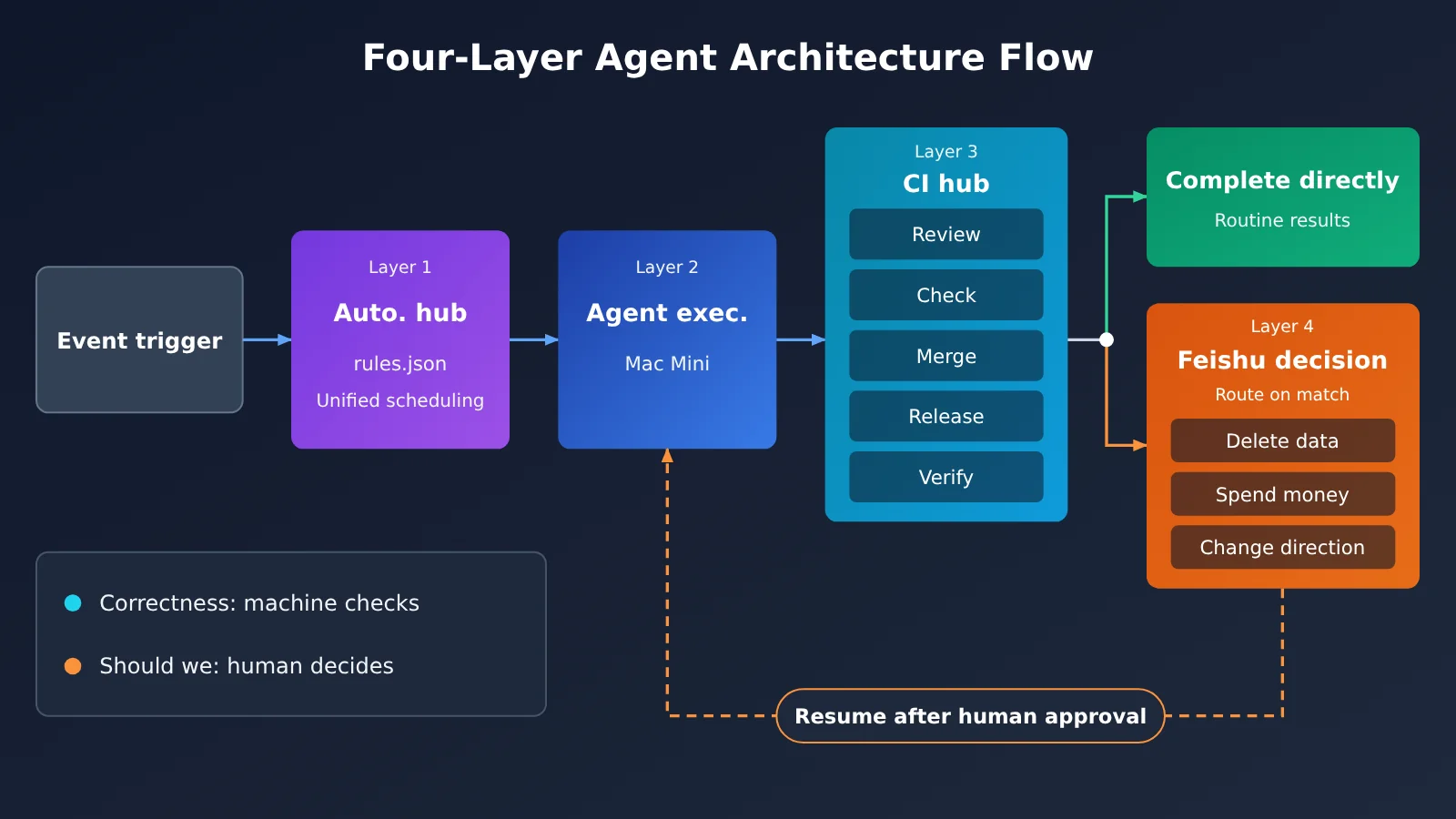
According to the public summary, the core idea behind Kazik’s system is to “take humans out of the starting point”: events trigger Agent work, rather than people initiating every task. The system has four layers, with human decisions placed in the final layer—as a “brake” for the workflow, not an “accelerator.”
| Layer | Responsibility | Implementation described in public information |
|---|---|---|
| Automation hub | Centrally manage event triggers and Agent scheduling | Rules configured centrally in rules.json |
| Agent execution layer | Run Agent tasks | Runs locally on a Mac Mini |
| CI hub | Review, check, merge, release, and verify | Built in-house |
| Feishu decision layer | Request human approval for critical decisions | Feishu cards |
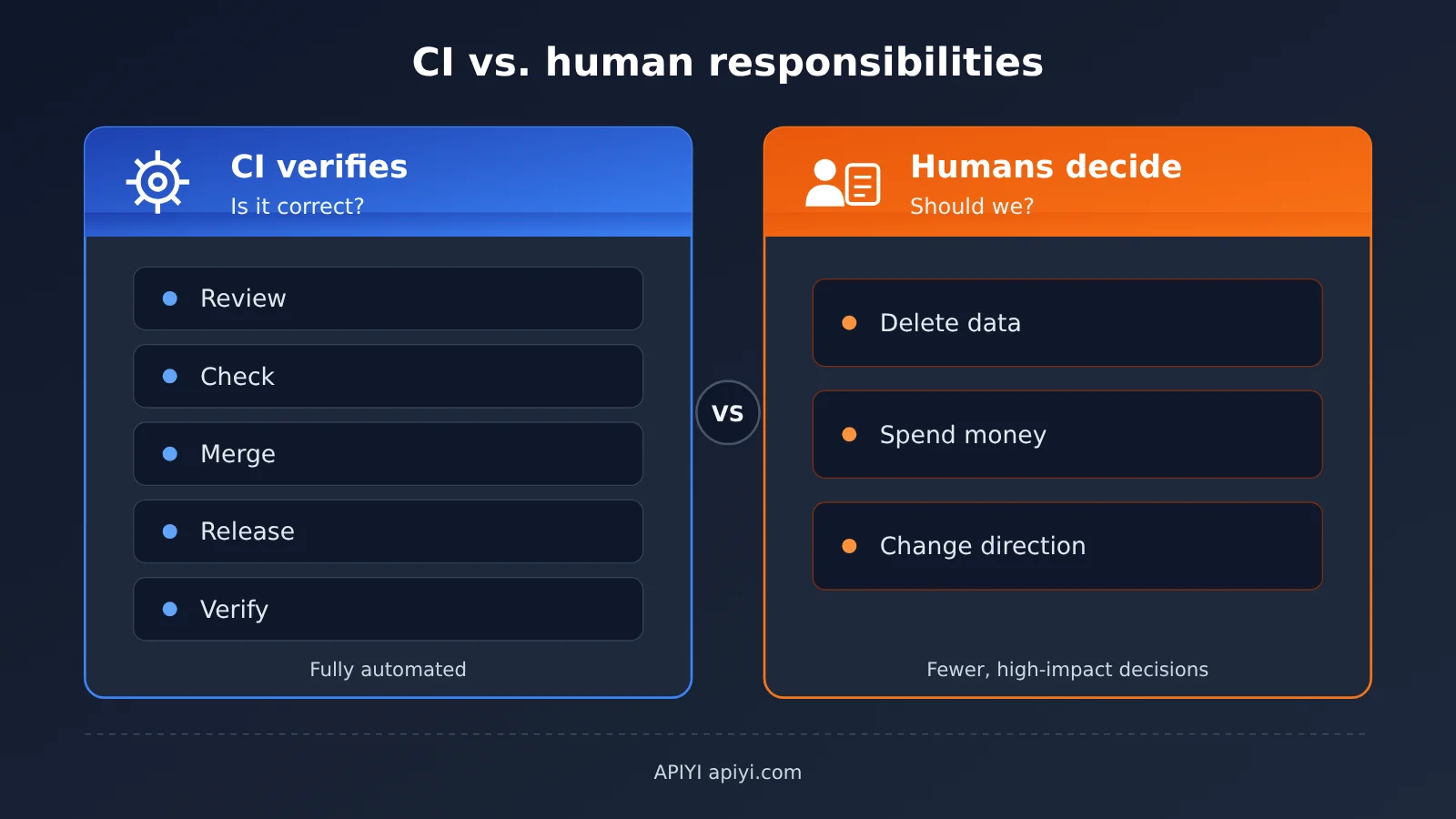
This structure reveals an important design choice: most questions of “is it correct?” go to the CI hub for automated verification. Only questions of “should we do it?” go to humans. The former can be checked against objective standards; the latter involve trade-offs and accountability. That’s the key distinction defining the human decision boundary.
It’s worth noting that the original source is only a summary. It doesn’t disclose the specific fields on the Feishu cards, how often human decisions are needed, expected response times, or the exact definition of “change direction.” The later discussion of card design and decision criteria builds on this principle as our own recommendations, rather than describing the original system.
How to Decide When an Agent Should Stop and Ask a Human: A Three-Dimensional Framework
“Deleting data, spending money, and changing direction” is a good starting point, but real systems involve far more types of actions. By generalizing these into three reusable dimensions, you can quickly assess any new action: reversibility, cost impact, and directional impact.
Dimension 1: Reversibility Determines Whether the Consequences Can Be Undone
Reversibility asks, “Can we undo it if it goes wrong?” Writing a draft, creating a branch, and running a script in a test environment are all reversible actions. If something goes wrong, you can discard the result and start over. Deleting production data, sending external emails, and publishing content, on the other hand, are irreversible or only partially reversible. The cost of undoing them is much higher than the cost of carrying them out.
To make the assessment concrete, ask: If the Agent realizes it made a mistake immediately after acting, how much time and effort would recovery take? If the answer exceeds what you’re willing to accept, the action should require approval.
Dimension Two: Cost Impact Determines Whether You Need a Budget Gate
Cost impact isn’t just about “how much will this cost?” It also includes “could the cost multiply?” An Agent’s biggest financial risk often comes from loops: a faulty retry mechanism or an overly broad trigger can cause model invocations to repeat for hours. An operation that’s cheap once can become unacceptably expensive when repeated out of control.
A more practical approach is to set budget thresholds: let the Agent act autonomously when both per-operation and cumulative spending stay within the limits, and have it stop and ask a person when either limit is exceeded. If your Agent needs to call multiple Large Language Models, a unified API platform like APIYI at apiyi.com brings usage together in one place. That makes it easier to track cumulative spending against your thresholds without switching between multiple providers’ dashboards.
Dimension Three: Direction Determines Who Owns the Goal
Direction is the least clear-cut of the three dimensions. It asks whether an action changes “where we’re going”—for example, by revising a content strategy, changing rule configurations, or shifting product priorities. Agents are good at finding the best path toward a given goal, but they’re less suited to deciding whether the goal itself should change. That requires business context, brand judgment, and accountability.
One practical way to draw the line: if an action changes the Agent’s own rules or goals (for example, rewriting trigger conditions in rules.json), or if its outcome will become a premise for many subsequent tasks, treat it as a change in direction.
| Dimension | Low-Risk Characteristics | High-Risk Characteristics | Recommended Handling |
|---|---|---|---|
| Reversibility | Drafts, branches, test environments, one-click rollback | Deletion, overwriting, public releases, sending messages | High-risk actions require approval |
| Cost impact | Low per-operation cost, cumulative spending within budget | Exceeds thresholds, potential for runaway loops | Autonomous within thresholds; approval beyond them |
| Direction | Execution under established goals | Changes to rules, goals, or long-term strategy | Always leave the decision to a person |
| Combined assessment | All three are low-risk | Any one is high-risk | Stop and ask a person if any dimension is high-risk |
The Cost of Too Many or Too Few Approvals
Setting boundaries is about balancing two kinds of failure. Both too many and too few approvals can derail an AI agent automation project, but in different ways.
| Situation | Typical behavior | Immediate consequence | Long-term impact |
|---|---|---|---|
| Too many approvals | Every step prompts for confirmation, and approval cards pile up | Automation becomes “clicking buttons by hand” | Approval fatigue: people start approving without reading |
| Too few approvals | Even critical actions are performed autonomously | Accidental deletions, overspending, or going off course | A single incident can destroy trust in the system |
| Reasonable boundaries | The agent stops only at three types of high-risk points | People handle only decisions that require human judgment | Trust builds gradually, allowing more autonomy over time |
The most subtle danger of too many approvals is “approval fatigue.” When people receive dozens of confirmation cards every day, they quickly get into the habit of approving them without reading. Approval becomes a formality—and can be more dangerous than having no approval at all, because everyone assumes someone is checking. The Kazik system’s restraint in “involving people only at three types of moments” is designed to make sure every interruption deserves careful attention.
Getting Started with Human Decision Boundaries for Agents: Build an Approval Workflow in Five Steps
Here’s how to design an approval workflow from scratch. It doesn’t depend on any specific framework—you can implement it with any event orchestration tool and instant messaging platform.
Step 1: Inventory All Agent Actions
List every tool and action the Agent can use, such as reading files, writing files, deleting records, calling external APIs, sending messages, and changing configurations. Tag each one across three dimensions to create an “action risk inventory.” This inventory is the foundation for all the rules that follow and gives your team a shared language for discussing boundaries.
Step 2: Manage Rules Centrally
Following Kazike’s approach of using rules.json to manage triggers and scheduling, put the rules for “which actions require approval” in a central configuration too, rather than scattering them across each Agent’s prompts. Centralized configuration has two benefits:
- Auditable: Anyone can see which operations currently require human confirmation.
- Adjustable: When the boundaries need tightening or loosening, there’s only one place to update.
Note that changing this configuration is itself a change in direction, so only a human should do it.
Step 3: Let CI Run Automated Checks First
Before asking for human input, let automated checks verify everything they can. Kazike’s CI platform covers five steps: review, check, merge, release, and verify. That means decisions handed to humans have already been screened for basic issues like formatting errors and test failures. Humans shouldn’t do checks that machines can handle, and machines shouldn’t make judgment calls for humans.
Step 4: Design the Decision Card
Here are our recommendations for designing a decision card—not details of the original system. The core principle is to help people make a decision in a matter of seconds:
- A one-sentence summary of the action: For example, “Delete draft records from before March”;
- The risk categories triggered: Indicate whether the action is irreversible, over budget, or a change in direction;
- Scope and cost: How many records are affected and how much the action is expected to cost;
- The Agent’s reasoning and evidence: Why it recommends the action and what CI verification found;
- Clear action buttons: Approve, reject, and, when needed, “Modify and execute.”
Step 5: Define Timeouts and Default Behavior
People aren’t always online. Define in advance how long a card can go unaddressed before it times out, and whether the default response is “don’t execute” or “execute with reduced scope.” For actions like deleting data or spending money, the default should be “don’t execute.” It’s better to let a task wait than to treat silence as authorization.
🚀 Quick start: When building a prototype, start with a unified model endpoint to get the entire “Agent execution → CI verification → card approval” workflow running. With APIYI at apiyi.com, you can call multiple popular models and switch between them without changing the approval logic. This lets you compare how often different models trigger approval and the quality of their reasoning.
What CI Verifies and What Humans Decide
Many teams wonder: if CI can check the work, why do we still need people? The answer is that they address different questions. Here’s how the responsibilities break down:
| Stage | Question | Basis for the decision | Owner |
|---|---|---|---|
| Review / check | Does the output meet the standards? | Rules, tests, formatting | CI platform |
| Merge / release | Can it move to the next stage? | Whether all checks passed | CI platform |
| Verification | Did the result actually take effect? | Post-action verification | CI platform |
| Deleting data / spending money / changing direction | Should we do it? | Business judgment and accountability | Human decision |
| Model invocation source | Which model should we use, and how much should we spend? | Budget thresholds | Configuration rules + human oversight; APIYI apiyi.com can help aggregate usage |
Frequently Asked Questions
Q1: What is an Agent’s human decision boundary?
It’s a set of rules that separates actions an Agent can take autonomously from those that require human approval. Within the boundary, the Agent runs at full speed. When it reaches the boundary, it pauses and hands the decision to a person. The boundary is typically defined using three criteria: reversibility, cost impact, and whether the action changes direction.
Q2: What’s the difference between human approval and automated CI checks?
CI answers “Is this correct?” using rules and tests, making it well suited to machines. Human approval answers “Should we do this?” based on business judgment and accountability. Automate the former as much as possible, and keep the latter focused and infrequent. Together, they provide both speed and reliability.
Q3: How should we define a vague category like “changing direction”?
The source material doesn’t disclose the author’s specific definition. Our recommendation is to treat any action that changes the Agent’s own rules or goals, or whose result becomes a premise for many subsequent tasks, as “changing direction.” When in doubt, require approval first, then gradually grant more autonomy based on experience.
Q4: Which scenarios need human decision points most?
The main ones include:
– **Data cleanup tasks**: Regularly deleting expired records or files;
– **Automated content publishing**: Final confirmation before external publication;
– **Batch model invocations**: Paid calls that could multiply through loops;
– **Strategy adjustments**: Changing content direction, scheduling rules, and so on.
Q5: How can we control the cost of an Agent calling Large Language Models?
Set budget thresholds for both individual calls and cumulative spending. Let the Agent act autonomously within those limits, and require approval when it exceeds them. Centralizing model invocations on a unified interface platform like APIYI apiyi.com makes it easier to monitor usage against thresholds and review spending afterward.
Q6: How can we quickly check whether our approval boundaries are reasonable?
Start with a small trial using real tasks, and track the daily number of approval requests, rejection rate, and average response time. If there are many requests but very few rejections, the boundary is probably too strict. If problems only surface after the fact, it’s probably too loose. Early on, you can use APIYI apiyi.com to run the same batch of tasks with multiple models and compare how often each one triggers approval.
Q7: What are the limitations of this approach?
Human approval depends on people being available and responsive, so tasks may pile up late at night or during holidays. People can also make the wrong call if the approval card lacks information. In addition, the source material for this article is a summary, and there are no public details about cases of erroneous execution without approval or the specific safeguards used. When implementing this approach, you’ll need to add timeout, logging, and rollback mechanisms suited to your own system.
When Should an Agent Stop and Ask a Human? Key Takeaways
- Core principle: Interrupt people only when deleting data, spending money, or changing direction. This keeps each approval meaningful.
- Three dimensions: Quickly classify any new action by reversibility, cost impact, and direction.
- Clear responsibilities: CI checks whether something is correct; humans decide whether it should be done. Neither replaces the other.
- Watch for approval fatigue: Too many requests can lead people to approve automatically, which is more dangerous than having no approvals at all.
- Default to caution: If an approval request times out, don’t execute the high-risk action.
- One access point: Use APIYI apiyi.com to access multiple models in one place, making it easier to manage cost thresholds and compare models.
Summary
Deciding when an agent should stop and ask a human comes down to drawing a clear line between efficiency and risk:
- Start with three decision points: Deleting data, spending money, and changing direction cover the vast majority of high-risk scenarios;
- Extend the boundary using three dimensions: Reversibility, cost impact, and direction help you assess any new action;
- Reduce the workload with automated checks: Let CI filter out basic issues so people only handle decisions that genuinely require judgment.
The boundary isn’t fixed once and for all—it can gradually loosen as trust builds. Start with strict limits, run a trial, and use data to decide where to grant more autonomy. During setup and tuning, APIYI apiyi.com provides a single access point for multiple models, so you can quickly test how different models perform in your approval workflow.
📚 References
- Digital Life Kǎzīkè Shares an Agent Automation Architecture Built Over a Year: Source for the principles and architecture described in this article
- Link:
aihot.news/items/dzwfvd9xp6v4qaj6olxezpier - Notes: Introduces a four-layer architecture covering an automation platform, Agent execution, a CI platform, and decision-making in Feishu. It also outlines the principle of “only involving people when deleting data, spending money, or changing direction.” The source is a summary; check the original for details.
Author: APIYI Technical Team
Technical discussions: Contact us through the APIYI homepage at apiyi.com to share practical experience with Agent automation and human-AI collaboration. For more resources, visit the documentation center at docs.apiyi.com.