
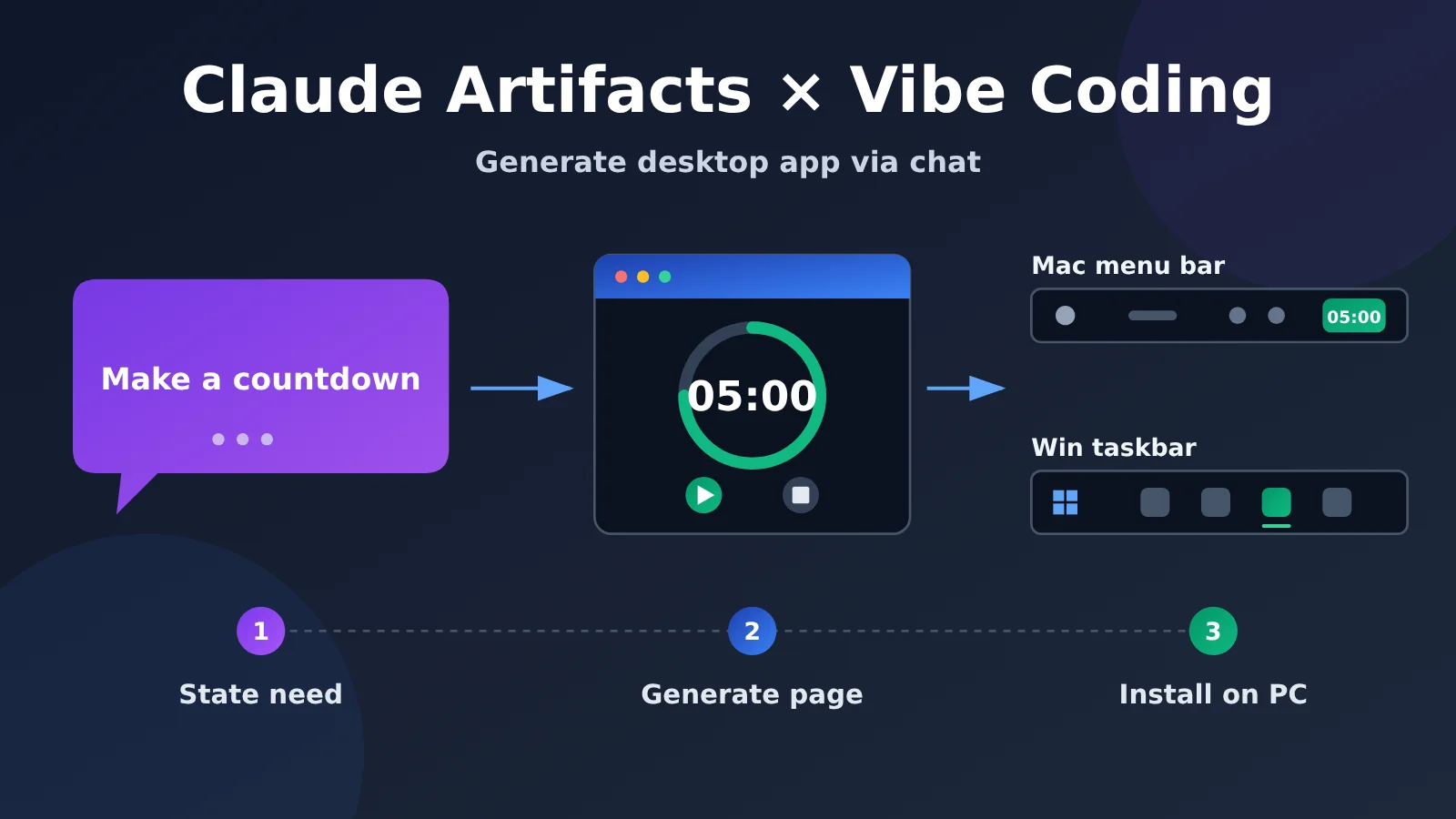
Yes, but only within limits. In Claude Artifacts, people who don’t code can build a small tool using natural language. As long as the work meets the requirements, it can be installed through Claude Desktop as a Mac or Windows app with its own window, icon, and launch entry point. What this actually means for Vibe Coding is that there are fewer hurdles between “describing what you want” and “having it installed on your computer ready to use.” The fundamentals of software development still need to be learned: clearly defining inputs and outputs, figuring out state changes, validating edge cases, and managing data and permissions properly. Apps built this way depend on Claude hosting, an internet connection, and login, and they aren’t suitable for independent distribution, so they’re more like a personal or small-team toolbox.
What you’ll learn from this article
- The official requirements for the Claude Artifacts desktop installation Beta: version, platform, entry point, and launch restrictions.
- Which kinds of small tools are a good fit for Artifacts, and which requirements mean you should start thinking about proper engineering.
- A set of “pre-meeting prep timer” prompts and an acceptance workflow designed by the author that you can follow along with directly.
- What you need to prepare when handing off to a full engineering project, and how to use APIs to take over the capabilities originally provided by the Claude host.
Index: First, a concept table clarifies terms like Artifacts, Vibe Coding, and permission bridge, then explains the impact by audience. The following “Objective Facts” section only organizes content from Anthropic’s official help center and announcements, with verification dates noted. The “Analysis and Judgment” section first lays out the conditions under which small tools are suitable, then walks through the author’s example from prompt to post-installation acceptance, and finally draws the line for when to migrate to a full engineering project along with a migration package checklist. The article ends with an FAQ and reference materials.
Note on evidence labeling: This article’s verification date is November 27, 2026. Content labeled “official” comes from Anthropic’s help center and product announcements. Content labeled “author example” is a practice workflow designed for this article; it’s an illustrative example with no measured data. This article also didn’t collect community feedback, so it doesn’t cite community claims.
Claude Artifacts and Vibe Coding: Concepts to Know First
| Concept | Quick explanation |
|---|---|
| Vibe Coding | A development style where you describe in natural language what you want the software to do, then keep requesting changes based on the runnable results |
| Claude Artifacts | Previewable, interactive outputs Claude generates during a conversation — for example, interactive pages or small tools |
| Install as app | The entry point in Claude Desktop that lets you install compatible Artifacts as desktop apps |
| Claude Desktop | Claude’s desktop client; the install feature requires version 6.28899.0 or later |
| Cloud code execution and file creation | The setting you must enable to create Artifacts; the newer UI calls it Create and edit files |
| Permission bridge | The mechanism that lets an installed app call capabilities such as system notifications after you approve it |
| Full computer access | A high-level permission that allows running programs and reading, writing, and deleting files; once granted, it may not prompt for confirmation every time |
| Persistent storage (personal / shared) | Data retention available on eligible plans, split into two types: saved per person and shared among multiple people |
| Connectors | An integration method that lets Artifacts access third-party services; recipients usually use them under their own account identity |
| Claude Code | Anthropic’s development tool built for multi-file projects and command-line workflows |
| Acceptance steps | A manual checklist written as “what to do, what you should see,” used to judge whether a feature meets the bar |
How Claude Artifacts Desktop Installation Affects Different Groups
| User group | Primary impact | What to watch out for |
|---|---|---|
| Individual users who don’t code | Can use conversation to create small tools like timers, reminders, and check-in trackers, then install them on their own computer | Requires internet access and login; updates from the creator sync automatically to installed apps |
| Non-technical roles on teams | Can quickly build small internal tools such as department forms and feedback collection | Before using shared storage, clarify who can view and who can edit, and test with a test account |
| Developers | Can use it as a fast track for requirements prototypes | When a prototype needs long-term maintenance, it should be converted into a formal project using a migration package |
| IT and administrators | The ability to create organization accounts is constrained by administrator settings | Full computer access can read, write, and delete files, so it should be evaluated separately |
Objective facts: what the Claude Artifacts desktop install Beta actually shipped
When the Claude Artifacts desktop Beta launched, and where the info comes from
Official: On November 24, 2026, Anthropic announced the ability to install Artifacts as apps, on Mac and Windows, in Beta. The getting-started examples in the install guide are a menu bar Pomodoro timer (original wording: “Make a Pomodoro timer”) and an hourly stretch reminder. The product announcement also mentions more complex uses like file managers, terminal tools, and system tray monitoring.
All of these examples come from the vendor. Beginners don’t have to start with something as complex as a file manager. The Pomodoro timer and stretch reminder have short flows with easy-to-observe results, which makes them better for practice.
What it takes to create and install Claude Artifacts
Official: Creating and installing are two separate steps with different conditions, summarized below.
| Stage | Conditions | Notes |
|---|---|---|
| Create | Claude web or desktop | Cloud code execution and file creation must be enabled in settings (the new UI calls it Create and edit files) |
| Create (organization accounts) | Follow admin settings | Admins may restrict the related capabilities |
| Install | Claude Desktop 6.28899.0 or later | The entry point only appears when you open a compatible Artifact |
| Install entry | Title menu, right-click menu, or Install as app in Share | You’ll still need to confirm after clicking |
| Platforms | Mac, Windows (Beta) | Other platforms aren’t covered this time |
| Unsupported artifacts | Templates, legacy chat artifacts, early Cowork live artifacts | These artifacts have no install entry point |
| Launch | Computer online and signed in to Claude (original wording “online and signed in”) | You can’t open an installed app offline or while signed out |
| Updates | The app still uses Claude-hosted artifacts | Changes made by the author sync automatically |
You can treat this table as a self-check list. If your environment drops connectivity often, or it’s inconvenient to stay signed in to Claude on your device, you can tell before installing that it isn’t for you.
Permissions, data, and sharing rules for Claude Artifacts
Official: Once an installed app is granted access through the product permissions bridge, it can use capabilities like system notifications. Full computer access lets it run programs and read, write, and delete files, and after you consent it may not prompt every time. Revoking full access may cause the app to reload or close, but file changes already made won’t be undone automatically.
After an app updates, the system authorizations granted to the previous version need to be confirmed again. Uninstalling the app removes the permissions it was granted, but the original Artifact in Claude remains. Removing the app and deleting the original work are two separate operations.
On data: eligible plans can use both personal and shared persistent storage. On sharing: people who can view the work may not be able to actually use its Claude or connector features. Recipients usually use connectors under their own account identity, and external guests and in-organization live sharing each follow their own rules.
Where official examples end and author examples begin in Claude Artifacts
The “pre-meeting prep timer,” the fifteen-second test path, the six acceptance steps, and the five-item migration pack that appear below are all author examples. They’re practice plans designed around the official rules; the actual output depends on what you get in Claude. The official docs don’t provide this flow, and this article has no measured data to show.
Analysis: Where Claude Artifacts Lowers the Bar for Vibe Coding
My take: Claude Artifacts lowers the startup cost, not the engineering cost. In the past, turning an idea into desktop software meant at least setting up an environment, building a UI, packaging, and installing. Now that whole chain collapses into one requirement sentence, one preview, and a click on Install as app. But whether the software actually works, whether the data is safe, and who’s responsible when something breaks — those questions don’t go away, they just show up later.
Because of that, what beginners should be practicing isn’t syntax — it’s turning requirements into rules they can verify by hand. People who can write acceptance steps get noticeably more out of Vibe Coding.
When a Claude Artifacts Mini-tool Makes Sense
Let’s start with when it’s a good fit. If most of the following hold true, Artifacts is a solid choice:
- Short flow: you can demo it successfully in under two minutes — a countdown, a check-in, a stretch reminder.
- Few users: mostly just you, or a handful of colleagues who meet the sharing conditions.
- Stable environment: devices that stay online and signed in to Claude long-term, on Mac or Windows.
- Light permissions: browser-level logic only, maybe plus a system notification.
- Data can be lost or exported: losing it won’t hurt, or you can read it back after exporting.
- Auto-updates are acceptable: the author changes something, and users follow along.
Conversely, the moment a tool needs to touch real files, have multiple people co-writing important records, or open without a network, this checklist starts to fall apart.
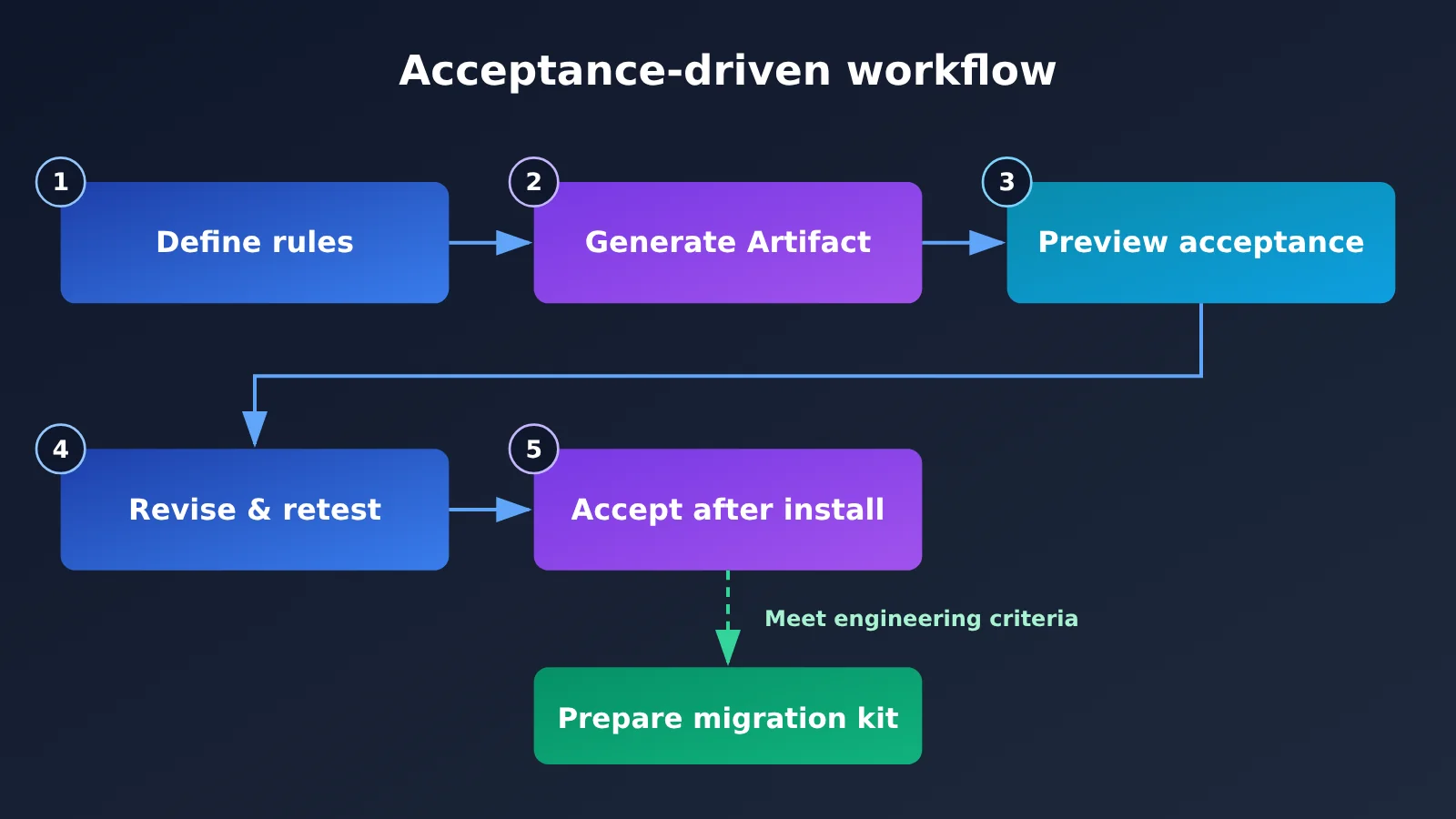
Walk Through the Author’s Example: Claude Artifacts from a Single Sentence to a Reviewable First Version
The author’s example: start with a small problem. Say you want to do a few minutes of prep before a meeting and need a countdown tool. The key is to write the rules as inputs and results you can try yourself. You can submit the following prompt directly in a regular chat.
Build a “pre-meeting prep” Artifact. Accept input from 1 to 60 minutes, and provide Start, Pause, Resume, and Reset. Use a 15-second countdown for testing; in normal mode, display minutes. When the countdown ends, show a message only once in the window. If the input is empty, negative, or over 60 minutes, show a message in Chinese. The first version should not access external services or read files. Give me six manual acceptance steps and the expected result for each one. List the timing rules separately in a short note.
This prompt has three deliberate design choices. It limits the input range, provides a 15-second fast test path, and explicitly says “the first version doesn’t access external services or read files,” keeping permissions to a minimum.
Once it’s generated, start by checking it in the preview with these steps:
- Enter text or a negative number—you should see a Chinese error message, and the countdown shouldn’t start.
- Click Start twice in a row—only one timer should be running, and it shouldn’t speed up.
- Pause while it’s running, wait 3 seconds, and the remaining time should stay the same.
- Click Resume and compare it with your phone’s stopwatch—the timing should match.
- When the countdown ends, the message should appear only once.
- Click Reset, and you should be able to run through the whole thing again.
For the second round of changes, ask for only one thing, such as “after refresh, go back to the initial state and keep the other behavior unchanged.” After the change, retest the start and end. When something goes wrong, record the input, steps, actual result, and expected result together. Feedback like “in test mode I entered 15 seconds, ran for 5 seconds, paused, waited 3 seconds, then resumed; it actually had 7 seconds left, but I expected 10 seconds” is much easier to fix than “it seems broken.”
The Second Acceptance Checks and Notification Permissions After Installing Claude Artifacts
After installation, the focus shifts to the “desktop environment.” Confirm that the launch entry on Mac or Windows can open the same tool, and that when you close the window and launch it again, it behaves as expected.
I recommend adding system notifications as a separate requirement for v2. The author’s example requests only notification permission, then tests two cases: if granted, notifications display correctly; if denied, the in-window prompt still works and core functionality is unaffected. Official docs say permission must be re-confirmed after an update, so before you plan to share it, it’s best to retest with a different account, and write the version, device, account, and behavior when permission is denied into the trial notes.
🎯 Quick-start tip: If you want to compare how well different models write acceptance steps during the exercise, you can use APIYI apiyi.com to call Claude, GPT, and Gemini with the same API key, give them the same requirement to generate an acceptance checklist, and then pick the clearest one.
When Claude Artifacts Should Move to a Full Engineering Project
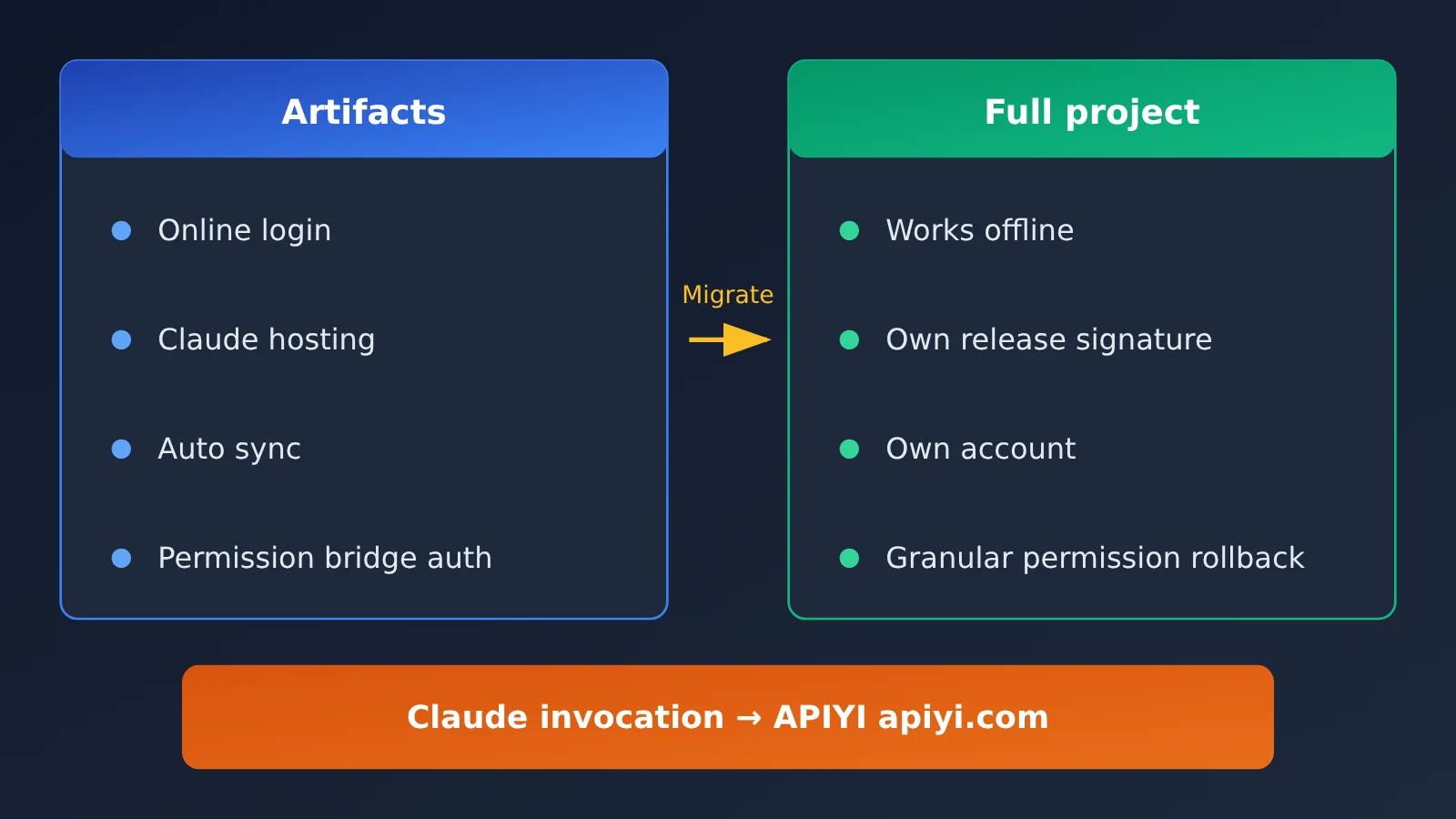
Now let’s talk about the boundary. In my view: once a requirement appears that “someone has to be accountable when this tool goes wrong,” it’s time to start preparing for an engineering handoff. The table below maps common signals to Artifacts’ limitations.
| Requirement signals | Current state of the Artifacts desktop app | What a full engineering project can do |
|---|---|---|
| Must open offline | Launch requires internet and a logged-in Claude account (official) | Control your own runtime environment |
| Cross-platform distribution, installer signing | Beta is limited to Mac and Windows; the app is still a Claude-hosted product (official) | Own build, signing, and release channels |
| Sign-in with your own account | Uses the Claude account system | Build your own identity system |
| Precise, granular data permissions | Only personal and shared storage types (official) | Design permissions by field and role |
| Multiple people editing at once, bulk changes | You need to verify concurrency behavior yourself | Transactions, conflict handling, and auditing |
| Version control and rollback | Auto-sync after the author makes changes (official) | Staged rollout and rollback |
At this point, you can start by asking three questions: Who releases new versions? Who handles incidents? Who can restore data? Once there’s a clear owner for all three, choose the repository, runtime environment, data layer, and release method based on your goals. Official docs say Claude Code can handle multi-file projects and commands, but actually shipping still depends on the project’s own tests, deployment configuration, and accountable owners.
Claude Artifacts Migration Package and API Takeover
From the author’s example: A migration package should include five items.
| No. | Item | Key details |
|---|---|---|
| 1 | Feature list | Features included and excluded in this version |
| 2 | Test data and steps | Fictional inputs including empty and invalid values, expected outputs, manual acceptance steps |
| 3 | Data description | Fields, storage method, export format, cleanup mechanism |
| 4 | Permission list | Notifications, local files, external services, login |
| 5 | Implementation notes | Code you can access, and which calls are provided by the Claude host |
The fifth item is the easiest to overlook. If an Artifact uses Claude at runtime—for example, to generate pre-meeting talking points from a meeting topic—that capability comes from the Claude host. Once it’s migrated out, you’ll need to call the model yourself through the API. Here’s a minimal example:
import openai

client = openai.OpenAI(
    api_key="YOUR_API_KEY",
    base_url="https://api.apiyi.com/v1"  # APIYI OpenAI-compatible endpoint
)

resp = client.chat.completions.create(
    model="YOUR_CLAUDE_MODEL",  # Replace with a Claude model name available in the console
    messages=[{"role": "user", "content": "主题:季度复盘。列出三条会前准备要点。"}]
)
print(resp.choices[0].message.content)
View the full code: replicate the timer rules + take over Claude calls + acceptance test cases
import openai
from typing import Tuple

client = openai.OpenAI(
    api_key="YOUR_API_KEY",
    base_url="https://api.apiyi.com/v1"
)
MODEL = "YOUR_CLAUDE_MODEL"  # Replace with a model name available in the console


def validate_minutes(raw: str) -> Tuple[bool, str]:
    """Replicate the original Artifact's input rules: 1–60 minutes; return Chinese messages for empty, negative, or out-of-range values."""
    text = (raw or "").strip()
    if not text:
        return False, "请输入准备时长"
    try:
        value = int(text)
    except ValueError:
        return False, "请输入整数分钟"
    if value < 1:
        return False, "时长至少 1 分钟"
    if value > 60:
        return False, "时长不能超过 60 分钟"
    return True, f"{value} 分钟"


def prep_points(topic: str) -> str:
    """Capability originally provided by the Claude host; after migration, call the API yourself instead."""
    try:
        resp = client.chat.completions.create(
            model=MODEL,
            messages=[
                {"role": "system", "content": "你是会议助理,回答简洁。"},
                {"role": "user", "content": f"主题:{topic}。列出三条会前准备要点。"}
            ],
            max_tokens=300
        )
        return resp.choices[0].message.content
    except Exception as e:
        # Match the original behavior: if the external capability fails, the main feature (timer) is unaffected
        return f"要点生成暂不可用:{e}"


# Migration package item 2: verify consistent output with the same set of fictional inputs
CASES = [("", False), ("abc", False), ("-3", False),
         ("0", False), ("61", False), ("1", True), ("60", True)]

for raw, expected in CASES:
    ok, msg = validate_minutes(raw)
    assert ok == expected, f"输入 {raw!r} 期望 {expected},实际 {ok}({msg})"
print("计时输入规则验收通过")
print(prep_points("季度复盘"))
The approach in this code matches the migration order: replicate the pure logic first, then take over external capabilities, and only after that add identity, storage, updates, and rollback. Handoff acceptance comes down to four checks: input and output match the original; testing with a separate account shows no unauthorized access; old data can be recovered; and the project can be rebuilt.
💰 Cost tip: After migration, model calls become pay-per-use. When you connect through APIYI apiyi.com, billing is usage-based, and new users get free trial credits—handy for estimating invocation costs during a small pilot phase.
Claude Artifacts and Vibe Coding FAQ
Q1: If I don’t know how to code at all, can I really build desktop software with Claude Artifacts?
You can build small installable tools (the official Beta supports Mac and Windows). The catch is that you need to be able to turn your requirements into testable rules, and you have to be willing to sign off on each step. It’s an app hosted by Claude, so you need an internet connection and a login to open it — it’s not a standalone installer you can distribute on your own.
Q2: How is Claude Artifacts different from traditional Vibe Coding tools?
The difference is mainly in the delivery stage: generation, preview, editing, and installation all happen inside Claude, which saves you from setting up an environment and packaging the app. The trade-off is that running depends on Claude, versions sync automatically with the author, and you have less room to control things yourself.
Q3: When was “install as app” for Claude Artifacts released?
Anthropic announced the Mac and Windows Beta on November 24, 2026. Installing requires Claude Desktop 6.28899.0 or later; this article was verified on November 27, 2026.
Q4: Why doesn’t my Artifact have an “Install as app” entry point?
First check your client version and platform. Then confirm the artifact type: per the official docs, templates, older chat artifacts, and early real-time Cowork artifacts don’t have this entry point. For organization accounts, also confirm that the admin settings allow the relevant capabilities.
Q5: After migrating to a full engineering project, how do I hook up the original Claude capabilities?
In the implementation notes of your migration package, mark which calls are provided by the host, then switch them to calling the API yourself. If you use the OpenAI-compatible interface from APIYI apiyi.com, just change `base_url` to `https://api.apiyi.com/v1` — the same key also lets you switch between GPT and Gemini for comparison.
Q6: What risks should I watch out for with Claude Artifacts desktop apps?
First, full computer access means the app can read, write, and delete files. Revoking authorization won’t automatically undo changes that have already been made, so test on a sample copy first. Second, for shared storage, define view and edit permissions up front. Finally, uninstalling an app doesn’t delete the original Artifact, so for data you need to keep, separately confirm whether it can be exported.
Looking back, the change Claude Artifacts brought to Vibe Coding is pretty concrete: for building a small tool for yourself, the barrier dropped from “knowing how to set up a project” to “knowing how to write requirements and sign off on results.” Once that barrier comes down, judgment matters even more. You need to know when it’s just good enough, and when you should organize the prototype, test data, and permission list and hand it off to engineering. When you reach the point where you need to call the models yourself, you can use the free quota on APIYI apiyi.com to get the post-migration call chain working end to end.