Author’s note: When you’re building e-commerce detail pages, long webpage images, or large-format posters, how do you choose between Kling Image 4.0’s 8K and Ideogram 4.6’s 4K refinement? This article compares the specs, rankings, and cost for the same job, then lays out who should do what.
If you need to produce an entire e-commerce detail page, a long webpage image, or a large-format poster you plan to have printed, chances are you’ve been weighing two new models lately: Kling Image 4.0 (Kuaishou Kling, released 2026-11-17) and Ideogram 4.6 (released 2026-11-19). Both pitch high resolution—one native 8K, the other native 4K—so the names sound alike, but the actual jobs they’re good at are different.
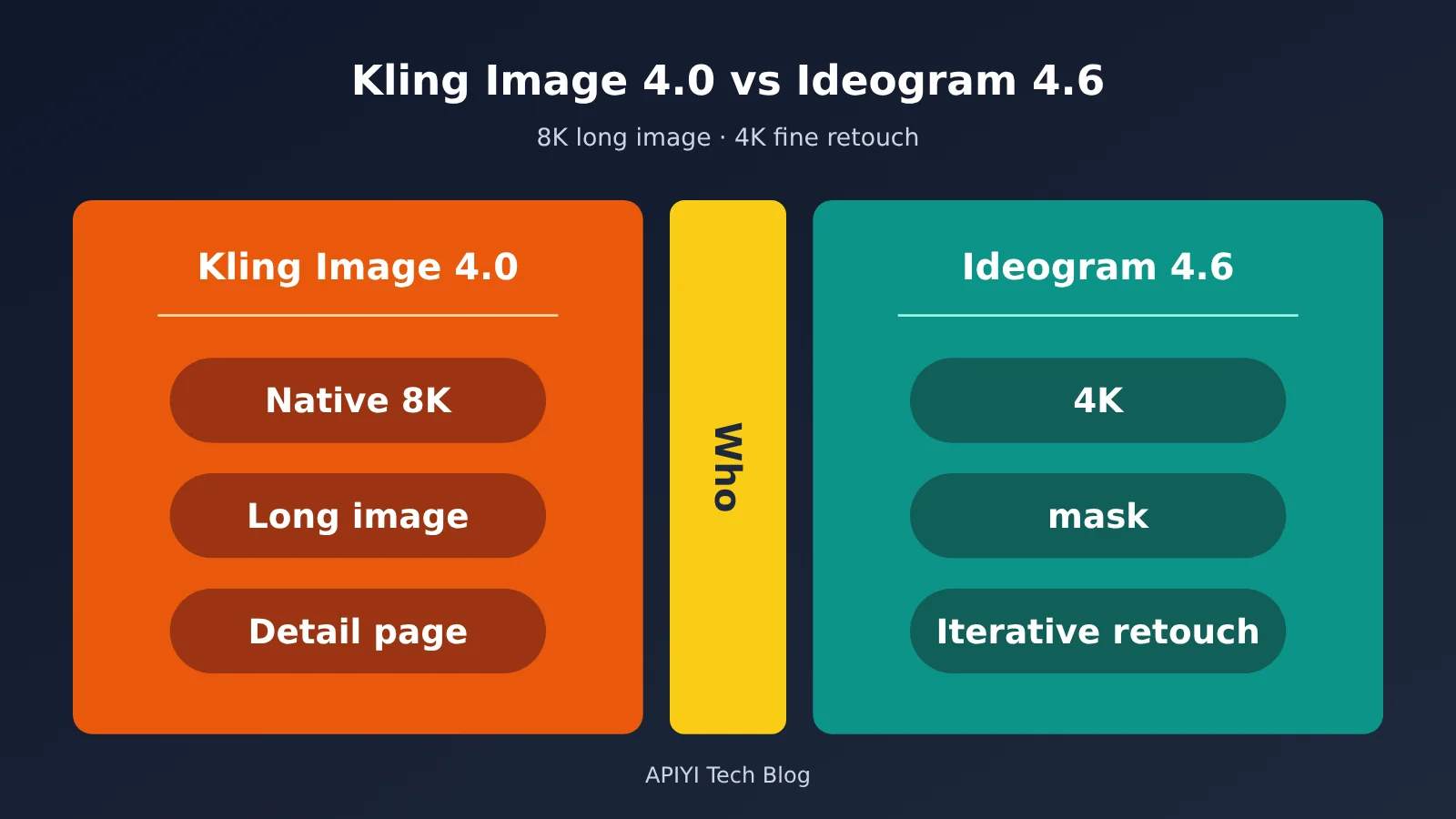
This isn’t a fence-sitting “each has its strengths” piece, and it won’t declare an overall winner. Kling Image 4.0 is positioned for getting 8K large images, long images, and e-commerce detail pages right in one pass. Ideogram 4.6 is positioned for 4K, masks, and multi-round refinement. This article compares just one thing: which model should get the work you have on hand.
Core value: By the end, you’ll know which model to use for each of four task types—8K large images, long webpage images, e-commerce detail pages, and repeated 4K refinement—and roughly how much the same job will cost.
Ideogram 4.6 vs. Kling Image 4.0: Core Positioning
First, let’s translate what “resolution” actually means on each side into plain English. Kling Image 4.0’s 8K is native output: single images and image sets come in three tiers — 2K, 4K, and native 8K — which makes it a good fit for large-format printing and any scenario that needs a big canvas. But keep this in mind: there’s currently no public benchmark that measures how crisp an 8K image really looks when you zoom in, so 8K only tells you the canvas is large — it’s not proof of image quality.
Ideogram 4.6 tops out at 4096×4096, split into 2K and 4K tiers. The official line emphasizes that “native 4K isn’t upscaling”: skin and fabric textures are generated at full resolution, rather than rendering a small image first and upscaling it afterward. The real differentiator is on the editing side: Precise Edit accepts source images up to 8192×8192 and, via context_window, changes only one region while returning everything else untouched, with output kept at the original dimensions.
| Dimension | Kling Image 4.0 | Ideogram 4.6 |
|---|---|---|
| Release date | 2026-11-17 | 2026-11-19 |
| Official positioning | Image generation/editing, native 8K | Precise editing + native 4K |
| Max output | Native 8K (single images, image sets) | 4096×4096 |
| Long-image support | Web long images, e-commerce detail page long images (1K/2K only) | No dedicated long-image tier |
| Editing method | Reference image + subject, up to 10 | mask, context_window, up to 5 source images |
| Best at | Producing large images, long images, and image sets in one pass | Iterating on the same image repeatedly without drift |
You can verify this directly on the official pages: the Ideogram 4.6 model page at ideogram.ai/models/4.6, and the Kling image API pricing page at kling.ai/dev/pricing.
Ideogram 4.6 vs. Kling Image 4.0: Key Differences
Difference 1: General Image Quality on AA — Kling Image 4.0 Leads
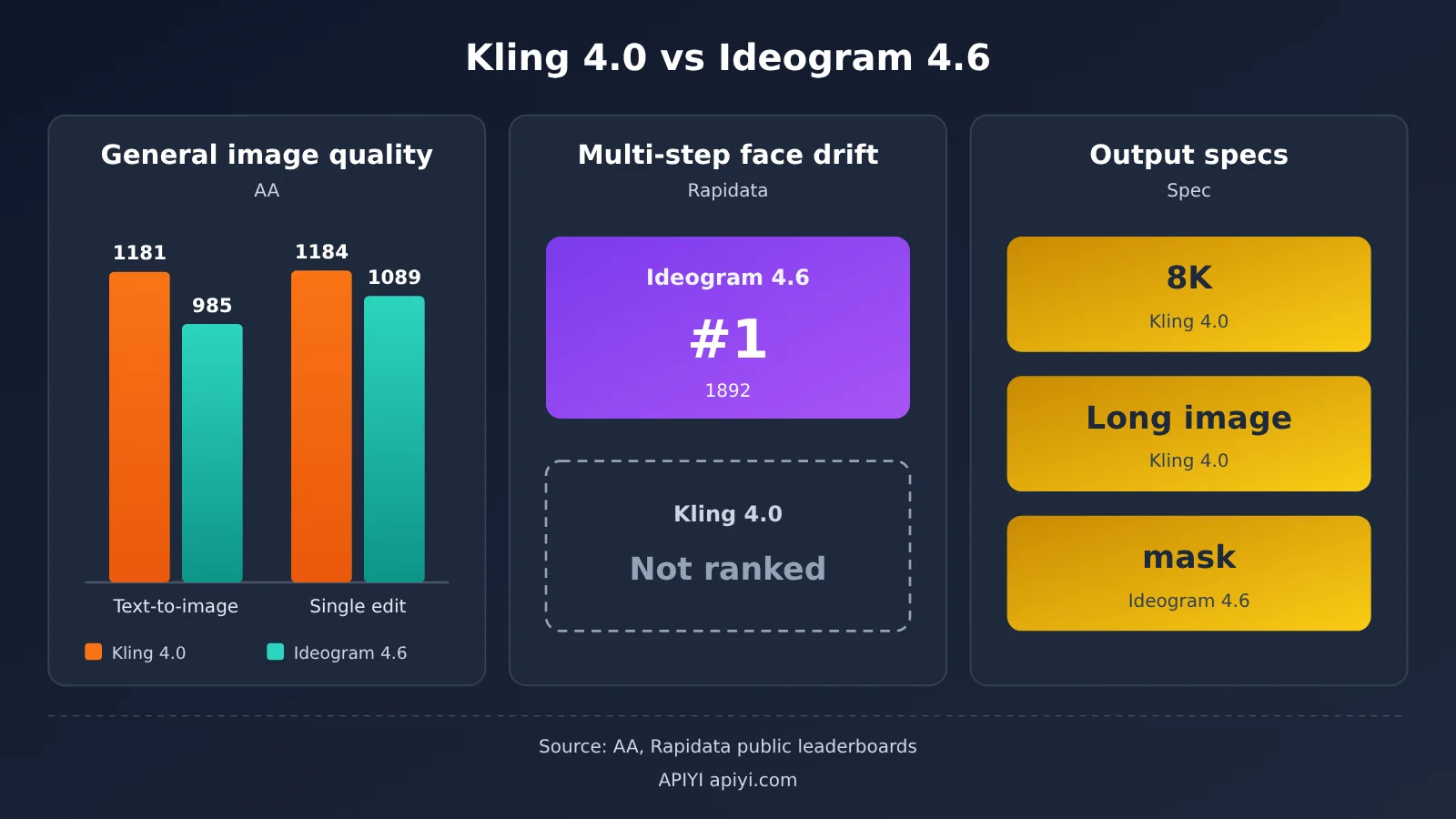
Both of Artificial Analysis (AA)’s leaderboards use blind head-to-head voting, comparing “single generation / single edit — which image does the average person prefer?” As of 2026-11-26, on the AA-Image-T2I v2.1 text-to-image leaderboard, Kling Image 4.0 scored 1181 ±12 and ranked 7th; Ideogram 4.6 (High) scored 985 ±13 and ranked 69th. On the AA-Image-Editing v2.1 single-edit leaderboard, Kling Image 4.0 scored 1184 ±13 and ranked 6th; Ideogram 4.6 scored 1089 ±14 and ranked 31st.
This shows that for the general preference of “one generation, one edit,” Kling Image 4.0 is clearly more popular. It’s worth noting that Ideogram 4.6 actually scores lower than the previous generation 4.5 (1017) on AA text-to-image, and only slightly higher than 4.5 (1064) on single editing. So it’s not an upgrade that’s “stronger across the board” — it specializes in image editing.
Difference 2: Multi-step face drift on Rapidata — Ideogram 4.6 takes No. 1
Rapidata’s Multi-step Image Edit leaderboard on benchmark.ai (updated 2026-11-10) measures something else: 199 real-person photos, each run through a 5-step editing chain that changes only clothing, objects, and text — never the face. Each step uses the model’s own output from the previous round as input, and at the end people blind-pick “which face after step 5 looks more like the original.” It measures face identity drift, not general image-editing quality, and the name is easy to confuse with AA’s Image Editing.
On this leaderboard, Ideogram 4.6 (Precise Edit, High Quality) ranks No. 1 with 1892 ±32 and an 86.3% win rate, 87 points ahead of third-place Seedream 5.5, with non-overlapping intervals. But its interval overlaps with second-place Ideogram 4.5 at 1860–1896, so there’s no way to tell which generation is stronger. Kling Image 4.0 is not on this leaderboard; only the previous generation, Kling Image O1, is listed, at No. 21, so you can’t use O1’s ranking as a stand-in for 4.0.
Difference 3: Output specs decide whether it can handle the job
The spec differences are more direct than the leaderboard. Kling Image 4.0 supports native 8K, up to 2,000 characters per image, up to 10 images per set at a time, and two dedicated long-image modes: web long images and e-commerce detail-page long images. Long-image mode only supports the 1K and 2K tiers. On the API side, reference images plus the subject can total up to 10.
Ideogram 4.6 outputs up to 4096×4096. The Generate endpoint accepts up to 5 source images (the first is the image being edited, the rest are references), plus up to 3 more when a mask is included. Precise Edit’s source-image limits are 50MB and 67,108,864 pixels (exactly 8192×8192). Source images larger than 4096×4096 are downscaled by default; to keep the original size, you need to use context_window=auto with a mask, or specify the y_min,x_min,y_max,x_max region yourself.
| Comparison dimension | Kling Image 4.0 | Ideogram 4.6 | Better for |
|---|---|---|---|
| AA text-to-image | 1181, No. 7 | 985, No. 69 | Kling |
| AA single edit | 1184, No. 6 | 1089, No. 31 | Kling |
| Rapidata multi-step face drift | 4.0 not ranked (O1 No. 21) | 1892, No. 1 | 4.6 |
| Native 8K output | Supported | Not supported | Kling |
| Web long image/detail page | Supported | Not supported | Kling |
| Region-specific retouching at original size | Not a focus | context_window + mask |
4.6 |
Ideogram 4.6’s Officially Reported Usable Rate for Image Edits
Ideogram has published its own usable rates for the same batch of image-edit requests on the High tier, comparing 4.5 with 4.6: recolor to a specified brand color code, 46% → 83%; touch up small product flaws, 61% → 86%; product shots, 66% → 88%; put a person in a new scene and still recognize them, 69% → 85%; edit only the masked area, 82% → 90%. This is official self-reported data. Ideogram hasn’t published the criteria for what counts as “usable,” and the comparison is against its own previous generation, not against Kling or anyone else.
The Cost of the Same Job: Ideogram 4.6 vs. Kling Image 4.0
Prices only make sense if you calculate them for the same job. Kling’s image API is billed in units. Based on the $300 resource pack with 78,216 units, each unit comes out to about $0.00384. Larger packs have a slightly lower unit price. Packs are valid for 180 days and don’t roll over. Ideogram 4.6 is billed per image, and any output larger than 2048×2048 is billed at the 4K tier.
| Task | Kling Image 4.0 | Ideogram 4.6 (High) |
|---|---|---|
| Generate one 2K image | 16 units, about $0.061 | Generation $0.10 |
| Generate one 4K image | 24 units, about $0.092 | Generation $0.20 |
| Generate one 8K image | 40 units, about $0.154 | No 8K output support |
| Edit one 4K image | Not a primary use case | Edit $0.60 |
| 5 consecutive 2K edit rounds | Not designed for multi-round refinement | 5×0.22 = $1.10 |
| Long webpage image | 1K 140 units (about $0.54), 2K 152 units | Not supported |
| Long e-commerce detail-page image | 1K 60–200 units (about $0.23–0.77), 2K 72–220 | Not supported |
One new change is worth calling out separately: Kling’s reference images/reference subjects are now billed at 0.8 units each (about $0.003). They used to be free. One reference subject counts as one reference image. If you’re used to packing in 10 references at once, you’ll need to factor this cost in. Long e-commerce detail-page images only support image-to-image and are priced in three tiers: short, medium, and long.
The per-thousand-image prices listed on the Artificial Analysis (AA) leaderboard (Kling $63/1k, $66/1k; Ideogram 4.6 $100/1k, $220/1k) are normalized according to each vendor’s default settings, so you can’t combine them with the official per-image prices above into one number.
Ideogram 4.6 and Kling Image 4.0 aren’t available on the platform yet; we’ll list them as soon as we can. Model IDs and prices are subject to the platform’s model list. If you need to run similar tasks today as a reference point, Seedream 5.5 (seedream-5-5-261028, 1K/1.5K at $0.020/image, 2K at $0.035/image, input images at $0.008/image) and Nano Banana 2.1 (gemini-nano-banana-2.1, $0.045 per call) are already available on APIYI apiyi.com and can get you started. Seedream 5.5 ranks No. 3 on Rapidata’s multi-step face drift leaderboard, making it a good choice for validating refinement workflows first.
Ideogram 4.6 vs Kling Image 4.0: Scenario Recommendations
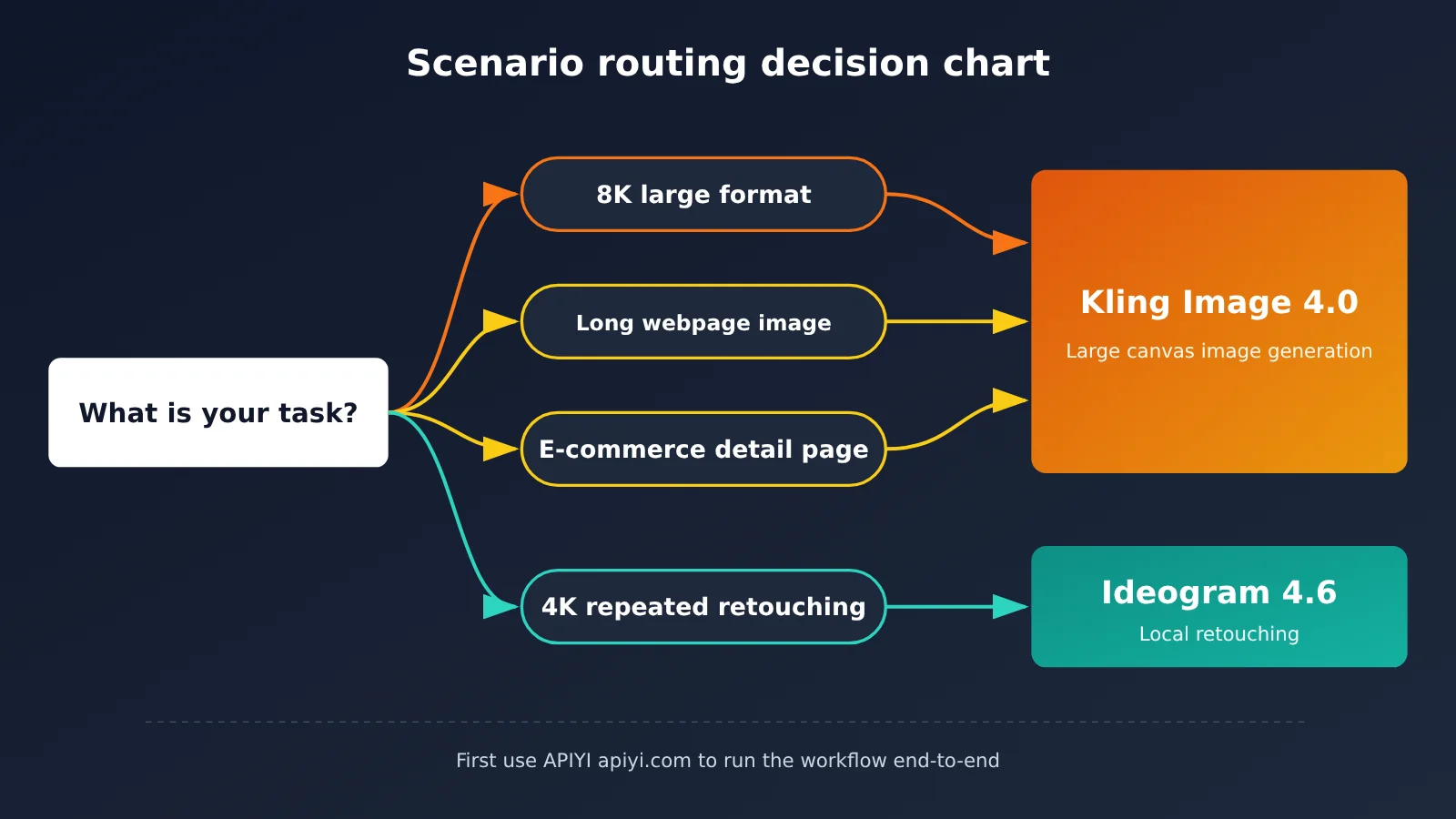
Scenario 1: 8K large-format posters — go with Kling Image 4.0
When you need large-format output like prints for banners, light boxes, or exhibition panels, Kling Image 4.0 is the only one of the two that natively outputs 8K, at roughly $0.154 per image. Keep in mind, though, that 8K only describes the canvas size — whether the detail actually holds up once enlarged isn’t backed by any public benchmark right now, so before delivery it’s worth spot-checking a local area at the real print size.
Scenario 2: Web long images — go with Kling Image 4.0
For vertical long canvases like campaign landing pages and long-image posters, Kling Image 4.0 has a dedicated web long-image mode: 1K 140 units, 2K 152 units. Ideogram 4.6 has no long-image option, and forcing a stitched version tends to produce seams and style inconsistencies.
Scenario 3: E-commerce detail pages — go with Kling Image 4.0
E-commerce detail-page long images are a dedicated Kling Image 4.0 capability, available only as image-to-image, tiered by length into three levels: 1K 60–200 units, 2K 72–220 units. Together with up to 10 images per group and 2000 characters of text per image, it’s well suited to building the main structure of a full detail page in one pass.
Scenario 4: 4K, iterating repeatedly on a single image — go with Ideogram 4.6
If you already have a main image you’re happy with and just want to keep tweaking one area — swapping the brand color, fixing a product flaw, changing the model’s background — Ideogram 4.6’s mask and context_window are a better fit. It ranks #1 on Rapidata’s multi-step face drift leaderboard, meaning the face still looks most like the original after five rounds of edits; it can also take an 8K source image, change only part of it, and keep the original dimensions.
💡 Scenario tip: The most reliable workflow is often the two in relay: first use Kling Image 4.0 to produce an 8K large image or a detail-page long image, then hand the areas that need retouching to Ideogram 4.6 to fix with
context_window. Before going live, you can run the “generate image → local retouch” workflow end to end using Seedream 5.5, which is available on APIYI apiyi.com.
Ideogram 4.6 vs Kling Image 4.0: Quick Start
Both models currently require going through their own official APIs. Ideogram 4.6’s endpoints are POST https://api.ideogram.ai/v2/image/generate/ideogram-4-6 and POST https://api.ideogram.ai/v2/image/precise-edit/ideogram-4-6, using multipart/form-data and the Api-Key header. By default they return synchronously, but you can also go async or use webhooks and then fetch results with GET /v2/generations/{id}. When debugging, it’s worth adding dry_run=true to get a quote first without generating — that way you avoid burning $0.60 per attempt on 4K edits.
The key parameter combination for Precise Edit looks like this:
- Upload the source image (max 50MB, 8192×8192) and attach a mask marking the region you want changed;
- Set
context_window=auto, or passy_min,x_min,y_max,x_maxmanually; - Pick a quality tier: Very low / Low / Medium / High; background can be
auto/transparent/opaque; - The prompt can be natural language or structured JSON.
If you want to run comparable tasks today through an OpenAI-compatible interface for comparison, you can use APIYI’s unified endpoint: when initializing the client, write client = OpenAI(api_key="YOUR_API_KEY", base_url="https://api.apiyi.com/v1"), and set the model to seedream-5-5-261028 or gemini-nano-banana-2.1. When wrapping it into a function, put base_url="https://api.apiyi.com/v1" in the config, so once Kling or Ideogram is listed later you only need to change the model parameter to switch. For specific request parameters, refer to the platform documentation.
| Available platform | Kling Image 4.0 | Ideogram 4.6 | On-platform reference for the same task |
|---|---|---|---|
| Official API | Kling Open Platform | Ideogram API | — |
| Partner platforms | Refer to official announcements | Leonardo, Runway, fal, Comfy, etc. | — |
| APIYI apiyi.com | Not yet available | Not yet available | Seedream 5.5, Nano Banana 2.1 |
Ideogram 4.6 vs. Kling Image 4.0: Decision Guide
🎯 One-line decision: For 8K and long-canvas images, go with Kling Image 4.0. For iterating on a single 4K image, go with Ideogram 4.6.
To break it down, there are really only two questions you need to ask. First, is your output larger than 4096×4096, or a vertical long canvas? If yes, you have to go with Kling Image 4.0. Second, do you need a single generation, or many rounds of edits on the same image? For one-shot generation, Kling is more popular on the AA general leaderboard and has a lower unit price; for multi-round refinement, especially when preserving faces, Ideogram 4.6 currently ranks #1 on the multi-step face drift leaderboard.
We don’t recommend forcing either tool to do the other’s job: making Ideogram 4.6 stitch long images, or making Kling Image 4.0 do five rounds of portrait edits, both go against their respective design positioning.
FAQ
Q1: Does Kling Image 4.0’s 8K mean its image quality is better than Ideogram 4.6’s 4K?
No. 8K is the native output canvas size — handy for large-format prints and long images — but there’s no public leaderboard measuring how sharp an 8K image stays after upscaling. For overall quality preference you’d look at the AA leaderboard, where Kling Image 4.0 does lead — but that has nothing directly to do with 8K.
Q2: What’s the difference between AA’s Image Editing and Rapidata’s Multi-step Image Edit?
AA measures general preference for a single edit — Kling Image 4.0 ranks 6th, Ideogram 4.6 ranks 31st. Rapidata measures whether a face still looks like the original after a 5-step edit chain — Ideogram 4.6 ranks 1st, and Kling Image 4.0 isn’t on the board at all. The two leaderboards have similar names but measure completely different things.
Q3: Can Kling Image O1 on the Rapidata leaderboard stand in for Kling Image 4.0?
No. O1 is the previous-generation model and ranks 21st, so its scores can’t be carried over to 4.0. Until 4.0 gets added to that leaderboard, its multi-step face-drift performance is unknown.
Q4: Can Ideogram 4.6 handle 8K images?
It can edit them, but not output them. Precise Edit accepts source images up to 8192×8192; combined with a mask and `context_window`, it changes only the local region, returns everything else untouched, and keeps the output at the original size. Its generation output cap, though, is 4096×4096.
Q5: Can I call these two models through APIYI right now?
Neither model is listed yet. Once they are, they’ll show up in the platform’s model list. If you want to run similar tasks today, sign up at APIYI apiyi.com and use `seedream-5-5-261028` or `gemini-nano-banana-2.1` to get your pipeline set up first — new users get free trial credits.
Q6: How much does cost change now that Kling charges for reference images?
Each reference image or reference subject costs 0.8 units, roughly $0.003 — not much per image. But if you use all 10 references in one go, that’s 8 units, equivalent to half the price of a single 2K image. If you’re producing detail pages in bulk, it’s worth budgeting for.
Q7: What are the known limitations of each?
Kling Image 4.0’s long images only support 1K and 2K, its 8K clarity has no public evaluation, and its multi-step face-drift performance is unknown. Ideogram 4.6 sits at just 69th on AA’s general text-to-image leaderboard, its 4K image editing costs $0.60 per image at the High tier — on the pricey side — and the officially reported usability-rate improvement lacks detailed judging criteria.
Ideogram 4.6 vs Kling Image 4.0: Key Takeaways
- Different positioning: Kling Image 4.0 is built for 8K, long-form images, and product detail pages, while Ideogram 4.6 focuses on 4K retouching
- 8K doesn’t equal image quality: 8K is a canvas size, and there’s no public leaderboard evidence yet for upscaled clarity
- General image quality: On AA’s two leaderboards, Kling scores 1181/1184, clearly above 4.6’s 985/1089
- Multi-step refinement: Ideogram 4.6 ranks No. 1 on Rapidata’s face drift leaderboard; Kling 4.0 isn’t listed
- Cost reference: 4K image generation with Kling is about $0.092; Ideogram 4.6 costs $0.20 to generate and $0.60 to edit
- What’s new: Kling now charges 0.8 units per reference image/subject; previously free
- Available today: Use Seedream 5.5 through APIYI apiyi.com to get a similar workflow running first
Summary
Comparing Ideogram 4.6 with Kling Image 4.0 comes down to two different jobs:
- Kling Image 4.0 handles the “output”: native 8K, long web images, e-commerce detail pages, and image sets — it builds the large canvas in one pass;
- Ideogram 4.6 handles the “editing”: with masks plus
context_window, you can change just one area on a 4K or even 8K source image, and it stays stable across multiple rounds; - Read the leaderboards separately: AA measures single-pass general preference, while Rapidata measures multi-step face consistency. They don’t substitute for each other.
If your work involves both generating large images and doing local retouching, the practical approach is to hand off between the two. Before they’re available, we recommend validating your workflow through APIYI apiyi.com with Seedream 5.5 or Nano Banana 2.1, which are already live; later, switching models only requires changing one parameter.
📚 References
-
Ideogram 4.6 Official Model Page: specs, pricing, and the officially reported availability rate
- Link:
ideogram.ai/models/4.6 - Notes: the primary source for resolution, quality tiers, and the price table
- Link:
-
Kling Image API Pricing Page: units-based billing and resource packs
- Link:
kling.ai/dev/pricing - Notes: keep an eye on the Image API — not the per-second video billing table
- Link:
-
Rapidata Multi-Step Image Editing Leaderboard: benchmark for face identity drift
- Link:
benchmark.ai/multi-step-image-edit - Notes: 5-step editing chains, with the full methodology for blind face-similarity scoring
- Link:
-
Artificial Analysis Image Leaderboard: AA-Image-T2I and AA-Image-Editing v2.1
- Link:
artificialanalysis.ai - Notes: blind-vote preference rankings for single-pass text-to-image and single-pass editing
- Link:
Author: APIYI Technical Team
Technical discussion: feel free to reach us via the APIYI homepage — for model versions and pricing, refer to the platform’s model list