
Here’s the short answer to one question: as of November 24, 2026, which entry points can developers actually use to get GLM-5.4, how each one is configured and billed, and when the general API opens up.
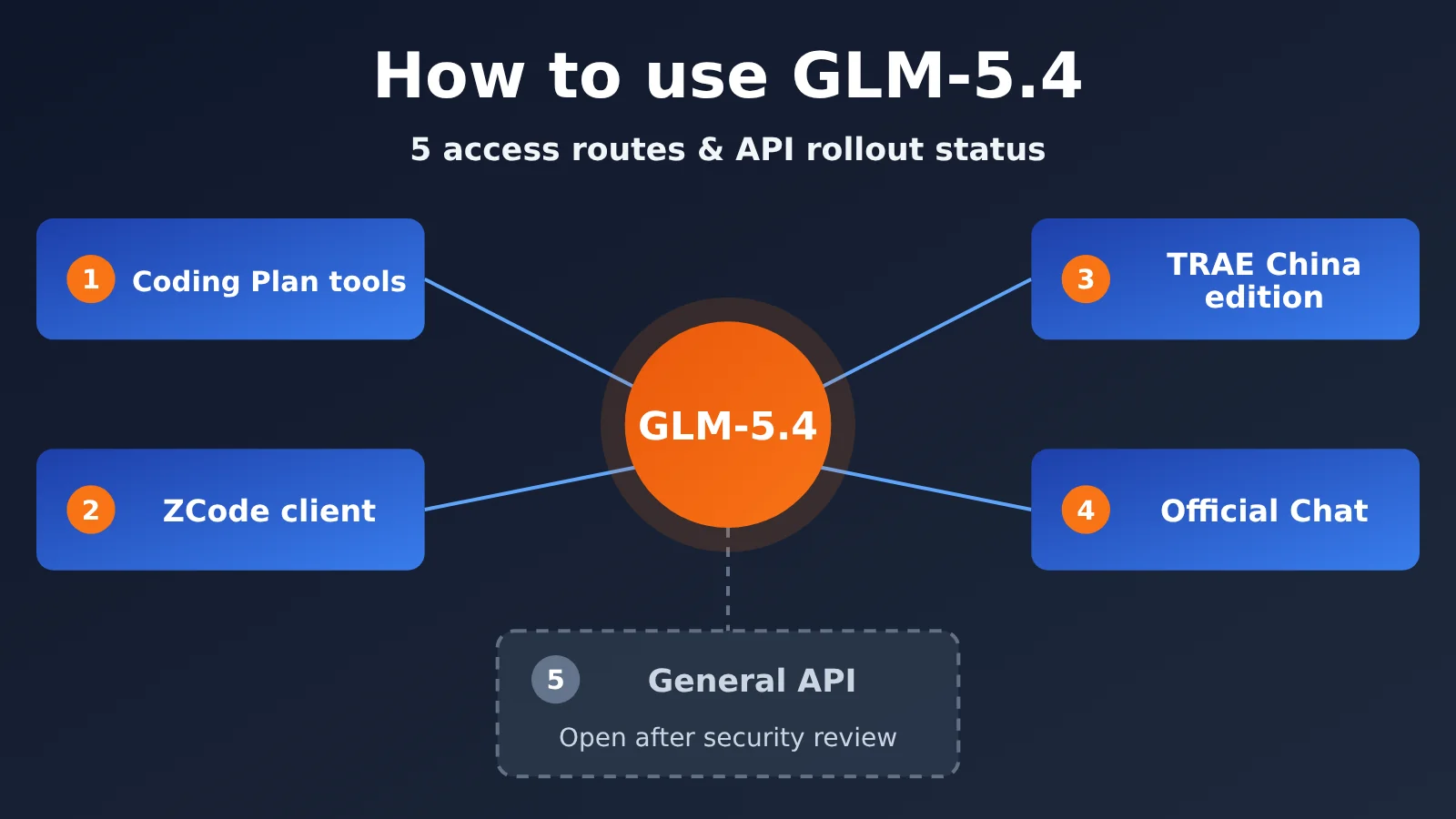
Bottom line first: GLM-5.4 currently follows a “plan + authorized products” model. On November 23, Zhipu announced it’s available to all GLM Coding Plan users — Lite, Pro, Max, and the team edition all include the model. For coding, you can go straight to ZCode, or point the model name to glm-5.4 inside Claude Code, OpenCode, WorkBuddy, and other tools that support Coding Plan. TRAE China edition added it on day one, but the first batch is limited to Pro+ members and above. If all you want is to try chatting, the official products like Z.ai Chat and Zhipu Qingyan will do. If you want to call GLM-5.4 from your own server on a pay-as-you-go basis, you can’t yet: the official word is that the general API opens after the security assessment is complete, and open weights follow a separate timeline.
GLM-5.4 Integration Knowledge Map
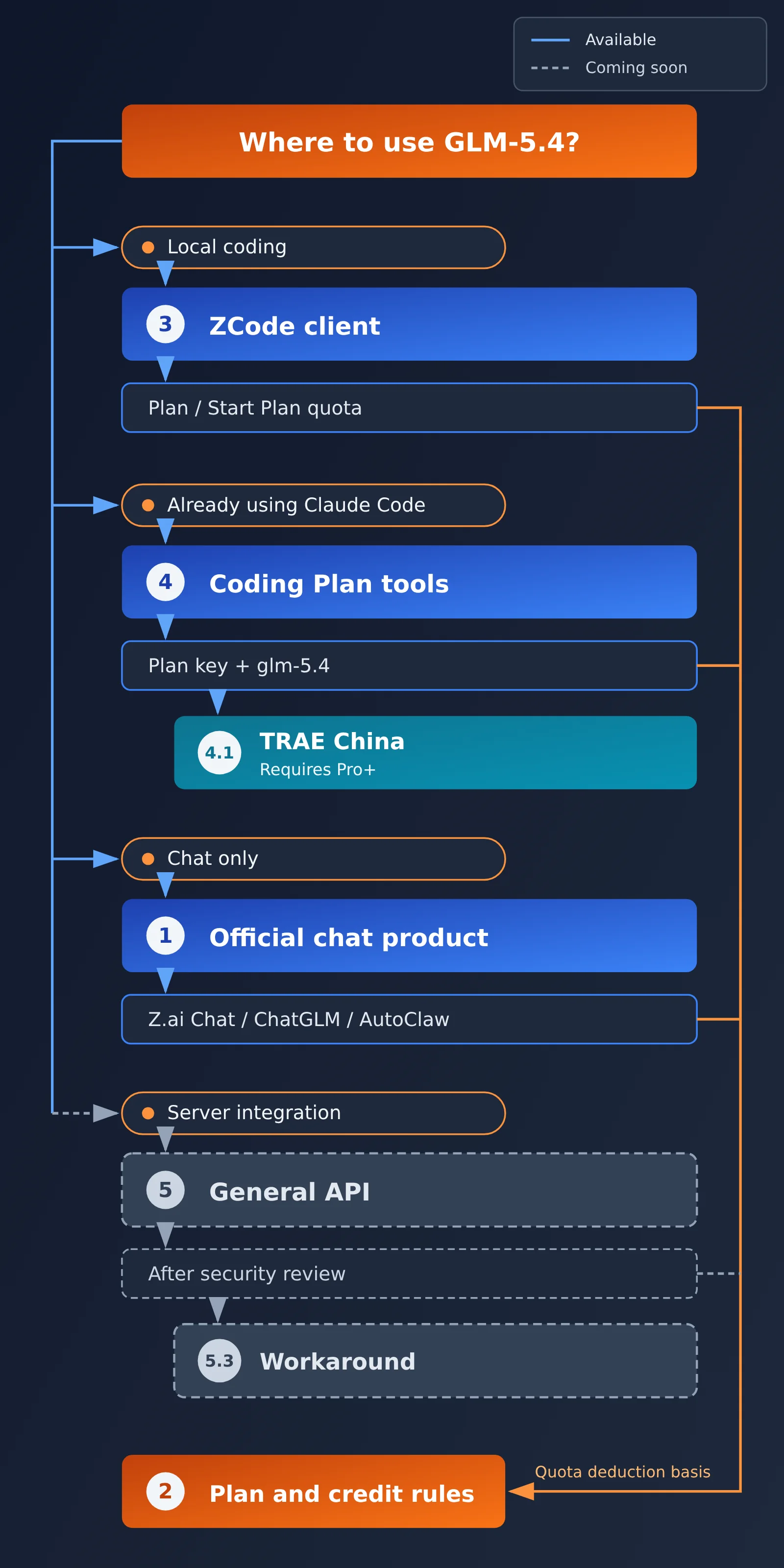
Figure note: the four branches correspond to four types of needs. The first three are already available; the fourth (General API) is still pending release. Whichever available route you take, credits are deducted according to the plan and credit rules in Section 2 — so it’s best to read Section 2 first, then jump to Sections 3 through 5 based on what you need.
Index and reading order:
- Section 1: Launch status and channel overview — figure out which entry points exist first.
- Section 2: Plans, credits, and the 1.5x quota — this is the billing basis for every entry point that follows.
- Sections 3 and 4: Concrete setup for ZCode and third-party tools. They’re parallel, so just look up whichever tool you use.
- Section 5: General API, key types, and weighting progress — the key reading for server-side developers.
- Section 6: Route selection and verification methods by scenario.
To Know
| Term | Short explanation |
|---|---|
| GLM Coding Plan | Zhipu’s subscription plan for coding tools, with quota deducted in credits |
| Plan key | A credential obtained from a personal or team plan, metered only against that plan |
| Standard key | Created on the standard API page, used for pay-as-you-go calls in your own apps |
| Credits | The plan’s unit of measurement, computed by summing three token types after multiplying each by its coefficient |
| 5-hour / weekly limits | The plan’s two quota gates; the short window refreshes dynamically, while the weekly quota runs on a seven-day cycle |
| Peak hours | Weekdays 14:00–18:00 (UTC+8); off-peak usage is charged at 50% of the base credits |
1. GLM-5.4 Launch Status and Access Channels
1.1 GLM-5.4 Channel Comparison
The channels listed in the Chinese and English release materials don’t fully match. The English release blog lists ZCode and Z.ai Chat. The Chinese research announcement lists ZCode, z.ai, Zhipu Qingyan, AutoClaw, and a group of launch partners. TRAE China edition, meanwhile, announced its membership requirement in its own community. Here’s the breakdown by entry type:
| Entry | Type | Requirement | Source |
|---|---|---|---|
| ZCode Desktop | Official coding client | Coding Plan subscription or Start Plan for new accounts | Zhipu / ZCode documentation |
| Claude Code, OpenCode, and similar tools | Tools that support Coding Plan | Valid plan key | Zhipu migration guide |
| TRAE China edition | Partner product | Pro+ membership or higher; client updated to the latest version | TRAE official community |
| WorkBuddy, Qoder, Miaoshou CatPaw | Launch partners | See each platform’s own documentation | Zhipu Chinese announcement |
| Z.ai Chat, Zhipu Qingyan, AutoClaw | Official chat products | Account permissions for each product | Chinese and English announcements |
| General model API | Pay-as-you-go API | Open after security assessment | Z.ai model documentation |
1.2 GLM-5.4: “Try It” and “Integrate It” Are Two Different Things
Just because an official product is usable doesn’t mean the general API for developers is already open. They’re separate launch items. When comparing entry points, focus on three dimensions: which account the quota is deducted from, whether you can call it from your own code, and which tool capabilities are available. ZCode and Coding Plan tools correspond to the coding workspace and tool calls. Chat entry points are a good place to start if you want to check language and visual understanding capabilities first. Only the general API can be embedded in your own website or product.
2. GLM-5.4 Coding Plan Subscriptions and Credit Rules
2.1 GLM-5.4 Plan Tiers and Dual Caps
In Mainland China, you can buy through the BigModel individual subscription portal (bigmodel.cn/glm-coding); outside China, you can buy through the Z.ai subscription page (z.ai/subscribe). The new individual plans now have two caps: a 5-hour cap and a weekly cap:
| Tier | 5-hour cap (credits) | Weekly cap (credits) | ZCode China monthly price reference | Discounted monthly price |
|---|---|---|---|---|
| Lite | 2,000 | 10,000 | CNY 118 | CNY 94.4 |
| Pro | 12,000 | 60,000 | CNY 538 | CNY 430.4 |
| Max | 28,000 | 140,000 | CNY 1,078 | CNY 862.4 |
Table note: Prices are taken from the ZCode China official website as of the date of verification. Global Coding Plan pricing starts at USD 18 per month. Actual billing depends on region, billing cycle, and available discounts, and the purchase page is the final reference. The 5-hour quota refreshes dynamically based on usage, while weekly credits run in seven-day cycles starting from the subscription date.
About the “1.5x”: under the same plan allowance, you can use about 1.5x as many tokens with GLM-5.4 as with GLM-5.3. This rule applies to the V2, V3, and Team editions specifically named by the vendor; legacy V1 keeps its original benefits. The English documentation describes the scope of this benefit as “plans with weekly limits.” In addition, ZCode’s earlier exclusive 1.5x promotion has ended, and conversions now follow the new rules across the board.
2.2 How GLM-5.4 Credits Are Calculated
The credits formula is public: multiply each of the three token types by its corresponding coefficient, add them up, then divide by 10,000.
| Model | Regular input coefficient | Cached input coefficient | Output coefficient |
|---|---|---|---|
| GLM-5.4 | 4.6 | 1.1 | 16 |
| GLM-5.3 | 6.9 | 1.7 | 24 |
Here’s a worked example. Say a request has 10,000 regular input tokens and 2,000 output tokens, with no cache hits and no separately billed MCP calls. During peak hours, GLM-5.4 consumes (10,000×4.6 + 2,000×16) ÷ 10,000 = 7.8 credits, and GLM-5.3 consumes 11.7 credits. During off-peak hours, both are charged at 50%, i.e., 3.9 and 5.85 credits respectively.
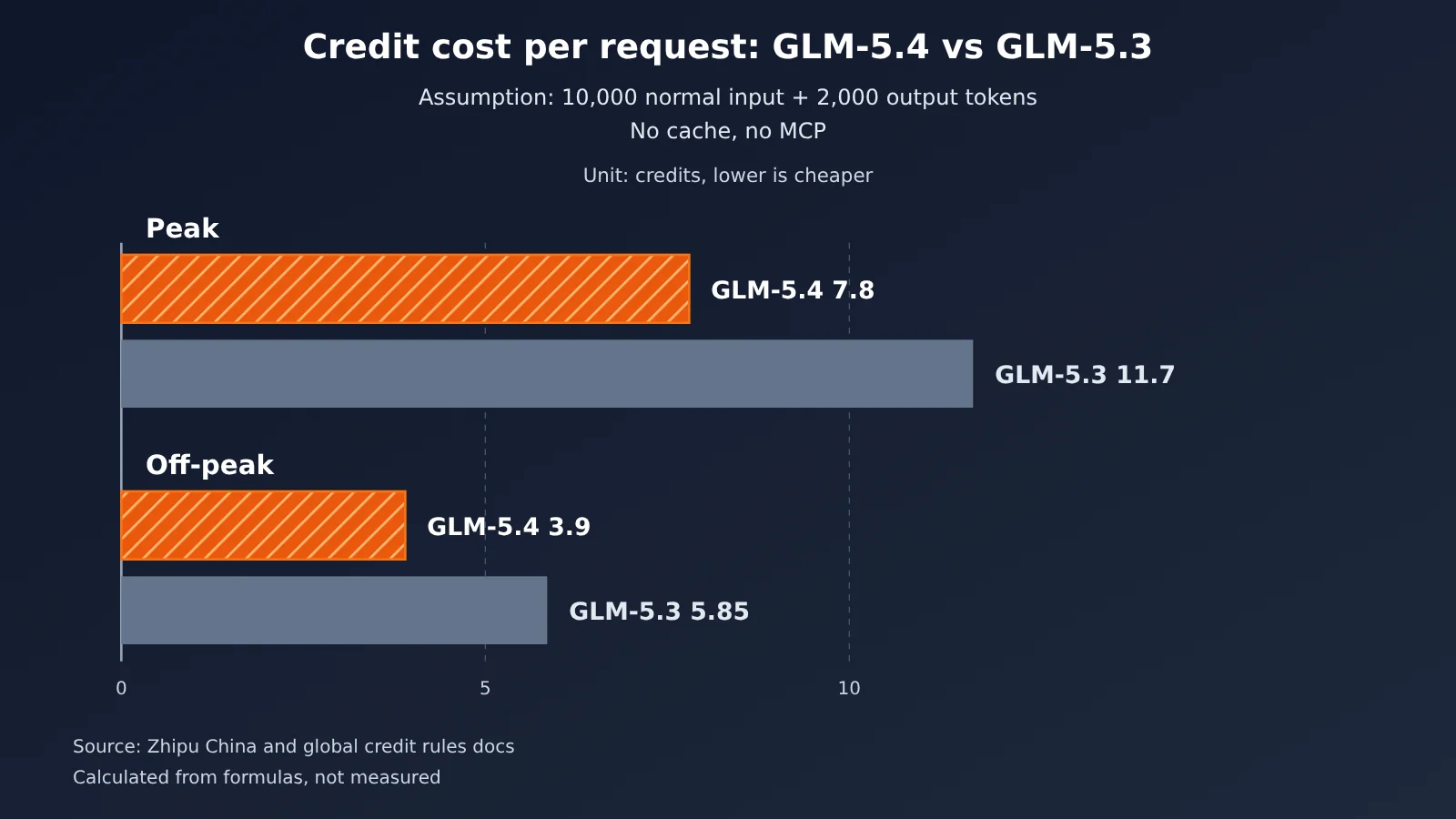
A note next to the chart: in this worked example, GLM-5.4 costs roughly two-thirds the credits of GLM-5.3 per request, which lines up with the “1.5x tokens” claim. Just remember this is derived from the formula, not measured. Your actual bill also depends on cache hit ratio, number of calls, and output length — long-output tasks are hit hardest by the output coefficient (16).
2.3 GLM-5.4’s V1/V2 versions and the Team plan
Starting July 30, 2026, the China region is rolling out a new individual plan, and how usage is metered changes along with it. Existing users can check whether they’re on V1 or V2 in the plan overview of their personal console. The legacy Team plan lists usage by seat. Assuming everything runs during off-peak hours, a standard seat gets up to 585 million GLM-5.4 tokens per week (390 million for GLM-5.3), while a premium seat gets 1.56 billion (1.04 billion for GLM-5.3). These are the ceilings from the old team versions; under the current credit system, actual usage depends on which plan you’re on, your cache hit rate, and when you actually use it. In the China region, the Team plan starts at two seats, seats are assigned by an admin, and each member can create their own plan key from the team dashboard.
3. Using GLM-5.4 with ZCode
3.1 Installing ZCode and signing in
Download the desktop version from the ZCode website (zcode.z.ai/cn). At the time of review the version was v4.0.0, with these installers available:
- macOS: Apple silicon and Intel builds.
- Windows: one installer for each architecture.
- Linux: Beta.
Once it starts up, you can authorize through the browser or just paste in an API key. After authorizing in the Chinese UI you land in the China region; sign in with the same phone number you use for BigModel, and your existing plan benefits get linked up.
3.2 Choosing GLM-5.4 and the thinking level in ZCode
Once you’re in the workspace, click the model name in the bottom-right corner of the input box and select GLM-5.4. If it’s not in the list, update the client first, then refresh on the “Settings → Model Settings” page. The thinking level is switched here too — low, high, and max, with max as the default. It’s worth running a quick task first to confirm the model name shown in the UI really is GLM-5.4 before you start any real work.
3.3 ZCode Start Plan and team quota
New accounts can claim a Start Plan on the trial plan page under model settings. The docs give a five-day example: 3 million GLM-5.4 tokens and 5 million GLM-5.3-Flash tokens per day. Whatever the page shows after you sign in is the final word, and it’s only usable inside the official ZCode client. Team plan users pick their organization name from the connection method menu for the BigModel provider, and members who’ve been assigned a seat will then use the team quota. Individual plans, team quotas, and trial quotas each have their own entry point, so before you start, confirm which one you’re currently connected to.
4. Using GLM-5.4 in TRAE, WorkBuddy, OpenCode, and Other Tools
4.1 TRAE China Edition
TRAE’s official Chinese community posted on November 23 at 14:28, confirming that the China edition would support GLM-5.4 from day one. The first batch is only available to Pro+ members and above, and you need to upgrade your client to the latest version. Keep in mind that “Pro+” here is TRAE’s own membership tier — it’s not the same as the Pro and Max tiers in Zhipu’s Coding Plan, so don’t mix them up.
4.2 WorkBuddy
In the WorkBuddy client, open Settings → Models and add a Coding Plan provider. The official docs ship with a built-in Zhipu Coding Plan preset — select it and fill in your subscription credentials. Zhipu also lists WorkBuddy as a launch partner in its announcement.
4.3 OpenCode
OpenCode’s model catalog already includes GLM-5.4, with a release date of November 23. Here’s how to connect through Coding Plan:
# 1. Log in to the provider
opencode auth login
#    China region accounts: select Zhipu AI Coding Plan
#    Global accounts: select Z.AI Coding Plan
#    Paste the plan key for the corresponding region when prompted

# 2. Switch models after starting the client
/models
#    Select GLM-5.4 from the list
The model entries in the catalog only identify the model. Which service actually handles your request, and which account gets billed, depends on the provider you logged in to. For membership tiers, pricing, and entry points of launch partners like Qoder and Miaoshou CatPaw, refer to each platform’s own documentation.
4.4 Connecting Claude Code, Codex, and Custom Tools to GLM-5.4
For coding tools that support custom models, follow Zhipu’s switching guide to set up a Coding Plan connection and specify the model name as glm-5.4. Different protocols map to different paths:
| Protocol / Client | Path | China region domain | Global domain |
|---|---|---|---|
| OpenAI Chat Completions compatible | /api/coding/paas/v4 |
open.bigmodel.cn |
api.z.ai |
| Claude Code (Anthropic compatible) | /api/anthropic |
open.bigmodel.cn |
api.z.ai |
| Codex (Responses compatible) | /api/v1 |
open.bigmodel.cn |
api.z.ai |
| General pay-as-you-go API (GLM-5.4 coming soon) | /api/paas/v4 |
open.bigmodel.cn |
api.z.ai |
| Server-side transitional calls for other models | /v1 (OpenAI compatible) |
APIYI apiyi.com | APIYI apiyi.com |
Table note: the model name, protocol, and authentication method must all come from the same region, and be configured in a tool you’re authorized to use. The first three rows use plan keys and are metered by your plan.
Here’s roughly what the configuration looks like for an OpenAI-compatible custom tool (field names depend on the specific tool):
provider: openai-compatible
base_url: https://open.bigmodel.cn/api/coding/paas/v4   # Change to https://api.z.ai/api/coding/paas/v4 for global accounts
api_key: YOUR_CODING_PLAN_KEY                          # Personal or team plan key
model: glm-5.4
In Claude Code, change the model mapping in your existing config to glm-5.4[1m], restart the client, then run /status to see the config file and model currently in effect. The China region switching guide recommends setting CLAUDE_CODE_AUTO_COMPACT_WINDOW to 512000 so the session compacts automatically as it approaches that window. The global guide’s 1M example sets it to 1000000. This variable only controls the client’s compaction strategy — the model’s own context spec is still 1M. When you need to adjust the thinking level, use /effort in Claude Code, or switch in the model selector in ZCode.
5. GLM-5.4 General API and Progress on Opening Up Weights
5.1 Key Categories Related to GLM-5.4
Starting October 16, BigModel in China classifies newly created credentials by purpose:
- Personal plan Key: obtained from the plan overview of your personal coding plan.
- Team Key: team members get their own Key under “My Plan”.
- Standard Key: created on the standard API page.
For newly created Keys, on supported endpoints, which balance gets charged depends on the Key type. Legacy compatibility Keys are still billed according to the original endpoint and whether the account ever had a plan. When integrating for the first time, it’s a good idea to run a small task first, then check the usage statistics to confirm the billing source is correct. Self-built apps, websites, and product integrations fall under the standard API scenario — they’re not covered by the coding tool plan.
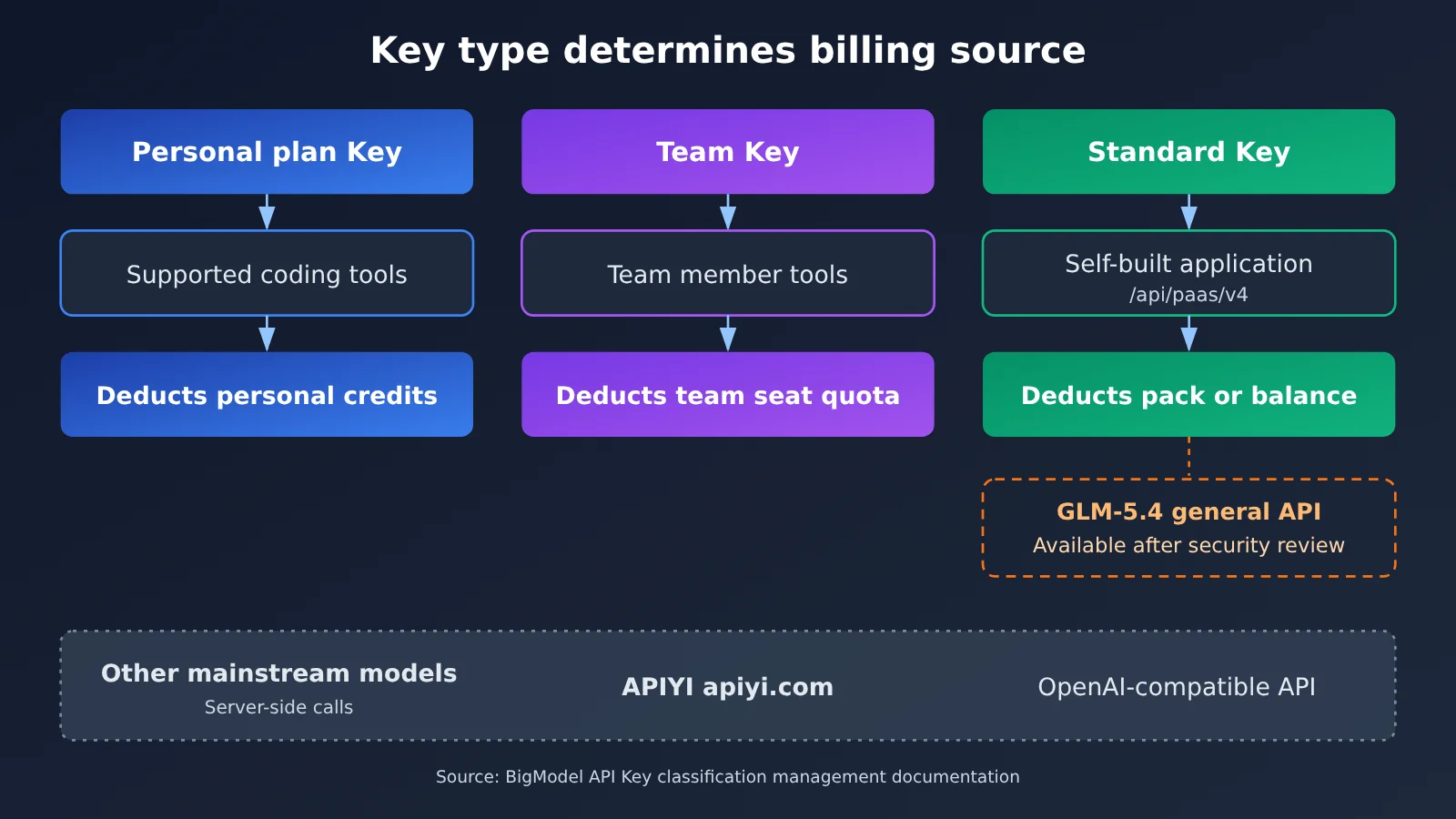
Note beside the figure: in one sentence — the Key type determines where the charge comes from, and the tool type determines which Key you can use. The side-path card in the diagram is just a transitional server-side option and has nothing to do with GLM-5.4’s official billing system.
5.2 Current Status of the GLM-5.4 General API
General pay-as-you-go APIs usually use the /api/paas/v4 path and consume resource packages or account balance. But according to the model documentation available on November 24, the external General API for GLM-5.4 is still at the stage of “opening after security assessment completion.” The headline on the English API platform homepage is still GLM-5.3, and the public per-million-token price list doesn’t include 5.4 either. So the 1.5x quota and credit multiplier mentioned earlier apply only to subscription plans and can’t be used to estimate future pay-as-you-go pricing. Model weights release is on a separate timeline. The launch blog only promises that they’ll be released on schedule after the necessary security hardening is complete; download details and pricing will have to wait for an official announcement.
5.3 Transitional Approach for Server-Side Integration
If your product needs to call Large Language Models dynamically on the server side right now, you can first build the pipeline with models that are already available. Once the GLM-5.4 General API officially opens, you can evaluate whether to switch based on official rates. If you write code against an OpenAI-compatible interface, switching models later usually only requires changing the base_url and model parameters.
🎯 Technical tip: During the server-side prototyping stage, you can use APIYI apiyi.com to call mainstream models like OpenAI, Claude, and Gemini with a single key. The interface is OpenAI-compatible, making it easy to compare performance and cost side by side. Whether GLM-5.4 will be listed on the platform should be based on the model list at apiyi.com; this article doesn’t speculate.
import openai

client = openai.OpenAI(
    api_key="YOUR_APIYI_KEY",
    base_url="https://api.apiyi.com/v1"  # APIYI OpenAI-compatible endpoint
)

resp = client.chat.completions.create(
    model="YOUR_MODEL_NAME",  # Refer to the model list at apiyi.com
    messages=[{"role": "user", "content": "用三句话解释什么是幂等接口"}]
)
print(resp.choices[0].message.content)
View the complete wrapper with switchable providers
import os
import openai
from typing import Optional

# Switch providers via environment variables; add an entry here once the GLM-5.4 General API is available
PROVIDERS = {
    "apiyi": {
        "base_url": "https://api.apiyi.com/v1",  # APIYI unified endpoint
        "key_env": "APIYI_API_KEY",
    },
    # "zhipu": {
    #     "base_url": "https://open.bigmodel.cn/api/paas/v4",  # Standard key, pending the official launch of GLM-5.4
    #     "key_env": "ZHIPU_STANDARD_KEY",
    # },
}

def chat(prompt: str, model: str, provider: str = "apiyi",
         system: Optional[str] = None, max_tokens: int = 1000) -> str:
    cfg = PROVIDERS[provider]
    client = openai.OpenAI(
        api_key=os.environ[cfg["key_env"]],
        base_url=cfg["base_url"],
    )
    messages = []
    if system:
        messages.append({"role": "system", "content": system})
    messages.append({"role": "user", "content": prompt})
    try:
        r = client.chat.completions.create(
            model=model, messages=messages, max_tokens=max_tokens
        )
        return r.choices[0].message.content
    except Exception as e:
        return f"Error: {e}"

if __name__ == "__main__":
    print(chat("列出代码评审的五个检查点", model="YOUR_MODEL_NAME",
               system="你是资深后端工程师"))
💰 Cost tip: When evaluating server-side options, you need to align usage and billing metrics before comparing the total cost of completing the same task. New users can claim free trial credits at APIYI apiyi.com and run a real task with low traffic before making a decision.
6. How to Choose a GLM-5.4 Integration Route
Start from the environment your task lives in, then match it against the conditions below:
- Writing code in a local repository: Go straight to ZCode, or configure it in a tool that already supports Coding Plan. Before you start, confirm three things: the actual model being invoked, whether you can attach images, and which account’s quota is being charged.
- Team-wide quota management: Pick an organization in ZCode, or have each member enter their own team key in the client.
- Already a TRAE China edition member: Confirm your membership tier is Pro+ or above, and upgrade the client to the latest version.
- Just want to check comprehension and reply quality: Start with official entry points like Z.ai Chat or Zhipu Qingyan — no need to buy a plan.
- Must integrate via the standard API on the server side: Wait until the general GLM-5.4 API is officially opened and its pricing and authorization arrangements are published, then integrate. Before that, you can get your business flow working end to end using APIYI apiyi.com’s OpenAI-compatible interface — afterward you’ll only need to change
base_urlandmodel.
Acceptance check: Whichever route you choose, validate it with the same small task. Once it runs, verify three things: whether the model name shown in the client is GLM-5.4; whether the charge source in your usage stats (personal plan, team seat, or trial quota) matches what you expected; and whether credit consumption roughly matches the estimate from the formula in Section 2.2, factoring in whether you were in peak or off-peak hours. If all three line up, your integration is configured correctly.
References
- Z.ai English Launch Blog: GLM-5.4 release channels and open-weights details
- Link:
z.ai/blog/glm-5.4
- Link:
- Zhipu Chinese Research Announcement: Official product and launch partner list
- Link:
zhipuai.cn/zh/research/164
- Link:
- Z.ai GLM-5.4 Model Docs: General API availability status
- Link:
docs.z.ai/guides/llm/glm-5.4
- Link:
- BigModel Coding Plan Overview: Plan limits and credit rules
- Link:
docs.bigmodel.cn/cn/coding-plan/overview
- Link:
- BigModel Latest Model Switching Guide: Configuration for Claude Code and other tools
- Link:
docs.bigmodel.cn/cn/coding-plan/latest-model
- Link:
- BigModel API Key Management by Category: Distinguishing plan keys from standard keys
- Link:
docs.bigmodel.cn/cn/coding-plan/notice/api-key-management
- Link:
- ZCode Docs: Download, model selection, and Start Plan
- Link:
zcode.z.ai/cn/docs/qa
- Link:
- TRAE China Release Post: Membership requirements explained
- Link:
forum.trae.cn/t/topic/605274
- Link:
Author: APIYI Technical Team
Technical Discussion: For multi-model server-side integration questions, feel free to reach us through the APIYI apiyi.com homepage. More documentation is available at docs.apiyi.com.