
Summary: This article uses the OpenAI Python SDK to call the Tencent Hunyuan Hy4 API in non-streaming mode, gets the first plain-text request working, and explains how to validate the result, estimate cost, check billing, and handle common errors.
Direct answer: The Tencent Hunyuan Hy4 API can be accessed through APIYI’s OpenAI-compatible interface. You only need three configuration items to send your first request:
- Key: Create one at
api.apiyi.com/tokenand set it in theAPIYI_API_KEYenvironment variable. - SDK Base URL:
https://api.apiyi.com/v1. - Model ID:
hy4.
The corresponding HTTP endpoint is POST https://api.apiyi.com/v1/chat/completions. As of 2026-11-21, the pricing table lists Hy4 at the following prices per million tokens: uncached input $0.85, output $2.55, and cache reads $0.045. Actual billing follows the APIYI pricing table at docs.apiyi.com/models (Tencent category).
Here’s the timeline: Tencent released the official Hy4 version on November 4 and opened the weights on November 20. APIYI had already listed the model before the weights were opened; see the launch announcement at docs.apiyi.com/news/hy4-launch. The announcement already includes a streaming example, so this article covers only four other things: non-streaming invocation, result validation, billing verification, and failure troubleshooting. The announcement mentions that Hy4 supports image input; this article only demonstrates plain text. Video, the Responses API, and Computer Use are out of scope for this article, and there are no actual test results in the text.
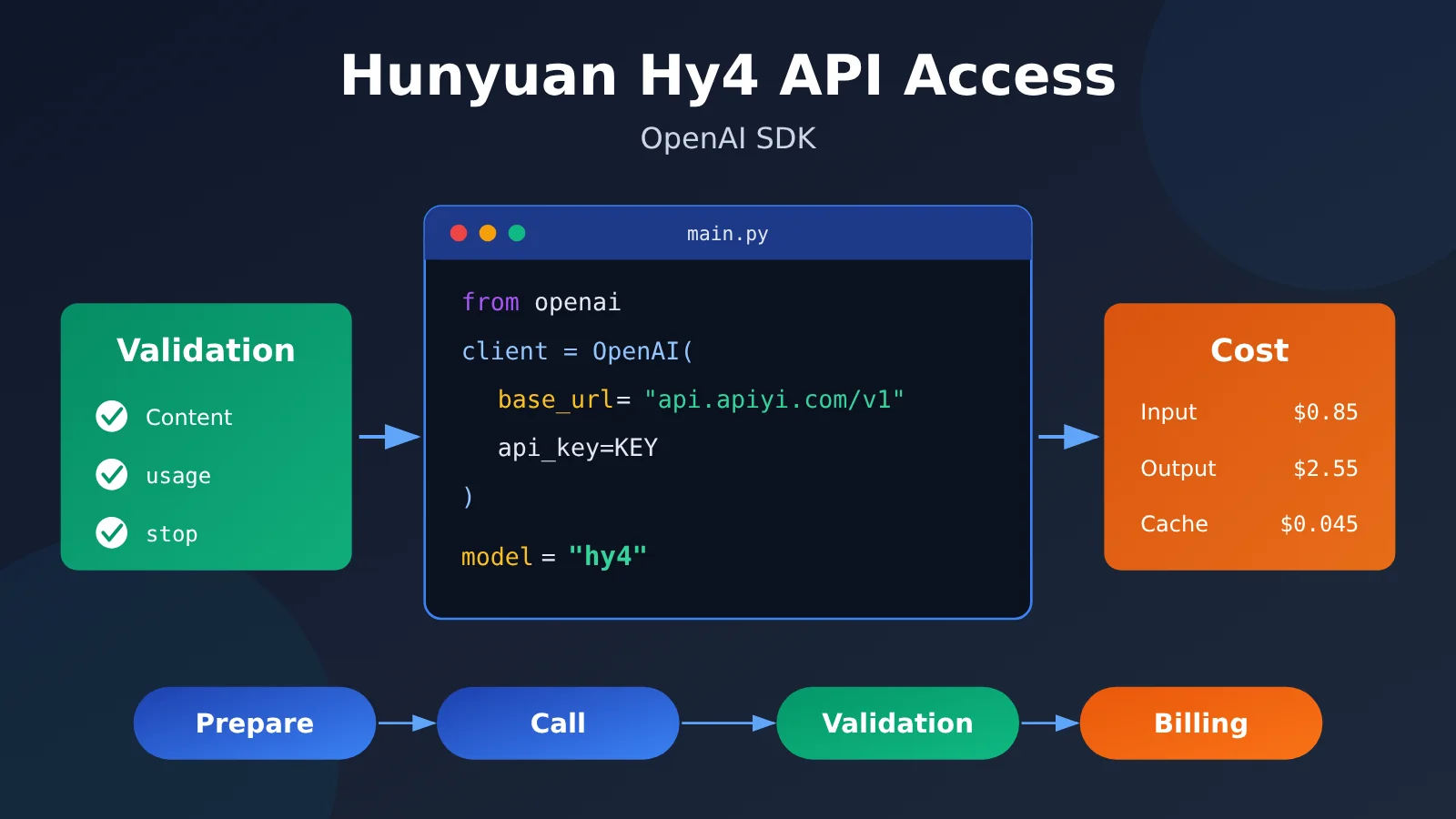
Tencent Hunyuan Hy4 API Integration: Knowledge Map and Reading Order
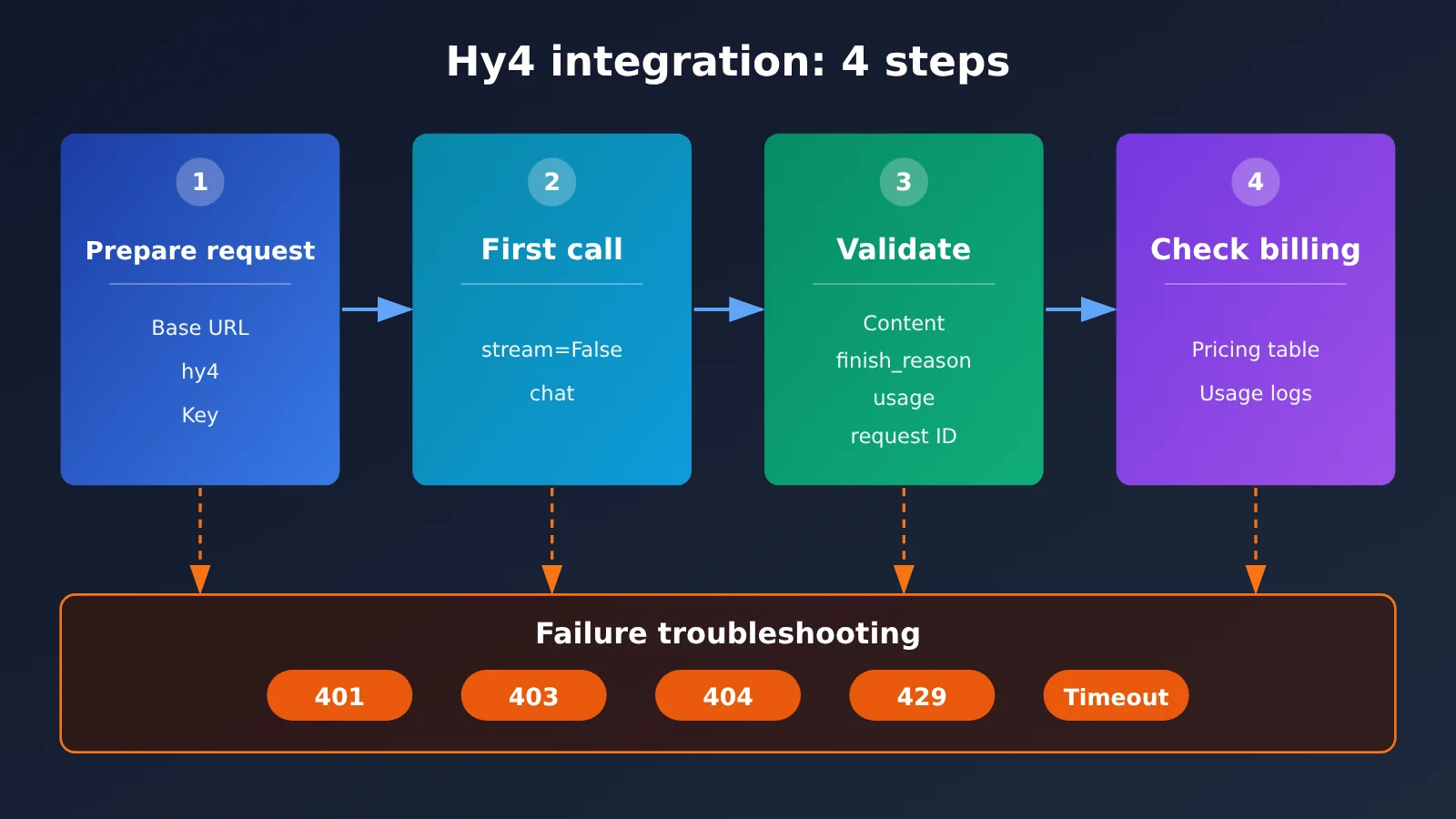
The whole process has four steps, and each step’s output becomes the next step’s input. We recommend reading in numbered order. You can jump to Section 4 on its own when you hit an error.
| Step | Corresponding section | Why it’s placed here | Acceptance criteria |
|---|---|---|---|
| Prepare the request | 1.1, 1.2 | If the endpoint, model name, or Key is wrong, every later step fails | The SDK imports, the environment variable can read the Key, and there’s no plaintext Key in the code |
| First call | 2.1, 2.2 | Use a short piece of text that contains no customer data to confirm the connection works | The returned content is “product=Hunyuan, version=Hy4”, it isn’t truncated, and you’ve saved the usage and request ID |
| Check the bill | 3.1, 3.2 | Once the connection works, estimate the cost to judge whether you can scale up the call volume | The estimate matches the console consumption log item by item |
| Troubleshooting | 4 | When any step fails, locate the cause by error code and error body | You can tell configuration errors, permission issues, rate limits, and timeouts apart, and decide whether a retry is safe |
To Know: Hy4 API Terminology
| Term | Brief explanation |
|---|---|
| Non-streaming (stream=False) | The model returns the complete result in one go after generation finishes, making it easy to check the content and usage as a whole |
| finish_reason | Why this generation ended. stop means it ended normally; length means it was truncated at the length limit |
| usage | The token usage field in the response; the common ones are prompt_tokens (input) and completion_tokens (output) |
| request ID | The identifier for a single request, used to locate this call in the logs. Not every response necessarily includes one |
| Cache read | The part of the input that hits the cache, billed at a separate cache-read price |
| Group (Default/SVIP) | The group the token belongs to, which determines which models this token can call |
1. Prepare the Tencent Hunyuan Hy4 API Request
1.1 Configure the Hy4 Model and Endpoint
Go through every configuration item one by one. Most first-call failures happen right here.
| Configuration item | Value | Notes |
|---|---|---|
| SDK base_url | https://api.apiyi.com/v1 |
Only enter up to /v1; the SDK appends /chat/completions automatically |
| HTTP endpoint | POST https://api.apiyi.com/v1/chat/completions |
Use this address when sending raw HTTP requests without the SDK |
| Model ID | hy4 |
The official model name — enter it in lowercase exactly as shown |
| Available groups | Default, SVIP | The token’s group must include Hy4 |
| Output mode | stream=False |
This article uses non-streaming throughout |
The most common mistake is putting the full endpoint into base_url. The SDK appends /chat/completions again after that address, so the path gets duplicated and you end up with a 404. For the complete documentation on the compatible interface, see docs.apiyi.com/api-capabilities/openai/compatible.
1.2 Install the OpenAI SDK and Store the Key Safely
The official Python SDK lives at github.com/openai/openai-python. It’s best to install it in a virtual environment so it doesn’t clash with package versions already on your system:
python -m venv .venv
source .venv/bin/activate          # Windows: .venv\Scripts\activate
python -m pip install openai
Create the key at api.apiyi.com/token. When you create it, make sure the token’s group can call Hy4. Once you have the key, put it into the current terminal’s environment variables — don’t write it into a code file:
export APIYI_API_KEY="你的令牌" # Windows PowerShell: $env:APIYI_API_KEY="你的令牌"
A few things to keep in mind when managing keys:
- The code reads the key only through
os.environ['APIYI_API_KEY']. If the environment variable isn’t set, usegetpassto prompt for it interactively — the input won’t be echoed on screen. - If you keep the key in a
.envfile, add it to.gitignoreso it doesn’t get committed to the repository. - If a key shows up in a screenshot, log, or support ticket, replace it with a mask like
sk-***first.
Acceptance check: run python -c "import openai, os; print(openai.__version__, bool(os.environ.get('APIYI_API_KEY')))" in your terminal. If it prints the version number and True, you’re done with this step.
2. Send Your First Hy4 Request with the OpenAI SDK
2.1 Complete Non-Streaming Python Example
This first request does one simple thing: extract a product name and version number from a public sentence—no customer data involved. That gives us two advantages. First, the output is short, so it’s cheap. Second, the answer is unique, so it’s easy to tell whether it’s right.
import os
import re
from getpass import getpass
from openai import OpenAI

key = os.environ.get("APIYI_API_KEY") or getpass("输入 APIYI_API_KEY:")

PROMPT = "仅从这句话提取产品和版本:腾讯混元 Hy4 正式版已上线。请只写一行:产品=…;版本=…"

with OpenAI(
    base_url="https://api.apiyi.com/v1",   # APIYI OpenAI-compatible endpoint
    api_key=key,
    timeout=60.0,
    max_retries=0,                         # Disable automatic retries; on failure, a human decides whether to resend
) as client:
    result = client.chat.completions.create(
        model="hy4",
        messages=[{"role": "user", "content": PROMPT}],
        stream=False,
    )

request_id = getattr(result, "_request_id", None)
print("request_id:", request_id if request_id else "响应未提供")

if not result.choices:
    raise SystemExit("未通过:choices 为空,没有返回正文")

choice = result.choices[0]
content = (choice.message.content or "").strip()
print("finish_reason:", choice.finish_reason)
print("content:", content)

usage = getattr(result, "usage", None)
prompt_tokens = getattr(usage, "prompt_tokens", None) if usage else None
completion_tokens = getattr(usage, "completion_tokens", None) if usage else None
print("prompt_tokens:", prompt_tokens if prompt_tokens is not None else "缺失(不按 0 处理)")
print("completion_tokens:", completion_tokens if completion_tokens is not None else "缺失(不按 0 处理)")


def accept(text: str, finish_reason) -> tuple[bool, str]:
    if not text:
        return False, "正文为空"
    if finish_reason == "length":
        return False, "输出被截断"
    t = re.sub(r"\s+", "", text)
    t = t.replace(":", "=").replace(":", "=").replace(";", ";")
    prod = re.search(r"产品=([^;\n]+)", t)
    ver = re.search(r"版本=([^;\n]+)", t)
    if not prod or not ver:
        return False, "缺少产品或版本字段"
    strip_punct = lambda s: re.sub(r"[。..,,、!!??\"“”'‘’]", "", s)
    if "混元" not in strip_punct(prod.group(1)):
        return False, f"产品值错误:{prod.group(1)}"
    if strip_punct(ver.group(1)) != "Hy4":
        return False, f"版本值错误:{ver.group(1)}"
    return True, "通过"


ok, reason = accept(content, choice.finish_reason)
print("验收:", reason)
A few settings in the example need explaining:
max_retries=0disables the SDK’s automatic retries. Section 4 explains that after a timeout, the server may already have completed the request—so an automatic resend could lead to duplicate billing. That’s why a human should decide whether to retry.- The
withstatement closes the connection after the call finishes. - If the usage fields are missing, the code explicitly prints
"缺失"rather than treating them as 0, so you don’t miss costs later when doing the math.
For more details on the response structure, see docs.apiyi.com/api-capabilities/openai/response-handling.
2.2 Acceptance Criteria for the First Hy4 Request
For acceptance, you only check two fields in message.content: the product value should contain “混元”, and the version value should be “Hy4”. Differences in full-width versus half-width colons and semicolons, as well as trailing punctuation at the end of the sentence, are all acceptable. Here’s one line of output that meets the requirement — this is an illustrative format, not an actual measured response:
产品=腾讯混元;版本=Hy4
Any of the following cases is an automatic fail — don’t let it slide just because it “looks about right”:
| Case | Verdict | Reason |
|---|---|---|
| choices is empty, or content is an empty string | Fail | No body text received, which means the pipeline didn’t actually run through |
finish_reason is length |
Fail | The output was truncated, so the result is incomplete |
| Version written as Hy3, Hunyuan, or some other value | Fail | The field value is wrong |
| Only punctuation, spaces, or colon width differences | Pass | This counts as an allowed formatting difference |
Once acceptance passes, record the request ID (if present in the response), the request time, the model name, prompt_tokens, and completion_tokens. You’ll need this information when you reconcile the bill in Section 3.2.
3. Estimate and Verify Hy4 API Costs
3.1 Estimating a batch task from the pricing table
The first request had a very short input, so its cost is negligible — not much of a basis for estimating anything. Let’s switch to a hypothetical scenario unrelated to that short sample request: a task with 100k input tokens, all cache misses, and 20k output tokens. Input and output are priced separately at their own rates:
| Billing item | Hypothetical usage | Unit price (per million tokens) | Cost |
|---|---|---|---|
| Input (cache miss) | 100,000 | $0.85 | $0.085 |
| Output | 20,000 | $2.55 | $0.051 |
| Total | — | — | $0.136 |
The math is 0.1 × 0.85 + 0.02 × 2.55 = 0.136. Two things to keep in mind when estimating:
- Output is priced at 3× the cache-miss input rate. For tasks with heavy output, cost is driven mainly by the output side.
- If
completion_tokensalready includes the model’s thinking portion, don’t add thinking costs again separately — that would double-count.
3.2 Separating cache buckets from actual usage logs
“Cache read” is a separately billed component, but different responses may split the fields differently, so there’s no universally applicable field name that guarantees precision. The reliable approach is to first confirm in your billing records whether cache-hit tokens are already counted inside the total input.
If billing confirms the cached portion is already included in total input, subtract the cached portion once from the total input, then price each part separately. Continuing the assumptions from 3.1, let’s further assume that 40k of the 100k input tokens hit the cache:
| Billing item | Hypothetical usage | Unit price (per million tokens) | Cost |
|---|---|---|---|
| Input (cache miss) | 60,000 | $0.85 | $0.051 |
| Cache read | 40,000 | $0.045 | $0.0018 |
| Output | 20,000 | $2.55 | $0.051 |
| Total | — | — | $0.1038 |
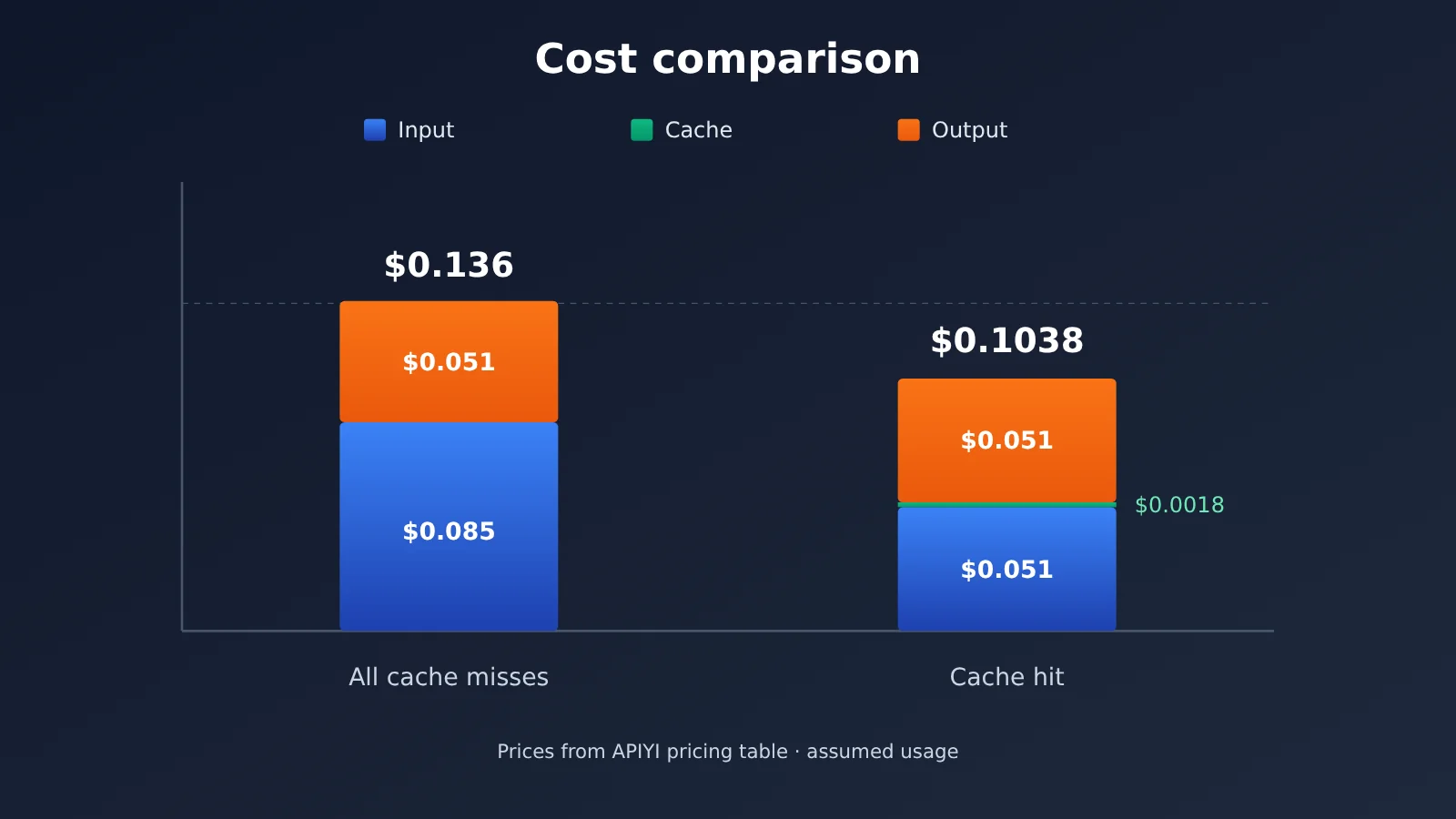
Estimates are just a reference — the usage logs are the source of truth. To verify, filter for the corresponding record in the console at api.apiyi.com/log:
- Narrow the range by request time.
- If the response provides a request ID, use it to pinpoint that exact request.
- Confirm the model is
hy4and that the token matches the one your code actually used. - Compare the input, cache, and output usage plus the charged amount in the log against your estimate.
For the specific meaning of log fields, see docs.apiyi.com/faq/log-billing-explained.
4. Troubleshooting Hy4 API Failures
When troubleshooting, check the HTTP status code first, then read the details in the error body. Judging by the status code alone makes it easy to draw the wrong conclusion — the same 429, for instance, can have completely different causes. Catch SDK exceptions at the original request from Section 2.1: for connection timeouts look at APITimeoutError, and for other connection failures look at APIConnectionError; when you get an error response, pull status_code, request_id, and the error body out of APIStatusError. Determine the result of the existing request first, then decide whether to retry; redact the error body before sharing it. The handling order is as follows:
| Error | Check first | Retry? |
|---|---|---|
| 401 | Whether the API key is correct, whether it has expired, and whether base_url is https://api.apiyi.com/v1 |
Don’t retry until the configuration is fixed |
| 403 | Use the error body to determine whether this is a group permission issue, and confirm that the token’s group includes Hy4 | Don’t retry until the permissions are fixed |
| 404 | Whether the path has /chat/completions appended twice, and whether the model name is hy4 |
Don’t retry until the configuration is fixed |
| 429 | Use the error body to determine whether it’s temporary rate limiting or an insufficient quota | Temporary rate limiting can be retried a limited number of times with backoff; an insufficient quota means topping up or adjusting the quota first |
| Connection error | Whether the network, proxy, and DNS are fine, and whether the base_url’s protocol and domain are correct | You can retry once the network is back |
| Timeout | First search api.apiyi.com/log by time to confirm whether the request was already executed |
If it was executed, don’t resend; if not, retry |
Two cases deserve special mention — 429 and timeouts:
- 429 backoff retries: these only apply to temporary rate limiting. Set an upper limit on the retry count and lengthen the interval progressively each time. If the quota is insufficient, no number of retries will succeed.
- Timeouts: the client not receiving a response within 60 seconds doesn’t mean the server hasn’t processed the request. If the server has already finished, resending directly executes it a second time and charges you again. So check the logs first, confirm the request wasn’t executed, and only then send it again.
If you need to contact technical support, redact sensitive information such as the API key and customer data from the error body and logs before submitting, then include the status code, request time, model name, and request ID. For how to retain and submit error information, see docs.apiyi.com/api-manual/error-reporting.
Once all troubleshooting is done, rerun the example from 2.1. The whole flow passes only when it satisfies three conditions at the same time:
- The validation function outputs “通过” (pass).
- finish_reason isn’t
length. - The console logs contain a record with the same timestamp and the model
hy4, and its usage matches the usage recorded locally.