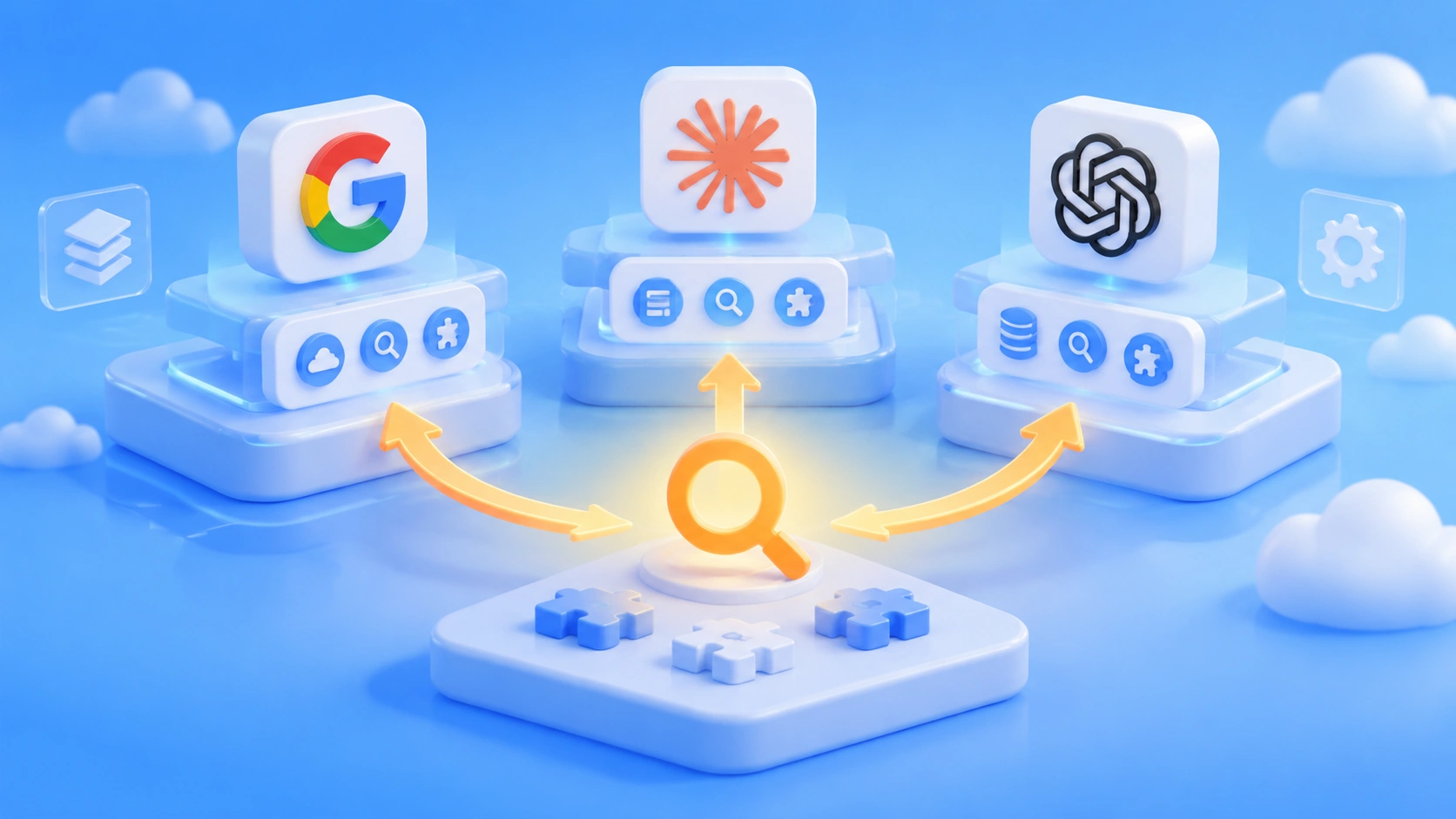
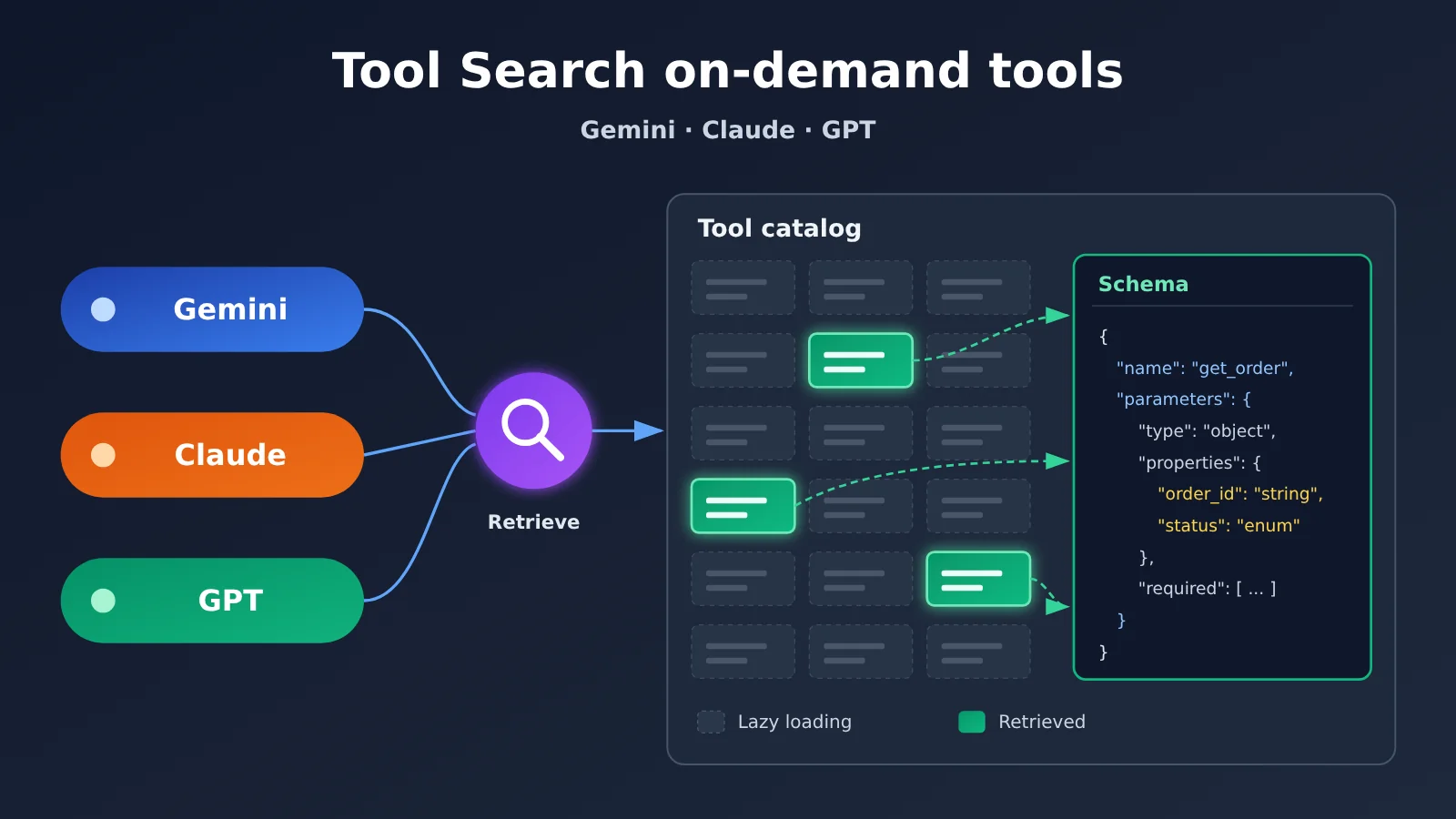
The three vendors’ Tool Search features solve the same problem, but their implementation paths differ widely. All three let the model see only brief tool hints at the start, then load the full parameter schema when a call is needed. The differences mainly come down to three areas: Gemini has both server-side and client-side retrieval modes, and client-side retrieval can bring in new tools; Claude exposes two server-side search methods, Regex and BM25, and uses tool_reference to discover within the already declared tool set; GPT groups tools with namespace, and its client mode can dynamically inject new tools through tool_search_output. When choosing, look at whether the tool library is fixed or changes frequently, and at your team’s existing API architecture.
What you’ll learn from this article
- Which API each of the three Tool Search features belongs to, and which field enables it.
- What each vendor keeps in the model’s initial context, and the roles of
short_description,tool_reference, andnamespace. - How the event chain for tool retrieval and actual function calls fits together, and where integration tends to go wrong.
- Which vendor supports adding tools to a conversation that weren’t in the initial request.
- For enterprise agents like order and inventory systems, how to choose based on the tool library’s structure.
Index: The main text first covers the release dates and shared approach of the three vendors, then breaks down the retrieval mechanisms and native fields of Gemini, Claude, and GPT respectively, followed by a summary table comparing them across eight dimensions and a walkthrough of the three technical paths using the same order-and-inventory agent. The final analysis section lays out selection principles and discusses issues to watch for in protocol adaptation for a cross-model gateway.
Tool Search: Key Concepts to Know
| Concept | Brief Explanation |
|---|---|
| Tool catalog | A collection of business tools available for retrieval, including names, descriptions, parameter definitions, and permission information |
| Tool Search | The ability to retrieve the tools needed for the current task and load their full definitions on demand |
defer_loading |
A field adopted by all three providers that marks a tool for deferred loading of its full definition |
| Regex | Uses regular expressions to match tool names, descriptions, or parameter clues |
| BM25 | A classic algorithm that ranks search results by the relevance between query terms and text |
tool_reference |
A content block Claude uses to reference an already-declared tool, which the API then expands into the full definition |
namespace |
A declaration in the OpenAI Responses API that groups related functions by business capability |
| Dynamic tool injection | The application passes tool definitions that weren’t declared in the initial request to the model so it can continue using them |
tool_search_output |
A response item returned by the OpenAI client during retrieval that carries matching tool declarations |
| Remote MCP | A remote service that provides discoverable, executable tools through the Model Context Protocol |
| Cache prefix | The beginning portion of input that stays consistent across multiple model calls and can be reused from cache |
Tool Search Impact at a Glance
- Agent developers: Once you have many tools, you no longer have to stuff every schema into the context at once. But the three providers have different request bodies and return events, so cross-model agents need separate parsing logic for each.
- Enterprise platform and tool catalog maintainers: Tool naming, short descriptions, and grouping now directly affect retrieval quality, and the tool catalog itself has become an asset that needs to be designed.
- Cost and operations leads: Tool Search doesn’t necessarily save money. Google’s official worked examples show both token savings and token increases, so whether to enable it should be based on measured billing costs.
The Facts: Release Timeline and Mechanics of the Three Tool Search Offerings
Why Gemini, Claude, and GPT All Offer Tool Search
When an agent is connected to a CRM, orders, inventory, logistics, ticketing, and multiple MCP servers at the same time, the tool declarations alone can eat up a large amount of context. Google’s documentation notes that a few dozen function declarations can consume tens of thousands of tokens. Anthropic gave an example: five MCP servers—GitHub, Slack, Sentry, Grafana, and Splunk—with 58 tools total, where the tool definitions alone came to about 55,000 tokens.
Here’s the release timeline for all three: Anthropic launched Tool Search Tool on November 24, 2025; OpenAI launched API Tool Search alongside GPT-5.4 on March 5, 2026; Google launched Tool Retrieval for the Gemini API in preview on November 19, 2026. All three follow the same basic idea: the model first knows what capabilities exist, and only reads the full parameter definitions when it actually needs to use them.
All three have published performance data, but the test conditions are completely different, so you can’t use them to rank the vendors. In Anthropic’s example, the initial context dropped from about 77,000 tokens to about 8,700 tokens, and in an internal MCP evaluation, Claude Opus 4’s tool-selection accuracy rose from 49% to 74%. OpenAI measured 250 tasks across 36 MCP servers in MCP Atlas and found total token usage dropped by 47%, with accuracy unchanged. Google currently only offers hypothetical calculations: with 200 tools, usage drops by about 85.6%; with 10 tools plus a long context, usage actually increases by about 36.5%.
Gemini Tool Search: Server-Side and Client-Side Retrieval Modes
Gemini’s Tool Retrieval relies on the Interactions API and requires v1beta; the older generateContent doesn’t support it. To enable server-side mode, add {"type": "tool_search"} to tools, then set defer_loading: true for low-frequency function or mcp_server tools. At first, the model only sees the names and short_description of deferred tools. Early Google testing showed that each tool entry averaged about 26 tokens. If no short description is configured, the first sentence of the full description is used instead.
One point that’s easy to misunderstand: in server-side mode, developers still have to submit the full tool definitions. Even when using previous_interaction_id, you still need to resend the complete tools array on every request. Deferred loading only keeps the full schema from entering the model’s context ahead of time. Also, loaded schemas can’t be unloaded in the current session; a single request can declare at most one tool_search; and server-side and client-side retrieval can’t be mixed in the same request.
| Dimension | Server-side retrieval | Client-side retrieval |
|---|---|---|
execution |
server (default) |
client |
| Retriever | Gemini API handles it | Built by the developer |
| Tool library must be declared in advance | Yes | No |
defer_loading |
Applies | Doesn’t apply |
| Extra round trips | No extra client round trip | One extra round trip per search |
| Typical scenarios | Large, relatively fixed tool collections | Private Tool Registry, multi-tenant, dynamic tools |
In client-side mode, the model calls a developer-defined search function (such as search_tool_registry), and the application returns the matching full tool declaration objects in function_result.result. This approach can introduce tools that weren’t declared in the original request during a conversation, for example when a user temporarily connects a new SaaS service in the session.
Claude Tool Search: Regex, BM25, and tool_reference
Claude’s Tool Search Tool is part of the Messages API, and the server provides two types of search tools: tool_search_tool_regex_20251119, where the model generates a regular expression and which works well for tool libraries with strong naming conventions; and tool_search_tool_bm25_20251119, where the model generates a natural-language query and which is good for discovering tools based on capability descriptions. Both approaches search tool names, descriptions, parameter names, and parameter descriptions. Claude’s parameter field is input_schema, which differs from the parameters field used by the other two providers.
A typical search sequence looks like this: Claude first issues a server_tool_use call to invoke the built-in search tool; the API returns tool_search_tool_result, which contains a tool_reference; the API then expands it into the full definition; finally, the model produces a business-level tool_use. Anthropic specifically notes that the srvtoolu_... identifier for the built-in search tool doesn’t require developers to send back a tool_result; the application only needs to execute the actual business tool_use.
| Claude Tool Search rule | Official specification |
|---|---|
| Max deferred tools per request | 10,000 |
| Default results per search | Up to 5, adjustable via limit |
| Regex query length | Up to 200 characters |
| BM25 query length | Up to 500 characters |
| Unsupported models | Claude Opus 4.1 and earlier models |
| Caching constraint | Tools with defer_loading: true can’t set cache_control |
Developers can also implement custom search using embeddings or other algorithms of their own, but the result is still a tool_reference, and the referenced tool must already be declared in the top-level tools. So Claude’s design is closer to “finding the tools you need from a pre-declared tool library.” On the MCP side, Claude configures the deferral policy through the MCP Connector’s mcp_toolset. You can set it globally in default_config or per tool in configs.
GPT Tool Search: Namespaces and Dynamic Tool Injection
OpenAI’s Tool Search lives in the Responses API and is supported by GPT-5.4 and newer compatible models. It’s enabled the same way, through tool_search and defer_loading. What sets it apart is namespace: developers can group related functions by business domain — crm, billing, and so on. The model first uses the namespace’s name and description to figure out which category is relevant, then expands the deferred functions inside that group only when it needs them. That makes tool grouping a structural part of the API itself, not just a naming convention.
In server-side mode, the event chain runs tool_search_call → tool_search_output → function_call → the app returns function_call_output. In client-side mode, the app receives tool_search_call, looks up the tool registry itself, then returns tool_search_output with the same call_id. Its tools field contains the full declarations of the matching tools, and the model only calls those functions on the next turn. The official docs allow you to return tools that weren’t declared in the original request here, while also requiring developers to strictly validate the dynamic schema and expose only trusted tool definitions.
On the caching side, OpenAI appends newly discovered tool definitions to the tail end of the context so the existing cached prefix takes as little of a hit as possible. With MCP, there’s a caveat: Tool Search in the Responses API supports on-demand discovery of MCP tools, while the Agents API wires in tool discovery automatically at runtime when the model and provider support it. The official guidance explicitly warns that the two sets of configuration can’t be swapped for one another.
Below is an illustrative Responses API request showing the basic structure of deferred loading. Field definitions follow the official OpenAI docs:
from openai import OpenAI

client = OpenAI(
    api_key="YOUR_API_KEY",
    base_url="https://api.apiyi.com/v1"  # APIYI OpenAI-compatible endpoint
)

tools = [
    {"type": "tool_search"},
    {
        "type": "function",
        "name": "inventory_get_stock",
        "description": "Inventory: check stock level by SKU.",
        "defer_loading": True,
        "parameters": {
            "type": "object",
            "properties": {"sku": {"type": "string"}},
            "required": ["sku"]
        }
    }
]

resp = client.responses.create(
    model="gpt-5.4",
    input="订单 A-1042 还没发货,帮我查一下 SKU-88 的库存。",
    tools=tools
)
for item in resp.output:
    print(item.type)  # Expect to see events like tool_search_call / function_call
View the illustrative code for client-side search and dynamic injection
import requests

BASE_URL = "https://api.apiyi.com/v1"  # Responses API requests forwarded through APIYI
HEADERS = {"Authorization": "Bearer YOUR_API_KEY"}

def search_registry(query: str) -> list:
    """Search the enterprise tool registry and filter by user permissions (illustrative)"""
    return [{
        "type": "function",
        "name": "warehouse_schedule_shipment",
        "description": "Warehouse: schedule a new shipment date.",
        "parameters": {
            "type": "object",
            "properties": {
                "order_id": {"type": "string"},
                "date": {"type": "string"}
            },
            "required": ["order_id", "date"]
        }
    }]

def handle(output_items: list) -> list:
    follow_ups = []
    for item in output_items:
        if item["type"] == "tool_search_call":
            query = item.get("arguments", {}).get("query", "")
            follow_ups.append({
                "type": "tool_search_output",
                "call_id": item["call_id"],      # Use the same call_id as the search call
                "tools": search_registry(query)  # Can include tools not declared in the initial request
            })
    return follow_ups
# Note: always validate dynamically returned schemas and only expose trusted tools
🚀 Quick validation tip: before wiring this into real business logic, use the unified key at APIYI apiyi.com to call GPT, Claude, and Gemini separately. Run the same tool registry through all three, confirm your parsing layer picks up the event structure correctly, and then decide which one becomes your primary setup.
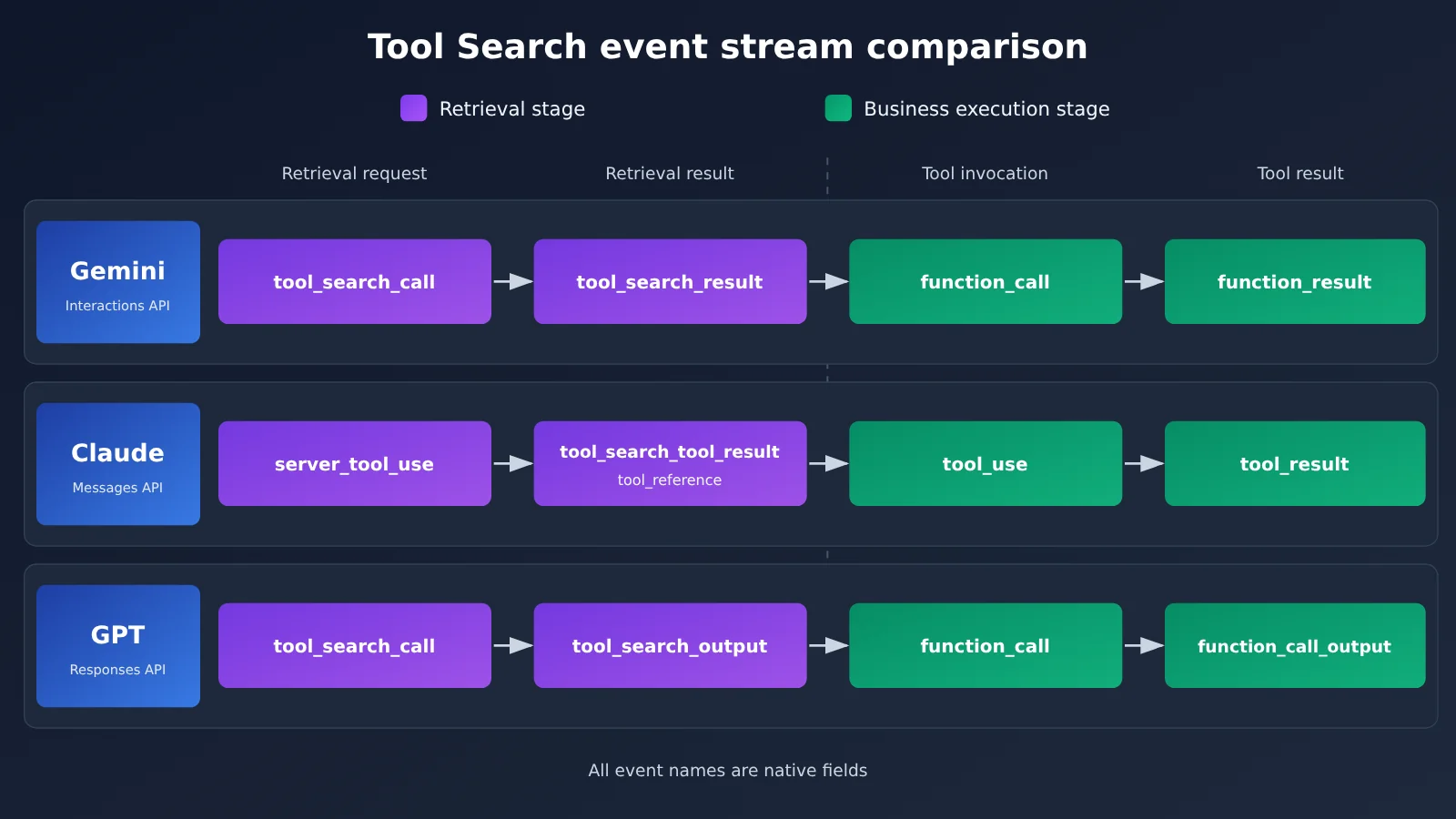
Every event name in the diagram above is a native field from the respective vendor. If you want to test the event stream for each vendor one by one, you can switch models with the same test script through APIYI apiyi.com and compare the results side by side.
Side-by-Side Comparison of the Three Tool Search Mechanisms
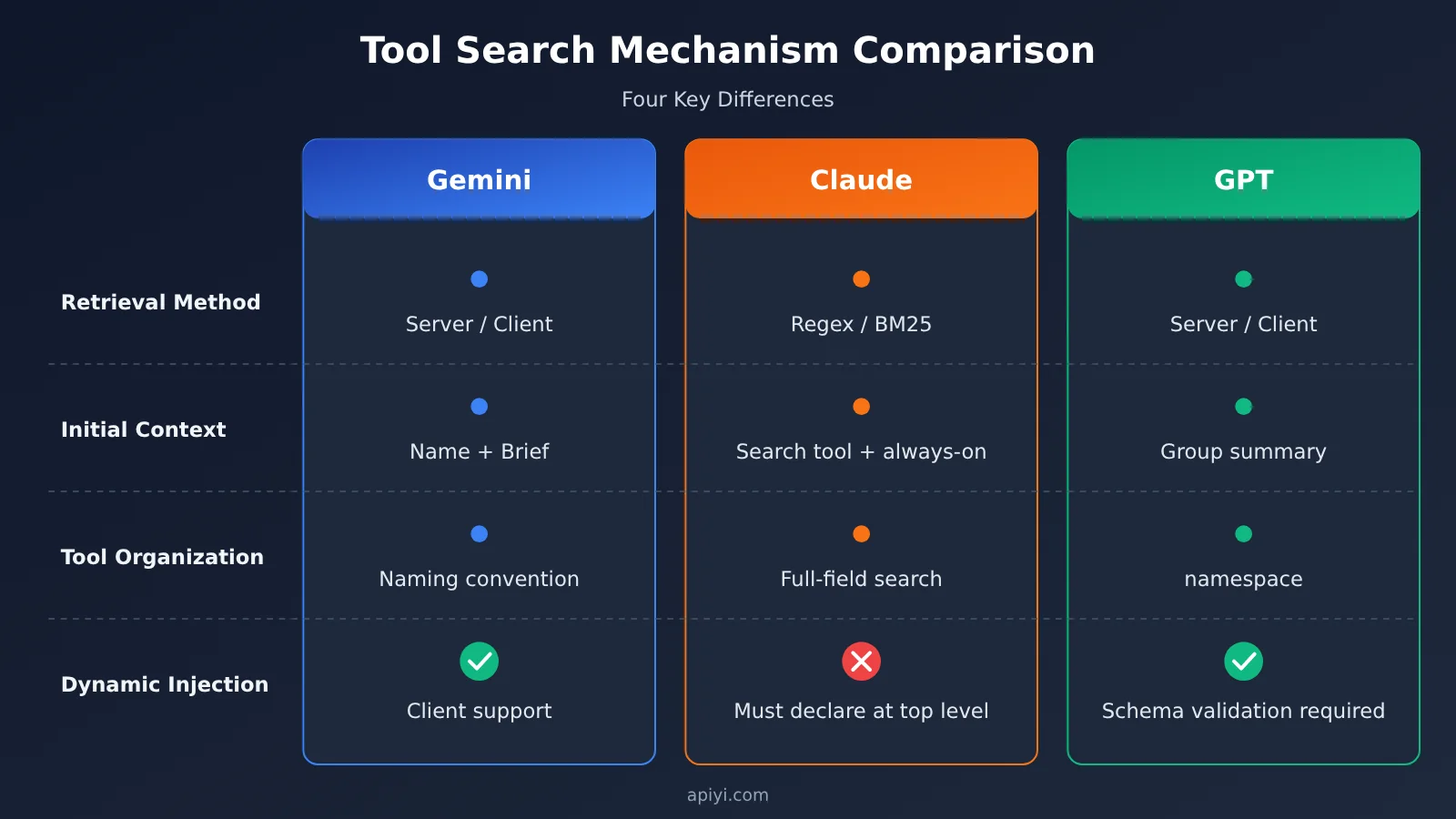
| Dimension | Gemini | Claude | GPT |
|---|---|---|---|
| API | Interactions API (v1beta) |
Messages API | Responses API |
| Retrieval method | Server-side (algorithm undisclosed) / client-side | Regex / BM25 / custom search | Server-side / client-side |
| Initial context retained | Name + short_description |
Search tool + non-deferred tools | Deferred tools or namespace summary |
| Tool organization | Naming convention + short description | Name, description, and parameters are all searchable | namespace grouping |
| Parameter field | parameters |
input_schema |
parameters |
| Client-side retrieval | Supported | Custom search returns tool_reference |
Supported (tool_search_output) |
| Dynamically adding new tools | Supported in client mode | Referenced tools must already be declared at the top level | Supported in client mode; schema must be validated |
| MCP integration | mcp_server + defer_loading |
mcp_toolset‘s default_config / configs |
Different rules for Responses and Agents |
| Caching and billing | No separate feature fee; keep an eye on total_tool_use_tokens |
No separate charge; deferred tools can’t set cache_control |
New tools are appended at the end to protect the cached prefix |
💡 Recommendation: The table above only compares interface rules you can actually verify. Real-world results depend on your tool library and conversation length, so it’s worth running a small-sample A/B test through the unified multi-model entry point at APIYI apiyi.com, then working out the cost from each vendor’s billing fields.
Analysis: When Each Tool Search Approach Fits
Looking at the Three Technical Routes Through an Order and Inventory Agent
Picture this business requirement: a user checks an order status, finds the item hasn’t shipped yet, then queries inventory, and finally decides whether a new shipping date can be arranged. The system has nine categories of tools—CRM, orders, inventory, warehouse scheduling, logistics, refunds, billing, notifications, and approvals—each with multiple functions.
- The Gemini route: Load the frequently used order query tools directly, set long-tail tools like inventory and warehouse scheduling to deferred loading, write good
short_descriptionvalues, and let server-side retrieval pick out the Schema forget_inventory. If warehouse scheduling tools are provisioned dynamically per tenant, switch to client-side retrieval and return them from a private Registry. - The Claude route: If the tool naming is regular (such as
inventory_*andwarehouse_*), Regex can hit them precisely; if the user speaks casually, saying things like “let’s see if we can restock,” BM25 works better. In the end,tool_referenceexpands into a callabletool_use. - The GPT route: Create
namespaceentries forcrm,inventory, andlogistics. The model first determines that both the inventory and logistics domains are involved, then expands the functions within those groups. A newly onboarded logistics provider can be injected through the client-sidetool_search_output.
This scenario is meant only to illustrate the differences in mechanism; it does not represent the measured success rates or latency of any of the three vendors.
Four Selection Principles for Developers
- Large, fixed tool libraries: Look at server-side retrieval capability first. All three providers can cover this, but note that Gemini has to resend the full tool array on every request, and Claude’s per-request deferred tool limit is 10,000.
- Need explicit control over the search strategy: Claude’s publicly documented Regex and BM25 are the only approaches with disclosed algorithms, making them a good fit for teams that want to hit targets precisely by naming convention. Gemini’s and GPT’s server-side algorithms aren’t disclosed, so you shouldn’t assume they work the same way as Claude’s.
- Tool libraries that change frequently or need filtering by user permissions: Focus on client-side dynamic injection. Both Gemini’s and GPT’s client-side modes can introduce new tools; Claude’s custom search can only reference already-declared tools, so you need to assemble the candidate set before sending the request.
- Small tool sets: Google’s worked example shows that with 10 tools plus a 30,000-Token long context, Token usage actually goes up by about 36.5%. Google recommends sticking with static loading when you have fewer than roughly 20 stable tools. That’s a useful reference point for the other two providers as well, but you’ll still want to test it yourself for each.
Protocol Adaptation Issues for Cross-Model Gateways
The easiest trap for teams building cross-model Agents is equating “I can call this model” with “this model’s Tool Search works.” You can split the capability into four layers: model access, protocol endpoints (Interactions / Messages / Responses), tool declaration fields (tool_search, defer_loading, namespace, MCP config), and execution and state management (retrieval events, function results, signature, session history). A successful model connection only proves the first layer is fine.
Pay special attention to one Gemini rule: in a stateless session with store=false, tool_search_call, tool_search_result, and their signature must not be modified or deleted, or you’ll get an HTTP 400. That means a gateway can’t arbitrarily compress or rewrite historical messages. Abstracting all three providers into a unified Tool Search interface requires maintaining an event mapping table at the Agent framework level. You can’t expect a single request body to work everywhere just by swapping the Base URL.
🎯 Technical tip: When connecting to multiple models through an aggregation platform like APIYI (apiyi.com), it’s a good idea to first run a small amount of traffic to confirm that the target endpoint and fields like
tool_search,defer_loading, andnamespaceare passed through intact before you put Tool Search into your production pipeline.
Variables Worth Watching
Gemini Tool Retrieval is still in preview, and the interface may change before general availability. As of November 20, 2026, there are still no independently verifiable tests of its average savings ratio, latency, and accuracy in real production environments. One trend you can count on: all three vendors are pushing “tool catalog governance” onto developers, and naming, short descriptions, grouping, and permissions will look more and more like index engineering for a retrieval system. Before you ship, I’d suggest setting up a controlled experiment that tracks initial input tokens, tool-use tokens, correct tool selection rate, no-match retrieval rate, and average number of searches — then cross-validate on the same task set across multi-model environments like APIYI apiyi.com, so a single vendor’s marketing numbers don’t skew your conclusions.
More tools doesn’t make an Agent smarter. What sets an Agent’s ceiling is whether it can accurately find the right tool when it needs one. As the Analects (Wei Ling Gong) puts it: “A workman must sharpen his tools if he is to do his work well.”
References
- Google Tool Retrieval technical documentation: server-side and client-side retrieval, limits, billing, and worked examples
- Link:
aistudio.google.com/docs/tool-retrieval
- Link:
- Google official announcement: Introducing Tool Retrieval in the Gemini API
- Link:
blog.google/innovation-and-ai/technology/developers-tools/gemini-api-tool-retrieval
- Link:
- Anthropic Tool Search Tool documentation: Regex, BM25, tool_reference, and limits
- Link:
platform.claude.com/docs/en/agents-and-tools/tool-use/tool-search-tool
- Link:
- Anthropic Advanced Tool Use announcement: Tool Search launch and internal evaluation
- Link:
anthropic.com/research/advanced-tool-use
- Link:
- OpenAI Tool Search documentation: namespace, client-side retrieval, and dynamic injection
- Link:
developers.openai.com/api/docs/guides/tools-tool-search
- Link:
- OpenAI GPT-5.4 announcement: Tool Search launch and MCP Atlas testing
- Link:
openai.com/index/introducing-gpt-5-4
- Link:
Author: APIYI Technical Team
Technical discussion: If you’d like to dig deeper into tool-calling adaptation for multi-model Agents, visit APIYI apiyi.com to get in touch. More integration resources are available in the docs.apiyi.com documentation center.