Author’s note: This post breaks down the Gemini 4 family — Hydrogen, Neon, and Carbon — by task scenario: their division of labor, thinking tiers, context entry points, and APIYI shelf pricing, plus a note on Argon sitting on the same shelf, so you can pick the right model for the job in front of you.
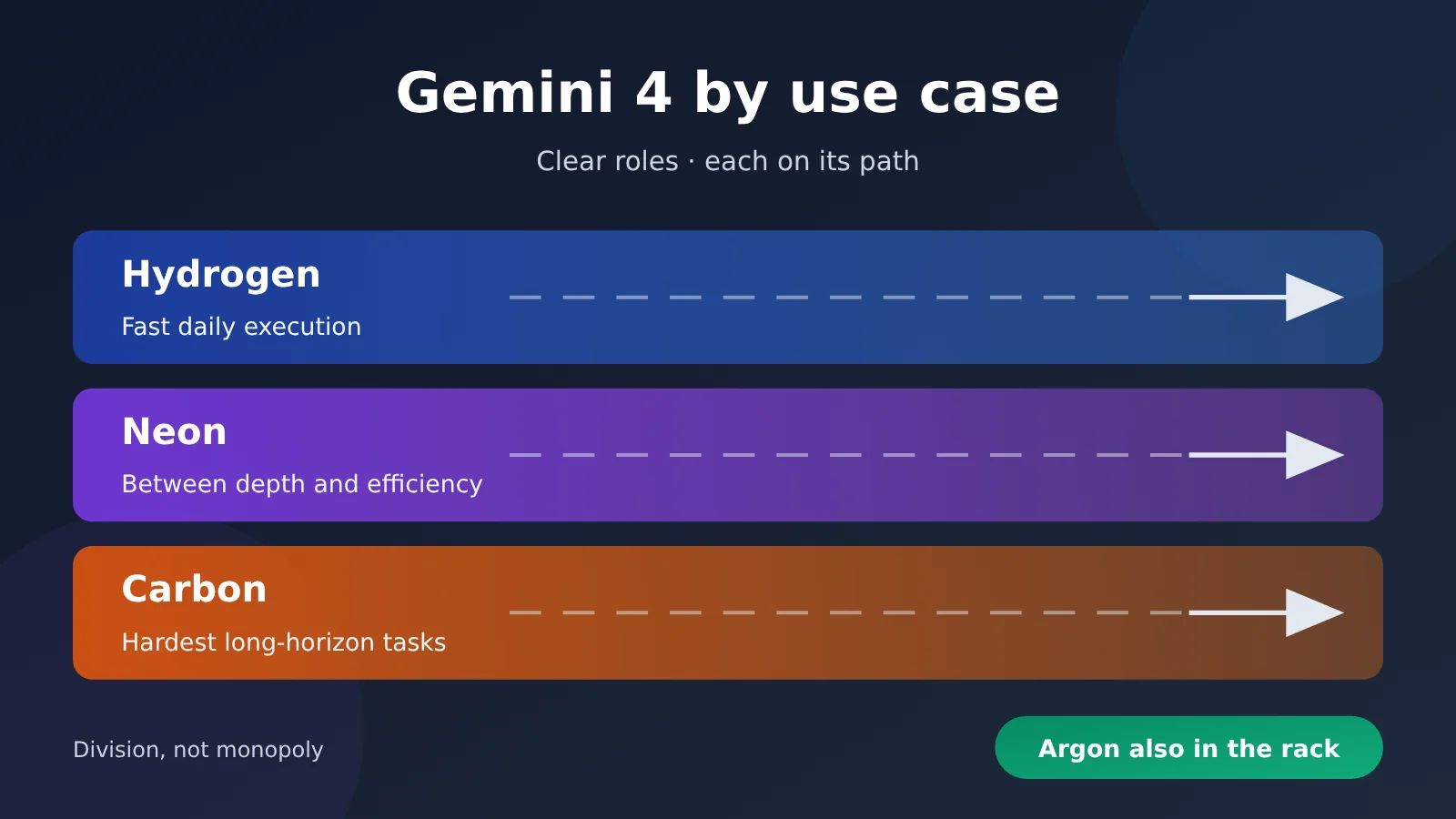
Gemini 4 rolled out several models over the course of November: Carbon launched on 2026-11-10, Hydrogen on 2026-11-12, and Neon on 2026-11-18. In Neon’s launch announcement, Google spelled out how the three split the work: Carbon takes on the hardest long-horizon tasks, Hydrogen handles fast everyday execution, and Neon sits between depth and efficiency.
This isn’t a “which one is stronger overall” ranking. The three models’ positioning never overlapped in the first place. The real question is: for this job in front of you, should it go to the fast one, the middle one, or the heaviest one? And the Gemini 4 family has more than three models on the shelf — Argon is there too, so don’t treat the family as a three-way choice.
Core value: By the end of this article, you’ll have a scenario-based method for choosing among Gemini 4 models, you’ll know what to look at for thinking tiers, context entry points, and pricing, and you’ll be able to estimate the cost of “this job” with a simple formula.
Gemini 4 Family Essentials: Getting Clear on What This Lineup Is Worth
Before picking a Gemini 4 model, don’t rush into the spec sheet. First, size up the task at hand. Is it a day-to-day operation you can describe in one sentence and need answered immediately, or a long-horizon job that demands multi-step reasoning, repeated planning, and a huge amount of context? Once you’ve settled the weight, the model pretty much picks itself.
| Model | Official positioning | Release date | Selection value |
|---|---|---|---|
| Gemini 4 Hydrogen | Fast everyday execution | 2026-11-12 | High-frequency, short-chain tasks where response speed matters |
| Gemini 4 Neon | Between depth and efficiency | 2026-11-18 | Tasks that need some reasoning depth without going for the heaviest model |
| Gemini 4 Carbon | The hardest long-horizon tasks | 2026-11-10 | Multi-step planning, long chains, tasks with the highest quality bar |
| Gemini 4 Argon | Another model in the family that’s also listed | Refer to official information | A supplementary option to include in comparisons as needed |
Where the Division of Labor Among the Three Main Gemini 4 Models Comes From
This division of labor comes from Google’s announcement when it released Neon on 2026-11-18 — not from third-party summarization. The thinking behind the announcement is clear: Carbon and Hydrogen launched one after the other, staking out the “hardest” and “fastest” ends respectively, and Neon then filled in the middle tier. Once you understand that sequence, you’ll see that Neon isn’t a downgraded Carbon or an upgraded Hydrogen — it’s built specifically for tasks where “neither end fits well.”
The main thread of this article is these three models named in the announcement. Argon also appears in APIYI’s model list, and we’ll explain where it sits in the pricing and use-case sections, but we won’t spread the discussion across it. If you see gemini-4-argon in the console, it’s not an item that got listed by mistake — it’s a real option in the family.
Gemini 4 Hydrogen, Neon, Carbon: Core Differences
The differences among the three models aren’t just about “fast vs. slow” — the thinking-tier design, context and entry points, and pricing structure each have their own quirks. The table below puts the dimensions people ask about most during model selection side by side, for easy comparison.
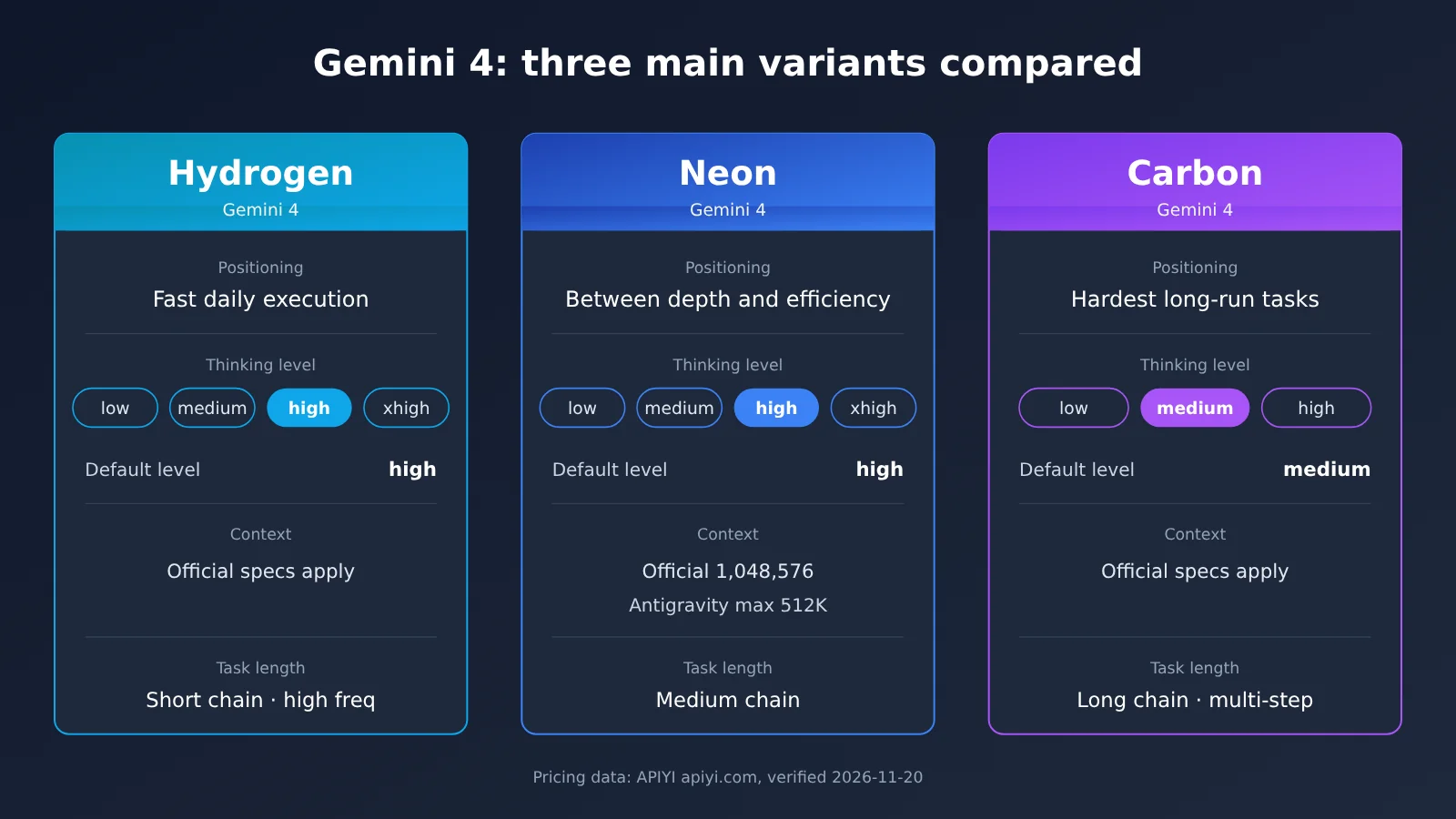
| Comparison Dimension | Gemini 4 Hydrogen | Gemini 4 Neon | Gemini 4 Carbon |
|---|---|---|---|
| Official positioning | Fast everyday execution | Between depth and efficiency | The hardest long-horizon tasks |
| Thinking tiers | low / medium / high / xhigh | low / medium / high / xhigh | low / medium / high |
| Default thinking tier | high | high | medium |
| Has xhigh | Yes | Yes | No |
| Context | Refer to official docs | Official 1,048,576; Antigravity docs list a maximum of 512K |
Refer to official docs |
| Suitable task length | Short chains, high frequency | Medium chains | Long chains, multi-step |
Gemini 4 Comparison Analysis
Hydrogen Comparison Analysis: Hydrogen holds a positioning advantage in response speed and everyday execution, making it a good fit for high-volume, short-chain invocations. But its positioning is precisely “fast everyday execution”—forcing complex tasks that require long-horizon planning onto it often means compensating by raising the thinking level. By comparison, these tasks run more smoothly on Neon or Carbon.
Neon Comparison Analysis: Neon strikes a balance between depth and efficiency, with four adjustable thinking levels and an official context window of 1,048,576. But it isn’t designed for the hardest long-horizon tasks; when work requires long periods of autonomous progress, Carbon is still the better fit. For tasks that are “a bit more complex than everyday work, but not quite the hardest,” Neon fills exactly that gap.
Carbon Comparison Analysis: Carbon is officially positioned for the hardest long-horizon tasks and is the heaviest model in the family. But it only has three thinking levels—low, medium, and high—defaulting to medium, with no xhigh. Handing it everyday lightweight tasks doesn’t show its value; Hydrogen is better suited to those scenarios.
Gemini 4 Thinking Level Differences: Same “high” Name, Different Meaning
Thinking levels are one of those things that are easiest to take for granted. Hydrogen and Neon have four levels—low, medium, high, and xhigh—with high as the default; Carbon has three—low, medium, and high—with medium as the default and no xhigh. That means if you write the same high, on Carbon it’s already the highest level, while on Hydrogen and Neon there’s still xhigh to go higher.
This has two practical implications. First, if your code hardcodes the thinking level as xhigh, you’ll need to adjust it accordingly when switching from Neon to Carbon—you can’t just copy it over as-is. Second, when no thinking level is passed, Carbon uses medium, while Hydrogen and Neon use high. The three models’ “default behavior” isn’t on the same baseline, so you need to align the levels first when comparing them side by side.
Gemini 4 Neon Context: Choose the Entry Point Too
Neon’s official context is 1,048,576 tokens, but Antigravity’s docs say up to 512K. In other words, the same Neon can handle different context sizes depending on the entry point. If your task needs to stuff a large volume of documents or code in at once, choose the entry point along with the model. Otherwise, you may hit truncation at the entry-point layer.
This warning matters especially for long-document analysis and large-codebase retrieval. First confirm how much context the entry point you’re using supports, then decide whether to feed everything in at once or split it into chunks. That’s much less hassle than troubleshooting truncation after the fact.
Gemini 4 Price Check: This Order on the APIYI Catalog
The prices below were verified on 2026-11-20 from two sources: the APIYI model master table docs.apiyi.com/models.md (updated 2026-11-19 10:59, UTC+8) and the APIYI pricing endpoint https://api.apiyi.com/api/pricing (version shell-api-modelmak-v1). In the pricing endpoint, a model_ratio of 1 corresponds to an input price of 2 USD/million tokens; the table below has already been converted using that rule.
| Model ID | Input (USD/million tokens) | Cache read (USD/million tokens) | Output (USD/million tokens) | Notes |
|---|---|---|---|---|
gemini-4-hydrogen |
1.5 |
0.075 |
7.5 |
Master table price |
gemini-4-neon |
3 |
0.15 |
15 |
Pricing endpoint: model_ratio 1.5, completion_ratio 5, cache_ratio 0.05; matches Google’s list price |
gemini-4-carbon |
2 |
0.1 |
10 |
Matches Google’s introductory price through 2026-11-30 |
gemini-4-argon |
2 |
0.1 |
10 |
Master table price |
Three things about this table deserve their own note:
- Neon’s data source: The November 19 version of the master table didn’t list
gemini-4-neon, but the pricing endpoint already has its pricing parameters. The converted result matches Google’s list price, and it can be called normally. - Carbon’s price validity: Carbon is currently at Google’s introductory price through 2026-11-30. Starting December 1, Google’s standard price changes to input
4and output20. At the time of verification, the APIYI catalog still showed the introductory price; for later changes, refer to the master table and pricing endpoint at that time. - Price is not the same as per-call cost: The models have different positioning and default thinking levels, so the same task can consume wildly different amounts of output tokens (including reasoning). Drawing conclusions from unit price alone can be misleading.
How to Estimate This Gemini 4 Order
You can estimate the cost of a single call with a simple formula: cost = input tokens ÷ 1,000,000 × input unit price + cache-read tokens ÷ 1,000,000 × cache-read unit price + output tokens ÷ 1,000,000 × output unit price. The key is not to guess the output token count off the top of your head. It’s better to run your own real task a few times and see how many tokens each model actually emits at the same thinking level.
Here’s a hypothetical example: one call with 200K input tokens, 20K output tokens, and no cache. Using current catalog prices, Hydrogen comes to about 0.45 USD, Neon about 0.9 USD, and Carbon about 0.6 USD. If Carbon is calculated at Google’s standard price after December 1, it’s about 1.2 USD. But that’s just arithmetic under the assumption of “same output volume.” In real tasks, a heavier model may finish in fewer turns, while a lighter model may need multiple retries. So how much this order ultimately costs can only be settled by actually running your task.
Gemini 4 Scenario Recommendations: Which One to Reach For
Once you have positioning, tier, and pricing as your three yardsticks, you can start mapping common tasks to the right model. Below are typical scenarios for each of the three main models, with Argon’s place covered at the end.
When to Choose Gemini 4 Hydrogen
- High-frequency short tasks: customer service script rewriting, form field extraction, simple classification and tagging — short per-call chains with high call volume.
- Latency-sensitive interactions: instant replies in a chat assistant, inline completion suggestions in an editor — the user is sitting there waiting.
- Batch preprocessing: before handing material off to a heavier model, use Hydrogen for cleanup, summarization, and initial screening.
When to Choose Gemini 4 Neon
- Medium-complexity analysis: reading a fairly long report and producing structured conclusions — needs reasoning, but not long autonomous runs.
- Large context, but not long-horizon: dropping a lot of material in at once for Q&A or comparison — provided the endpoint you’re using supports that length.
- Workflows needing adjustable depth: within the same pipeline, sometimes use medium for speed, sometimes switch to xhigh for reliability.
When to Choose Gemini 4 Carbon
- The hardest long-horizon tasks: multi-step planning, pushing through across several subtasks, work that needs repeated course correction along the way.
- Quality first: solution design, complex problem decomposition — the kind of task where getting it wrong once is expensive.
- Agent-style execution: tasks that require the model to run autonomously for a long stretch and call tools multiple times.
Where Does Gemini 4 Argon Fit?
Argon is also on the APIYI master table, priced at input 2, cache read 0.1, and output 10. In the Neon announcement, Google named three models for the lineup — Hydrogen, Neon, and Carbon — so Argon isn’t part of the main split this article covers. If your task is hard to place among the three, you can add Argon to your test set, run the same batch of cases through it, and then decide.
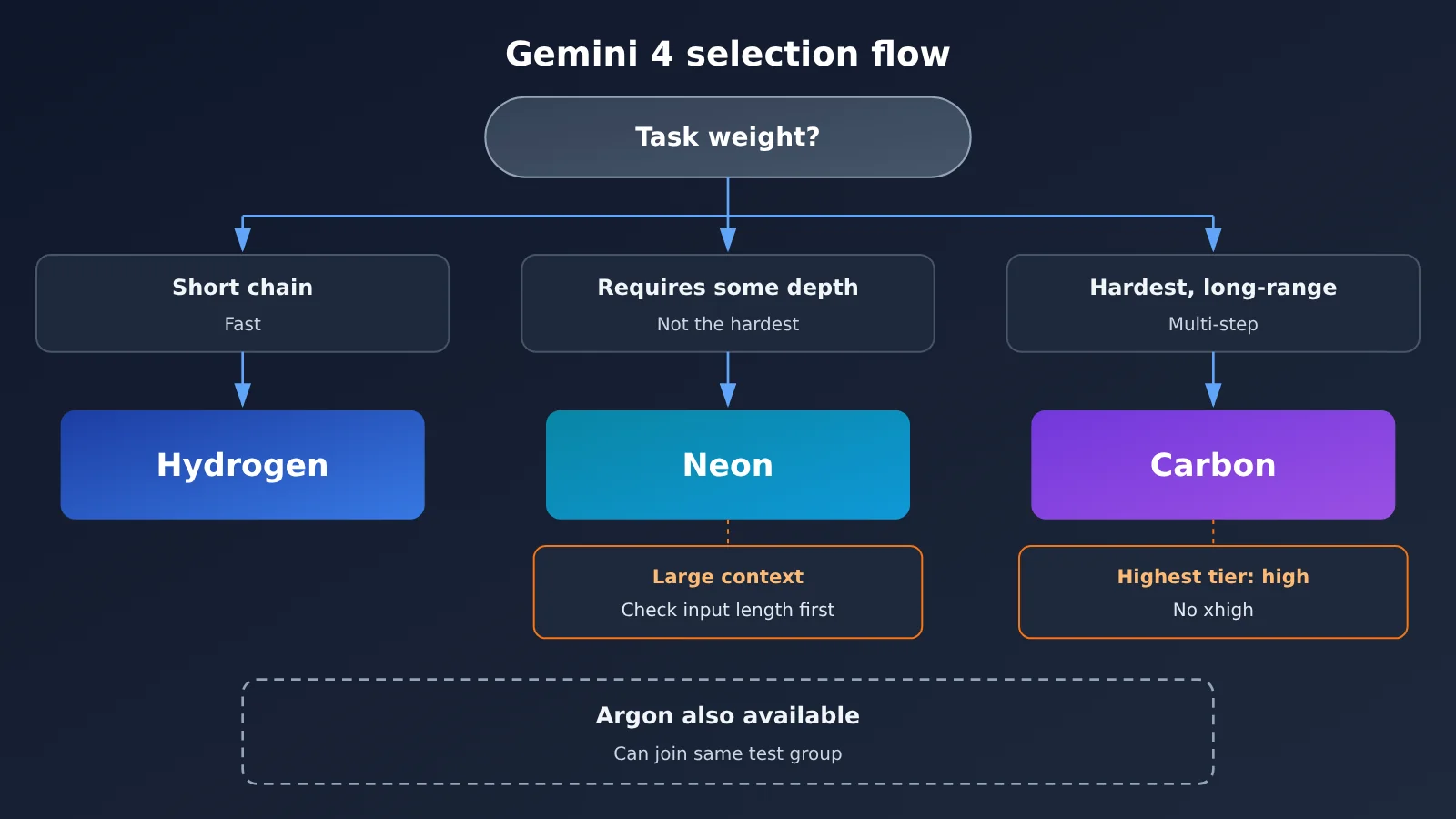
| Task characteristics | Top pick | Alternative | Selection notes |
|---|---|---|---|
| Short chain, high frequency, speed required | Hydrogen | Neon (low/medium) | Defaults to high; drop the tier if you want speed |
| Moderate reasoning, adjustable depth | Neon | Hydrogen (xhigh) or Carbon | Four adjustable tiers, default high |
| Large context stuffed in all at once | Neon | Chunk it, then use other models | Official 1,048,576; Antigravity maxes out at 512K |
| Hardest, long-horizon, multi-step | Carbon | Neon (xhigh) | Top tier is high; no xhigh |
| Hard to choose among the three | Head-to-head test with the same set | Add Argon | Normalize the thinking tier before comparing |
Gemini 4 Quick Start: Switching Between Three Models on APIYI
APIYI offers an OpenAI-compatible interface, so a single API key gets you the whole Gemini 4 family — switching models only means changing the model name. Here’s the whole integration process in a nutshell:
- Get an API key: Register an APIYI account and create a key in the console; new users get free trial quota.
- Configure the endpoint: Use the OpenAI-compatible SDK, set
base_urltohttps://api.apiyi.com/v1, and put your key inapi_key. - Choose a model name: In the request’s
modelfield, entergemini-4-hydrogen,gemini-4-neon, orgemini-4-carbon— and addgemini-4-argonwhen you need a comparison. - Set the reasoning tier: Pass the tier according to the field description for the corresponding model in the APIYI docs; note that Carbon doesn’t accept
xhigh. - Record token usage: Read the input, cache-read, and output tokens from the returned usage, then plug them into the formula above to work out the cost of that call.
| Config item | Value | Notes |
|---|---|---|
base_url |
https://api.apiyi.com/v1 |
OpenAI-compatible endpoint, works across the whole family |
model |
gemini-4-hydrogen / gemini-4-neon / gemini-4-carbon / gemini-4-argon |
Switching models is just this one field |
| Reasoning tier | Hydrogen, Neon: low / medium / high / xhigh; Carbon: low / medium / high | When omitted, Hydrogen and Neon default to high, Carbon defaults to medium |
| Pricing check | Master table docs.apiyi.com/models.md, pricing endpoint /api/pricing |
Go by the data on the day of the call |
For side-by-side comparisons, it’s worth preparing a set of 5 to 10 representative real tasks, fixing the prompt and reasoning tier, and then running through them by swapping the model name one at a time. What you get is quality, latency, and token data from your own scenario — far more telling than any generic leaderboard for deciding who should handle this particular job.
🚀 Quick start: We recommend starting with the free trial quota from APIYI apiyi.com and running all three mainline models through the same task set. Since the interface is unified, switching models just means changing the
modelfield — you can finish a round of comparison in a few minutes.
Gemini 4 Model Selection: Decision Guide
Here’s how to compress everything above into a single decision path: first judge how heavy the task is, then check the thinking tier and the context entry point, and finally estimate what this particular job will cost using a real task. Three steps, and the model choice is usually pretty clear.
- Start with the weight: short and fast tasks go to Hydrogen, middle-of-the-road tasks to Neon, and the hardest long-horizon tasks to Carbon.
- Then check the tier: when migrating across models, verify whether
xhighis available and align the thinking tier before comparing. - Then check the entry point: for large-context tasks, confirm the entry point’s supported length first — Neon maxes out at 512K on Antigravity.
- Finally, look at this one job: plug your real task’s token usage into the formula, and keep in mind that Carbon’s introductory pricing ends on 2026-11-30.
💡 Selection tip: Which Gemini 4 you pick depends mainly on the weight of the task at hand and the quality bar you need — not on some “overall ranking” of any single model. We suggest testing all three mainline models plus Argon with the same Key through APIYI apiyi.com, then making your decision based on token usage.
Frequently Asked Questions (FAQ)
Q1: What are Gemini 4 Hydrogen, Neon, and Carbon?
They are the three models in the Gemini 4 family whose distinct roles were named in a Google announcement: Carbon handles the hardest long-horizon tasks, Hydrogen handles fast day-to-day execution, and Neon sits between depth and efficiency. Their positioning is complementary—they aren’t just simple high-, mid-, and low-tier configurations.
Q2: What’s the difference between Gemini 4 Neon and Carbon?
Carbon targets the hardest long-horizon tasks. Its thinking levels are low, medium, and high, with medium as the default and no xhigh. Neon sits between depth and efficiency, with four levels from low to xhigh, high as the default, and an official context window of `1,048,576`. The longer the task and the more it requires multi-step autonomous execution, the better Carbon fits. Medium tasks that need adjustable depth and a large context window are better suited to Neon.
Q3: When were these Gemini 4 models released?
Carbon was released on 2026-11-10, Hydrogen on 2026-11-12, and Neon on 2026-11-18. The explanation of how the three divide their work came from Google’s announcement on the day Neon launched.
Q4: Are these the only three models in the Gemini 4 family?
No. Argon is also on APIYI’s model list, priced at input `2`, cached read `0.1`, and output `10` (USD per million tokens). This article focuses on the three named in the announcement, but when choosing a model, you can include Argon in the same test group.
Q5: How can I quickly invoke Gemini 4 through the API?
We recommend using an aggregation platform that supports multiple models for testing:
1. Visit APIYI at apiyi.com to register an account and get an API key and free trial credits.
2. Use an OpenAI-compatible SDK and set `base_url` to `https://api.apiyi.com/v1`.
3. Enter `gemini-4-hydrogen`, `gemini-4-neon`, or `gemini-4-carbon` in the `model` field.
With the same key, you can switch within the family, making side-by-side comparison easy.
Q6: Will Gemini 4 Carbon’s pricing change later?
Yes. Carbon’s current input `2` and output `10` are Google’s introductory prices, valid through 2026-11-30. Starting December 1, Google’s standard prices are input `4` and output `20`. When checked on 2026-11-20, APIYI’s listing still showed the introductory price. For later updates, refer to the real-time data in the model list and pricing API.
Q7: What are common pitfalls when choosing a Gemini 4 model?
There are three common ones: first, hard-coding `xhigh` and then migrating to Carbon, which doesn’t have that level; second, comparing default levels directly and ignoring that Carbon defaults to medium while the other two default to high; third, stuffing Neon with an overly long context and ignoring entry limits—for example, Antigravity docs state a maximum of 512K.
Key Takeaways for Choosing Gemini 4
- The division of labor comes from the official team: Carbon takes on the hardest long-horizon tasks, Hydrogen handles fast everyday work, and Neon sits in the middle.
- There’s more than three models in the family: Argon is also available; if you’re having trouble deciding, throw it into the test too.
- Thinking tiers aren’t structured the same way: Carbon only goes up to high and defaults to medium, while the other two offer xhigh and default to high.
- Context depends on the entry point: Neon’s official figure is
1,048,576, while the Antigravity docs list a maximum of 512K. - Pricing has a time limit: Carbon’s introductory price runs through 2026-11-30; Google’s standard price goes up starting December 1.
- Cost is per order: Beyond the unit price, you also need to look at actual output tokens—use the formula to estimate this particular order.
- Compare through a unified interface: Switch model names with a single Key via APIYI to run the same test group.
Summary
The key points for choosing Gemini 4:
- Weigh the task first: Fast everyday execution, mid-tier deep tasks, and the hardest long-horizon tasks map to Hydrogen, Neon, and Carbon respectively.
- Check the tiers and entry points: Thinking tiers aren’t identical across the three models, and Neon’s large context needs to be used with the right entry point.
- Let this order speak for itself: Pricing should be evaluated alongside real token usage and timing—Carbon’s introductory price has a cutoff date.
The Gemini 4 family is designed around division of labor rather than one model doing everything. Instead of agonizing over “which one is strongest,” figure out the characteristics of the order in front of you, then run a comparison with real tasks. I recommend using APIYI apiyi.com to quickly verify results—the platform offers free testing credits and a unified interface covering the whole family.
📚 References
-
Google Gemini 4 Neon announcement (2026-11-18): Official details on how Hydrogen, Neon, and Carbon divide responsibilities
- Note: The positioning descriptions, release date, and thinking-tier information in this article are based on this source.
-
Antigravity documentation: Explanation of Neon’s context limit at that entry point
- Note: We recommend checking this before using that entry point for large-context tasks.
-
APIYI model catalog and pricing API: List prices and pricing parameters for the Gemini 4 family
- Note: The catalog was updated on 2026-11-19 10:59 (UTC+8). The pricing API version is
shell-api-modelmak-v1; prices are subject to the data on the day of the call.
- Note: The catalog was updated on 2026-11-19 10:59 (UTC+8). The pricing API version is
Author: APIYI Technical Team
Technical discussion: Feel free to contact us through the APIYI official website homepage. More model and pricing materials are available in the APIYI Documentation Center.