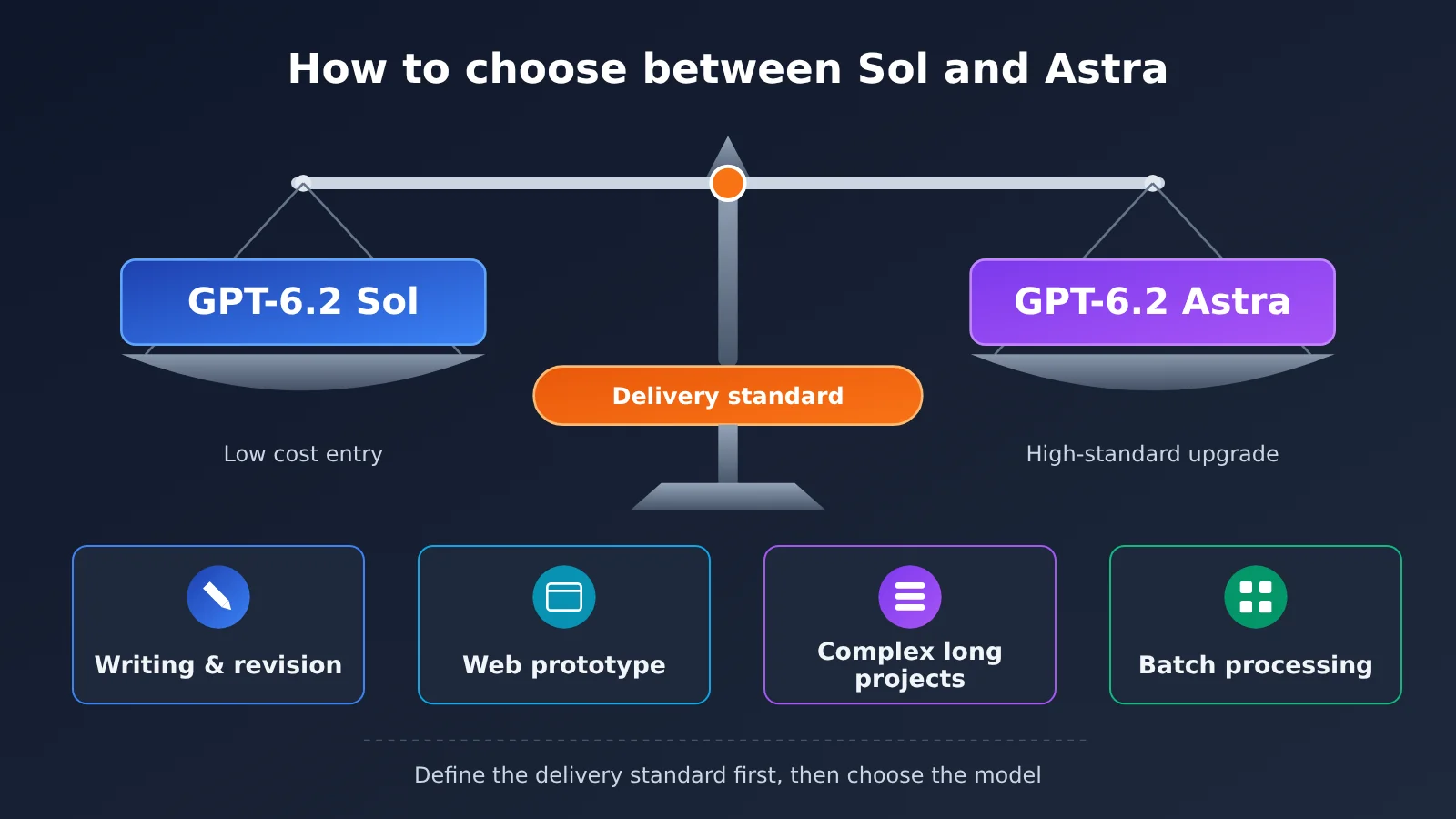
The short answer: for most everyday writing, web prototypes, and batch-processing tasks, start with GPT-6.2 Sol. Switch to GPT-6.2 Astra only when Sol’s output misses the bar you defined up front, or when the cost of reworking it has already exceeded the price gap. The official API list price for the two models differs by 4x. OpenAI’s official evaluations show the gap is small on some tasks — but those results only apply to the specific benchmarks used, and can’t be extrapolated into a general conclusion. So the point isn’t which model is stronger; it’s how high your task’s delivery standards need to be.
The recommendation above is editorial advice, not OpenAI’s official model-selection guidance, and not the result of our own hands-on testing. All evaluation figures cited here come from OpenAI’s official report.
What you’ll learn by the end of this article:
- Release dates, availability, input/output capabilities, and official API list prices for GPT-6.2 Sol and Astra.
- Which numbers in the official evaluations actually tell you something, and which can’t be extrapolated.
- Where to start for four common scenarios — everyday writing and revision, web prototypes, complex long-running projects, and budget-sensitive batch processing — when to upgrade to Astra, and which steps always need a human check.
- A copy-and-paste A/B test log you can use to compare factual accuracy, usability, rework rounds, and total cost.
Index: Start with the “To Know” concept table and the at-a-glance impact summary to get the terminology down and see what this release means for different people. Part 1 lays out the objective facts: release details, official evaluations, and pricing rules. Part 2 is the editorial analysis — a scenario-by-scenario decision table, a cost-estimation method, and an A/B testing workflow, plus source links at the end.
To Know: GPT-6.2 Sol and Astra Related Concepts
| Concept | Brief Explanation |
|---|---|
| GPT-6.2 Astra | The higher-positioned, higher-priced model in OpenAI’s GPT-6.2 series, released November 17, 2026 |
| GPT-6.2 Sol | Another model released the same day; its official API list price is about one quarter of Astra’s |
| GDPval v2 | One of the benchmarks used in OpenAI’s official report; this article only cites the improvement margins given officially |
| ALE (Agents’ Last Exam) | Evaluates multi-step professional workflows; the improvement margins in this article use GPT-6 Astra as the baseline and aren’t mixed with GDPval v2 |
| FrontierCode 2.0 | The coding benchmark in the official report; the cost comparison cited in this article only holds within this test |
| max reasoning tier | The highest setting among the model’s reasoning effort options, usually meaning more thinking and higher cost |
| percentage point | The difference between two percentages — for example, going from 50% to 56.2% is a 6.2 percentage point increase |
| cache read | Repeated input content that hits the cache is billed at a lower unit price |
| cache write | The fee incurred when writing content into the cache; the official documentation states this is charged separately |
| 272K threshold | Once a single request’s input exceeds roughly 272,000 tokens, the entire request is billed at a higher multiplier |
| delivery standard | The selection premise proposed by the editor: write clearly in advance “what level of output counts as usable” |
GPT-6.2 Sol and Astra: Impact at a Glance
- Regular ChatGPT users: The official help docs show this rollout is mainly aimed at ChatGPT Work and Codex, with the standard Chat experience not included in this round—so you probably won’t notice any change in the short term.
- Developers and small teams: Both models will gradually open up through the API. Given the 4x difference in unit price, your model-routing strategy will directly affect the bill, so it’s worth planning ahead.
- Content creators: Both models take text and images as input and output text. They don’t have native video generation, so they can’t replace video generation tools.
- Budget-conscious batch users: The multiplier rule for long inputs beyond 272K has a big impact on the cost of processing large batches of long documents—more important than simply comparing per-unit prices.
1. The Objective Facts About GPT-6.2 Sol and Astra
This section only compiles information OpenAI has made public. It contains no editorial judgment. Verified as of November 18, 2026.
1.1 GPT-6.2 Sol and Astra: Release and Availability
On November 17, 2026, OpenAI released GPT-6.2 Astra and GPT-6.2 Sol at the same time. According to the official notes, both models will roll out gradually to ChatGPT Work, Codex, and the API — regular Chat isn’t part of this round. “Gradual rollout” means different accounts may get access at different times, so check the official help docs for the specifics.
As for what these models can do: both accept text and image input and produce text output. The official materials don’t mention native video generation. If video generation is what you need, this release won’t directly solve it.
1.2 Official Benchmark Data for GPT-6.2 Sol and Astra
The table below summarizes the benchmark conclusions from the official report. Keep in mind that each row is an independent benchmark with a different baseline — you can’t compare numbers across rows.
| Benchmark | Subject | Result in the official report | Caveats |
|---|---|---|---|
| GDPval v2 | GPT-6.2 Astra | +6.2 percentage points vs. GPT-6 Astra, with 22% fewer output tokens | Baseline is the previous-generation Astra |
| GDPval v2 | GPT-6.2 Sol | +5.3 percentage points vs. GPT-6.1 Sol | Baseline is GPT-6.1 Sol, which differs from Astra’s baseline |
| ALE | GPT-6.2 Astra | +5.2 points vs. GPT-6 Astra | The unit is “points” — don’t mix it up with GDPval’s “percentage points” |
| FrontierCode 2.0 | Sol vs. Astra | With both at the max reasoning tier, Sol is within 0.5 points of Astra at roughly 1/5 the task cost | Only holds for this test at this reasoning tier — not a general cost conclusion |
All of the above come from OpenAI’s official report, not from our team’s own testing. As for the 22% reduction in Astra’s output tokens — that figure is given in the GDPval v2 context, so whether it carries over to your specific tasks is something you’ll need to verify yourself.
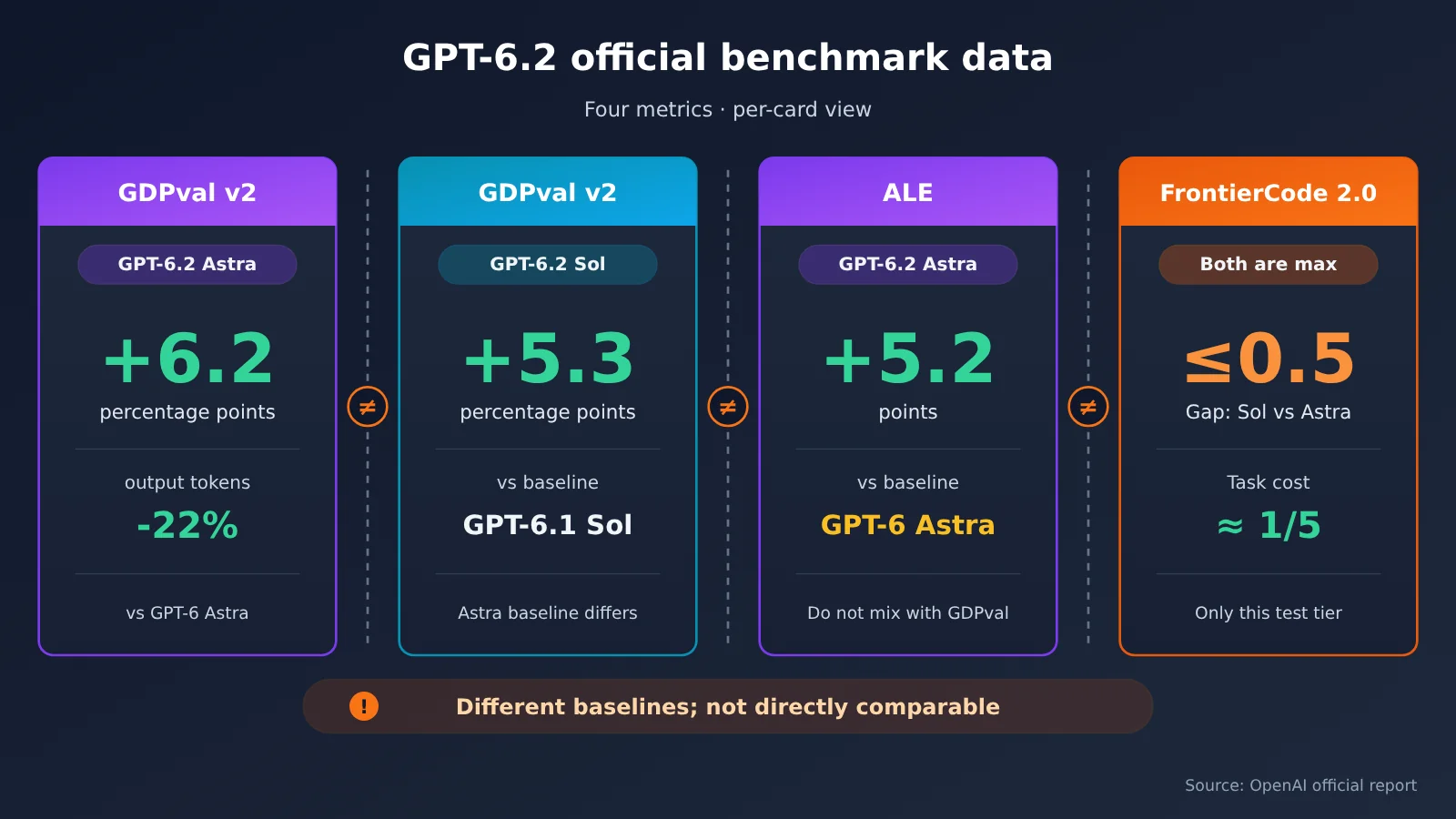
The chart above breaks the four benchmarks into separate cards so readers don’t mistakenly compare numbers from different baselines side by side. If you want to run your own comparison against your business data, you can record results using the template in section 2.4, then switch models within the same codebase through an OpenAI-compatible endpoint like APIYI apiyi.com.
1.3 Official API Pricing Rules for GPT-6.2 Sol and Astra
Here are the official standard API prices, in USD per million tokens:
| Billing item | GPT-6.2 Astra | GPT-6.2 Sol | Notes |
|---|---|---|---|
| Uncached input | $8 | $2 | Sol is 1/4 of Astra |
| Cache read | $0.4 | $0.1 | Input unit price after a cache hit |
| Output | $40 | $10 | Sol is 1/4 of Astra |
| Cache write | Billed separately | Billed separately | See the official model page for details |
| Input over 272K | Input and cache rates ×2, output ×1.5 for the entire request | Same as left | Calculated on the whole request, not just the portion above the threshold |
Pay close attention to that last row. Once you cross the 272K threshold, the multiplier applies to the entire request, not just the tokens above the threshold. For tasks that need to stuff in large amounts of long documents, you should budget for this rule separately rather than looking only at the base unit price.
💡 Pricing note: The table above shows OpenAI’s official standard API prices. Third-party platform pricing and availability need to be verified separately. This article has not verified whether these two models are available on APIYI (apiyi.com) — please refer to the platform’s model list.
2. How to Choose Between GPT-6.2 Sol and Astra: The Editor’s Analysis
The following is the editor’s inference and advice based on the facts in Part 1. It does not represent OpenAI’s official position, nor has it been verified by our own testing.
2.1 Define Delivery Criteria First, Then Choose GPT-6.2 Sol or Astra
When many people choose a model, their first reaction is to ask, “Which one is stronger?” But the official FrontierCode 2.0 data suggests another angle: in this test, when both were at the max reasoning tier, the gap between Sol and Astra was within 0.5 points, yet the task cost was only about 1/5. Even if this conclusion can’t be extrapolated, it’s enough to show that the gain from “being stronger” may be small, while the cost difference may be large.
So the editor recommends answering three questions before choosing a model: Who will use this output? How costly would an error be? How many rounds of rework can you accept at most? The clearer the answers, the easier it is to judge whether Sol is already good enough. If the delivery criteria aren’t clear, switching to Astra just means repeating the trial-and-error process in a more expensive way.
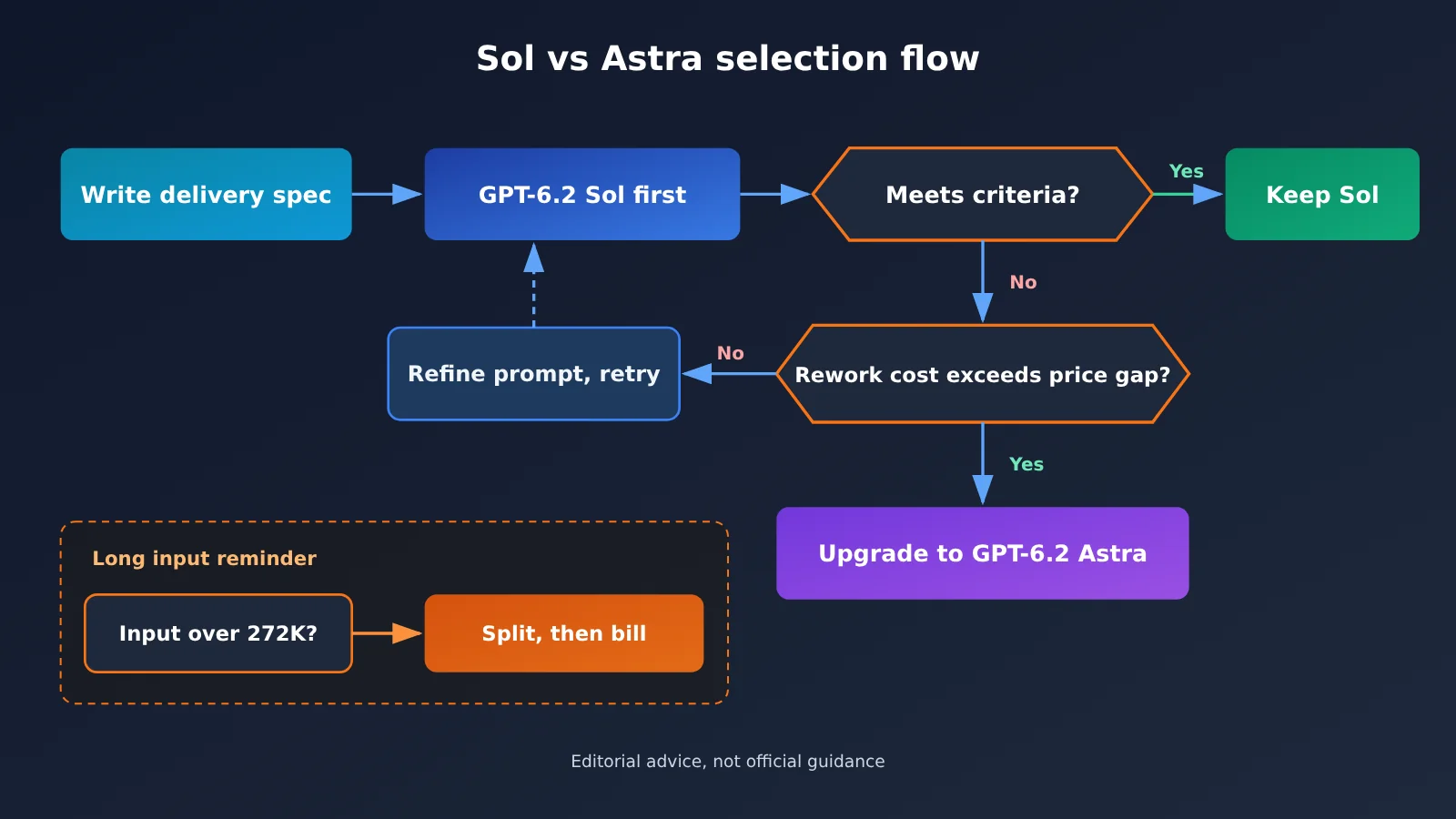
2.2 Decision Table for 4 Scenarios: GPT-6.2 Sol vs. Astra
The table below is editorial advice, not official guidance. “Escalation trigger conditions” mean situations where it’s worth trying Astra; “manual checkpoints” are steps you can’t skip no matter which model you use.
| Scenario | Starting model | Trigger conditions to escalate to Astra | Points that require manual checks |
|---|---|---|---|
| Everyday writing and editing | GPT-6.2 Sol | After 2–3 consecutive rounds the tone or structure still doesn’t meet requirements; need to handle long-form writing with rigorous argumentation | Facts, data, quotes, and names; whether the original meaning was altered without authorization |
| Web prototype | GPT-6.2 Sol | Interaction logic spans multiple pages, and the code Sol generates repeatedly has state errors; need high-fidelity reproduction based on design mockup images | Actually run it in the browser; form validation, mobile adaptation; whether the dependencies actually exist |
| Complex long projects | Depends on delivery standards; you can try Astra directly | Task chain is long with heavy context dependencies, and one mistake causes large-scale downstream rework | Key decision nodes, cross-file consistency, test coverage |
| Budget-sensitive batch processing | GPT-6.2 Sol | Error rate in sampling exceeds your set threshold, and post-processing correction costs more | Proportional sampling checks; whether a single input exceeds 272K; cache hit rate |
In everyday writing and editing scenarios, the challenge is usually factual accuracy and style fit, not reasoning depth. Starting with Sol is more cost-effective, but regardless of which model you use, data and quotes must be manually verified.
In web prototype scenarios, “it runs” is a hard standard that can be objectively judged. To determine whether Sol is sufficient, you need to actually run it and check the core interactions, error states, and mobile adaptation — you can’t decide whether to escalate based on a single successful run.
Complex long projects are the scenario with the strongest case for directly considering Astra. The official report’s 22% reduction in output tokens on GDPval v2 uses the older GPT-6 Astra as the comparison baseline, so you can’t use it to estimate savings relative to GPT-6.2 Sol. The total task cost of the two new models still needs to be verified independently under the same delivery standards. For budget-sensitive batch processing, you should prioritize controlling the length of each individual input to avoid triggering the 272K multiplier.
2.3 How to Estimate Costs for GPT-6.2 Sol and Astra
Here’s an illustrative calculation using official list prices to show how billing rules affect costs—not a representation of consumption for any real task. Assume a single request has 50K input tokens (excluding cache) and 5K output tokens:
- Sol: 0.05 × $2 + 0.005 × $10 = $0.15
- Astra: 0.05 × $8 + 0.005 × $40 = $0.60
If you increase input to 300K tokens and output to 10K tokens, you trigger the 272K multiplier:
- Sol: 0.3 × $4 + 0.01 × $15 = $1.35
- Astra: 0.3 × $16 + 0.01 × $60 = $5.40
This example illustrates two things. First, at the same token usage, the price gap stays around 4x. Second, once you cross 272K, per-request cost rises significantly. For batch jobs, splitting long documents below the threshold may reduce the long-context surcharge, but net savings depend on repeated context, extra requests, and quality loss—you can’t assume it saves more money than switching models.
Real costs also depend on actual output length and rework rounds. If Sol needs an average of 3 rounds to meet the bar while Astra gets it done in 1, the final bill gap narrows—which is why Section 2.4 recommends tracking “rework rounds.”
The code below is only an integration example and was not tested for this article. The A/B script outputs an official list-price equivalent estimate assuming no caching and input of no more than 272K, not an actual third-party bill; third-party costs should be calculated using their actual rates.
The example code below shows how to switch models within the same codebase. The model IDs follow the naming on the official model page; refer to the actual model list on your platform for what’s available:
import openai

client = openai.OpenAI(
    api_key="YOUR_API_KEY",
    base_url="https://api.apiyi.com/v1"  # APIYI OpenAI-compatible endpoint; model availability is subject to the platform's model list
)

response = client.chat.completions.create(
    model="gpt-6.2-sol",  # Change to "gpt-6.2-astra" when you need to upgrade
    messages=[{"role": "user", "content": "按以下交付标准改写这段文案:……"}]
)
print(response.choices[0].message.content)
print(response.usage)  # Record token usage to calculate total cost
View the A/B comparison script (run the same task on both models and record usage)
import openai

PRICES = {  # Equivalent estimate from official standard pricing, not an actual third-party bill; applies only to requests with ≤272K input and no caching
    "gpt-6.2-sol":   {"input": 2.0, "output": 10.0},
    "gpt-6.2-astra": {"input": 8.0, "output": 40.0},
}

client = openai.OpenAI(
    api_key="YOUR_API_KEY",
    base_url="https://api.apiyi.com/v1"  # Switch models through the unified APIYI interface
)

def run_once(model: str, prompt: str) -> dict:
    resp = client.chat.completions.create(
        model=model,
        messages=[{"role": "user", "content": prompt}],
    )
    u = resp.usage
    cached = getattr(getattr(u, "prompt_tokens_details", None), "cached_tokens", 0) or 0
    if u.prompt_tokens > 272000 or cached:
        raise ValueError("This simplified estimate only applies to requests with input ≤272K and no caching")
    p = PRICES[model]
    cost = u.prompt_tokens / 1e6 * p["input"] + u.completion_tokens / 1e6 * p["output"]
    return {
        "model": model,
        "output": resp.choices[0].message.content,
        "input_tokens": u.prompt_tokens,
        "output_tokens": u.completion_tokens,
        "official_standard_equivalent_usd": round(cost, 4),
    }

task = "Put the full prompt and delivery criteria for the same task here"
for m in PRICES:
    r = run_once(m, task)
    print(r["model"], r["input_tokens"], r["output_tokens"], r["official_standard_equivalent_usd"])
🚀 Getting started tip: The key to an A/B test is “same task, same prompt, same delivery standard.” When you use an OpenAI-compatible interface like APIYI apiyi.com, switching models is just a matter of changing the
modelparameter — which makes it much easier to control variables. Before you go live, confirm that the target model already shows up in the platform’s model list.
2.4 A/B Test Record Template for GPT-6.2 Sol vs. Astra
Below is a blank template — fill in your own test results. Pick at least 3–5 representative tasks per scenario and record each one separately; don’t draw conclusions from a single run.
| Check dimension | How to record it | GPT-6.2 Sol | GPT-6.2 Astra |
|---|---|---|---|
| Factual accuracy | Verify data, quotes, and names one by one; record the number of errors | ||
| Usability | Does it meet the delivery standard you defined in advance (yes / no / partly) | ||
| Number of rework rounds | How many rounds it took from first generation to meeting the bar | ||
| Input / output tokens | Cumulative across all rounds; watch for exceeding 272K | ||
| Total cost | Calculated from cumulative tokens across all rounds, including rework rounds | ||
| Manual effort | Minutes spent checking and editing | ||
| Verdict | Which model to use by default for this task going forward |
When filling this in, it’s best to look at “total cost” and “manual effort” together. If the value of the human time Astra saves exceeds the extra API fees you pay, upgrading makes sense; if not, stick with Sol and put your energy into refining prompts and delivery standards.
2.5 How Small Teams Can Design Routing for GPT-6.2 Sol and Astra
For small teams, our editors suggest a routing approach of “Sol by default, upgrade to Astra when conditions call for it.” Specifically, you can bake the trigger conditions from the table in Section 2.2 into your workflow: for instance, if a certain type of task gets reworked more than a set number of rounds, automatically switch to Astra to regenerate it, and log the reason. After accumulating data for a while, you’ll end up with a selection basis grounded in your own business data—more reliable than any general-purpose benchmark.
This kind of routing needs an access layer that makes switching models easy. APIYI apiyi.com offers an OpenAI-compatible interface, where a single API key lets you call multiple mainstream models—well suited for building this kind of routing. That said, before the GPT-6.2 series officially shows up in the platform’s model list, get the workflow running smoothly with existing models first.
There’s one more thing worth keeping an eye on: both models are in a gradual rollout phase, so official pricing, availability scope, and model page details may all change. The following judgment is a prediction: as more third-party evaluations appear, the gap between Sol and Astra on specific tasks will be broken down in finer detail than the official reports suggest. When that happens, your own A/B record table will be a more valuable reference than any single benchmark score.
References
- OpenAI official release page: Release notes and official benchmarks for GPT-6.2 Astra and Sol
- Link:
openai.com/index/introducing-gpt-6-2-astra-sol/ - Notes: All the GDPval v2, ALE, and FrontierCode 2.0 data in this article comes from this page
- Link:
- OpenAI Help Center: Availability details for ChatGPT Work and Codex
- Link:
help.openai.com/en/articles/20001275-chatgpt-work-and-codex - Notes: Rollout scope and details on gradual availability
- Link:
- GPT-6.2 Astra model info: Official API model page
- Link:
developers.openai.com/api/docs/models/gpt-6.2-astra - Notes: Pricing, caching, and long-context billing rules
- Link:
- GPT-6.2 Sol model info: Official API model page
- Link:
developers.openai.com/api/docs/models/gpt-6.2-sol - Notes: Pricing, caching, and long-context billing rules
- Link:
Models keep evolving. The more reliable approach is to define your delivery standards clearly first, then compare them using the same task. If you want to compare multiple models within a single codebase, you can access them through APIYI apiyi.com and then record the results using the template in this article.
Preparedness ensures success; unpreparedness spells failure. — The Book of Rites · Doctrine of the Mean
Author: APIYI Technical Team
Technical discussion: Feel free to reach out to us on the APIYI apiyi.com homepage. For more integration resources, visit the docs.apiyi.com documentation center