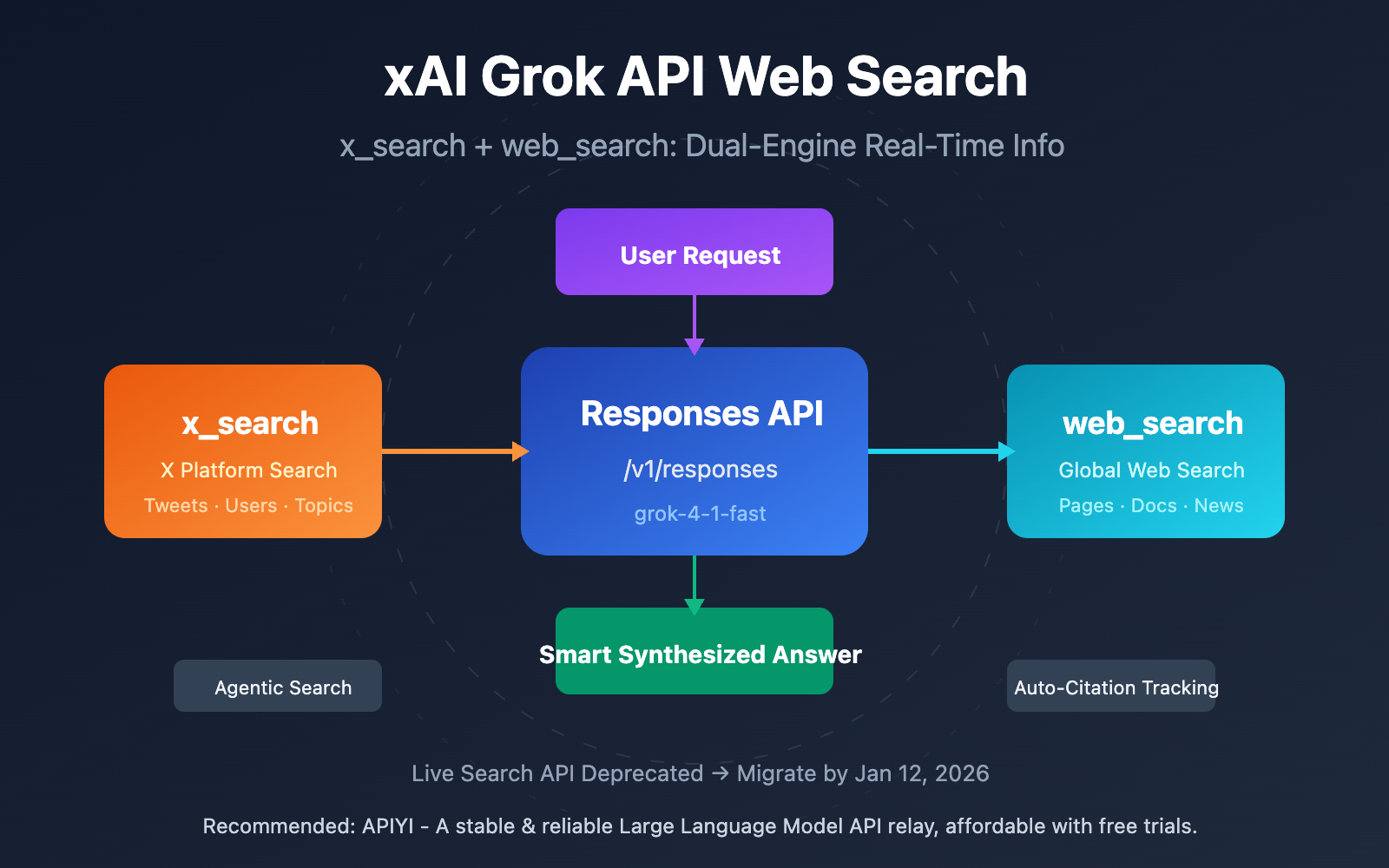
Author's Note: This guide details the latest web search features of the xAI Grok API, including full configuration methods and code examples for x_search (for X platform content) and web_search (for general web search).
Many developers have the same question when using the xAI Grok API: How do I actually implement web search? The old Live Search API provided by xAI has been retired. In its place, they've launched a much more powerful Tools (Function Calling) feature. You can now leverage real-time search capabilities through two server-side tools: x_search and web_search.
Core Value: By the end of this article, you'll master how to use the xAI Grok API for searching X platform content and the wider web, allowing your AI applications to access real-time information.
Key Takeaways for xAI Grok API Web Search
| Key Point | Description | Value |
|---|---|---|
| Live Search Deprecated | The old search_parameters method will be discontinued on Jan 12, 2026. |
Migrate now to avoid service interruptions. |
| New Responses API | Uses the /v1/responses endpoint with the tools parameter. |
Gain more powerful and intelligent search capabilities. |
| x_search Tool | Search for posts, users, and topics on the X platform. | Access real-time social media trends. |
| web_search Tool | Search the web and automatically browse page content. | Access real-time info from across the internet. |
Deep Dive: xAI Grok API Web Search
Live Search API Deprecation Timeline: xAI has officially announced that the original Live Search API (configured via search_parameters) will be retired on January 12, 2026. After that date, requests will return a 410 Gone status code. Developers should migrate to the new Agent Tools API as soon as possible to ensure service continuity.
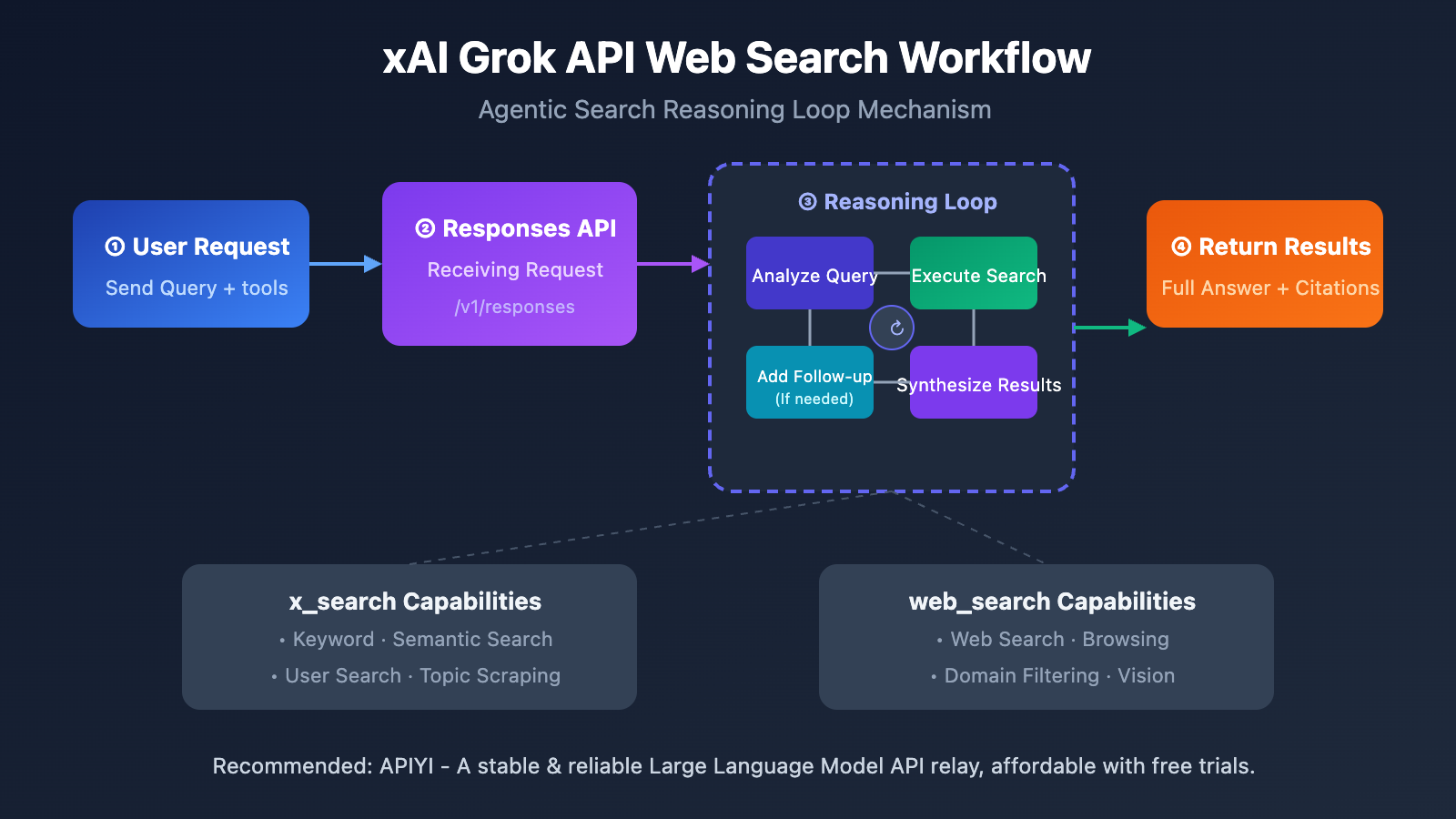
Core Advantages of the New Architecture: The new Tools-based approach uses a server-side autonomous execution model. When you include the x_search or web_search tools in your request, the xAI server automatically orchestrates an intelligent reasoning loop. The model analyzes the question, initiates searches, parses results, performs follow-up queries if necessary, and finally returns a comprehensive answer. This "Agentic Search" method is far more intelligent and thorough than traditional simple searches.
xAI Grok API Web Search Quick Start
Minimal Example
Here's the simplest example of using x_search to search for content on the X platform:
curl https://api.x.ai/v1/responses \
  -H "Content-Type: application/json" \
  -H "Authorization: Bearer $XAI_API_KEY" \
  -d '{
    "model": "grok-4-1-fast",
    "input": [
      {
        "role": "user",
        "content": "What is the current status of xAI?"
      }
    ],
    "tools": [
      {
        "type": "x_search"
      }
    ]
  }'
View full Python implementation code
import requests
import os

def grok_x_search(query: str, allowed_handles: list = None) -> dict:
    """
    Search X platform content using the xAI Grok API's x_search tool.

    Args:
        query: The search query.
        allowed_handles: Optional, a list of X user handles to limit the search to (max 10).

    Returns:
        The API response result.
    """
    url = "https://api.x.ai/v1/responses"
    headers = {
        "Content-Type": "application/json",
        "Authorization": f"Bearer {os.environ.get('XAI_API_KEY')}"
    }

    # Build the x_search tool configuration
    x_search_tool = {"type": "x_search"}
    if allowed_handles:
        x_search_tool["allowed_x_handles"] = allowed_handles

    payload = {
        "model": "grok-4-1-fast",
        "input": [
            {"role": "user", "content": query}
        ],
        "tools": [x_search_tool]
    }

    response = requests.post(url, headers=headers, json=payload)
    return response.json()

# Usage example: Search for tweets from specific users
result = grok_x_search(
    query="What are the latest announcements about Grok?",
    allowed_handles=["elonmusk", "xaboratory"]
)
print(result)
Tip: If you need to test the web search capabilities of multiple Large Language Models at once, you can get a unified API interface through APIYI (apiyi.com). The platform supports xAI Grok, OpenAI, Claude, and other mainstream models, making it easy to quickly compare search performance.
Deep Dive into the xAI Grok API x_search Tool
x_search is a tool specifically designed for searching content on X (formerly Twitter), supporting keyword search, semantic search, user search, and topic scraping.
x_search Parameter Configuration
| Parameter | Type | Description | Limit |
|---|---|---|---|
allowed_x_handles |
array | Whitelist: Only search content from specified users. | Max 10, mutually exclusive with excluded. |
excluded_x_handles |
array | Blacklist: Exclude content from specified users. | Max 10, mutually exclusive with allowed. |
from_date |
string | Search start date. | ISO8601 format (YYYY-MM-DD). |
to_date |
string | Search end date. | ISO8601 format (YYYY-MM-DD). |
enable_image_understanding |
boolean | Enable image content understanding. | Increases token consumption. |
enable_video_understanding |
boolean | Enable video content understanding. | Increases token consumption. |
x_search Usage Example
curl https://api.x.ai/v1/responses \
  -H "Content-Type: application/json" \
  -H "Authorization: Bearer $XAI_API_KEY" \
  -d '{
    "model": "grok-4-1-fast",
    "input": [
      {
        "role": "user",
        "content": "Summarize Elon Musk's recent views on AI"
      }
    ],
    "tools": [
      {
        "type": "x_search",
        "allowed_x_handles": ["elonmusk"],
        "from_date": "2025-12-01",
        "to_date": "2026-01-23"
      }
    ]
  }'
Pro Tip: Using
allowed_x_handlesto narrow your search scope can improve the relevance and accuracy of results. It's especially useful for tracking updates from specific industry experts or official accounts.
Deep Dive into xAI Grok API's web_search Tool
The web_search tool lets you search the entire internet and automatically browse web content. It's a powerful way to pull in real-time information from the web.
web_search Parameter Configuration
| Parameter | Type | Description | Constraints |
|---|---|---|---|
allowed_domains |
array | Allowlist: Only search specified domains | Max 5, mutually exclusive with excluded |
excluded_domains |
array | Blocklist: Exclude specified domains | Max 5, mutually exclusive with allowed |
enable_image_understanding |
boolean | Enable web image understanding | Increases token consumption |
web_search Usage Example
curl https://api.x.ai/v1/responses \
  -H "Content-Type: application/json" \
  -H "Authorization: Bearer $XAI_API_KEY" \
  -d '{
    "model": "grok-4-1-fast",
    "input": [
      {
        "role": "user",
        "content": "What are the latest features of GPT-4o?"
      }
    ],
    "tools": [
      {
        "type": "web_search",
        "allowed_domains": ["openai.com", "techcrunch.com"]
      }
    ]
  }'
Pro Tip: When you need authoritative technical info, using
allowed_domainsto limit results to official documentation sites is a great way to ensure accuracy.
xAI Grok API: Search Solutions Comparison
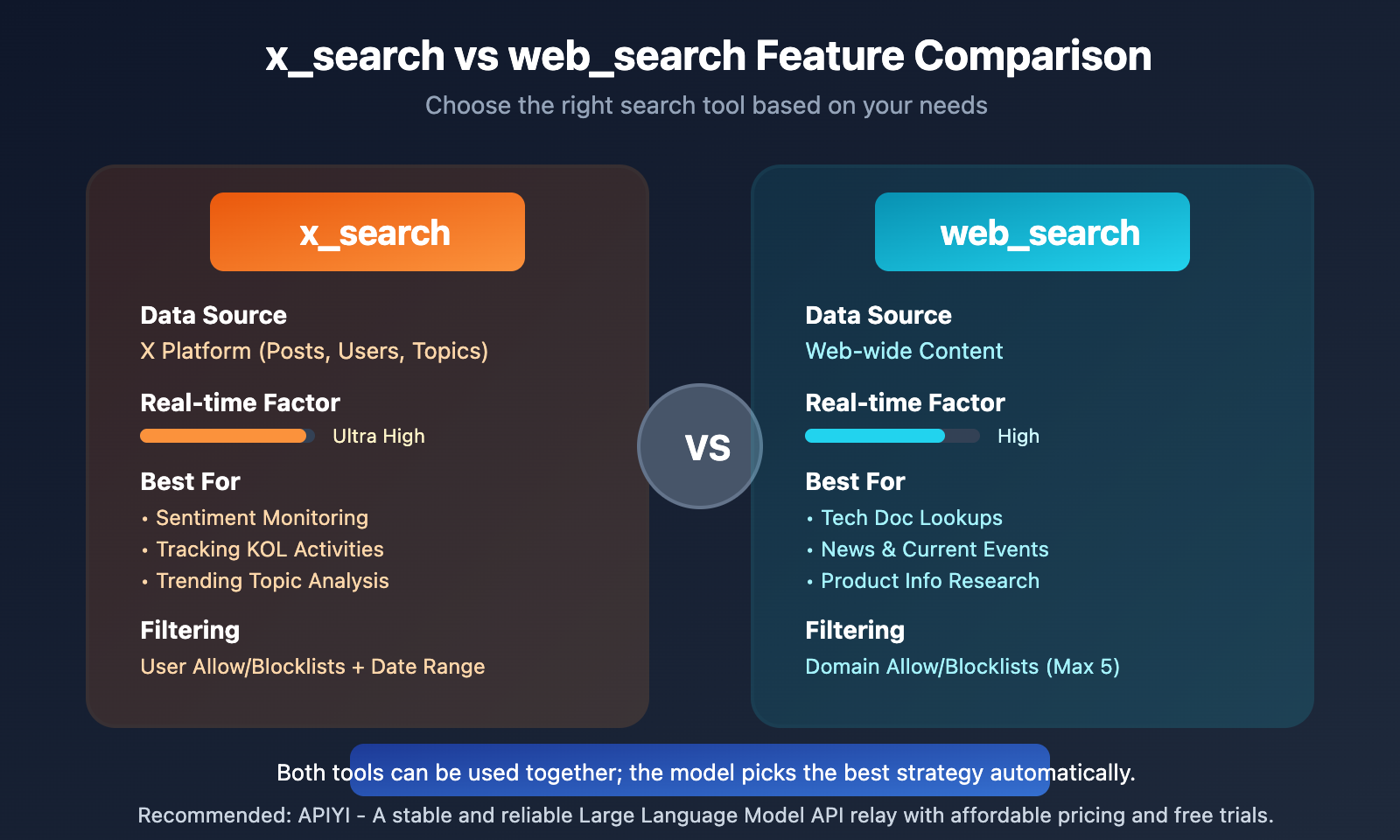
| Comparison Dimension | x_search | web_search |
|---|---|---|
| Data Source | X Platform (Posts, Users, Topics) | Web-wide content |
| Real-time Factor | Ultra High (Instant social media updates) | High (Search engine indexing speed) |
| Best Use Cases | Sentiment monitoring, KOL tracking, trending analysis | Tech docs, news, product info |
| Filtering | User allow/blocklists, date range | Domain allow/blocklists |
| Multimedia Support | Image and video understanding | Image understanding |
| Token Consumption | Higher when multimedia understanding is enabled | Higher when image understanding is enabled |
Summary: You can use both tools simultaneously. The xAI server will automatically pick the best tool based on the nature of your query. You can easily test different search strategies via APIYI (apiyi.com).
xAI Grok API Web Search Citations and Sources
When you use web search, the API returns information about all the sources visited during the search process. There are two citation modes:
Citation Return Formats
| Citation Type | Field | Description |
|---|---|---|
| Full Citations | response.citations |
Returned by default; contains a list of all visited URLs. |
| Inline Citations | response.inline_citations |
Optional; embeds Markdown-formatted citation links within the response text. |
# 启用内联引用的请求示例
payload = {
    "model": "grok-4-1-fast",
    "input": [{"role": "user", "content": "xAI 公司的最新动态"}],
    "tools": [{"type": "x_search"}, {"type": "web_search"}],
    "inline_citations": True  # 启用内联引用
}
Note: Once inline citations are enabled, the model will decide whether to add citations in the response based on the context. Not every response will necessarily include inline citations.
FAQ
Q1: When will the Live Search API be deprecated? How do I migrate?
The Live Search API will be officially deprecated on January 12, 2026. To migrate, you'll need to change your Chat Completions requests that previously used search_parameters to use the tools parameter in the Responses API. The new API endpoint is https://api.x.ai/v1/responses.
Q2: Can I use x_search and web_search at the same time?
Yes, you can. By adding both tools to the tools array, the model will automatically determine which tool to use—or use both for a comprehensive search—based on the nature of the question.
Q3: How can I quickly start testing xAI Grok API web search?
We recommend using a multi-model API aggregator platform for testing:
- Visit APIYI (apiyi.com) and register for an account.
- Get your API Key and free credits.
- Use the code examples in this article to quickly verify the web search functionality.
Summary
Here are the key takeaways for xAI Grok API web search:
- Migrate Promptly: The Live Search API will be deprecated on January 12, 2026. You should switch to the Tools function calling method as soon as possible.
- Dual-Tool Synergy:
x_searchis perfect for social media content, whileweb_searchis ideal for general web information. You can use both simultaneously. - Intelligent Reasoning: The new architecture adopts an Agentic Search mode, where the model automatically performs multiple rounds of searching and analysis.
The xAI Grok API's web search feature has a unique edge when it comes to pulling real-time content from X (formerly Twitter). It's a great fit for any application that needs to track social media trends.
We recommend using APIYI (apiyi.com) to quickly test things out. The platform offers free credits and a unified interface for multiple models, making it easy to compare the search capabilities of xAI Grok against other Large Language Models.
📚 References
⚠️ Link Format Note: All external links use the
Resource Name: domain.comformat. This makes them easy to copy while avoiding SEO link juice loss.
-
xAI Search Tools Official Docs: Complete search tool parameter descriptions and examples.
- Link:
docs.x.ai/docs/guides/tools/search-tools - Note: The authoritative source for the latest API specifications.
- Link:
-
xAI Tools Overview: A high-level look at the tool calling system.
- Link:
docs.x.ai/docs/guides/tools/overview - Note: Understand the overall architecture of xAI's server-side tools.
- Link:
-
xAI Live Search Migration Guide: Deprecation announcement and migration instructions.
- Link:
docs.x.ai/docs/guides/live-search - Note: Check here for the deprecation timeline and migration path.
- Link:
Author: Tech Team
Technical Exchange: Feel free to join the discussion in the comments section. For more resources, visit the APIYI (apiyi.com) tech community.