Author's Note: How architectural design institutes use Nano Banana Pro API to batch generate concept renderings, scheme comparisons, and presentation drawings—with actual costs at just 20% of the official price.
Architectural designers produce a huge volume of concept sketches, scheme renderings, and presentation materials every day. Traditional rendering workflows are time-consuming and expensive. This article will show you how to use the Nano Banana Pro API to batch-generate architectural renderings, helping design institutes move quickly from sketch to final render.
Core Value: By the end of this article, you'll have mastered an AI image generation workflow specifically for architectural design, enabling batch output that's cost-effective and consistently high-quality.
Core Highlights of Nano Banana Pro in Architectural Design
| Key Point | Description | Value |
|---|---|---|
| Native 4K Resolution | Supports ultra-HD output up to 3840×2160. | Perfect for large-scale exhibition boards and presentation materials. |
| Batch Generation | API calls support concurrent requests. | Generate hundreds of concept drawings in a single day. |
| Significant Cost Advantage | Access via APIYI at just 20% of official prices. | $0.05 per image (same price for 1K-4K). |
| Style Consistency | Use reference images to maintain design language. | Ensures visual cohesion during project presentations. |
| Complex Instruction Parsing | Multimodal architecture supports precise descriptions. | Accurately renders professional architectural terms and fine details. |
Technical Advantages of Nano Banana Pro
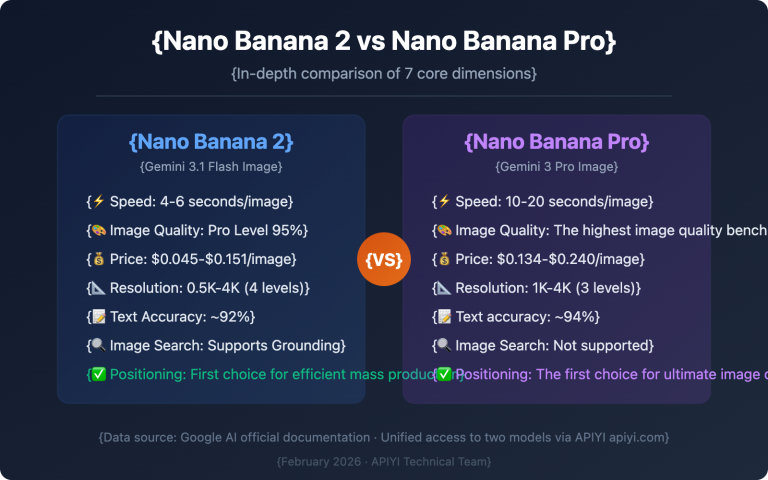
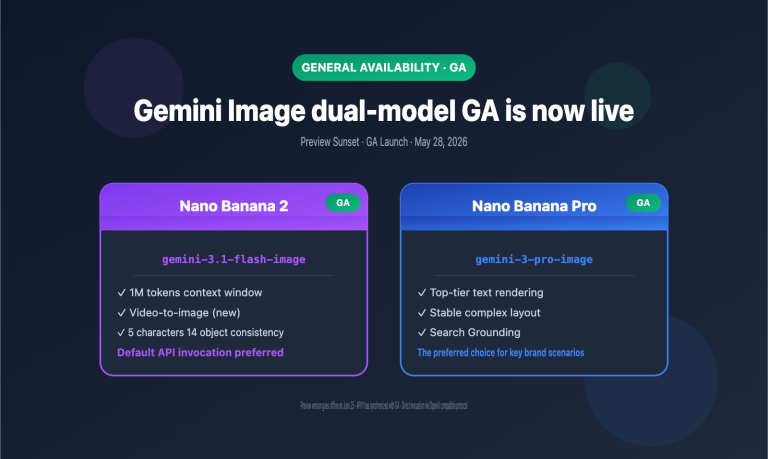
Nano Banana Pro is an image generation model developed by Google DeepMind based on Gemini 3 Pro. Unlike traditional diffusion models (such as Imagen 3), it employs a multimodal architecture that's far better at grasping complex architectural design instructions.
This model currently tops the LMSYS Chatbot Arena image generation leaderboard with the highest ELO score. It's particularly adept at handling architectural scenes that require precise spatial relationships, material descriptions, and lighting effects. For design institutes needing massive concept output, its stable output quality and efficient API capabilities are major competitive advantages.
Why Architectural Design Institutes Need API Access
Traditional web-based AI tools (like Midjourney or DALL-E) have obvious efficiency bottlenecks: you can only generate one image at a time, you're constantly copy-pasting prompts, and you can't integrate them with internal systems. With API access, design institutes can achieve:
- Mass Production: Submit 50-100 generation tasks at once and let them queue automatically.
- System Integration: Connect with BIM software or project management systems to create automated workflows.
- Cost Control: Pay only for actual usage, avoiding the waste of fixed subscription fees.
- Data Security: Enterprise-grade API calls help prevent sensitive design schemes from leaking.
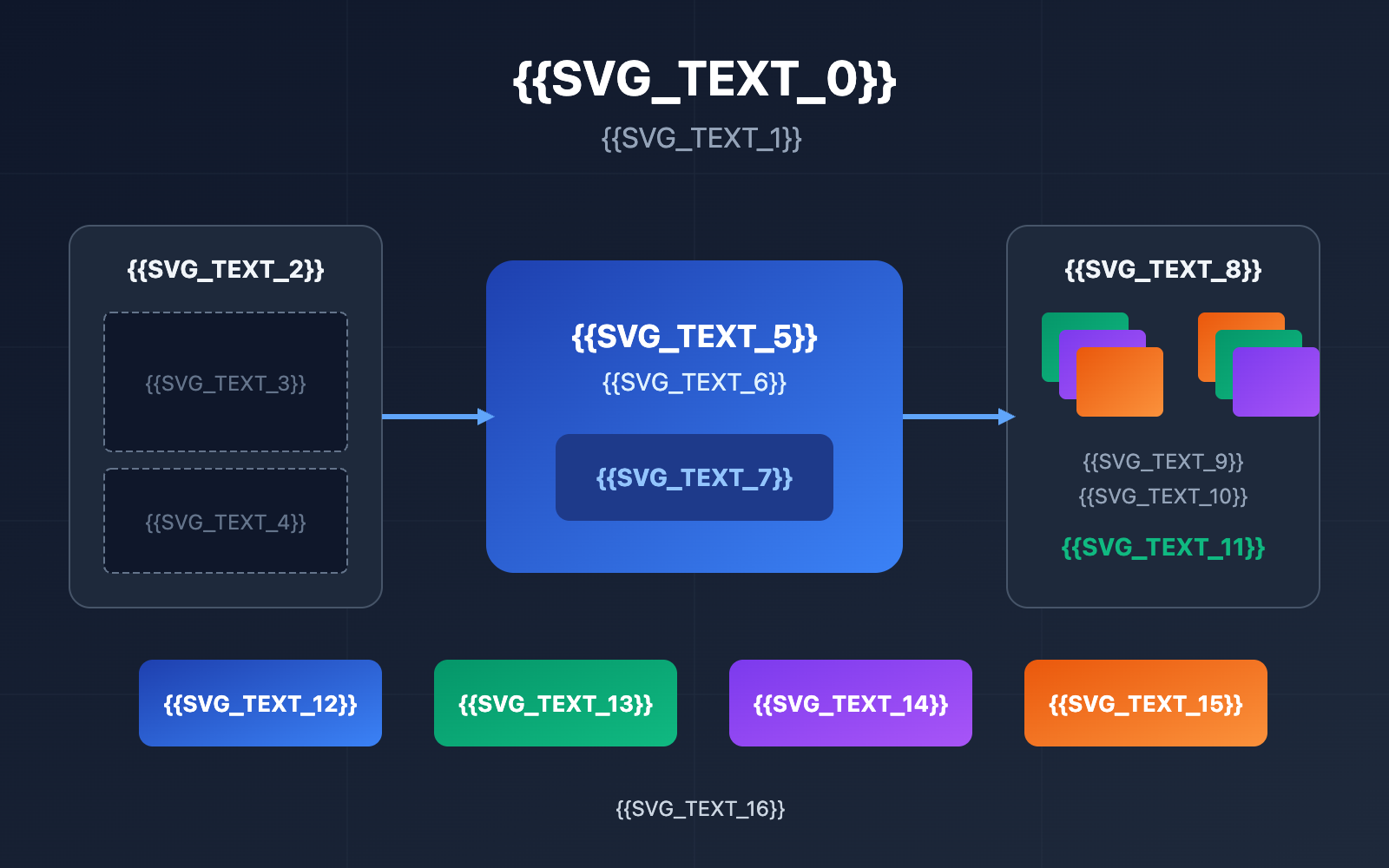
SVG Placeholder Translations:
- {{SVG_TEXT_0}}: Nano Banana Pro: Batch Image Generation for Architectural Design
- {{SVG_TEXT_1}}: AI-Driven Batch Rendering Workflow
- {{SVG_TEXT_2}}: Design Input
- {{SVG_TEXT_3}}: Hand-drawn Sketches
- {{SVG_TEXT_4}}: Prompt Descriptions
- {{SVG_TEXT_5}}: Nano Banana Pro
- {{SVG_TEXT_6}}: Google AI Image Generation
- {{SVG_TEXT_7}}: APIYI · 80% Off Access
- {{SVG_TEXT_8}}: Batch Output
- {{SVG_TEXT_9}}: 4K High-def Renderings
- {{SVG_TEXT_10}}: Only $0.05 Per Image
- {{SVG_TEXT_11}}: 100+ Images Per Day
- {{SVG_TEXT_12}}: 4K Native Resolution
- {{SVG_TEXT_13}}: Batch Concurrent Generation
- {{SVG_TEXT_14}}: Style Consistency
- {{SVG_TEXT_15}}: 80% Cost Savings
- {{SVG_TEXT_16}}: Recommended APIYI: Stable and reliable AI Large Language Model API hub, affordable prices, free trial
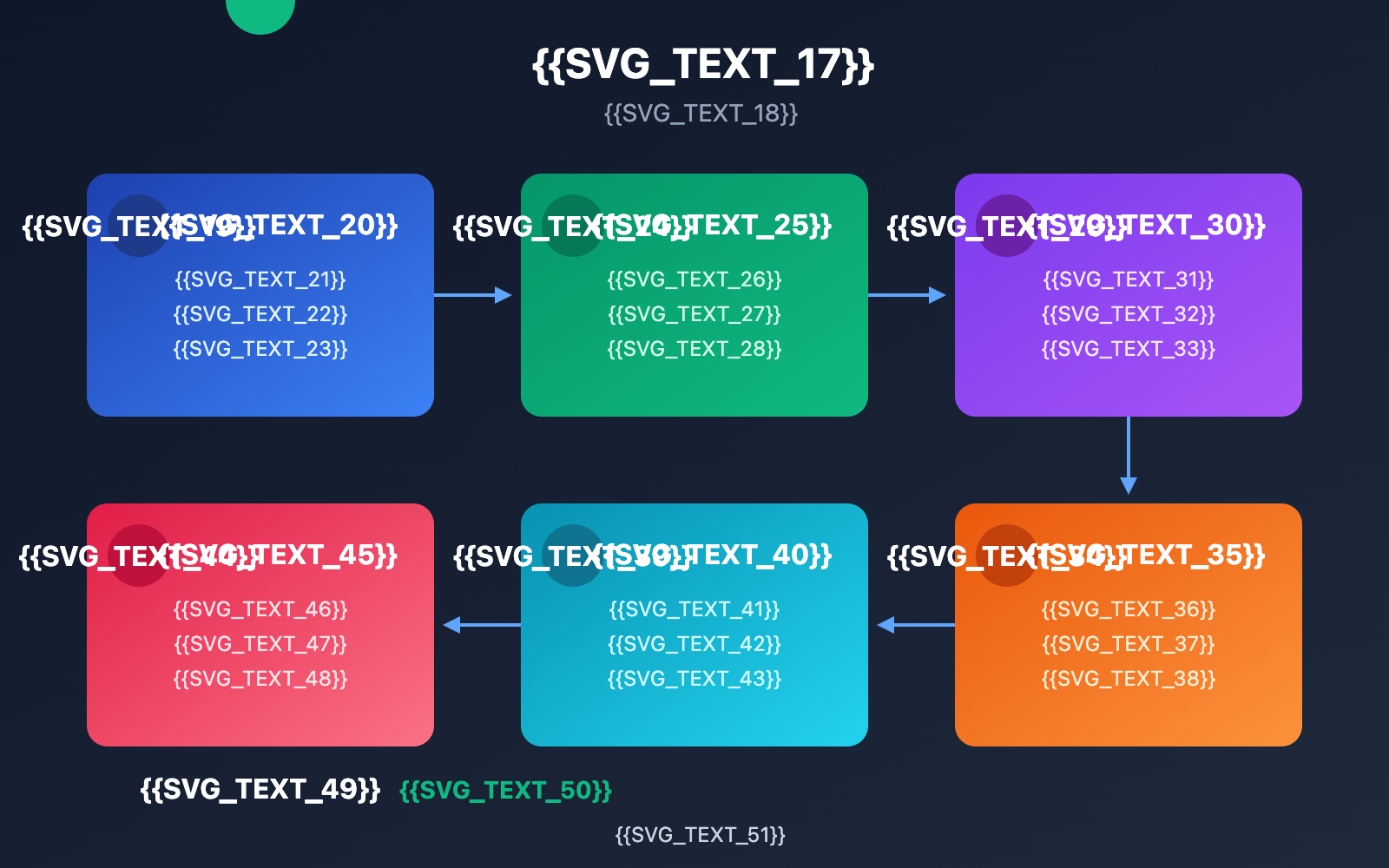
- {{SVG_TEXT_17}}: 6-Step AI Rendering Workflow for Architectural Institutes
- {{SVG_TEXT_18}}: A complete process from requirement analysis to batch output
- {{SVG_TEXT_19}}: 1
- {{SVG_TEXT_20}}: Requirement Analysis
- {{SVG_TEXT_21}}: Define the purpose of renderings
- {{SVG_TEXT_22}}: Determine quantity and resolution
- {{SVG_TEXT_23}}: Organize design key points
- {{SVG_TEXT_24}}: 2
- {{SVG_TEXT_25}}: Prompt Templating
- {{SVG_TEXT_26}}: Build project-specific templates
- {{SVG_TEXT_27}}: Extract reusable style keywords
- {{SVG_TEXT_28}}: Preset scene parameter sets
- {{SVG_TEXT_29}}: 3
- {{SVG_TEXT_30}}: Batch Generation
- {{SVG_TEXT_31}}: Submit API tasks in bulk
- {{SVG_TEXT_32}}: 5-10 concurrent requests
- {{SVG_TEXT_33}}: Auto-save and naming
- {{SVG_TEXT_34}}: 4
- {{SVG_TEXT_35}}: Screening & Optimization
- {{SVG_TEXT_36}}: Quick browse generated results
- {{SVG_TEXT_37}}: Filter images matching intent
- {{SVG_TEXT_38}}: Document high-quality prompts
- {{SVG_TEXT_39}}: 5
- {{SVG_TEXT_40}}: Secondary Refinement
- {{SVG_TEXT_41}}: Image-to-image fine-tuning
- {{SVG_TEXT_42}}: Local area optimization
- {{SVG_TEXT_43}}: Maintain style consistency
- {{SVG_TEXT_44}}: 6
- {{SVG_TEXT_45}}: Integrated Output
- {{SVG_TEXT_46}}: Unified color grading & post-processing
- {{SVG_TEXT_47}}: Arrange by presentation logic
- {{SVG_TEXT_48}}: Export for print/display
- {{SVG_TEXT_49}}: ✓
- {{SVG_TEXT_50}}: Done: 100+ 4K architectural renderings per day
- {{SVG_TEXT_51}}: Recommended APIYI: Stable and reliable AI Large Language Model API hub, affordable prices, free trial
Quick Start with Nano Banana Pro for Architectural Design
Minimalist Example
Here's the simplest way to generate architectural renderings—it only takes about 10 lines of code to get running:
import google.generativeai as genai
from PIL import Image
import io

# Configure APIYI access
genai.configure(
    api_key="YOUR_API_KEY",
    transport="rest",
    client_options={"api_endpoint": "https://vip.apiyi.com"}
)

# Generate architectural rendering
model = genai.GenerativeModel("nano-banana-pro")
response = model.generate_content(
    "Modern minimalist style residential building, white fair-faced concrete exterior walls, "
    "large floor-to-ceiling glass windows, surrounded by green landscaping, "
    "warm lighting at dusk, architectural photography style, 4K HD"
)

# Save the image
if response.candidates[0].content.parts[0].inline_data:
    image_data = response.candidates[0].content.parts[0].inline_data.data
    image = Image.open(io.BytesIO(image_data))
    image.save("architecture_render.png")
View full code for batch generation
import google.generativeai as genai
from PIL import Image
import io
import asyncio
import aiohttp
from typing import List, Dict
import json

class ArchitectureImageGenerator:
    """
    Batch Generator for Architectural Renderings
    Supports concurrent requests, progress tracking, and error retries.
    """

    def __init__(self, api_key: str):
        # Configure APIYI endpoint
        genai.configure(
            api_key=api_key,
            transport="rest",
            client_options={"api_endpoint": "https://vip.apiyi.com"}
        )
        self.model = genai.GenerativeModel("nano-banana-pro")

    def generate_single(self, prompt: str, output_path: str) -> bool:
        """Single image generation"""
        try:
            response = self.model.generate_content(prompt)
            if response.candidates[0].content.parts[0].inline_data:
                image_data = response.candidates[0].content.parts[0].inline_data.data
                image = Image.open(io.BytesIO(image_data))
                image.save(output_path)
                return True
        except Exception as e:
            print(f"Generation failed: {e}")
        return False

    def batch_generate(self, prompts: List[Dict], output_dir: str) -> List[str]:
        """
        Batch generate architectural renderings

        Args:
            prompts: List of dictionaries containing 'name' and 'prompt'
            output_dir: Output directory
        Returns:
            List of successfully generated file paths
        """
        results = []
        for i, item in enumerate(prompts):
            output_path = f"{output_dir}/{item['name']}.png"
            print(f"Generating [{i+1}/{len(prompts)}]: {item['name']}")

            if self.generate_single(item['prompt'], output_path):
                results.append(output_path)
                print(f"✓ Complete: {output_path}")
            else:
                print(f"✗ Failed: {item['name']}")

        return results


# Usage example: Batch generating scheme comparisons
if __name__ == "__main__":
    generator = ArchitectureImageGenerator("YOUR_API_KEY")

    # Define multiple design schemes
    design_schemes = [
        {
            "name": "scheme_A_modern",
            "prompt": "Modernist office building, glass curtain wall facade, "
                     "intersecting geometric volumes, roof garden, daytime natural lighting, "
                     "architectural photography style, 4K HD rendering"
        },
        {
            "name": "scheme_B_neoclassic",
            "prompt": "Neoclassical office building, stone facade, "
                     "symmetrical composition, entrance portico, columnar decoration, "
                     "evening lighting effects, architectural photography style, 4K HD rendering"
        },
        {
            "name": "scheme_C_sustainable",
            "prompt": "Sustainable design office building, vertical green facade, "
                     "solar panel roof, rainwater harvesting system, "
                     "natural lighting atrium, architectural photography style, 4K HD rendering"
        }
    ]

    # Execute batch generation
    results = generator.batch_generate(design_schemes, "./renders")
    print(f"\nBatch generation complete, {len(results)} images total")
Pro Tip: Get access to the Nano Banana Pro API via APIYI at apiyi.com. This is the platform's top-performing flagship model, backed by heavy maintenance resources. It's stable for commercial use, guaranteed official-grade, has no rate limits, and is priced at just 20% of the official site.
Application Scenarios for Nano Banana Pro in Architecture
Six Core Scenarios
| Scenario | Application | Efficiency Boost |
|---|---|---|
| Conceptual Sketches | Rapidly turn hand-drawn sketches into renderings | Traditional: 8 hours → 5 mins |
| Scheme Comparison | Batch generate different styles from the same angle | 10+ schemes in parallel |
| Bidding Presentations | Create a sequence of renderings with a unified style | Full set of materials in a day |
| Design Intent Sync | Quickly verify design ideas described by clients | On-the-spot confirmation |
| Facade Material Testing | Compare different material effects for the same scheme | 5 materials in 10 mins |
| Atmospheric Research | Simulate day/night and seasonal effects | Batch generate timeline effects |
Architectural Design Prompt Guide
Writing high-quality prompts for architectural renderings works best when you follow this structure:
Base Structure: [Building Type] + [Style Characteristics] + [Material Description] + [Environment/Atmosphere] + [Camera Angle] + [Quality Requirements]
| Element | Example | Why it matters |
|---|---|---|
| Building Type | High-rise residential, commercial complex, cultural center | Defines the functional positioning |
| Style | Modern minimalist, Neo-Chinese, parametric design | Sets the design language |
| Materials | Fair-faced concrete, perforated aluminum, wood slats | Specifies the main facade textures |
| Atmosphere | Warm dusk light, rainy/damp, morning mist | Sets the emotional tone |
| Camera Angle | Eye-level, bird's-eye, close-up detail | Chooses the presentation perspective |
| Quality | Architectural photography, 4K HD, HDR | Defines the output fidelity |
Excellent Prompt Example:
Urban waterfront cultural arts center, parametric curved form design,
white UHPC ultra-high performance concrete exterior walls,
large low-reflectivity glass curtain walls,
stepped building massing forming viewing platforms,
golden sunlight at dusk with reflections on water,
eye-level shot from the plaza direction,
architectural photography style, 4K Ultra HD rendering
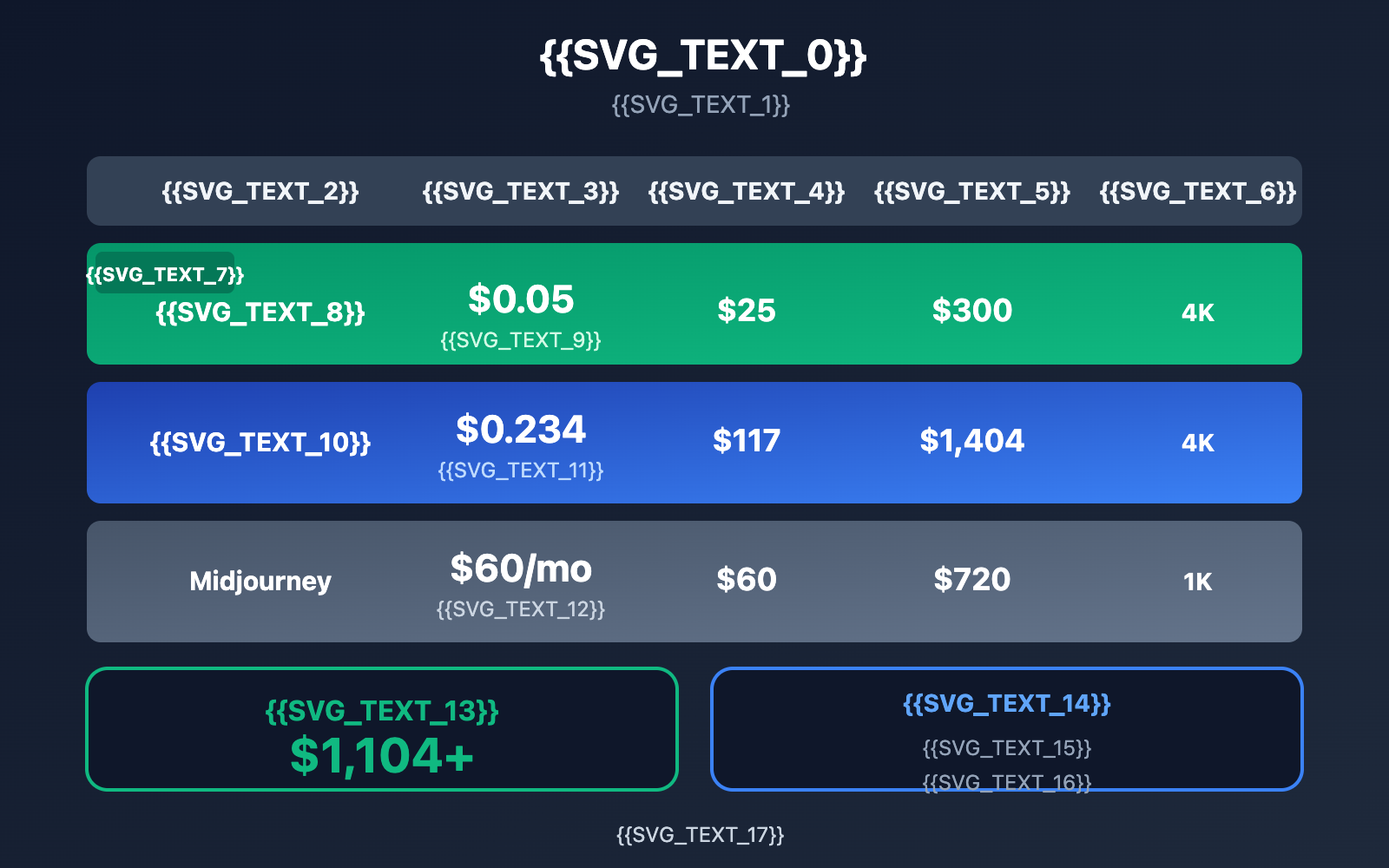
Nano Banana Pro: Price vs. Performance
| Comparison Item | Nano Banana Pro (APIYI) | Nano Banana Pro (Official) | Imagen 4 | Midjourney |
|---|---|---|---|---|
| Price per Image | $0.05 | $0.234 | $0.04-0.06 | $0.02/image (Subscription) |
| Max Resolution | 4K (3840×2160) | 4K (3840×2160) | 2K | 1024×1024 |
| API Access | ✅ Supported | ✅ Supported | ✅ Supported | ❌ Not supported |
| Batch Generation | ✅ Unlimited | ✅ Quota limits | ✅ Quota limits | ❌ Manual operation |
| Architectural Understanding | ⭐⭐⭐⭐⭐ | ⭐⭐⭐⭐⭐ | ⭐⭐⭐⭐ | ⭐⭐⭐⭐ |
| Chinese Prompt Support | ✅ Excellent | ✅ Excellent | ✅ Good | ⚠️ Average |
| Style Consistency | ✅ 14 Reference images | ✅ 14 Reference images | ⚠️ Limited | ⚠️ Limited |
Cost Calculation Example
Let's say a medium-sized design institute needs to generate 500 conceptual renderings a month:
| Solution | Unit Price | Monthly Cost | Annual Cost |
|---|---|---|---|
| APIYI Nano Banana Pro | $0.05 | $25 | $300 |
| Official Nano Banana Pro | $0.234 | $117 | $1,404 |
| Midjourney Subscription | $60/mo | $60 | $720 |
By using APIYI, you'll save over $1,100 annually while getting higher 4K resolution and batch generation capabilities.
Cost Advantage: APIYI offers a flat-rate pricing strategy for 1-4K resolutions. Whether you're generating 1K or 4K images, it's $0.05 per shot, which is incredibly competitive in the industry.
Nano Banana Pro: Real-World Workflow
The 6-Step AI Rendering Workflow for Design Institutes
Step 1: Requirement Breakdown
- Clarify the purpose of the rendering (concept display, option comparison, bid presentation).
- Determine the required quantity and resolution.
- Outline the key design points that need to be expressed.
Step 2: Prompt Templating
- Build an exclusive prompt template library for the project.
- Extract reusable style descriptors.
- Preset parameter combinations for different scenarios.
Step 3: Batch Generation
- Use the API to submit generation tasks in bulk.
- Set a reasonable concurrency level (suggested 5-10 concurrent tasks).
- Automatically save and name the output files.
Step 4: Screening & Optimization
- Quickly browse through the batch generation results.
- Filter images that align with the design intent.
- Record high-quality prompts for future reuse.
Step 5: Refinement
- Perform local optimizations on selected images.
- Use the image-to-image (i2i) feature to fine-tune details.
- Maintain a consistent style across the series of renderings.
Step 6: Final Export
- Unify color grading and post-processing.
- Arrange the image sequence according to the presentation logic.
- Export formats suitable for printing or screen projection.
Using It with Traditional Rendering Tools
Nano Banana Pro isn't meant to replace traditional 3D rendering workflows; instead, it's a fast validation tool for the early design stages. Here's a recommended collaboration model:
| Design Phase | Tool Selection | Description |
|---|---|---|
| Conceptual Sketching | Nano Banana Pro | Quickly validate design intent |
| Design Development | Nano Banana Pro + Sketch References | Refine details with Image-to-Image |
| Construction Documentation | Lumion / V-Ray / D5 | Precise materials and lighting |
| Presentation Materials | Nano Banana Pro Batch Generation | Stylistically consistent image sequences |
FAQ
Q1: Is the precision of architectural renderings generated by Nano Banana Pro high enough?
Nano Banana Pro generates conceptual renderings, which are perfect for early-stage design expression and client communication. For construction-grade rendering that requires precise dimensions and physical material properties, we still recommend using professional tools like Lumion or V-Ray. The two can work great together: use AI for rapid output and professional tools for fine-tuning and detailed development.
Q2: How do I ensure a consistent style when batch-generating renderings?
Nano Banana Pro supports uploading up to 14 reference images. You can simultaneously upload project design style guides, finalized renderings, and material samples. The system will learn the visual language of these references to ensure style consistency during batch generation. We recommend creating a dedicated collection of reference images for each project.
Q3: How can I get started with testing quickly?
We recommend using the APIYI platform for your tests:
- Visit APIYI (apiyi.com) to register an account.
- Get your Nano Banana Pro API Key and free trial credits.
- Use the code examples in this article to quickly verify the results.
- Online Experience: You can test the image output directly at imagen.apiyi.com.
Summary
Key takeaways for using Nano Banana Pro in architectural design:
- Native 4K Resolution: Meets the needs of large-scale display boards and high-definition presentations, costing only $0.05 per image.
- Batch Generation Capabilities: Implement automated workflows through API calls to produce hundreds of renderings a day.
- Significant Cost Advantage: Accessing the tool via the APIYI platform costs about 80% less than official prices, saving over a thousand dollars a year.
- Synergy with Traditional Tools: It serves as a rapid validation tool for early-stage design, complementing professional rendering software.
For architectural design institutes that need to produce a high volume of conceptual renderings, Nano Banana Pro is currently the most cost-effective AI image generation solution available.
We recommend getting API access through APIYI (apiyi.com). The platform provides stable service, official channel guarantees, and unlimited speed, making it the primary high-volume channel for Nano Banana Pro usage.
📚 References
⚠️ Link Format Note: All external links use the
Resource Name: domain.comformat. This makes them easy to copy while avoiding direct navigation to prevent SEO weight loss.
-
Google AI Image Generation Docs: Official API guide
- Link:
ai.google.dev/gemini-api/docs/image-generation - Description: Contains full API parameters and invocation examples.
- Link:
-
APIYI Nano Banana Pro Zone: Chinese integration documentation
- Link:
apiyi.com - Description: Provides Chinese documentation, code samples, and pricing information.
- Link:
-
Online Experience: Test without coding
- Link:
imagen.apiyi.com - Description: Experience Nano Banana Pro's image generation directly in your browser.
- Link:
-
Sample Code Download: Full development reference
- Link:
xinqikeji.feishu.cn/wiki/W4vEwdiCPi3VfTkrL5hcVlDxnQf - Description: Includes multi-language call examples for Python, Node.js, and more.
- Link:
Author: Tech Team
Tech Exchange: Feel free to discuss your tips for using architectural AI renderings in the comments. For more resources, you can visit the APIYI apiyi.com tech community.