Author's Note: A deep dive into Sora 2's cameo_permission_denied error, covering 4 permission settings, character existence verification methods, API call best practices, and production fault tolerance strategies.
When using the Sora 2 API to call character (Cameo) features, developers frequently run into the 「cameo_permission_denied」 error. The full error message looks like this: {"error":{"code":"cameo_permission_denied","message":"You are not allowed to access one or more mentioned cameos.","param":null,"type":"invalid_request_error"}}. This error usually isn't caused by your code—it's actually triggered by character permission restrictions or because the character has been deleted or deactivated.
Core Value: By the end of this article, you'll understand the 4 types of permission settings in Sora 2, master how to verify if a character exists via their Profile URL, learn the logic for pre-checking permissions before an API call, and build a production-grade fault tolerance strategy.
Key Takeaways for Sora 2 Character Permission Errors
| Point | Description | Impact |
|---|---|---|
| 4 Permission Levels | Only me / People I approve / Mutuals / Everyone | Determines who can use the character in videos |
| Profile URL Verification | Check status via sora.chatgpt.com/profile/{handle} |
Helps determine if a character exists or was deleted |
| Dynamic Revocation | Creators can modify permissions or deactivate characters instantly | API calls may fail suddenly without warning |
| 30-Day Cleanup | Deleted characters are purged from the system after 30 days | Profile will return "Failed to load profile" |
| No API Pre-check | Sora API lacks a dedicated permission query endpoint | Must be determined by triggering an error during a generation request |
Sora 2 Character Permissions Explained
What is a Cameo (Character)?
The Cameo feature in Sora 2 lets users create digital characters by recording short videos. These characters can then be referenced in future video generations. Each character has a unique Handle (Username) and Character ID, for example:
- Handle:
@vee.papi - Profile URL:
https://sora.chatgpt.com/profile/vee.papi - Character ID:
25d56f016.meridian(Internal system ID)
Why are you getting the permission_denied error?
According to official OpenAI documentation and developer feedback, this error typically stems from one of the following:
- Permission Restrictions: The creator set permissions to "Only me" or "People I approve," and your account isn't on the list.
- Character Deleted: The creator deleted the character. Interestingly, the system often returns a permission error instead of a "not found" error.
- Character Deactivated: The creator manually deactivated the character, making it unavailable to everyone.
- Handle Typo: If you reference a handle that doesn't exist or is misspelled, the system might return a permission error.
- Account Restrictions: Your Sora account might be restricted from accessing specific characters (this is rare).
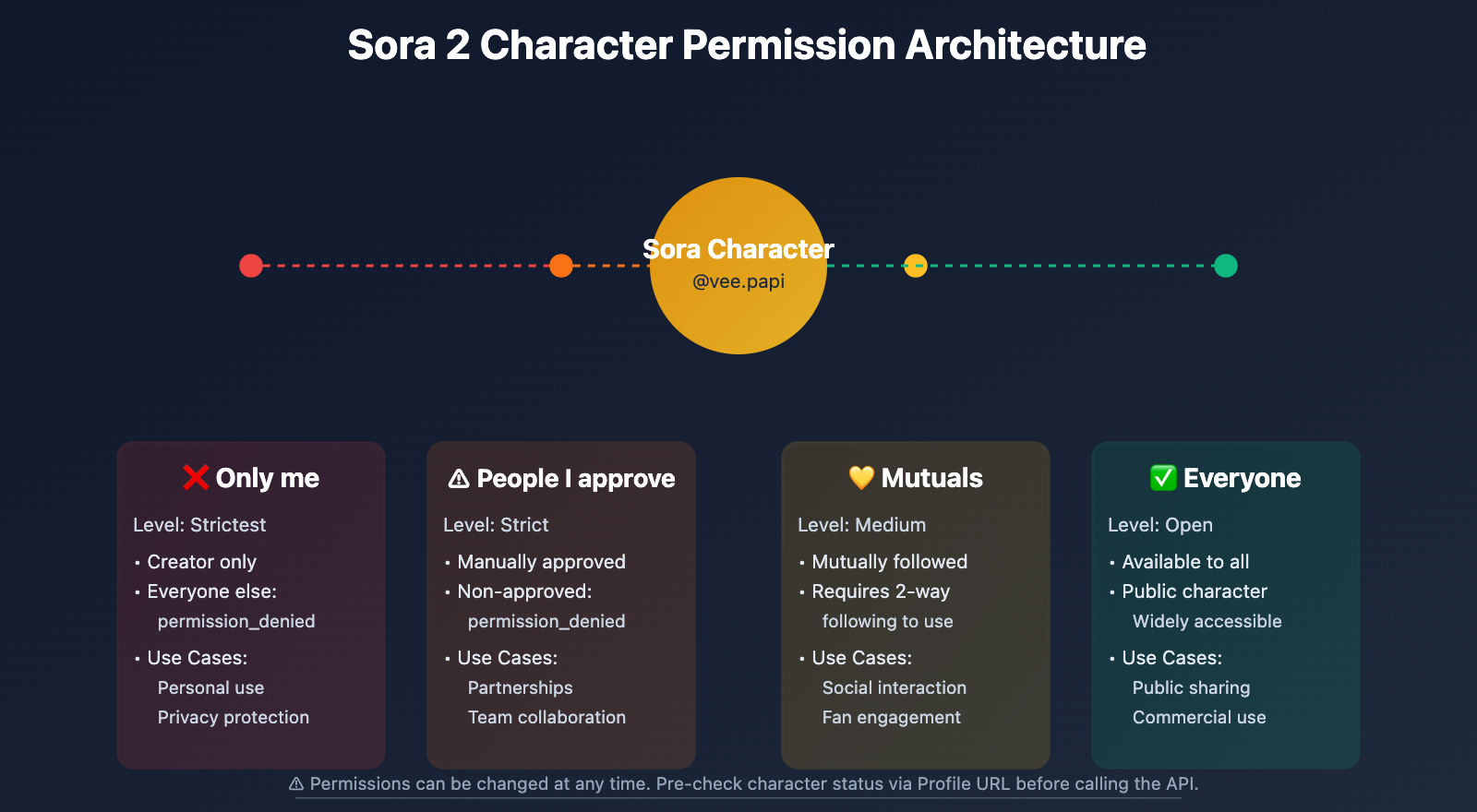
The 4 Character Permission Levels
| Permission Level | Description | API Call Impact |
|---|---|---|
| Only me | Only the creator can use it | All other users will receive permission_denied |
| People I approve | Specific users manually approved by the creator | Non-approved users will receive permission_denied |
| Mutuals | Mutually followed users (Creator follows you + You follow creator) | Non-mutual followers will receive permission_denied |
| Everyone | Available to all Sora users | Theoretically should not trigger permission errors (unless deleted) |
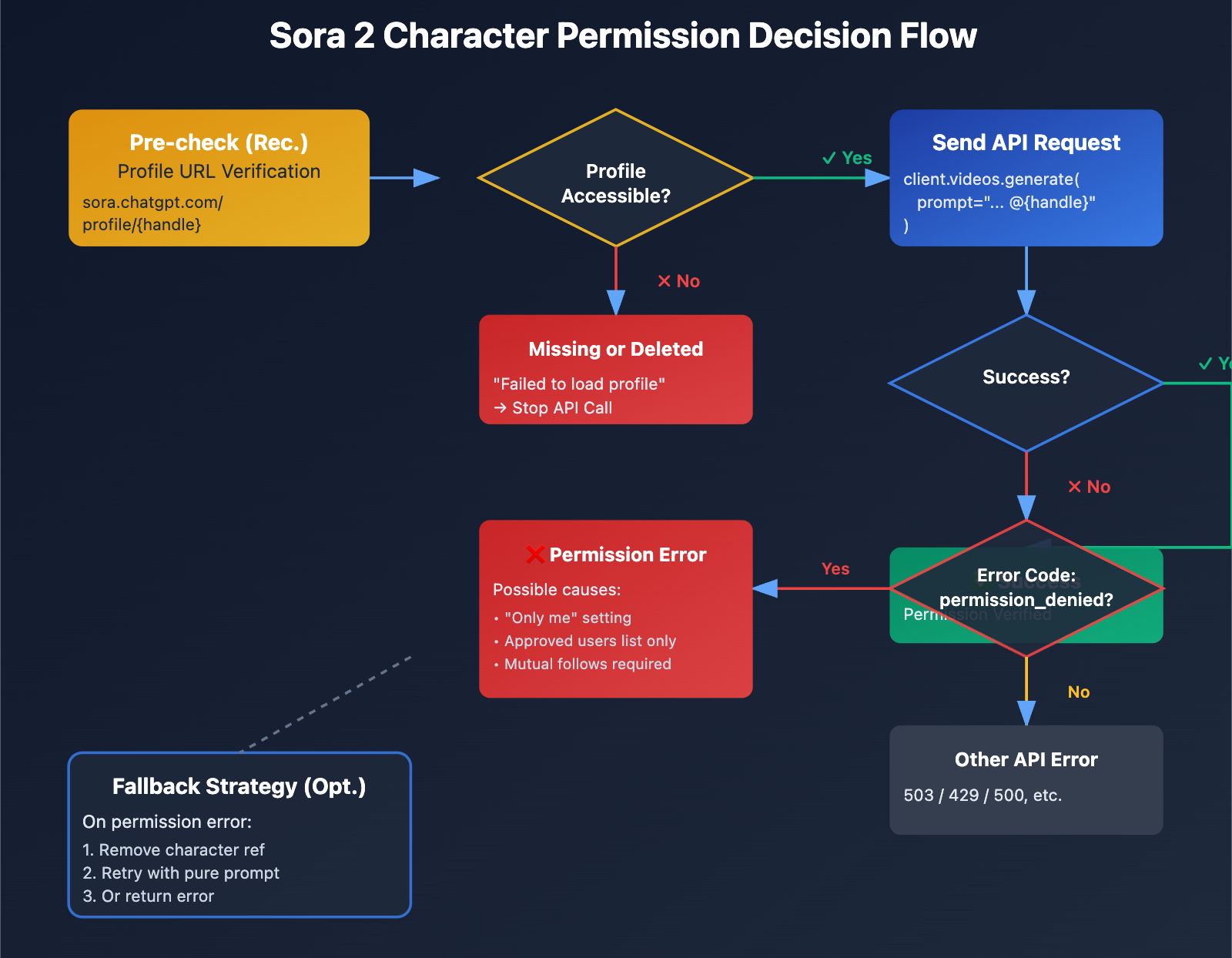
Verifying Character Existence via Profile URL
Profile URL Format
Sora character profile pages follow this URL format:
https://sora.chatgpt.com/profile/{handle}
Examples:
https://sora.chatgpt.com/profile/vee.papihttps://sora.chatgpt.com/profile/25d56f016.meridian
Verification Logic
By requesting the Profile URL, you can determine the character's status:
| HTTP Response | Page Content | Character Status | Expected API Result |
|---|---|---|---|
| 200 OK | Displays character info and videos | Character exists and is publicly visible | Depends on permission settings |
| 200 OK | "Failed to load profile. Please try again." | Character deleted or handle doesn't exist | Definitely returns permission_denied |
| 403 Forbidden | No access permission | Character exists but permission is "Only me" | Definitely returns permission_denied |
| 404 Not Found | Handle doesn't exist | Character was never created | Definitely returns permission_denied |
Key Finding: Even if a character has been deleted, Sora might still return a 200 status code, but the page will display "Failed to load profile". This indicates that the system is keeping a placeholder for the handle, even though the character data has been wiped.
Python Implementation: Character Existence Check
Here's a full implementation for verifying if a character exists via the Profile URL:
import requests
from typing import Dict, Optional

def check_character_availability(handle: str) -> Dict[str, any]:
    """
    Check if a Sora character is available

    Args:
        handle: The character's Handle (with or without the @ prefix)

    Returns:
        {
            "exists": bool,           # Whether the character exists
            "accessible": bool,       # Whether it's accessible (not necessarily usable for API)
            "status": str,            # "available" / "deleted" / "not_found" / "unknown"
            "profile_url": str
        }
    """
    # Clean the Handle (remove the @ prefix)
    handle = handle.lstrip("@")

    profile_url = f"https://sora.chatgpt.com/profile/{handle}"

    try:
        response = requests.get(profile_url, timeout=10)

        # Check page content
        content = response.text.lower()

        if response.status_code == 200:
            if "failed to load profile" in content:
                return {
                    "exists": False,
                    "accessible": False,
                    "status": "deleted",
                    "profile_url": profile_url,
                    "message": "The character has been deleted or the handle doesn't exist"
                }
            else:
                return {
                    "exists": True,
                    "accessible": True,
                    "status": "available",
                    "profile_url": profile_url,
                    "message": "Character exists and profile is accessible (but API calls depend on permission settings)"
                }

        elif response.status_code == 403:
            return {
                "exists": True,
                "accessible": False,
                "status": "restricted",
                "profile_url": profile_url,
                "message": "Character exists but permission is set to private"
            }

        elif response.status_code == 404:
            return {
                "exists": False,
                "accessible": False,
                "status": "not_found",
                "profile_url": profile_url,
                "message": "Handle doesn't exist"
            }

        else:
            return {
                "exists": None,
                "accessible": None,
                "status": "unknown",
                "profile_url": profile_url,
                "message": f"Unknown status code: {response.status_code}"
            }

    except requests.RequestException as e:
        return {
            "exists": None,
            "accessible": None,
            "status": "error",
            "profile_url": profile_url,
            "message": f"Request failed: {str(e)}"
        }

# Usage example
result = check_character_availability("vee.papi")
print(f"Character status: {result['status']}")
print(f"Message: {result['message']}")

if result["exists"]:
    print("✅ Character exists, you can try an API call")
else:
    print("❌ Character doesn't exist or was deleted; the API call will definitely fail")
View full production-grade code
import requests
import time
from typing import Dict, List, Optional
from openai import OpenAI

class SoraCharacterValidator:
    """
    Sora Character Validator
    Supports batch checking, caching, and pre-checks before API calls
    """

    def __init__(self, cache_ttl: int = 3600):
        """
        Args:
            cache_ttl: Cache expiration time (seconds), default is 1 hour
        """
        self.cache = {}
        self.cache_ttl = cache_ttl

    def check_character(self, handle: str, use_cache: bool = True) -> Dict:
        """Check a single character (supports caching)"""
        handle = handle.lstrip("@")

        # Check cache
        if use_cache and handle in self.cache:
            cached_result, timestamp = self.cache[handle]
            if time.time() - timestamp < self.cache_ttl:
                return cached_result

        # Execute check
        profile_url = f"https://sora.chatgpt.com/profile/{handle}"

        try:
            response = requests.get(profile_url, timeout=10)
            content = response.text.lower()

            if response.status_code == 200:
                if "failed to load profile" in content:
                    result = {
                        "exists": False,
                        "accessible": False,
                        "status": "deleted",
                        "message": "Character has been deleted"
                    }
                else:
                    result = {
                        "exists": True,
                        "accessible": True,
                        "status": "available",
                        "message": "Character available"
                    }
            elif response.status_code == 403:
                result = {
                    "exists": True,
                    "accessible": False,
                    "status": "restricted",
                    "message": "Character private"
                }
            else:
                result = {
                    "exists": False,
                    "accessible": False,
                    "status": "not_found",
                    "message": "Handle doesn't exist"
                }

        except Exception as e:
            result = {
                "exists": None,
                "accessible": None,
                "status": "error",
                "message": str(e)
            }

        # Update cache
        self.cache[handle] = (result, time.time())

        return result

    def batch_check(self, handles: List[str]) -> Dict[str, Dict]:
        """Batch check characters"""
        results = {}
        for handle in handles:
            handle = handle.lstrip("@")
            results[handle] = self.check_character(handle)
            time.sleep(0.5)  # Avoid sending requests too fast
        return results

    def validate_before_api_call(
        self,
        client: OpenAI,
        prompt: str,
        characters: List[str]
    ) -> Dict:
        """
        Validation before API call

        Args:
            client: OpenAI client
            prompt: Video generation prompt
            characters: List of character handles to use

        Returns:
            {
                "safe_to_call": bool,
                "invalid_characters": List[str],
                "warnings": List[str]
            }
        """
        invalid_characters = []
        warnings = []

        for handle in characters:
            result = self.check_character(handle)

            if not result["exists"]:
                invalid_characters.append(handle)
                warnings.append(f"⚠️ {handle}: {result['message']}")

            elif not result["accessible"]:
                warnings.append(f"⚠️ {handle}: Call might fail due to permission settings")

        return {
            "safe_to_call": len(invalid_characters) == 0,
            "invalid_characters": invalid_characters,
            "warnings": warnings
        }

# Usage example
validator = SoraCharacterValidator()

# Batch check characters
handles = ["vee.papi", "25d56f016.meridian", "nonexistent.user"]
results = validator.batch_check(handles)

for handle, result in results.items():
    print(f"{handle}: {result['status']} - {result['message']}")

# Validation before API call
client = OpenAI(api_key="YOUR_API_KEY", base_url="https://vip.apiyi.com/v1")

validation = validator.validate_before_api_call(
    client=client,
    prompt="A character walking in a park",
    characters=["vee.papi", "25d56f016.meridian"]
)

if validation["safe_to_call"]:
    print("✅ All characters verified, safe to call API")
else:
    print(f"❌ Invalid characters found: {validation['invalid_characters']}")
    for warning in validation["warnings"]:
        print(warning)
Technical Advice: In production environments, it's recommended to make Sora API calls through the APIYI (apiyi.com) platform. This platform automatically verifies character availability before calling and provides detailed error logs and fallback strategies to avoid batch failures caused by character permission issues.
Sora 2 API Call Best Practices
Practice 1: Verify characters before calling
Before making the actual API call, pre-check the character's status via the Profile URL:
from openai import OpenAI

client = OpenAI(
    api_key="YOUR_API_KEY",
    base_url="https://vip.apiyi.com/v1"
)

def safe_generate_with_character(prompt: str, character_handle: str):
    """
    Safe generation with character validation
    """
    # Step 1: Validate character
    validator = SoraCharacterValidator()
    check_result = validator.check_character(character_handle)

    if not check_result["exists"]:
        raise ValueError(f"❌ Character {character_handle} doesn't exist or was deleted, stopping call")

    if check_result["status"] == "restricted":
        print(f"⚠️ Warning: Character {character_handle} might cause failure due to permission settings")

    # Step 2: Call API
    try:
        response = client.videos.generate(
            model="sora-2-1080p",
            prompt=f"{prompt} @{character_handle}",
            timeout=120
        )
        return response

    except Exception as e:
        error_msg = str(e)

        if "cameo_permission_denied" in error_msg:
            print(f"❌ Permission Error: You don't have permission to access character @{character_handle}")
            print(f"   Possible reason: Permission set to 'Only me' or 'People I approve'")
        else:
            print(f"❌ Other error: {error_msg}")

        raise e

# Usage example
try:
    result = safe_generate_with_character(
        prompt="A character dancing in the rain",
        character_handle="vee.papi"
    )
    print("✅ Generation successful")
except ValueError as e:
    print(f"Pre-check failed: {e}")
except Exception as e:
    print(f"API call failed: {e}")
Practice 2: Gracefully handle permission_denied errors
When you encounter a cameo_permission_denied error, provide user-friendly feedback and a fallback plan:
def generate_with_fallback(prompt: str, character_handle: str):
    """
    Generation with fallback strategy
    Removes character reference and continues generation on failure
    """
    try:
        # Try using the character
        response = client.videos.generate(
            model="sora-2-1080p",
            prompt=f"{prompt} @{character_handle}",
            timeout=120
        )
        return {
            "success": True,
            "used_character": True,
            "data": response
        }

    except Exception as e:
        error_msg = str(e)

        if "cameo_permission_denied" in error_msg:
            print(f"⚠️ Unable to use character @{character_handle}, trying to remove reference")

            # Fallback: Remove character reference, generate with pure prompt
            try:
                response = client.videos.generate(
                    model="sora-2-1080p",
                    prompt=prompt,  # No character reference
                    timeout=120
                )
                return {
                    "success": True,
                    "used_character": False,
                    "fallback": True,
                    "data": response
                }

            except Exception as fallback_error:
                return {
                    "success": False,
                    "error": str(fallback_error)
                }
        else:
            return {
                "success": False,
                "error": error_msg
            }

# Usage example
result = generate_with_fallback(
    prompt="A person walking on the beach at sunset",
    character_handle="vee.papi"
)

if result["success"]:
    if result.get("used_character"):
        print("✅ Generation successful with character")
    else:
        print("⚠️ Fell back to generation without character")
else:
    print(f"❌ Generation failed: {result['error']}")
Practice 3: Fault tolerance strategy for batch calls
In batch generation scenarios, a single character failure shouldn't stop the entire task:
from typing import List, Dict

def batch_generate_with_characters(
    prompts: List[str],
    character_handles: List[str]
) -> List[Dict]:
    """
    Batch generation (with character fault tolerance)

    Args:
        prompts: List of prompts
        character_handles: Character handles corresponding to each prompt

    Returns:
        List of results
    """
    results = []
    validator = SoraCharacterValidator()

    for i, (prompt, handle) in enumerate(zip(prompts, character_handles)):
        print(f"\nProcessing task {i+1}/{len(prompts)}: @{handle}")

        # Pre-check character
        check_result = validator.check_character(handle)

        if not check_result["exists"]:
            print(f"⚠️ Skipping: Character @{handle} doesn't exist")
            results.append({
                "index": i,
                "success": False,
                "reason": "character_not_found"
            })
            continue

        # Try to generate
        try:
            response = client.videos.generate(
                model="sora-2-1080p",
                prompt=f"{prompt} @{handle}",
                timeout=120
            )
            results.append({
                "index": i,
                "success": True,
                "data": response
            })
            print(f"✅ Task {i+1} complete")

        except Exception as e:
            error_msg = str(e)

            if "cameo_permission_denied" in error_msg:
                print(f"⚠️ Permission error, trying generation without character")

                # Fallback generation
                try:
                    response = client.videos.generate(
                        model="sora-2-1080p",
                        prompt=prompt,
                        timeout=120
                    )
                    results.append({
                        "index": i,
                        "success": True,
                        "fallback": True,
                        "data": response
                    })
                    print(f"✅ Task {i+1} fallback complete")
                except:
                    results.append({
                        "index": i,
                        "success": False,
                        "reason": "fallback_failed"
                    })
            else:
                results.append({
                    "index": i,
                    "success": False,
                    "reason": "api_error",
                    "error": error_msg
                })

        time.sleep(2)  # Avoid hitting rate limits

    return results

# Usage example
prompts = [
    "A character running in the forest",
    "A character sitting by the fireplace",
    "A character flying in the sky"
]
characters = ["vee.papi", "25d56f016.meridian", "another.user"]

results = batch_generate_with_characters(prompts, characters)

# Statistics
success_count = sum(1 for r in results if r["success"])
print(f"\nTotal tasks: {len(results)}, Successful: {success_count}, Failed: {len(results) - success_count}")
Solution Suggestion: For enterprise-level applications, we recommend calling the Sora API through the APIYI (apiyi.com) platform. It offers enterprise features like intelligent retries, character validation caching, and batch call optimization, significantly improving the success rate and stability of batch generation tasks.
Impact of Character Permission Settings on API Calls
Permission Settings Explained
When creating a Sora character, you can choose from the following permission levels:
| Permission Level | Use Case | Impact on API Calls |
|---|---|---|
| Only me | Personal use; you don't want others using your character's likeness. | All API calls fail except for those from the creator. |
| People I approve | Collaborative projects; only specific team members are allowed access. | The creator must manually approve each user. |
| Mutuals | Social scenarios; only mutual followers can use the character. | Requires a two-way following relationship. |
| Everyone | Public characters; intended for widespread use. | In theory, all users can call this character via API. |
Permissions Can Be Revoked Anytime
Key Risk: Even if a character is initially set to "Everyone," the creator can change it to "Only me" or delete the character at any time. This means:
- A character that works today might fail tomorrow.
- Batch tasks might fail halfway through due to permission changes.
- Relying on public characters for the long term carries inherent risks.
Mitigation Strategies:
- Regular Validation: Check if the characters you depend on are still available on a daily or weekly basis.
- Caching Strategy: Cache validation results for 1–6 hours to avoid redundant requests.
- Fallback Plans: Always have a character-less Fallback prompt ready.
- Multi-Character Backups: For critical scenarios, prepare 2–3 similar characters as backups.
FAQ
Q1: Why does my API call return permission_denied, even though the Profile page opens normally?
This happens because Profile Visibility and Character Usage Permissions are two independent settings:
- Profile Visibility: Controls who can view the character's profile page and history.
- Character Usage Permissions: Controls who can reference that character in video generation.
Even if a profile is set to public (visible to everyone), the usage permissions might still be "Only me." In this case:
- ✅ You can visit
https://sora.chatgpt.com/profile/{handle}and see the character info. - ❌ Your API call will return a
cameo_permission_deniederror.
Solution: Contact the character creator and ask them to change the usage permissions to "Everyone" or add your account to their "People I approve" list.
Q2: How can I tell if a character was deleted or if I just don’t have permission?
You can distinguish between these scenarios by looking at the content returned by the Profile URL:
Scenario 1: Character is deleted
- Profile URL returns a 200 status code.
- Page displays:
Failed to load profile. Please try again. - API call:
cameo_permission_denied.
Scenario 2: Permissions are set to private
- Profile URL might return 200 (showing limited info) or 403 (access denied).
- Page displays: Limited info or "Private profile."
- API call:
cameo_permission_denied.
Quick way to judge:
result = check_character_availability("handle")

if result["status"] == "deleted":
    print("❌ Character has been deleted; API calls will definitely fail.")
elif result["status"] == "restricted":
    print("⚠️ Character exists but might fail due to permission settings.")
elif result["status"] == "available":
    print("✅ Character exists, but API calls still depend on usage permissions.")
Recommendation: In a production environment, characters that fail multiple times in a row should be removed from your calling list to avoid wasting API quota.
Q3: How should I reference the Handle and Character ID during API calls?
The Sora API supports two ways to reference a character:
Method 1: Using @ + Handle (Recommended)
response = client.videos.generate(
    model="sora-2-1080p",
    prompt="A character dancing @vee.papi"
)
Method 2: Using Character ID (Not recommended)
# The ID is usually an internal string like 25d56f016.meridian
response = client.videos.generate(
    model="sora-2-1080p",
    prompt="A character dancing @25d56f016.meridian"
)
Key Differences:
- Handle: User-friendly and easy to remember, but the creator can change it (making the old handle invalid).
- Character ID: A permanent system-internal identifier that never changes, but it's hard to read or recognize.
Best Practice: In production, we recommend storing both the Handle and the Character ID. Prioritize using the Handle, and fall back to the Character ID if the Handle becomes invalid.
Note: Regardless of which method you use, you must comply with the character's permission settings. If you don't have access, both methods will return a cameo_permission_denied error.
Summary
Key takeaways for the Sora 2 cameo_permission_denied error:
- Complex permission system: Four permission levels (Only me / People I approve / Mutuals / Everyone) determine who's allowed to use a character via the API.
- Profile URL is the key: You can check if a character exists via
sora.chatgpt.com/profile/{handle}. If it returns "Failed to load profile," the character has been deleted. - Permissions can change dynamically: Character creators can modify permissions or delete characters at any time, which might cause a previously working character to suddenly fail.
- No pre-check API: The Sora API doesn't provide a permission query interface. You have to verify via the Profile URL or by handling the error during an actual call.
- Fault tolerance is a must for production: You'll need to implement character validation caching, fallback strategies, and batch task fault tolerance to ensure a single character failure doesn't break your entire workflow.
Since this feature relies heavily on User-Generated Content (UGC), Sora character availability is naturally unpredictable. We recommend using APIYI (apiyi.com) to quickly test your character invocation logic. The platform provides free credits and detailed diagnostic tools, supporting Sora 2 and various other video generation models to help you build a stable production environment.
📚 References
⚠️ Link Format Note: All external links use the
Resource Name: domain.comformat. This makes them easy to copy while avoiding SEO weight loss from direct links.
-
OpenAI Sora Official Documentation: Generating content with Cameos
- Link:
help.openai.com/en/articles/12435986-generating-content-with-cameos - Description: Official guide on Cameo creation workflows, permission settings, and usage limits.
- Link:
-
Sora 2 Cameo Full Tutorial: Character creation and troubleshooting
- Link:
www.aifreeapi.com/en/posts/sora-2-cameo-yourself-tutorial - Description: The latest 2026 comprehensive guide for Cameo features, including recording tips and permission setups.
- Link:
-
Sora Character Creation Guide: Best practices for character consistency
- Link:
help.apiyi.com/sora-character-creation-complete-guide-en.html - Description: In-depth analysis of Sora character creation and API calling best practices.
- Link:
-
Cameo Likeness in Sora 2: Permissions, privacy, and FAQs
- Link:
sider.ai/blog/ai-tools/cameo-likeness-in-sora-2-a-friendly-guide-to-prompts-permissions-and-pitfalls - Description: Detailed explanation of the Cameo permission system and privacy protection mechanisms.
- Link:
Author: Technical Team
Tech Discussion: Feel free to share your Sora character invocation experiences in the comments. For more API troubleshooting resources, visit the APIYI (apiyi.com) technical community.