
Got a PUBLIC_ERROR_MINOR or other error codes when generating videos with Veo 3.1? This is a common frustration many developers face when calling Google's video generation API. This article will systematically cover all common error types in Veo 3.1, including safety filter codes, resource limitation errors, and policy violation prompts, helping you quickly pinpoint issues and find solutions.
Core Value: After reading this article, you'll master the meaning and handling methods of various Veo 3.1 error codes, enabling you to efficiently troubleshoot video generation failures.
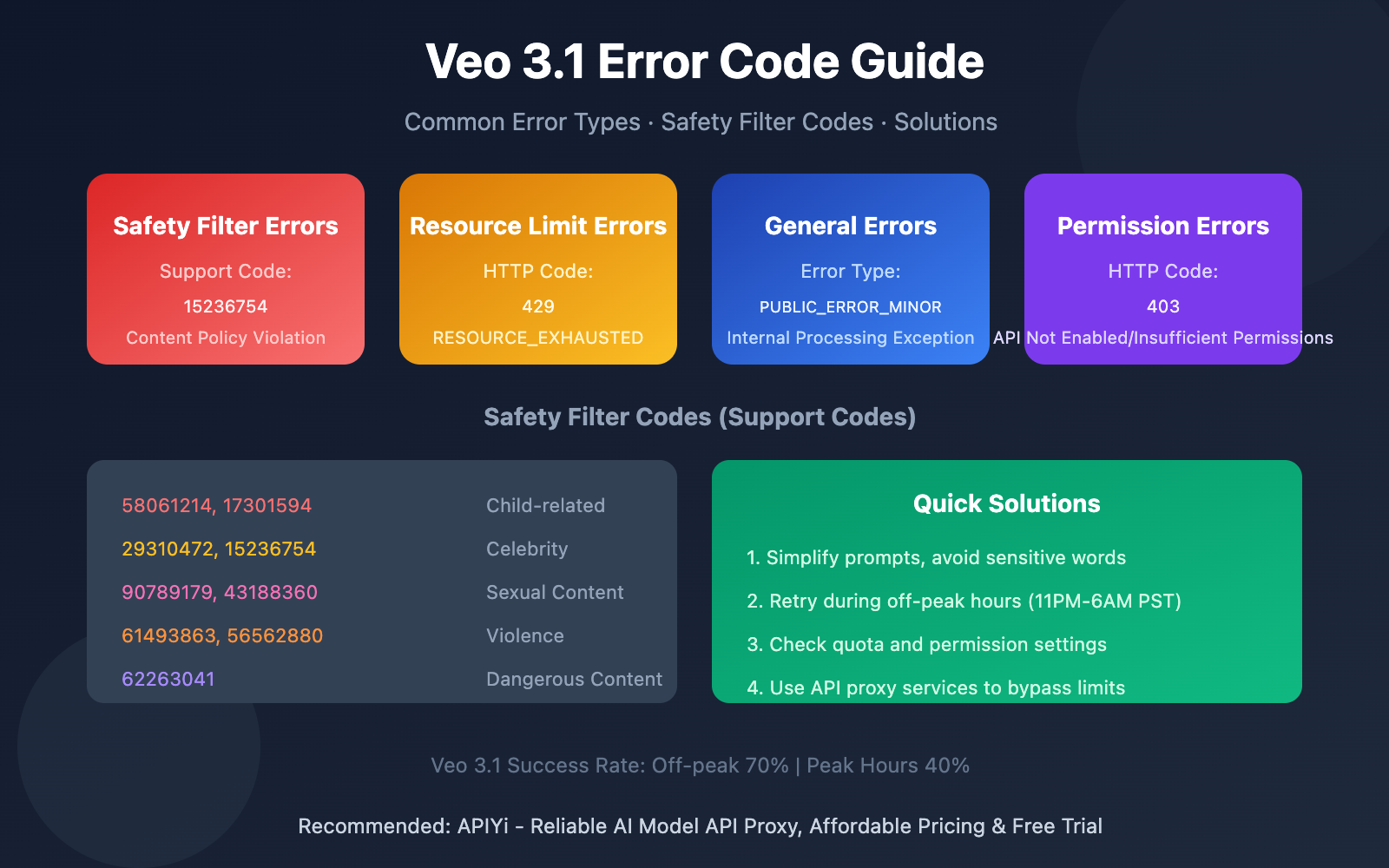
Veo 3.1 Error Code Essentials
| Error Type | Error Code/Status | Cause | Solution |
|---|---|---|---|
| General Errors | PUBLIC_ERROR_MINOR | Internal processing exception | Wait and retry or simplify request |
| Resource Limits | 429 RESOURCE_EXHAUSTED | Too many requests/quota exhausted | Reduce frequency or wait for quota reset |
| Safety Filters | Support Code (8-digit number) | Content triggered safety policy | Modify prompt to avoid sensitive content |
| Permission Errors | 403 Forbidden | API not enabled or insufficient permissions | Check project configuration and API enablement |
Understanding PUBLIC_ERROR_MINOR
PUBLIC_ERROR_MINOR is a generic error type in Veo 3.1, typically indicating:
- Server-side internal processing exception – The model encountered an issue during generation
- Audio processing failure – Veo 3.1 failed while processing video audio
- Temporary resource unavailability – GPU memory shortage or service overload
Recommended Actions:
- Wait 5-10 minutes before retrying
- Simplify your prompt to reduce generation complexity
- Avoid peak hours (9-11 AM, 1-3 PM, 7-9 PM PST)
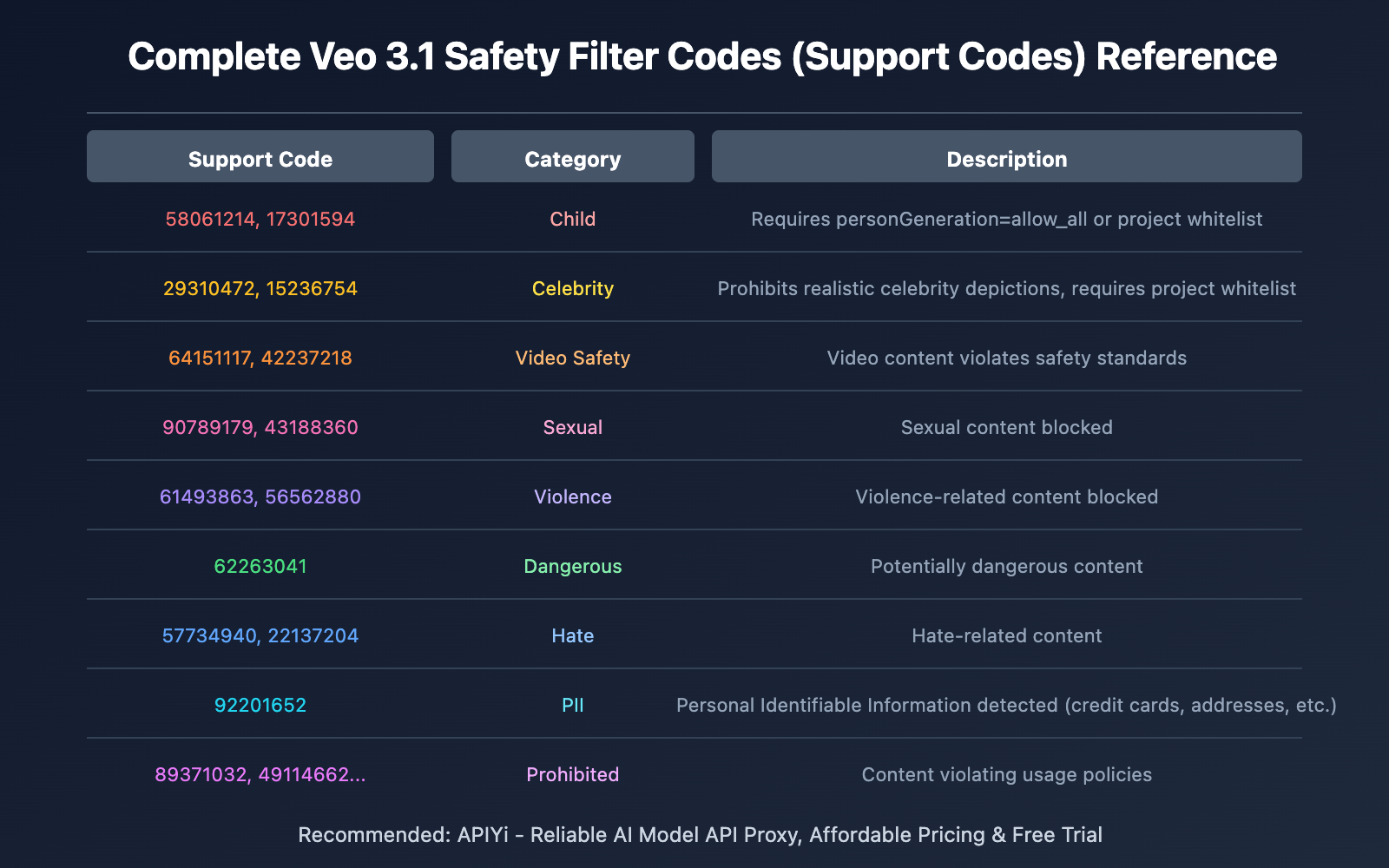
Veo 3.1 Safety Filter Code Breakdown
When video generation gets blocked by safety filters, you'll see an error message like this:
Veo could not generate videos because the input image violates
Vertex AI's usage guidelines. Support codes: 15236754
Complete Support Code Reference Table
| Support Code | Category | Description |
|---|---|---|
| 58061214, 17301594 | Child | Child-related content, requires personGeneration=allow_all |
| 29310472, 15236754 | Celebrity | Realistic celebrity likeness, requires project whitelist authorization |
| 64151117, 42237218 | Video Safety | Video content violates safety standards |
| 90789179, 43188360 | Sexual | Sexual content |
| 61493863, 56562880 | Violence | Violence-related content |
| 62263041 | Dangerous | Potentially dangerous content |
| 57734940, 22137204 | Hate | Hate-related content |
| 78610348 | Toxic | Toxic/malicious content |
| 32635315 | Vulgar | Vulgar content |
| 92201652 | PII | Personally Identifiable Information (credit card numbers, addresses, etc.) |
| 74803281, 29578790, 42876398 | Other | Other safety issues |
| 89371032, 49114662, 63429089, 72817394 | Prohibited | Policy violations |
Common HTTP Error Codes
429 RESOURCE_EXHAUSTED
This is one of the most common errors, indicating too many requests or quota exhaustion.
Triggered by:
- Single user request rate too high
- System-level request limits
- Daily quota depleted
Solution:
import time

def generate_with_retry(prompt, max_retries=3):
    for i in range(max_retries):
        try:
            # Call Veo API
            response = veo_generate(prompt)
            return response
        except ResourceExhaustedError:
            wait_time = (2 ** i) * 10  # Exponential backoff
            print(f"Quota limit hit, waiting {wait_time} seconds...")
            time.sleep(wait_time)
    raise Exception("Max retries exhausted")
403 Forbidden
Common causes:
- Generative Language API not enabled in your project
- Project not added to necessary allowlist
- Invalid authentication credentials
Resolution steps:
- Enable Generative Language API in Google Cloud Console
- Check if your project has Veo API access
- Verify your API Key or service account credentials
Other Common Errors
"Something Went Wrong" Generic Error
This is a catch-all error that can stem from various underlying issues. Possible causes:
| Cause Category | Description | Occurrence Probability |
|---|---|---|
| Server Overload | Capacity exceeded by 300-400% during peak hours | Most Common |
| Insufficient GPU Resources | Complex requests consuming 95% of GPU memory | Common |
| Security System False Positives | Normal words triggering content filters | Common |
| Network Issues | Connection timeouts, DNS problems | Less Common |
Words that easily trigger false positives:
- "fire" (may be interpreted as shooting)
- "shot" (may be interpreted as shooting)
- "strike" (may be interpreted as attack)
- "execution" (may be interpreted as killing)
"This generation might violate our policies"
Policy violation warning, but it's often a false positive. How to handle:
- Rephrase your prompt – Avoid ambiguous expressions
- Remove specific phrases – Delete potentially sensitive descriptions
- Generate in steps – Start with a simple version, then gradually add details
Veo 3.1 Error Handling Best Practices
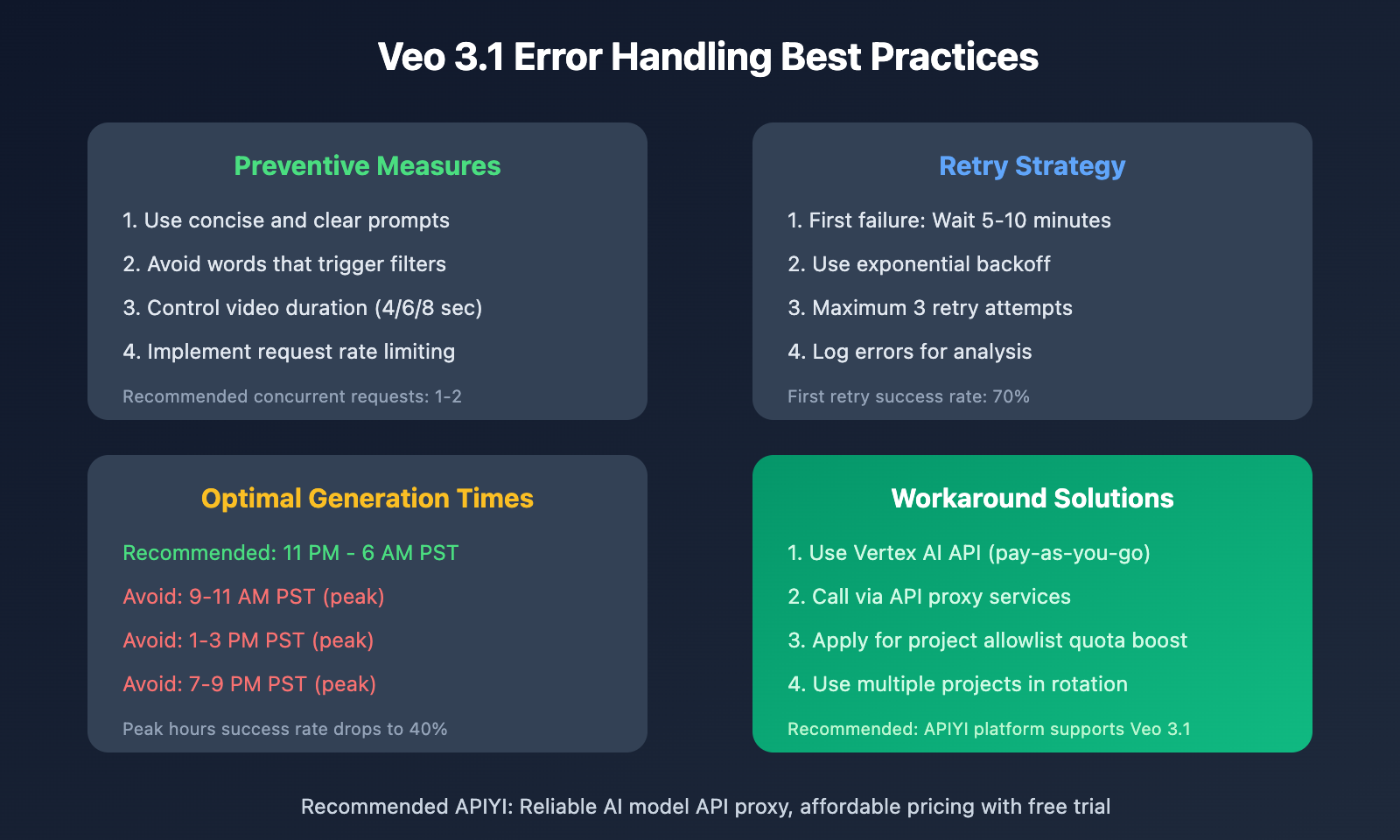
Code Example: Complete Error Handling
import time
from enum import Enum

class VeoErrorType(Enum):
    RESOURCE_EXHAUSTED = "429"
    FORBIDDEN = "403"
    SAFETY_FILTER = "safety"
    PUBLIC_ERROR_MINOR = "public_error_minor"
    UNKNOWN = "unknown"

def handle_veo_error(error_response):
    """Handle Veo 3.1 errors"""

    error_code = error_response.get("code", "")
    error_message = error_response.get("message", "")
    support_code = extract_support_code(error_message)

    if "429" in str(error_code):
        return VeoErrorType.RESOURCE_EXHAUSTED, "Too many requests, wait and retry"

    if "403" in str(error_code):
        return VeoErrorType.FORBIDDEN, "Insufficient permissions, check API config"

    if support_code:
        category = get_safety_category(support_code)
        return VeoErrorType.SAFETY_FILTER, f"Safety filter: {category}"

    if "PUBLIC_ERROR_MINOR" in error_message:
        return VeoErrorType.PUBLIC_ERROR_MINOR, "Internal processing error, simplify request and retry"

    return VeoErrorType.UNKNOWN, error_message

# Safety filter code mapping
SAFETY_CODES = {
    "58061214": "Child", "17301594": "Child",
    "29310472": "Celebrity", "15236754": "Celebrity",
    "90789179": "Sexual", "43188360": "Sexual",
    "61493863": "Violence", "56562880": "Violence",
    "62263041": "Dangerous",
    # ... more codes
}
Tip: Call Veo 3.1 through APIYI (apiyi.com) – the platform provides stable API proxy services that can bypass some official limitations and improve generation success rates.
FAQ
Q1: How do I fix the PUBLIC_ERROR_MINOR error?
This is a generic error indicating an internal processing exception. Here's what you can try:
- Wait 5-10 minutes and retry
- Simplify your prompt to reduce complexity
- Avoid peak usage times
- If it persists, consider using an API relay service
Q2: Why do normal prompts trigger safety filters?
Veo 3.1's safety filters can be overly sensitive at times, leading to false positives. Common trigger words include "fire", "shot", "strike", etc. The workaround is to use alternative phrasing – for example, change "fire in the fireplace" to "burning logs in the hearth".
Q3: How can I see detailed error reasons?
Enable the includeRaiReason: true parameter in your API request to get more detailed safety filter reasons. The returned Support Code can be cross-referenced with the tables in this article to identify the specific category.
Summary
Here are the key takeaways about Veo 3.1 error codes:
- PUBLIC_ERROR_MINOR: Generic internal error – waiting and retrying or simplifying your request usually resolves it
- Support Code (8-digit number): Safety filter code – check the tables to understand why content was blocked
- 429 RESOURCE_EXHAUSTED: Rate limiting – use exponential backoff for retries
- Best Practices: Avoid peak hours, use concise prompts, implement retry mechanisms
If you're experiencing persistent errors, you might want to consider using Veo 3.1 through APIYI apiyi.com, which offers a more stable calling experience and professional technical support.
References
⚠️ Link Format Note: All external links use the
Resource Name: domain.comformat for easy copying but aren't clickable, helping avoid SEO weight loss.
-
Veo on Vertex AI Official Documentation: Google Cloud's official API reference docs
- Link:
docs.cloud.google.com/vertex-ai/generative-ai/docs/model-reference/veo-video-generation - Note: Check out the complete API parameters and response formats
- Link:
-
Veo Responsible AI Guide: Safety filters and usage guidelines
- Link:
docs.cloud.google.com/vertex-ai/generative-ai/docs/video/responsible-ai-and-usage-guidelines - Note: Learn about the complete list of safety filter codes
- Link:
-
Veo 3.1 Common Error Troubleshooting: Community-curated error handling guide
- Link:
skywork.ai/blog/llm/veo-3-1-troubleshooting-common-errors-2 - Note: More hands-on experience and solutions
- Link:
Author: Tech Team
Tech Discussion: Feel free to discuss in the comments. For more resources, visit the API Yi apiyi.com tech community


