
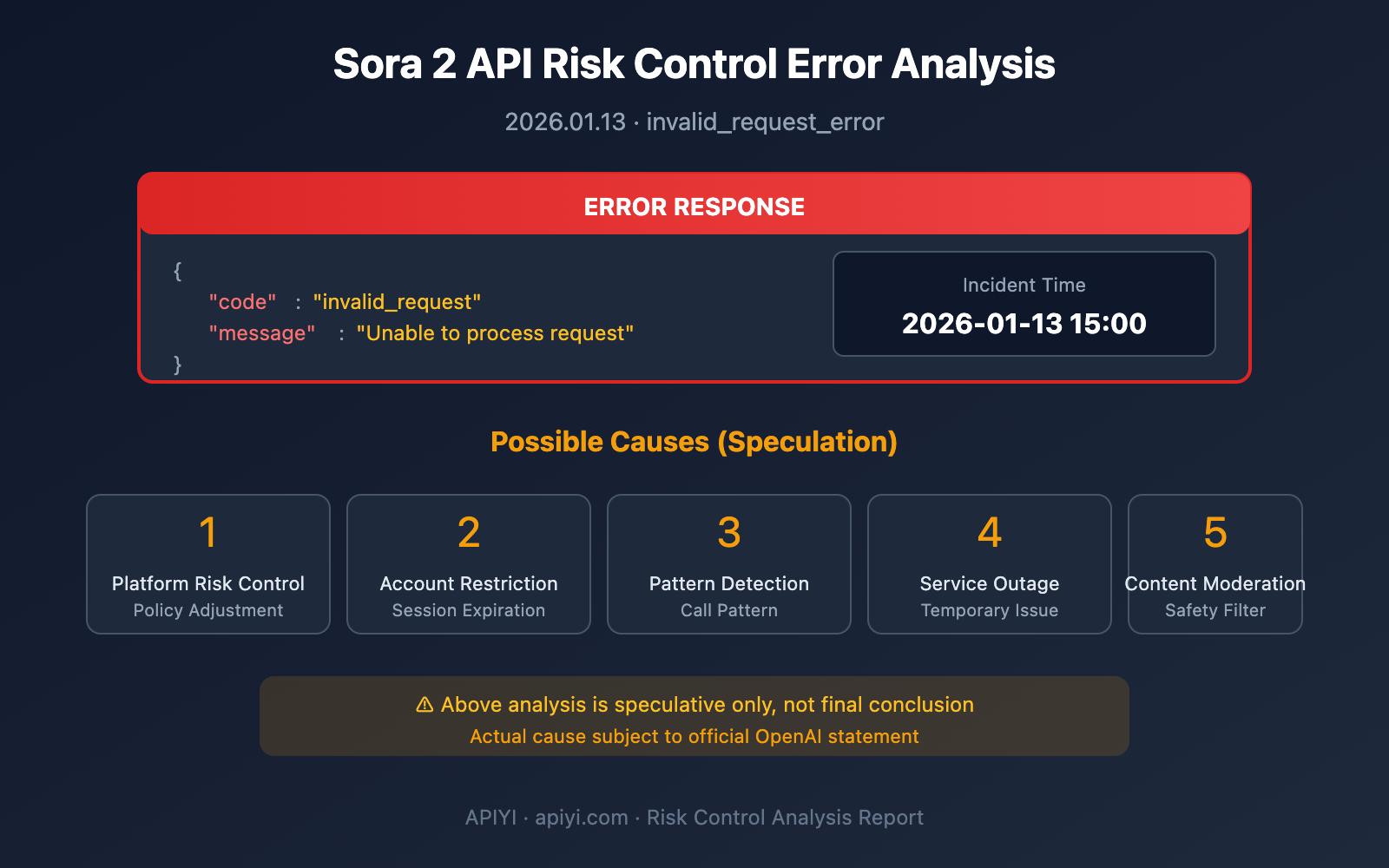
Event Overview: Around 15:00 Beijing time on January 13, 2026, some users reported encountering risk control errors when calling the Sora 2 API, receiving
{"error":{"code":"invalid_request","message":"Unable to process request","param":null,"type":"invalid_request_error"}}. This article analyzes possible causes – purely speculative.
Sora 2 API Error Description
Error Details
On the afternoon of January 13, 2026, users encountered the following error when calling the Sora 2 API:
{
  "error": {
    "code": "invalid_request",
    "message": "Unable to process request",
    "param": null,
    "type": "invalid_request_error"
  }
}
| Error Field | Value | Description |
|---|---|---|
| code | invalid_request | Request deemed invalid |
| message | Unable to process request | Unable to process the request |
| param | null | No specific parameter issue indicated |
| type | invalid_request_error | Error type is invalid request |
Error Characteristics Analysis
This error message has several noteworthy characteristics:
- param is null: Doesn't point to a specific problematic parameter
- Vague message: "Unable to process request" is a generic rejection message
- Non-standard error code: Different from common rate_limit or authentication errors
This type of vague error response typically means the server actively rejected the request, rather than the request format being incorrect.
Possible Reasons for Sora 2 API Errors
⚠️ Disclaimer: The following analysis is purely speculative based on available information and does not represent any final conclusions. Actual reasons should be confirmed by official OpenAI statements.
Possible Reason 1: Platform Risk Control Policy Adjustments
Evidence for this speculation:
OpenAI has been frequently adjusting Sora 2's access policies recently:
| Timeline | Policy Changes |
|---|---|
| 2026.01.07 | Added phone number verification requirement |
| 2026.01.10 | Free users restricted from web version |
| 2026.01.13 | Current invalid_request error appears |
Possible scenarios:
- The platform might be conducting a new round of access method screening
- Certain calling patterns may have been identified as non-standard access
- The risk control system might be undergoing testing or upgrades
Possible Reason 2: Account or Session-Level Restrictions
Evidence for this speculation:
OpenAI implements differentiated management for different account types:
| Account Type | Restriction Status |
|---|---|
| Free accounts | Can no longer use web version for generation |
| Plus accounts | Have Credits limitations |
| Pro accounts | Relatively relaxed but still capped |
| API calls | May trigger frequency detection |
Possible scenarios:
- Specific account's calling patterns may have been flagged
- Session tokens might have expired or been revoked
- Account status may have changed
Possible Reason 3: Request Pattern Recognition
Evidence for this speculation:
Third-party API integrations typically have characteristic calling patterns:
- High-frequency consecutive requests
- Similar request content patterns
- Specific client identifiers
- Concentrated source IPs
Possible scenarios:
- Calling patterns differ significantly from normal users
- Request frequency exceeds expected thresholds
- Source characteristics added to watch list

Possible Reason 4: Temporary Server Issues
Evidence for this speculation:
Based on OpenAI status page historical records:
| Failure Type | Historical Cases |
|---|---|
| Latency spikes | Degraded latency for Sora API |
| Error rate increases | Increased error rates for Sora API |
| Service outages | Large-scale outage in Dec 2024 |
Possible scenarios:
- Server undergoing maintenance or updates
- Some nodes may be experiencing issues
- Errors might automatically resolve shortly
Possible Reason 5: Content Safety Moderation Triggers
Evidence for this speculation:
Sora 2 implements strict content safety policies:
- Violence and adult content are prohibited
- Requests involving real people are restricted
- Copyright-related content is filtered
- Certain sensitive topics are blocked
Possible scenarios:
- Request content may have triggered safety review
- Moderation system might have false positives
- Certain keywords may have been temporarily blacklisted
How to Handle Sora 2 API Errors
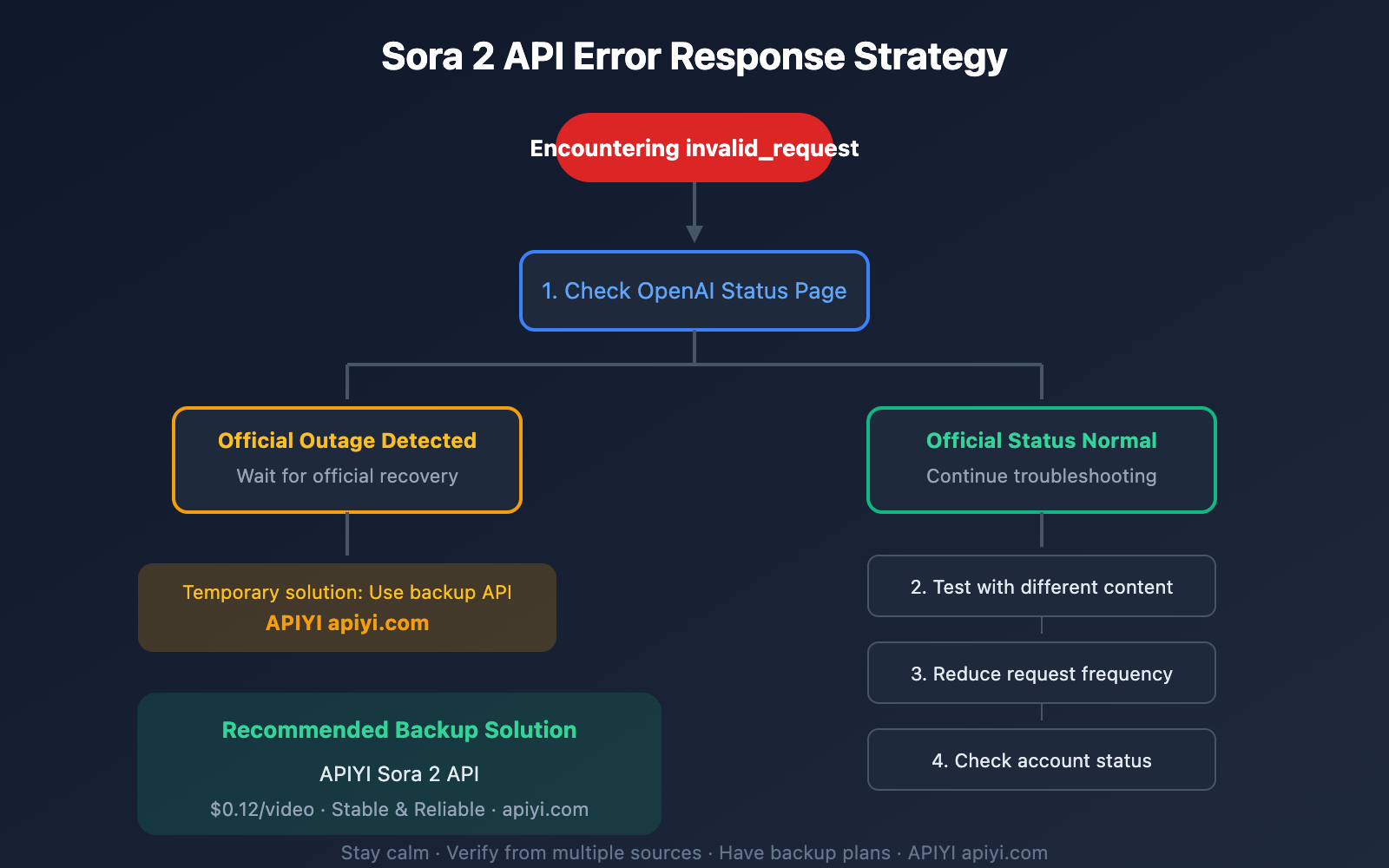
Immediate Troubleshooting Steps
| Step | Action | Purpose |
|---|---|---|
| 1 | Check OpenAI Status Page | Confirm if it's an official outage |
| 2 | Test with different request content | Rule out content triggering issues |
| 3 | Reduce request frequency | Rule out rate limiting issues |
| 4 | Check account status | Confirm account is functioning normally |
| 5 | Wait and observe | Temporary issues may auto-resolve |
Check Official OpenAI Status
Visit the OpenAI status page: status.openai.com
Current system overall operational status:
- Overall availability rate of approximately 99.06% during Oct 2025 – Jan 2026
- Most recent officially recorded Sora issue was a login problem on Dec 18, 2025
- Status page updates major outage information in real-time
Backup Solution: Use Stable API Services
If the official interface experiences fluctuations, you might consider using third-party API services as backup:
import openai

# APIYI backup access solution
client = openai.OpenAI(
    api_key="your_apiyi_key",
    base_url="https://vip.apiyi.com/v1"
)

response = client.chat.completions.create(
    model="sora-2",
    messages=[{
        "role": "user",
        "content": "A serene lake at sunset with mountains"
    }]
)
🎯 Backup Recommendation: APIYI apiyi.com provides Sora 2 API access services, which can serve as a backup when the official interface fluctuates, ensuring business continuity.
Sora 2 API Error Types Quick Reference
OpenAI API Common Error Comparison
| Error Type | Typical Causes | Recommended Action |
|---|---|---|
| invalid_request_error | Invalid or rejected request | Check request content and format |
| authentication_error | Authentication failure | Verify API Key |
| rate_limit_error | Exceeding rate limits | Reduce request frequency |
| server_error | Server-side error | Wait and retry |
| insufficient_quota | Insufficient quota | Top up or upgrade |
invalid_request Breakdown Scenarios
| Message Content | Possible Cause |
|---|---|
| Unable to process request | Generic rejection, likely risk control |
| Missing required parameter | Required parameter missing |
| Invalid parameter value | Parameter value invalid |
| Content policy violation | Content violates policy |
| Model not available | Model unavailable |
The "Unable to process request" error you're seeing falls under the generic rejection type – you'll need to look at the context to figure out what's actually going on.
Sora 2 API Risk Control Historical Reference
Recent Policy Changes Timeline
| Date | Event | Affected Scope |
|---|---|---|
| 2025.09.30 | Sora 2 official release | Global users |
| 2025.12.18 | Web login issues | Web users |
| 2026.01.07 | Phone verification added | All users |
| 2026.01.10 | Free user restrictions | Free users |
| 2026.01.13 | invalid_request errors | Some API users |
Risk Control Evolution Trends
Based on historical observations, OpenAI's management of Sora shows these patterns:
- Gradual Tightening: A progressive shift from open to restricted
- Differentiated Management: Different treatment for different user groups
- Escalating Technical Countermeasures: Detection methods continuously improving
- Rapid Policy Adjustments: Frequent changes with minimal advance notice
Sora 2 API Error: What to Watch For Next
Signals to Keep Monitoring
| Observation Area | What to Track |
|---|---|
| Official Announcements | OpenAI status page and social media |
| Community Feedback | Developer forum discussions |
| Error Changes | Whether error messages get updated |
| Recovery Time | How long the issue persists |
Recommended Monitoring Strategy
# Simple health check example
import openai
import time

def check_sora_status():
    try:
        client = openai.OpenAI(
            api_key="your_key",
            base_url="https://vip.apiyi.com/v1"
        )
        # Test with a simple prompt
        response = client.chat.completions.create(
            model="sora-2",
            messages=[{"role": "user", "content": "test"}]
        )
        return "OK"
    except Exception as e:
        return f"Error: {str(e)}"

# Check status periodically
while True:
    status = check_sora_status()
    print(f"{time.strftime('%Y-%m-%d %H:%M:%S')} - {status}")
    time.sleep(300)  # Check every 5 minutes
Wrapping Up: How to Reasonably Handle Sora 2 API Errors
Key Takeaways
| Point | Explanation |
|---|---|
| Don't Panic | A single error doesn't mean a long-term issue |
| Verify Multiple Ways | Confirm the root cause from different angles |
| Stay Patient | Temporary glitches usually resolve themselves |
| Have a Backup | Critical services should have a Plan B |
Possible Causes Review
The potential reasons for this invalid_request_error include:
- Platform Risk Control Adjustments – Higher likelihood
- Account or Session Limits – Needs specific investigation
- Request Pattern Recognition – Related to call patterns
- Temporary Server Issues – May auto-recover
- Content Safety Review – Related to request content
⚠️ Disclaimer: The above analysis is speculative and shouldn't be taken as definitive. We recommend following OpenAI's official updates for clarity.
Alternative Access Options
If you need stable Sora 2 API access:
🎯 Recommended Solution: APIYI apiyi.com provides Sora 2 API services at $0.12 per generation, supporting high-concurrency calls. It's a reliable backup when the official interface isn't stable.
References:
- OpenAI Status Page: status.openai.com
- OpenAI API Error Codes Documentation: platform.openai.com/docs/guides/error-codes
- OpenAI Developer Community: community.openai.com


