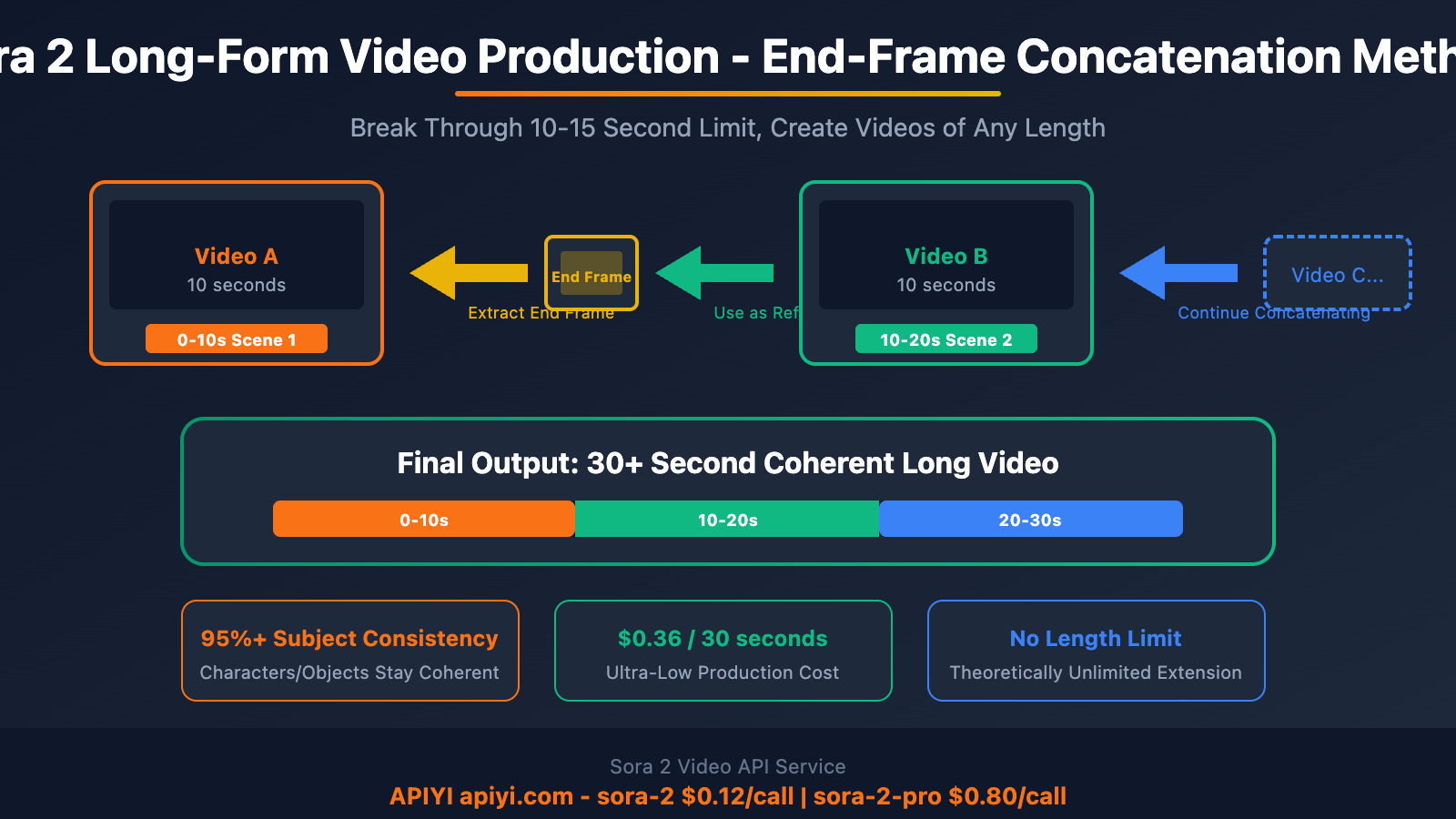
This article explains the end-frame concatenation method in detail, using the final frame of the previous video as a reference image for the next video to achieve long-form video production with subject consistency.
"Sora 2 can only generate 10-second videos, how can I create longer content?"—This is a core problem faced by many creators.
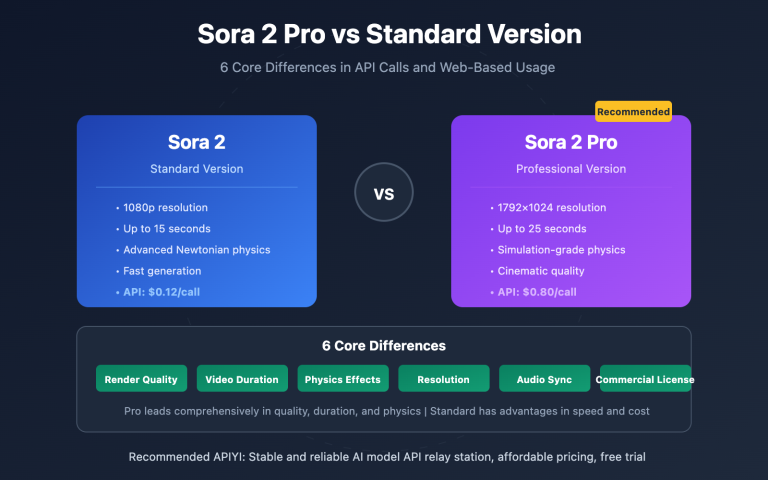
OpenAI Sora 2's current video length limits are: 10-15 seconds for regular users, with Pro users getting up to 25 seconds maximum. However, through the end-frame concatenation method, we can break through this limitation to create coherent videos of 30 seconds, 60 seconds, or even longer.
Core Value: Master Sora 2's end-frame concatenation technique to achieve long-form video production with subject consistency, suitable for scenarios like e-commerce advertising and brand promotional videos.
Sora 2 Video Length Limitation Explained
Before introducing the breakthrough method, let's understand Sora 2's current video length limitations:
| User Type | Video Duration | Notes |
|---|---|---|
| Regular Users | 10-15 seconds | 15 seconds supported after October 2025 update |
| Pro Users | Up to 25 seconds | Using Storyboard feature on web interface |
| API Calls | 10 seconds / 15 seconds | Depending on model version |
Why Break Through the Limitation?
Many commercial scenarios require longer videos:
- E-commerce Advertising: Complete product showcases need 30-60 seconds
- Brand Promotional Videos: Brand storytelling requires 1-2 minutes
- Short Dramas/Short Videos: Single scenes often exceed 15 seconds
- Tutorial Demonstrations: Complete workflows need more time
🎯 Solution: Through the "end-frame concatenation method," connect multiple short videos end-to-end while maintaining subject consistency to achieve video production of any length.
Sora 2 Last-Frame Stitching Principle
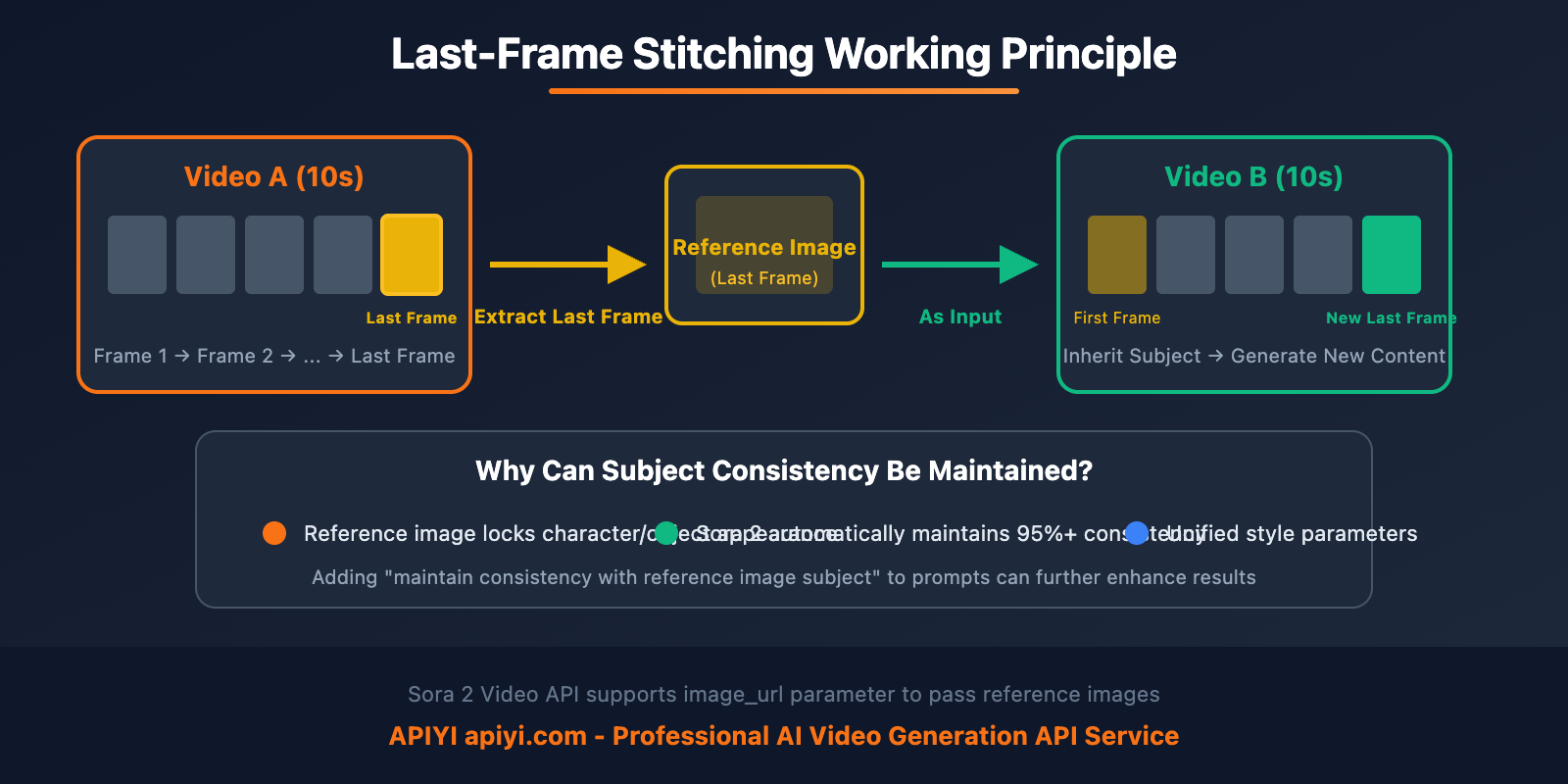
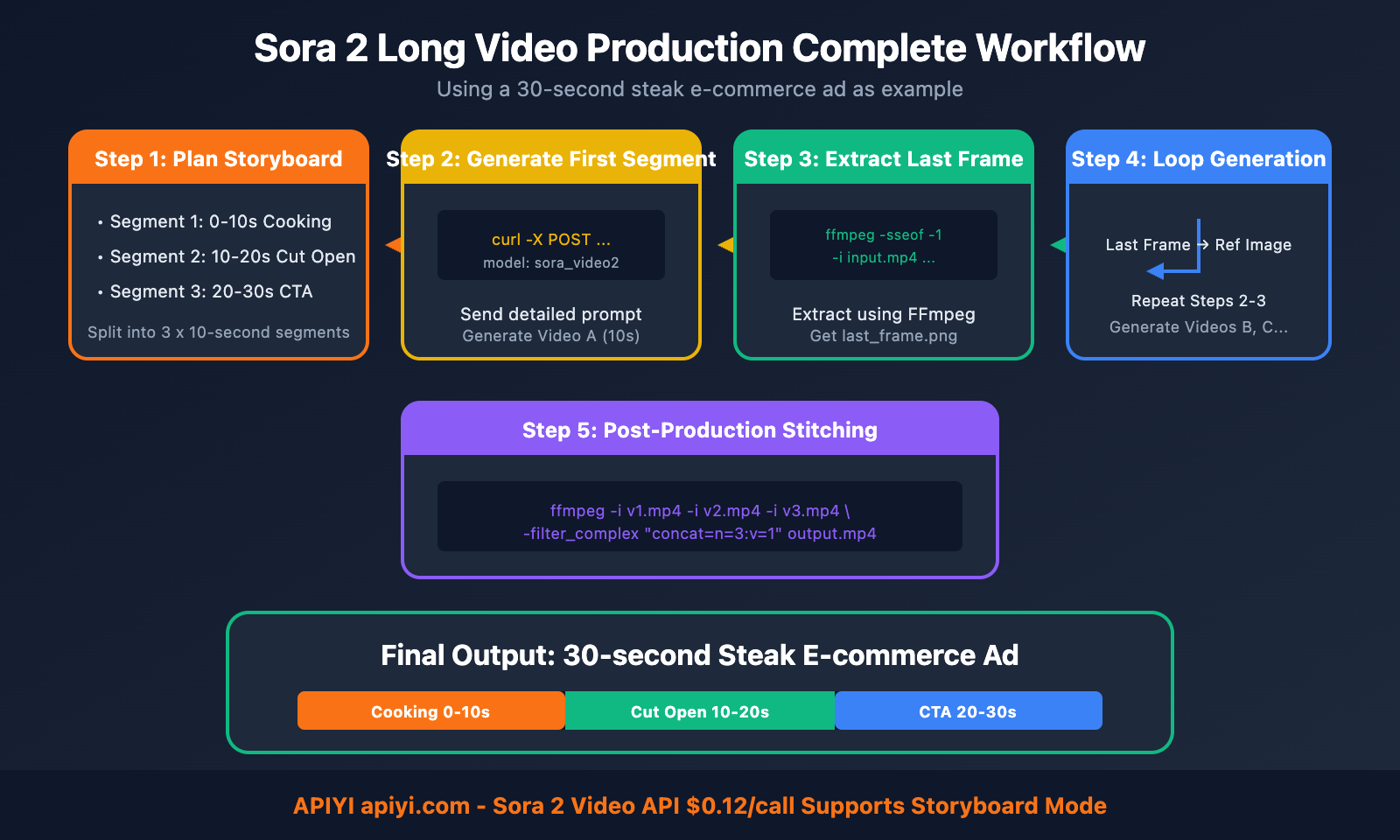
The core principle of Last-Frame Stitching is to use the last frame of the previous video as the reference image (starting frame) for the next video, ensuring visual continuity between videos.
Stitching Workflow
Video A (10s) → Extract last frame → As Video B reference image → Video B (10s) → Extract last frame → ...
     ↓                                    ↓
  Scene 1 Content                      Scene 2 Content (Subject Consistency Maintained)
Why Does This Method Work?
Sora 2 possesses powerful subject consistency capabilities:
| Feature | Description |
|---|---|
| Character Preservation | 95%+ character/object consistency |
| Costume Continuity | Automatically maintains character clothing and facial features |
| Scene Coherence | Maintains continuity of spatial background |
| Style Unity | Ensures consistent visual style across videos |
Sora 2 Long Video Production Practice
Below is a practical example of a steak e-commerce advertisement, demonstrating how to use the last-frame stitching method to create a complete 30-second video.
Step 1: Plan the Storyboard
Split the 30-second video into 3 segments of 10 seconds each:
| Segment | Time | Content Description |
|---|---|---|
| Segment 1 | 0-10s | Steak cooking process, sizzling on hot plate, marbling close-up |
| Segment 2 | 10-20s | Cut open steak to show pink meat quality, brand packaging reveal |
| Segment 3 | 20-30s | Brand logo, e-commerce order interface, CTA ending |
Step 2: Generate the First Video
Use the API to generate the first 10-second segment:
curl -X POST "https://api.apiyi.com/v1/chat/completions" \
  -H "Authorization: Bearer sk-your-api-key" \
  -H "Content-Type: application/json" \
  -d '{
    "model": "sora_video2",
    "stream": true,
    "storyboard": true,
    "style": "anime",
    "messages": [
      {
        "role": "user",
        "content": [
          {
            "type": "text",
            "text": "Create a 10-second high-quality steak e-commerce brand advertisement video: 0-2s: Thick-cut steak sizzling on hot plate, slow-motion close-up of golden sear and marbling; 2-4s: Display brand steak packaging, emphasizing prime cut, cold chain, grain-fed quality; 4-6s: Cooking pace accelerates, quick cuts of salting, brushing butter, garlic slices and herbs; 6-8s: Cut open finished steak, presenting pink medium-rare meat quality and flowing juices; 8-10s: Brand logo appears, showing e-commerce order interface with 'Limited-time offer, next-day delivery' text, ending with CTA: Order now, eat better. Overall style is premium, modern, highly appetizing with e-commerce advertising rhythm."
          }
        ]
      }
    ]
  }'
Step 3: Extract Last Frame and Generate Subsequent Videos
Extract the last frame from the first video as the reference image for the second video:
curl -X POST "https://api.apiyi.com/v1/chat/completions" \
  -H "Authorization: Bearer sk-your-api-key" \
  -H "Content-Type: application/json" \
  -d '{
    "model": "sora_video2",
    "stream": true,
    "storyboard": true,
    "style": "anime",
    "messages": [
      {
        "role": "user",
        "content": [
          {
            "type": "image_url",
            "image_url": {
              "url": "https://your-storage.com/last-frame-video1.png"
            }
          },
          {
            "type": "text",
            "text": "Continue creating a 10-second video based on the reference image: Camera slowly pulls back from cut steak to show complete plating with garnishes and rising steam. Then transition to brand packaging close-up, highlighting premium texture. Finally show satisfied consumption scene, emphasizing product value. Maintain consistent visual style and steak subject with reference image."
          }
        ]
      }
    ]
  }'
Step 4: Post-Production Stitching
Use FFmpeg or video editing software to stitch multiple segments:
# Stitch videos using FFmpeg
ffmpeg -i video1.mp4 -i video2.mp4 -i video3.mp4 \
  -filter_complex "[0:v][1:v][2:v]concat=n=3:v=1[outv]" \
  -map "[outv]" output_30s.mp4
Sora 2 Subject Consistency Optimization Tips
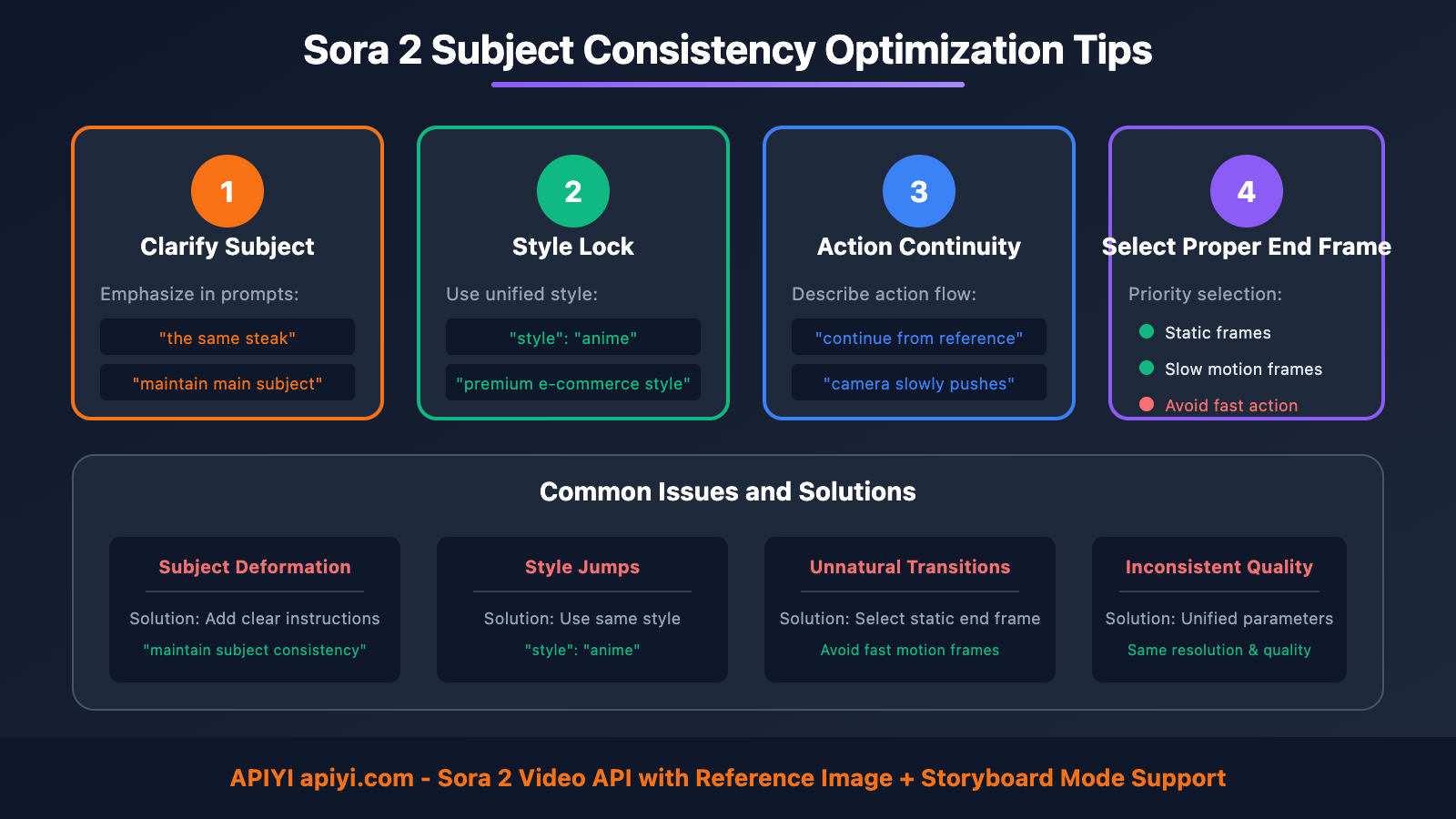
To make spliced videos more coherent, pay attention to the following subject consistency optimization tips:
Prompt Optimization Strategies
| Technique | Description | Example |
|---|---|---|
| Clarify Subject | Emphasize the same subject in each video segment | "the same steak", "maintain the main subject" |
| Style Lock | Specify a unified visual style | "premium e-commerce style", "cinematic quality" |
| Action Continuity | Describe action continuation from the previous frame | "continue from reference image", "camera slowly pushes forward" |
| Avoid Complex Switches | Reduce frequent switching between multiple subjects | Maintain a single focal point throughout |
Storyboard Parameter Description
Key parameters for API calls:
{
  "model": "sora_video2",
  "storyboard": true,
  "style": "anime",
  "messages": [...]
}
| Parameter | Description |
|---|---|
storyboard |
Enable storyboard mode to improve narrative coherence |
style |
Style preset to maintain consistency across multiple video segments |
image_url |
Reference image/end frame to ensure subject consistency |
Common Issues and Solutions
| Issue | Cause | Solution |
|---|---|---|
| Subject Deformation | Insufficiently clear description | Add explicit instructions like "maintain subject consistency" |
| Style Jumps | Style not locked | Use the same style parameter |
| Unnatural Transitions | Improper end frame selection | Select static or slow-motion frames as reference |
| Inconsistent Quality | Differences in generation parameters | Maintain the same resolution and quality settings |
Sora 2 Long Video Production Cost Analysis
The cost advantage of producing long videos through API is significant:
| Video Length | Number of Segments Required | API Cost (sora-2) | Notes |
|---|---|---|---|
| 10 seconds | 1 segment | $0.12 | Single generation |
| 20 seconds | 2 segments | $0.24 | End-frame stitching |
| 30 seconds | 3 segments | $0.36 | End-frame stitching |
| 60 seconds | 6 segments | $0.72 | End-frame stitching |
APIyi Sora 2 Interface Pricing
| Model | Price | Features |
|---|---|---|
| sora-2 | $0.12/request | Standard version, suitable for high-volume generation |
| sora-2-pro | $0.80/request | Professional version, higher quality |
🎯 Cost Recommendation: Producing a 30-second e-commerce advertisement video using sora-2 costs only about $0.36 (approximately 2.5 RMB), reducing costs by 99%+ compared to traditional video production. Call through APIyi apiyi.com with OpenAI-compatible format for easy integration.
❓ Sora 2 Long Video Production FAQ
Q1: How high is the subject consistency of the end-frame stitching method?
Sora 2's subject consistency retention rate reaches 95%+. It can be further improved through:
- Using static or slowly moving frames as reference images
- Explicitly stating "maintain subject consistency with reference image" in prompts
- Using the same style parameters to lock in the style
For scenarios with extremely high requirements, it's recommended to use the sora-2-pro model.
Q2: What’s the maximum video length that can be produced?
Theoretically, there's no upper limit. Through the end-frame stitching method:
- 20 seconds: 2 segments, essentially imperceptible
- 30-60 seconds: 3-6 segments, suitable for most commercial scenarios
- 2 minutes+: Requires more segments, recommend professional editing
In actual production, it's recommended to keep it within 60 seconds. For ultra-long videos, suggest dividing into multiple independent scenes.
Q3: How to extract the last frame of a video?
Using FFmpeg commands:
# Extract the last frame of the video
ffmpeg -sseof -1 -i input.mp4 -frames:v 1 last_frame.png

# Or extract a frame at a specific timestamp
ffmpeg -ss 9.9 -i input.mp4 -frames:v 1 frame_9.9s.png
You can also use Python + OpenCV or online tools for extraction.
Q4: What’s the difference between Storyboard mode and normal mode?
| Feature | Normal Mode | Storyboard Mode |
|---|---|---|
| Narrative capability | Single scene | Multi-shot narrative |
| Coherence | Average | Stronger |
| Shot transitions | Not supported | Automatically handled |
| Application scenarios | Simple visuals | Complex stories |
Recommend using storyboard: true for scenarios requiring multiple shots, such as e-commerce advertisements.
🎯 Summary
Sora 2 Last Frame Stitching Method is an effective solution for breaking through video length limitations.
Key Points:
| Point | Description |
|---|---|
| Method Principle | Last frame of previous video → Reference image for next video |
| Subject Consistency | 95%+ retention rate, can be further improved through prompt optimization |
| Cost Advantage | Only $0.36 for a 30-second video |
| Use Cases | E-commerce ads, brand videos, short dramas, etc. |
Operation Workflow:
- Plan Storyboard: Split long video into multiple 10-second segments
- Generate First Segment: Use detailed prompts to generate the first video
- Extract Last Frame: Use FFmpeg to extract the final frame
- Sequential Generation: Use the last frame as reference image to generate subsequent videos
- Post-production Stitching: Use video editing software to merge all segments
Final Note: By calling Sora 2 video API through APIYI apiyi.com, which supports storyboard mode and reference image functionality, this is an efficient solution for creating long videos. It's recommended to use sora-2 ($0.12/call) for testing, and sora-2-pro ($0.80/call) for final production to achieve higher quality.
📝 Author Bio: Senior AI application developer specializing in large model API integration and architectural design. Regularly shares AI development practical experience. More technical resources and best practice cases available at APIYI apiyi.com technical community.
🔔 Technical Exchange: Welcome to discuss technical issues in the comments section. Continuously sharing AI development experience and industry updates. For in-depth technical support, contact our technical team through APIYI apiyi.com.