Author’s note: This comparison looks at AI APIs versus ChatGPT and Claude memberships across 5 dimensions—billing model, usage limits, feature form, model choice, and integration & data—to help you pick the right option for each scenario and get your costs straight in 2026.
When choosing AI tools, a lot of people run into the same question: if I’m already paying for a ChatGPT or Claude membership, do I still need to buy API access separately? And if I only use the API, will I be missing out on the nice features that come with a membership? This article compares pay-as-you-go AI API calls against ChatGPT and Claude membership subscriptions, and gives clear recommendations from two angles: cost structure and feature boundaries.
This isn’t a wishy-washy “they each have their strengths” analysis. We’ll break both options down into 5 quantifiable points of difference and directly tell you which one to pick for different scenarios.
Core value: After reading this, you’ll be able to use your own real usage numbers to figure out which option saves you more money, and you’ll be able to judge which needs only a membership can satisfy and which needs only an API can handle.
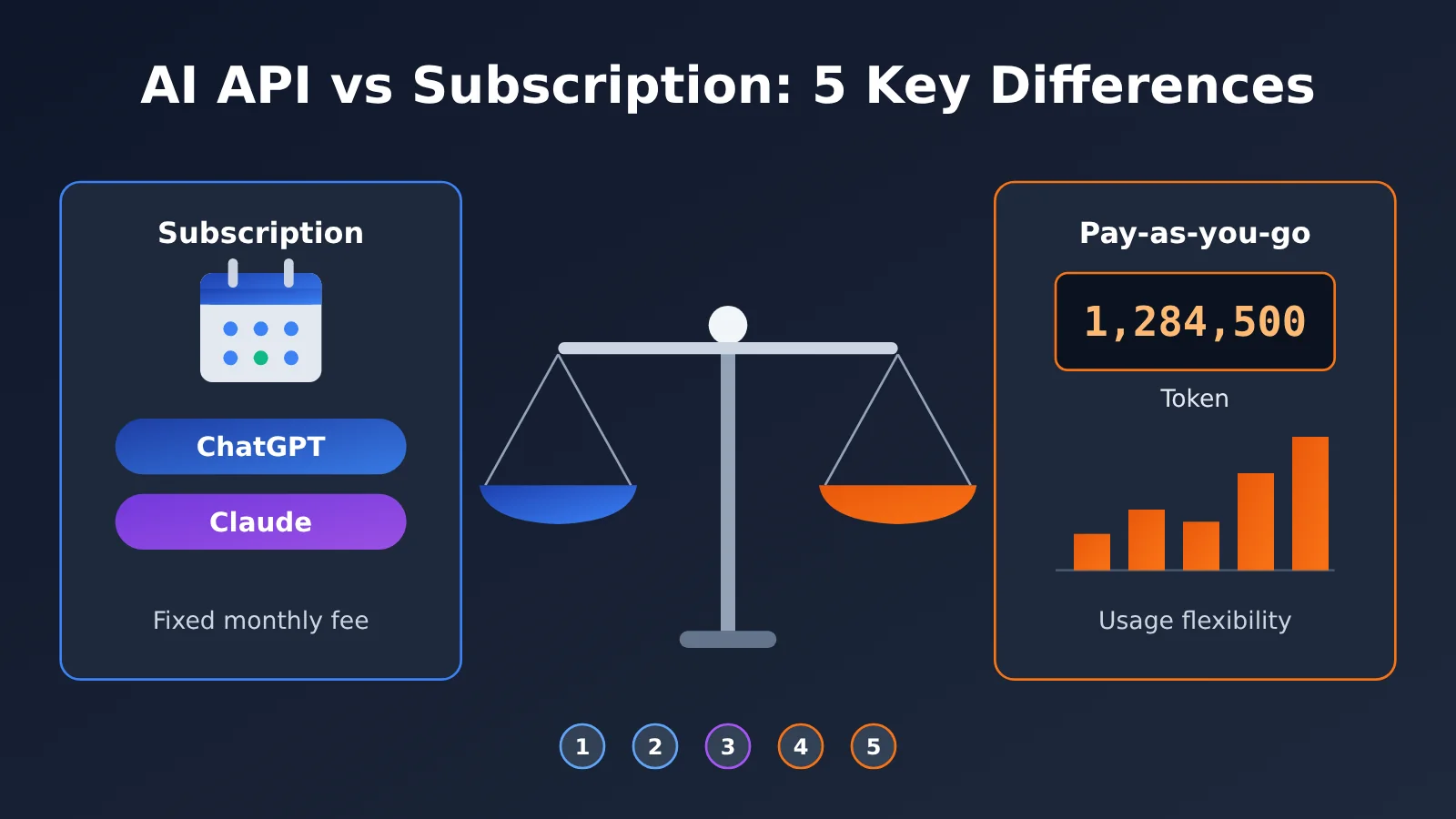
The 5 Core Differences Between AI APIs and ChatGPT/Claude Subscriptions
Let’s start with the big picture. Subscriptions and APIs can both call models from the same vendor, but they’re built for different ways of working. A subscription is a finished product; an API is a set of programmable capabilities.
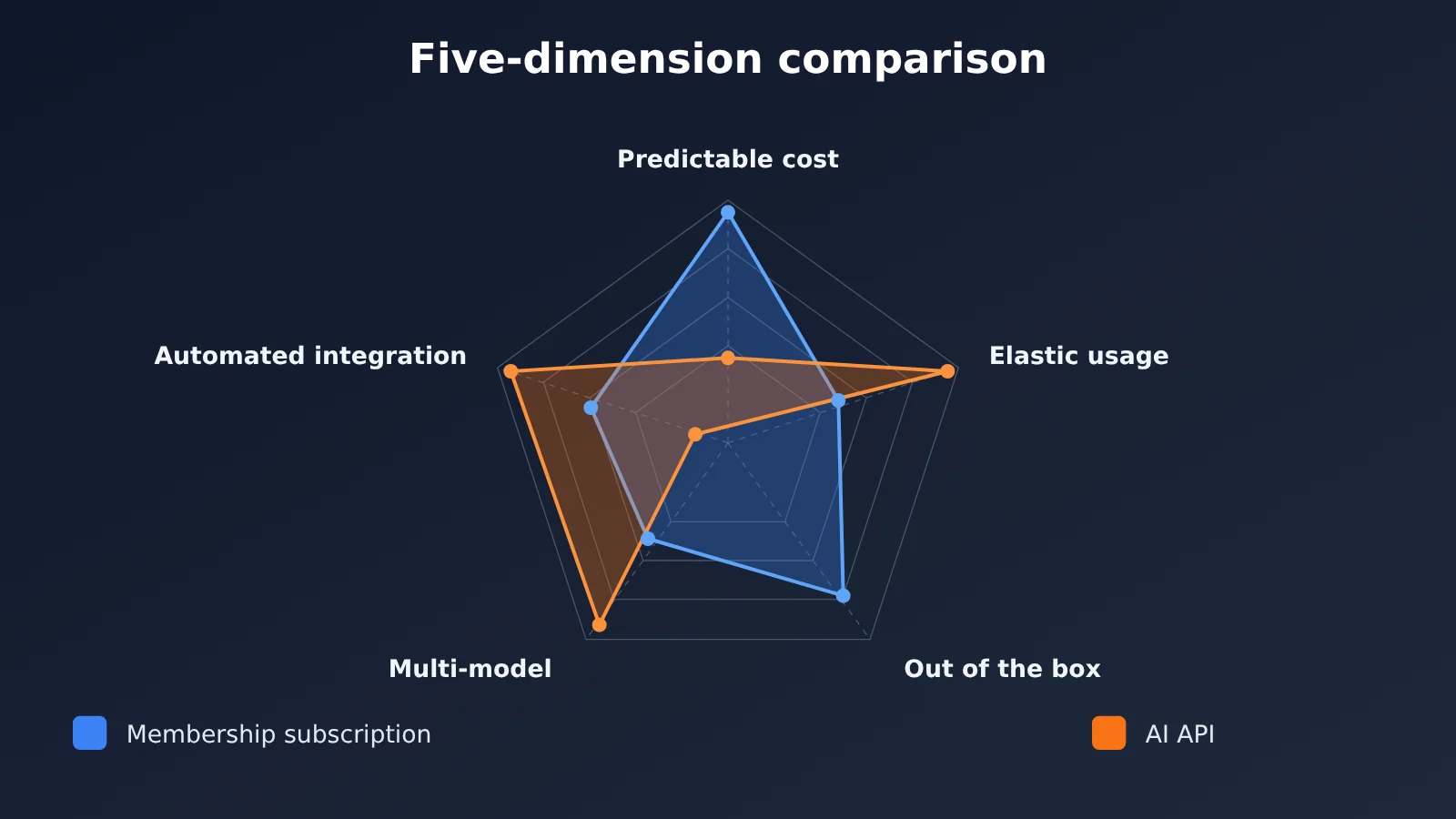
| Dimension | ChatGPT / Claude Subscription | AI API (pay-as-you-go) | Winner |
|---|---|---|---|
| Billing model | Flat monthly fee, same price whether you use a lot or a little | Billed per input and output token | Depends on usage — API for light or batch use, subscription for heavy chat |
| Usage limits | Capped by message count or time window | Rate quotas (RPM/TPM), expandable with payment | API |
| Feature set | Built-in browsing, files, image generation, memory, projects, etc. | Model capability only — you build the rest | Subscription |
| Model choice | Locked to that vendor’s models | Mix and match across vendors | API |
| Integration and data | Manual use in the app or web UI only | Connects to programs, workflows, and your own systems | API |
Why You Can’t Compare API and Subscription Costs Directly
A subscription price is a fixed number. An API price is “unit price × usage.” The units of measurement aren’t the same, so comparing unit prices alone leads to bad conclusions. Some people assume APIs are cheap, then burn through a huge number of tokens in a single long-context, multi-turn conversation. Others assume a subscription means “unlimited,” then hit rate caps repeatedly during peak hours.
The right approach: estimate your monthly token consumption first, then compare that against the subscription fee. Here’s a breakdown of the five differences, one by one.
Difference 1: AI API vs. Membership Billing Models
Memberships run on a subscription model. Individual users usually have a basic paid tier and a higher-end tier, while teams and enterprises have separate per-seat plans. Exact prices vary with vendor adjustments and region, so check the official ChatGPT and Claude pricing pages for current numbers. The biggest advantage of a subscription is predictable cost — you know exactly what you’ll spend each month before you pay.
APIs use pay-as-you-go billing, and the formula is simple: monthly cost = input tokens × input price + output tokens × output price. Prices differ dramatically between models — flagship models and lightweight models are often an order of magnitude apart, and that gap is exactly why APIs can save you so much money.
Estimating AI API Usage: 4 Typical Scenarios
One Chinese character corresponds to roughly 1 to 2 tokens. The approximations below estimate monthly usage for each scenario, so you can plug in the unit price of whichever model you plan to use.
| Scenario | Usage Assumption | Estimated Monthly Tokens | Cost Tendency |
|---|---|---|---|
| Light Q&A | 20 rounds per day, ~1,500 tokens per round | ~900K | API is usually cheaper, especially with a lightweight model |
| Everyday office work | 50 rounds per day, ~3,000 tokens per round | ~4.5M | Depends on the model; you’ll need to run the numbers |
| Heavy long-context use | 100 rounds per day, ~8,000 tokens per round | ~24M | Membership is usually the better deal |
| Batch processing | 10,000 documents at once, ~3,000 tokens each | ~30M (one-time) | API only — memberships don’t support batching |
Here’s a detail that often gets overlooked: multi-turn API conversations bill for historical messages over and over. By turn 10, the previous 9 turns are sent again as input, so input tokens pile up fast in long conversations. Memberships don’t bill by token, which makes long conversations their strong suit.
Difference 2: Usage limits for ChatGPT and Claude memberships vs. AI APIs
Memberships aren’t unlimited. ChatGPT sets message caps for different models, and quotas for higher-tier reasoning models are usually tighter. Claude memberships use usage quotas that reset on a rolling time window and impose periodic caps for heavy use. Once your quota runs out, you either wait for it to reset, switch to a lower-tier model, or upgrade to a more expensive plan.
API limits work differently: they cap rate, not total volume. Common metrics are requests per minute (RPM) and tokens per minute (TPM). As long as your account has sufficient balance and you stay under the rate limits, you can keep calling. For businesses that need steady output, this “pay to scale” model is more controllable.
The trade-off is clear: memberships fit the pace of “a person chatting at a computer,” while APIs fit the pace of “a program running continuously in the background.” If your work is often interrupted by membership quotas at critical moments, it’s time to consider an API.
Difference 3: Built-in membership features vs. implementing them with AI APIs
This is where memberships deliver the most value. A membership isn’t just “access to a model”—it’s a polished product experience. The table below lists features included with memberships and the effort required to replicate them with an API.
| Built-in membership feature | Membership experience | How to implement with AI API | Implementation difficulty |
|---|---|---|---|
| Web search | One-click enable, with automatic source citations | Integrate a search API or use a model with search capabilities | Medium |
| File and image understanding | Drag and drop to upload | Parse files yourself, or call multimodal APIs | Medium |
| Image generation | Generate images directly in the chat | Call image generation model APIs | Low |
| Memory and projects | Automatically remembers preferences and organizes by project | Build your own database to store history and context | High |
| Voice conversation | Real-time voice in the app | Combine speech recognition, the model, and speech synthesis | High |
| Coding Agent | Official coding tools available as part of membership | Configure third-party or official CLI tools with an API key | Low |
The takeaway: if what you need is a polished AI assistant, there’s almost no substitute for a membership. Recreating the full feature set with APIs takes significant development effort, and it’s rarely worth it for individual users. But if you only use one or two capabilities—like plain text Q&A or batch image generation—implementing them with an API is quite cheap.
Difference 4: Multiple Models with AI APIs vs. a Single Vendor with Subscriptions
A ChatGPT subscription only gets you OpenAI models, and a Claude subscription only gets you Anthropic models. Plenty of people end up paying for both just to get the strengths of each — and then spend their day switching between two interfaces.
With an API approach, you pick the model that fits the task. Use a strong reasoning model for coding, and a lightweight one for simple classification and summarization. This kind of “tiered invocation” is the most effective way to keep costs under control. With an aggregation platform, a single API key covers multiple vendors, and switching models is just a matter of changing one parameter.
| Task Type | Recommended Model Direction | Why Choose It |
|---|---|---|
| Complex programming and long-document analysis | Claude flagship models | Strong long-context understanding and coding ability |
| General conversation and multimodal tasks | GPT series models | Mature ecosystem and well-developed tool calling |
| Ultra-long documents and video understanding | Gemini series models | Large context window and strong multimodal capability |
| Batch summarization and classification | Lightweight models from each vendor | Low unit price and fast response |
Difference 5: Where AI APIs Win on Integration and Data Control
With a subscription, you can only use the model manually through a web page or app — your own programs can’t call it directly. If you want AI to automatically handle support tickets, compile daily data reports, or embed intelligent features into your product, the API is the only way to go.
Data policies differ too. API services from major vendors typically don’t use your request data to train models by default, whereas consumer subscription products often require users to manually turn off the relevant option in settings. Check each vendor’s latest privacy policy for the specific terms — enterprise users should go through them line by line before choosing a platform.
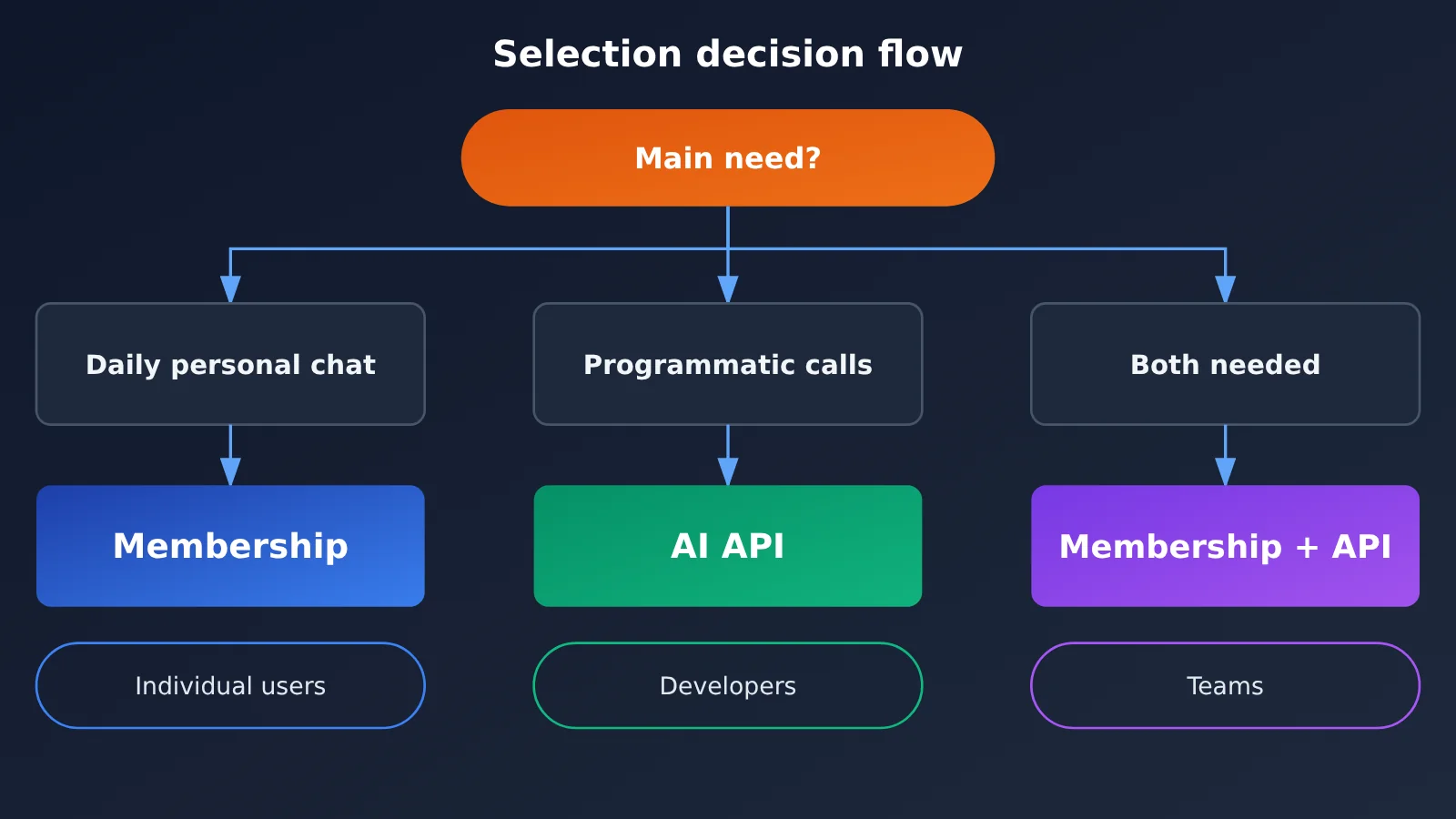
Scenario Recommendations: ChatGPT/Claude Subscriptions or AI API
When to choose a ChatGPT or Claude subscription
- Heavy individual chat users: If you have long conversations every day and frequently work with long documents, a flat monthly fee can cap your costs.
- Non-technical users: You don’t want to write code and need out-of-the-box features like web browsing, file uploads, and voice.
- Deep reliance on a single vendor’s ecosystem: For example, you’ve long used Claude Projects or ChatGPT’s custom GPTs.
When to choose an AI API
- Developers and product teams: You need to embed model capabilities into apps, scripts, or automated workflows.
- Light users or those with fluctuating usage: Sometimes you only use it a few times a week; pay-as-you-go can be cheaper than a flat monthly fee.
- Batch tasks: Translation, summarization, data cleaning, content generation, and other scenarios that require processing large amounts of data at once.
- Multi-model setups: You want to use GPT, Claude, and Gemini together and switch flexibly based on the task.
Hybrid approach: subscription + AI API
For many teams, the best solution is a hybrid: core members keep a subscription for day-to-day thinking and exploration, while automated parts of business workflows go through the API. This preserves the subscription product experience and gives scalable workloads the flexibility of pay-as-you-go billing.
How to Use AI APIs to Replace Some Subscription Features: A Quick Start
If you want to verify whether the API approach works for you, the code below gets you up and running in just a few lines. APIYI provides an OpenAI-compatible interface, so your existing OpenAI SDK code only needs a base_url change to call multiple models.
Minimal Example
import openai

client = openai.OpenAI(
    api_key="YOUR_API_KEY",
    base_url="https://api.apiyi.com/v1"  # APIYI unified endpoint: one key, many models
)

response = client.chat.completions.create(
    model="gpt-4o-mini",  # Can be swapped for Claude, Gemini, etc. — check the console model list for exact names
    messages=[{"role": "user", "content": "Explain what a Token is in three sentences"}]
)
print(response.choices[0].message.content)
View the full code: multi-model comparison + usage tracking + cost estimation
import openai
from typing import Dict

client = openai.OpenAI(
    api_key="YOUR_API_KEY",
    base_url="https://api.apiyi.com/v1"
)

# Fill in the actual prices shown in your console (unit: per million Tokens)
PRICE_TABLE: Dict[str, Dict[str, float]] = {
    "gpt-4o-mini": {"input": 0.0, "output": 0.0},
    "claude-sonnet-model-name": {"input": 0.0, "output": 0.0},
}

def ask(model: str, prompt: str, history: list = None) -> dict:
    """Call a model and return the answer plus Token usage"""
    messages = (history or []) + [{"role": "user", "content": prompt}]
    resp = client.chat.completions.create(model=model, messages=messages)
    usage = resp.usage
    return {
        "answer": resp.choices[0].message.content,
        "input_tokens": usage.prompt_tokens,
        "output_tokens": usage.completion_tokens,
    }

def estimate_cost(model: str, input_tokens: int, output_tokens: int) -> float:
    """Estimate the cost of this call using the formula"""
    price = PRICE_TABLE.get(model, {"input": 0.0, "output": 0.0})
    return (input_tokens * price["input"] + output_tokens * price["output"]) / 1_000_000

def monthly_projection(daily_rounds: int, avg_in: int, avg_out: int, model: str) -> float:
    """Project monthly cost from average daily usage, for comparison against a monthly membership fee"""
    return estimate_cost(model, avg_in * daily_rounds * 30, avg_out * daily_rounds * 30)

if __name__ == "__main__":
    question = "Compare subscription vs. pay-as-you-go pricing, three pros and cons each"
    for model in PRICE_TABLE:
        try:
            r = ask(model, question)
            cost = estimate_cost(model, r["input_tokens"], r["output_tokens"])
            print(f"[{model}] input {r['input_tokens']} / output {r['output_tokens']} Tokens, estimated cost {cost:.6f}")
            print(r["answer"][:200], "\n")
        except Exception as e:
            print(f"[{model}] call failed: {e}")

    # Example: 20 rounds/day, 1000 input and 500 output Tokens per round, projected monthly
    print("Monthly projection:", monthly_projection(20, 1000, 500, "gpt-4o-mini"))
Once you run the full code, you’ll get the real Token usage for each model on the same question. Plug your daily average into monthly_projection and you’ll have a number you can compare directly against your membership fee.
🚀 Quick start: Sign up at APIYI apiyi.com and claim the free trial credits first, then run the script above with the 10 questions you ask most often. Get real usage numbers before deciding whether to keep your membership — that’s far more reliable than going with your gut.
Decision Guide: Choosing Between AI APIs and ChatGPT/Claude Subscriptions
Combine the five differences above into a single decision matrix—match it to your situation and the answer should be clear.
| Your situation | Recommended option | Key reason |
|---|---|---|
| Long chats every day, rely on web browsing and memory | Subscription | Fixed monthly fee caps cost; features work out of the box |
| Only a few times a week, simple questions | AI API | Pay-as-you-go; pay only for what you use |
| Need both GPT and Claude | AI API | One interface covers multiple providers, avoiding two subscription fees |
| Building a product or automating workflows | AI API | Subscriptions can’t be called programmatically |
| Team needs both exploration and batch output | Subscription + AI API | Balances hands-on experience and flexibility |
| Sensitive to data-training policies | AI API (check terms) | API data policies are often stricter by default |
💡 Recommendation: Which option to choose mainly depends on your usage volume and how you use it. We recommend spending a week testing with real tasks on the APIYI platform at apiyi.com, tracking token consumption, and then comparing that with the monthly subscription fee. The platform supports unified access to multiple mainstream models, making it easy to compare and switch within the same codebase.
FAQ
Q1: Do AI APIs and ChatGPT memberships use the same model?
Usually the same model family, but a different product layer. Memberships stack system prompts, web browsing, memory, and other features on top of the model, so the same question may not get identical answers in the app versus the API. The API gives you the more “raw” model capability, with behavior you control yourself through parameters and prompts.
Q2: Can the API alone completely replace a Claude membership?
For plain text chat, code generation, and document analysis, yes—and paired with a third-party chat client you can get a close experience. But product features like project management, memory, and voice in the official app need to be built yourself. If those features are your main use, keeping the membership is less hassle.
Q3: How often do membership and API prices change?
Vendors adjust them at irregular intervals as new models launch. When a new flagship model arrives, API pricing for older models often drops, and membership tiers and quotas may change too. We’d suggest rechecking the official pricing page once a quarter and re-running your own usage numbers.
Q4: Which scenarios save the most money with the API?
– **Light Q&A**: when usage is low, pay-as-you-go is clearly cheaper than a fixed monthly fee.
– **Routing simple tasks**: hand summarization, classification, and format conversion to lightweight models—their unit prices are much lower.
– **Batch processing**: pay for one-off large tasks by actual tokens instead of carrying a long-term subscription just for them.
Q5: How do I quickly call GPT, Claude, and Gemini through an API?
We recommend using an aggregation platform that supports multiple models:
1. Visit APIYI apiyi.com and sign up for an account
2. Create an API key in the console and claim your free trial credits
3. Set the base_url in this article’s code to `https://api.apiyi.com/v1` and change the model parameter to switch models
Q6: What are the downsides of the API approach?
First, costs aren’t capped. Token accumulation across long-context multi-turn chats can exceed expectations, so we’d set up usage alerts. Second, it takes some technical know-how—non-developers need a third-party client. Third, it lacks the membership’s product features; web browsing, memory, and the like need extra setup. To reduce cost risk, you can check the details of each call in the APIYI apiyi.com console and catch abnormal spend early.
AI API vs. ChatGPT & Claude Subscriptions: Key Takeaways
- Different billing models: A subscription is a flat monthly fee; an API charges per unit multiplied by token usage.
- Different rate-limiting logic: Subscriptions cap total usage, while APIs limit request rate—as long as your balance holds up, you can keep calling.
- Subscriptions win on product: Web browsing, memory, voice, project management, and other features work right out of the box.
- APIs win on flexibility: Multi-model combinations, batch processing, and programmatic integration are things only an API can do.
- Watch costs on long conversations: Multi-turn API conversations re-bill historical messages, so you need to control context.
- Test before you decide: Run real tasks with the free credits at APIYI apiyi.com and let the data guide your choice.
Summary
The core differences between AI APIs and ChatGPT/Claude subscriptions:
- Cost structure: Subscriptions suit heavy, long-conversation users; APIs suit light, fluctuating, and batch scenarios.
- Feature boundaries: Subscriptions deliver a complete product experience; APIs offer programmability and multi-model freedom.
- The best answer is often a hybrid: Use a subscription for day-to-day exploration and the API for workflows you can scale.
Don’t jump to conclusions based on unit price or monthly fee alone—run the numbers using a week of your real usage data, and the answer becomes very clear. I recommend validating quickly through APIYI apiyi.com, which offers free credits and a unified interface across multiple models, making the cost of testing essentially zero.
📚 References
- ChatGPT Official Pricing Page: Membership tiers and benefits
- Link:
openai.com/chatgpt/pricing -
Notes: Check the current price and model quota for each tier
-
Claude Official Pricing Page: Claude membership and team plans
- Link:
claude.com/pricing -
Notes: Learn about the usage quotas and included tools for each tier
-
OpenAI API Documentation: API parameters and billing details
- Link:
platform.openai.com/docs -
Notes: Understand token billing, rate limits, and data policies
-
Anthropic Official Documentation: Claude API usage guide
- Link:
docs.anthropic.com - Notes: Context windows, rate limits, and best practices
Author: APIYI Technical Team
Technical Discussion: Feel free to reach out to us on the APIYI homepage. For more integration tutorials, check out the docs.apiyi.com documentation center.