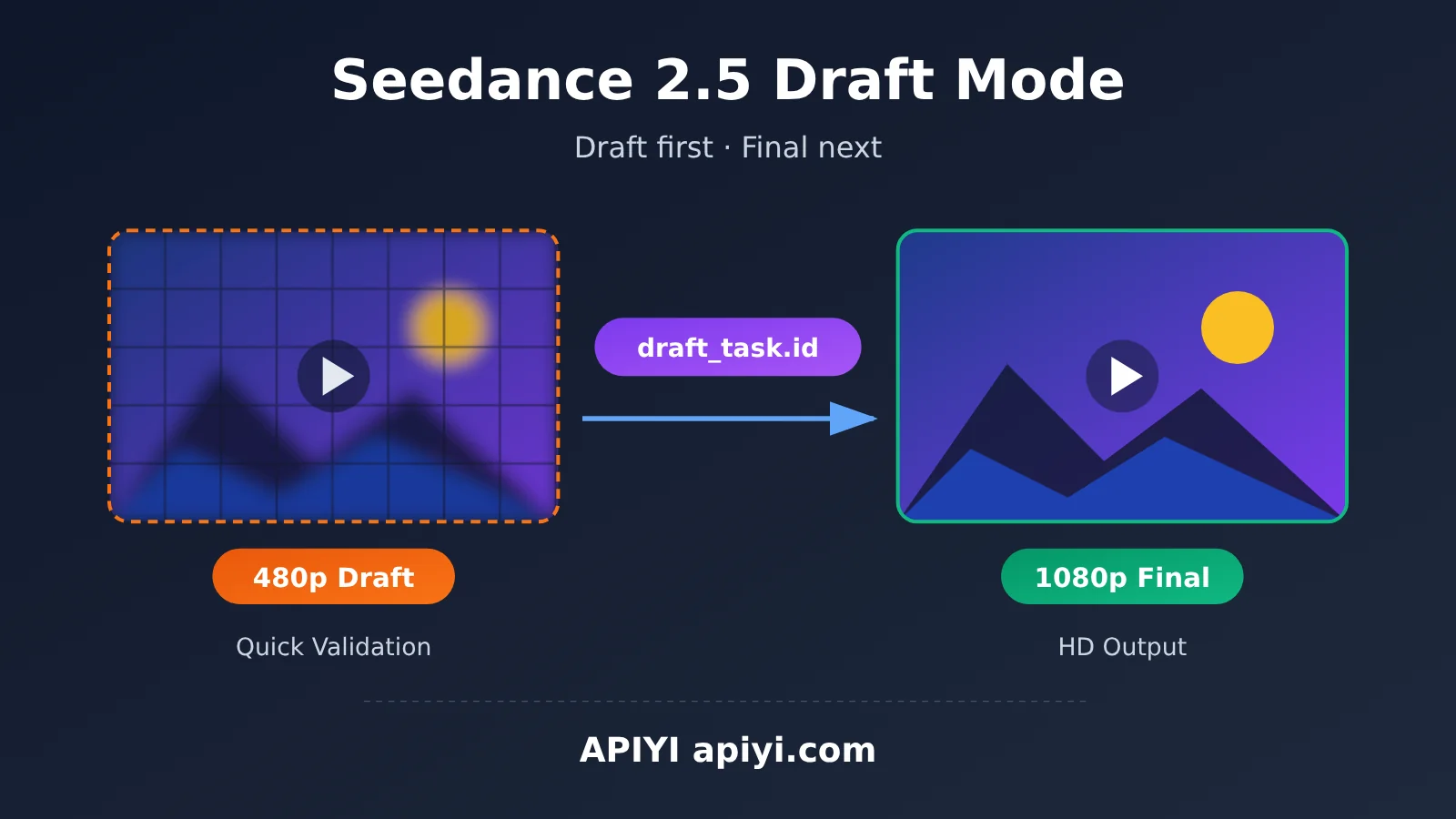
Author’s note: This article explains the two-stage workflow for Seedance 2.5 Draft Mode. Generate a low-cost 480p draft first, then create the 1080p final video once you’re happy with the result. It includes ready-to-run request examples.
When generating AI videos, a common problem is going straight to a high-resolution final video only to find that the composition, camera movement, or subject’s actions aren’t quite right. You have to generate it again, wasting both time and money. On October 25, 2026, APIYI’s documentation added a complete guide to Seedance 2.5 Draft Mode. With this mode, you can first validate your idea with a 480p draft, then use the draft task ID to generate a 1080p final video once you’re satisfied.
This isn’t a new, standalone API. Draft Mode uses Seedance’s existing asynchronous task API. You only need to add draft: true to the request body, or reference the draft task ID in the second stage. If your project already uses Seedance, the changes are minimal.
Key takeaway: By the end of this article, you’ll understand the two-stage Seedance 2.5 Draft Mode workflow, key parameters, billing rules, and usage limits—and be ready to add a “review the draft, then generate the final video” workflow to your own video production pipeline.
Key Features of Seedance 2.5 Draft Mode
According to the APIYI documentation, the key details of Seedance 2.5 draft mode can be summarized as follows:
| Feature | Description | Benefit for Developers |
|---|---|---|
| Supported model | doubao-seedance-2-5-260628 |
The model name is fixed, so you can use it directly |
| Stage 1: Draft | Set draft: true in the request body to generate a 480p draft |
Quickly validate composition and camera movements at a lower cost |
| Stage 2: Final video | Reference the draft using content[].draft_task.id to generate a 1080p final video |
Create a high-resolution version after confirming the result |
| Interface | Uses the existing asynchronous task interface (create a task + query its status) | No new SDK or integration logic needed |
| Billing | Drafts and final videos are billed separately | Pay the final-video fee only for drafts you’re happy with |
| Expiration | Draft task IDs are valid for 7 days | Generate the final video within 7 days |
Why Use Seedance 2.5 Draft Mode?
Video generation differs from text generation in a few important ways: each generation takes longer, costs more, and produces less predictable results. Even with a carefully detailed prompt, the model may interpret the camera pacing or subject’s actions differently than you expect. If you generate every video directly at 1080p, an unsatisfactory result means paying the full cost of a final video.
Draft mode splits the process into two steps: a “test shoot” and a “full production.” A 480p draft is enough to evaluate the subject, camera movement, and overall mood. Once you’re happy with the result, you can use that draft to generate a 1080p final video. For teams producing short videos, ad creatives, or storyboard previews at scale, this approach can significantly reduce the number of unusable videos.
How the Two Stages of Seedance 2.5 Draft Mode Work
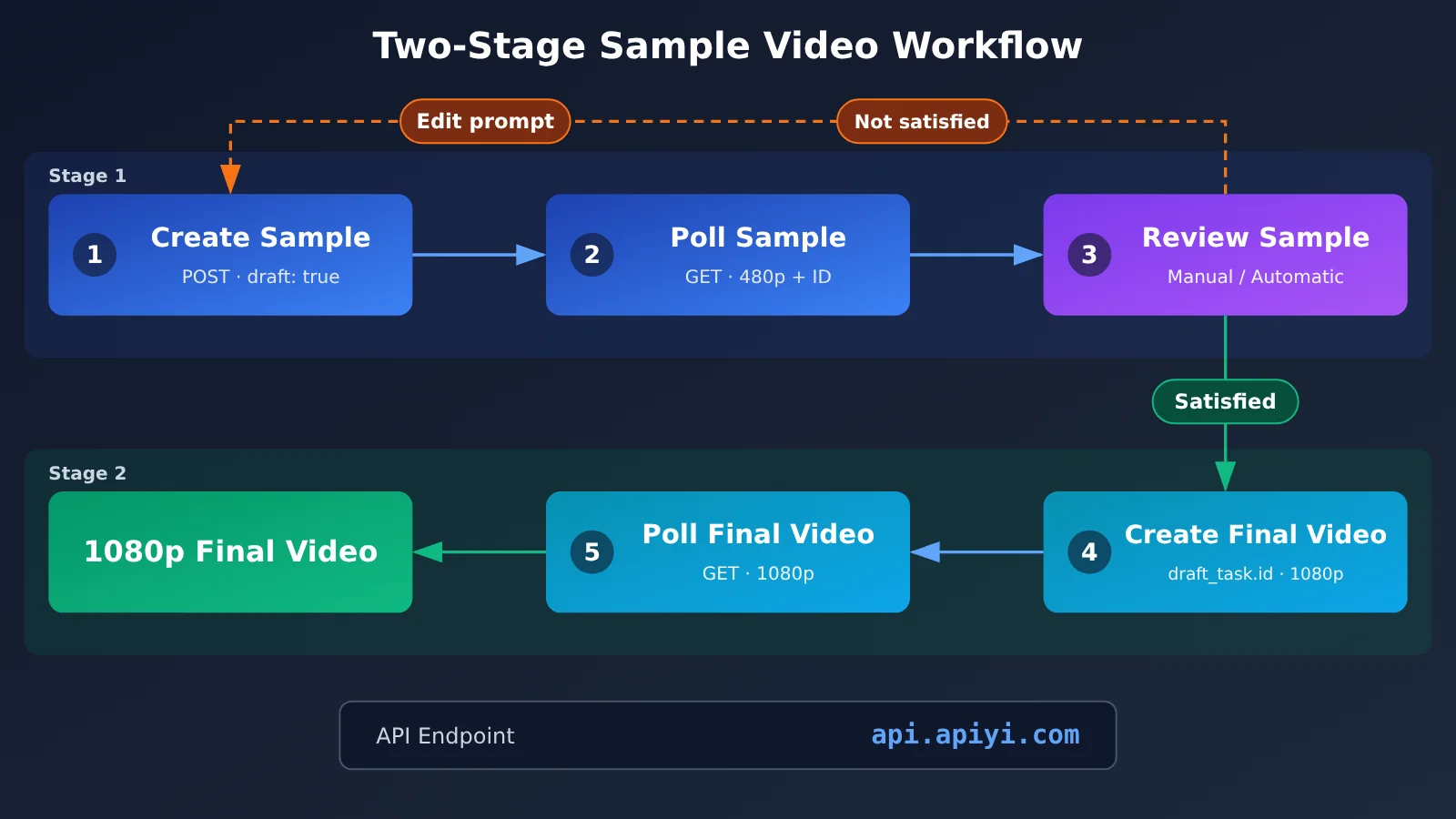
Keep in mind that the final video isn’t simply an upscaled version of the draft. Stage 2 creates a new generation task that references the draft task through draft_task.id, inherits relevant settings from the draft stage, and outputs the video at 1080p. For details on which parameters are inherited and which can’t be changed in Stage 2, see the “Parameter Inheritance and Limitations” section of the APIYI documentation.
Quick Start: Seedance 2.5 Draft Mode
Before you begin, create an API key in the APIYI console at apiyi.com and set it as the APIYI_API_KEY environment variable. The examples below read the key from the environment variable so you don’t have to put it in your code.
Step 1: Generate a 480p Draft
Here’s the simplest request for creating a draft task. The key is to set "draft": true and use a resolution of 480p:
curl -X POST "https://api.apiyi.com/seedance/api/v3/contents/generations/tasks" \
  -H "Authorization: Bearer ${APIYI_API_KEY}" \
  -H "Content-Type: application/json" \
  -H "Accept-Encoding: identity" \
  --data '{
    "model": "doubao-seedance-2-5-260628",
    "content": [
      {"type": "text", "text": "一只橘猫在窗边伸懒腰,阳光洒在木地板上,镜头缓慢推进"}
    ],
    "draft": true,
    "resolution": "480p",
    "ratio": "16:9",
    "duration": 4,
    "generate_audio": false
  }'
The API is asynchronous. When the task is created successfully, it returns a task ID. Save this ID: you’ll need it to check the draft result and generate the final video.
Step 1: Request Parameters
| Parameter | Example value | Description |
|---|---|---|
model |
doubao-seedance-2-5-260628 |
Seedance 2.5 model name |
content |
Text array | Content description; the example uses a plain-text prompt |
draft |
true |
Enables preview mode, the key setting for this first stage |
resolution |
480p |
Preview resolution |
ratio |
16:9 |
Aspect ratio |
duration |
4 |
Video duration in seconds |
generate_audio |
false |
Whether to generate audio; disabled in this example |
The Accept-Encoding: identity request header tells the server not to compress the response, which can make it easier for some clients to parse the result directly. We recommend keeping it.
Step 2: Check the Preview Task Status
After creating a preview task, poll for its status until it succeeds and returns a video URL. This uses the existing asynchronous task endpoint. Typically, you send a GET request to the task URL with the task ID. Refer to the APIYI documentation for the exact path and response fields:
curl -X GET "https://api.apiyi.com/seedance/api/v3/contents/generations/tasks/${TASK_ID}" \
  -H "Authorization: Bearer ${APIYI_API_KEY}" \
  -H "Accept-Encoding: identity"
We recommend polling every 5–10 seconds. More frequent requests aren’t useful and may trigger rate limits.
Step 3: Generate the 1080p Final Video Using the Draft Task ID
Once you’re happy with the draft, reference its task ID in the content array using draft_task.id, and set the resolution to 1080p:
curl -X POST "https://api.apiyi.com/seedance/api/v3/contents/generations/tasks" \
  -H "Authorization: Bearer ${APIYI_API_KEY}" \
  -H "Content-Type: application/json" \
  -H "Accept-Encoding: identity" \
  --data '{
    "model": "doubao-seedance-2-5-260628",
    "content": [
      {"type": "draft_task", "draft_task": {"id": "YOUR_DRAFT_TASK_ID"}}
    ],
    "resolution": "1080p"
  }'
Replace YOUR_DRAFT_TASK_ID with the draft task ID returned in Step 1. Check the two-stage request examples in the documentation for the accepted values of the type field and any other optional parameters in the content item. The final video task is also asynchronous. Use the method from Step 2 to check its status and retrieve the 1080p video.
View the Full Python Implementation (Draft → Review → Final Video)
import os
import time
import requests

API_KEY = os.environ["APIYI_API_KEY"]
BASE_URL = "https://api.apiyi.com/seedance/api/v3/contents/generations/tasks"  # APIYI Seedance async task endpoint
MODEL = "doubao-seedance-2-5-260628"

HEADERS = {
    "Authorization": f"Bearer {API_KEY}",
    "Content-Type": "application/json",
    "Accept-Encoding": "identity",
}


def create_task(payload: dict) -> str:
    """Create an asynchronous task and return its task ID."""
    resp = requests.post(BASE_URL, headers=HEADERS, json=payload, timeout=60)
    resp.raise_for_status()
    data = resp.json()
    return data["id"]


def wait_task(task_id: str, interval: int = 8, timeout: int = 900) -> dict:
    """Poll the task status until it succeeds or fails."""
    start = time.time()
    while time.time() - start < timeout:
        resp = requests.get(f"{BASE_URL}/{task_id}", headers=HEADERS, timeout=30)
        resp.raise_for_status()
        data = resp.json()
        status = data.get("status")
        print(f"[{task_id}] status = {status}")
        if status == "succeeded":
            return data
        if status in ("failed", "cancelled", "expired"):
            raise RuntimeError(f"Task ended unsuccessfully: {data}")
        time.sleep(interval)
    raise TimeoutError(f"Polling timed out for task {task_id}")


def generate_draft(prompt: str) -> str:
    """Stage 1: Generate a 480p draft."""
    payload = {
        "model": MODEL,
        "content": [{"type": "text", "text": prompt}],
        "draft": True,
        "resolution": "480p",
        "ratio": "16:9",
        "duration": 4,
        "generate_audio": False,
    }
    task_id = create_task(payload)
    result = wait_task(task_id)
    print("Draft result:", result.get("content"))
    return task_id


def generate_final(draft_task_id: str) -> dict:
    """Stage 2: Generate the 1080p final video using the draft task ID."""
    payload = {
        "model": MODEL,
        "content": [
            {"type": "draft_task", "draft_task": {"id": draft_task_id}}
        ],
        "resolution": "1080p",
    }
    task_id = create_task(payload)
    return wait_task(task_id)


if __name__ == "__main__":
    draft_id = generate_draft("An orange cat stretches by a window as sunlight falls across the wooden floor. The camera slowly pushes in.")
    ok = input("Are you happy with the draft? (y/n): ").strip().lower()
    if ok == "y":
        final = generate_final(draft_id)
        print("Final video result:", final.get("content"))
    else:
        print("Adjust the prompt and generate a new draft.")
The response field names in this example (such as `id`, `status`, and `content`) follow the common structure of the Seedance async task API. Adapt the code to match the actual response when integrating it.
🚀 Get started quickly: We recommend claiming the free trial credits for new users at APIYI apiyi.com. Use 480p drafts to refine your prompt, then generate 1080p videos in batches. The platform uses a unified API key for billing, making it easier to manage invocation costs across multiple video projects.
Seedance 2.5 Preview Mode vs. Direct Final Video Generation
Whether to use preview mode depends on how much your workflow prioritizes predictable results versus fast delivery. The table below compares the two approaches:
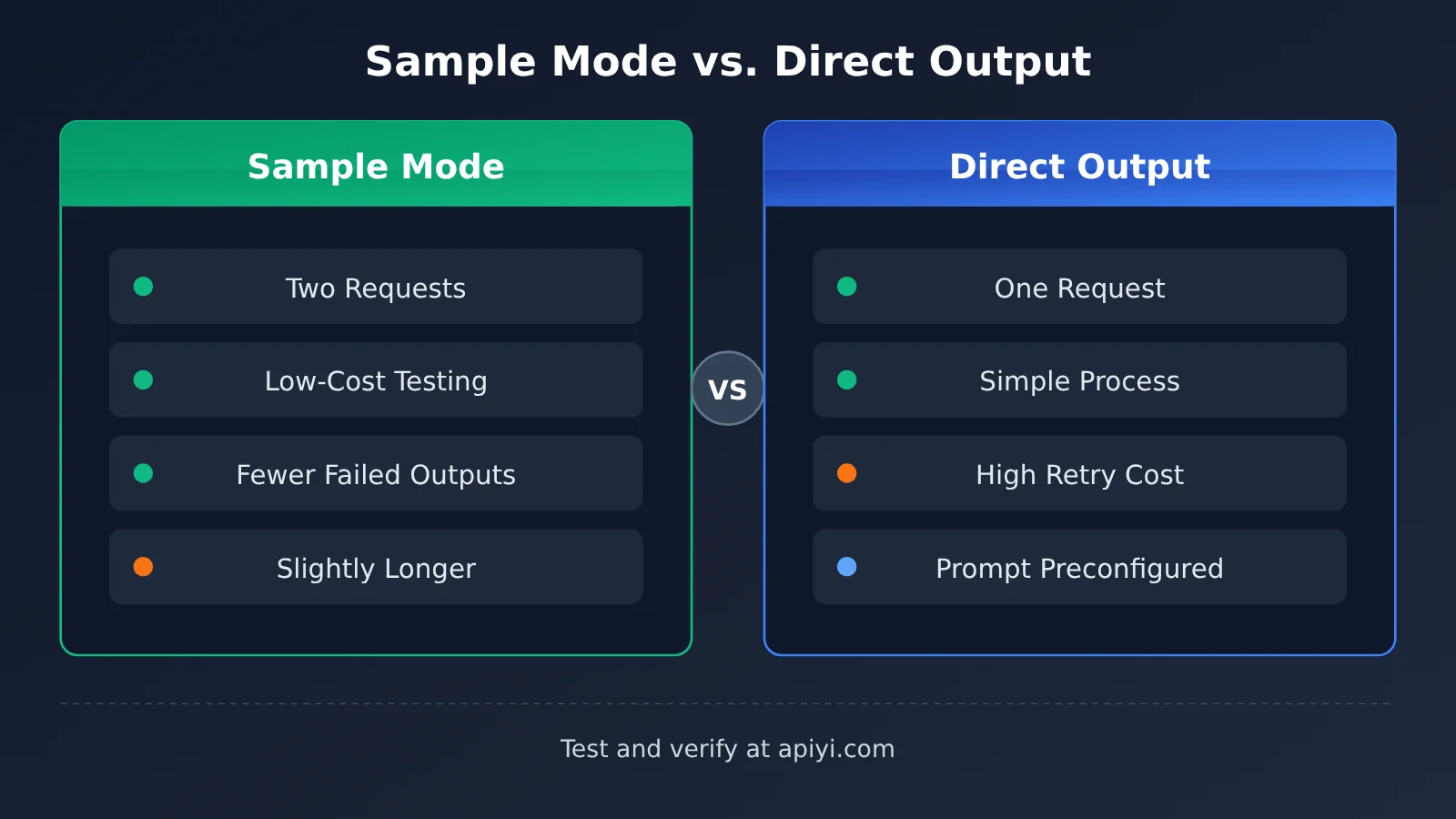
| Dimension | Preview Mode (480p → 1080p) | Direct 1080p Generation |
|---|---|---|
| Number of requests | Create a task twice | Create a task once |
| Cost of iteration | Low; if you’re not satisfied, you only lose the cost of the preview | High; if you’re not satisfied, you have to regenerate the entire video |
| Predictability | High; the final video is based on an approved preview | Depends on the prompt and randomness |
| Total time | Slightly longer, with an extra round of preview generation and review | Shorter |
| Best for | Creative exploration, client approval, and screening batches of assets | Standardized production with finalized prompts |
| Billing | Preview and final video are billed separately | Only the final video is billed |
Comparing Seedance 2.5 Preview Modes
Direct final video generation has the simpler workflow: one request gets you the finished video. But if the subject or camera movement isn’t right, the cost and wait time for the entire 1080p video are wasted. Preview mode, by contrast, lets you iterate at a lower resolution, making it a better fit for projects that need multiple rounds of prompt adjustments or client approval before moving forward.
If your prompt templates have been thoroughly tested and produce relatively consistent results, direct generation is also a reasonable choice. A practical approach is to use preview mode for new ideas and templates, and direct generation for proven ones. You can switch between the two at any time using the same asynchronous API.
💡 Recommendation: To compare the actual results, try running a few tests with your own business prompts in both modes. When you call the API through APIYI apiyi.com, both modes use the same endpoint and API key; just change the request body parameters to switch between them.
Seedance 2.5 Sample Mode Integration Notes
A few details are easy to overlook when integrating sample mode into a production environment. The table below summarizes some common points to watch:
| What to Watch For | Details | Recommendation |
|---|---|---|
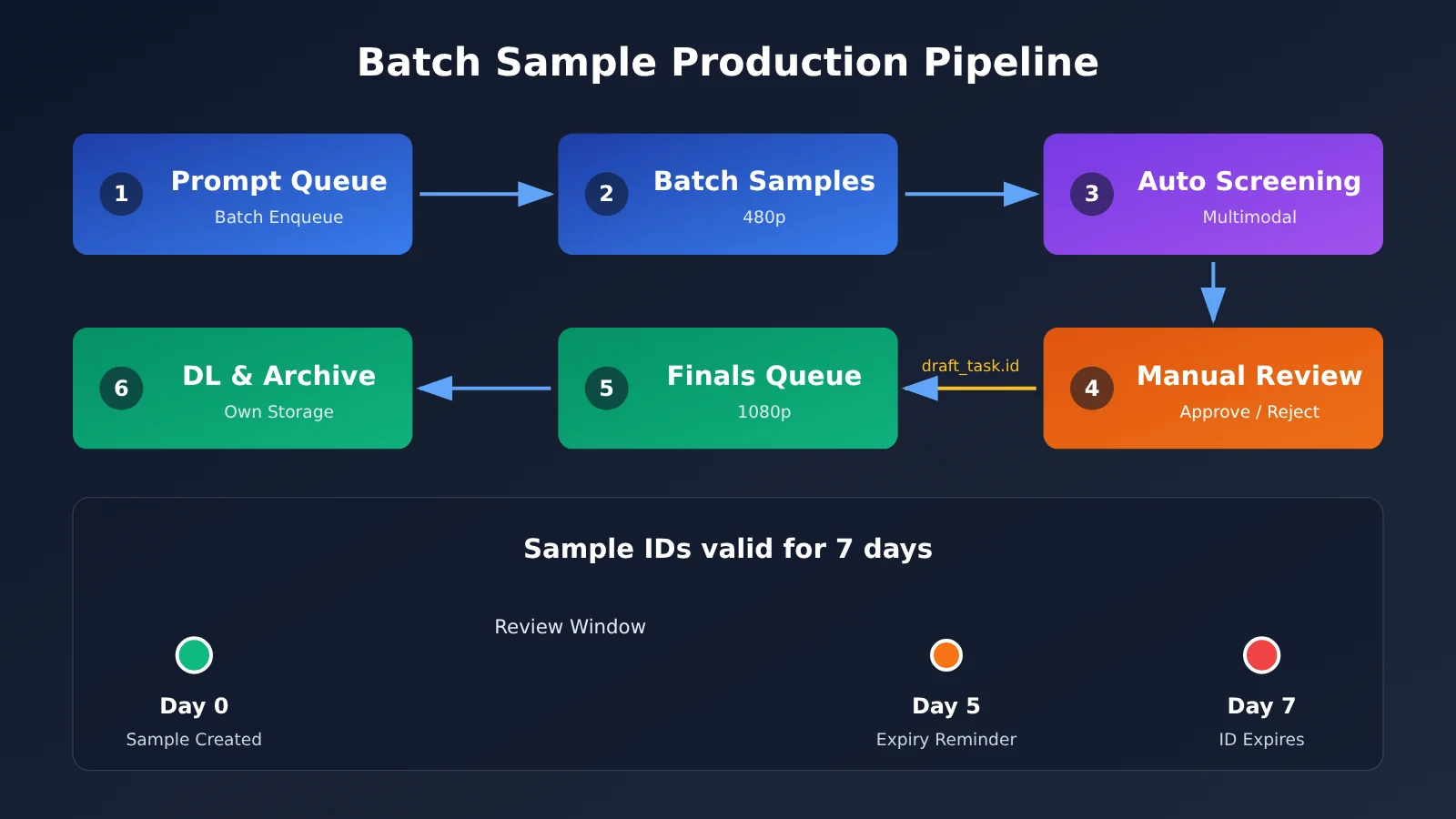
| 7-day validity | Sample task IDs are valid for 7 days. Once they expire, they can’t be used to generate the final video. | Record when each sample was created in your database and remind reviewers before it expires. |
| Separate billing | Samples and final videos are billed as two separate tasks. | Track sample costs separately in your budget reports. |
| Parameter inheritance | The final video inherits the relevant settings from the sample stage. | If you need to change the prompt, generate a new sample rather than expecting to make changes in the second stage. |
| Asynchronous polling | You need to poll for task status at both stages. | Wrap the polling logic in a shared function and set a reasonable timeout. |
| Saving video URLs | Links to generated videos may expire. | Download the video to your own storage as soon as you get the result. |
Workflow Design Recommendations for Seedance 2.5 Sample Mode
For team workflows, we recommend splitting sample mode into three stages: “generate, review, and release.” After the system generates samples in batches, it sends them to reviewers. Sample task IDs that pass review go into the final video queue, while rejected samples—with feedback attached—return to the prompt-adjustment stage. This keeps human review focused on the lower-cost sample stage.
For more automated pipelines, you can also use a multimodal model to do an initial screening at the sample stage—for example, checking whether the specified subject appears in the frame or whether there’s any obvious distortion. Samples that pass the initial screening can then be sent to a human reviewer, further reducing the review workload. Since APIYI provides a unified interface to several leading models, you can use the same API key for video generation and multimodal review.
Frequently Asked Questions (FAQ)
Q1: What is Seedance 2.5 draft mode?
Seedance 2.5 draft mode is a two-stage video generation workflow. In the first stage, set `draft: true` to generate a 480p draft and preview the result. In the second stage, reference the draft task using `content[].draft_task.id` to generate the final 1080p video. It uses the existing asynchronous task API, so there’s no need for additional integration.
Q2: How is draft mode different from generating a 1080p video directly?
Generating a video directly is simpler, but if you’re not satisfied with the result, you’ll have to regenerate the entire video. Draft mode lets you iterate at a lower resolution first, then generate the high-resolution version once you’ve confirmed the result. This gives you more control over the final output and works well for creative exploration and workflows that require review and approval.
Q3: When can I use Seedance 2.5 draft mode?
The APIYI documentation center added instructions for two-stage Seedance 2.5 draft mode calls on October 25, 2026. Use the `doubao-seedance-2-5-260628` model. For the full list of parameters and examples, see the Seedance video generation page at docs.apiyi.com.
Q4: What are the best use cases for Seedance 2.5 draft mode?
It’s particularly useful for:
– **Ad creative proposals**: Show clients a 480p draft to confirm the direction before delivering the 1080p version
– **High-volume short-form video production**: Generate drafts in batches, select the best ideas, and create final videos only for the selected drafts
– **Storyboard previews**: Quickly validate camera movement and composition before producing the final video
Q5: How can I quickly use the API to call Seedance 2.5 draft mode?
We recommend these steps:
1. Visit APIYI at apiyi.com, create an account, and generate an API key
2. Claim the free testing credits for new users
3. Use the curl example in this article. The endpoint is `https://api.apiyi.com/seedance/api/v3/contents/generations/tasks`. Generate a draft first, then the final video.
You can use the same key to call models like OpenAI, Claude, and Gemini, making it easier to build a complete video production pipeline.
Q6: How is draft mode billed?
Drafts and final videos are billed separately. Generating one 480p draft and one 1080p final video will incur two charges. For current pricing, see the model pricing page in the APIYI console at apiyi.com. Since the draft is generated at a lower resolution, it’s a cost-effective way to iterate.
Q7: What should I do if my draft task ID expires?
A draft task ID is valid for 7 days. After that, you can’t use it to generate a final video. If it expires, you’ll need to generate a new draft using the original prompt. Since generation is randomized, the new draft may not exactly match the previous one, so we recommend completing your review before the task ID expires.
Q8: What are the known limitations of draft mode?
The main known limitations are:
– **Model restriction**: The draft mode described in the documentation uses `doubao-seedance-2-5-260628`
– **Expiration**: Draft task IDs are valid for only 7 days
– **Parameter inheritance**: The final video inherits relevant settings from the draft stage, and only a limited range of parameters can be changed. See the “Parameter Inheritance and Limitations” section of the documentation for details.
– **Generation time**: The two-stage workflow takes longer overall than generating a video directly, so consider this tradeoff for time-sensitive use cases.
Seedance 2.5 Draft Mode: Key Takeaways
- Two-stage workflow: Set
draft: trueto generate a 480p preview, then reference its task ID to create the final 1080p video. - Unchanged API: The workflow uses Seedance’s existing asynchronous task API, so projects that have already integrated it need only make minor changes.
- Key field: In the final-video stage, reference the preview task using
content[].draft_task.id. - Billing: Previews and final videos are billed separately, so you only pay for a final video when you’re happy with the preview.
- Expiration: Preview task IDs are valid for 7 days, so review and approve them promptly.
- Best use cases: Draft mode is especially useful for exploring creative ideas, getting client approval, and screening large batches of assets.
- Getting started: Claim free credits on APIYI at apiyi.com and follow the examples in this article to run through the full workflow.
Summary
Here are the key points about Seedance 2.5 draft mode:
- Preview before producing: Use low-cost 480p previews to validate composition and camera movement, reducing the number of unusable 1080p videos.
- Easy integration: Just add the
draftparameter and referencedraft_task.id; you can reuse the existing asynchronous API. - Keep billing and expiration in mind: Preview task IDs are valid for 7 days, and previews and final videos are billed separately.
If your video workflow often involves revising prompts, it’s worth integrating draft mode soon. Start by running a few representative prompts through the “preview → final video” workflow, then evaluate the results and costs before rolling it out to batch production.
We recommend using APIYI at apiyi.com to quickly test Seedance 2.5 draft mode. The platform offers an OpenAI-compatible API, pay-as-you-go billing, and free testing credits for new users.
📚 References
- APIYI Seedance 2 Video Generation Documentation — Draft Mode: Official instructions for calling Seedance 2.5 in draft mode
- Link:
docs.apiyi.com/api-capabilities/seedance2/video-generation#draft-mode -
Details: Includes examples of two-stage requests, parameter inheritance and limitations, billing, and expiration
-
APIYI Documentation Center: Documentation for all models available on the platform
- Link:
docs.apiyi.com - Details: Explore the Seedance model selection overview and learn how to call other models
Author: APIYI Technical Team
Technical Support: If you run into issues during integration, contact us from the homepage of APIYI at apiyi.com. For more resources, visit the documentation center at docs.apiyi.com.