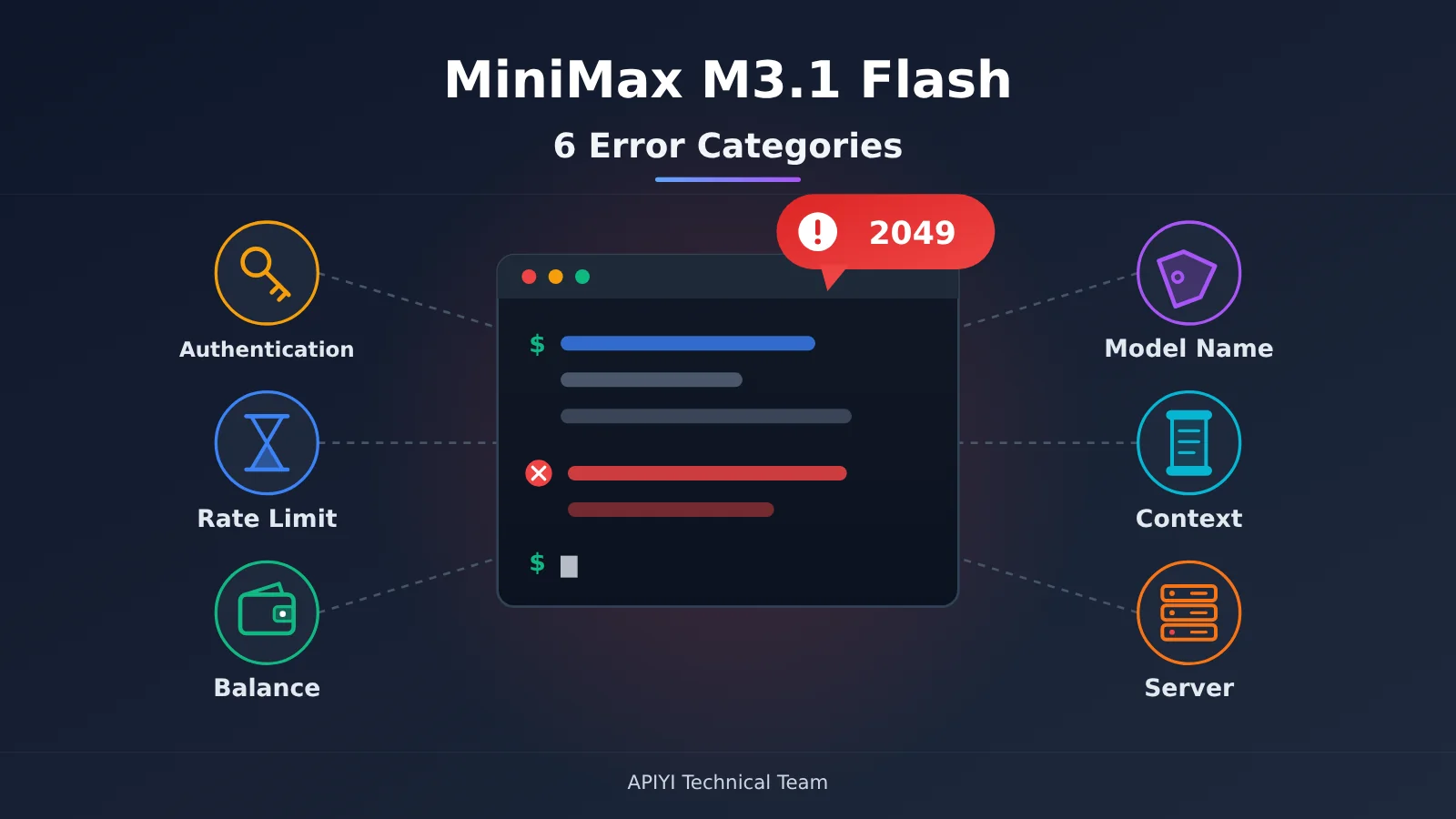
Author’s note: This guide groups common MiniMax M3.1 Flash errors into six categories. For each one, it explains what the error looks like, why it happens, how to fix it, and how to confirm the fix—so even beginners can troubleshoot step by step.
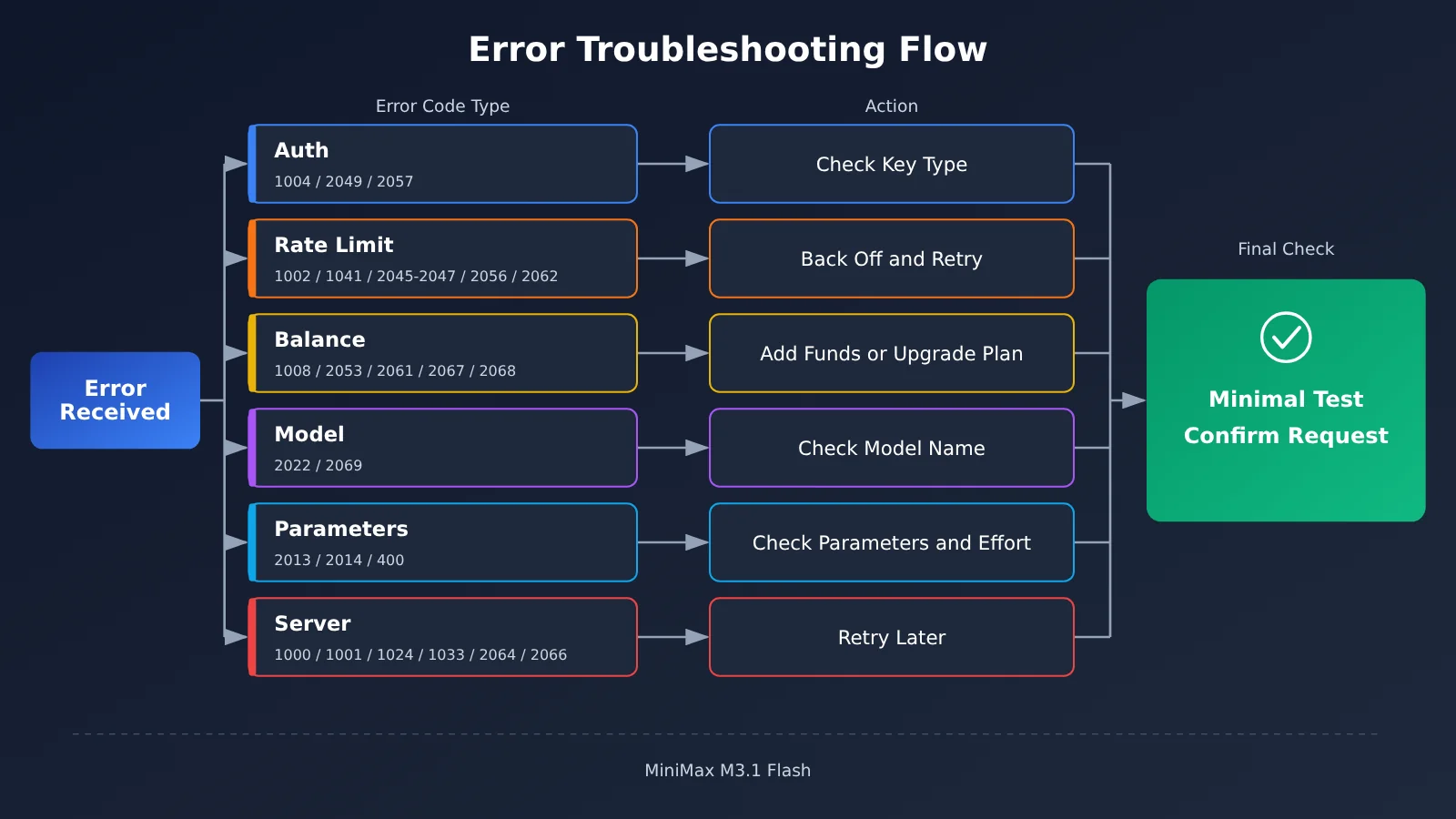
Bottom line: When MiniMax M3.1 Flash returns an error, first check which category the error code belongs to. Fix configuration issues for authentication and balance errors; slow down and retry for rate limits and server errors; and adjust the request itself for model name and parameter errors. You can pinpoint most issues in under five minutes.
This isn’t just a simplified translation of the error code table. The official table gives only a one-line explanation for each code. This guide regroups them by scenario and adds a step that’s often missing: how to confirm the issue is fixed. Data in this article is labeled by source: “Officially reported” refers to figures published by MiniMax, while “Third-party benchmark” refers to results from independent organizations such as Vals. Information that hasn’t been made public is labeled “Not disclosed.”
What you’ll get out of this guide: By the end, you’ll be able to understand every common error code returned by M3.1 Flash, know what to do first, and recognize when you shouldn’t switch to this model.
Key Troubleshooting Tips for MiniMax M3.1 Flash Errors
First, let’s clarify a few terms that come up throughout this guide. An error code is a number returned by an API that tells you what went wrong. An API key is like a key that lets you access the API—without one, or if you use the wrong one, the platform won’t recognize you. A token is the unit models use to measure text length. As a rough guide, about 750 English words equal 1,000 tokens. Rate limiting means the platform caps how many requests you can send within a given period. Exceed that limit, and your requests will be rejected.
| Category | Typical error codes | In a nutshell | What to do |
|---|---|---|---|
| ① Key authentication | 1004, 2049, 2057 | The key is incorrect, expired, or you’re mixing up two types of keys | Update your configuration |
| ② Rate limits and concurrency | 1002, 1041, 2045/2046/2047, 2056, 2062 | You’re sending requests too quickly, too often, or at an uneven rate | Slow down and retry |
| ③ Balance and plan | 1008, 2053, 2067, 2061/2068 | Your balance or quota is insufficient, or your plan doesn’t include this model | Add funds or upgrade |
| ④ Model name issues | 2022, 2069, old Preview names | The model name is wrong or the model has been retired | Update the model name |
| ⑤ Context and parameters | Over 1M, 2013, 2014, 400 errors related to thinking | The input is too long, the parameters are incorrect, or thinking has been explicitly disabled | Adjust the request |
| ⑥ Content and server issues | 1026/1027, 1042, 1000/1001/1024/1033/2064/2066 | The content was blocked, or there’s a platform-side issue | Change the content or wait |
First, check which type of MiniMax M3.1 Flash key you’re using
Many errors stem from not knowing which type of key you have. The official FAQ clearly states that pay-as-you-go API keys and M Plan subscription keys are different types of keys, and you get them from different places in the console. M Plan is MiniMax’s subscription offering, with three tiers: Go, Explore, and Build. All tiers include the M3.1 Flash text model. Check the official website for current monthly pricing.
| Comparison | Pay-as-you-go API key | M Plan subscription key |
|---|---|---|
| How you’re charged | Deducted from your account balance based on usage | Uses your subscription quota |
| How quotas work | Requests stop when your balance runs out | Quota is replenished over 5-hour windows |
| Typical use cases | Business systems, batch jobs | Coding tools such as Claude Code, Codex, Cursor, and OpenCode |
| Common errors specific to this key type | 1008: insufficient balance | 2056, 2062, 2067, 2057 |
MiniMax M3.1 Flash Quick Start: Check These 3 Parameters Before Troubleshooting
This guide skips lengthy code samples and focuses on the three parameters you’re most likely to change when troubleshooting. The first is the model name. When connecting directly to MiniMax, use the official name:
model="MiniMax-M3.1-Flash"
The second is the API endpoint. MiniMax offers an Anthropic-compatible endpoint, https://api.minimax.io/anthropic (recommended by MiniMax), and an OpenAI-compatible endpoint, https://api.minimax.io/v1. Don’t mix them up. If you’re calling the model through an aggregator, use the endpoint provided by that platform, for example:
base_url="https://api.apiyi.com/v1" # APIYI OpenAI-compatible endpoint
The third is the reasoning effort setting. You can choose low, medium, high, xhigh, or max. If you don’t specify a value, it defaults to max. Higher settings mean more reasoning, more output tokens, and higher latency:
reasoning_effort="low" # OpenAI protocol field name
🚀 Quick-start tip: When troubleshooting errors, changing several things at once makes it harder to identify the cause. Start with the shortest possible request—“Hi”—to confirm that your API key and endpoint are working, then gradually add a longer context and tool calls. If you can’t access M3.1 Flash yet, you can test the workflow with MiniMax-M3, which is available on APIYI at apiyi.com. Check APIYI’s pricing page to confirm whether M3.1 Flash is available.
Troubleshooting 6 Common MiniMax M3.1 Flash Errors
Category 1: MiniMax M3.1 Flash Key Authentication Errors
What they look like: You get error 1004 (not authorized or token not match group), 2049 (invalid API Key), or 2057 (not token plan token).
Why they happen: The most common causes of 1004 and 2049 are an extra space or newline when copying the Key, a deleted Key, or an old Key still stored in an environment variable. Error 2057 means “this endpoint requires an M Plan subscription Key.” It usually happens when you use a pay-as-you-go Key where a subscription Key is required—a classic case of mixing up the two types of Keys.
How to fix it:
- Copy the Key again from your account dashboard. Make sure there are no spaces, quotation marks, or line breaks at either end.
- Confirm that your program is actually using the new Key. Remove the old value from environment variables and configuration files.
- If you get error 2057, switch to the subscription Key in your M Plan dashboard. Likewise, don’t use a subscription Key with a pay-as-you-go endpoint.
How to confirm it’s fixed: Send a simple “Hello” request using the same Key. If you get a text response, authentication is working.
Category 2: MiniMax M3.1 Flash Rate Limit and Concurrency Errors
Concurrency means the number of requests being processed at the same time. Rate limit errors have one thing in common: “You haven’t done anything wrong; you’re just sending requests too quickly or all at once.” The general fix is to slow down, though the details vary.
| Error code | Meaning | Common trigger | What to do |
|---|---|---|---|
| 1002 | rate limit | Too many requests in a short time | Retry later with backoff |
| 1041 | conn limit | Too many simultaneous open connections | Reduce concurrency; contact support if it keeps happening |
| 2045 | rate growth limit | A sudden spike in request volume | Increase traffic gradually |
| 2046 | token growth limit | A sudden spike in token usage | Increase usage gradually |
| 2047 | conn growth limit | A sudden spike in the number of connections | Increase connections gradually |
| 2056 | usage limit exceeded | M Plan quota exhausted | Wait for the next 5-hour window |
| 2062 | M Plan rate limit exceeded | Too many requests with a subscription Key | Reduce request frequency, upgrade, or switch to the pay-as-you-go API |
Why they happen: Errors 2045–2047 are a little different: they don’t mean you’ve exceeded an overall limit. They mean your usage is growing too quickly. MiniMax requires request volume, token usage, and connection counts to remain steady rather than spiking. Error 2062 can also have another meaning: if it appears when you check usage, you may not have an active M Plan subscription.
How to fix it: Use exponential backoff when retrying—for example, wait 1 second, then 2, then 4, instead of immediately hammering the endpoint after a failure. When launching a batch job, ramp up traffic in stages rather than maxing out concurrency all at once.
How to confirm it’s fixed: Monitor the success rate over time. You’re in good shape when rate limit errors stop appearing in a row and requests are flowing steadily.
Category 3: MiniMax M3.1 Flash Balance and Plan Errors
What it looks like: 1008 (insufficient balance), 2053 (insufficient credit), 2067, 2061, or 2068.
Why it happens: Error 1008 means your pay-as-you-go account has insufficient balance. Error 2053 means you don’t have enough Credits and need to purchase more or upgrade your plan. Error 2067 means you’ve used up your plan allowance and haven’t enabled automatic Credits billing. Errors 2061 and 2068 mean your current plan doesn’t support the model you’re trying to use. For example, the H3 video model is only available on the Explore and Build plans, so requests from the Go plan will fail.
How to fix it: For 1008, top up your balance. For 2053, purchase Credits or upgrade your plan. For 2067, upgrade your plan, or purchase Credits and enable automatic billing. For 2061 or 2068, switch to a model included in your plan or upgrade your plan.
How to confirm it’s fixed: Check that your balance or allowance has been updated in the dashboard, then send another test request. A successful response means you’re all set.
Category 4: MiniMax M3.1 Flash Model Name Is Incorrect or Retired
What it looks like: 2022 (model is not exist) or 2069 (model is no longer available).
Why it happens: Error 2022 usually means the model name is misspelled or your account doesn’t have access to that model. Common mistakes include changing the capitalization, leaving out a hyphen, or copying a model name from another platform. For example, OpenRouter’s minimax/minimax-m3.1-flash:free is a third-party model name and won’t work with the official MiniMax API. Error 2069 means the model has been retired.
Also, watch out for the old Preview name. The official documentation says MiniMax-M3.1-Flash-Preview has been retired. Requests using that name are currently handled by MiniMax-M3.1-Flash, so they might not fail just yet. But since the old name is retired, it’s best to switch to the official name soon to avoid unexpected issues if the rules change.
How to fix it: Copy MiniMax-M3.1-Flash directly from the official documentation instead of typing it manually. If you get error 2069, switch to a model that’s currently available.
How to confirm it’s fixed: Send a test request using the new model name, then check that the model field in the response matches what you expected.
💡 Model name tip: When using an aggregator platform, check the model names on that platform’s pricing page. If a model isn’t listed on the APIYI (apiyi.com) pricing page, requests for it will fail. The troubleshooting approach is the same as for error 2022.
Category 5: MiniMax M3.1 Flash Context and Parameter Errors
The context window is the total length a model can “see” in a single request, including the conversation history, files, and the model’s output. The official documentation states that M3.1 Flash has a context limit of 1,000,000 tokens. Requests that exceed this limit can’t be processed.
What it looks like: In addition to requests being rejected for exceeding the limit, you may see error 2013 (invalid params, meaning the parameters are invalid), error 2014 (empty input, meaning the input is empty), or a 400 error specific to M3.1 Flash: model "MiniMax-M3.1-Flash" requires adaptive thinking. The error code list also includes 1039 (token limit); the official recommendation is to try again later.
Why it happens: The thinking-related 400 error occurs because thinking can’t be turned off for M3.1 Flash. Setting thinking to disabled or effort to none will trigger it. Error 2014 often means a variable was empty when messages were assembled, while error 2013 usually means a field name or value is incorrect.
How to fix it:
- Request is too long: Trim the conversation history or process it in chunks. The official recommendation for Claude Code is to set the automatic compaction window to 524288 (512K), leaving some headroom.
- Thinking-related 400: Remove parameters that turn off thinking, and lower the effort instead. Use the field name for your protocol:
output_config.effortfor the Anthropic protocol,reasoning_effortfor the OpenAI protocol, andreasoning.effortfor the Responses protocol. - 2013 / 2014: Print the final request body and check each field and its contents for errors or empty values.
There’s another case that can look like an error: with the OpenAI-compatible protocol, thinking content is returned separately in the reasoning_content field, while content contains only the final answer. If your code still extracts thinking content from M3’s <think> tags, you’ll need to update it—or it may look like the “thinking content is missing.”
How to confirm it’s fixed: Resend the request with the same length and parameters, and confirm that you get a 200 response and that content and reasoning_content both appear as expected.
Category 6: MiniMax M3.1 Flash Content and Server-Side Errors
What they look like: Error codes 1026 and 1027 indicate sensitive input or output content. Code 1042 means the input contains too high a proportion of invisible characters. Codes 1000, 1001, 1024, 1033, 2064, and 2066 indicate an unknown error, request timeout, internal error, system error, high cluster load, and processing timeout, respectively.
Why they happen: Codes 1026 and 1027 are triggered by content moderation. Code 1042 often occurs with text copied from webpages, PDFs, or Word documents that contains lots of hidden characters, such as zero-width characters. The remaining errors are platform-side issues and usually aren’t related to your configuration.
How to fix them: For codes 1026 and 1027, revise the input and try phrasing it differently. For code 1042, clean the text by removing hidden and invalid characters. For server-side errors, retry later as recommended by the official guidance, using a backoff strategy.
How to confirm the issue is fixed: For content-related issues, resend the cleaned input and confirm the request succeeds. For server-side issues, confirm service returns to normal after retrying. If the errors persist for a long time, contact official support.
Notes on Model Names When Calling MiniMax M3.1 Flash Through APIYI
When calling models through APIYI, the most important rule is: use the model name shown on the APIYI pricing page. Requests using model names that aren’t listed there will fail. As of the publication date, October 22, 2026, MiniMax-M3.1-Flash isn’t listed on the APIYI pricing page. We’ll add it as soon as possible; check the APIYI pricing page to confirm whether it’s available.
| Model name | MiniMax official status | APIYI status | Notes |
|---|---|---|---|
| MiniMax-M3.1-Flash | Available | Check the pricing page | Not listed on the pricing page as of publication |
| MiniMax-M3 | Available | Available | Supports both OpenAI and Anthropic formats; available in the Claude Code group |
| MiniMax-M2.7 / M2.7-highspeed | — | Available | Previous-generation text models |
| MiniMax-M2.5 / M2.5-lightning | — | Available | Previous-generation text models |
| claude-opus-5-5 | — | Available | Anthropic’s current flagship model |
Until M3.1 Flash is listed, you can use MiniMax-M3 to set up your workflow. Once the new model name appears on the pricing page, you’ll usually only need to replace the model parameter. Don’t reuse MiniMax’s official API key or endpoint: APIYI has its own API key and base_url.
When You Shouldn’t Use or Switch to MiniMax M3.1 Flash
Beyond troubleshooting errors, there’s another kind of “problem”: the model itself may not be a good fit for your task. The information below is grouped by source to help you decide.
Officially reported (MiniMax’s official comparison table): Terminal Bench 4.0 scored 38.1, compared with 51.8 for Claude Opus 5. SWE Refactor Bench scored 23.0, compared with 31.0 for Opus 5. DeepSWE v1.1 scored 73.7, below the 77.0 scored by DeepSeek V4.1 Flash-1017. One important note: the Claude model in the official table is Opus 5, not Opus 5.5. Opus 5.5 remains Anthropic’s strongest flagship model, and MiniMax hasn’t published a metric-by-metric comparison against it. So it wouldn’t be accurate to say M3.1 Flash has “caught up with” or “surpassed” Opus 5.5.
Third-party evaluations (Vals AI): M3.1 Flash scored 53.78% on the Vals Index, ranking 15th out of 22 models. It’s improved significantly over M3 on benchmarks such as Vibe Code Bench, but it’s weaker on long-horizon Agent tasks. It scored 25.25% on Terminal-Bench 4.0, ranking 22nd out of 51 models.
Unknown or unpublished: MiniMax hasn’t released a technical report explaining what changed in Flash. The claim that it costs one-third as much as M3 is based on tasks, but the exact calculation method hasn’t been disclosed. The speed figures published by MiniMax also differ somewhat between its blog and product page.
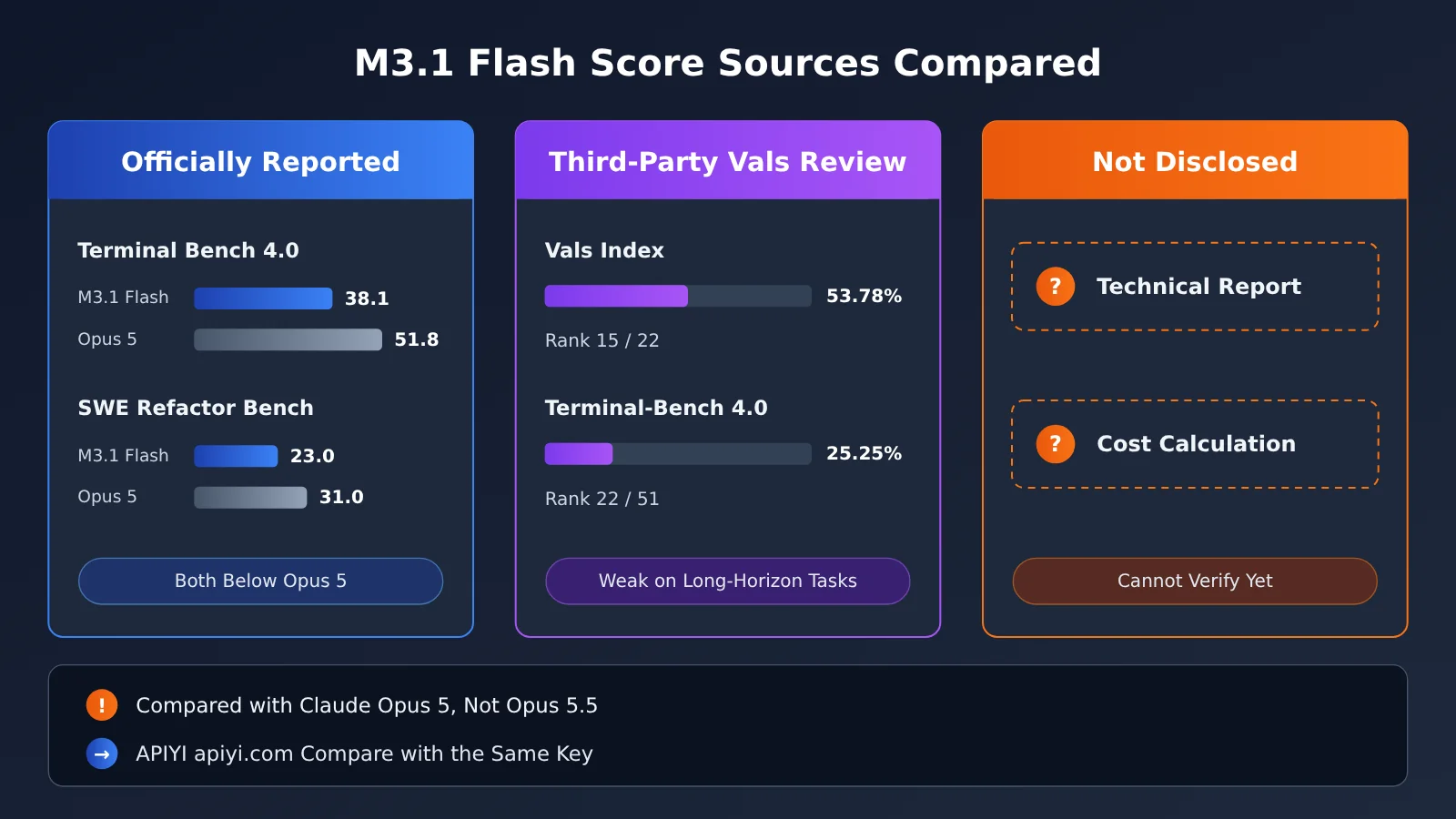
Overall, consider holding off on using or switching to M3.1 Flash in these scenarios:
- Long-horizon Agent tasks and terminal-intensive workflows: Both official reports and third-party evaluations point to these as weak spots.
- Large-scale code refactoring: MiniMax’s official results for SWE Refactor Bench are lower than Opus 5’s.
- Real-time applications where you need to disable reasoning to reduce latency: M3.1 Flash’s reasoning can’t be disabled; you can only lower the effort level.
- M3 is running reliably, and your setup depends on parsing
<think>: Update your parsing logic before migrating to avoid issues. - You need private deployment: MiniMax says the weights will be released on October 23, but they weren’t available at the time of writing.
- You’re running production traffic through APIYI: Keep using MiniMax-M3 until the new model appears on the pricing page.
Frequently Asked Questions (FAQ)
Q1: Where can I find MiniMax M3.1 Flash error codes?
Error codes appear as numbers in the API response. For the full descriptions, see MiniMax’s official error code documentation. This article groups the most common text model errors into six categories, and the quick-reference table at the end lets you look them up at a glance.
Q2: What’s the difference between 1004 and 2049?
Both are related to your API key. Error 2049 means the API key is invalid. Error 1004 means the request is unauthorized, or the key doesn’t match the group. Troubleshoot both the same way: copy the key again, confirm it’s valid, and make sure your program is using the new value.
Q3: I’m still using MiniMax-M3.1-Flash-Preview. Will it start returning errors right away?
According to the official documentation, the Preview version has been retired, and requests using the old name are currently handled by MiniMax-M3.1-Flash. So they won’t necessarily fail right away. Still, it’s best to switch to the official model name soon to avoid future changes that could trigger errors 2022 or 2069.
Q4: MiniMax M3.1 Flash feels too slow. Can I turn off thinking?
No. Setting thinking to disabled or effort to none will return a 400 error. To save time and tokens, set effort to low or medium. The default is max.
Q5: How do I call MiniMax models through APIYI?
Sign up at APIYI apiyi.com and get an API key. Change `base_url` to the platform’s URL, then enter the model name exactly as shown on the pricing page. MiniMax-M3 is currently available; check the pricing page to see whether M3.1 Flash is supported.
Q6: What should I do if I get a “model not found” error when calling a model through APIYI?
First, check the model name on the APIYI apiyi.com pricing page and copy it exactly. Don’t reuse the name format from MiniMax’s official platform or another provider. Calls will fail if the model name isn’t listed on the pricing page.
Q7: How long should I retry server-side errors?
The official recommendation is simply to “try again later”; no specific wait time is given. In practice, use exponential backoff, gradually increasing the interval between retries. If the errors persist for a long time, contact official support.
MiniMax M3.1 Flash Error Troubleshooting: Key Takeaways
- Classify the error before taking action: Check which category the error code belongs to, then decide whether to change your configuration, reduce your request rate, or adjust the request.
- Don’t mix up the two types of keys: Pay-as-you-go keys and M Plan subscription keys go in different places. Mixing them up triggers error 2057.
- Smooth out traffic to avoid rate limits: Errors 2045–2047 are often caused by sharp traffic spikes. Ramp up batch jobs gradually.
- You can’t turn off thinking: You can lower the effort level, but trying to disable thinking entirely will return a 400 error.
- Copy the exact model name: Preview models have been retired, and model names aren’t interchangeable across third-party platforms.
- Verify every fix: After each change, test with the shortest possible request to confirm the issue is resolved.
- Check the pricing page when using a platform: When making calls through APIYI (apiyi.com), use the model name listed on the pricing page.
MiniMax M3.1 Flash Error Code Quick Reference
| Error code | Meaning | First thing to try |
|---|---|---|
| 1004 | Unauthorized / Key doesn’t match the group | Copy the key again and check that it’s correct |
| 2049 | Invalid API key | Confirm the key is correct and hasn’t expired |
| 2057 | An M Plan subscription key is required | Switch to a subscription key |
| 1002 | Rate limited | Retry with backoff |
| 1041 | Connection limit reached | Reduce concurrency; contact support if the issue persists |
| 2045 / 2046 / 2047 | Request volume, token usage, or connection count increased too quickly | Ramp up gradually |
| 2056 | M Plan quota exhausted | Wait for the next 5-hour window |
| 2062 | M Plan rate limit exceeded or no active plan | Reduce request frequency, upgrade, or switch to the pay-as-you-go API |
| 1008 | Insufficient balance | Add funds |
| 2053 | Not enough Credits | Buy Credits or upgrade |
| 2067 | Usage quota exhausted and automatic billing isn’t enabled | Upgrade or buy Credits and enable automatic billing |
| 2061 / 2068 | Your plan doesn’t support this model | Switch models or upgrade your plan |
| 2022 | Model doesn’t exist | Check the model name and your access permissions |
| 2069 | Model has been retired | Switch to an available model |
| 400 requires adaptive thinking | Thinking was forcibly disabled | Remove the parameter that disables it and adjust the effort level instead |
| 2013 | Invalid parameter | Print the request body and check each field |
| 2014 | Empty input | Check your message assembly logic |
| 1039 | Token limit | Retry later |
| 1026 / 1027 | Input / output content flagged as sensitive | Modify the input |
| 1042 | Too many invisible characters | Remove hidden characters |
| 1000 / 1001 / 1024 / 1033 | Unknown error, timeout, internal error, or system error | Retry later |
| 2064 / 2066 | High cluster load / processing timeout | Retry later |
Use One APIYI Key to Call Both MiniMax and Claude Opus 5.5
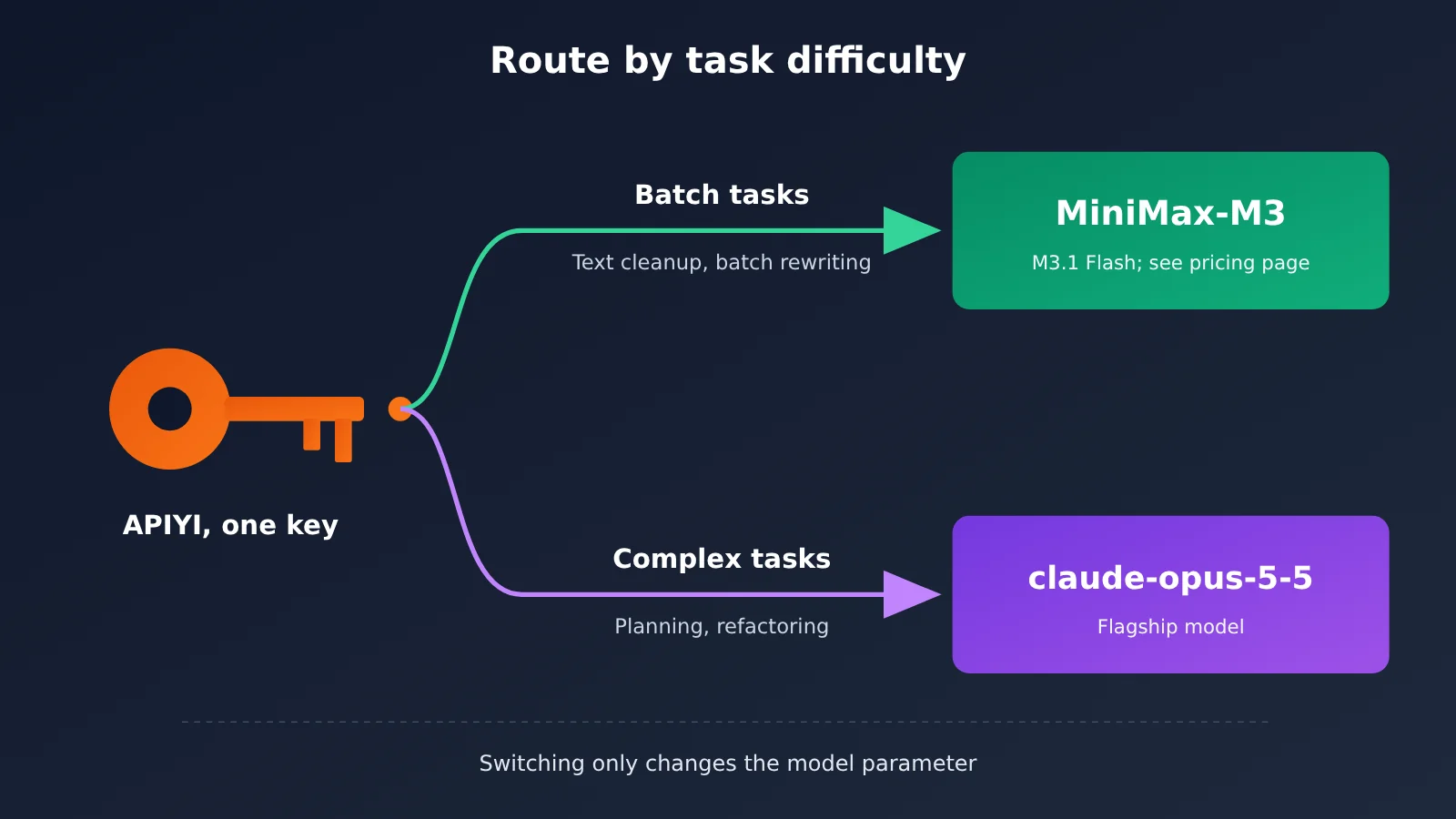
Most teams don’t need to use just one model. They need to route tasks based on their complexity. With APIYI, one API key can call overseas models like Claude, GPT, and Gemini, as well as domestic models like DeepSeek and MiniMax. To switch between them, you only need to change the model parameter.
A good way to split the work is to give lower-cost, high-volume tasks to the MiniMax series—things like text cleanup, batch rewriting, and routine code completion—and leave complex planning and large-scale refactoring to claude-opus-5-5, Anthropic’s most capable flagship model. This keeps costs under control without compromising quality on critical tasks. Until M3.1 Flash is available, you can use MiniMax-M3 for batch tasks. Check the pricing page to confirm whether M3.1 Flash is available.
Summary
Key points for troubleshooting MiniMax M3.1 Flash errors:
- Check these six categories: authentication, rate limits, balance, model name, context and parameters, and content and server issues. Identify the category first, then troubleshoot.
- Watch out for Flash-specific rules: thinking can’t be disabled, the old Preview name has been retired, and you should read thinking content from
reasoning_content. - Always verify after a fix: test each issue with the shortest possible request so you don’t assume it’s fixed when it isn’t.
If your task involves long-running Agent workflows or large-scale refactoring, read the “When Not to Use It” section before deciding. To compare MiniMax and Claude in the same workflow, try them with one API key through APIYI at apiyi.com. Check the pricing page for the current model names.
📚 References
- MiniMax Official Error Code Documentation: Complete explanations of text model error codes
- Link:
platform.minimax.io/docs/api-reference/errorcode -
Note: Source for the error code meanings and official recommendations in this article
-
MiniMax Official Model Invocation Documentation: Model names, endpoint URLs, effort, and thinking fields
- Link:
platform.minimax.io/docs/guides/text-generation -
Note: Source for context limits and rules such as thinking being impossible to disable
-
MiniMax M Plan Subscription Documentation: Plan tiers and Preview retirement details
- Link:
platform.minimax.io/docs/m-plan/intro -
Note: Information about subscription keys and five-hour quota windows
-
MiniMax Official API FAQ: Differences between the two types of keys
- Link:
platform.minimax.io/docs/faq/about-apis -
Note: Where to obtain pay-as-you-go keys and subscription keys
-
Vals AI Model Evaluation Page: Third-party benchmark data
- Link:
vals.ai/models/minimax_MiniMax-M3.1-flash - Note: Third-party results, including the Vals Index and Terminal-Bench
Author: APIYI Technical Team
Technical questions: Feel free to contact us on the APIYI homepage at apiyi.com. For more resources, visit the documentation center at docs.apiyi.com.