A new term has been making waves in the overseas developer community: "Claudex." It’s not an official product name, but rather a nickname developers coined for the practice of "running OpenAI models inside the Claude Code shell." A developer shared a simple three-step configuration method on social media, accompanied by a cheeky remark: if you aren't quite ready to install the Codex client, you can just stay in the familiar Claude Code interface and point it toward GPT-5.6 Sol. After Theo (t3.gg) retweeted it with some technical context, it went viral, becoming a hot topic in the AI programming tool space over the last few weeks. In this article, we’ll break down what Claudex actually is, the principles behind the CLIProxyAPI tool it relies on, and the specific configuration steps and environment variables you'll need.
What is Claudex: A Hybrid of Interface and Model
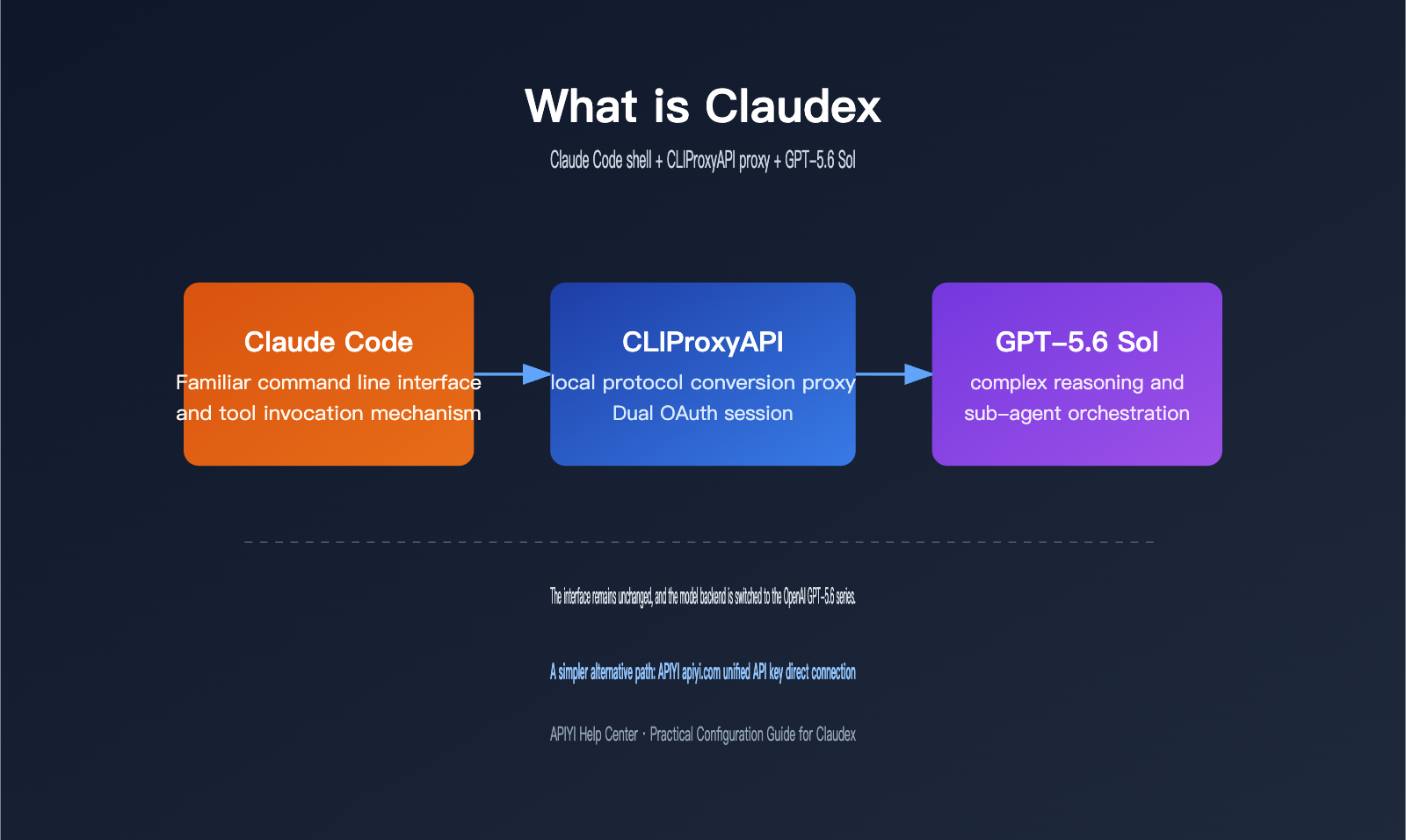
The name "Claudex" is a portmanteau of Claude and Codex. It refers to a hybrid workflow: you keep the command-line interface and tool-calling mechanism of Claude Code, but route the actual inference requests to OpenAI's GPT-5.6 Sol model. The reason developers are going through the trouble isn't just for the sake of novelty; comparative tests in the community have shown that GPT-5.6 Sol actually performs more reliably under Claude Code’s task orchestration logic than it does in the native Codex environment.
The issue lies in a known flaw within the official Codex harness. According to developer reports on GitHub, GPT-5.6 Sol defaults to a sub-agent orchestration mode that hides key fields like agent_type, model, reasoning_effort, and service_tier. This forces every sub-task derived by Sol to inherit its full, high-cost configuration, even when the sub-task itself only requires a lighter model like Terra or Luna. In other words, the sub-agent routing mechanism in the Codex environment has a bug, and Claude Code’s file-based sub-agent definition happens to bypass this limitation.
| Comparison Dimension | Native Codex Harness | Claude Code Harness (Claudex Mode) |
|---|---|---|
| Sub-agent Model Downgrade | Restricted; Sol hides key fields | Explicitly configurable via env vars |
| Sub-agent Definition | Built-in orchestration logic | File-based sub-agent definitions |
| Tool Call Concurrency | Fixed policy | Adjustable via CLAUDE_CODE_MAX_TOOL_USE_CONCURRENCY |
| Tool Search Mechanism | Full load by default | Toggleable via ENABLE_TOOL_SEARCH |
It's worth noting that some developers have reported no significant performance difference in standard coding tasks. This discrepancy seems to appear primarily in complex tasks that rely heavily on sub-agent orchestration. Therefore, it's better to treat Claudex as an "experimental option" rather than a one-size-fits-all solution.
The way this configuration trick spread isn't surprising. Since the launch of the GPT-5.6 series, the overseas developer community has been buzzing about which harness is best for running Sol. Many have grown accustomed to the interaction rhythm and plugin ecosystem of Claude Code and don't want to switch to an entirely unfamiliar toolchain just to try out a new model. The Claudex approach is essentially "maximum gain for minimum effort": you don't have to learn a new command-line tool; you just change the destination of the underlying requests. That’s why it’s much easier to adopt than installing a standalone Codex client.
What is CLIProxyAPI: A Protocol Translation Proxy
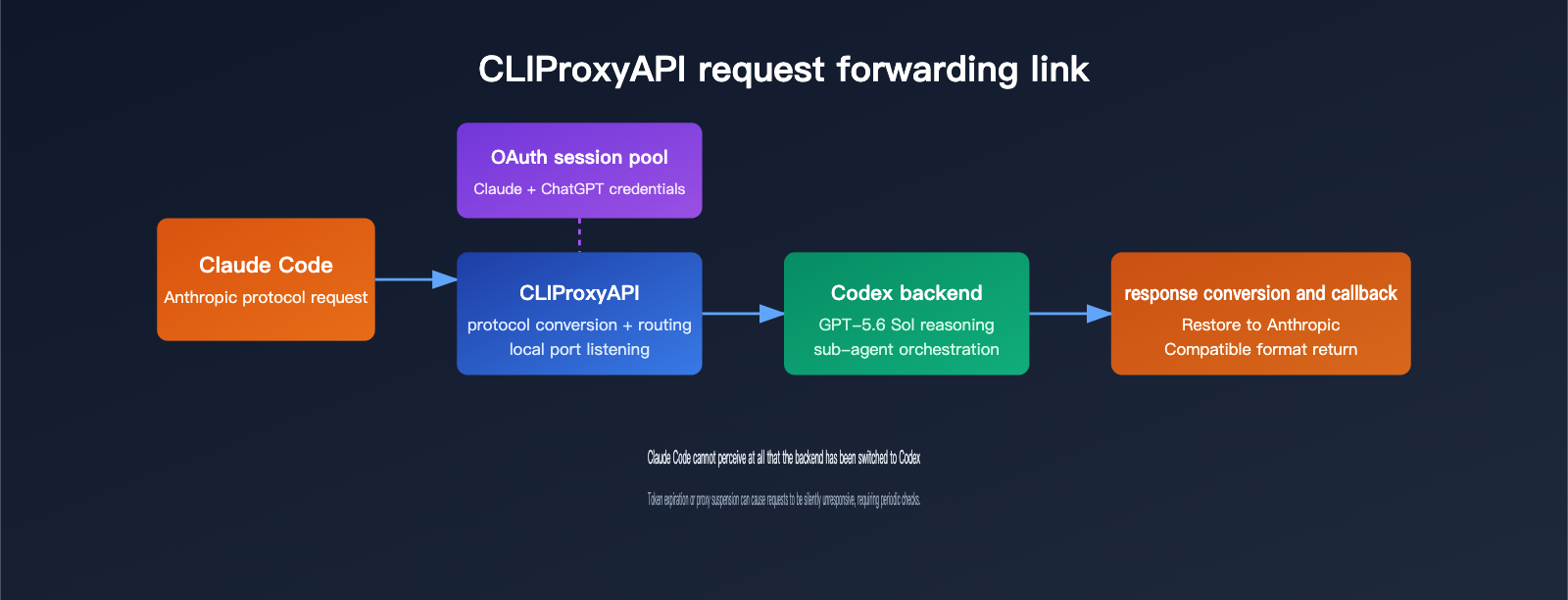
To get Claudex working, you need a middle layer to translate the Anthropic protocol requests sent by Claude Code into a format that OpenAI Codex understands. That’s exactly what CLIProxyAPI does. It’s an open-source local proxy service that wraps OAuth sessions from various CLI tools—like Codex, Claude Code, and Gemini CLI—into standard HTTP API interfaces compatible with OpenAI, Gemini, Claude, and Codex. It also handles streaming responses, function calling, multimodal inputs, and load balancing across multiple accounts.
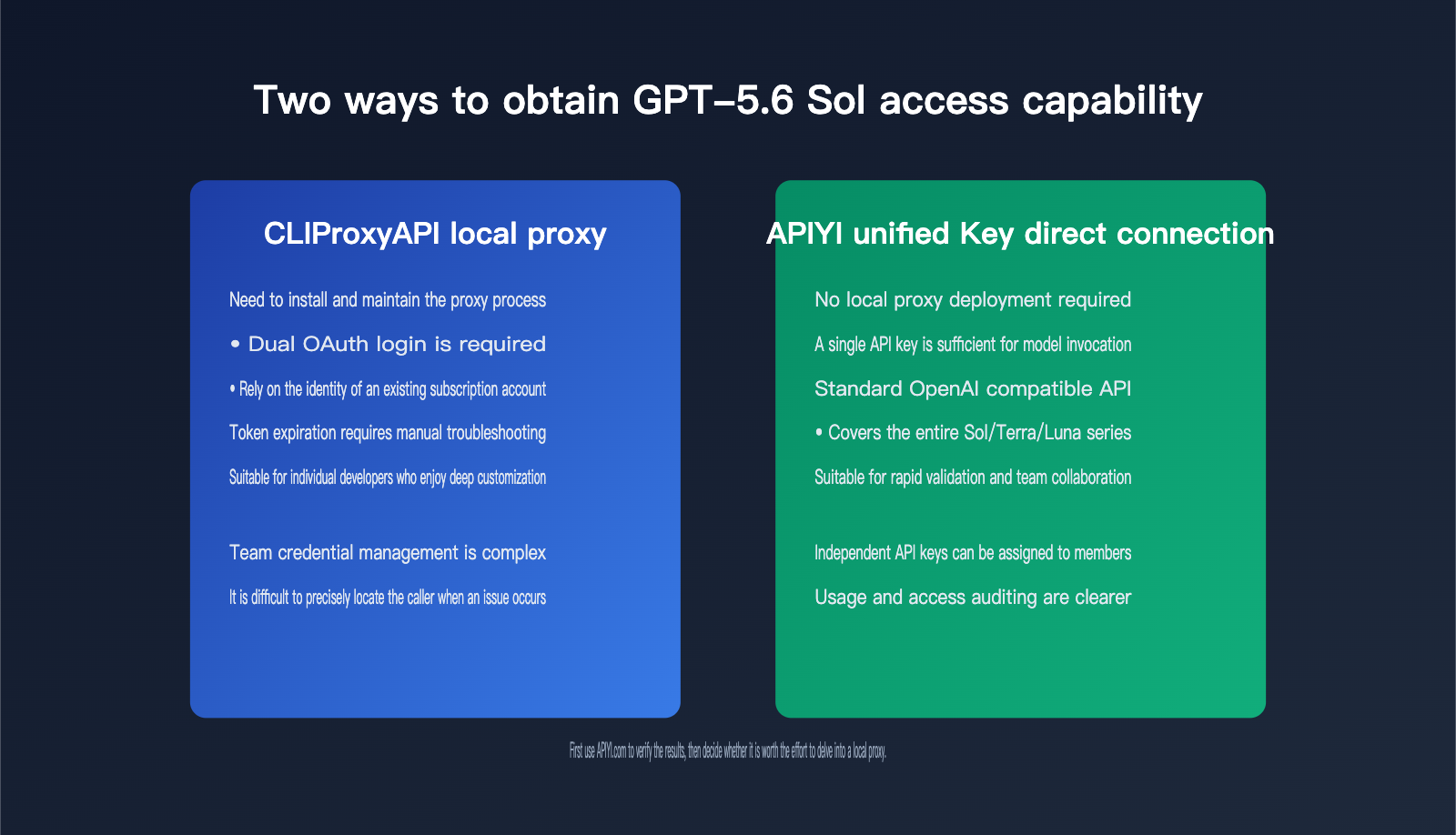
Think of it as a protocol conversion gateway: instead of building custom integration logic for every model provider, you let the proxy expose a unified, standard interface. This approach is actually quite similar to the philosophy behind APIYI (apiyi.com)—both are solving the "fragmented model interface" problem. The key difference is that CLIProxyAPI relies on your local, existing Claude and ChatGPT subscriptions, whereas cloud-based gateways like APIYI let you call the full GPT-5.6 model series directly via an API key, without needing to maintain local OAuth sessions or proxy processes.
| Component | Function | Compatible Protocols |
|---|---|---|
| OAuth Login Module | Reuses existing Claude / ChatGPT subscription identity | Anthropic OAuth, OpenAI OAuth |
| Protocol Translation Layer | Exposes a unified standard interface | OpenAI / Gemini / Claude / Codex |
| Multi-account Routing | Distributes requests via round-robin to bypass rate limits | All supported |
| Local Service Process | Listens on a local port for CLI tool connections | HTTP / WebSocket |
In terms of deployment, CLIProxyAPI offers both binary packages and Docker images. The repository includes a docker-compose.yml and build scripts, making it easy to spin up a containerized service. The configuration is a simple YAML file where you define the listening port, credential storage path, and whether to enable multi-account round-robin. You can grab the config.example.yaml from the official repo and tweak it to your needs. The project also provides a Go SDK, so if you’d rather embed this proxy capability into your own internal services instead of running a separate process, there’s a ready-to-use integration path.
The Five-Step Setup: From Installation to Execution
Translating the theory into practice, the process breaks down into five steps. First, install CLIProxyAPI using the official binary or Docker image, and set up your YAML config file to define the listening port and credential storage path. Second, complete the OAuth login for both your Claude and OpenAI accounts. The proxy will save both sets of credentials locally, automatically selecting the right identity based on the target model for each request.
Third, point your Claude Code traffic to the local proxy. Usually, this means setting ANTHROPIC_BASE_URL to the address where CLIProxyAPI is listening, tricking Claude Code into thinking it’s talking to the official Anthropic API while the traffic is actually being intercepted and routed. Fourth, define a claudex alias command that bundles the necessary environment variables, so you can jump into this hybrid mode with a single command. Fifth, run a test task to verify it works. I recommend starting with an orchestration-heavy task rather than a simple single-file edit, so you can see if the sub-agent routing is actually kicking in.
The trickiest part is usually the connection between steps two and three. Both OAuth tokens have their own refresh cycles. If the proxy process runs for a long time without a restart, the tokens might expire, causing requests to be silently rejected—which looks like Claude Code just hanging rather than throwing a clear error. It’s a good idea to manage the proxy process with a system process manager and periodically check the logs to ensure both accounts are still authenticated. Don't wait until you're in the middle of a task to find out your credentials have expired!
alias claudex='CLAUDE_CODE_SUBAGENT_MODEL=gpt-5.6-sol \
CLAUDE_CODE_ALWAYS_ENABLE_EFFORT=1 \
CLAUDE_CODE_MAX_TOOL_USE_CONCURRENCY=3 \
ENABLE_TOOL_SEARCH=false \
claude --model gpt-5.6-sol'
🎯 Pro Tip: If you just want to experience GPT-5.6 Sol in action, you don't necessarily have to go through the double OAuth setup. We recommend grabbing an API key from APIYI (apiyi.com) to call GPT-5.6 Sol, Terra, and Luna directly via standard OpenAI-compatible interfaces. Once you've verified the performance, you can decide if it's worth the effort to maintain your own local proxy and OAuth sessions.
Breaking Down Environment Variables in the Claudex Alias
The alias command mentioned above might look simple, but the four environment variables each address specific issues. Understanding what they do is key to deciding if this configuration fits your workflow.
| Environment Variable | Purpose | Why it's needed |
|---|---|---|
CLAUDE_CODE_SUBAGENT_MODEL |
Forces all sub-agents to use a specific model | Bypasses fallback failures caused by hidden Codex harness fields |
CLAUDE_CODE_ALWAYS_ENABLE_EFFORT |
Always enables the reasoning effort parameter | Ensures Sol maintains the specified reasoning intensity for every call |
CLAUDE_CODE_MAX_TOOL_USE_CONCURRENCY |
Limits the number of concurrent tool calls | Prevents rate-limiting errors when using an API proxy service |
ENABLE_TOOL_SEARCH |
Disables the on-demand tool search mechanism | Avoids conflicts between tool search and protocol translation in some proxy scenarios |
The CLAUDE_CODE_MAX_TOOL_USE_CONCURRENCY variable is particularly worth noting. If your proxy layer can't keep up with the concurrent tool calls requested by Claude Code, you'll likely trigger 400 errors. This is the same issue you'd see when calling the official API directly—essentially, the concurrent requests are exceeding the backend's processing capacity. When you run into these errors, besides lowering this environment variable, you might want to consider switching to an API proxy service with higher concurrency support to save time on constant configuration tweaking.
Troubleshooting Common Errors: From Lag to Rate Limiting
While setting up this combination, you'll likely run into a few common errors. Knowing how to troubleshoot them ahead of time will save you a lot of back-and-forth.
| Symptom | Potential Cause | Troubleshooting Path |
|---|---|---|
| Claude Code unresponsive for a long time | Proxy process OAuth token expired | Check proxy logs and re-trigger the login flow |
| Returns 400 with concurrency limit error | Concurrent tool calls exceed backend capacity | Lower CLAUDE_CODE_MAX_TOOL_USE_CONCURRENCY |
| Sub-agent still using high-cost model | Environment variables not active in current shell | Ensure the alias is defined in the same session starting Claude Code |
| Tool list loading is abnormally slow | Tool search mechanism conflicts with protocol translation | Try toggling the ENABLE_TOOL_SEARCH setting |
Concurrency rate limiting is the most frequent issue. It stems from the same root cause as when you hit limits calling the official API directly—the request rate is simply too high for the backend to handle. The troubleshooting approach is universal: whether you're using a local proxy or calling cloud interfaces directly, it's always better to start by lowering concurrency and testing the limits incrementally rather than trying to max out parameters right away.
Which GPT-5.6 Series Model Should You Choose?
By default, the Claudex configuration points to GPT-5.6 Sol, but keep in mind that this is just the top-tier model in the GPT-5.6 family. This naming system uses numbers to denote model generations, while Sol, Terra, and Luna represent three independently iterative capability tiers, each tailored to different levels of task complexity and budget requirements.
| Model | Positioning | Use Case |
|---|---|---|
| GPT-5.6 Sol | Flagship for complex reasoning and long-chain tasks | Multi-sub-agent orchestration, research-grade analysis, security auditing |
| GPT-5.6 Terra | Daily workhorse | Standard coding, document processing, batch tasks |
| GPT-5.6 Luna | Lightweight and high-frequency | Simple repetitive tasks, rapid response scenarios |
The real value of using this sub-agent routing scheme with Claudex is that it allows you to delegate complex primary tasks to Sol, while automatically offloading split-off lightweight sub-tasks to Terra or Luna, effectively controlling your overall model invocation costs. If you don't want to maintain a local proxy, you can also call these three tiers on-demand via the APIYI (apiyi.com) platform. This lets you handle everything from task planning to sub-task execution using a single account system, without worrying about whether sub-agent routing is restricted by a harness.
When choosing a model, don't feel pressured to "always use the most expensive one." Sol is priced significantly higher than Terra and Luna; if your task doesn't involve deep reasoning or long-chain orchestration, Terra can often deliver similar results while cutting costs substantially. This is why understanding the sub-agent degradation mechanism is more important than just picking a single model—what really drives your total spend isn't usually the model used for the main task, but whether the large volume of split-off sub-tasks is being efficiently distributed to the more affordable tiers.
FAQ
Is Claudex an official product from Anthropic or OpenAI?
No. It’s a hybrid approach built by the developer community using third-party proxy tools like CLIProxyAPI. Essentially, it stitches together the interfaces and model capabilities of both vendors and does not represent the official stance of either company.
Why not just use the Codex client to call GPT-5.6 Sol?
You certainly can, but some developers have reported that the native Codex harness has routing flaws in sub-agent orchestration scenarios, which prevents lightweight sub-tasks from degrading to cheaper models. If your tasks don't involve complex sub-agent splitting, you might not notice the difference.
Are there security risks in setting up this CLIProxyAPI proxy?
A local proxy stores your account OAuth credentials, so you need to be mindful of file access permissions and avoid deploying it on publicly accessible servers. If you just want to quickly verify model performance, using a cloud gateway like APIYI (apiyi.com) with an independent API key makes access control and usage auditing much easier.
What if multiple people on my team want to share this configuration?
CLIProxyAPI supports multi-account polling, so theoretically, you could connect team members' subscription accounts to a single proxy instance to share the load. However, this significantly increases the complexity of credential management; if one account runs into issues, the entire team's model invocation could be affected. For team scenarios, we recommend using a unified API gateway to assign independent keys to each member. This allows you to pinpoint the specific caller if issues arise, rather than having everyone share a single local proxy process.
Final Thoughts
At the end of the day, Claudex is really just an engineering workaround discovered by the community. Its true value lies in revealing how different vendors' harnesses handle sub-agent orchestration, rather than proving that one model or tool is objectively better than another. These kinds of "hacked-together" solutions from developers often have a short shelf life—once the official Codex team patches the field-hiding issue in sub-agent routing, the reason for Claudex’s existence might disappear entirely. However, the insight it provides—that harness design can fundamentally impact model performance—remains valuable for evaluating any AI coding tool down the road.
If you’re just looking to get a taste of the reasoning capabilities of GPT-5.6 Sol, there’s no need to rush into setting up CLIProxyAPI or dealing with double OAuth logins. You can start by running a test through APIYI (apiyi.com) using the standard interface. Once you’ve confirmed the results, you can decide if it’s really worth the effort to dive deep into the local proxy path.