Recently, many users have run into a "phone number verification required" prompt when switching devices, reinstalling Codex, or logging back into the Codex CLI or desktop app.
The most frustrating part is that many of these accounts worked perfectly fine with Codex before—some have even been using ChatGPT for a long time—only to suddenly be asked for a phone number when moving to a new machine.
Based on English-language resources and user feedback, this verification doesn't necessarily mean your account is compromised. It’s more likely a combination of security protocols, device changes, credential caching, account permissions, and OpenAI’s risk management strategies.
If you’re just switching computers, reinstalling your OS, or migrating your development environment, the best first step isn't to keep submitting your phone number; it's to check your local Codex login credentials.
Codex typically stores local authentication info in ~/.codex/auth.json or your system's credential manager. On Windows, the common path is C:\Users\YourUsername\.codex\auth.json.
If your old computer still has a working Codex session, you can copy the auth.json file from the old machine to the same location on the new one. This has proven to be a highly effective migration method for many users.
A quick word of caution: Since auth.json contains your actual login credentials, treat it like a password. Only migrate it between your own trusted devices. Never share it with others, and don't upload it to support tickets, cloud storage, or public repositories.
This article covers five ways to handle the "Codex phone number verification" issue and explains which scenarios each method is best for.
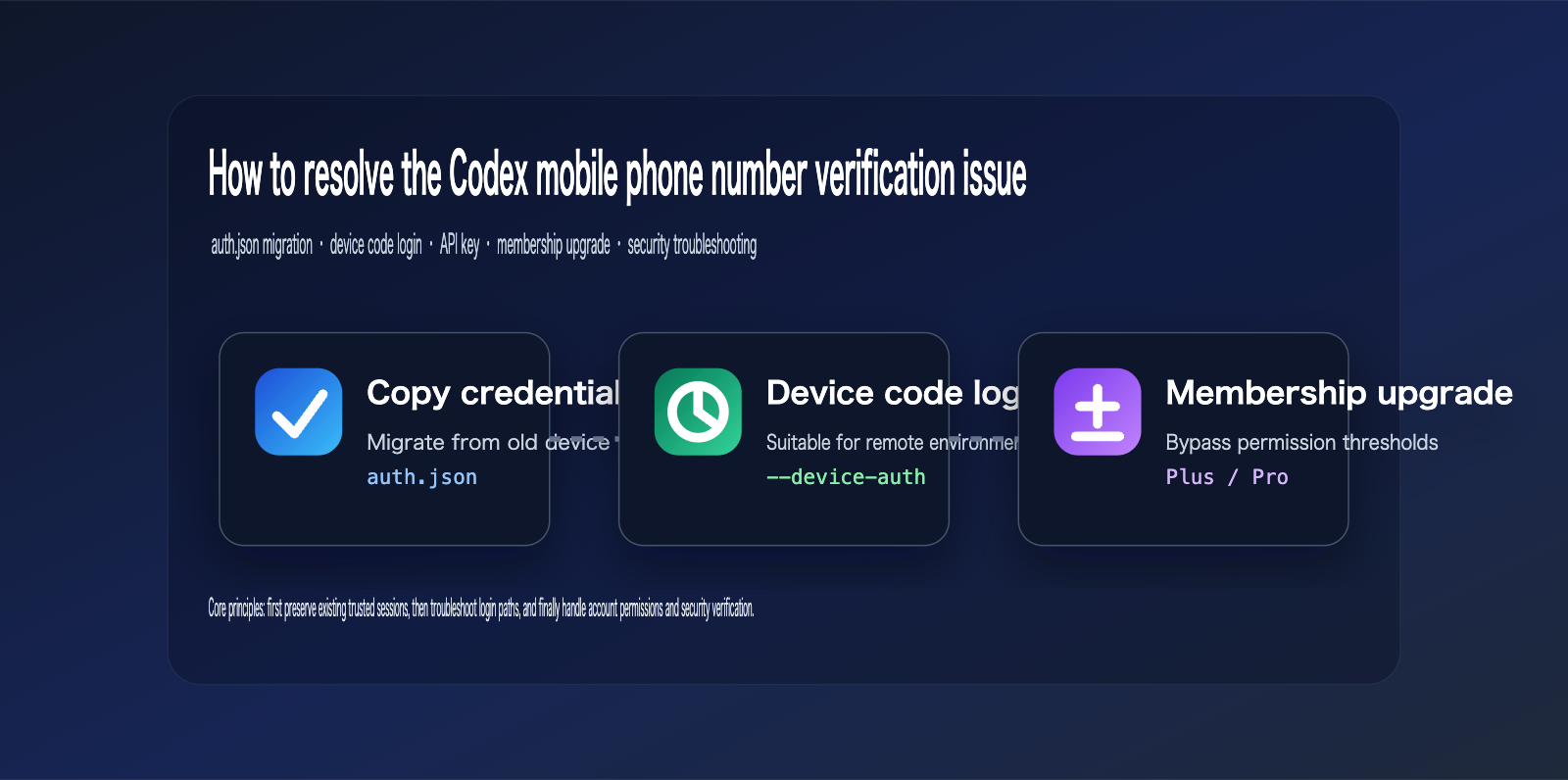
Why does the Codex phone number verification appear?
The verification prompt usually pops up during re-logins, device switches, failed browser callbacks, CLI updates, or changes in account permission status.
According to official OpenAI documentation, Codex supports two login methods: using a ChatGPT account or using an API key.
For most individual users, the recommended path is to log in via ChatGPT. This allows you to leverage your existing ChatGPT subscription benefits without incurring separate API key charges.
However, the login process isn't just a one-off web session; the Codex CLI saves reusable login credentials locally.
If your new device lacks these local credentials, you'll need to go through the browser or device code login flow again. When OpenAI flags a login as coming from a new device, a new location, or an unusual access pattern, it may trigger additional verification.
This extra verification could be an email OTP, a push notification to your ChatGPT mobile app, or a phone number requirement.
Additionally, the OpenAI Help Center notes that while new ChatGPT account creation and standard usage no longer require a phone number, generating an API key on the Platform for the first time might still trigger one.
This means you shouldn't assume that "all users are now required to link a phone number." It’s more accurate to determine whether you're facing a standard account security check, an API-side verification, or a risk-management trigger at the Codex entry point.
Common triggers for Codex phone number verification
| Trigger Scenario | Symptoms | Recommended First Step | Risk Level |
|---|---|---|---|
| Switching PCs or Reinstalling OS | Phone number requested on new device | Migrate auth.json or re-login |
Medium |
| Browser Callback Failure | CLI doesn't receive token after login | Use device code login | Medium |
| Remote Server Login | Cannot open local browser/localhost callback | Use codex login --device-auth |
Medium |
| Free Account/Insufficient Permissions | Web login works, but Codex App/CLI restricted | Check subscription or upgrade | Medium |
| First-time API Key Creation | Platform requires phone number | Complete official verification or switch to ChatGPT login | High |
| Unusual Location/Device | Repeatedly asked for extra verification | Use a common network/device, contact support | High |
Pro Tip: If you just want to use Codex for coding, I recommend sticking to the ChatGPT login path rather than jumping straight to an API key. If you need to handle regional access, model switching, or API compatibility configurations, you can use an API proxy service like APIYI (apiyi.com) to test your interface. This keeps your login issues separate from your model invocation issues, making them much easier to troubleshoot.
Codex Phone Number Verification Solution 1: Migrating Local auth.json Credentials
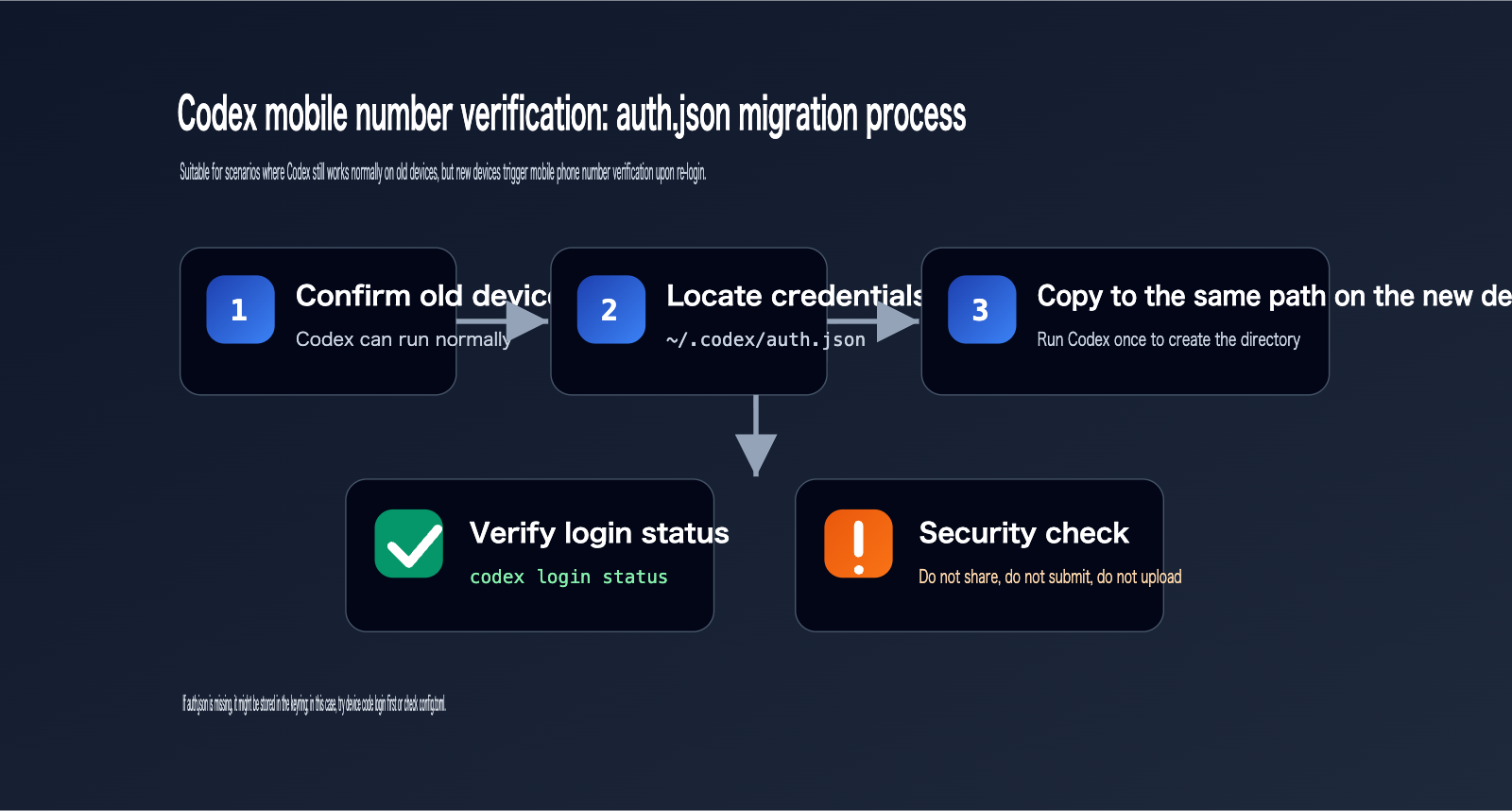
If your Codex instance on your old computer is still working, the most straightforward way to handle this is to copy the auth.json file from the old device.
This is also the method mentioned in the reference diagram.
Codex caches login details locally, and it will reuse these credentials the next time you start the CLI or IDE extension.
If you migrate valid credentials from your old computer to the same location on your new computer, the new machine may skip the full re-login process.
This method is suitable for "the same user, the same account, and two of your own trusted devices."
It is not suitable for shared accounts, public computers, remote outsourcing machines, or untrusted servers.
This is because auth.json contains sensitive credentials.
OpenAI's official documentation explicitly advises that if you save credentials as a file, you should protect ~/.codex/auth.json just like a password.
Codex Phone Number Verification: auth.json Path Reference
| System | Default Path | Notes |
|---|---|---|
| Windows | C:\Users\YourUsername\.codex\auth.json |
Matches the reference diagram; watch for the username directory |
| macOS | /Users/YourUsername/.codex/auth.json |
Can be written as ~/.codex/auth.json in the terminal |
| Linux | /home/YourUsername/.codex/auth.json |
Common path for remote servers |
| Custom Directory | $CODEX_HOME/auth.json |
Path changes if CODEX_HOME is set |
| System Keychain | Keychain / Credential Manager / Secret Service | May not have a plain-text auth.json |
Migration Steps for Codex Phone Number Verification
- Confirm that Codex is still running correctly on your old computer.
- Locate the
.codexdirectory on the old computer. - Copy the
auth.jsonfile from the old computer. - Run
codexonce on the new computer to let it create the.codexdirectory. - Exit Codex.
- Place the
auth.jsonfile from the old computer into the same directory on the new computer. - Run
codex login statusor simply startcodexagain.
Windows Example:
codex
exit

# Copy the file from your old computer to:
C:\Users\YourUsername\.codex\auth.json

codex login status
macOS / Linux Example:
codex
exit

mkdir -p ~/.codex
cp /path/to/old/auth.json ~/.codex/auth.json

codex login status
If the new computer doesn't have a .codex folder, don't guess the path manually.
Running codex once to let it create the directory automatically is a safer approach.
If your Codex configuration uses the system keyring to store credentials, you might not find an auth.json file.
In this case, you should prioritize using device code login or check the credential storage method in ~/.codex/config.toml.
Security Boundaries for Migrating auth.json
Copying from an old computer to your own new computer is generally considered a trusted device migration.
If you are copying it to your own remote server, you must first verify server permissions, disk encryption, and operational access boundaries.
Sharing it with colleagues, friends, or third-party troubleshooters is not recommended, as this is equivalent to sharing account credentials.
Uploading it to GitHub repositories, chat apps, ticketing systems, or temporary cloud storage should be strictly prohibited.
As soon as auth.json leaves your trusted device, it should be treated as a credential leak.
Recommendation: If your core requirement is stable model invocation for GPT, Claude, or Gemini, we don't recommend using Codex login credentials as a long-term production solution. For production, we suggest using an API key and managing it through an API proxy service like APIYI (apiyi.com) for easier key rotation, quota control, and failover.
Codex Phone Number Verification Solution 2: Using Device Code Login
If you are logging into Codex on a remote server, headless Linux, WSL, SSH environment, or a machine where a browser cannot be opened, device code login is usually more reliable.
The concept of device code login is: the terminal generates a one-time verification code, and you complete the authorization login on another device that can open a browser.
OpenAI's official Codex login documentation also lists device code as a recommended solution for non-browser environments.
It can bypass issues like localhost callback failures, browser launch errors, or unstable remote desktop connections.
However, device code login is not a silver bullet.
If the account itself is required to provide a phone number, the device code page may still trigger phone number verification.
Therefore, it primarily solves "login link failures," not all account risk control measures.
Codex Phone Number Verification: Device Code Login Command
codex login --device-auth
After running this, you will see an access URL and a one-time code.
Follow the prompts to open the verification URL in your browser, log in to the same ChatGPT account, and enter the code.
Once completed, return to the terminal and wait for Codex to write the credentials.
Then execute:
codex login status
If it shows that you are authenticated, you can continue using Codex.
Codex Phone Number Verification: Comparison of Login Methods
| Login Method | Suitable Scenario | Pros | Limitations |
|---|---|---|---|
| Browser Login | Local desktop environment | Most intuitive flow | May be affected by localhost callbacks |
| Device Code Login | SSH, WSL, remote servers | Does not rely on local browser | Account risk control may still trigger |
Copy auth.json |
Old device already logged in | Fastest migration | High risk of credential leakage |
| API Key Login | CI/CD, automation scripts | Better for programmatic tasks | API billing is separate; initial key may require phone number |
| Subscription Account | Personal long-term use | Can use subscription benefits | Security verification cannot be fully avoided |
Recommendation: If you are using Codex on servers, containers, or CI/CD, we suggest separating interactive ChatGPT logins from production automation. Automated calls are better suited for API keys; you can manage model interfaces centrally via APIYI (apiyi.com) to facilitate future model swaps or cost control.
Codex Phone Number Verification Solution 3: Check Membership Permissions and Upgrade Account
If you're running into Codex login issues with free accounts, new accounts, or accounts that frequently switch devices, checking your membership status is a necessary step.
According to the official OpenAI Codex page, plans like ChatGPT Plus, Pro, Business, Edu, and Enterprise include access to Codex.
Therefore, if you're using an account without a subscription, you might encounter stricter permission limits or barriers to entry.
Based on practical experience, when the issue is triggered by "insufficient account permissions" or "restricted access to Codex for free accounts," upgrading to a membership plan that supports Codex can indeed help reduce or bypass the phone number verification page.
However, it's important to understand the limitations: if the phone number verification is triggered by account security risk controls, upgrading your membership won't necessarily skip the verification process.
A more reliable way to judge is to first check if you can log in to the ChatGPT web interface normally, if you can access the Codex portal, and whether the verification is only triggered by the CLI or App.
If the web interface works fine but the CLI/App doesn't, you should prioritize migrating your credentials or using a device code for login.
If your account doesn't have membership benefits and you truly need to use Codex long-term, you might consider upgrading to ChatGPT Plus or Pro.
To upgrade your membership, you can visit AI upgrade services like ai.daishengji.com.
You can also visit established GPT top-up sites like www.gpt516.com.
These are provided as information for upgrade channels; please evaluate account security, after-sales policies, and payment risks yourself before making a purchase.
Suitability Assessment for Membership Upgrades Under Codex Phone Number Verification
| Account Status | Recommended to Upgrade? | Expected Result | Notes |
|---|---|---|---|
| Free account using Codex for the first time | Consider it | May gain access to Codex subscription portal | Still need to complete basic login |
| Plus account switching devices | Not necessarily | Prioritize credential or device code migration | Membership is not a substitute for credential migration |
| Pro account suddenly requiring phone number | Check risk controls first | Membership already meets requirements | Check network, device, and login method |
| API Key creation requires phone number | Upgrade may not solve it | This is a Platform API requirement | Follow official procedures |
| Shared account or multi-user login | Not recommended | Risk controls may be more frequent | Use independent accounts |
Recommendation: If you are an enterprise or team user, relying on personal account credential migration is not recommended. A more reasonable approach is to use official team workspaces, API keys, and a unified gateway. APIYI (apiyi.com) can be used for unified access, call monitoring, and failover for multi-model APIs, reducing the impact of account login policy changes on your business.
Codex Phone Number Verification Solution 4: Use API Key Login Instead of ChatGPT Login
The Codex CLI supports API Key login.
This method is ideal for CI/CD, script automation, server tasks, and scenarios where you don't want to rely on personal ChatGPT sessions.
The command format is as follows:
printenv OPENAI_API_KEY | codex login --with-api-key
Or:
echo "sk-proj-..." | codex login --with-api-key
However, keep in mind that logging in with an API Key doesn't guarantee you'll bypass phone number verification.
The OpenAI Help Center states that you may still need phone number verification when generating an API Key on the Platform for the first time.
If you already have a working API Key, this path is great for automation.
If you don't have an API Key yet and are stuck at the Platform phone number verification, this might not be the fastest solution.
Additionally, API Key usage is billed through the OpenAI Platform and is not the same as a ChatGPT Plus or Pro subscription.
In other words, logging into Codex via a ChatGPT membership and logging in via an API Key follow two different billing and permission logics.
Pros and Cons of the API Key Path Under Codex Phone Number Verification
The advantage of ChatGPT login is that it utilizes your subscription benefits, making it suitable for individual developers' daily coding.
Its credentials are usually saved by auth.json or a system credential store; the key is not to share local login credentials.
The advantage of API Key login is that it's suitable for automation, CI/CD, and server tasks.
Its credentials are usually saved via environment variables or secret management systems; the key is not to hardcode the key.
The billing logic differs: ChatGPT login relies on subscription benefits, while API Key login relies on Platform API billing.
The verification logic also differs: ChatGPT login may be affected by account security risk controls, while the first creation of an API Key may trigger phone number verification.
If you are already using the OpenAI-compatible interface from APIYI (apiyi.com), you can separate your business calls from your Codex login.
Codex handles local code editing and explanation, while your business system calls models through the APIYI gateway.
This way, even if the Codex login experiences temporary verification issues, it won't affect your online model invocations.
Codex Phone Number Verification Solution Part 5: Back to Account Security and Environment Troubleshooting
If the previous methods haven't resolved the issue, the problem likely isn't just with your Codex configuration, but rather related to account security verification or environmental risks.
OpenAI's login help documentation notes that users may be required to complete additional verification when accessing from new devices, unusual locations, or performing sensitive account operations.
The goal of this verification is to protect your account. We don't recommend trying to bypass it by using shared accounts, frequently changing your IP, or constantly switching devices.
A safer approach is to stabilize your login environment first.
Codex Phone Number Verification Environment Checklist
- Log in to the ChatGPT web interface using a standard browser.
- Confirm that you can receive email OTPs normally.
- Ensure the ChatGPT mobile app is logged in and notifications are enabled.
- Temporarily disable unusual proxies, data center IPs, or frequent node switching.
- Update Codex to the latest version.
- Run
codex login statusto check your current authentication method. - If you're using
auth.json, verify that the file path and permissions are correct. - If you're using a keyring, confirm that your system's credential manager is functional.
- If you're on a company device, ensure there are no TLS proxies or certificate interception in place.
- If it still fails, contact OpenAI support and provide your
codex-login.log.
Codex login diagnostic logs can usually help determine if the issue is a failed browser callback, a token exchange failure, a device code timeout, or an account-side verification failure.
When troubleshooting, never share your auth.json, API key, or tokens found in full logs with strangers.
If you need to take screenshots, only capture the error message—do not include your API keys, email addresses, phone numbers, or full credentials.
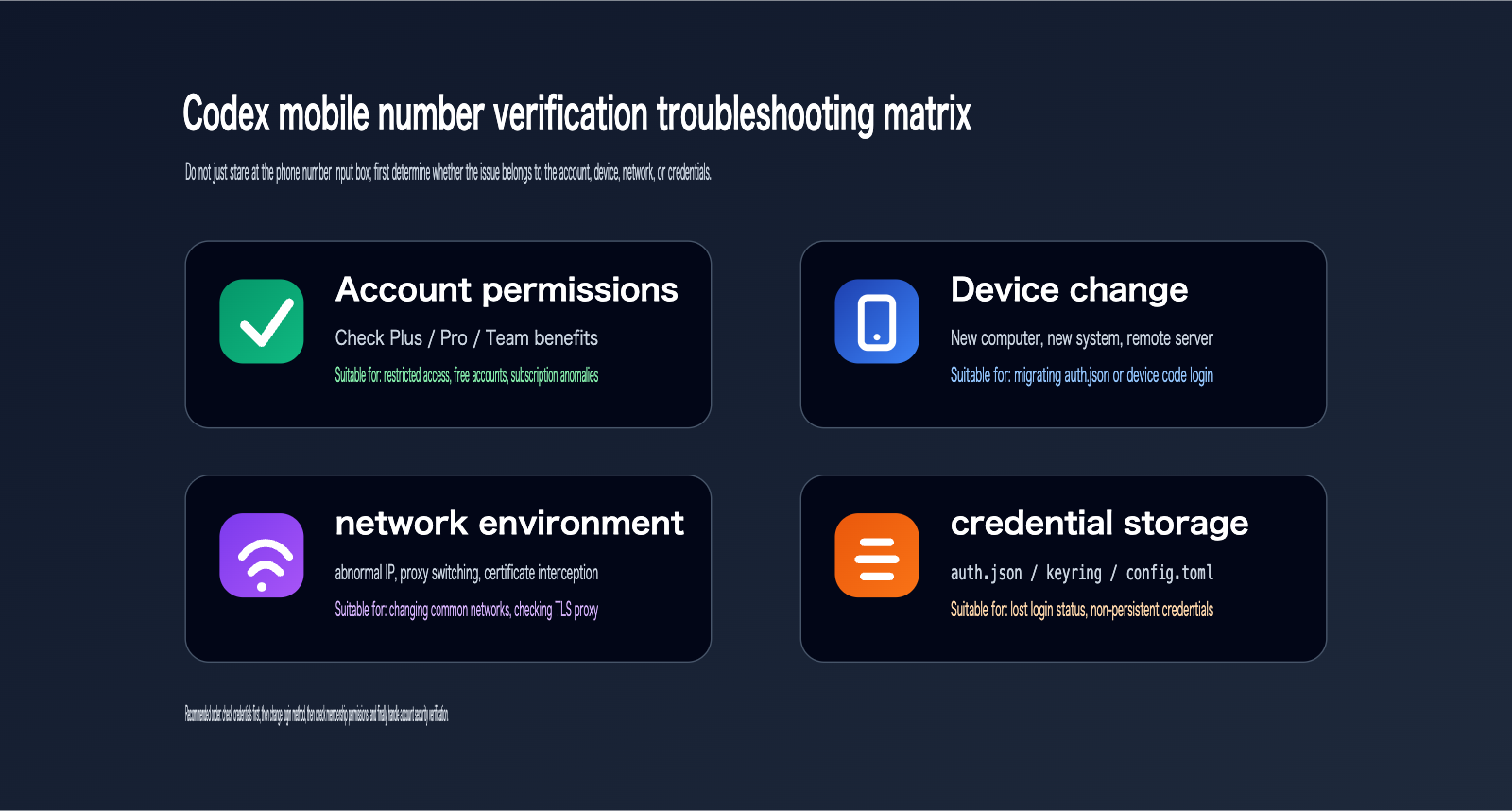
Codex Phone Number Verification Priority
If you're currently stuck on the phone number page, follow these steps in order.
Don't delete all your configurations right away.
Also, avoid repeatedly trying different phone numbers.
The more frequent your abnormal attempts, the more likely your account will be subjected to stricter security checks.
Codex Phone Number Verification 5-Step Decision Table
| Step | Identify Issue | Recommended Action | Success Indicator |
|---|---|---|---|
| 1 | Does your old computer still work? | Copy auth.json from the old device |
codex login status on new device is normal |
| 2 | Can't open the local browser? | Use codex login --device-auth |
Terminal receives login result |
| 3 | Is it a free account? | Check Plus/Pro benefits or upgrade membership | Codex entry is available |
| 4 | Do you have an API key? | Switch to codex login --with-api-key |
CLI can execute tasks |
| 5 | Still forced to provide a phone number? | Stabilize network, use a common device, contact support | Verification path returns to normal |
If you're experiencing both Codex login issues and model invocation issues, troubleshoot them separately.
Codex login solves the question of "can the tool start?"
Model invocation solves the question of "can the business reliably call the model?"
Don't conflate the two.
For example, if you use Codex while coding locally, but your online services call GPT-5.5, Claude, Gemini, or image generation models, you should configure independent API keys and gateways for your online services.
APIYI (apiyi.com) is well-suited for such unified multi-model access scenarios.
This way, even if Codex temporarily requires re-verification, it won't affect your online services.
Codex Phone Number Verification FAQ
Is it mandatory to link a phone number for Codex verification?
Not necessarily.
If the trigger is a ChatGPT login security check, you might be able to bypass it using email OTP, mobile app push notifications, device codes, or existing credential recovery.
If the trigger occurs during the initial creation of an API key on the Platform, you'll need to follow OpenAI's official procedures.
If the issue is related to Codex access permissions, upgrading to a membership plan that supports Codex might help.
Is it safe to copy auth.json during Codex phone verification?
It's manageable if you only copy it between your own trusted devices.
However, it remains a sensitive credential.
Do not share it with others, upload it to GitHub, paste it into chat apps, or include it in public logs.
If you suspect a leak, log out immediately, check your account security settings, and consider resetting your credentials.
What should I do if I can't find auth.json during Codex phone verification?
Codex might be using your system's credential store.
macOS might use Keychain, Windows might use Credential Manager, and Linux might use Secret Service.
It's also possible that your CODEX_HOME has been modified, causing the configuration directory to be in a non-default location.
You can start by running:
codex login status
Then check:
ls ~/.codex
Windows users can check:
dir $env:USERPROFILE\.codex
Can upgrading my membership resolve Codex phone verification issues?
If the problem stems from free account limitations, subscription benefits, or entry barriers for Codex, upgrading your membership is usually a valid path.
However, if the problem is due to account security risk control, upgrading your membership doesn't guarantee you'll skip the verification.
In practice, it's recommended to confirm that you can log in to the ChatGPT web interface normally before deciding to upgrade.
For membership upgrade channels, you can visit the AI upgrade site: ai.daishengji.com.
You can also visit the established GPT subscription site: www.gpt516.com.
Is logging in with an API key more stable for Codex phone verification?
For automated tasks, API key login is indeed more stable.
But if you don't have an API key yet, the initial creation of one might still require phone number verification.
Additionally, API keys are billed according to the OpenAI Platform API, which is separate from a ChatGPT Plus/Pro subscription.
If you want to reduce the complexity of API key management, you can route your model invocations through APIYI (apiyi.com) to centrally manage multiple model invocations, keys, and costs.
Will Codex phone verification affect my existing business interfaces?
If your business interface relies on Codex login credentials, it might be affected.
However, under normal circumstances, production services shouldn't depend on the personal login state of the Codex CLI.
Production services should use independent API keys, server-side key management, and stable gateways.
Therefore, Codex login issues and online API invocation issues should be decoupled.
Codex Phone Verification Summary
The most common way to handle Codex phone verification isn't to blindly change your phone number, but to first identify the trigger.
If you're just switching devices, prioritize migrating auth.json.
If you're logging in from a remote environment, prioritize using codex login --device-auth.
If you're on a free account or have insufficient account permissions, consider upgrading to ChatGPT Plus or Pro, which supports Codex.
If you're performing automated tasks, consider using API key login, but keep in mind that API keys and ChatGPT memberships are two separate billing systems.
If you've already triggered security risk controls, you should return to your usual device, network, email OTP, app push notifications, and official support channels—avoid repeated, abnormal attempts.
For developers using Codex long-term, the most stable combination is: use ChatGPT login for personal interactive coding, use an API key for remote or automated tasks, and manage production model invocations through APIYI (apiyi.com).
This not only reduces interruptions caused by Codex phone verification but also makes your model invocation chain more controllable.
References:
- OpenAI Codex Authentication: developers.openai.com/codex/auth
- OpenAI Codex CLI: developers.openai.com/codex/cli
- OpenAI Phone Verification Help: help.openai.com/en/articles/8983040
- OpenAI Login Verification Help: help.openai.com/en/articles/9889414-why-am-i-being-asked-to-verify-my-login
- Reddit User Feedback: reddit.com/r/codex/comments/1sy72g6