Author's Note: I've compiled 20 verified prompts for Claude Code's /loop command, covering 6 key scenarios including PR reviews, deployment monitoring, code quality, security scanning, and log analysis, complete with interval setting recommendations.
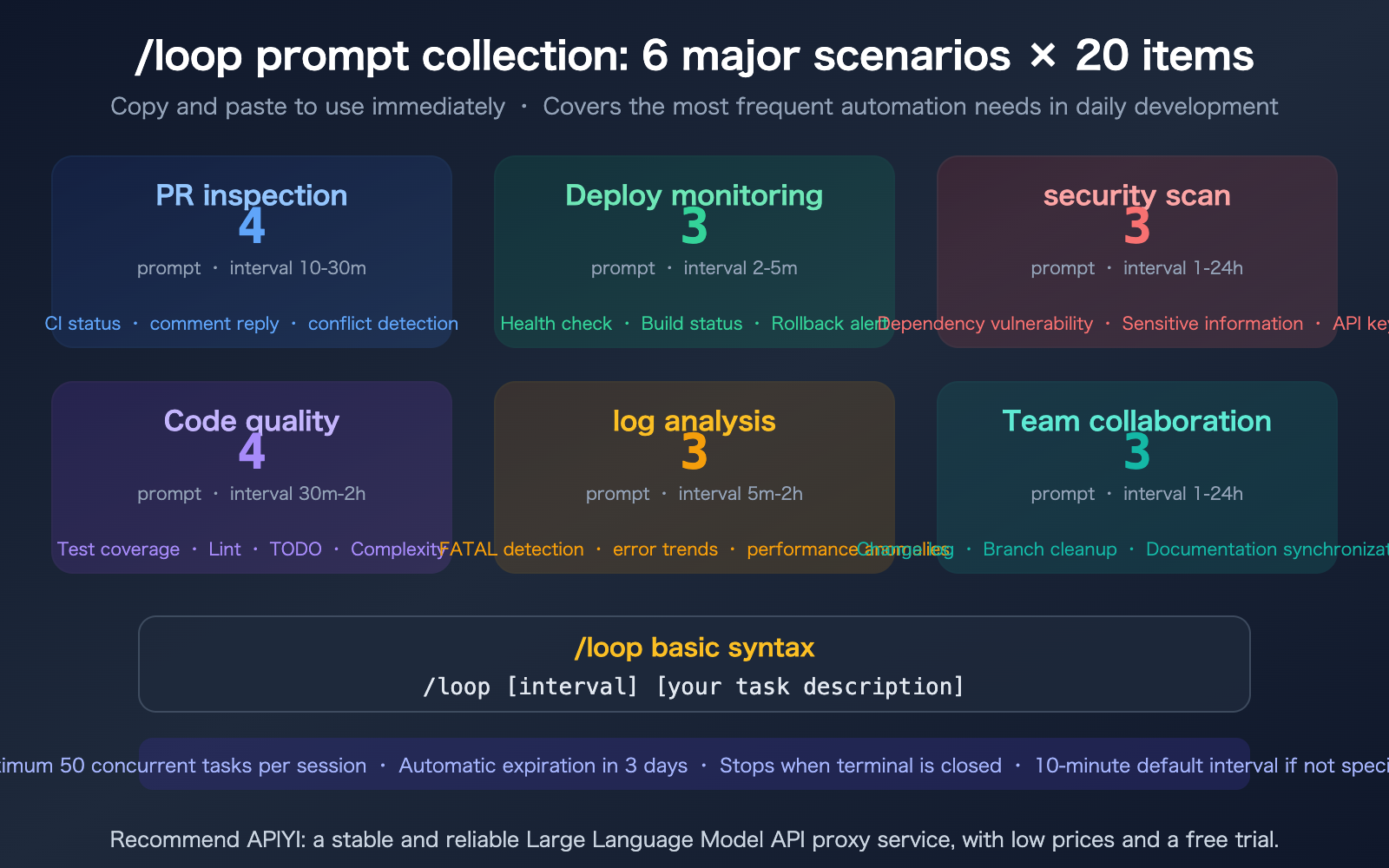
The /loop command in Claude Code is the most practical new feature as of March 2026—it transforms Claude Code from a "one-off chat assistant" into a "continuously running background worker." However, many developers have set up /loop but aren't sure what to run. This article collects 20 field-tested /loop prompts, categorized into 6 major scenarios, ready for you to copy and paste.
Core Value: These 20 prompts cover the most frequent automation needs in daily development, with recommended intervals and tips for each.
/loop Basics Quick Look
Before we dive into prompts, let's quickly get up to speed on the core mechanics of /loop.
| Dimension | Description |
|---|---|
| Basic Syntax | /loop [interval] [task description] |
| Default Interval | 10 minutes (if no interval is specified) |
| Interval Format | 5m (minutes), 2h (hours), 1d (days) |
| Max Concurrency | 50 scheduled tasks per session |
| Auto-Expiration | Automatically deleted after 3 days |
| Stop Conditions | Closing the terminal / Exiting the session / SSH disconnection |
| Key Feature | Natural language description; Claude automatically converts it into a cron expression |
Scenario 1: PR Inspection (4 Prompts)
PR inspection is where /loop really shines—many developers waste a ton of time constantly switching between reviewing PRs and writing code. Let Claude handle the background checks, and you only need to step in when you get a notification.
Prompt #1: CI Status Monitoring
/loop 10m Check the CI status of all open PRs. If there's a new failure, let me know which PR it is, which job failed, and the reason for the failure.
Recommended Interval: 10 minutes
Value: Catch CI failures instantly without manually refreshing GitHub.
Prompt #2: PR Comment Follow-up
/loop 15m Check all open PRs I've created. If there are new comments or review feedback, summarize the content and tell me which ones require a response from me.
Recommended Interval: 15 minutes
Value: Never miss a review comment again and stay responsive.
Prompt #3: Merge Conflict Detection
/loop 30m Check the latest commits on the main branch. If my current branch has conflicts with main, list the files that are in conflict.
Recommended Interval: 30 minutes
Value: Identify conflicts early so you don't have to deal with them right at the moment of merging.
Prompt #4: Automated PR Review
/loop 15m Check if any new PRs have been opened. If so, automatically review the changes and summarize: 1) What was changed, 2) Potential issues, and 3) Suggestions.
Recommended Interval: 15 minutes
Value: Turn Claude into a 24/7 online Code Reviewer.
Scenario 2: Deployment Monitoring (3 Prompts)
Prompt #5: Service Health Check
/loop 5m curl localhost:3000/health, if a non-200 status code or timeout is returned, notify me immediately with the service status and recent error logs
Recommended Interval: 5 minutes
Value: Detects service downtime instantly during local development.
Prompt #6: Build Pipeline Monitoring
/loop 5m check the latest run status of GitHub Actions. If any workflow fails, tell me which workflow, which step failed, and the key lines from the failure logs
Recommended Interval: 5 minutes
Value: No need to keep staring at the Actions page waiting for build results.
Prompt #7: Post-Deployment Regression Detection
/loop 2m run npm test -- --testPathPattern="critical" and check the results. If any tests fail, notify me immediately. Stop once 3 consecutive runs pass
Recommended Interval: 2 minutes (short-term monitoring after deployment)
Value: Automatically runs critical tests after deployment to confirm no regressions.
Scenario 3: Security Scanning (3 Prompts)
Prompt #8: Dependency Vulnerability Detection
/loop 24h run npm audit and list all high and critical severity vulnerabilities, providing recommended remediation actions (upgrading versions or replacing packages)
Recommended Interval: 24 hours
Value: Automatically checks dependency security daily without manual audits.
Prompt #9: Sensitive Information Scanning
/loop 1h scan the git diff from the last hour to check if any API keys, passwords, tokens, or other sensitive information were accidentally committed. Alert me immediately if found
Recommended Interval: 1 hour
Value: Prevents sensitive information from leaking into your git history.
Prompt #10: Security-Focused Code Review
/loop 2h scan newly added or modified files in the src/ directory for security risks like SQL injection, XSS, or command injection. If found, generate a fix PR directly
Recommended Interval: 2 hours
Value: Continuous security auditing with automated fix generation.
Scenario 4: Code Quality (4 Prompts)
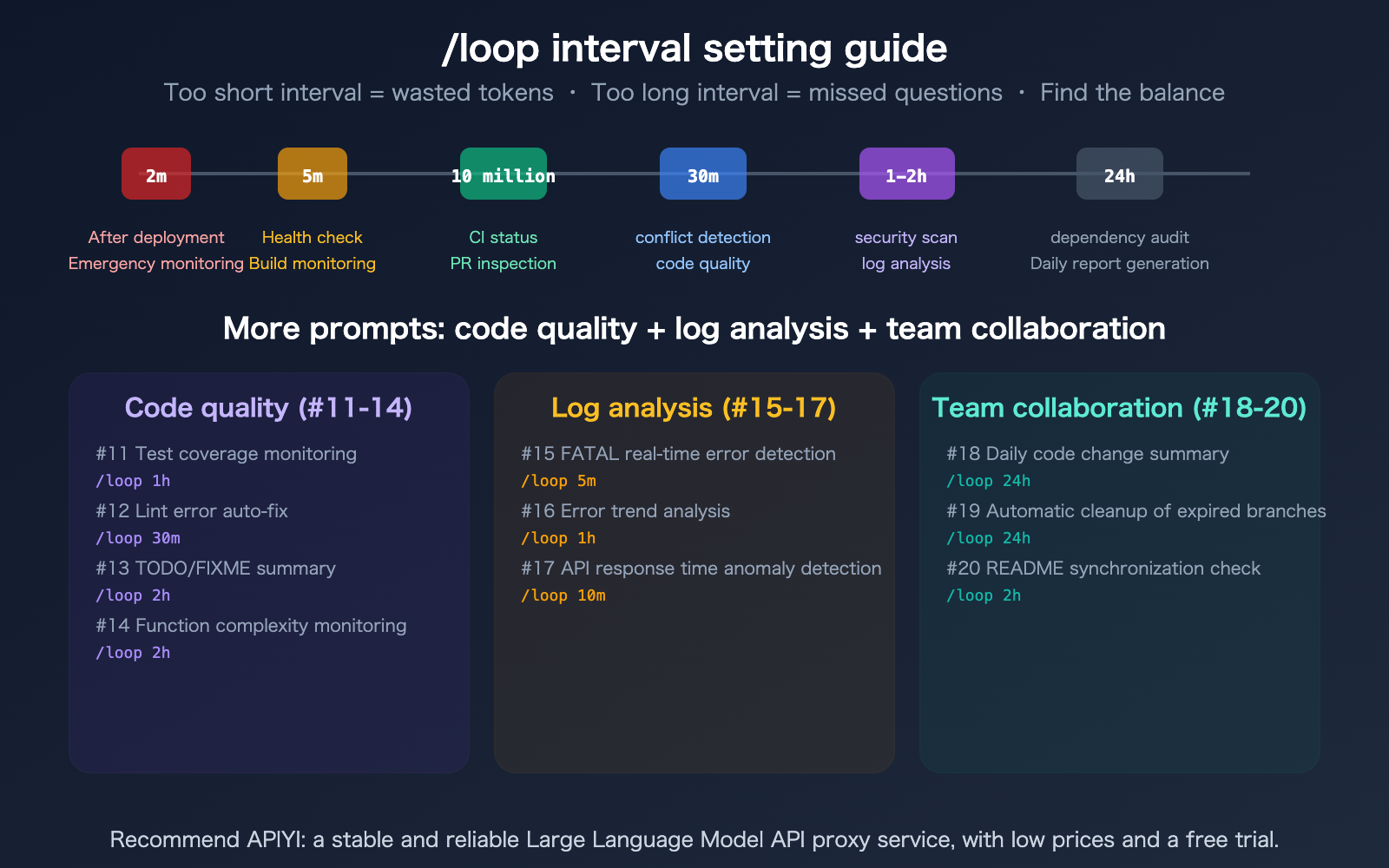
Prompt #11: Test Coverage Monitoring
/loop 1h Run a test coverage check. If the overall coverage drops below 80% or if any new files are missing tests, list the specific files and provide recommendations.
Prompt #12: Automated Lint Error Fixing
/loop 30m Run eslint src/ --fix. If there are errors that cannot be automatically fixed, summarize the error types and their locations.
Prompt #13: TODO/FIXME Summary
/loop 2h Scan all TODO and FIXME comments in the code, sort them by priority, and check if any items have been pending for more than 7 days.
Prompt #14: Function Complexity Monitoring
/loop 2h Check recently modified files in src/. If any function has a cyclomatic complexity exceeding 15 or is longer than 100 lines, suggest a refactor.
Scenario 5: Log Analysis (3 Prompts)
Prompt #15: Real-time FATAL Error Detection
/loop 5m Scan ./logs/app.log for any FATAL or ERROR entries added in the last 5 minutes. If a fixable error is found, automatically open a fix PR.
Value: Combining automated detection with automated fixes maximizes the value of /loop.
Prompt #16: Error Trend Analysis
/loop 1h Count the number of ERROR entries in the ./logs/ directory over the last hour. Compare this to the previous hour and trigger an alert if there's an increase of more than 50%.
Prompt #17: API Response Time Anomalies
/loop 10m Check API requests in ./logs/access.log from the last 10 minutes. If the average response time exceeds 2 seconds or if any individual request takes longer than 10 seconds, list the details of the slow requests.
Scenario 6: Team Collaboration (3 prompts)
Prompt #18: Daily Code Change Summary
/loop 24h Summarize all git commits from the past 24 hours, grouped by module, and list a summary of changes and affected files for each developer.
Value: Automatically generates team daily reports, saving everyone from writing them manually.
Prompt #19: Stale Branch Cleanup
/loop 24h List all remote branches that haven't been updated in over 30 days, indicate whether they have been merged into main, and suggest which ones can be safely deleted.
Prompt #20: README Sync Check
/loop 2h Check if the installation steps and API documentation in README.md are consistent with the actual code, and flag any outdated content.
Best Practices for Using /loop
/loop Interval Cheat Sheet
| Urgency | Recommended Interval | Use Case |
|---|---|---|
| Urgent | 2-5m | Post-deployment regression testing, service health checks |
| Important | 10-15m | CI monitoring, PR comment follow-ups, API anomalies |
| Routine | 30m-2h | Code quality, security scans, log trends |
| Low Frequency | 24h | Dependency audits, daily report generation, branch cleanup |
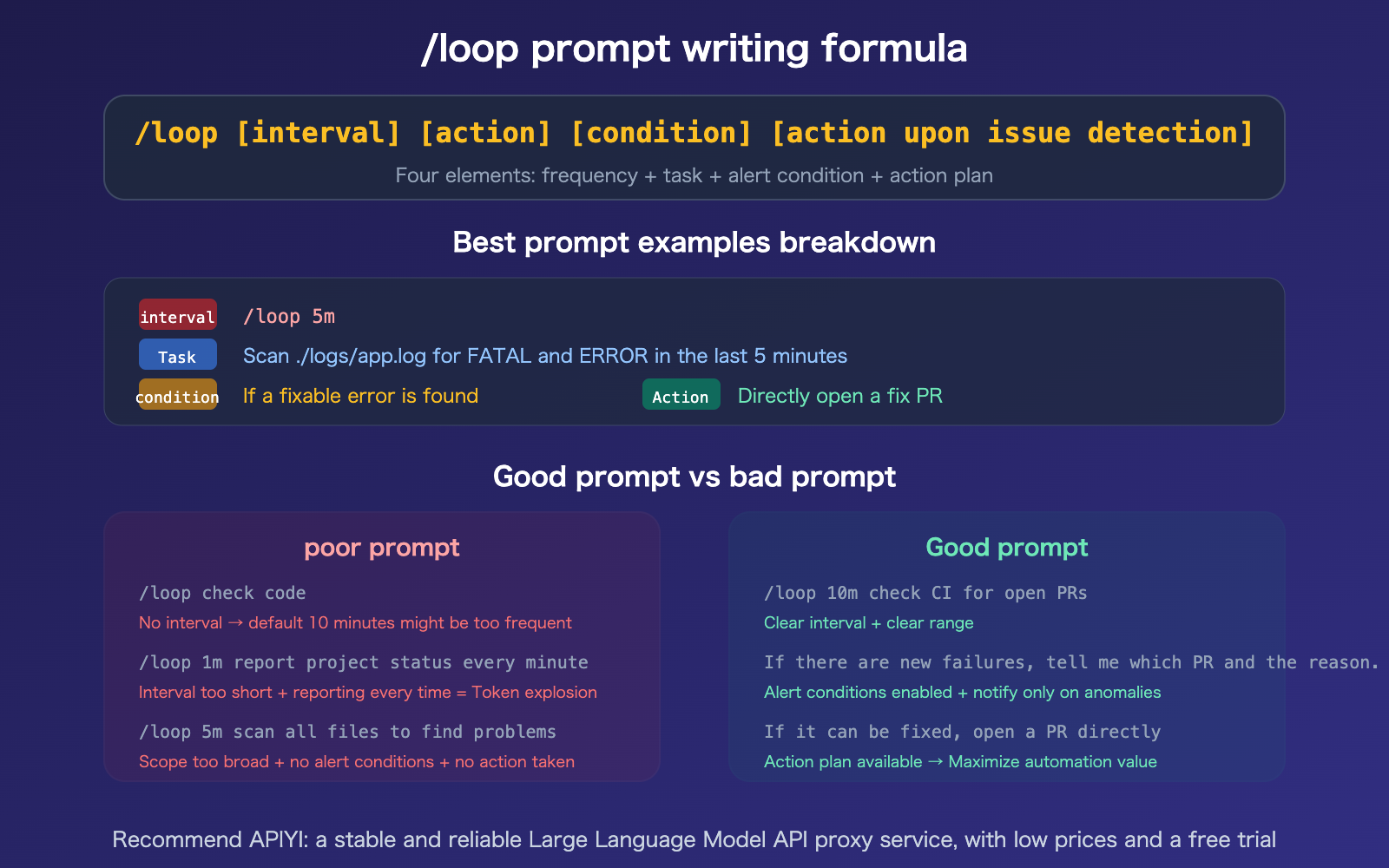
Tips for Writing /loop Prompts
| Tip | Description | Example |
|---|---|---|
| Define Alert Conditions | Notify only on anomalies to avoid information overload | "Tell me if it fails" instead of "Report every time" |
| Specify Action Plans | Automatically execute fixes when issues are found | "Open a PR directly if it's fixable" |
| Limit Scope | Avoid wasting time scanning the entire project | "Scan the src/ directory" instead of "Scan all files" |
| Set Termination Conditions | Prevent meaningless continuous execution | "Stop after 3 consecutive passes" |
| Combine with External Tools | /loop output can trigger notifications | "Write output to alert.log for monitoring systems to read" |
🎯 Practical Advice: I recommend starting with PR inspections (#1-#2) and deployment monitoring (#5), as these scenarios offer the highest return on investment. Once you're comfortable, gradually add recurring tasks for security scanning and code quality.
If you're using API calls to Claude models for more complex automation, I recommend accessing Claude Opus 4.6 at a 20% discount via APIYI (apiyi.com).
FAQ
Q1: How many tokens does /loop consume?
Each loop execution counts as a full Claude request, so token consumption depends on the complexity of the task. Simple health checks (#5) typically use about 500–1,000 tokens per run, while complex code reviews (#10) might consume 5,000–10,000 tokens. Pro tip: use short intervals (5–10m) for monitoring tasks and longer intervals (1–2h) for analytical tasks to avoid wasting tokens. You can enjoy a 20% discount on Claude API calls by using APIYI (apiyi.com).
Q2: Will /loop tasks persist after I close the terminal?
No, they won't. /loop tasks only run while your Claude Code session is active. Closing the terminal, exiting the session, or losing your SSH connection will terminate all scheduled tasks, and they cannot be recovered. If you need tasks to run 24/7, I recommend using cron with Claude's headless mode (claude -p), or setting up system-level cron jobs to trigger Claude Code.
Q3: Are 50 concurrent tasks enough?
For the vast majority of use cases, yes. Even if you enable all 20 prompts from this article, you'd only be using 20 slots. However, it's best to enable them selectively based on priority—PR inspections and deployment monitoring are "must-haves" (high value), while security scans and code quality checks can be enabled on demand. Keep in mind that every task execution consumes tokens, so running too many at once will burn through your quota quickly.
Q4: Can /loop integrate with external notifications (Slack/Email)?
/loop doesn't send notifications directly, but you can incorporate external tools into your prompts: "Append alert information to ./alerts.log," and then use a separate script to monitor that file and send Slack or email notifications. A more advanced approach is to use an MCP connector to interact with Slack directly, or use Claude Code Hooks to trigger notifications when specific events occur.
Summary
Key takeaways for effective Claude Code /loop prompts:
- 20 Prompts across 6 Scenarios: PR inspections (4), deployment monitoring (3), security scans (3), code quality (4), log analysis (3), and team collaboration (3)—just copy, paste, and go.
- The Four Pillars of a Great Prompt: Interval + Task + Alert Conditions + Action Plan. Only notify when there's an anomaly, and automate fixes whenever possible.
- Start with PR Inspections: PR inspections and deployment monitoring offer the best return on investment, so I recommend starting there.
We recommend accessing the Claude Opus 4.6 API via APIYI (apiyi.com) to enjoy a 20% discount. Whether you're running /loop tasks or other AI development workflows, you'll benefit from high concurrency and stable, unthrottled service.
📚 References
-
Claude Code Scheduled Tasks Official Documentation: Complete guide for
/loopand/schedule- Link:
code.claude.com/docs/en/scheduled-tasks - Description: Covers syntax, limitations, and configuration methods.
- Link:
-
Claude Code /loop Practical Guide: 3 real-world workflow cases
- Link:
medium.com/@joe.njenga/claude-code-loop-create-new-native-autonomous-loops-that-work - Description: Includes full implementations for PR reviews, build monitoring, and log scanning.
- Link:
-
Claude Code /loop Automated Development Workflow: Detailed usage methods and tips
- Link:
verdent.ai/guides/claude-code-loop-command - Description: Covers interval selection, prompt optimization, and external integration methods.
- Link:
-
APIYI Documentation Center: 20% off access to Claude Opus 4.6 API
- Link:
docs.apiyi.com - Description: Token consumption for
/looptasks can be discounted via APIYI.
- Link:
Author: APIYI Technical Team
Technical Discussion: Feel free to join the discussion in the comments section. For more resources, visit the APIYI documentation center at docs.apiyi.com.