Claude Code has quickly become a staple in the developer's AI toolkit. However, most people are only scratching the surface, using maybe 30% of its potential—mostly just for basic chat-based coding.
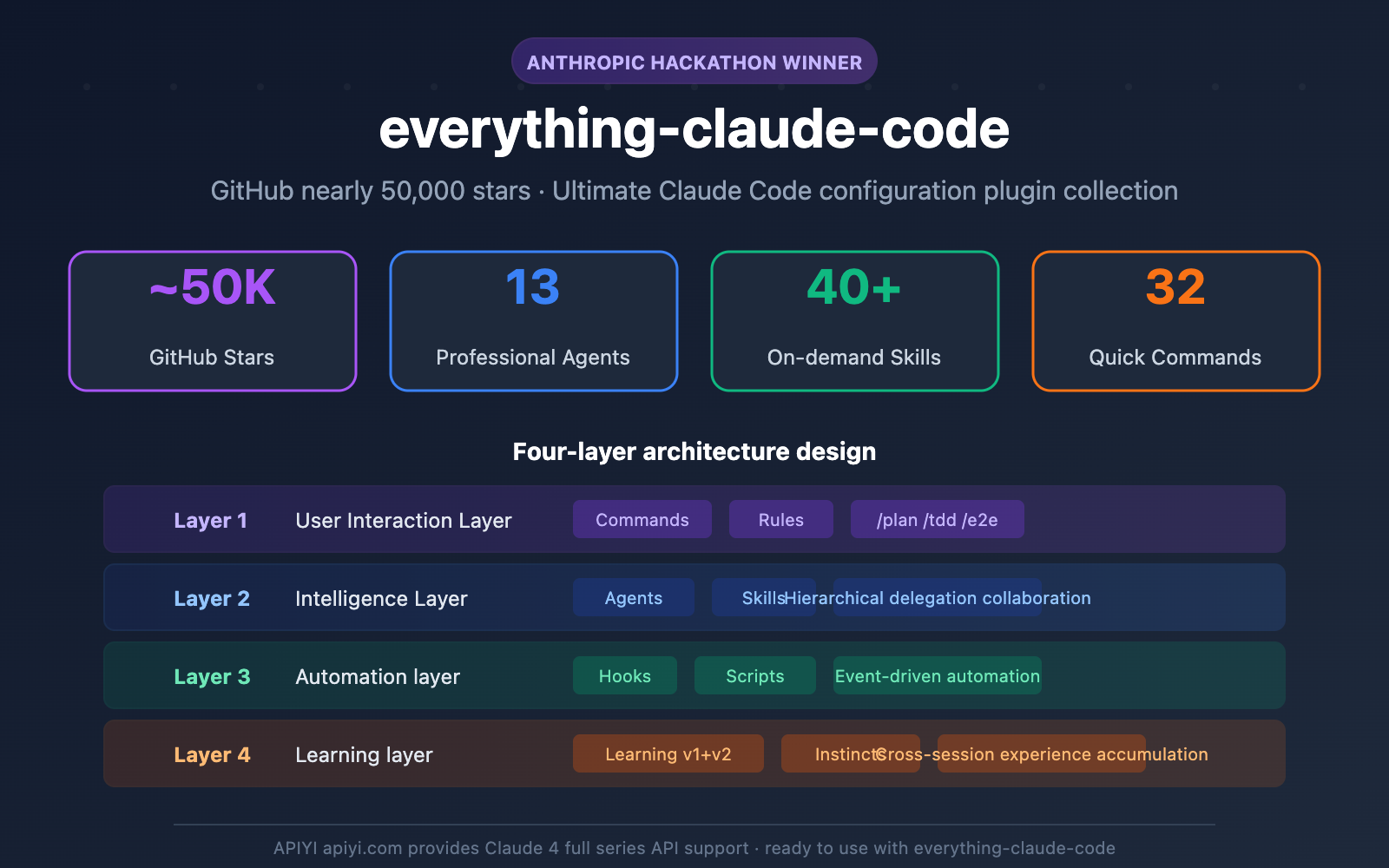
everything-claude-code is a collection of Claude Code configuration plugins with nearly 50,000 stars on GitHub, open-sourced by Anthropic hackathon winner Affaan Mustafa. This project provides 13 expert Agents, 40+ on-demand Skills, 32 shortcut commands, and a comprehensive continuous learning system that can take your Claude Code productivity to a whole new level.
The core philosophy of the project: Claude Code isn't just a chat tool; it's a deeply customizable AI Agent orchestration platform.
| Project Metric | Data |
|---|---|
| GitHub Stars | ~49,900 (Nearly 50k) |
| Forks | ~6,200 |
| Expert Agents | 13 |
| On-demand Skills | 40+ |
| Shortcut Commands | 32 |
| Supported Languages | TypeScript, Python, Go, Java, C++ |
| Current Version | v1.5.0 (February 2026) |
| License | MIT Open Source |
🚀 Quick Start: Claude Code model invocation requires Claude model support. You can quickly access API endpoints for models like Claude 4 Sonnet and Claude 4 Opus via APIYI (apiyi.com). It's ready to use out of the box and integrates perfectly with the everything-claude-code plugin collection.
What is everything-claude-code: From Hackathon Winner to 50k-Star Open Source Project
The Origin of everything-claude-code
In September 2025, Affaan Mustafa and teammate @DRodriguezFX participated in a New York hackathon hosted by Anthropic and Forum Ventures. They built the zenith.chat product in just 8 hours using nothing but Claude Code, standing out among 100+ teams to take first place and a $15,000 API credit prize.
The secret weapon behind this win was the Claude Code configuration setup Affaan had been refining over 10 months of daily use. After the competition, he open-sourced these configurations as everything-claude-code.
Core Positioning of everything-claude-code
everything-claude-code isn't a standalone software; it's a configuration enhancement layer for Claude Code. It extends Claude Code's capabilities in several ways:
| Enhancement Dimension | Native Claude Code | With everything-claude-code |
|---|---|---|
| Task Planning | Requires manual description | /plan command automatically breaks down tasks |
| Code Review | Requires manual request | Specialized Agents perform automatic reviews |
| Test-Driven | Requires manual test writing | TDD Agent guides the entire process |
| Security Scanning | No built-in scanning | AgentShield scans with 912 rules |
| Knowledge Accumulation | Sessions are independent | Continuous learning system for cross-session memory |
| Multi-language Support | Generic handling | Language-specific rules and best practices |
GitHub Repository: github.com/affaan-m/everything-claude-code
Deep Dive: The Four-Layer Architecture of everything-claude-code
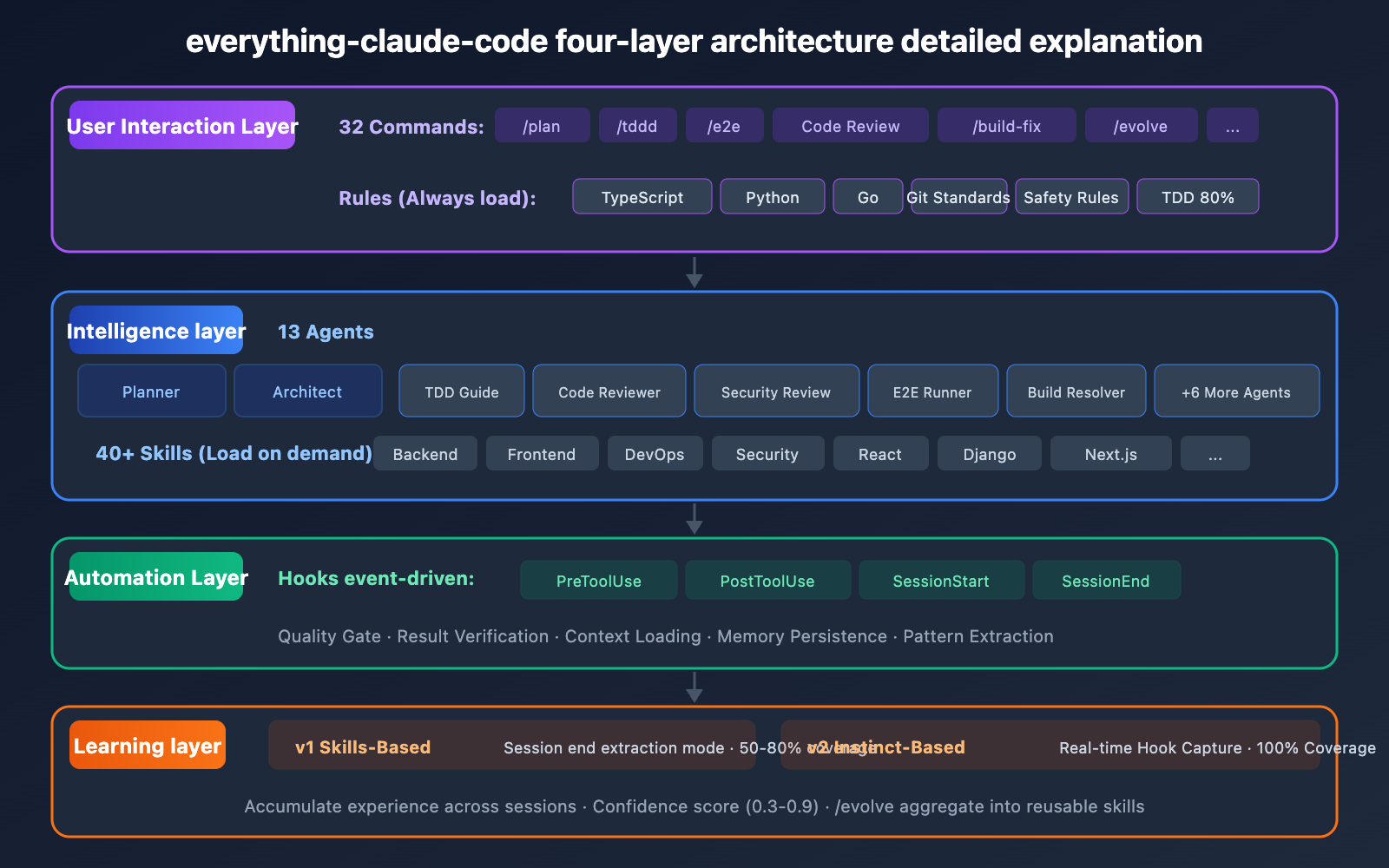
everything-claude-code uses a meticulously designed four-layer architecture, with each layer solving a different set of problems:
Layer 1: User Interaction Layer (Commands + Rules)
The 32 shortcut commands are the entry points for interacting with everything-claude-code. They're categorized into 6 main types:
| Command Category | Example Commands | Purpose |
|---|---|---|
| Core Workflow | /plan, /tdd, /e2e |
Task planning, TDD, end-to-end testing |
| Code Quality | /code-review, /build-fix, /refactor-clean |
Reviewing code, fixing builds, refactoring |
| Multi-Agent Collab | /multi-plan, /multi-execute |
Multiple Agents collaborating on complex tasks |
| Learning System | /learn-eval, /evolve |
Evaluating learning outcomes, evolving experience into skills |
| Language Specific | /go-review, /python-review |
Language-specific code reviews |
| Session Management | /sessions, /checkpoint |
Session tracking and saving checkpoints |
Rules are foundational configurations always loaded into the context. They include general coding standards, Git workflow specs, test coverage requirements (80% TDD), and security rules. Rules are split into three dedicated configurations for TypeScript, Python, and Go.
Layer 2: Intelligence Layer (Agents + Skills)
The 13 specialized Agents form the core of everything-claude-code. Each Agent has clear responsibility boundaries and restricted tool permissions:
| Agent Name | Responsibility | Tool Permissions |
|---|---|---|
| Planner | High-level task decomposition and planning | Broad (Orchestrator) |
| Architect | System design and architectural decisions | Broad (Orchestrator) |
| TDD Guide | Guides the TDD process | Code + Test tools |
| Code Reviewer | General code analysis | Read-only analysis |
| Security Reviewer | Specialized security audits | Read-only analysis |
| Build Error Resolver | Diagnoses and fixes build errors | Build + Debug tools |
| E2E Runner | Executes end-to-end tests | Test execution tools |
| Refactor Cleaner | Code refactoring and cleanup | Code editing tools |
| Doc Updater | Automatic documentation maintenance | Doc editing tools |
| Go Reviewer | Go-specific code review | Read-only analysis |
| Go Build Resolver | Fixes Go build errors | Go build tools |
| Python Reviewer | Python-specific review (PEP 8) | Read-only analysis |
| Database Reviewer | SQL/ORM/Migration reviews | Database read-only |
Agents use a hierarchical delegation model: Orchestrator Agents (Planner, Architect) have broad tool access and can dispatch specialized Agents. Specialized Agents only access tools relevant to their specific role, preventing unauthorized operations.
40+ Skills are domain knowledge modules loaded on demand. Unlike Rules, Skills only load when needed, saving space in the resident context window. They cover:
- Backend Development: API design patterns, database caching, migration strategies, performance optimization.
- Frontend Development: React, Next.js, E2E testing, Page Object Model.
- Language Specific: TypeScript, Python, Go, Java, C++, Django, Spring Boot.
- DevOps: Docker containerization, deployment patterns, PM2 process management.
- Advanced Features: Token optimization, cost-aware LLM pipelines, security scanning.
🎯 Tech Tip: The Agent and Skills system in everything-claude-code relies on the powerful reasoning of Claude models. We recommend using the APIYI (apiyi.com) platform to access Claude 4 series APIs. Pairing them with everything-claude-code lets you fully leverage its multi-Agent collaboration capabilities.
Layer 3: Automation Layer (Hooks + Scripts)
Hooks are event-driven automation mechanisms that trigger at different stages of the Claude Code lifecycle:
| Hook Type | Trigger Timing | Function |
|---|---|---|
| PreToolUse | Before tool execution | Quality gate checks |
| PostToolUse | After tool execution | Result verification |
| SessionStart | At session start | Loads context and memory |
| SessionEnd | At session end | Saves patterns and persistent memory |
| PreCompact | Before context compression | Strategic compression suggestions |
| Stop | When session terminates | Pattern extraction and experience distillation |
Layer 4: Learning Layer (Continuous Learning v1 + v2)
This is the most unique feature of everything-claude-code—it allows Claude Code to accumulate experience across different sessions.
v1 Learning System (Skill-based):
- Extracts coding patterns via the Stop Hook at the end of a session.
- Stores patterns in the
~/.claude/skills/learned/directory. - Achieves approximately 50-80% coverage.
v2 Learning System (Instinct-based):
- Achieves 100% coverage via PreToolUse/PostToolUse Hooks.
- Each learning unit is an "Instinct," complete with a confidence score (0.3-0.9).
- Use the
/evolvecommand to aggregate 3 or more related Instincts into a reusable Skill module.
everything-claude-code Installation and Claude Code API Configuration Guide
Installing everything-claude-code
Prerequisites: Claude Code CLI v2.1.0 or higher.
Step 1: Install the Plugin
# Install via the Claude Code plugin marketplace
/plugin marketplace add affaan-m/everything-claude-code
/plugin install everything-claude-code@everything-claude-code
Step 2: Install Rule Files
# Clone the repository
git clone https://github.com/affaan-m/everything-claude-code.git
cd everything-claude-code

# Select the rule set based on your primary development language
./install.sh typescript    # For TypeScript projects
./install.sh python        # For Python projects
./install.sh golang        # For Go projects
Step 3: Verify Installation
# Test it within Claude Code
/plan "Add user authentication"
If you see the Planner Agent automatically breaking down the task and delegating it to other Agents, the installation was successful.
Claude Code API Integration and Configuration
Claude Code requires API support from Claude models to run. Here are the steps to configure it using the APIYI platform:
# Set the API base URL
export ANTHROPIC_BASE_URL=https://api.apiyi.com

# Set your API key
export ANTHROPIC_API_KEY=your_api_key_here
💡 Tip: The APIYI (apiyi.com) platform supports the full range of Claude models, including Claude 4 Opus and Claude 4 Sonnet. Since everything-claude-code's multi-agent collaboration generates a significant number of API calls, using APIYI's flexible billing can help you effectively control costs.
Once configured, Claude Code will automatically use the APIYI endpoint for model invocation, and all everything-claude-code Agents and Skills will work perfectly.