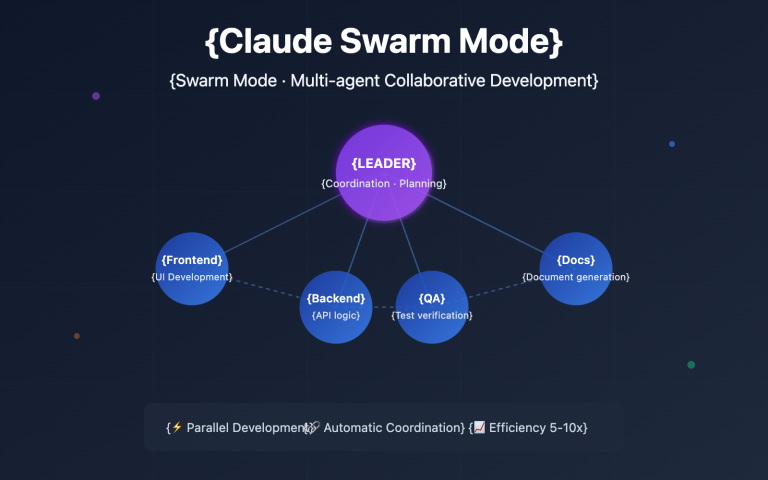
Author's Note: A deep dive into the latest Agent Teams multi-agent collaboration feature in Claude Opus 4.6. We'll cover the architecture, 5 core advantages, real-world cases, and a quick-start guide to help you master this revolutionary AI programming tool.
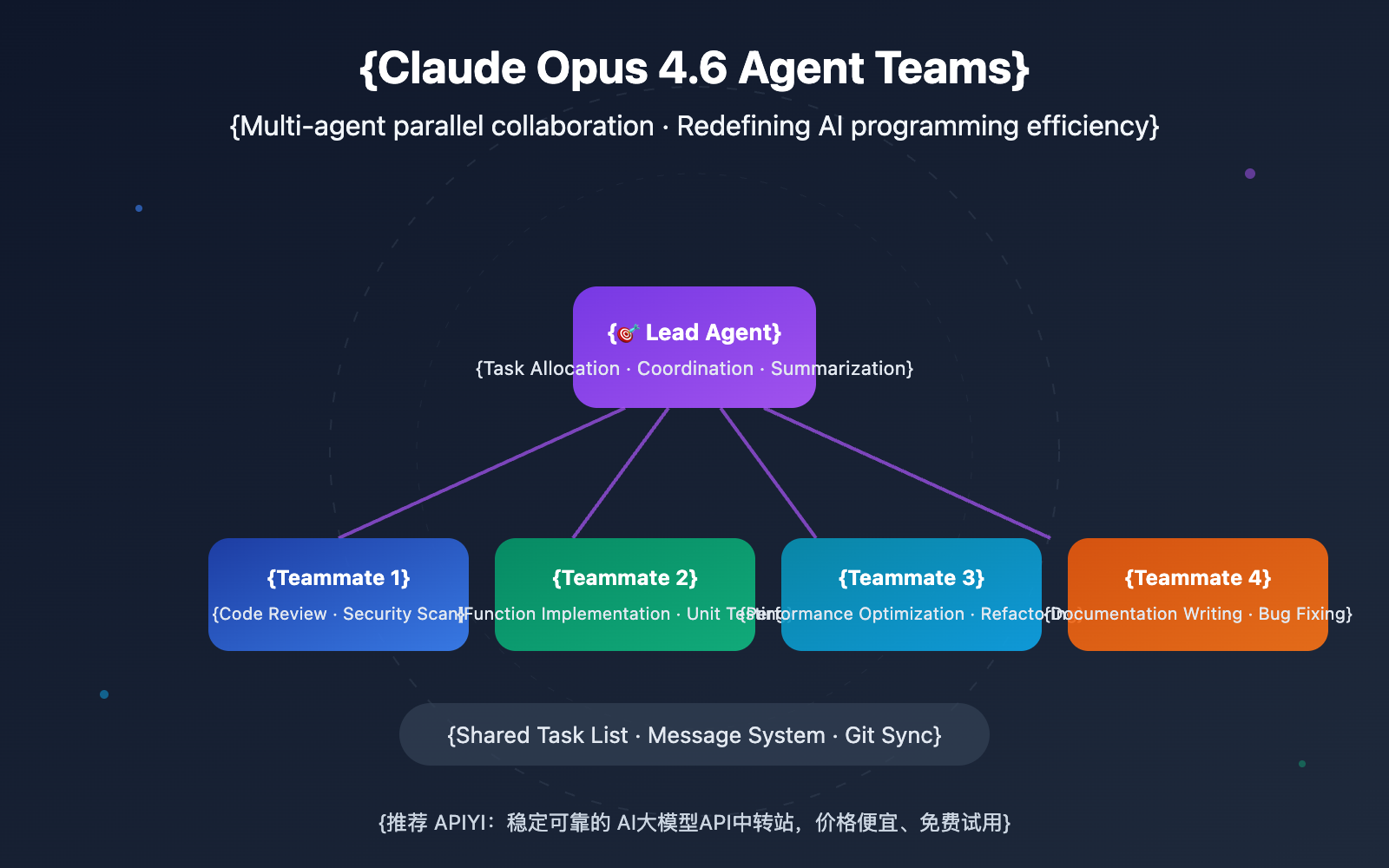
On February 5, 2026, Anthropic officially released Claude Opus 4.6, the most powerful flagship model in the Claude family to date. Beyond major upgrades like the 1M context window and adaptive reasoning, the most eye-catching new feature is Agent Teams—a brand-new workflow that allows multiple AI agents to collaborate in parallel.
Core Value: By the end of this article, you'll have a full grasp of how Agent Teams works and its 5 core advantages. You'll also learn how to use multi-agent collaboration to supercharge your development efficiency.
Claude Opus 4.6 Agent Teams: Core Highlights
| Highlight | Description | Value |
|---|---|---|
| Parallel Collaboration | Multiple Claude instances working simultaneously on independent tasks | Multiplies development efficiency |
| Autonomous Coordination | Shared task list + messaging system; agents self-organize | No manual micro-management needed |
| 1M Context | First Opus-level model to support a million-token context | Full understanding of massive codebases |
| Adaptive Reasoning | 4 levels of thinking depth (low/medium/high/max) | Flexibly balances speed and quality |
| Real-world Validation | 16 parallel agents built a 100k-line C compiler in 2 weeks | Proven industrial-grade reliability |
What is Claude Opus 4.6 Agent Teams?
Simply put, Agent Teams allows a Claude Code session (the Lead) to spin up multiple independent Claude Code instances (Teammates). Each teammate has its own full context window and can handle reading, writing, and testing in parallel. They stay in sync using a shared task list and a messaging system.
Think of it like this: if previous versions of Claude were like a brilliant solo developer, Agent Teams is like a full engineering squad. Every member has Claude Opus 4.6-level intelligence, and they can talk to each other to figure out who does what.
This feature is currently available as a Research Preview within Claude Code and can be enabled via the environment variable CLAUDE_CODE_EXPERIMENTAL_AGENT_TEAMS=1.
5 Core Advantages of Claude Opus 4.6 Agent Teams
Advantage 1: True Parallel Development Capabilities
Traditional AI coding assistants are single-threaded—you give them a task, and they finish it before moving to the next. Agent Teams, however, enables true parallelism:
| Work Mode | Processing Method | Efficiency | Best For |
|---|---|---|---|
| Single Agent | Sequential task execution | Baseline speed | Simple feature development |
| Subagents | Main Agent delegates subtasks; results are returned | ~2-3x speedup | Independent research or verification tasks |
| Agent Teams | Multiple independent Agents work and coordinate simultaneously | Theoretically N-fold speedup | Parallel development of multiple modules in large projects |
Anthropic conducted a mind-blowing experiment with Agent Teams: 16 parallel Claude Agents wrote a 100,000-line C compiler (implemented in Rust) in just two weeks, consuming 2 billion input tokens and 140 million output tokens. This compiler is capable of compiling the Linux 6.9 kernel, QEMU, FFmpeg, SQLite, PostgreSQL, and Redis, achieving a 99% pass rate on the GCC test suite.
While the project cost about $20,000, the value proposition is outstanding considering the sheer scale and quality of the output.
Advantage 2: Intelligent Task Coordination System
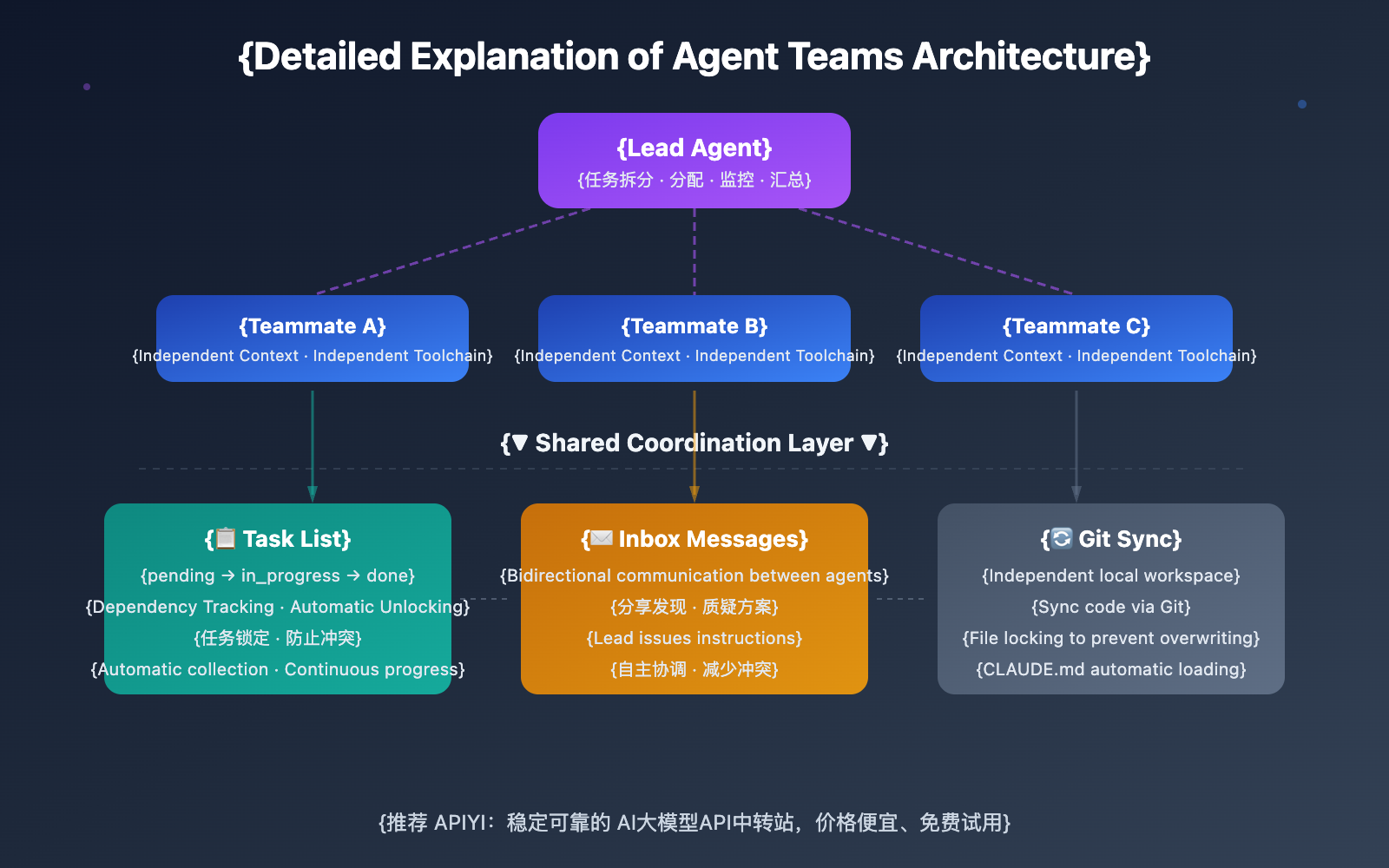
The most powerful aspect of Agent Teams is its built-in task management and coordination mechanism:
Shared Task List:
- Each task has three states:
pending,in_progress, andcompleted. - Tasks support dependencies—blocked work automatically resumes once its dependency is finished.
- Teammates can autonomously pick up the next pending task after finishing their current one.
Messaging System (Inbox):
- Agents can send messages to one another.
- Teammates can share findings, challenge each other's solutions, and coordinate independently.
Task Locking Mechanism:
- Tasks are "locked" by writing text files to the
current_tasks/directory. - This prevents two Agents from working on the same issue simultaneously.
This coordination mechanism makes Agent Teams far more than just simple parallel processing—it's true team collaboration.
Advantage 3: Key Differences Between Agent Teams and Subagents
Many newcomers confuse Agent Teams with Subagents. Here are their core differences:
| Comparison Dimension | Subagents | Agent Teams |
|---|---|---|
| Work Mode | Runs within the main Agent's session | Each is an independent Claude Code instance |
| Communication | Only returns results to the main Agent | Two-way communication via Shared Task List + Inbox |
| Collaboration Depth | Delegate-Execute-Return (One-way) | Share findings, challenge each other, autonomous coordination |
| Context | Shares part of the main Agent's context | Each independently loads project context (CLAUDE.md, etc.) |
| Use Case | Quick research or verification tasks | Complex projects requiring multi-perspective collaboration |
| Cost | Within the main Agent's token budget | Each instance is billed separately |
Recommendation: If you just need a quick hand with an independent subtask, use Subagents. If your team members need to share findings, challenge each other's approaches, and coordinate autonomously, go with Agent Teams.
🎯 Pro Tip: When using Agent Teams for the first time, I recommend starting with non-coding tasks like code reviews, technical research, or bug investigations. These tasks showcase the value of parallel exploration while avoiding the coordination complexity of parallel implementation. You can get API access to Claude Opus 4.6 through the APIYI (apiyi.com) platform to quickly experience the power of Agent Teams.
Advantage 4: Powered by a Million-Token Context Window
The prowess of Agent Teams is inseparable from the raw power of Opus 4.6 itself. This version brings several key upgrades:
| Capability | Opus 4.5 | Opus 4.6 | Improvement |
|---|---|---|---|
| Context Window | 200K | 1M (beta) | 5x |
| ARC AGI 2 (Reasoning) | 37.6% | 68.8% | +83% |
| BrowseComp (Retrieval) | 67.8% | 84.0% | +24% |
| Terminal-Bench 2.0 (Coding) | 59.8% | 65.4% | +9.4% |
| τ2-bench (Tool Use) | 88.9% | 91.9% | +3.4% |
| OSWorld (Computer Use) | 66.3% | 72.7% | +9.7% |
| MRCR v2 (Long Context Retrieval) | 18.5%* | 76.0% | +311% |
*Note: The 18.5% figure for MRCR v2 is from Sonnet 4.5; Opus 4.5 data for this test was not released.
The Significance of a Million-Token Context: Each Teammate can fit a massive amount of code into its independent context window. This means that when working on large projects, every Agent can understand the full project structure rather than just seeing isolated snippets. Combined with Agent Teams, this makes multi-agent parallel processing of large codebases a reality.
Advantage 5: Adaptive Thinking Control in Claude Opus 4.6
Opus 4.6 introduces Adaptive Thinking, an upgrade over the previous Extended Thinking. This feature is particularly crucial for Agent Teams:
4 Levels of Thinking Depth Control:
- Max: Always uses deep reasoning with no limit on thinking depth—ideal for Agents making architectural decisions.
- High (Default): Always thinks and provides deep reasoning—suitable for routine coding and debugging tasks.
- Medium: Moderate thinking; simple queries might skip the thinking phase—perfect for batch processing simple files.
- Low: Prioritizes speed with minimal thinking—best for quick file searches and information lookups.
In an Agent Team, different Teammates can use different thinking depths. For example, the Agent responsible for architectural design can use the Max level, while the Agent responsible for file indexing uses the Low level. This ensures the quality of critical decisions while optimizing overall costs.
Claude Opus 4.6 Agent Teams Quick Start
Minimalist Example
Here's the simplest way to call Claude Opus 4.6 via API—you can get it running in just 10 lines of code:
import openai

client = openai.OpenAI(
    api_key="YOUR_API_KEY",
    base_url="https://vip.apiyi.com/v1"
)

response = client.chat.completions.create(
    model="claude-opus-4-6",
    messages=[{"role": "user", "content": "解释一下什么是 Agent Teams"}]
)
print(response.choices[0].message.content)
View the full Agent Teams workflow
Step 1: Install Claude Code CLI
Make sure you've installed the latest version of the Claude Code command-line tool.
Step 2: Enable Agent Teams
Set the environment variable in your terminal:
export CLAUDE_CODE_EXPERIMENTAL_AGENT_TEAMS=1
Step 3: Use natural language commands in Claude Code
Once you've opened Claude Code, describe the tasks you need to process in parallel using natural language:
This project requires the following work:
1. Review src/auth/ for security vulnerabilities
2. Write unit tests for src/api/
3. Optimize query performance in src/database/
Please create an Agent Team to handle these tasks in parallel.
Step 4: Monitor and guide the team
Use Shift+Up/Down to switch between different Teammates and check their progress. If a Teammate runs into trouble, you can give them new instructions directly.
Step 5: Summarize results
The Lead Agent will automatically gather all the results from the Teammates and provide you with a comprehensive report.
Pro Tip: Get your Claude Opus 4.6 API Key and free test credits via APIYI (apiyi.com) to quickly verify how Agent Teams performs. The platform supports a unified interface for the entire Claude model family, making it easy to compare and switch between them.
Claude Opus 4.6 Agent Teams: Deep Dive into Practical Modes
Agent Teams supports two running modes to suit different use cases:
| Running Mode | UI Appearance | Terminal Requirements | Use Cases |
|---|---|---|---|
| In-Process | Runs within the same terminal window | Any terminal | Default mode, best compatibility |
| Split Panes | Each Agent gets its own pane | Requires tmux or iTerm2 | When you need to monitor multiple Agents simultaneously |
4 Typical Collaboration Scenarios for Claude Opus 4.6 Agent Teams
Scenario 1: Large-scale Code Refactoring
Break the project into independent modules, with each Teammate responsible for refactoring one. Agents coordinate via task lists to ensure interface compatibility.
Scenario 2: Parallel Test Writing
Each Teammate handles test coverage for a specific set of files. This is the safest type of parallel task since test files usually don't conflict with each other.
Scenario 3: Multi-hypothesis Bug Investigation
When you hit a hard-to-pinpoint bug, spawn 5 Teammates to investigate different hypotheses. Through a "scientific debate" mode, they can challenge each other's theories, and the hypothesis that survives is likely the true root cause.
Scenario 4: Full-stack Feature Development
One Teammate builds the backend API, another handles the frontend UI, one writes tests, and another handles documentation—true full-stack parallel development.
🎯 Cost Control Tip: Each Teammate in an Agent Team consumes tokens independently. We recommend using the pay-as-you-go model on the APIYI (apiyi.com) platform to keep costs in check; the platform provides real-time usage monitoring and budget alerts.
FAQ
Q1: What’s the difference between Claude Opus 4.6 Agent Teams and OpenAI Codex?
Agent Teams focuses on parallel multi-agent collaboration, emphasizing autonomous coordination and communication between Agents. Codex is more geared toward executing single, complex programming tasks. Opus 4.6 leads GPT-5.2 on Terminal-Bench 2.0 (65.4% vs. 64.7%) and significantly outperforms it on τ2-bench tool usage (91.9% vs. 82.0%). Which one you choose depends on your specific needs—if you need multi-agent collaboration, Opus 4.6 Agent Teams is currently the best choice.
Q2: How much does it cost to use Claude Opus 4.6 Agent Teams?
Opus 4.6 API pricing is $5/million input tokens and $25/million output tokens (within a 200K context). In Agent Teams, each Teammate is billed independently. For reference, Anthropic's C compiler project, which used 16 Agents over two weeks, cost about $20,000. For daily development, using 3-5 Teammates for medium-sized tasks keeps costs within a manageable range. You can get better rates and free test credits through the APIYI (apiyi.com) platform.
Q3: How can beginners quickly get started with Claude Opus 4.6 Agent Teams?
We recommend these steps to get up and running:
- Visit APIYI (apiyi.com) to register an account and get your API Key.
- Install the latest version of the Claude Code CLI tool.
- Set the environment variable
CLAUDE_CODE_EXPERIMENTAL_AGENT_TEAMS=1. - Start with read-only tasks like code reviews or technical research.
- Once you're comfortable, move on to parallel coding tasks.
Summary
Key takeaways for Claude Opus 4.6 Agent Teams:
- True Parallel Collaboration: Multiple independent Claude instances work simultaneously, coordinating autonomously through a shared task list and messaging system, rather than simple task delegation.
- Industrial-Grade Validation: The real-world case of 16 Agents writing a 100,000-line C compiler proves the maturity and reliability of this technology.
- Flexible Control: With 4 levels of adaptive reasoning depth and a million-token context window, every Teammate can work in its optimal state.
- Progressive Onboarding: Start with read-only code reviews and gradually transition to parallel coding, which lowers the learning curve.
Agent Teams represents a paradigm shift in AI-assisted programming—moving from a "solo assistant" to "team collaboration." For developers who need to handle large projects or complex tasks, this is a tool worth exploring seriously.
We recommend using APIYI (apiyi.com) for quick access to the Claude Opus 4.6 API. The platform provides free credits and a unified interface for multiple models, letting you experience the power of Agent Teams at the lowest possible cost.
📚 References
⚠️ Link Format Note: All external links use the
Resource Name: domain.comformat. This makes them easy to copy but prevents direct clicking to avoid SEO weight loss.
-
Anthropic Claude Opus 4.6 Release Announcement: Official release notes and technical details
- Link:
anthropic.com/news/claude-opus-4-6 - Description: Includes full performance benchmark data and feature introductions
- Link:
-
Claude Code Agent Teams Official Documentation: Detailed usage guides and best practices
- Link:
code.claude.com/docs/en/agent-teams - Description: Includes architecture details, configuration methods, and troubleshooting
- Link:
-
Building a C compiler with a team of parallel Claudes: A real-world case study from the Anthropic Engineering Blog
- Link:
anthropic.com/engineering/building-c-compiler - Description: A full technical retrospective on 16 agents collaborating to write a C compiler
- Link:
-
Claude API Pricing Documentation: Latest pricing information and cost calculations
- Link:
platform.claude.com/docs/en/about-claude/pricing - Description: Includes standard pricing, long-context pricing, and batch processing discounts
- Link:
Author: Technical Team
Technical Exchange: Feel free to discuss in the comments section. For more resources, visit the APIYI apiyi.com technical community.