作者注:详解 OpenClaw 十大最常用指令,包括 /new、/status、/model、/compact 等核心命令的语法、参数和实战技巧
OpenClaw 作为 2026 年最火的开源 AI 助手,拥有强大的指令系统。但很多用户只会基础聊天,没有发挥出它的全部潜力。本文整理了 十大最常用的 OpenClaw 指令,帮你从新手变高手。
核心价值: 掌握这 10 个指令,你将能高效管理会话、切换模型、控制成本、执行系统命令,让 OpenClaw 真正成为你的生产力倍增器。
OpenClaw 指令系统概览
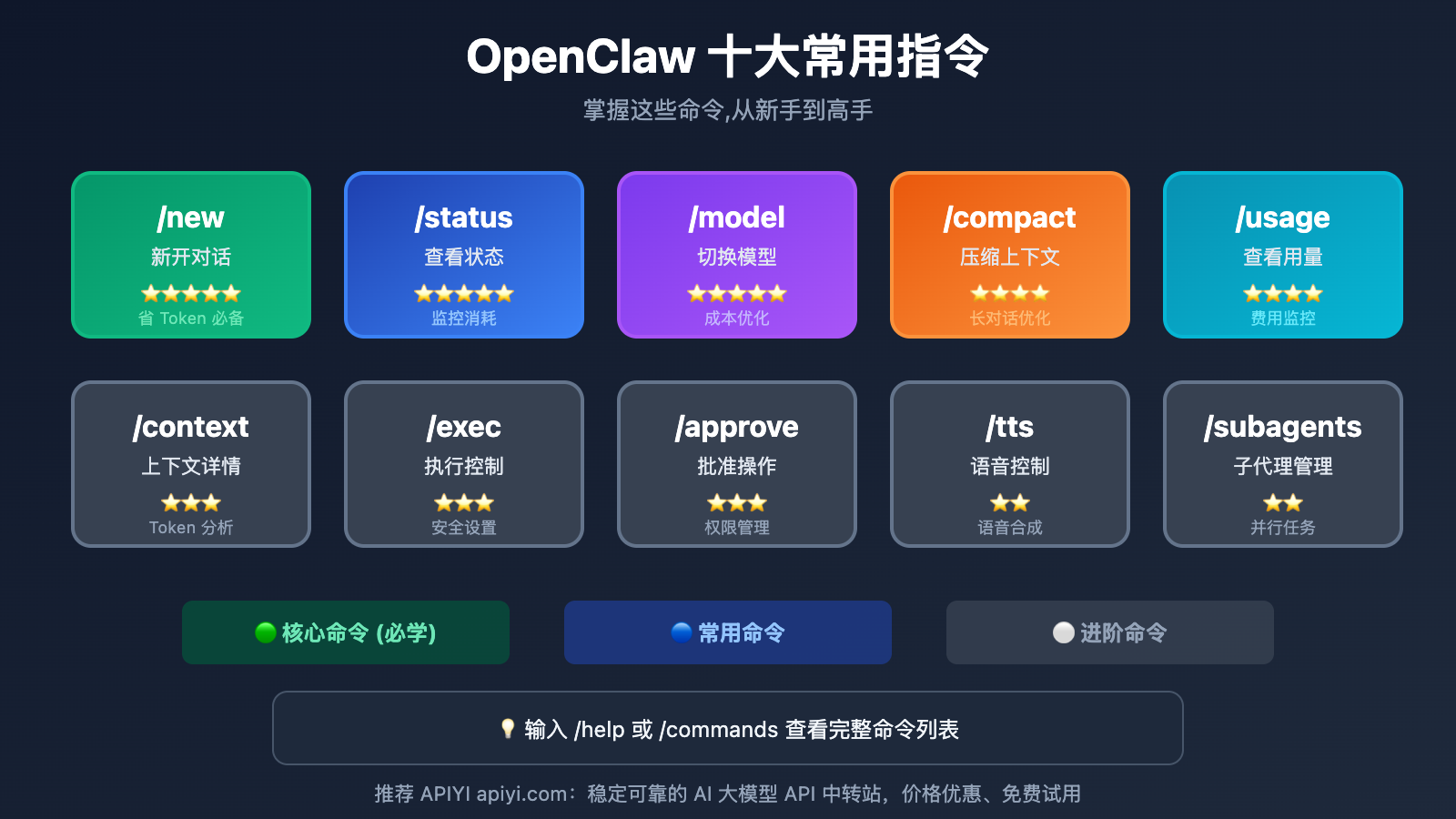
OpenClaw 的指令分为两大类:聊天斜杠命令 和 CLI 终端命令。
| 类型 | 使用场景 | 示例 |
|---|---|---|
| 斜杠命令 | 在聊天窗口中使用 | /new, /status, /model |
| CLI 命令 | 在终端中使用 | openclaw status, openclaw health |
本文主要介绍聊天中最常用的斜杠命令,这些命令在 WhatsApp、Telegram、Slack、Discord、WebChat 等所有平台都通用。
🎯 小技巧: 在任何聊天窗口输入
/help或/commands可以查看完整的命令列表。
指令 1: /new — 新开对话
重要程度: ⭐⭐⭐⭐⭐
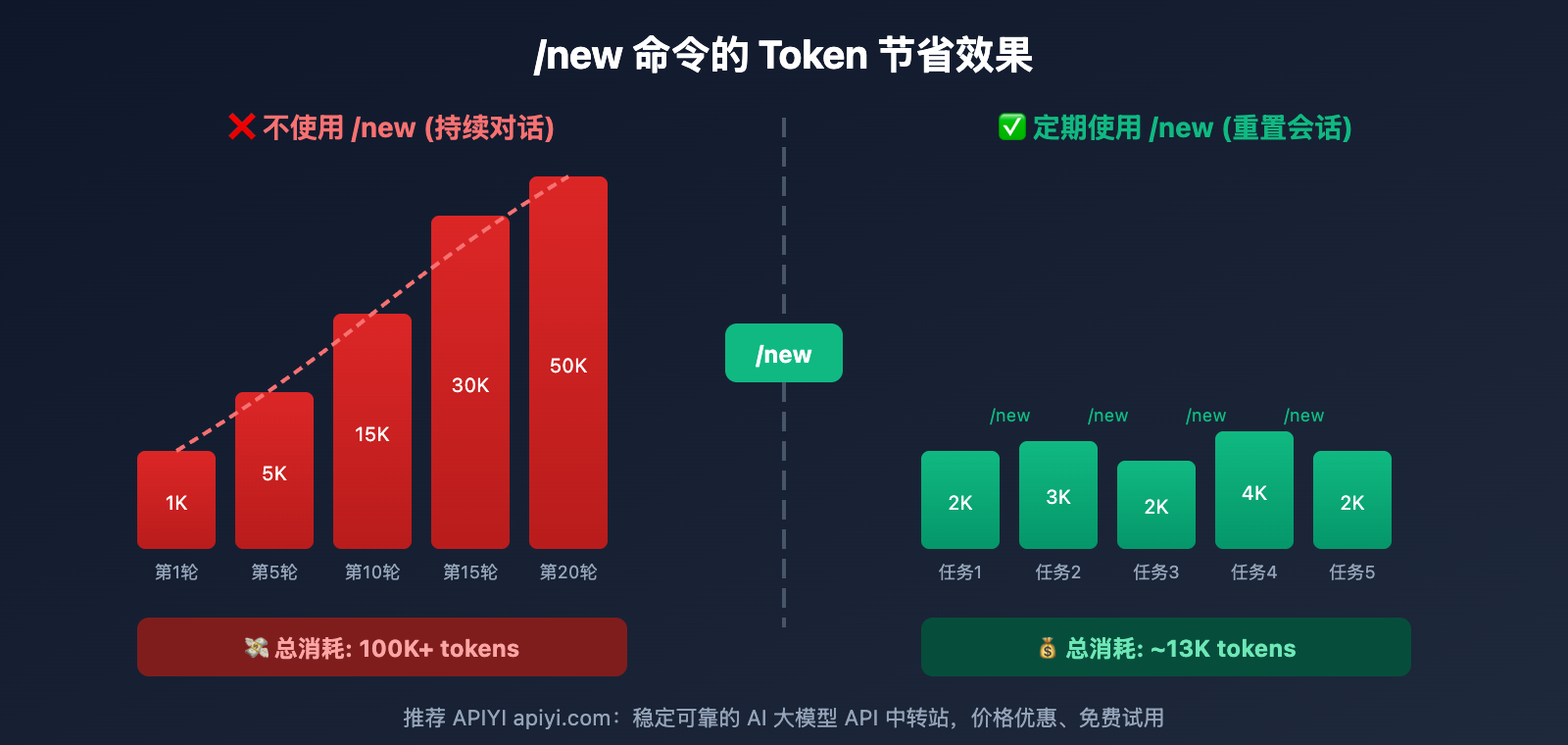
这是最重要的命令之一。OpenClaw 会把历史对话全部传给 API,导致 Token 累积。使用 /new 开始新会话,可以大幅节省 Token 成本。
基本语法
/new
/new [model]
使用示例
# 开始新对话
/new

# 开始新对话并切换到 Haiku 模型
/new haiku

# 开始新对话并指定完整模型名
/new claude-sonnet-4-5
使用场景
| 场景 | 建议 |
|---|---|
| 切换到新任务 | ✅ 立即 /new |
| 对话变慢 | ✅ 立即 /new |
| 费用异常增长 | ✅ 立即 /new |
| 每完成一个独立任务 | ✅ /new 重置 |
技术细节
/new会创建新的sessionId- 重置 compactionCount 计数器
- 保留 sessions.json 配置
- 不影响已保存的记忆 (AGENTS.md)
成本提示: 通过 APIYI apiyi.com 平台调用 API,配合
/new命令定期重置,可以将 Token 消耗降低 50% 以上。
指令 2: /status — 查看状态
重要程度: ⭐⭐⭐⭐⭐
快速了解当前会话状态、Token 使用量和预估成本。
基本语法
/status
输出内容
执行 /status 后会显示:
| 信息 | 说明 |
|---|---|
| 当前模型 | 正在使用的 AI 模型 |
| 上下文使用量 | 已消耗的 Token 数量 |
| 最后响应 Token | 上一轮对话的 Token |
| 预估成本 | 本次会话费用 (仅 API Key 用户可见) |
| Gateway 状态 | 网关是否繁忙 |
使用建议
- 感觉对话变慢时检查
/status - 上下文超过 50% 时考虑
/new - 定期检查成本,避免"烧钱"
指令 3: /model — 切换模型
重要程度: ⭐⭐⭐⭐⭐
动态切换 AI 模型,实现成本和性能的最优平衡。
基本语法
/model <name>
/model list
/model status
/model <number>
/model <model>@<profile>
使用示例
# 查看可用模型列表
/model list

# 切换到 Haiku (省钱)
/model haiku

# 切换到 Opus (强力)
/model opus

# 使用模型编号切换
/model 3

# 查看当前模型详情
/model status

# 使用特定认证配置
/model sonnet@work-profile
模型选择建议
| 任务类型 | 推荐模型 | 切换命令 |
|---|---|---|
| 日常聊天 | Haiku | /model haiku |
| 代码生成 | Sonnet | /model sonnet |
| 复杂推理 | Opus | /model opus |
模型别名
OpenClaw 支持模型别名简写:
/model haiku    → claude-haiku-4-5
/model sonnet   → claude-sonnet-4-5
/model opus     → claude-opus-4-5
🎯 省钱技巧: 日常任务使用
/model haiku,只在复杂任务时临时/model opus。通过 APIYI apiyi.com 平台,可以在同一 API Key 下无缝切换多种模型。
Command 4: /compact — Compressing Context
Importance: ⭐⭐⭐⭐
When your chat gets long but you don't want to lose the context, use /compact to condense your chat history into a summary.
Basic Syntax
/compact
/compact [instructions]
Examples
# Default compression
/compact

# Compression with instructions (tell the AI what to keep)
/compact Keep the code-related discussions, everything else can be simplified
How It Works
- Summarizes old chat content.
- Keeps recent messages intact.
- The summary is stored in the transcript.
- Significantly reduces token consumption.
Use Cases
| Scenario | Recommended Command |
|---|---|
| Before starting a long task | /compact |
| When context is nearing the limit | /compact |
| Keeping important context while saving tokens | /compact Keep key information |
/compact vs /new Comparison
| Command | Effect | Best For |
|---|---|---|
/new |
Complete reset, clears history | Switching to a new task |
/compact |
Compresses history, keeps a summary | Continuing the current task while saving tokens |
Command 5: /usage — Check Usage
Importance: ⭐⭐⭐⭐
Monitor token consumption and costs in detail—it's your core tool for cost control.
Basic Syntax
/usage off
/usage tokens
/usage full
/usage cost
Parameters
| Parameter | Effect |
|---|---|
off |
Disables usage display |
tokens |
Shows token counts only |
full |
Shows complete usage details |
cost |
Shows local cost statistics |
Examples
# Enable full usage display
/usage full

# View cost statistics
/usage cost

# Disable usage display
/usage off
Output Example
After enabling /usage full, every reply will include:
📊 Tokens: Input 1,234 | Output 567 | Total 1,801
💰 Cost: $0.0234
Pro-tip: You can check more detailed usage stats and history trends by visiting the APIYI (apiyi.com) platform console.
指令 6: /context — 查看上下文详情
重要程度: ⭐⭐⭐
深入了解 Token 消耗的具体来源,帮助针对性优化。
基本语法
/context
/context list
/context detail
/context json
参数说明
| 参数 | 效果 |
|---|---|
list |
列出上下文组件 |
detail |
显示每个文件/工具的 Token 占用 |
json |
JSON 格式输出 |
使用示例
# 查看上下文概览
/context list

# 查看详细 Token 分布
/context detail
输出内容
/context detail 会显示:
- Bootstrap 文件 (SOUL.md, AGENTS.md 等) 的 Token 数
- 每个 Skill 的 Token 占用
- 工具定义的 Token 消耗
- 系统提示词总大小
这对于优化系统提示词、精简 Bootstrap 文件非常有帮助。
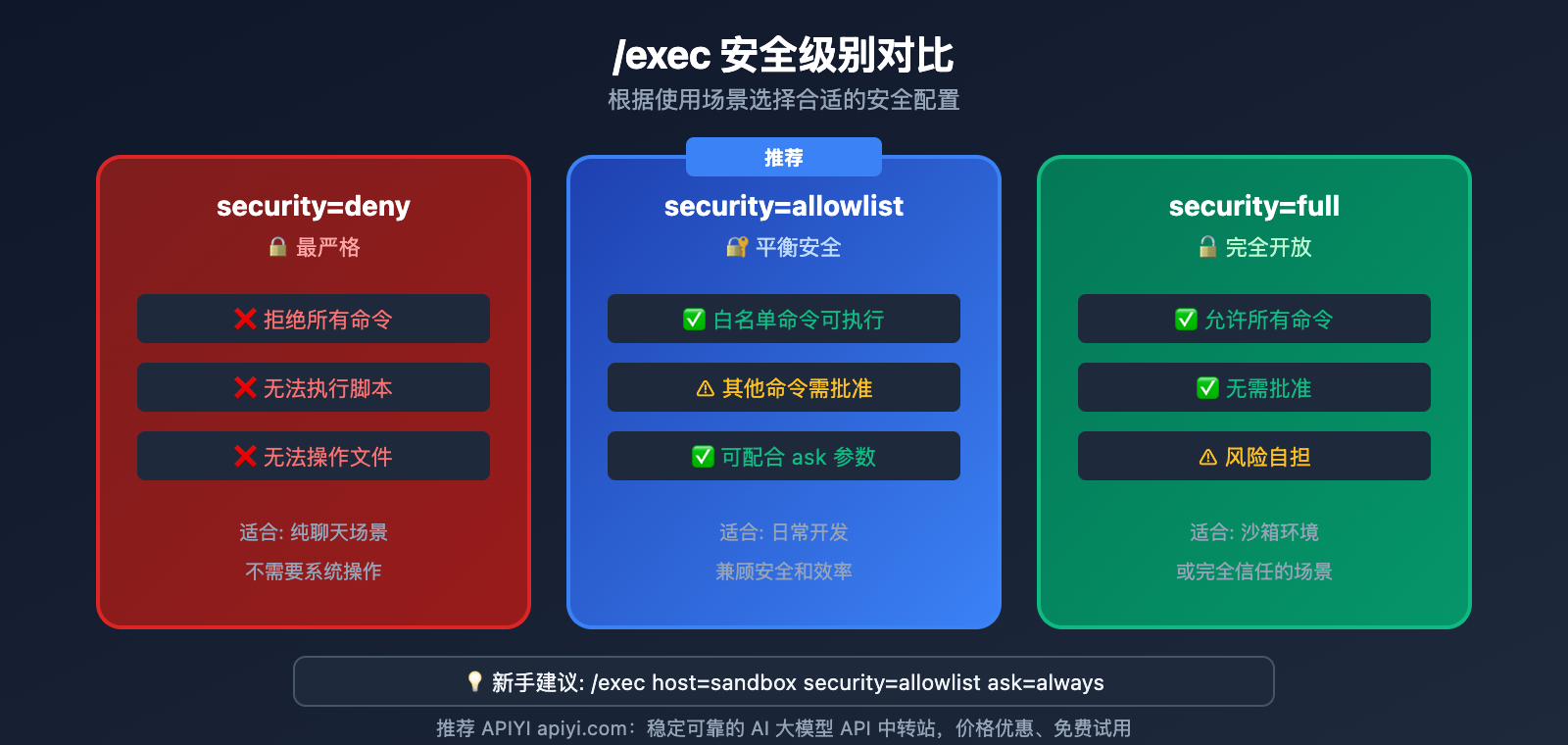
指令 7: /exec — 执行控制
重要程度: ⭐⭐⭐
控制 OpenClaw 执行系统命令的权限和方式。
基本语法
/exec
/exec host=<sandbox|gateway|node>
/exec security=<deny|allowlist|full>
/exec ask=<off|on-miss|always>
参数详解
| 参数 | 选项 | 说明 |
|---|---|---|
host |
sandbox | 在 Docker 沙箱执行 |
| gateway | 在网关主机执行 | |
| node | 在配对节点执行 | |
security |
deny | 拒绝所有命令 |
| allowlist | 只允许白名单命令 | |
| full | 允许所有命令 | |
ask |
off | 不询问直接执行 |
| on-miss | 不在白名单时询问 | |
| always | 每次都询问 |
使用示例
# 查看当前执行设置
/exec

# 设置为沙箱执行 + 白名单模式
/exec host=sandbox security=allowlist

# 设置为每次询问
/exec ask=always
安全建议
- 初次使用建议
security=allowlist ask=always - 熟悉后可改为
ask=on-miss - 敏感环境保持
host=sandbox
Command 8: /approve — Approve Action
Importance: ⭐⭐⭐
Use this command to respond when OpenClaw requests permission to execute an action.
Basic Syntax
/approve <id> allow-once
/approve <id> allow-always
/approve <id> deny
Parameters
| Parameter | Effect |
|---|---|
allow-once |
Allow this time; it'll ask again next time |
allow-always |
Permanently allow this type of action |
deny |
Deny this action |
Examples
# Allow this single action
/approve abc123 allow-once

# Permanently allow this type of action
/approve abc123 allow-always

# Deny the action
/approve abc123 deny
Use with /elevated
# Enable elevated permissions mode (fewer prompts)
/elevated on

# Skip prompts entirely (use with caution)
/elevated full

# Disable elevated permissions
/elevated off
Command 9: /tts — Text-to-Speech Control
Importance: ⭐⭐
Control OpenClaw's text-to-speech (TTS) functionality.
Basic Syntax
/tts off
/tts always
/tts inbound
/tts tagged
/tts status
/tts provider
Parameters
| Parameter | Effect |
|---|---|
off |
Disable text-to-speech |
always |
Play voice for all responses |
inbound |
Only reply with voice for voice-based inputs |
tagged |
Only play voice for specifically tagged content |
status |
View current TTS status |
provider |
View or switch TTS providers |
Examples
# Check TTS status
/tts status

# Enable voice for everything
/tts always

# Disable voice
/tts off
TTS Providers
OpenClaw supports several TTS engines:
- Edge TTS: Free, serves as the default fallback.
- OpenAI TTS: High quality, requires an API Key.
- ElevenLabs: Great for custom voices, requires configuration.
指令 10: /subagents — 子代理管理
重要程度: ⭐⭐
管理后台运行的子代理,适合长时间或并行任务。
基本语法
/subagents list
/subagents stop <id>
/subagents log <id>
/subagents info <id>
/subagents send <id> <message>
参数说明
| 参数 | 效果 |
|---|---|
list |
列出所有子代理 |
stop |
停止指定子代理 |
log |
查看子代理日志 |
info |
查看子代理详情 |
send |
向子代理发送消息 |
使用示例
# 查看运行中的子代理
/subagents list

# 停止某个子代理
/subagents stop agent-123

# 查看子代理输出
/subagents log agent-123
使用场景
- 让子代理处理长时间的代码分析
- 并行执行多个独立任务
- 保持主对话简洁,复杂任务交给子代理
常用指令速查表
| 指令 | 功能 | 常用场景 |
|---|---|---|
/new |
新开对话 | 切换任务、省 Token |
/status |
查看状态 | 监控消耗、检查进度 |
/model |
切换模型 | 优化成本、提升性能 |
/compact |
压缩上下文 | 长对话省 Token |
/usage |
查看用量 | 成本监控 |
/context |
上下文详情 | 优化配置 |
/exec |
执行控制 | 安全设置 |
/approve |
批准操作 | 权限管理 |
/tts |
语音控制 | 语音交互 |
/subagents |
子代理管理 | 并行任务 |
常见问题
Q1: 命令在 Web UI 中不起作用怎么办?
这是一个已知 Bug (Issue #4446)。临时解决方案:
- 使用其他渠道 (WhatsApp/Telegram) 执行命令
- 使用 CLI 命令:
openclaw gateway status - 等待官方修复后更新版本
Q2: 如何查看所有可用命令?
在聊天中输入:
/help
或
/commands
会显示完整的命令列表和简要说明。
Q3: 如何节省 API 成本?
核心策略:
- 定期
/new重置对话 - 使用
/model haiku处理简单任务 - 开启
/usage full监控消耗 - 通过 APIYI apiyi.com 获取更优惠的 API 价格
总结
OpenClaw 十大常用指令的核心价值:
- /new: 最重要的省钱命令,定期重置会话
- /status: 随时了解消耗状态
- /model: 动态切换模型,平衡成本和性能
- /compact: 保留上下文的同时压缩 Token
- /usage: 详细监控费用
- /context: 深入了解 Token 来源
- /exec: 控制命令执行安全
- /approve: 管理操作权限
- /tts: 控制语音交互
- /subagents: 管理并行任务
掌握这些指令,你就能充分发挥 OpenClaw 的强大能力,同时保持成本可控。
推荐通过 APIYI apiyi.com 接入 Claude 等模型,获取更优惠的价格,配合这些指令实现成本最优化。
📚 参考资料
⚠️ 链接格式说明: 所有外链使用
资料名: domain.com格式,方便复制但不可点击跳转,避免 SEO 权重流失。
-
OpenClaw 斜杠命令文档: Slash Commands
- 链接:
docs.openclaw.ai/tools/slash-commands - 说明: 官方斜杠命令完整参考
- 链接:
-
OpenClaw FAQ: 常见问题解答
- 链接:
docs.openclaw.ai/help/faq - 说明: 常见问题和最佳实践
- 链接:
-
OpenClaw Token 使用文档: Token Use
- 链接:
docs.openclaw.ai/token-use - 说明: Token 监控和优化方法
- 链接:
-
OpenClaw GitHub 仓库: 官方源码
- 链接:
github.com/openclaw/openclaw - 说明: 最新版本和 Issue 跟踪
- 链接:
作者: 技术团队
技术交流: 欢迎在评论区讨论 OpenClaw 使用技巧,更多 AI API 资料可访问 APIYI apiyi.com 技术社区