API file upload is a common technical requirement developers face when calling AI interfaces for video generation, image processing, and more. In this post, we'll dive into how the multipart/form-data encoding works. We'll use the Sora 2 image-to-video API as a practical example to help you master the core skills of API file uploading.
Core Value: By the end of this article, you'll fully understand the underlying mechanics of multipart/form-data, learn how to use the curl -F command for uploads, and be able to independently implement image upload features for AI APIs like Sora 2.
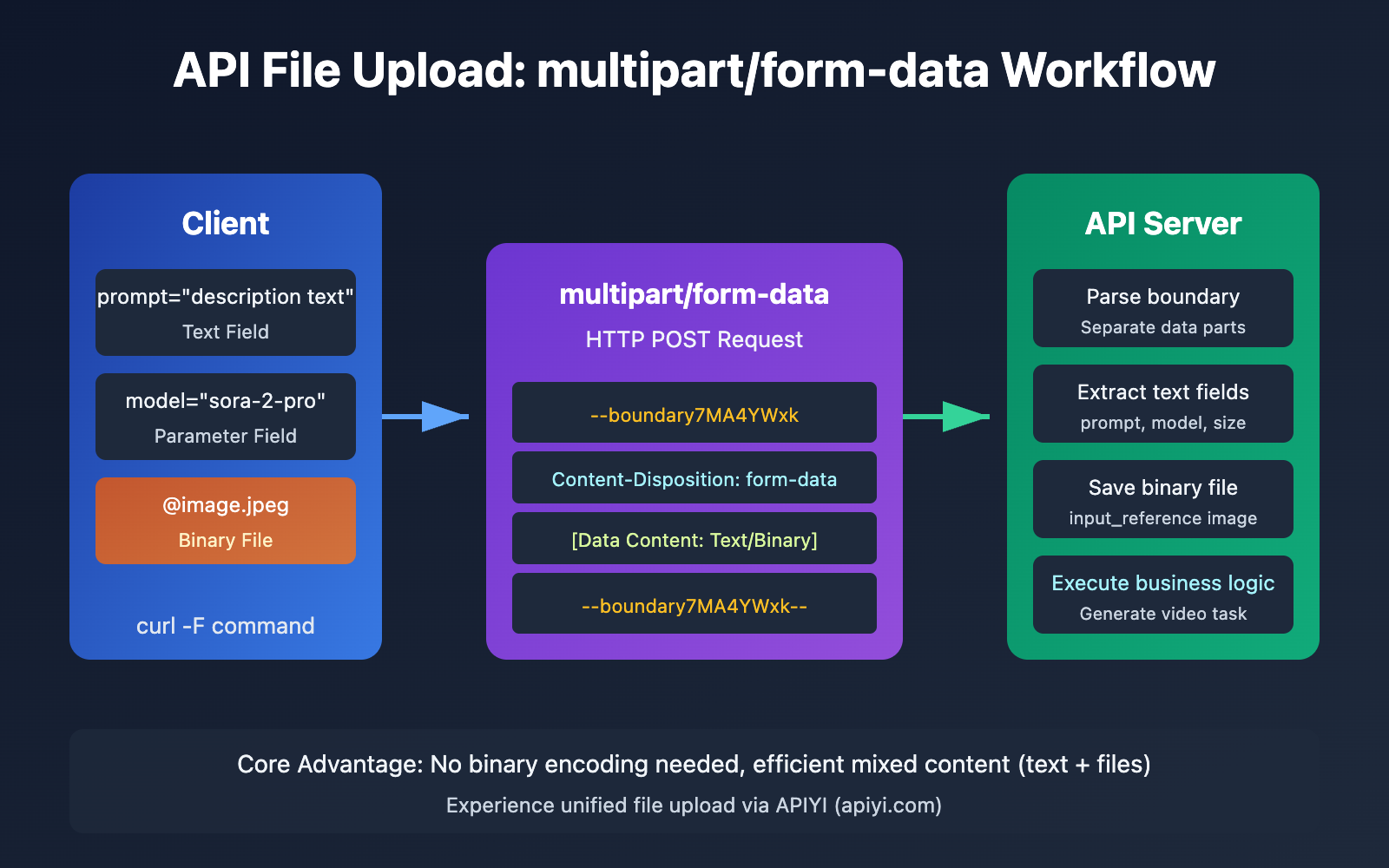
Essentials of API File Uploading
Before jumping into the code, we need to understand why API file uploads require a special encoding method.
Why use multipart/form-data?
When you send standard text data via an API, you can use simple application/x-www-form-urlencoded encoding. However, this approach runs into serious issues when handling files:
| Encoding Type | Use Case | File Support | Efficiency |
|---|---|---|---|
application/x-www-form-urlencoded |
Simple key-value pairs | ❌ Not suitable | Binary requires URL escaping; low efficiency |
application/json |
Structured data | ⚠️ Requires Base64 encoding | Increases payload size by ~33% |
multipart/form-data |
File Uploads | ✅ Native Support | No extra encoding; highly efficient |
Proposed in 1998 under the RFC 2388 standard, multipart/form-data was specifically designed to solve the problem of sending mixed text and binary data over HTTP.
How multipart/form-data works
The core idea of multipart/form-data is to split a single HTTP request body into multiple independent "parts," where each part can have its own content type.
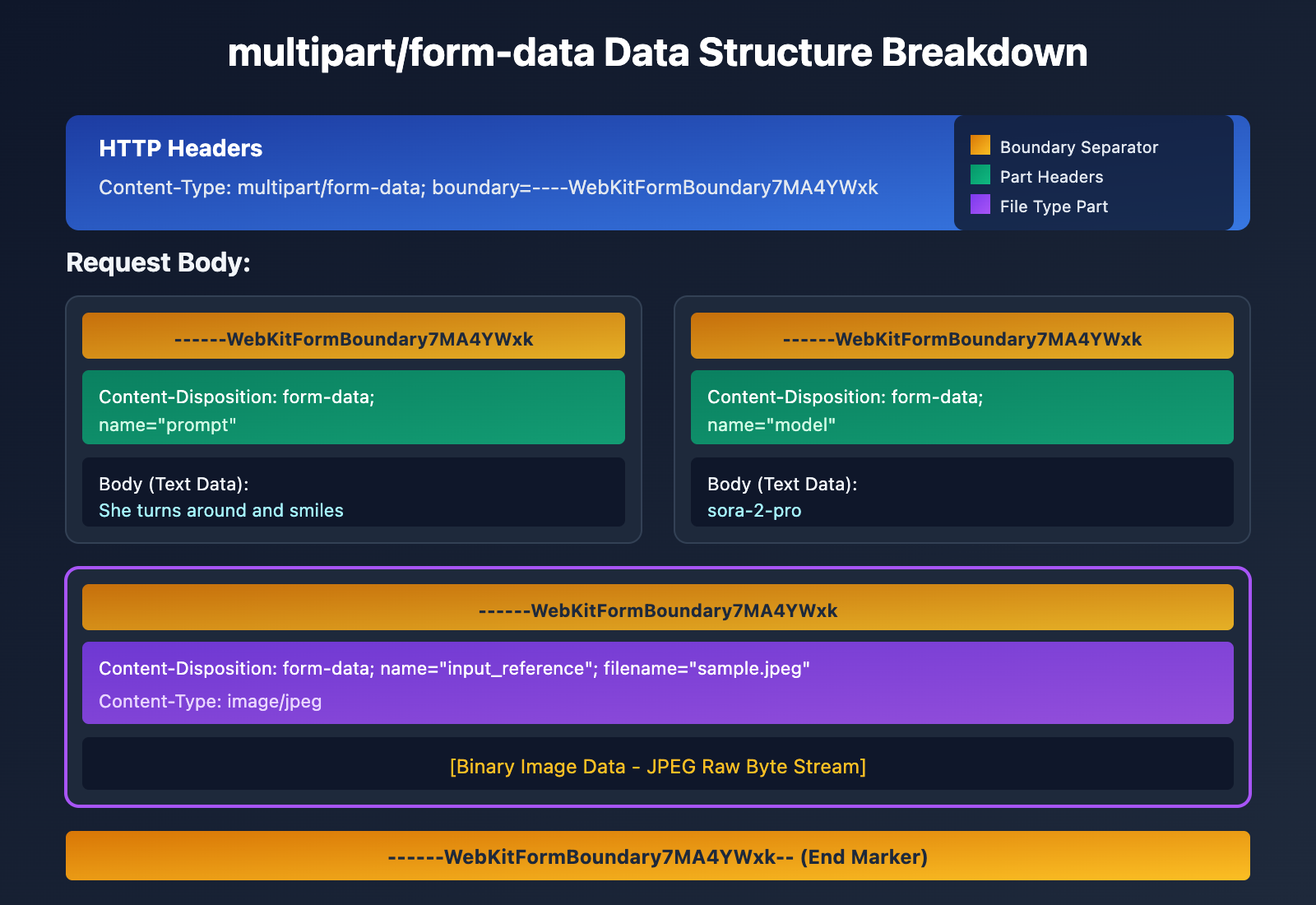
Data Structure Breakdown
A typical multipart/form-data request looks like this:
POST /v1/videos HTTP/1.1
Host: api.apiyi.com
Content-Type: multipart/form-data; boundary=----WebKitFormBoundary7MA4YWxk

------WebKitFormBoundary7MA4YWxk
Content-Disposition: form-data; name="prompt"

She turns around and smiles
------WebKitFormBoundary7MA4YWxk
Content-Disposition: form-data; name="model"

sora-2-pro
------WebKitFormBoundary7MA4YWxk
Content-Disposition: form-data; name="input_reference"; filename="sample.jpeg"
Content-Type: image/jpeg

[Binary Image Data]
------WebKitFormBoundary7MA4YWxk--
| Component | Function | Example |
|---|---|---|
| Boundary | A unique identifier that separates each part of the data. | ----WebKitFormBoundary7MA4YWxk |
| Content-Disposition | Metadata describing that specific part. | form-data; name="prompt" |
| Content-Type | The MIME type of that part. | image/jpeg |
| Body | The actual data payload. | Text or binary data. |
🎯 Pro Tip: The boundary must be a unique string that won't appear within the actual content of the request body. The server uses this boundary to parse and isolate each data part.
Deep Dive into curl -F: A Practical Guide to API File Uploads
curl is pretty much the go-to command-line tool for HTTP requests, and its -F flag is specifically designed for handling multipart/form-data.
The Basics of curl -F
curl -F "field_name=value" URL
curl -F "file_field=@/absolute/path/to/local_file" URL
| Parameter Format | Description | Example |
|---|---|---|
-F "key=value" |
Sends a standard text field | -F "prompt=Hello" |
-F "key=@file" |
Uploads a local file | -F "image=@/absolute/path/to/photo.jpg" |
-F "key=@file;type=mime" |
Specifies the file's MIME type | -F "image=@/absolute/path/to/photo.jpg;type=image/jpeg" |
-F "key=@file;filename=new.jpg" |
Sets a custom filename for the upload | -F "image=@/absolute/path/to/local.jpg;filename=upload.jpg" |
curl -F vs. Other Parameters
It's easy to get -F, -d, and -X POST mixed up, but they serve different purposes:
# ❌ INCORRECT: -d is for x-www-form-urlencoded, not ideal for file uploads
curl -X POST -d "[email protected]" https://api.example.com/upload

# ❌ INCORRECT: Manually setting Content-Type while using -d
curl -X POST -H "Content-Type: multipart/form-data" -d "..." https://api.example.com/upload

# ✅ CORRECT: Use -F to let curl handle Content-Type and boundaries automatically
curl -F "file=@/absolute/path/to/image.jpg" https://api.example.com/upload
How it works under the hood: When you use
-F, curl automatically:
- Sets the request method to POST.
- Sets
Content-Type: multipart/form-data.- Generates a unique boundary string.
- Formats the request body according to RFC standards.
Sora 2 API: Real-World File Upload Practice
Sora 2, OpenAI's video generation model, allows you to upload reference images via the API to guide video creation. This is a classic scenario for multipart/form-data.
Sora 2 Image-to-Video API Parameters
| Parameter | Type | Required | Description |
|---|---|---|---|
prompt |
string | ✅ | Text description of the video |
model |
string | ❌ | Model selection: sora-2 or sora-2-pro |
size |
string | ❌ | Resolution: 1280x720, 720x1280, 1024x1792, 1792x1024 |
seconds |
integer | ❌ | Duration: 4, 8, or 12 seconds |
input_reference |
file | ❌ | Reference image to be used as the first frame |
{{SVG_TEXT_0}} Sora 2 vs Sora 2 Pro Model Comparison
{{SVG_TEXT_1}} Access both models via APIYI (apiyi.com)
{{SVG_TEXT_2}} sora-2
{{SVG_TEXT_3}} sora-2-pro
{{SVG_TEXT_4}} Generation Quality
{{SVG_TEXT_5}} Good
{{SVG_TEXT_6}} Excellent
{{SVG_TEXT_7}} Rendering Speed
{{SVG_TEXT_8}} Fast
{{SVG_TEXT_9}} Slow
{{SVG_TEXT_10}} API Cost
{{SVG_TEXT_11}} Standard
{{SVG_TEXT_12}} High
{{SVG_TEXT_13}} Use Case
{{SVG_TEXT_14}} Rapid Prototyping
{{SVG_TEXT_15}} PoC and Iterative Testing
{{SVG_TEXT_16}} Production Output
{{SVG_TEXT_17}} High-quality Finals, Commercial Projects
{{SVG_TEXT_18}} File Upload
{{SVG_TEXT_19}} ✓ Supports input_reference
{{SVG_TEXT_20}} ✓ Supports input_reference
{{SVG_TEXT_21}} 💡 Pro-tip: Use sora-2 for fast iteration during development, then switch to sora-2-pro for top-tier quality in the final output.
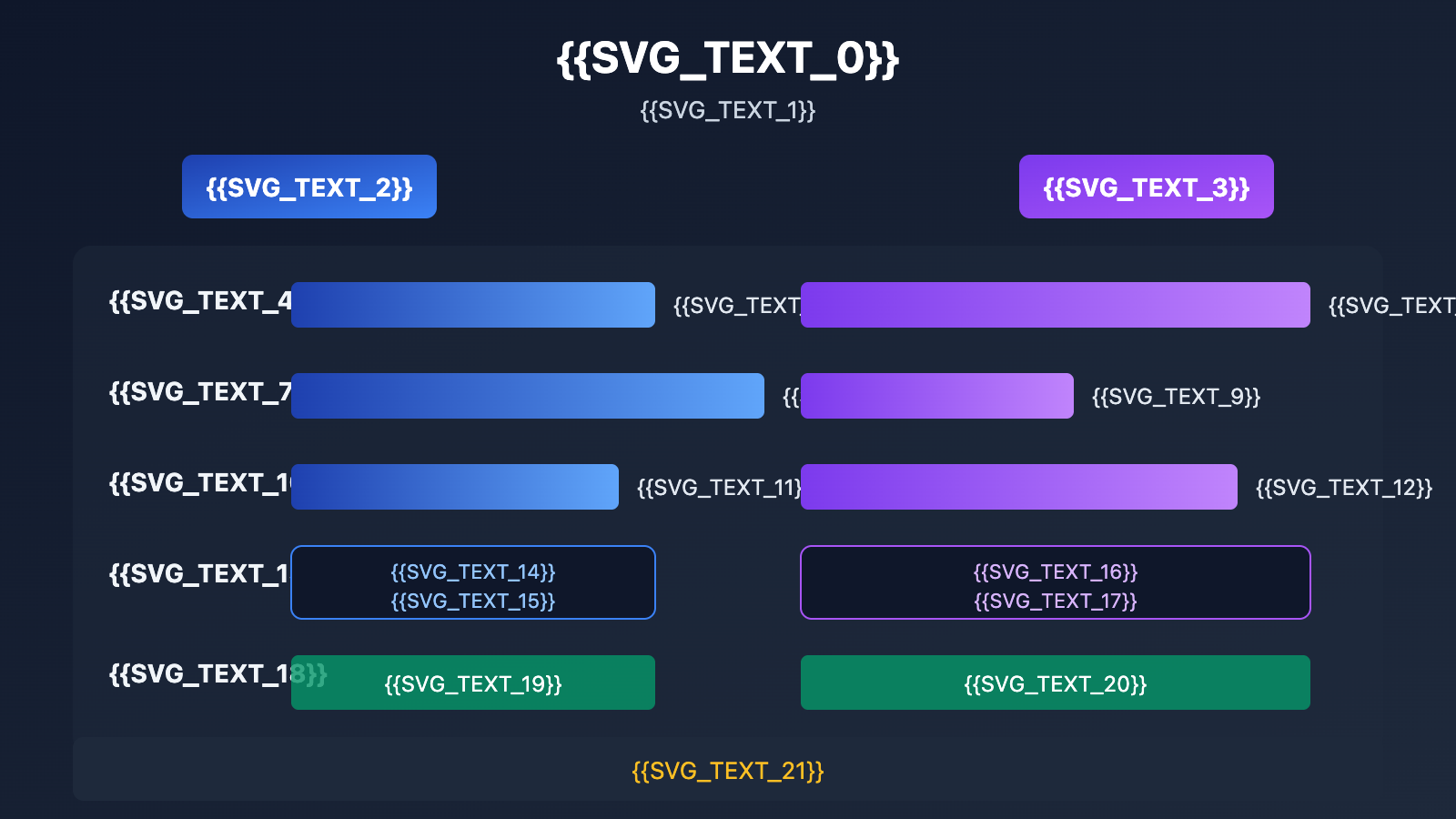
Sora 2 Model Comparison
| Feature | sora-2 | sora-2-pro |
|---|---|---|
| Generation Quality | Good | Excellent |
| Rendering Speed | Fast | Slow |
| Best For | Rapid Prototyping, Proof of Concept | Production-grade Output |
| Price | Standard | High |
| Available Platforms | APIYI (apiyi.com), Official API | APIYI (apiyi.com), Official API |
Full Example for Sora 2 File Upload
Here’s a complete curl command to generate a video using a reference image on Sora 2:
curl -X POST "https://api.apiyi.com/v1/videos" \
  -H "Authorization: Bearer $APIYI_KEY" \
  -H "Content-Type: multipart/form-data" \
  -F prompt="She turns around and smiles, then slowly walks out of the frame." \
  -F model="sora-2-pro" \
  -F size="1280x720" \
  -F seconds="8" \
  -F input_reference="@/absolute/path/to/sample_720p.jpeg;type=image/jpeg"
Command Breakdown
| Part | Description |
|---|---|
curl -X POST |
Specifies the POST request method |
"https://api.apiyi.com/v1/videos" |
The Sora 2 video generation endpoint on APIYI |
-H "Authorization: Bearer $APIYI_KEY" |
Passes your API key via an environment variable |
-H "Content-Type: multipart/form-data" |
Declares the content type (added automatically by curl -F) |
-F prompt="..." |
Your text description for the video |
-F model="sora-2-pro" |
Selects the high-quality model |
-F size="1280x720" |
Sets a widescreen 720p resolution |
-F seconds="8" |
Sets an 8-second duration |
-F input_reference="@..." |
Uploads the local reference image |
🚀 Quick Start: We recommend using the APIYI (apiyi.com) platform for quick Sora 2 API testing. It provides ready-to-use interfaces, making integration seamless without complex configurations.
Key Considerations for Image Uploads
When uploading reference images to the Sora 2 API, keep these points in mind:
| Requirement | Description |
|---|---|
| Resolution Matching | The image resolution must match the target video size parameter |
| Supported Formats | image/jpeg, image/png, image/webp |
| File Size | We recommend keeping files under 10MB |
| Image Quality | Clear images with solid composition yield significantly better results |
Implementing multipart/form-data Upload in Python
While curl is great for quick tests, you'll likely use a programming language for actual development. Here's how to handle file uploads in Python.
Minimal Example
import requests

# Using the unified APIYI interface
url = "https://api.apiyi.com/v1/videos"
headers = {"Authorization": "Bearer YOUR_API_KEY"}

# Preparing multipart data
files = {
    "input_reference": ("sample.jpeg", open("sample_720p.jpeg", "rb"), "image/jpeg")
}
data = {
    "prompt": "She turns around and smiles, then slowly walks out of the frame.",
    "model": "sora-2-pro",
    "size": "1280x720",
    "seconds": "8"
}

response = requests.post(url, headers=headers, data=data, files=files)
print(response.json())
View full code (including error handling and polling)
import requests
import time
import os

class Sora2Client:
    """Sora 2 API Client - Supports multipart/form-data file uploads"""

    def __init__(self, api_key: str, base_url: str = "https://api.apiyi.com/v1"):
        self.api_key = api_key
        self.base_url = base_url
        self.headers = {"Authorization": f"Bearer {api_key}"}

    def create_video(
        self,
        prompt: str,
        model: str = "sora-2",
        size: str = "1280x720",
        seconds: int = 8,
        input_reference: str = None
    ) -> dict:
        """
        Create a video generation task

        Args:
            prompt: Video description (prompt)
            model: Model selection (sora-2 or sora-2-pro)
            size: Resolution
            seconds: Duration (4, 8, 12)
            input_reference: Path to reference image (optional)

        Returns:
            Dictionary containing task information
        """
        url = f"{self.base_url}/videos"

        data = {
            "prompt": prompt,
            "model": model,
            "size": size,
            "seconds": str(seconds)
        }

        files = None
        if input_reference and os.path.exists(input_reference):
            # Determine MIME type based on file extension
            ext = os.path.splitext(input_reference)[1].lower()
            mime_types = {
                ".jpg": "image/jpeg",
                ".jpeg": "image/jpeg",
                ".png": "image/png",
                ".webp": "image/webp"
            }
            mime_type = mime_types.get(ext, "application/octet-stream")

            files = {
                "input_reference": (
                    os.path.basename(input_reference),
                    open(input_reference, "rb"),
                    mime_type
                )
            }

        try:
            response = requests.post(
                url,
                headers=self.headers,
                data=data,
                files=files,
                timeout=30
            )
            response.raise_for_status()
            return response.json()
        except requests.exceptions.RequestException as e:
            return {"error": str(e)}
        finally:
            if files and "input_reference" in files:
                files["input_reference"][1].close()

    def get_video_status(self, video_id: str) -> dict:
        """Query the status of video generation"""
        url = f"{self.base_url}/videos/{video_id}"
        response = requests.get(url, headers=self.headers, timeout=30)
        return response.json()

    def wait_for_completion(self, video_id: str, poll_interval: int = 10) -> dict:
        """Poll and wait for video generation to finish"""
        while True:
            status = self.get_video_status(video_id)
            if status.get("status") in ["completed", "failed"]:
                return status
            print(f"Status: {status.get('status')}... waiting {poll_interval}s")
            time.sleep(poll_interval)


# Example usage
if __name__ == "__main__":
    client = Sora2Client(api_key=os.getenv("APIYI_KEY"))

    # Create an Image-to-Video task
    result = client.create_video(
        prompt="She turns around and smiles, then slowly walks out of the frame.",
        model="sora-2-pro",
        size="1280x720",
        seconds=8,
        input_reference="sample_720p.jpeg"
    )

    if "id" in result:
        print(f"Task created: {result['id']}")
        final_result = client.wait_for_completion(result["id"])
        print(f"Video URL: {final_result.get('video_url')}")
    else:
        print(f"Error: {result}")
Pro-tip: You can get free test credits at apiyi.com to quickly verify the Image-to-Video feature.
Multipart Handling in the requests Library
When using Python's requests library to handle multipart/form-data, keep these key points in mind:
| Parameter | Purpose | Description |
|---|---|---|
data |
Standard form fields | Dictionary format: {"key": "value"} |
files |
File fields | Tuple format: {"name": (filename, file_obj, content_type)} |
⚠️ Note: When you use the
dataandfilesparameters together,requestsautomatically sets the correctContent-Typeand boundary for you. You don't need to (and shouldn't) specify them manually.
JavaScript/Node.js Implementation
Browser Environment (FormData API)
const formData = new FormData();
formData.append('prompt', 'She turns around and smiles');
formData.append('model', 'sora-2-pro');
formData.append('size', '1280x720');
formData.append('seconds', '8');
formData.append('input_reference', fileInput.files[0]);

fetch('https://api.apiyi.com/v1/videos', {
    method: 'POST',
    headers: {
        'Authorization': 'Bearer YOUR_API_KEY'
        // Note: Do NOT manually set Content-Type
    },
    body: formData
})
.then(response => response.json())
.then(data => console.log(data));
Node.js Environment
const FormData = require('form-data');
const fs = require('fs');
const axios = require('axios');

const form = new FormData();
form.append('prompt', 'She turns around and smiles');
form.append('model', 'sora-2-pro');
form.append('size', '1280x720');
form.append('seconds', '8');
form.append('input_reference', fs.createReadStream('sample_720p.jpeg'), {
    contentType: 'image/jpeg'
});

axios.post('https://api.apiyi.com/v1/videos', form, {
    headers: {
        ...form.getHeaders(),
        'Authorization': 'Bearer YOUR_API_KEY'
    }
})
.then(response => console.log(response.data));
💡 Key Tip: When using
FormDatain the browser, don't manually set theContent-Typeheader. The browser will automatically add the correct boundary parameter for you.
Troubleshooting Common multipart/form-data Issues
Common Upload Failures
| Issue | Symptom | Solution |
|---|---|---|
| Missing boundary | Server returns 400 | Don't set Content-Type manually; let your tools generate it automatically |
| MIME type error | File rejected | Use ;type=image/jpeg to specify it explicitly |
| Incorrect file path | File not found | Ensure the path after the @ symbol is correct; both relative and absolute paths are supported |
| Resolution mismatch | Sora API error | Image resolution must match the size parameter exactly |
| File too large | Timeout or rejection | Compress the image or use chunked uploads |
Debugging Tips
Use curl's -v flag to inspect the complete request:
curl -v -F "[email protected]" https://api.example.com/upload
This will show you:
- Request headers (including the auto-generated Content-Type and boundary)
- The structure of the request body
- The server's response
FAQ
Q1: Which is better: multipart/form-data or Base64 encoding?
multipart/form-data is better for file uploads. Base64 encoding increases the file size by about 33%, which adds to network transmission time and server processing load. multipart/form-data transmits binary data directly, making it much more efficient.
However, in certain scenarios (like WebSockets or single-field JSON APIs), Base64 might be your only option. When calling APIs via the APIYI (apiyi.com) platform, we recommend using multipart/form-data whenever possible for better performance.
Q2: Why is my curl -F upload failing?
Common reasons include:
- File path issues: Double-check that you've provided the correct path after the
@symbol. - Permission issues: Check if the file has the necessary read permissions.
- MIME type: Some APIs require you to specify the correct content-type.
We suggest using APIYI (apiyi.com) to verify your request format in a test environment first. The platform provides detailed error messages to help you pinpoint issues quickly.
Q3: Which image formats does the Sora 2 API support?
The Sora 2 API supports the following formats for input_reference:
- JPEG (
.jpg,.jpeg) – Recommended for its good compression. - PNG (
.png) – Supports transparency channels. - WebP (
.webp) – A modern format with small file sizes.
Note that the image resolution must match the target video's size parameter. For example, if you're using a 1280x720 resolution, your reference image also needs to be 1280×720.
Q4: How should I handle large file uploads?
For large files, consider these strategies:
- Chunked uploads: Break the file into smaller pieces and upload them sequentially.
- Compression/Optimization: Compress the file as much as possible without sacrificing necessary quality.
- Resumable uploads: Implement support to resume an upload from where it left off if it fails.
Since multipart/form-data supports streaming, servers can process data as it's being received, making it well-suited for large file scenarios.
Summary
In this article, we've taken a deep dive into multipart/form-data, the core technology behind API file uploads:
Key Takeaways:
| Key Point | Description |
|---|---|
| Encoding Principles | Boundaries separate multipart data, with each part having its own independent Content-Type. |
| curl -F Command | Use -F "key=value" to send text and -F "key=@file" to upload files. |
| Sora 2 Practice | Use the input_reference parameter to upload reference images; just make sure the resolutions match. |
| Multi-language Support | Implementation via Python requests or JavaScript FormData. |
| Debugging Tips | Use curl -v to inspect the full request details. |
Mastering multipart/form-data is a fundamental skill for AI API development. Whether you're working with Sora 2 for video generation, GPT-4 Vision for image understanding, or any other API that requires file uploads, the core principles remain the same.
We recommend using APIYI at apiyi.com to quickly verify your file upload functionality and experience a unified API interface with comprehensive technical support.
Author: APIYI Team | Dedicated to sharing Large Language Model API technical insights.
Technical Exchange: Visit apiyi.com for more API development resources.
References
-
RFC 2388: multipart/form-data Standard Specification
- Link:
tools.ietf.org/html/rfc2388
- Link:
-
curl Official Documentation: Multipart Formposts
- Link:
everything.curl.dev/http/post/multipart
- Link:
-
MDN Web Docs: Using FormData Objects
- Link:
developer.mozilla.org/en-US/docs/Web/API/XMLHttpRequest_API/Using_FormData_Objects
- Link:
-
OpenAI Sora API Documentation: Video Generation Guide
- Link:
platform.openai.com/docs/guides/video-generation
- Link: