
Summary: Tencent Hunyuan’s four image generation versions fall into two categories. 2.1, 3.0, and 3.0-Instruct let you download the weights and deploy locally; Hy-Image 3.5 Preview is currently available only as a hosted service. This article follows two main threads—whether you can manage deployment yourself, and whether image editing takes text, images, or conversation as input—to explain what each version is best suited for.
The short answer: Based on information verified as of November 25, 2026, your choice comes down to three conditions: how many 80 GB GPUs you have on hand, whether image editing needs to accept existing images, and whether you’re comfortable with cloud-based calls. If you have only a single 24 GB-class GPU and just need to generate a 2K draft from a prompt, choose HunyuanImage 2.1. If you already have three or more 80 GB GPUs and mainly do batch text-to-image generation, choose HunyuanImage 3.0 Base. If you want to do instruction-based image editing locally or multi-image fusion, and you have eight 80 GB GPUs, choose 3.0-Instruct / Instruct-Distil. If you need 4K delivery and multi-turn iterative editing but don’t plan to build your own compute, choose the hosted Hy-Image 3.5 Preview; you can call it through Tencent Cloud TokenHub, ADP, or APIYI apiyi.com’s OpenAI Images-compatible API.
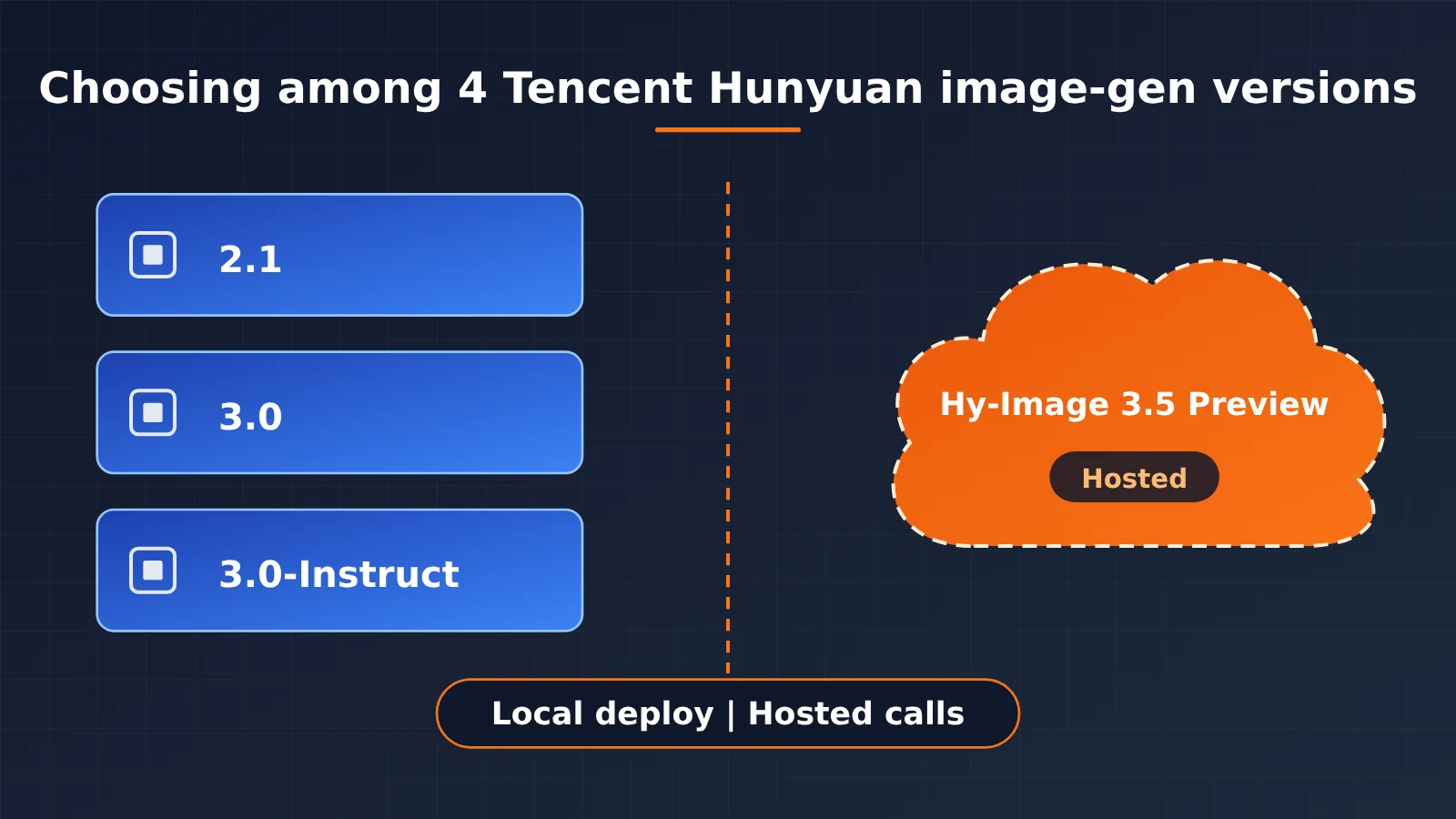
Hunyuan Image Generation Model Selection Knowledge Map
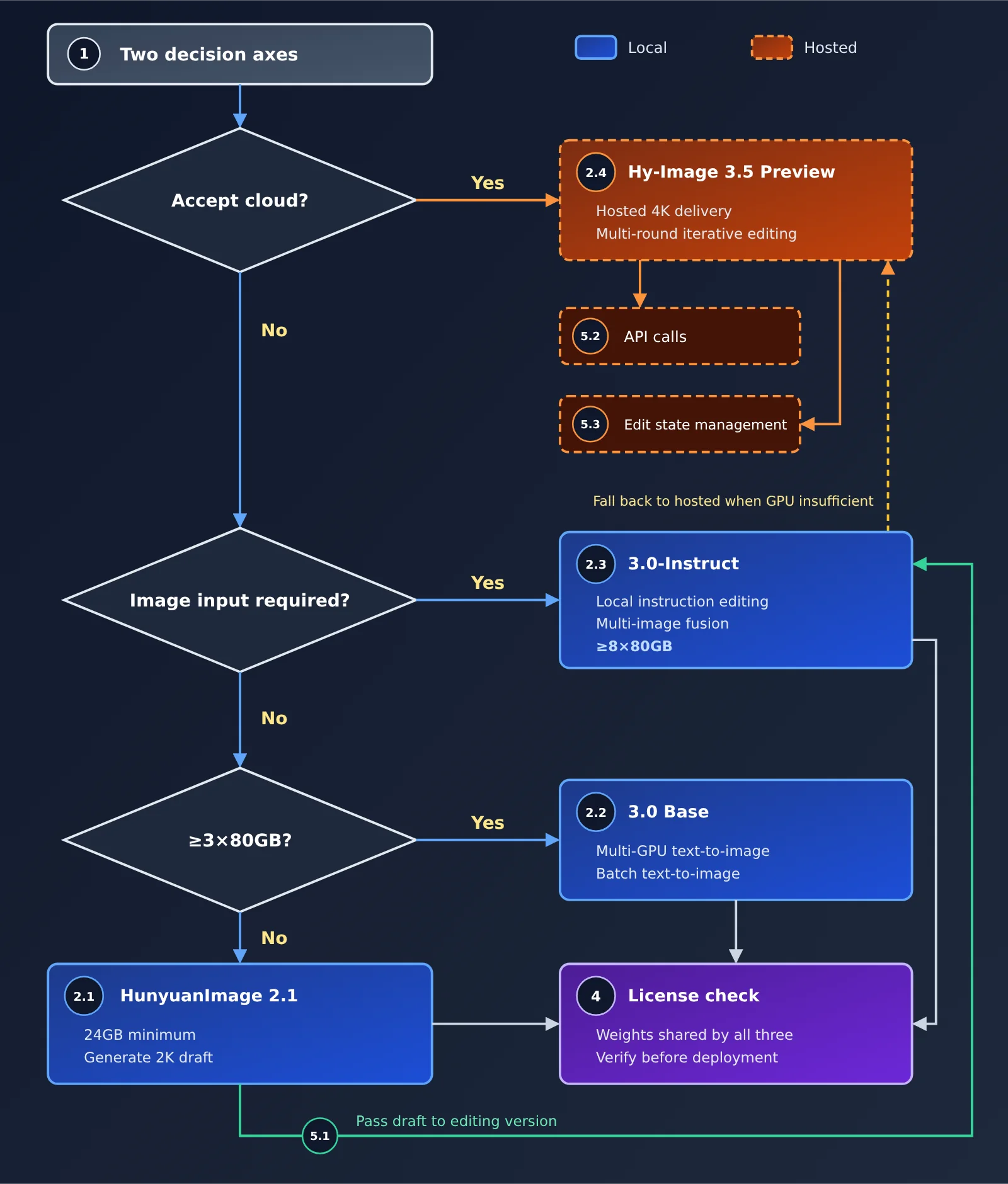
Figure caption: Start with the question “can you accept cloud-based invocation?” If you can’t, you’re limited to the three local versions 2.1, 3.0, and 3.0-Instruct, and all three have to go through the license verification in Section 4. If you can accept it, 3.5 Preview handles 4K delivery and multi-turn image editing. And if your local Instruct GPUs fall short, you can always pivot to managed hosting.
Hunyuan Image Generation Article Index
The article starts with the criteria, then breaks down each version one by one, and finishes with hands-on steps. Section 1 lays out the two axes for judging, and those set the yardstick for every comparison that follows. Section 2 walks through the four versions individually, so you can jump around as needed. Section 3 lines up hardware and timelines against the same baseline. Section 4 covers the licensing for all three sets of publicly released weights. Section 5 lays out the division of labor — “draft locally, then edit locally or on a hosted service” — along with the invocation code. Section 6 comes back to the selection decision.
Hunyuan Image Generation Selection: To Know
| Term | Plain explanation |
|---|---|
| Active parameters | The parameter count a mixture-of-experts model actually uses per token during computation. The 3.0 series sits at roughly 13 billion, but VRAM must be planned around the full ~80 billion weights |
| CPU offload | Moving part of the model into system memory to reduce VRAM usage, at the cost of host pressure and speed |
| Distilled version | A version that approximates the original model’s results with fewer sampling steps — for example, the 2.1 distilled version at 8 steps, or Instruct-Distil at 8 steps |
| Refiner | A second-stage model in 2.1 used after diffusion generation to improve detail and sharpness |
assembled_history |
The conversation history returned by 3.5 Preview in TokenHub, which must be passed back verbatim when making edits in the next round |
| Partner API node | A node in ComfyUI that calls a remote service, so generation doesn’t run on the local machine |
1 Two Decision Axes for Choosing Hunyuan Image Generation
1.1 Deployment axis: weights, inference endpoint, and license
Whether you can deploy locally depends on three things: whether Tencent has released the weights, what inputs the public inference endpoint accepts, and what the accompanying license allows. There’s one point that’s easy to confuse. Tencent Cloud’s hosted Hy-Image-3.0 (model hy-image-v3) once supported both text-to-image and reference-based image generation, while the HunyuanImage-3.0 base weights Tencent released list only text-to-image in the official deployment matrix. Even though both are called “3.0,” the capabilities of the hosted and self-managed versions aren’t interchangeable. So the first step in choosing is to determine which version you’ll actually call or download.
1.2 Image-editing axis: whether the input is text, images, or conversation
Image-editing capability depends on what the endpoint accepts. Versions that accept only text can only generate from scratch. Versions that accept an image plus instructions can modify or blend images that already exist. Only versions that accept conversation history can keep editing results established in earlier turns. On this axis, 2.1 and the 3.0 base version fall into the first category, 3.0-Instruct into the second, and the TokenHub interface for 3.5 Preview into the third.
2 A detailed breakdown of Tencent Hunyuan’s four image generation versions
2.1 HunyuanImage 2.1: Generating 2K drafts locally
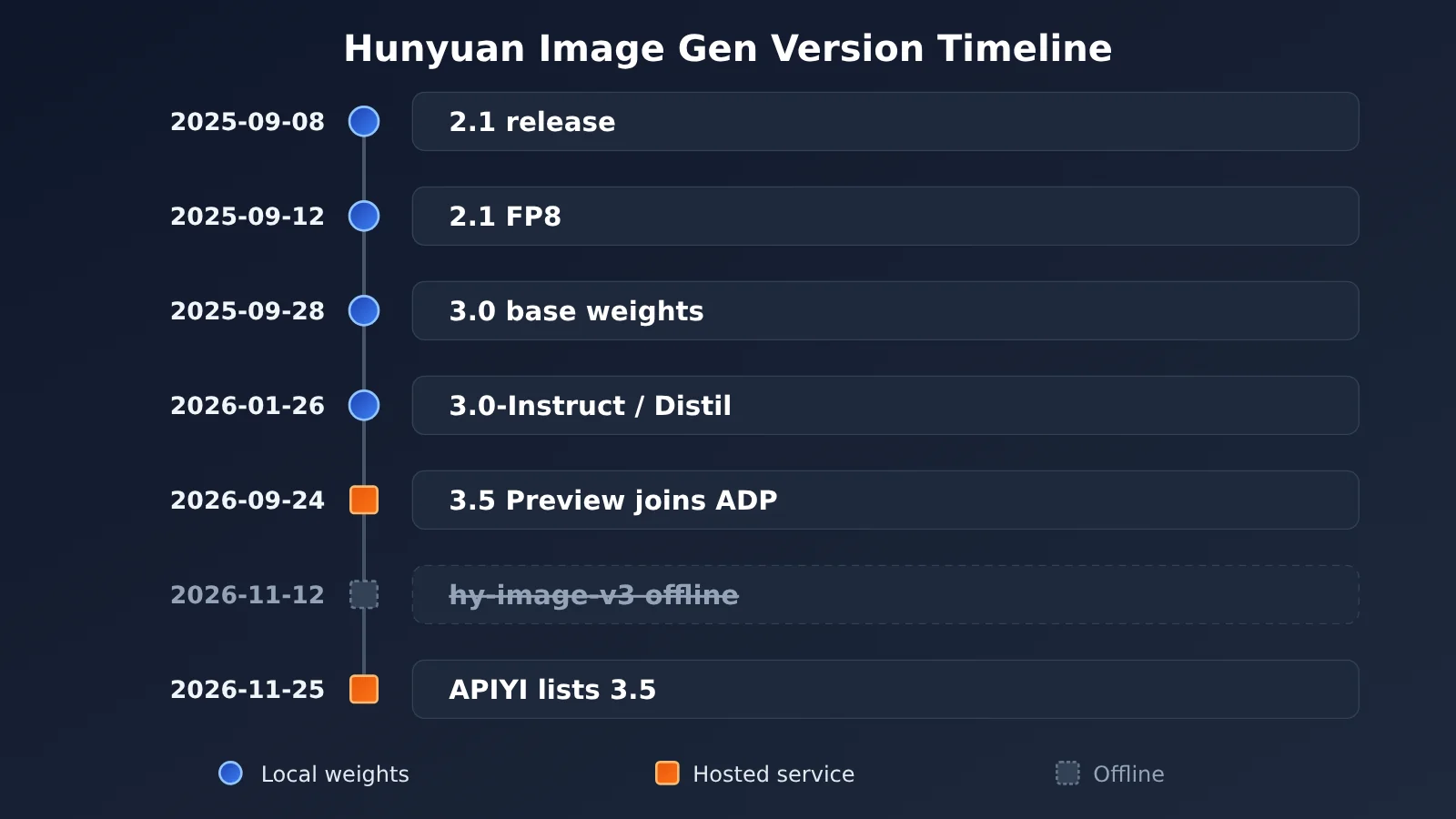
Tencent released the inference code and pretrained weights for 2.1 on September 8, 2025, and then added an FP8 quantized model on September 12. Officially, it’s described as a text-to-image model with roughly 17 billion parameters. The pipeline first generates with a diffusion model, then uses a Refiner to improve details, with a square output size of 2048×2048. The team also notes that generating directly at 1K can introduce artifacts, so they recommend using the native 2K setting.
The runtime environment is Linux plus an NVIDIA GPU with CUDA support. The official 24 GB minimum VRAM assumes you enable both FP8 and CPU offloading, which shifts some of the load to the host machine. If you have enough VRAM, you can turn off offloading to speed up inference. The non-distilled configuration is recommended at 50 steps, the distilled version at 8 steps, and enabling the refiner is advised. Comfy Org repackaged the base, distilled, refiner, and FP8 weights for local workflows. It’s a good idea to record the weights and refiner settings used each time, so the measured speed and saved images map to a specific configuration.
2.1 works well for generating product drafts, illustrations, or backgrounds with Chinese or English prompts. If you want to edit an existing product photo, it doesn’t accept image input, so you’ll need to use one of the versions covered later.
2.2 HunyuanImage 3.0 Base Edition: Multi-GPU Text-to-Image
The 3.0 base weights and inference code were released on September 28, 2025. According to the technical report, the model uses a unified autoregressive multimodal framework with a Mixture-of-Experts architecture. It has about 80 billion total parameters and activates roughly 13 billion per token. The official hardware matrix requires at least three GPUs with 80 GB of VRAM each, and the full repository files on Hugging Face are about 169 GB. Downloading the weights, running inference, and retaining checkpoints each take up their own storage or VRAM.
You can load the model with Transformers and call it from a script, and the official documentation also provides vLLM acceleration instructions. The deployment example recommends Python 3.12 or later and CUDA 12.8, PyTorch 2.8.0; FlashInfer is optional acceleration. One thing to keep in mind: the prompt enhancement example in the repository calls DeepSeek through Tencent Cloud to rewrite prompts, which introduces a cloud call. If you need fully self-managed operation, just use the configuration that takes prompts directly locally. Also, the unified multimodal capabilities described in the technical report are broader than the inference entry points actually exposed by the base checkpoint.
The hosted legacy hy-image-v3 API has 37 preset sizes, accepts up to 3 reference images (each no larger than 10 MB), and caps output area at 1,048,576 pixels. Both the Tencent Cloud China site and the international site state that it was retired on November 12, 2026. Hosted users need to migrate to the new cloud API, while self-managed users can still get the base weights from the Tencent Model Repository.
2.3 HunyuanImage 3.0-Instruct: Local Instruction-Based Image Editing and Multi-Image Fusion
Tencent released Instruct and Instruct-Distil on January 26, 2026. The Instruct checkpoint can handle both text-to-image and editing or fusion with images plus text, and it has built-in reasoning and prompt rewriting. The official example passes a list of image paths and an instruction to generate_image, combining the brand mark from one image with the material from another into a new design. On the command line, use --image to specify input paths; separate multiple images with commas. --image-size accepts auto, specific width and height, or an aspect ratio, while --infer-align-image-size makes the output match the input image dimensions.
The two parameters serve different purposes. When refreshing an old brand image and switching to a new display layout, use --image-size to set the new dimensions. If you want to edit on the original image canvas, enabling the alignment option is a better fit. For single-image background replacement, spell out the subject and the target environment in the instruction. For multi-image fusion, state which elements each image should contribute.
The hardware requirements are the steepest among the local options. Both Instruct and Distil need at least eight GPUs with 80 GB each, and the weight files are about 169 GB each. The Instruct example uses 50 steps, while Distil recommends 8. In the repository’s release plan, image-to-image has shipped, but multi-turn interaction is still planned. So for continuous local editing, your app needs to save each round’s image, instruction, and seed itself, then feed the chosen previous version as input to the next inference run. The official docs list direct generation, rewrite-then-generate, and reason-then-rewrite-then-generate as three optional task modes; it’s worth recording them alongside the model version in your delivery notes.
2.4 Hy-Image 3.5 Preview: Hosted 4K Delivery and Multi-Round Image Editing
As of the verification date, there are three confirmed delivery forms for 3.5 Preview: a hosted API, the Tencent Cloud ADP workbench and application tools (access announced on September 24, 2026), and a remote Partner API node for ComfyUI. In the Tencent weights and code directories we checked, we didn’t find a self-managed release of 3.5. The ComfyUI workflow can chain local pre- and post-processing, but generation and editing on the 3.5 node are both handled by the remote API.
TokenHub uses the model hy-image-v3.5-preview and submits messages synchronously. For consecutive image edits, you need to send the old messages, the assembled_history from the previous response, and the new instructions for the current round back together. For example, if a bottle is changed to an autumn scene in the first round and its packaging text is modified in the second, the third round can still preserve the background and text established in the first two rounds. To output exactly 4096×4096, just set size; if you use the automatic area preset, it only goes up to 2K. Reference images can be supplied via a public direct link or Base64, and links to delivered images and historical intermediate images are valid for 12 hours by default.
3 Hunyuan Image Generation Versions: Hardware and Timeline Comparison
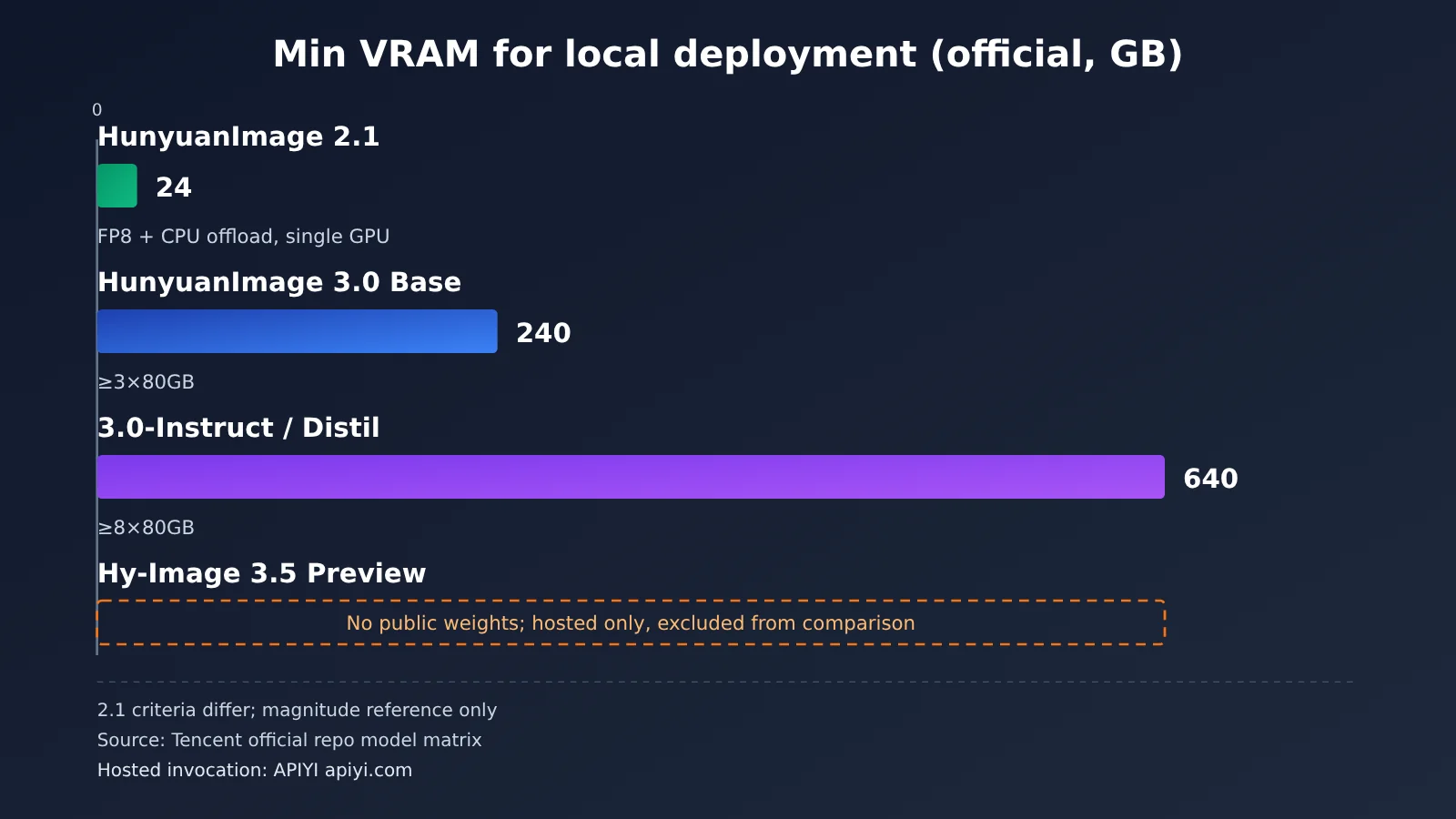
The key takeaway from this chart is the order-of-magnitude gap: 2.1 is single-GPU class, 3.0 is 3-GPU class, and Instruct is 8-GPU class. The 24 GB figure for 2.1 relies on FP8 and CPU offloading, so it uses a different basis from the other two versions; it’s only useful as an order-of-magnitude reference, not for direct comparison of exact multiples.
| Version | Release or integration date | Parameter scale | Minimum VRAM (official) | Weight files | Sampling steps | Available entry points |
|---|---|---|---|---|---|---|
| HunyuanImage 2.1 | 2025-09-08 (FP8 version 09-12) | About 17 billion | 24 GB (FP8 + CPU offload) | Multiple packaged versions | 50 / Distilled 8 | Local, ComfyUI |
| 3.0 Base | 2025-09-28 | 80 billion total / 13 billion active | ≥3×80 GB | About 169 GB | Not disclosed | Local Transformers / vLLM |
| 3.0-Instruct / Distil | 2026-01-26 | 80 billion / 13 billion | ≥8×80 GB | About 169 GB each | 50 / Distil 8 | Local |
| Hy-Image 3.5 Preview | ADP 2026-09-24 | Not disclosed | Not applicable (hosted) | No public weights | Not disclosed | TokenHub, ADP, ComfyUI remote node, APIYI apiyi.com |
4 License Check for Three Public Hunyuan Weights
2.1, the 3.0 base version, and 3.0-Instruct all come with the Tencent Hunyuan Community License. On Hugging Face, Instruct is tagged other — the accompanying license text is what actually governs. Its license header still carries the September 28, 2025 release date from 3.0.
| Clause area | Key points |
|---|---|
| Nature of the grant | A non-exclusive, non-transferable, royalty-free, limited right covering use, copying, modification, creation of derivative works, and compliant distribution |
| Geographic restrictions | Excludes the EU, the UK, and South Korea; use of generated outputs in those regions is likewise restricted |
| Scale threshold | If the licensee’s relevant product or service exceeded 100 million monthly active users in the calendar month before the release date, a separate license must be obtained from Tencent |
| Distribution obligations | Provide a copy of the license, mark modified files as changed, and attach the Notice when distributing in a non-hosted manner |
| Public-facing services | Operators must disclose their legal identity and state that they are independent of Tencent |
| Training restrictions | When using the model or its outputs to improve AI models, the scope is limited to Tencent Hunyuan and its derivative models |
| Output labeling | Appendix A requires publicly released generated content to be conspicuously labeled as machine-generated, with responsibility for use of the outputs resting with the user |
Once you’ve settled on which weights to use, it’s worth walking through your four use cases — deployment, public-facing services, redistribution, and training — one by one against the terms bundled with that specific version. 3.5 Preview runs through a hosted channel, so the relevant platform’s terms of service apply; it falls outside the scope of these three licenses.
5 Hunyuan Image Generation: Local Deployment and Division of Labor for Image Editing
| Editing Need | Input Type | Recommended Version | Who Saves the State |
|---|---|---|---|
| Generate a 2K first draft from a prompt | Text | 2.1 / 3.0 Basic | Not applicable |
| Change background or layout of an existing image | Image + instruction | 3.0-Instruct | App saves the input image |
| Fuse elements from multiple images | Multiple images + instruction | 3.0-Instruct | App saves the input images |
| Continuous multi-round edits (hosted) | Conversation history | 3.5 Preview (TokenHub) | Return assembled_history |
| 4K delivery + continuous editing (OpenAI-compatible) | Reference image array + instruction | 3.5 Preview (APIYI) | App uses the previous round’s result as the reference image |
5.1 Local Pipeline: 2.1 for Drafts, Instruct for Targeted Edits
Teams on a tight budget can split the work like this: use 2.1 to generate empty scenes or standalone display concept images, which gives you native 2K drafts; when edits are needed, hand the draft to a version that can accept images. If you have 8 GPUs locally, give it to 3.0-Instruct; if not, go with the hosted invocation described in section 5.2. The drafts from 2.1 can also serve directly as reference base images for subsequent design work.
5.2 Hosted path: Calling Hunyuan Hy-Image 3.5 Preview
APIYI launched 3.5 Preview on November 25, 2026, using the OpenAI Images-compatible protocol. The two price tiers default to 2048×2048 and 4096×4096 output respectively, and reference images are passed in through the images array. In the example below, refer to the documentation page for the model name, endpoint, and response fields; the code uses variables as placeholders.
import requests

BASE_URL = "https://api.apiyi.com/v1"   # APIYI OpenAI-compatible entry point
API_KEY = "YOUR_API_KEY"
MODEL = "YOUR_HY_IMAGE_35_MODEL"        # Use the model name from the Hunyuan image generation page at docs.apiyi.com

payload = {
    "model": MODEL,
    "prompt": "把瓶子的背景换成秋季枫林,保留瓶身原有标签文字",
    "size": "2048x2048",
    "images": ["https://example.com/bottle.png"],  # Reference image array
}
resp = requests.post(
    f"{BASE_URL}/images/generations",   # For the endpoint, refer to the reference image API documentation
    headers={"Authorization": f"Bearer {API_KEY}"},
    json=payload,
    timeout=300,
)
data = resp.json()["data"][0]
print(data.get("url") or data.get("b64_json", "")[:80])
🚀 Quick start: We recommend first using the free quota for new users on APIYI apiyi.com to get the 2K tier working, and confirming that the reference image format and response fields are fine before switching to the 4K tier. That way, you won’t end up repeatedly debugging on large images.
5.3 State Management for Iterative Image Edits
Both the local 3.0-Instruct version and the 3.5 Preview on APIYI require the app to manage multi-round state itself. The only difference is that TokenHub stitches the history together for you through assembled_history. A round log structure like this works well:
round_log = {
    "round": 3,
    "model": "hy-image-3.5-preview",       # or 3.0-Instruct + task mode
    "reference": "archive/round2_final.png",  # archived result from the previous round
    "instruction": "保持秋景背景与新包装字,仅把瓶盖改为哑光金",
    "still_valid": ["秋季枫林背景", "包装文字:Autumn Reserve"],
    "seed": 1234,
}
Two things to watch out for. First, TokenHub’s image links expire after 12 hours, so if you’re editing across days, use your own archived final image rather than relying on the historical link. Second, repeat the requirements that are still valid in the new instruction—like still_valid in the example above—so the third-round edit doesn’t lose what was already settled in the first two rounds. There’s also a difference in how 4K is defined: the ComfyUI node source code shows that outputs above 2K are first rendered at 2K and then upscaled by the model, while 4K on TokenHub and APIYI follows the file size specs in their respective docs. The APIYI apiyi.com documentation center has the full field descriptions for the reference image API, so you can check them side by side.
6 Hunyuan Image Generation Model Selection Guide
Going back to the three conditions at the start, you can directly check against the conclusions below:
- Only a single 24 GB GPU, and you just need drafts: choose 2.1.
- Have 3 × 80 GB GPUs, mainly doing batch text-to-image: choose 3.0 base version, and disable cloud prompt rewriting to ensure full self-management.
- Have 8 × 80 GB GPUs, and need local image editing or multi-image fusion: choose 3.0-Instruct; use Distil when you want speed.
- Need 4K delivery and multi-round editing, and don’t plan to build your own compute: choose 3.5 Preview. Projects previously using the hosted
hy-image-v3also need to migrate to this generation as soon as possible.
The verification method is also straightforward: use the same product image and the same set of instructions, run three rounds of edits on both local Instruct and hosted 3.5 Preview, and check whether the third round preserves the background and text locked in during the first two rounds. If you don’t have a multi-GPU environment yet, you can first run the hosted-side comparison on APIYI apiyi.com with a single Key, then decide whether to invest in local compute.
References
- Tencent HunyuanImage-2.1 repository: code, system requirements, and sampling examples
- Link:
github.com/Tencent-Hunyuan/HunyuanImage-2.1
- Link:
- Tencent HunyuanImage-3.0 repository: model matrix, base version, and Instruct usage
- Link:
github.com/Tencent-Hunyuan/HunyuanImage-3.0
- Link:
- HunyuanImage 3.0 technical report: architecture and parameter scale
- Link:
arxiv.org/abs/2509.23951
- Link:
- Tencent Cloud TokenHub invocation guide: 3.5 Preview session-based image editing, reference images, and link validity period
- Link:
cloud.tencent.com/document/product/1823/135745
- Link:
- Tencent Cloud ADP announcement: 3.5 Preview integration notes
- Link:
adp.tencent.com/zh/blog/hy-image-35-preview-tencent-adp
- Link:
- APIYI Hunyuan image generation docs: integration overview and reference image API
- Link:
docs.apiyi.com/api-capabilities/hunyuan-image/overview
- Link:
Author: APIYI Technical Team
Technical discussion: For integration questions, feel free to contact us via the APIYI apiyi.com official website; for API details, see the docs.apiyi.com documentation center.