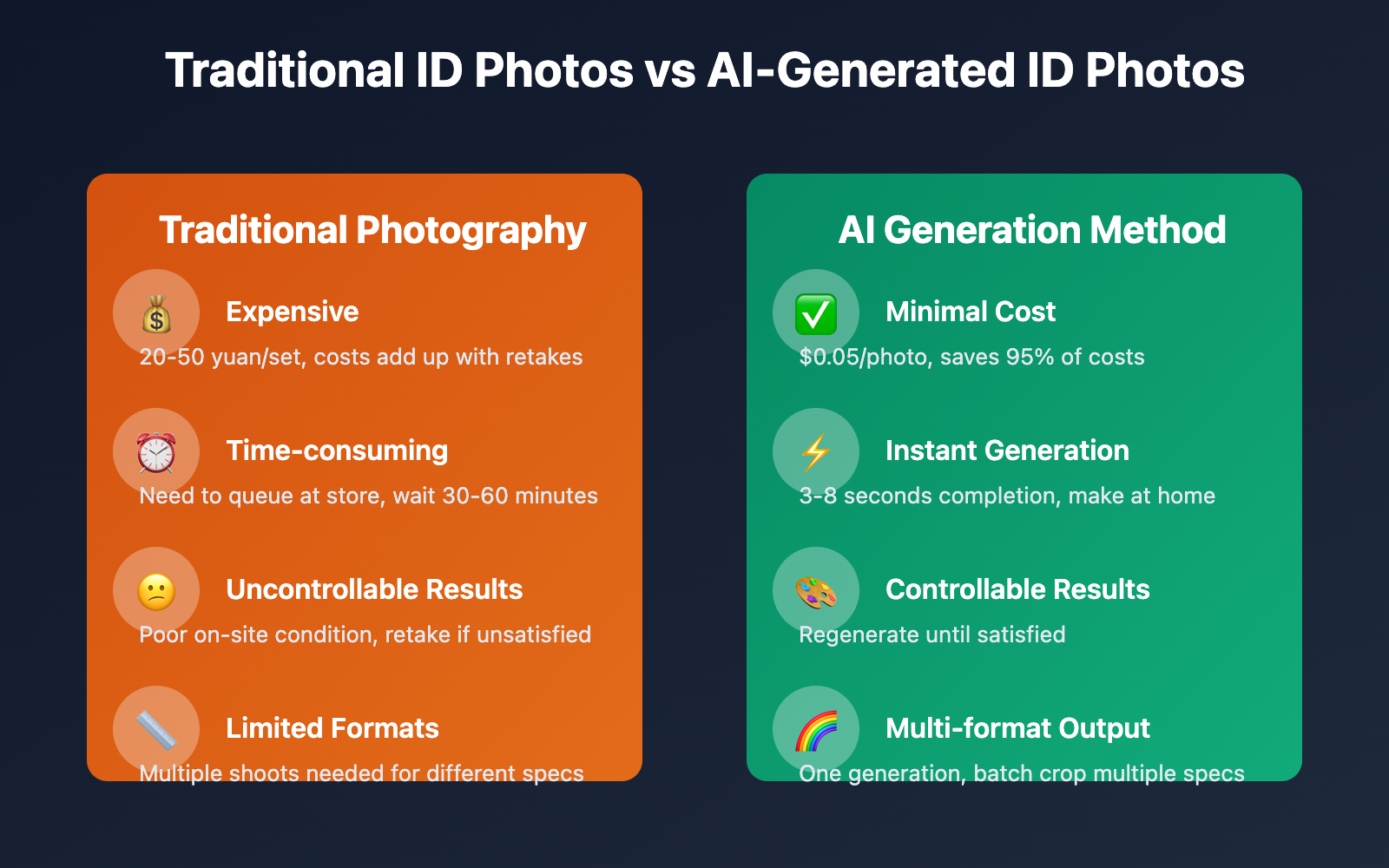
In daily life, ID photos are a high-frequency necessity—passports, visas, resumes, exam registration, social security cards and other scenarios all require standardized ID photos. Traditional photography methods are not only expensive (20-50 yuan/set), but also require queuing, uncontrollable on-site shooting results, and reshoots if unsatisfied. With the maturity of AI image generation technology, Nano Banana Pro (Gemini 3 Pro Image model) brings a completely new solution for ID photo production. This article will deeply analyze the technical applications of Nano Banana Pro in ID photo production and provide 3 verified practical methods.
Analysis of Nano Banana Pro's ID Photo Production Capabilities
Nano Banana Pro is Google DeepMind's latest AI image generation model released on November 20, 2025, hailed as the "most powerful AI version of Photoshop," achieving top-level performance in character consistency. Although it is essentially a creative image generation model, it demonstrates unique application value in ID photo production scenarios.
Core Advantages: Intelligent Background Replacement and Portrait Retouching
Nano Banana Pro's greatest value in ID photo production lies in two core capabilities:
1. One-Click Background Color Change
Through simple prompt descriptions (such as "ID photo, white background, front view, clear features, neutral expression"), any photo can be converted to standard ID photo style. The model can intelligently recognize character contours and generate clean solid-color backgrounds, even handling complex hair edges naturally and seamlessly.
2. Professional-Grade Portrait Retouching
The model automatically optimizes facial features, including even skin tone, fine-tuning facial proportions, removing blemishes, etc., generating results close to "most beautiful ID photo" effects while maintaining natural authenticity and avoiding traces of excessive retouching.
Technical Limitations: Size Specification Challenges
It's important to clarify that Nano Banana Pro, as a creative image generation tool, cannot directly meet the precise size requirements of ID photos. Standard ID photos have strict regulations for the following parameters:
- Photo dimensions (e.g., 35mm×48mm, 51mm×51mm)
- DPI resolution (typically requiring 300-600 DPI)
- Head-to-photo ratio (head should occupy 60-70% of photo height)
- Top margin (2-4mm from top of head to top edge of photo)
Therefore, Nano Banana Pro is more suitable as a preliminary material generation tool in the ID photo production workflow, combined with professional cropping and size adjustment tools to complete the final product.
🎯 Technical Recommendation: Position Nano Banana Pro as a "high-quality ID photo material generator" rather than a "one-click finished product tool". We recommend calling the Gemini 3 Pro Image API through the API易 apiyi.com platform to generate high-resolution portrait materials, then use professional tools for size cropping and specification adjustment. This platform provides stable interface services, supports 2K and 4K high-resolution output at only $0.05 per call, ensuring sufficient pixel margin for post-cropping.
3 Practical Methods for Creating ID Photos with Nano Banana Pro
Method 1: Image Master + Post-Cropping — Quick Personal Creation
Applicable Scenarios: Individual users, small batch needs, cost-effectiveness seekers
This is the simplest and most direct method, suitable for individual users who need 1-5 ID photos with different background colors.
Core Operation Process:
-
Prepare Original Photo:
- Use a phone or camera to take a front-facing half-body photo
- Requirements: Even lighting, simple background, clear facial features, natural expression
- Resolution recommendation: At least 1080p, 2K or higher recommended
-
Visit APIYI Image Master:
- Open "APIYI Image Master" at image.apiyi.com
- Upload original photo as reference image
-
Input ID Photo Prompt:
ID photo style, {background color} background, front portrait, clear facial features, natural expression, standard professional image, even lighting, no shadows, high definition, professional photography style- Replace
{background color}with: white, blue, red, or other needed colors - Select 4K resolution output to ensure post-cropping quality
- Replace
-
Generate and Download:
- Click generate, wait 3-8 seconds
- If unsatisfied with results, adjust prompt and regenerate
- Download high-resolution PNG image
-
Post-Processing:
- Use professional tools (like Photoshop, Meitu Xiuxiu, Zuotang) for:
- Crop to target size (e.g., 35mm×45mm)
- Adjust portrait ratio and position
- Set DPI to 300-600
- Add detail optimization (such as brightness and contrast fine-tuning)
- Use professional tools (like Photoshop, Meitu Xiuxiu, Zuotang) for:
Cost Analysis:
- Nano Banana Pro generation: $0.05/image (through APIYI platform)
- Post-processing tools: Free (Meitu Xiuxiu, Zuotang) or low-cost (Photoshop subscription)
- Total cost: Approximately $0.05-0.10/set (including multiple background colors)
- Compared to traditional photography: Saves 95% cost (traditional photography 20-50 yuan/set)
Advantages:
- ✅ Extremely low cost, highest cost-effectiveness
- ✅ Simple operation, no professional skills required
- ✅ Can generate repeatedly until satisfied
- ✅ Supports quick switching between multiple background colors
Limitations:
- ⚠️ Requires manual post-processing
- ⚠️ Can only generate one image at a time
- ⚠️ Not suitable for large batch needs
💡 Selection Suggestion: This method is suitable for individual users who occasionally need to update ID photos. Using Nano Banana Pro through the APIYI apiyi.com platform, 4K resolution images only cost $0.05/image. Generating multiple background color versions only costs $0.15-0.20, far lower than traditional photography fees.
Method 2: API Batch Calling + Automated Processing — Enterprise-Level Solution
Applicable Scenarios: Enterprise batch creation, HR system integration, online service platforms
For enterprises that need to create ID photos for dozens or even hundreds of employees, or online platforms providing ID photo services, API batch calling is the most efficient solution.
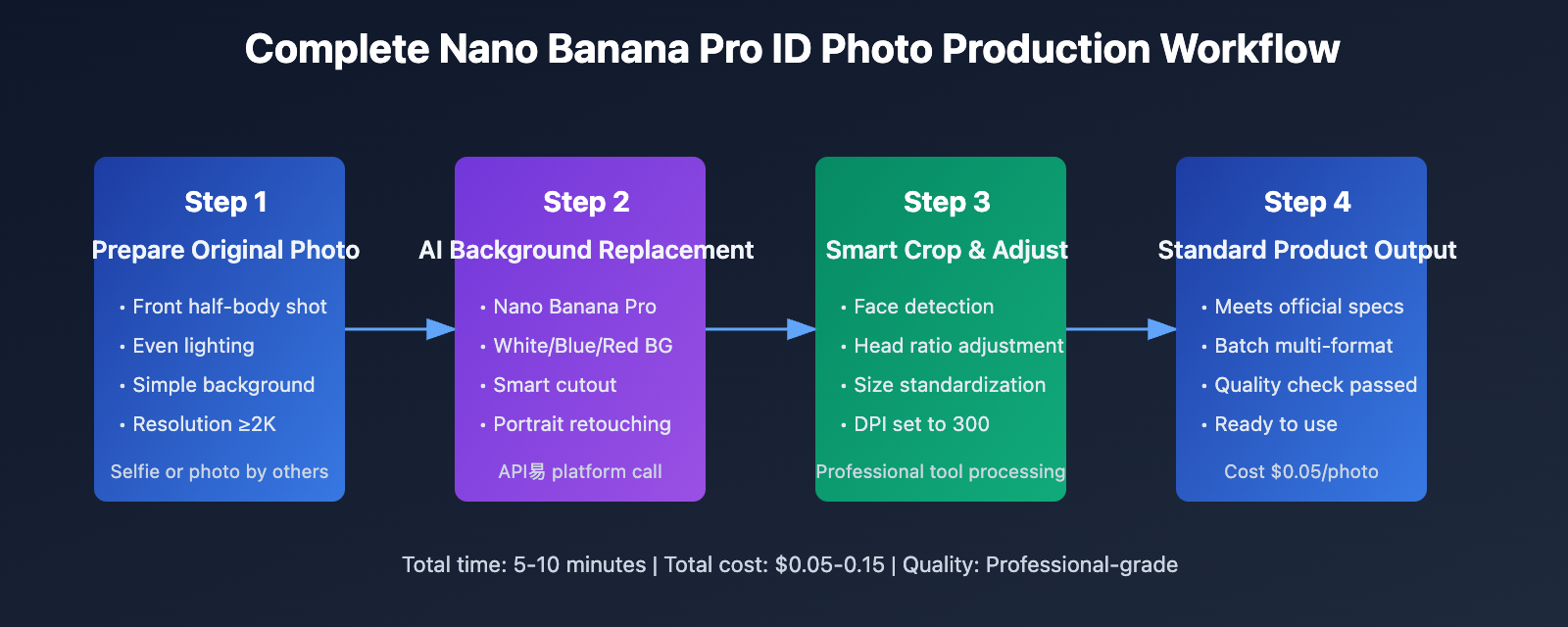
Technical Architecture:
A complete enterprise-level ID photo generation system includes:
- Original Photo Collection: Batch upload or real-time camera capture
- AI Background Replacement: Call Nano Banana Pro API to generate standard backgrounds
- Smart Cropping Module: Automatically detect face position, crop according to specifications
- Size Standardization: Batch adjust to target size and DPI
- Quality Check: Automatically filter unqualified photos
- Finished Product Export: Batch naming and archiving by employee name
Python Implementation Example:
Here's a complete batch ID photo generation script:
import requests
import base64
from PIL import Image
from pathlib import Path
import face_recognition

class IDPhotoGenerator:
    def __init__(self, api_key, base_url="https://api.apiyi.com"):
        self.api_key = api_key
        self.base_url = base_url
        self.headers = {
            "Authorization": f"Bearer {api_key}",
            "Content-Type": "application/json"
        }

    def generate_id_photo(self, input_image, background_color="white",
                         output_path=None):
        """Generate ID photo background using Nano Banana Pro"""
        # Load original image and convert to base64
        with open(input_image, "rb") as f:
            image_data = base64.b64encode(f.read()).decode()

        # Build prompt
        bg_color_map = {
            "white": "white",
            "blue": "blue",
            "red": "red"
        }

        prompt = f"""ID photo style, {bg_color_map[background_color]} solid color background,
        front portrait, clear facial features, natural expression, standard professional image,
        even lighting, no shadows, high definition, professional photography style"""

        payload = {
            "model": "gemini-3-pro-image",
            "prompt": prompt,
            "reference_images": [image_data],
            "resolution": "4096x4096",
            "num_images": 1
        }

        response = requests.post(
            f"{self.base_url}/v1/images/generations",
            headers=self.headers,
            json=payload
        )

        if response.status_code == 200:
            result = response.json()
            image_url = result["data"][0]["url"]

            # Download image
            img_response = requests.get(image_url)
            if output_path:
                with open(output_path, "wb") as f:
                    f.write(img_response.content)

            return output_path
        else:
            raise Exception(f"Generation failed: {response.status_code}")

    def smart_crop(self, image_path, output_size=(413, 531), dpi=300):
        """Smart crop to standard size (35mm×45mm = 413×531px @300DPI)"""
        # Load image
        image = Image.open(image_path)

        # Use face_recognition to detect face position
        img_array = face_recognition.load_image_file(image_path)
        face_locations = face_recognition.face_locations(img_array)

        if not face_locations:
            raise Exception("No face detected")

        # Get face position (top, right, bottom, left)
        top, right, bottom, left = face_locations[0]
        face_height = bottom - top
        face_width = right - left

        # Calculate crop area (head occupies 65% of photo height)
        target_width, target_height = output_size
        target_ratio = target_width / target_height

        # Calculate crop box based on face center
        face_center_x = (left + right) // 2
        face_center_y = (top + bottom) // 2

        # Head should occupy 65% of photo height, calculate required crop height
        crop_height = int(face_height / 0.65)
        crop_width = int(crop_height * target_ratio)

        # Calculate crop box coordinates
        crop_left = max(0, face_center_x - crop_width // 2)
        crop_top = max(0, top - int(crop_height * 0.1))  # Leave 10% space at top
        crop_right = min(image.width, crop_left + crop_width)
        crop_bottom = min(image.height, crop_top + crop_height)

        # Crop and resize
        cropped = image.crop((crop_left, crop_top, crop_right, crop_bottom))
        resized = cropped.resize(output_size, Image.LANCZOS)

        # Set DPI
        resized.info['dpi'] = (dpi, dpi)

        return resized

    def batch_process(self, input_dir, output_dir, backgrounds=["white", "blue"]):
        """Batch process ID photos"""
        Path(output_dir).mkdir(parents=True, exist_ok=True)

        input_images = list(Path(input_dir).glob("*.jpg")) + \
                      list(Path(input_dir).glob("*.png"))

        results = []
        for i, img_path in enumerate(input_images, 1):
            print(f"\nProcessing {i}/{len(input_images)}: {img_path.name}")

            base_name = img_path.stem

            for bg_color in backgrounds:
                try:
                    # Generate background
                    temp_path = f"{output_dir}/{base_name}_{bg_color}_temp.png"
                    self.generate_id_photo(
                        input_image=str(img_path),
                        background_color=bg_color,
                        output_path=temp_path
                    )

                    # Smart crop
                    cropped = self.smart_crop(temp_path)

                    # Save final result
                    final_path = f"{output_dir}/{base_name}_{bg_color}_35x45mm.jpg"
                    cropped.save(final_path, "JPEG", quality=95, dpi=(300, 300))

                    results.append({
                        "name": base_name,
                        "background": bg_color,
                        "path": final_path,
                        "status": "success"
                    })

                    print(f"✅ Completed: {bg_color} background")

                    # Delete temporary file
                    Path(temp_path).unlink()

                except Exception as e:
                    print(f"❌ Failed: {bg_color} background - {str(e)}")
                    results.append({
                        "name": base_name,
                        "background": bg_color,
                        "status": "failed",
                        "error": str(e)
                    })

        return results

# Usage example
if __name__ == "__main__":
    # Initialize generator
    generator = IDPhotoGenerator(api_key="your_apiyi_api_key_here")

    # Batch process
    results = generator.batch_process(
        input_dir="original_photos",
        output_dir="id_photos",
        backgrounds=["white", "blue", "red"]
    )

    # Statistics
    success_count = sum(1 for r in results if r["status"] == "success")
    total_count = len(results)
    total_cost = (total_count / 3) * 0.05  # Generate 3 backgrounds per original image

    print(f"\n✅ Batch processing completed!")
    print(f"Success: {success_count}/{total_count}")
    print(f"💰 Total cost: ${total_cost:.2f} (based on APIYI platform pricing)")
Cost-Benefit Analysis:
| Solution | Cost per Person | Cost for 100 People | Processing Time | Manual Intervention |
|---|---|---|---|---|
| Traditional Photography | ¥30-50 | ¥3,000-5,000 | 2-3 days | High |
| Outsourcing Services | ¥10-20 | ¥1,000-2,000 | 1-2 days | Medium |
| APIYI Platform | $0.15 (¥1) | $15 (¥100) | 1-2 hours | Very Low |
Advanced Optimization Tips:
- Concurrent Processing: Use Python
concurrent.futuresfor multi-threaded concurrent calls, improving processing speed 5-10 times - Quality Check: Integrate face detection API to automatically filter unqualified photos (closed eyes, side face, obstructions, etc.)
- Multi-Specification Output: Generate once, automatically crop to multiple common sizes (1-inch, 2-inch, 35×45mm, 51×51mm)
- Watermark and Naming: Batch add institutional watermarks, automatically name by employee ID
💰 Cost Optimization: Through batch calling on the APIYI apiyi.com platform, generating 3 background color ID photos for 100 employees costs only $15 (approximately ¥100), saving 97% compared to traditional photography. The platform supports high-concurrency calling and flexible interface configuration, making it ideal for enterprise-level batch creation scenarios.
Method 3: Hybrid Solution — Professional Tool Deep Integration
Applicable Scenarios: Pursuing ultimate quality, special specification requirements, government agency purposes
For scenarios with strict photo quality requirements such as passports and visas, Nano Banana Pro can be deeply integrated with professional ID photo tools.
Recommended Tool Combination:
- Nano Banana Pro: Generate high-quality portrait materials, optimize background and basic retouching
- Meitu Xiuxiu ID Photo: Provide standard size templates, automatic portrait ratio adjustment
- PicWish (Zuotang): AI intelligent detection of photo compliance, millimeter-precision cropping
- Photoshop (optional): Professional-grade detail optimization
Workflow:
Original Photo
  ↓
Nano Banana Pro (Background Replacement + Initial Retouching)
  ↓
Meitu Xiuxiu/PicWish (Size Cropping + Specification Adjustment)
  ↓
Quality Check (AI Automatic Detection of Standard Compliance)
  ↓
Final Product
Key Quality Control Points:
- Lighting Uniformity: When generating with Nano Banana Pro, emphasize "even lighting, no shadows, professional studio lighting" in prompt
- Natural Skin Tone: Avoid excessive beautification, maintain realistic skin tone
- Facial Feature Clarity: Ensure eyebrows, eyes, nose, and mouth contours are clear, not obscured by hair
- Portrait Ratio: Strictly control head occupying 60-70% of photo height
- Top Distance: Top of head to photo upper edge 2-4mm (depending on specific specifications)
🎯 Professional Recommendation: For official purposes such as passports and visas, it's recommended to adopt the hybrid solution of "Nano Banana Pro material generation + professional tool retouching". Generate 4K high-resolution materials through the APIYI apiyi.com platform, then use Meitu Xiuxiu or PicWish for standardized processing, ensuring quality while significantly reducing costs.
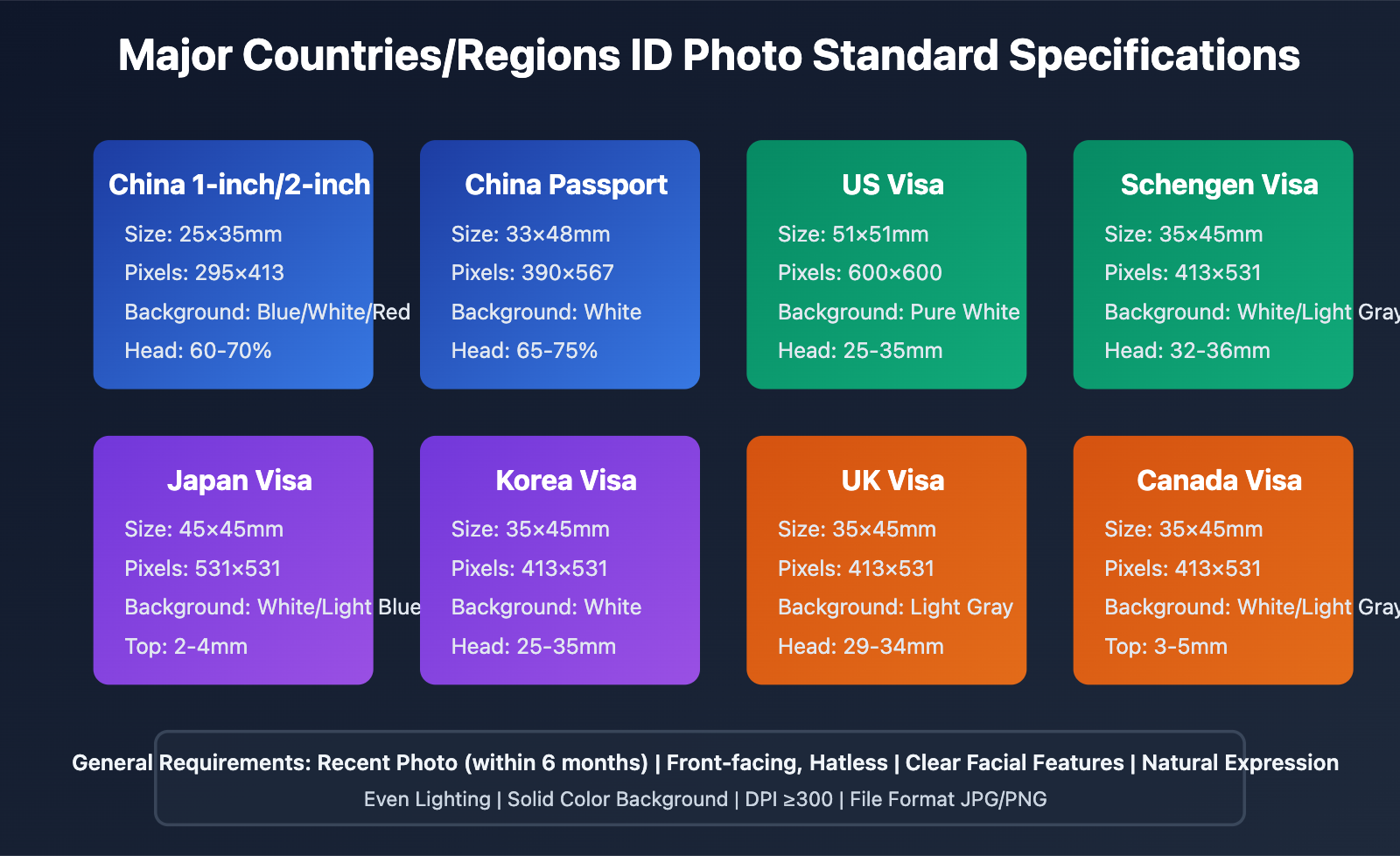
ID Photo Standard Specifications Guide by Country
ID photos have different specification requirements depending on the country and purpose. Below is a comparison table of commonly used specifications:
Common Sizes in China
| Purpose | Size (mm) | Pixels (300DPI) | Background Color |
|---|---|---|---|
| 1 inch | 25×35 | 295×413 | Blue/White/Red |
| Small 1 inch | 22×32 | 260×378 | Blue/White |
| Large 1 inch | 33×48 | 390×567 | Blue/White |
| 2 inch | 35×49 | 413×579 | Blue/White/Red |
| Small 2 inch | 35×45 | 413×531 | White |
| ID Card | 26×32 | 358×441 | White |
| Passport | 33×48 | 390×567 | White |
International Visa Sizes
| Country/Region | Size (mm) | Pixels (300DPI) | Background Color | Special Requirements |
|---|---|---|---|---|
| USA | 51×51 | 600×600 | White | Head 25-35mm |
| Schengen Countries | 35×45 | 413×531 | White/Light Gray | Head 32-36mm |
| UK | 35×45 | 413×531 | Light Gray | Head 29-34mm |
| Japan | 45×45 | 531×531 | White/Light Blue | Top margin 2-4mm |
| South Korea | 35×45 | 413×531 | White | Head 25-35mm |
| Canada | 35×45 | 413×531 | White/Light Gray | Top margin 3-5mm |
| Australia | 35×45 | 413×531 | Light Color | Head 32-36mm |
| Singapore | 35×45 | 413×531 | White | Head 25-35mm |
Background Color Standards
| Background Color | RGB Value | Purpose |
|---|---|---|
| Pure White | (255, 255, 255) | Passport, Visa, Driver's License, ID Card |
| Light Gray | (240, 240, 240) | Some European country visas |
| Blue | (67, 142, 219) | Graduation certificate, work permit, resume |
| Dark Blue | (0, 102, 204) | Some qualification certificates |
| Red | (255, 0, 0) | Marriage certificate, party member card |
General Quality Requirements
All ID photos must meet the following basic requirements:
- ✅ Recently taken (within 6 months)
- ✅ Front-facing without headwear, eyes looking directly at camera
- ✅ Facial features clear and complete, not covered by hair
- ✅ Both ears visible (required by some countries)
- ✅ Natural expression, slight smile without showing teeth or neutral
- ✅ No sunglasses or tinted glasses
- ✅ Plain solid background, no patterns or shadows
- ✅ Even lighting, no obvious shadows
- ✅ Appropriate attire, avoid white clothing (for white background photos)
💡 Practical Tip: When using Nano Banana Pro to generate ID photo materials, clearly specify the target purpose (such as "US visa ID photo") and specification requirements in the prompt to improve generation quality. Through the API易 apiyi.com platform, you can quickly generate versions with multiple specifications and background colors, generating a complete set of backups in one go.
ID Photo Quality Optimization Techniques
Technique 1: Original Photo Quality Control
Shooting Environment Preparation:
- Choose an environment with even lighting (natural light or soft light)
- Background should be as simple as possible (plain wall is best)
- Camera/phone distance from subject: 1-1.5 meters
- Lens height aligned with eye level
Subject Preparation:
- Arrange hair to expose complete facial features
- Choose dark colored clothing (blue/black/gray), avoid white
- Natural and relaxed expression, eyes looking straight at camera
- Upright posture, level shoulders
Shooting Techniques:
- Use portrait mode or shallow depth of field to blur background
- Take several shots and select the best result
- Ensure focus is on the eyes, image is clear and sharp
Technique 2: Nano Banana Pro Prompt Optimization
Basic Template:
ID photo, {background color} solid background, front portrait, clear facial features, natural expression,
standard professional image, even lighting, no shadows, high definition, professional photography style
Advanced Optimization:
Professional ID photo, {background color} (RGB {specific values}) solid background, standard front portrait,
complete and clear facial features, distinct eyebrow-eye-nose-mouth contours, natural skin tone, no excessive beautification,
dignified and natural expression, slightly closed lips, eyes looking straight ahead,
even soft lighting, no facial shadows, clear hairline,
formal attire, dark colored top, neat neckline,
compliant with {country/purpose} ID photo standards, professional studio quality, 4K ultra HD
Precise Background Color Control:
- Pure white background:
background-color: rgb(255, 255, 255), pure white, no gradient - Standard blue background:
background-color: rgb(67, 142, 219), standard blue - US visa white background:
background-color: rgb(255, 255, 255), US passport photo white background
Technique 3: Golden Rules for Post-Processing Cropping
Head Proportion Calculation:
- Use face detection library (such as OpenCV, face_recognition) to locate facial features
- Calculate face height (from chin to hairline)
- Crop height = Face height / 0.65 (ensure head occupies 65%)
- Crop width = Crop height × Target aspect ratio
Top Margin Control:
- Detect highest point of hairline
- Top margin = Crop height × 0.05-0.08 (5-8%)
- For 35×45mm specification, leave 2-4mm at top
Python Automation Example:
def calculate_crop_box(face_location, target_size=(413, 531)):
    top, right, bottom, left = face_location
    face_height = bottom - top

    # Head should occupy 65%
    crop_height = int(face_height / 0.65)
    crop_width = int(crop_height * (target_size[0] / target_size[1]))

    # Leave 7% at top
    crop_top = top - int(crop_height * 0.07)
    crop_left = (left + right) // 2 - crop_width // 2

    return (crop_left, crop_top, crop_left + crop_width, crop_top + crop_height)
Technique 4: Batch Quality Inspection
For batch-generated ID photos, it is recommended to implement automated quality inspection:
Inspection Items:
- Face Detection: Ensure one and only one face is detected
- Facial Feature Completeness: Check if eyebrows, eyes, nose, and mouth are completely visible
- Head Proportion: Calculate percentage of photo height occupied by head
- Background Purity: Detect if background is a single color
- Lighting Evenness: Analyze if facial lighting is even
- Resolution Check: Ensure DPI requirements are met
Python Implementation Example:
def quality_check(image_path):
    """Automatic ID photo quality check"""
    issues = []

    # 1. Face detection
    img = face_recognition.load_image_file(image_path)
    faces = face_recognition.face_locations(img)

    if len(faces) == 0:
        issues.append("No face detected")
    elif len(faces) > 1:
        issues.append("Multiple faces detected")

    if len(faces) == 1:
        # 2. Head proportion check
        top, right, bottom, left = faces[0]
        face_height = bottom - top
        image_height = img.shape[0]
        ratio = face_height / image_height

        if ratio < 0.6 or ratio > 0.75:
            issues.append(f"Head proportion non-compliant: {ratio:.2%} (should be 60-70%)")

        # 3. Facial feature detection
        landmarks = face_recognition.face_landmarks(img)[0]
        required_features = ['left_eye', 'right_eye', 'nose_tip', 'top_lip']

        for feature in required_features:
            if feature not in landmarks:
                issues.append(f"{feature} not detected")

    # 4. Background purity check (simplified version, check color variance in background region)
    background_region = img[0:50, 0:50]  # Take top-left corner region
    color_variance = background_region.std()

    if color_variance > 15:
        issues.append(f"Background not pure enough, color variance: {color_variance:.2f}")

    # 5. Resolution check
    pil_img = Image.open(image_path)
    dpi = pil_img.info.get('dpi', (72, 72))

    if dpi[0] < 300:
        issues.append(f"DPI too low: {dpi[0]} (should be ≥300)")

    return {
        "pass": len(issues) == 0,
        "issues": issues
    }
🚀 Automation Recommendation: Integrate quality inspection into the batch generation workflow, automatically flag non-compliant photos and regenerate them to ensure 100% of final delivered ID photos meet standards. Through the flexible API of the API易 apiyi.com platform, you can easily implement automated retry and quality control logic.
Frequently Asked Questions
Can ID photos generated by Nano Banana Pro be directly used for official purposes?
Direct use is not recommended. While Nano Banana Pro generates high-quality portrait materials, they may not fully meet the precise specification requirements for official ID photos (size, DPI, head ratio, etc.).
Correct approach:
- Use Nano Banana Pro to generate high-resolution portrait materials
- Use professional tools (Meitu XiuXiu, Zuotang, Photoshop) for standardized cropping
- Strictly adjust size and proportions according to official specifications for the intended use
- Confirm DPI is set to 300-600 before printing
For important official uses like passports and visas, it's recommended to consult the relevant authorities to confirm the final product meets requirements.
How to ensure the generated ID photo background color fully complies with standards?
Standard ID photos have precise RGB value requirements for background colors, which Nano Banana Pro may not guarantee at the pixel level.
Solutions:
-
Solution 1: After generating with Nano Banana Pro, use Photoshop or Python PIL library to replace background color with precise RGB values
from PIL import Image import numpy as np def replace_background(image_path, target_rgb=(255, 255, 255)): img = Image.open(image_path) img_array = np.array(img) # Detect background area (simplified: pixels with similar colors) # In practice, more precise matting algorithms should be used mask = np.all(np.abs(img_array - img_array[0, 0]) < 20, axis=-1) # Replace background color img_array[mask] = target_rgb return Image.fromarray(img_array) -
Solution 2: Use professional matting tools (Zuotang, remove.bg) to extract the portrait first, then add a background with precise colors
💡 Technical Recommendation: After generating initial materials through the apiyi.com platform, use Python scripts to batch replace background colors with standard RGB values, ensuring both quality and compliance. The platform supports 4K high-resolution output, providing ample pixel margin for post-processing.
Different countries have different visa photo requirements, how to quickly generate multiple versions?
Establish a standardized prompt template library and cropping specification configuration, then automate generation through scripts.
Configuration File Example (id_photo_specs.json):
{
  "us_visa": {
    "size_mm": [51, 51],
    "size_px": [600, 600],
    "dpi": 300,
    "background": "rgb(255, 255, 255)",
    "head_ratio": [0.50, 0.69],
    "head_top_mm": [3, 5]
  },
  "schengen": {
    "size_mm": [35, 45],
    "size_px": [413, 531],
    "dpi": 300,
    "background": "rgb(255, 255, 255)",
    "head_ratio": [0.70, 0.80],
    "head_top_mm": [2, 4]
  },
  "china_passport": {
    "size_mm": [33, 48],
    "size_px": [390, 567],
    "dpi": 300,
    "background": "rgb(255, 255, 255)",
    "head_ratio": [0.65, 0.75],
    "head_top_mm": [2, 4]
  }
}
Automation Script:
import json

def generate_multi_spec_photos(input_image, output_dir, specs_file="id_photo_specs.json"):
    """Generate multiple specification ID photos based on configuration file"""
    with open(specs_file) as f:
        specs = json.load(f)

    generator = IDPhotoGenerator(api_key="your_apiyi_api_key")

    results = {}
    for spec_name, spec in specs.items():
        print(f"Generating {spec_name} specification...")

        # 1. Generate material with background replacement
        temp_path = f"{output_dir}/temp_{spec_name}.png"
        generator.generate_id_photo(input_image, "white", temp_path)

        # 2. Crop according to specifications
        output_path = f"{output_dir}/{spec_name}.jpg"
        cropped = generator.smart_crop(
            temp_path,
            output_size=tuple(spec['size_px']),
            dpi=spec['dpi']
        )
        cropped.save(output_path, dpi=(spec['dpi'], spec['dpi']))

        results[spec_name] = output_path
        print(f"✅ Completed: {output_path}")

    return results

# Usage
results = generate_multi_spec_photos("my_photo.jpg", "multi_spec_output")
print(f"\nGenerated {len(results)} specifications of ID photos")
Generate once, automatically output multiple specifications including US visa, Schengen visa, China passport, etc., significantly improving efficiency.
How to batch print generated ID photos?
Solution 1: Professional Printing Services
- Send JPG files (300 DPI) meeting specifications to online printing services (like Taobao ID photo printing)
- Cost: approximately ¥0.5-1 per sheet (8 photos)
Solution 2: Self-Service Printing
- Use A4 layout tools (such as Photoshop, Python reportlab) to arrange multiple ID photos on A4 paper
- Print using a photo printer (300 DPI or higher)
- Precisely cut
Python A4 Layout Example:
from PIL import Image

def layout_a4(id_photos, output_path="a4_layout.jpg"):
    """Arrange ID photos on A4 paper"""
    # A4 size: 210×297mm = 2480×3508px @300DPI
    a4_width, a4_height = 2480, 3508
    a4 = Image.new('RGB', (a4_width, a4_height), (255, 255, 255))

    # Load ID photos
    photos = [Image.open(p) for p in id_photos]

    # Arrange (4 rows, 2 columns, total 8 photos)
    margin = 100
    x_positions = [margin, a4_width // 2 + margin // 2]
    y_positions = [margin + i * (photos[0].height + margin) for i in range(4)]

    idx = 0
    for y in y_positions:
        for x in x_positions:
            if idx < len(photos):
                a4.paste(photos[idx], (x, y))
                idx += 1

    a4.save(output_path, dpi=(300, 300))
    print(f"✅ A4 layout completed: {output_path}")

# Usage
layout_a4([
    "white_bg.jpg", "white_bg.jpg", "white_bg.jpg", "white_bg.jpg",
    "blue_bg.jpg", "blue_bg.jpg", "blue_bg.jpg", "blue_bg.jpg"
])
💰 Cost Advantage: By generating ID photo materials through the apiyi.com platform, combined with self-service layout and printing, the cost per finished photo can be as low as ¥0.1-0.2, saving 99% compared to traditional photo studios (¥20-50), representing significant savings.
How to handle special situations (wearing glasses, hair obstruction, etc.)?
Wearing Glasses:
- Most countries allow regular glasses, but not tinted glasses or sunglasses
- Ensure lenses have no glare and eyes are clearly visible
- Emphasize in Nano Banana Pro prompts: "wearing regular glasses, no reflection on lenses, eyes clearly visible"
Hair Obstruction:
- Bangs should not cover eyebrows and eyes
- Long hair should be arranged behind ears, exposing both ears (required by some countries)
- Add to prompt: "hair neatly styled, forehead and eyebrows fully visible, ears exposed"
Religious Headwear/Accessories:
- Some countries allow religious headwear, but must ensure full face is visible
- Prompt: "religious headwear, full facial features visible, no shadow on face"
Children's ID Photos:
- Infants may not be able to maintain standard posture
- Recommend taking multiple shots, then use Nano Banana Pro to optimize background on the best one
- Prompt: "child portrait, natural expression, eyes open looking forward"
Summary and Outlook
Nano Banana Pro brings revolutionary convenience and cost advantages to ID photo production, transforming from "must go to a photo studio" to "can complete at home". The three methods introduced in this article each have their characteristics:
- Method 1 (ImageFX + Post-Cropping): Suitable for individual users, lowest cost, simplest operation
- Method 2 (API Batch Calling + Automation): Suitable for enterprises and institutions, highest efficiency, can be integrated into existing systems
- Method 3 (Hybrid Solution): Suitable for official uses pursuing ultimate quality, most reliable quality
Which method to choose depends on specific needs: use case, volume scale, quality requirements, and technical capability. For ordinary individual users, Method 1 is recommended; for corporate HR or online service platforms, Method 2 is the best choice; for official uses like passports and visas, Method 3 is most reliable.
With continuous advancement of AI image generation technology, future ID photo production will become more intelligent:
- One-click Standard Product Generation: Directly output ID photos meeting official specifications without post-processing
- Real-time Quality Detection: AI automatically detects and prompts non-compliance items, adjusting in real-time
- AR Virtual Shooting: Preview ID photo effects in real-time through AR technology, guiding users to adjust posture
- Blockchain Authentication: ID photos authenticated upon generation, anti-counterfeiting and traceable
🎯 Action Recommendation: Visit the apiyi.com platform immediately to start your AI-driven ID photo production journey. Whether for individual temporary needs or enterprise batch production, the platform can provide stable, low-cost Gemini 3 Pro Image API services, with ID photo costs as low as $0.05 per photo, helping reduce your ID photo production costs by over 95%.