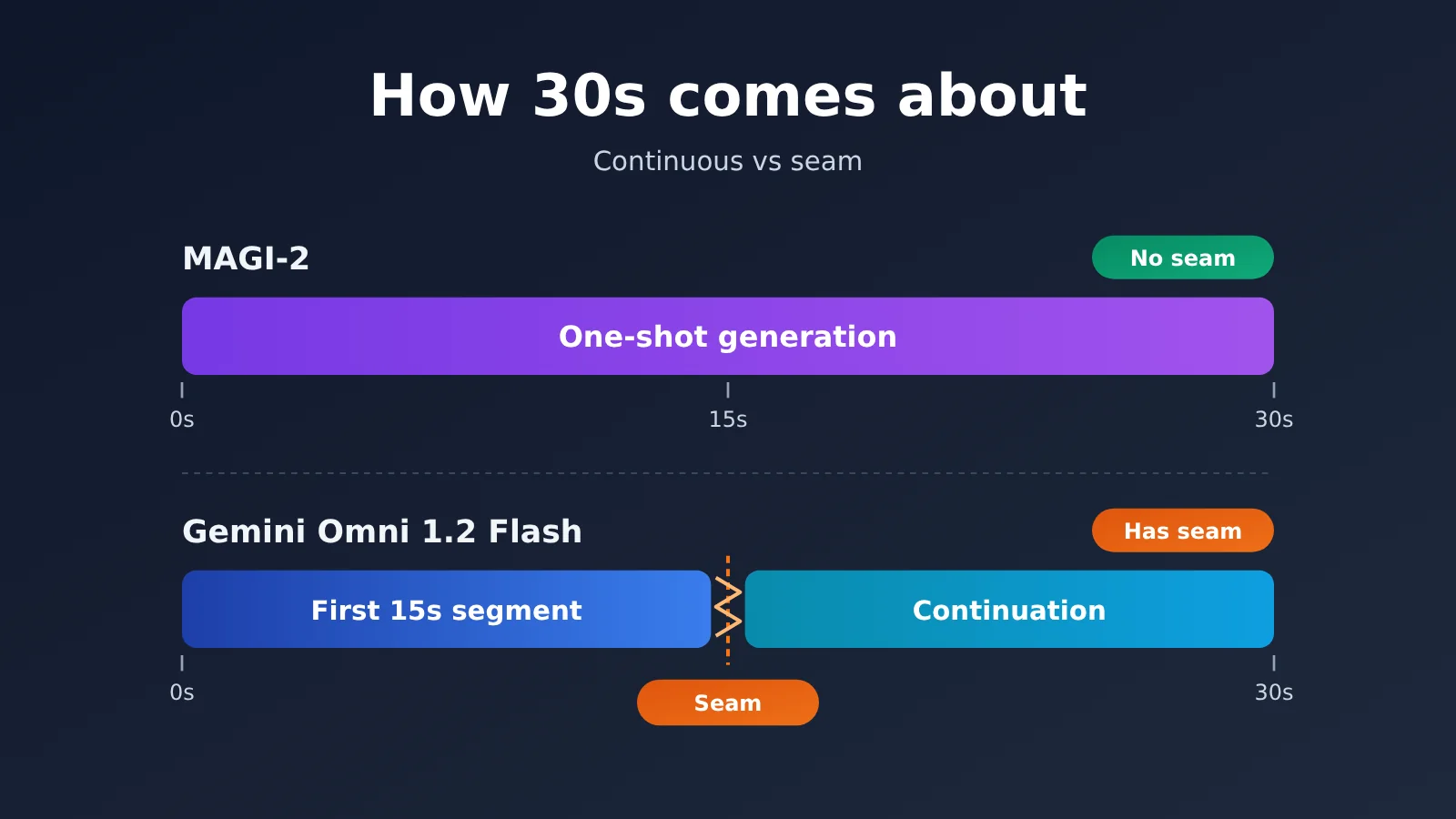
They both say “up to 30 seconds,” but these two AI video models get there in very different ways. MAGI-2 can generate 30 seconds in a single pass, while Gemini Omni 1.2 Flash tops out at 15 seconds per generation and reaches the remaining time through continuation. For ordinary short shots, the difference is barely noticeable. But for a one-take sequence, it affects character memory, audio continuity, and rework costs.
MAGI-2 was released by Sand.ai on 2026-11-24, debuting on the Higgsfield platform and its API. Gemini Omni 1.2 Flash was released and reached GA on 2026-11-05, and its official model ID is gemini-omni-1.2-flash. This article compares only “single-pass generation” and “segmented continuation,” based on official documentation, vendor-reported claims, and third-party statements with cited sources.
Key takeaway: After reading this, you’ll be able to choose which 30-second mechanism fits a given shot type, and tell the difference between duration, reference assets, 1080p source, pricing, and API boundaries.
MAGI-2 vs. Gemini Omni 1.2 Flash: Core Differences
Let’s start with a four-point comparison. Here, “advantage” only refers to 30-second long takes; it doesn’t mean one model wins overall.
| Comparison dimension | MAGI-2 | Gemini Omni 1.2 Flash | 30-second scenario takeaway |
|---|---|---|---|
| Duration mechanics | Up to 30 seconds in a single generation | 3–15 seconds per generation; each extension round adds 3–10 seconds, up to 30 seconds total | MAGI-2 is better suited to continuous shots |
| Reference inputs | Up to 20: 10 images, 5 videos, 5 audio clips | Up to 6 images, plus separate reference-video limits; the API doesn’t accept audio | MAGI-2 supports broader inputs |
| 1080p source | Latent spatiotemporal upscaling, with reference images re-injected | Native 360p / 720p; 1080p via upsampling | Neither is native 1080p |
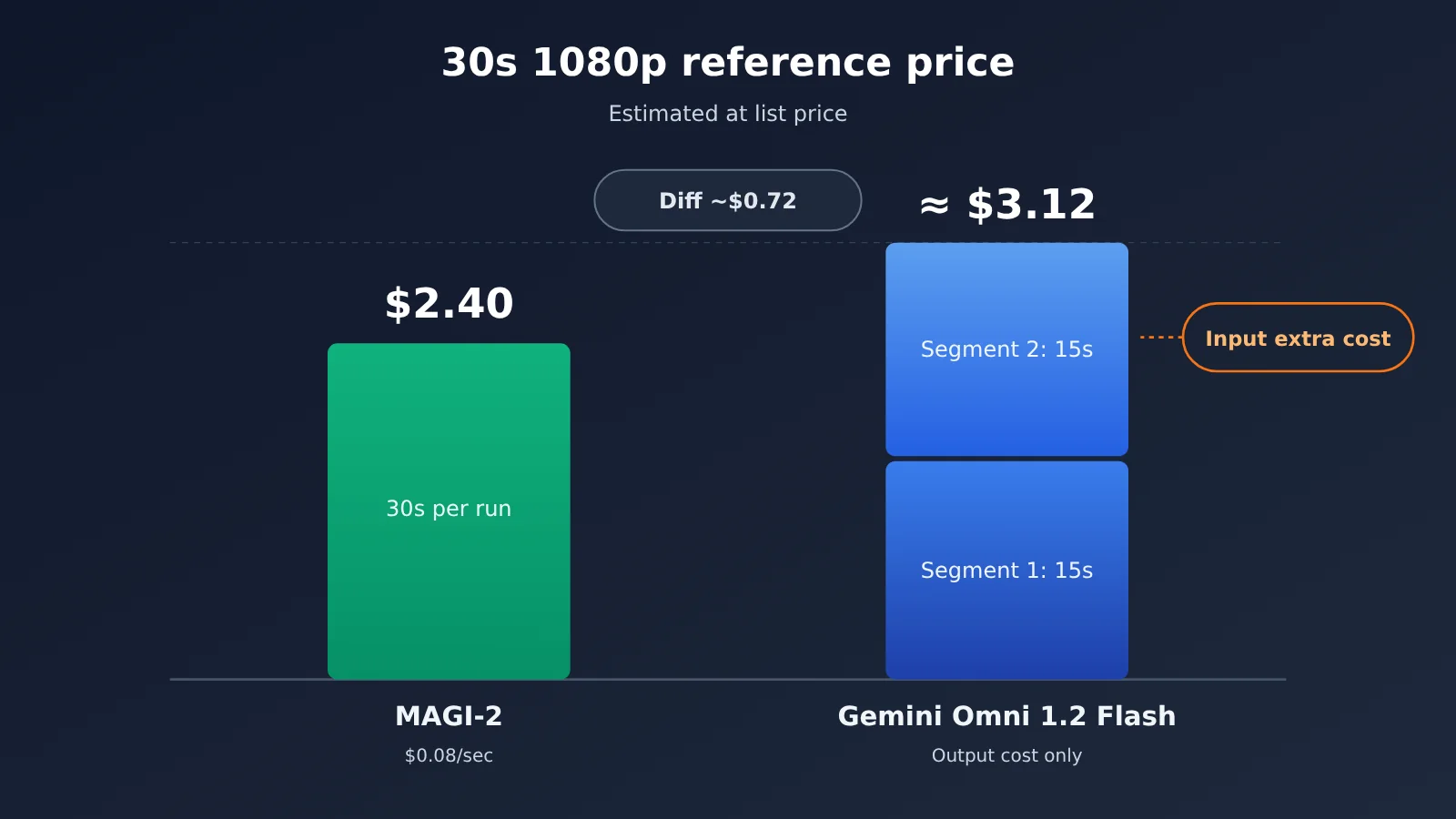
| 30-second 1080p reference price | $2.40 | About $3.12 for output | MAGI-2 has lower list pricing |
The capabilities in the table are based on vendor claims. MAGI-2’s figures come from Sand.ai’s technical blog and launch post; Gemini’s specs come from Google’s official documentation. Specs don’t directly equate to final output quality.
How to Understand Gemini Omni 1.2 Flash’s “Two Segments”
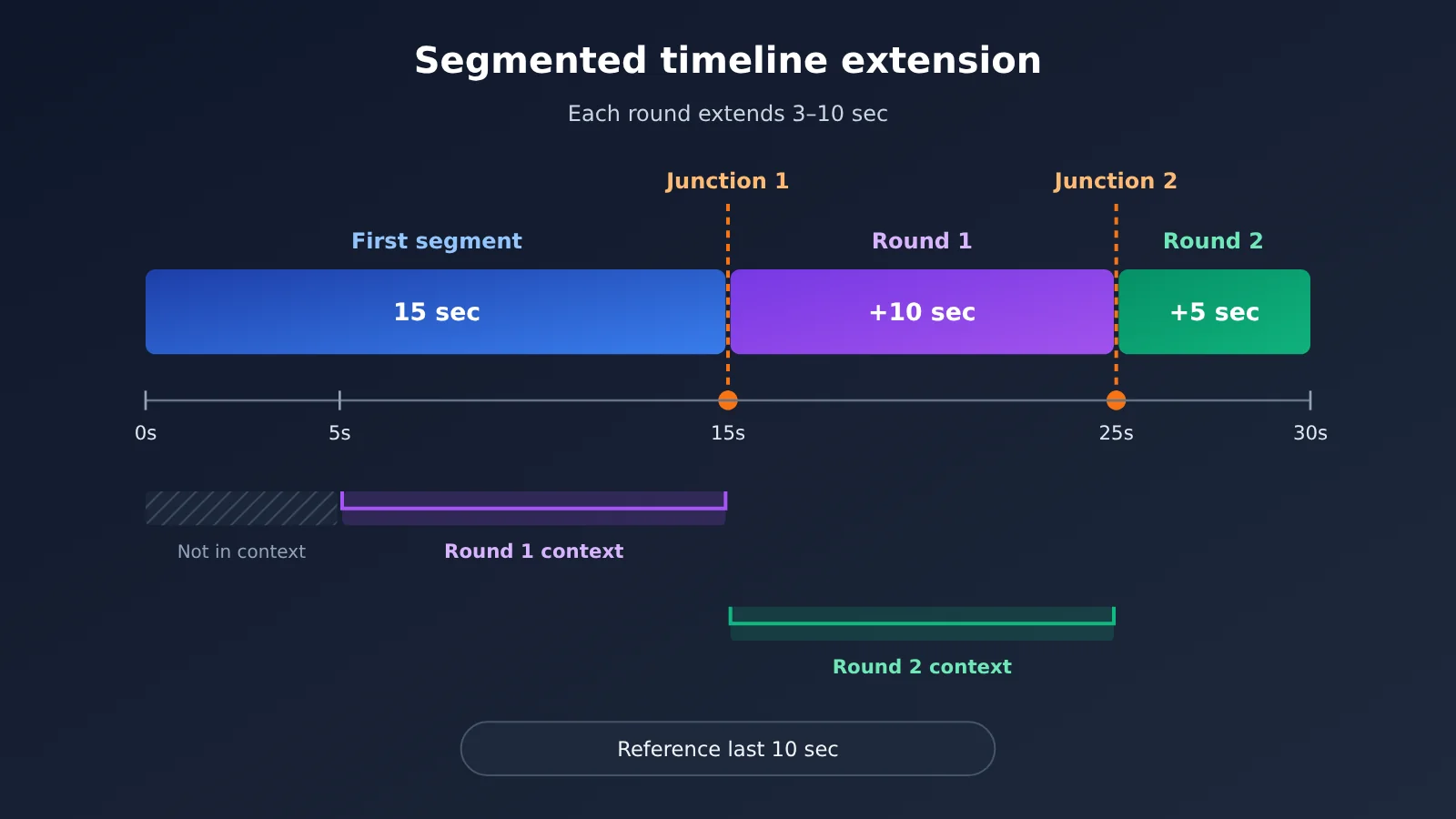
The common framing is “15 seconds plus another 15 seconds,” but there’s an easy-to-miss restriction in the official specs: each extension round is only 3–10 seconds. If you strictly use the extension feature, going from 15 seconds to 30 seconds takes at least two rounds—for example, 15 seconds + 10 seconds + 5 seconds—which leaves two join points.
Another approach is to generate two separate 15-second segments and combine them in editing software. That does give you only one join point, but the second segment isn’t the model’s native extension. This article uses two 15-second segments for pricing to keep total duration consistent; when planning production, you should budget time based on the actual number of extension steps.
What Happens When MAGI-2 Generates in a Single Pass on the Final Cut
Gemini uses the last 10 seconds as context when it extends. Following that mechanism, the information from the first 5 seconds of a 15-second opening segment isn’t part of the context in the first extension round. If a prop only shows up at the start, drops out of frame, and then reappears after the continuation, it needs manual verification even more.
MAGI-2 packs 30 seconds into a single task, and picture and sound are generated simultaneously by one backbone, covering dialogue lip-sync, Foley, ambient sound, and music. It sidesteps the junctions between tasks, but “no seams” doesn’t mean “no drift”: Sand.ai itself admits that extremely high-speed motion occasionally has trajectory and continuity issues, and complex soundscapes still fall short on layering and physical realism.
| Production Stage | MAGI-2 One 30-Second Pass | Gemini Omni 1.2 Flash Segmented Continuation |
|---|---|---|
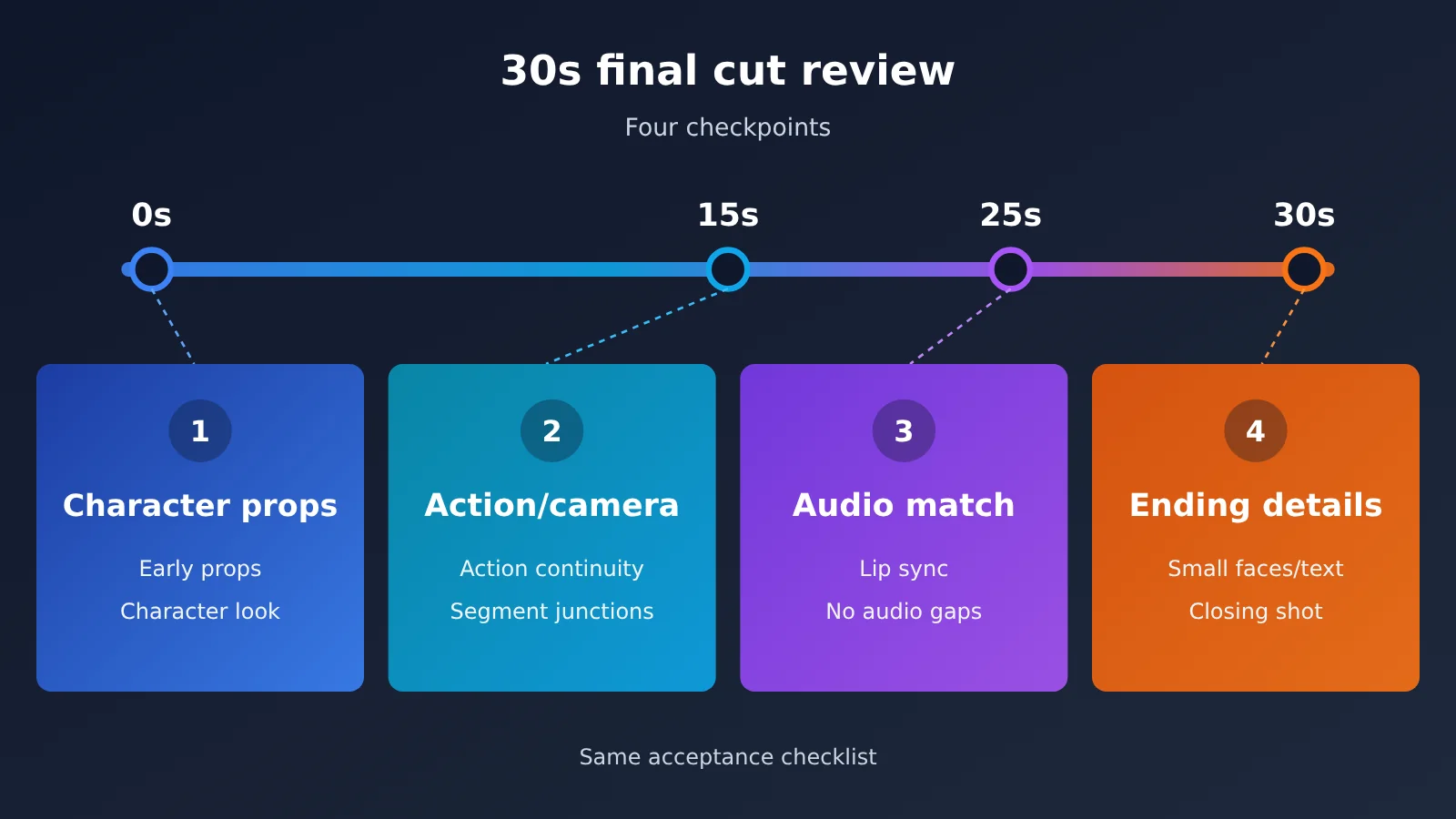
| Action continuity | No junction between tasks | Focus checks on the 15s and 25s marks |
| Early information | Planned within a single task | Extension references the last 10 seconds |
| Audio check | Listen to the whole segment once | Also check rhythm and ambient sound at the junctions |
| Rework unit | Regenerate the whole thing, or try targeted editing | Keep the satisfactory early part and redo the later part |
| Pacing control | Can specify cut times and shot sizes | Suited to advancing segment by segment after confirmation |
So segmentation isn’t always a bad thing. When the first 15 seconds are already satisfactory, redoing only the later portion can be easier to control than re-rolling the whole thing; what truly struggles with seams is the shot where action, camera movement, and dialogue happen to cross the junction.
MAGI-2 and Gemini Omni 1.2 Flash: Neither Offers Native 1080p
MAGI-2’s 1080p goes through a latent spatiotemporal upscaler—spatiotemporal upscaling in latent space. During upscaling, it re-injects the original reference image, and the company says this helps improve small-face consistency and text clarity in 30-second long takes.
Gemini’s native tiers are 360p and 720p, while 1080p and 4K both use upsampling. The two take different technical paths, but neither generates native 1080p, so you can’t judge which is more “real” based on the resolution label alone. When comparing sample clips, look at small faces, signage text, texture flicker, and motion edges—not just the export size.
Scene Recommendations for MAGI-2 and Gemini Omni 1.2 Flash
When picking a model, first mark the parts of the shot that can’t be cut, then look at the reference material. Just because the model can stretch to 30 seconds doesn’t mean your action is right to cut at that point.
When MAGI-2 Fits Best
- Continuous camera movement: the camera moves through multiple spaces, the action spans 15 seconds, and there’s no suitable edit point midway.
- Audio-driven storytelling: dialogue, music, or audio references need to be planned together with the visuals.
- Multiple reference constraints: you have lots of character, scene, action, and audio references, and need mixed image, video, and audio input.
- Timed shot changes: you need to cut to a specific framing at a specific second, rather than just extending the image continuously.
MAGI-2 supports six aspect ratios, 25 fps, and targeted editing of existing video. Be careful with medium-to-long-shot 2D animation; the company acknowledges that its local motion can be too smooth.
When Gemini Omni 1.2 Flash Fits Best
- Your shot is already within 15 seconds: it supports 1-second increments, so you don’t have to pay for long-duration features.
- You can review in segments: approve the first segment, then decide whether to continue—good for stories that move beat by beat.
- You need a 720p preview or a 4K output tier: 720p is native; 4K still uses upsampling.
- You already have a Google API workflow: your team can adopt the Interactions API and doesn’t depend on audio references.
It has only 16:9 and 9:16 aspect ratios, and its output carries a SynthID watermark. Reference images top out at 6, covering up to 2 characters with 3 images each; 11–15-second reference videos allow only 1, while the 3–10-second tier allows 3, each no longer than 3 seconds. English is fully supported; other languages are officially marked as not evaluated, so Chinese-language projects should validate with short shots first.
Reference material tip: start by listing the actual number of images, videos, and audio files, then check same-type models in the model documentation at APIYI apiyi.com. Being able to upload more assets doesn’t mean each asset will be accurately followed; for the first round, it’s best to keep only the necessary references that affect characters and action.
MAGI-2 vs. Gemini Omni 1.2 Flash Pricing
You need to look at the pricing in three separate buckets: MAGI-2’s launch per-second price, the vendor’s official list price, and APIYI’s actual on-platform price. The models, billing methods, and sales channels are different, so you can’t blend them into one “average price per second.”
The 30-Second 1080p Math for MAGI-2 vs. Gemini Omni 1.2 Flash
| Item | Billing basis | 30-second 1080p reference price | Notes |
|---|---|---|---|
| MAGI-2 launch price | $0.08/second | $2.40 | Based on the 2026-11-24 announcement |
| Gemini official list price | About $0.104/second | About $3.12 | Combined total for two 15-second outputs |
The gap is about $0.72, and MAGI-2 comes out lower in this example. Gemini’s official basis is $12 per 1 million tokens for video output, with 8688 tokens per second at 1080p; input is billed separately at $1.50 per 1 million tokens, and there’s no free tier. So the $3.12 excludes input and excludes redoing failed clips.
Retries can change the math. At list price, redoing the entire MAGI-2 video once adds another $2.40; if Gemini only has to redo one 10-second 1080p output, that’s about $1.04 more, with input billed separately. You should track “how much it took to get one usable final video,” not just the first submission.
There’s an even bolder claim online: X user @chetaslua said on 2026-11-24 that MAGI-2 covers about 90% of Seedance 2.5’s use cases and is nearly 6.5× cheaper. That’s just one person’s take; don’t use it as a budgeting basis.
Similar MAGI-2 Options: APIYI’s Actual On-Platform Prices
As of our 2026-11-25 check, APIYI (apiyi.com) had 278 online models. MAGI-2 isn’t listed yet, but we’ll add it to the platform as soon as possible; model availability and pricing are subject to the platform’s model list.
Google-family video currently has no channel on APIYI. The VEO 3.1 official relay was announced as discontinued on 2026-11-09. This refers to the APIYI channel; it doesn’t mean all of Google’s own video services have shut down. For now, you can pick from these three options:
| Model available on APIYI | Duration and specs | On-platform price | How to use for 30 seconds |
|---|---|---|---|
| Seedance 2.5 | 4–30 seconds, up to 30 reference images, includes an audio track by default | $8.1761 for 720p/30 seconds; $3.0873 for 1080p/5 seconds | Can do 30 seconds in a single run |
| wan3.0-video | Up to 30 seconds, includes an audio track by default | $0.1176/second at 1080P | 30 seconds at the per-second rate: $3.528 |
| MiniMax-H3 | 768P only, 4–15 seconds, audio track can’t be turned off | $0.03/second | Needs to be split into multiple shots |
Seedance 2.5 is billed by token; the figures above are on-platform example prices, so don’t extrapolate the 5-second price directly to 30 seconds at 1080p. When comparing prices, go by the model list and checkout page on APIYI (apiyi.com); look at pricing group, resolution, and billing unit together.
MAGI-2 and Gemini Omni 1.2 Flash: API Boundaries and Quick Start
The two APIs aren’t interchangeable just by swapping a model name. Gemini Omni 1.2 Flash runs on Google’s Interactions API, not GenerateContent; APIYI offers OpenAI-compatible access, and some video tasks get dedicated endpoints.
| API item | Gemini Omni 1.2 Flash official API | How APIYI handles it |
|---|---|---|
| API shape | Interactions API | OpenAI-compatible base URL https://api.apiyi.com/v1 |
| Audio input | The current version doesn’t support audio input or audio references | Depends on the specific video model’s capabilities |
| Negative prompt | Not supported | Depends on the specific video model’s parameters |
| Other limits | No system instructions, temperature, top_p, stop sequences, or Batch |
Parameters can’t be copied across different models |
| Tokens | Uses Google-side credentials | One token works across all hosted models |
Google’s official blog mentions audio cues, but the API docs state that the current version doesn’t support uploading audio input or audio references — trust the API docs when integrating. Also note: YouTube videos can’t be used as input, and starting 2026-12-03, requests to the previous-generation 1.1 will be automatically routed to 1.2 and billed at 1.2 rates.
How to get a 30-second video workflow working before MAGI-2 goes live
- Check the model name: Start with APIYI’s model list. Model IDs are case-sensitive, and whether the version number uses dots or hyphens must be copied exactly as listed — for example,
doubao-seedance-2-5-260628. - Set the base URL and token: Point
base_urlathttps://api.apiyi.com/v1and use the same token. The dedicated video paths still have to follow the docs — don’t guess them. - Create a task: Seedance 2.5 uses
POST /seedance/api/v3/contents/generations/tasks; MiniMax-H3 usesPOST /hailuo/v2/video_generation. - Short first, long later: Validate the character and camera movement first, then submit the 30-second version.
wan3.0-videocan do a cheap 480P preview at $0.0294/second on-site. - One acceptance checklist: Check early props, action continuity, the small face, text, and audio; for segmented pieces, re-check the joins separately.
APIYI is designed around managing all hosted models with a single token; once MAGI-2 is integrated, it’ll use the same token and the same base URL — the specific model ID and video endpoint will follow the docs at that point.
Quick start: Grab a token and the new-user trial credits at apiyi.com first, then build a 30-second baseline with
wan3.0-videoor Seedance 2.5. When you switch models later, keep the same storyboard and acceptance checklist and just adjust the parameters per each model’s docs.
MAGI-2 and Gemini Omni 1.2 Flash Decision Guide
MAGI-2 vs Gemini Omni 1.2 Flash: Deciding Shot by Shot
- The action runs past 15 seconds and can’t be cut: prioritize MAGI-2—a single 30-second generation fits a one-take shot better.
- The story has natural turning points: Gemini’s segmentation gives you more control; place the handoff at an occlusion, pause, or cut.
- You must pass an audio reference: MAGI-2’s public input capabilities match this need; Gemini’s current API doesn’t.
- 1080p quality matters most: don’t pick a side upfront—use the same set of reference images to check the upscaled detail.
- You need to ship video through APIYI now: use Seedance 2.5 or
wan3.0-videofor a single 30-second generation first; MiniMax-H3 works better for splitting into short shots.
If you can only rely on one rule, ask yourself: “Can it break at the 15-second mark?” If it can’t, go with a single 30-second generation first. If it can, then compare the rework advantage that comes from segmented review.
MAGI-2 and Gemini Omni 1.2 Flash FAQ
Q1: What is MAGI-2, and is it suitable for open-source deployment?
It’s Sand.ai’s joint audio-video generation model. The technical blog lists 480B total parameters with about 28B activated, while the release post says 400B parameter weights will be opened soon. The officials haven’t explained the discrepancy, and they haven’t provided a timeline or license. On 2026-11-24, onvid.ai estimated that 400B weights at 16-bit would be about 800GB, so right now it’s not wise to base a project on the assumption that you can “download it and deploy.”
Q2: Can Gemini Omni 1.2 Flash generate 30 seconds in one go?
No. The per-generation limit is 15 seconds. Each extension adds 3–10 seconds, up to a maximum of 30 seconds. Going from a 15-second first segment to 30 seconds takes at least two extension rounds.
Q3: Is MAGI-2’s 1080p more “real” than Gemini’s?
There’s no basis for that judgment. MAGI-2 does latent spatiotemporal upscaling and reinjects the reference image, while Gemini uses upsampling. Neither is native 1080p. The focus should be on detail and continuity in sample clips generated from the same prompt.
Q4: Do MAGI-2’s benchmark scores prove it’s better at long shots?
Not directly. Sand.ai self-reported an average Elo of 1150.3 across four tasks on AA Video Arena v2.1, compared with 998.5 for the previous Preview generation. That’s not an independent retest, and it’s not a dedicated 30-second continuity evaluation.
Q5: Can I call MAGI-2 through APIYI now?
MAGI-2 isn’t listed yet, but we’ll bring this model online as soon as possible. Model names and pricing are subject to the platform’s model list. If you need to get started now, you can choose Seedance 2.5 or wan3.0-video on apiyi.com and lock down your 30-second storyboard, task submission, and acceptance workflow first.
Q6: Can I use Gemini Omni 1.2 Flash on APIYI?
Not currently—there’s no Google video channel on APIYI. The official interface for Gemini Omni 1.2 Flash is the Interactions API. To run video on APIYI, you can choose Seedance 2.5, wan3.0-video, or MiniMax-H3.
Q7: Are two 15-second segments always cheaper than one 30-second take?
No. For the same 30 seconds at 1080p, MAGI-2’s reference price is $2.40, while two Gemini outputs cost about $3.12, with input billed separately. But segmentation lets you redo only part of the video, so the final cost depends on how many rework rounds you need and how long each rework takes.
MAGI-2 and Gemini Omni 1.2 Flash Key Takeaways
- Different mechanisms: MAGI-2 caps a single pass at 30 seconds, while Gemini reaches 30 seconds through multiple rounds of extension.
- Different production risks: A single generation has no task connection points, whereas segmented continuation makes it easier to rework specific parts.
- Different material boundaries: MAGI-2 can mix images, video, and audio, while Gemini’s current API doesn’t accept audio.
- 1080p is also non-native: Both have upscaling steps, so image quality should be judged using same-prompt sample clips.
- Look at the price breakdown: The reference price for 30 seconds of 1080p is $2.40 versus about $3.12.
- Ready-made options: APIYI apiyi.com lets you start with Seedance 2.5 or
wan3.0-videofor 30 seconds.
Summary: How to Choose Between MAGI-2 and Gemini Omni 1.2 Flash
One-shot takes, audio references, and multi-material constraints align more with MAGI-2’s product direction; short shots, natural transitions, and segment-by-segment confirmation suit Gemini Omni 1.2 Flash better. The former’s cost is reworking the entire piece, while the latter’s cost is managing extended context and connection points.
First mark the actions that can’t be broken on the timeline, then choose the mechanism. If you need to get a workflow running now, you can start with Seedance 2.5 or wan3.0-video from APIYI apiyi.com, and use the same 30-second storyboard to check continuity, details, and actual costs.
References
- Sand.ai MAGI-2 technical blog: model architecture, asset inputs, upscaling mechanism, and official limitations
- Link:
sand.ai/blog/magi-2
- Link:
- Official MAGI launch post: 30 seconds, 1080p, and per-second pricing
- Link:
x.com/magiai_hq/status/2125290721003680155
- Link:
- Gemini Omni 1.2 Flash official materials: 2026-11-05 release specs, pricing, and API limits
- APIYI documentation: available models, video endpoints, and on-site pricing, verified 2026-11-25
Author: APIYI Technical Team
Technical discussion: For models, endpoints, and integration details, see the docs.apiyi.com documentation center