Author’s note: The differences between Kling Image 4 and Seedream 5.5 really come down to two separate things: resolution tiers, and editing rounds plus transparent backgrounds. This article pulls those two apart and compares them side by side, so you can pick based on what you actually need.
When people are torn between Kling Image 4 and Seedream 5.5, they often start by checking the overall leaderboard score. But the strengths each model shines at don’t sit on the same axis. This article compares resolution tiers and editing rounds and transparent backgrounds separately — first unpacking what each metric is actually measuring, then talking about how to choose.
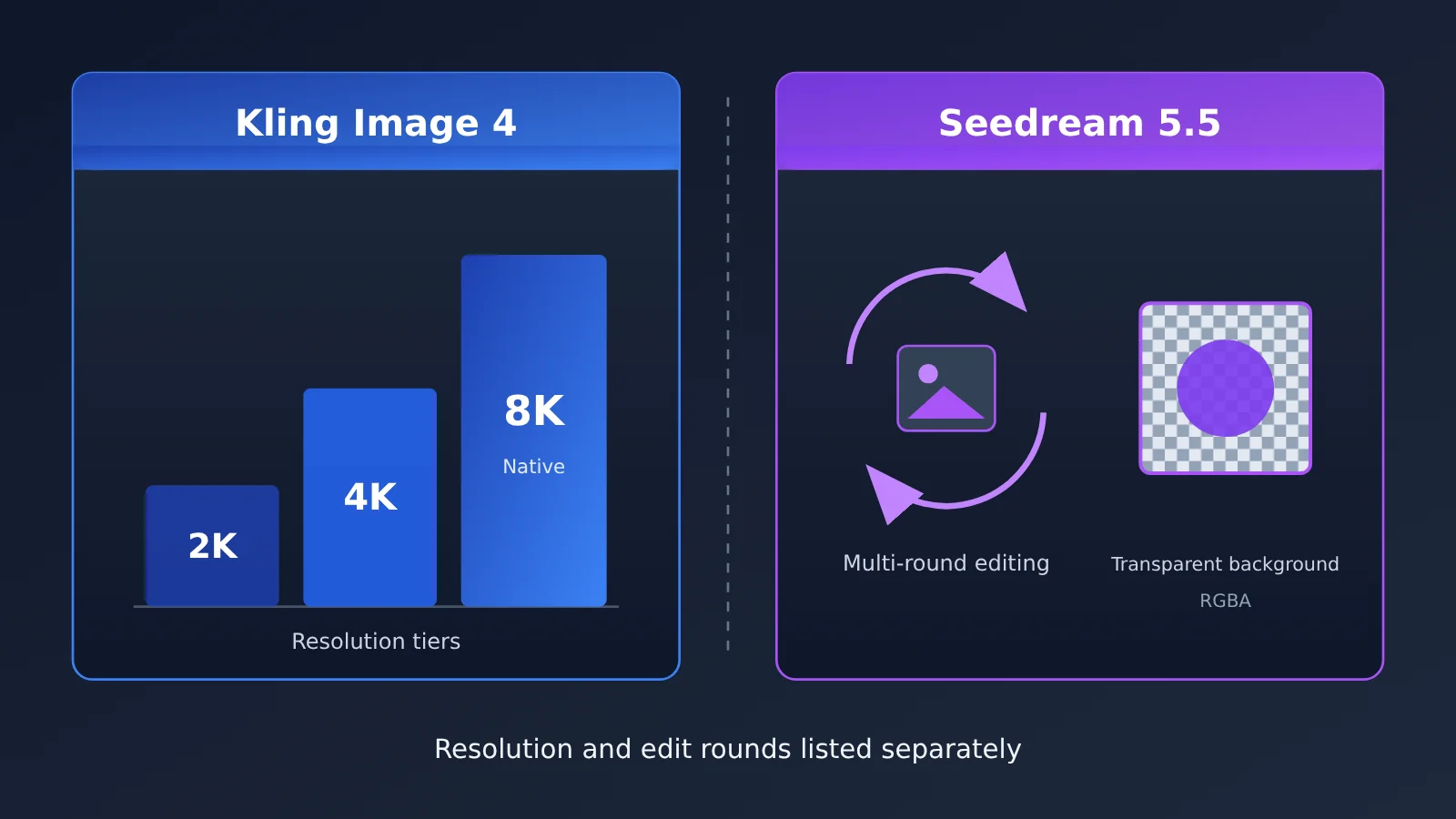
This isn’t an article declaring an overall winner. Kling’s official specs list resolution tiers up to native 8K, while Seedream advertises multi-round editing and native RGBA output. The first answers “how large can the image be,” the second answers “how many times can I edit it, and can it output a transparent background directly.” You can’t convert one into the other.
Core value: after reading this, you’ll be able to tell which axis your needs fall on, then weigh third-party blind-test leaderboards and integration options to make your choice.
Core differences between Kling Image 4 and Seedream 5.5: take it apart along two axes first
Before comparing them, break “capability” into two dimensions that cannot substitute for each other. Resolution determines the physical size of the deliverable and the upper limit on detail. The number of image-editing rounds and the transparent background determine the cost of back-and-forth revisions and post-processing compositing in the workflow. A model standing out on one axis doesn’t mean it’s better or worse on the other.
| Comparison dimension | Kling Image 4 | Seedream 5.5 | How to read this row |
|---|---|---|---|
| Resolution tiers | Single images and image groups support 2K / 4K / native 8K; long images only 1K / 2K | Reference materials do not cover its highest resolution tier | Officially published specs; leaderboards can’t measure them |
| Multi-turn editing | Reference materials do not cover the round limit | Officially self-reported at up to about 100 rounds | Officially self-reported, not measured by a third party |
| Transparent background | Reference materials do not cover | Officially self-reported native RGBA | Officially self-reported; affects matting and compositing workflows |
| Third-party blind tests | Has data on both the text-to-image and image-editing leaderboards | Has data on both the text-to-image and image-editing leaderboards | Measures perceptual preference at the 1024 scale |
| Availability on APIYI | Not yet listed | Listed with two same-price channels | Model names and prices are subject to the platform’s model list |
How to Read Kling Image 4’s Resolution Tiers
According to the specs Kling has published, the single-image and image-set modes each offer three tiers: 2K, 4K, and native 8K. “Native” here is the official wording — it means the image is generated at that size directly, not rendered small and then upscaled. The long-image mode only exposes 1K and 2K, so if your work is mostly long images, the 8K story doesn’t apply to you.
| Kling Image 4 mode | Available resolution tiers | What it suits |
|---|---|---|
| Single image | 2K / 4K / native 8K | Print posters, large-format display boards, HD wallpapers |
| Image set | 2K / 4K / native 8K | Key visuals for a series, multi-angle product shots |
| Long image | 1K / 2K | Long posters, vertical detail-page style content |
One thing worth stating up front: 8K is a capability the vendor announced, and third-party leaderboards don’t test under conditions that reach it. The boards normalize everything to a 1024 scale, so their scores can’t tell you anything about the detail quality of 8K output. If 8K is your reason for picking this model, you’ll need to generate at your target size yourself and inspect the results.
How to Read Seedream 5.5’s Edit Rounds and Transparency
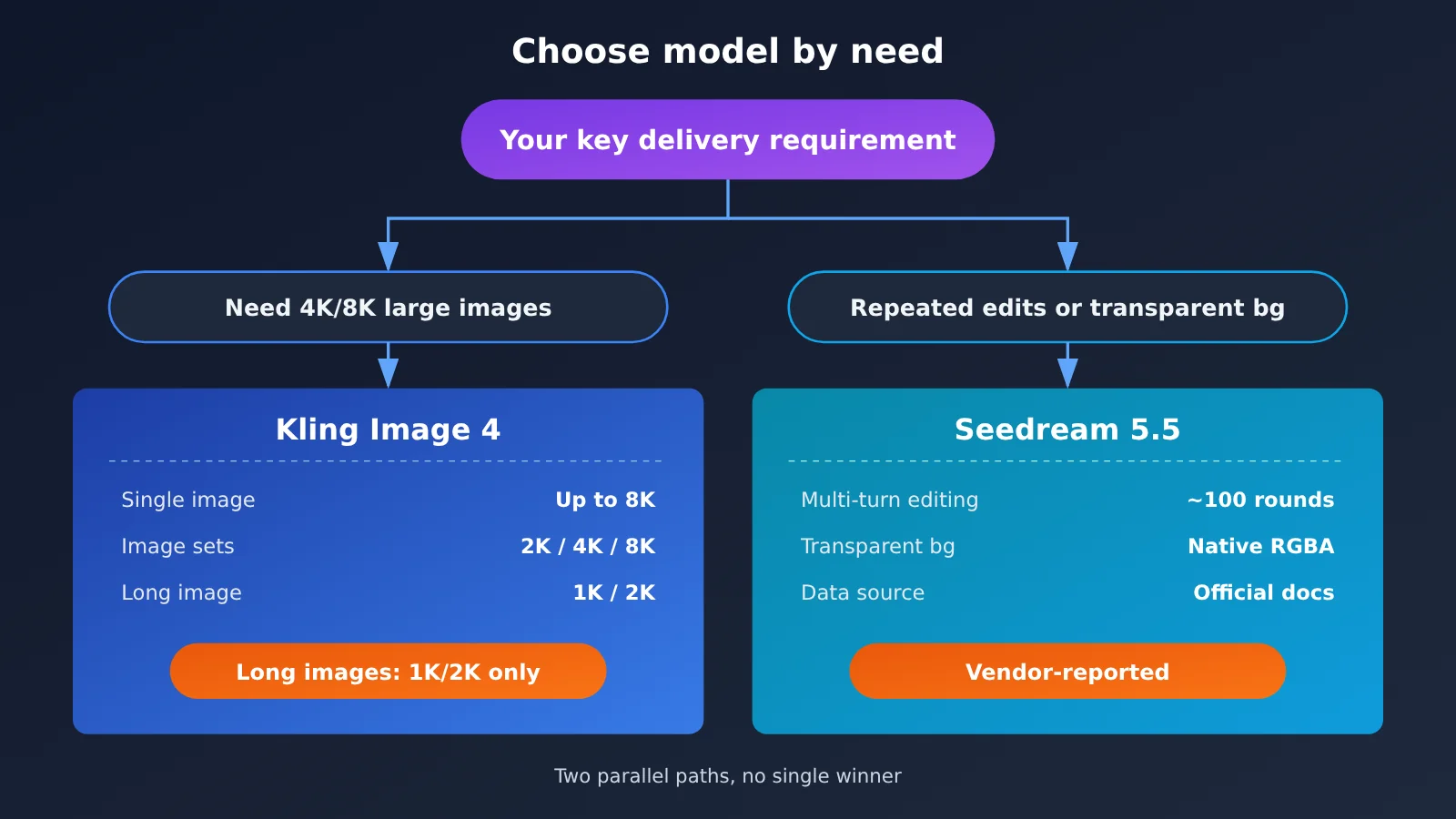
On the Seedream 5.5 side, the vendor’s own highlights are multi-round editing of up to roughly 100 rounds, and native RGBA — that is, output that comes with an alpha channel built in. Both of these come from the vendor’s documentation rather than third-party leaderboards, so this article treats them as “vendor-reported” claims rather than verified conclusions.
The vendor also published comparison numbers for text corruption rates, but the comparison was against Seedream 5.0 Pro, GPT Image 2.5, and Nano Banana 2.1 — in other words, self-testing. That data was never compared against Kling, and never against GPT Image 2.6, so you can’t use it to infer who does better at text rendering, Seedream or Kling.
How to read the Kling Image 4 and Seedream 5.5 leaderboard data
As of 2026-11-19, the Artificial Analysis image leaderboard includes both text-to-image and image editing data for these two models. The leaderboard calculates scores based on blind-test votes, and every score comes with a confidence interval and a rank range. When reading this kind of leaderboard, whether the intervals overlap matters more than a single score.
| Leaderboard | Model | Score | Confidence interval | Sample size | Rank range | Leaderboard price per 1,000 images (1024-normalized) |
|---|---|---|---|---|---|---|
| Text-to-image | Kling Image 4.0 | 1180 | 1167–1193 | 5550 | 6–9 | $63 |
| Text-to-image | Seedream 5.5 | 1134 | 1122–1146 | 5260 | 13–17 | $20 |
| Image editing | Kling Image 4.0 | 1183 | 1169–1197 | 5628 | 5–7 | $66 |
| Image editing | Seedream 5.5 | 1160 | 1146–1174 | 5101 | 8–11 | $28 |
On the text-to-image leaderboard, the two confidence intervals don’t overlap: Kling’s lower bound of 1167 is above Seedream’s upper bound of 1146. Under the evaluation conditions of this leaderboard, blind-test voters show a fairly clear preference for Kling’s text-to-image results.
The image editing leaderboard is a different story. Kling’s interval is 1169–1197, and Seedream’s is 1146–1174; the two intervals meet between 1169 and 1174. Their rank ranges are 5–7 and 8–11, which don’t overlap, but the edges of the score intervals already touch. So for image editing, we can only say there’s a gap—not that the gap is huge. And this image editing leaderboard measures the perceived quality of a single edit result; it doesn’t measure how many consecutive edits it can handle, nor whether it supports transparent backgrounds.
Also pay attention to the price column: the leaderboard’s price per thousand images is normalized to a 1024 scale, and it isn’t the same as what you’d actually spend generating 2K, 4K, or 8K images. Before using it to estimate real costs, confirm your output dimensions and billing rules.
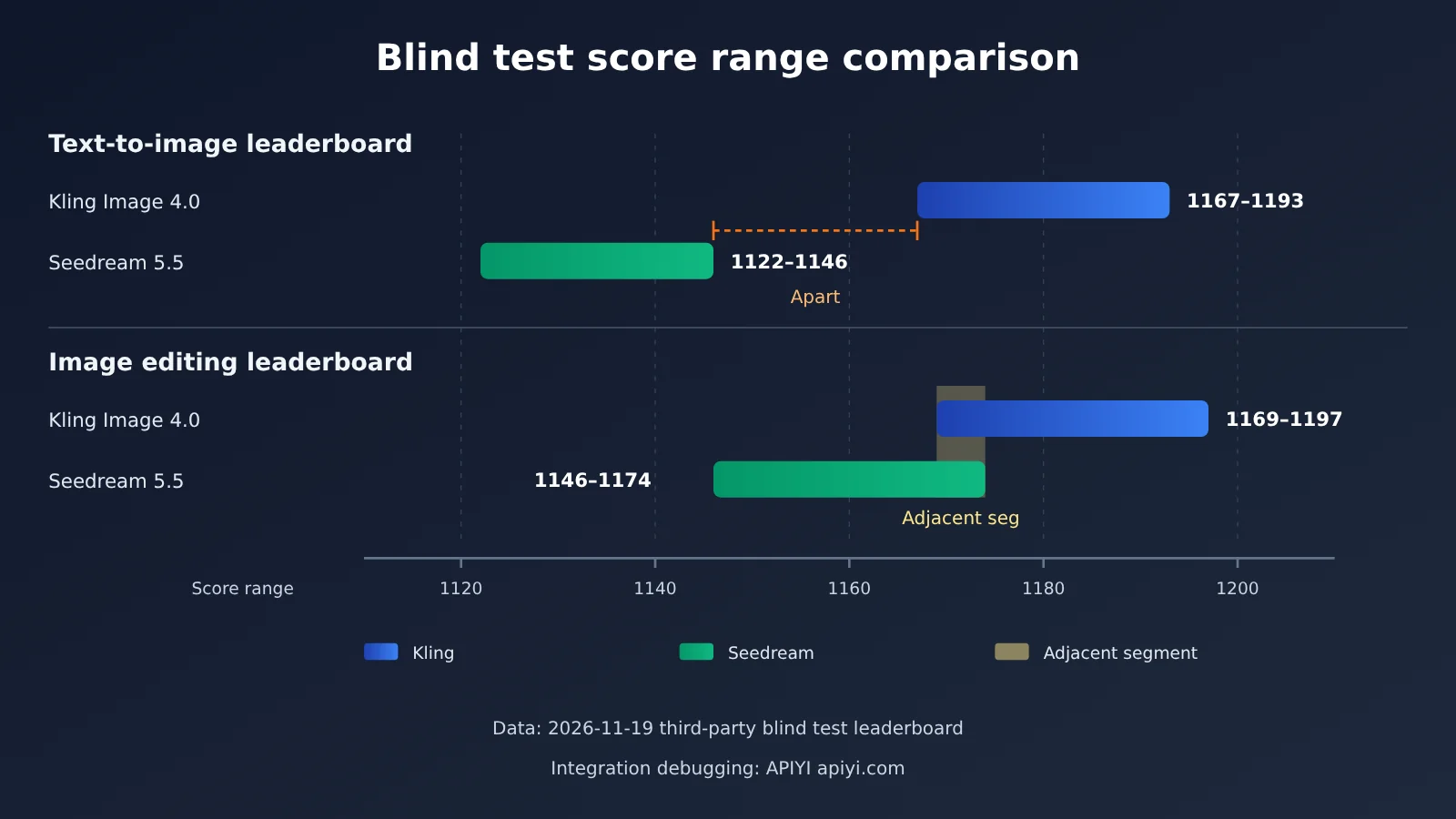
📊 Data note: The table above uses data from a public page of a third-party blind-test leaderboard. The leaderboard doesn’t test native 8K, 100-round editing, or transparent backgrounds. You’ll need to verify these capabilities in your own workflow. Seedream 5.5 can already be called and tested directly via APIYI apiyi.com.
Kling Image 4 and Seedream 5.5: Scenario Recommendations
First figure out which axis your needs fall on — then the choice gets a lot simpler. Below I’ve broken it down by need type, since each model has scenarios where it shines.
When to choose Kling Image 4
- Large-format print and display: posters, exhibition boards, outdoor graphics, and other deliverables that need 4K or even native 8K — these map neatly onto the resolution tiers Kling has officially announced.
- Series output of consistent image sets: series mode also covers 2K through 8K, making it a good fit for a set of key visuals that need a uniform size.
- One-shot generation where look and feel matters most: if you’re mainly doing text-to-image with few revisions, Kling tends to rank higher in third-party text-to-image blind tests, which is worth using as a reference.
When to choose Seedream 5.5
- Design workflows that need repeated revisions: when a single image goes through many versions, the officially reported multi-turn editing capability (up to about 100 rounds) maps directly onto that need — though you’ll want to verify the ceiling on your own tasks.
- Transparent-background assets: stickers, icons, e-commerce white-background scene swaps, elements for compositing — the officially reported native RGBA output saves you the separate masking step.
- Immediate API access: Seedream 5.5 is already available on APIYI, so you can plug it straight into your existing OpenAI-compatible code.
What if you need both axes?
If a project needs both large-format finals and heavy revision plus transparent assets, split it by stage: put the asset generation and iterative tweaking on one model, and the final large-format output on the other. There’s no official guidance for this kind of combination, so you’ll need to test how well the handoff works yourself.
How to Call Seedream 5.5 via APIYI (Kling Image 4 Isn’t Listed Yet)
Seedream 5.5 is available on APIYI through two channels: seedream-5-5-261028 (BytePlus) and doubao-seedream-5-5-261028 (Volcano). Both are priced the same. Billing depends only on the size parameter and the number of input reference images, as follows:
| Billing item | Condition | Price |
|---|---|---|
| Output image | size is exactly 1K or 1.5K |
$0.020/image |
| Output image | Any other case (including omitting size, 2K, or custom dimensions) | $0.035/image |
| Input reference image | Per reference image | Plus $0.008 each |
| Pricing field | model_price is 0 and model_ratio is 1.1 in pricing | Read it as the unit prices above — don’t multiply again and treat it as a markup |
The integration steps are below. Everything uses the OpenAI-compatible image endpoint:
- Sign up at APIYI apiyi.com and create an API key. New users get free trial credits.
- Set the API base URL to
https://api.apiyi.com/v1and send requests toPOST /v1/images/generations. - Include
Authorization: Bearer YOUR_API_KEYandContent-Type: application/jsonin the request headers. - Example request body:
{"model": "seedream-5-5-261028", "prompt": "透明背景的玻璃香水瓶,柔和侧光", "size": "1K"}. - With the OpenAI SDK, initialize it as
client = OpenAI(api_key="YOUR_API_KEY", base_url="https://api.apiyi.com/v1"), then callclient.images.generate(model="doubao-seedream-5-5-261028", prompt="...", size="1.5K").
A few gotchas to watch out for:
- The platform’s master table shows “chat” in the endpoint column, but actual calls still go through
/v1/images/generations— don’t use the chat endpoint. - The
nparameter is silently ignored. No matter what you pass, you only get 1 image back, so send concurrent requests if you need more. - Omitting
sizebills at $0.035/image. If you want the $0.020 tier, explicitly pass 1K or 1.5K.
Kling Image 4 isn’t listed on APIYI yet. We’ll get it up as soon as we can; model IDs and pricing will follow the platform’s model list. If you want to estimate Kling’s cost for large images in the meantime, you can reference the credit pricing for the $300 image pack: $0.00384 per credit, 16 credits for one 2K image (~$0.061), and 40 credits for one 8K image (~$0.154). This basis differs from the 1024-normalized price shown on the leaderboard, so don’t mix the two when comparing.
🚀 Quick-start tip: To check whether Seedream 5.5’s transparent backgrounds and multi-turn editing work on your own assets, run a small batch at the 1K tier on APIYI apiyi.com first — it’s cheap and gives fast feedback. Once it checks out, scale up the size.
Kling Image 4 vs. Seedream 5.5: Decision Guide
Checking each requirement one by one will get you to a decision better than looking at an overall score. The table below shows “which criterion to check first,” not the final verdict:
| Your primary need | Criterion to check first | Leaning toward | What you need to verify yourself |
|---|---|---|---|
| Native 8K / 4K images | Kling’s official resolution tiers | Kling Image 4 | 8K detail quality, which benchmarks can’t measure |
| Long-format images | Kling’s long images are only 1K / 2K | Depends on your long-image size requirements | Whether 2K meets your delivery needs |
| Dozens of rounds of edits | Seedream’s self-reported ~100 rounds | Seedream 5.5 | Whether the subject drifts after many rounds |
| Transparent-background assets | Seedream’s self-reported native RGBA | Seedream 5.5 | Quality of semi-transparent edge areas |
| Subjective look of a single text-to-image run | Blind-test intervals for text-to-image don’t overlap | Kling Image 4 | Whether it matches your style preferences |
| Subjective look of a single image edit | Image-editing intervals touch at the endpoints | The gap is limited; try both | Compare them with your own editing instructions |
💡 Recommendation: Start by writing down the three types of images you deliver most often, then figure out whether they need size, or revision count and transparent backgrounds, and use the table above to choose. You can test Seedream 5.5 right now through APIYI’s unified interface at apiyi.com; once Kling Image 4 is available, you can also switch models with the same code to compare them.
Common Questions (FAQ)
Q1: Can a single overall score really settle Kling Image 4 vs. Seedream 5.5?
We wouldn’t recommend it. The standout capabilities of these two models sit on different axes: Kling offers officially published resolution tiers all the way up to native 8K, while Seedream claims multi-round editing and native RGBA. Third-party leaderboards only measure how a single generation looks at the 1024 scale, so they can’t cover either of those two things.
Q2: Is Kling Image 4’s 8K available in all modes?
No. According to the officially published specs, single images and image sets support 2K, 4K, and native 8K, while long images only support 1K and 2K. Also, 8K is an official spec that third-party leaderboards can’t evaluate — you’ll need to generate images yourself to check the actual detail.
Q3: Were Seedream 5.5’s hundred-round editing and transparent background measured by third parties?
No. Both the roughly 100-round multi-turn editing limit and native RGBA are capabilities reported by the vendor itself, not results from the blind-test leaderboard cited in this article. We’d suggest verifying them on your own assets, especially checking whether the subject stays consistent after many rounds of edits.
Q4: Is the gap between Kling Image 4 and Seedream 5.5 big on the editing leaderboard?
The gap is limited. The rank ranges of 5–7 and 8–11 don’t overlap, but their score ranges meet between 1169 and 1174, so you can’t call it a landslide. This leaderboard measures how a single edit looks, not the ability to make repeated edits in sequence.
Q5: How do I call Seedream 5.5 through the API?
Sign up at APIYI (apiyi.com) to get an API key, set the base URL to `https://api.apiyi.com/v1`, send a request to `POST /v1/images/generations`, and set model to `seedream-5-5-261028` or `doubao-seedream-5-5-261028`. If you want billing at $0.020 per image, you need to explicitly pass size as 1K or 1.5K.
Q6: When will Kling Image 4 be available on APIYI?
It’s not listed yet, but we’ll get this model up as soon as we can. For specific model IDs and pricing, refer to the platform’s model list, and keep an eye on model updates at APIYI (apiyi.com).
Q7: Why does a request with n=4 only return one image?
On APIYI, Seedream 5.5 silently ignores the `n` parameter and always returns exactly 1 image per request. If you need multiple images, fire off multiple requests concurrently instead.
Kling Image 4 and Seedream 5.5 Key Takeaways
- Think of them as two separate axes: Resolution tiers are one thing; the number of editing rounds and transparent backgrounds are another — you can’t convert one into the other.
- Kling’s resolution tiers: Single images and image sets go up to native 8K, while long images only come in 1K and 2K.
- Seedream’s official claims: Up to around 100 editing rounds and native RGBA — you’ll need to verify these yourself.
- Text-to-image leaderboard ranges don’t overlap: Blind tests show a fairly clear preference for Kling’s text-to-image output.
- Image-editing leaderboard ranges touch: The rankings don’t overlap, but the score ranges are adjacent, so the gap is limited.
- Leaderboard prices are normalized: The price per thousand images is normalized to 1024, so it doesn’t reflect the real cost of larger sizes.
- How to get started: Seedream 5.5 is already callable on APIYI apiyi.com; Kling isn’t listed yet.
Summary
There are three key points for comparing Kling Image 4 and Seedream 5.5:
- Figure out which axis your needs fall on first: If you want large-size finished products, look at Kling’s published resolution tiers; if you need repeated edits or transparent backgrounds, look at what Seedream officially claims.
- Separate leaderboards from official specs: Third-party leaderboards measure single-pass visual quality at 1024 scale — 8K, hundred-round editing, and transparent backgrounds are all outside their evaluation scope.
- Validate with your own assets: Official specs and leaderboards are only references; in the end, what matters is the actual results on your deliverables.
My suggestion: start by running Seedream 5.5 through your real editing workflow for one round, and watch the stability of multi-round editing and the edge quality of transparent backgrounds. Once Kling Image 4 is listed, switch models in the same code and compare large-size output. I’d recommend running these kinds of tests through APIYI apiyi.com — one API key lets you call multiple models, and new users get free credits too.
📚 References
-
Artificial Analysis Text-to-Image Leaderboard: blind-test scores, intervals, and normalized prices for Kling Image 4.0 and Seedream 5.5 on text-to-image
- Link:
artificialanalysis.ai/image/leaderboard/text-to-image - Notes: Use this to compare perceptual preference for a single text-to-image generation; pay attention to the confidence intervals and rank ranges
- Link:
-
Artificial Analysis Image Editing Leaderboard: blind-test data for image editing with both models
- Link:
artificialanalysis.ai/image/leaderboard/editing - Notes: Only measures the result of a single edit — it doesn’t measure the number of editing rounds or transparent backgrounds
- Link:
-
APIYI Documentation Center: image generation API invocation guide and model list
- Link:
docs.apiyi.com - Notes: See how to call Seedream 5.5 and its billing rules, plus whether Kling is currently listed
- Link:
Author: APIYI Technical Team
Technical discussion: Feel free to get in touch with us through the homepage of the APIYI apiyi.com website; for more resources, visit the docs.apiyi.com documentation center