Author’s note: Based on the official model card, the November 18 product announcement, and the November 19 product page, this piece lays out Genie 4’s 720p, up-to-24-fps, and synchronized-audio specs; explains that the evaluation has no published scores and that continuous interaction lasts about one minute; and covers how it and Genie 3 are meant to be used separately by task.
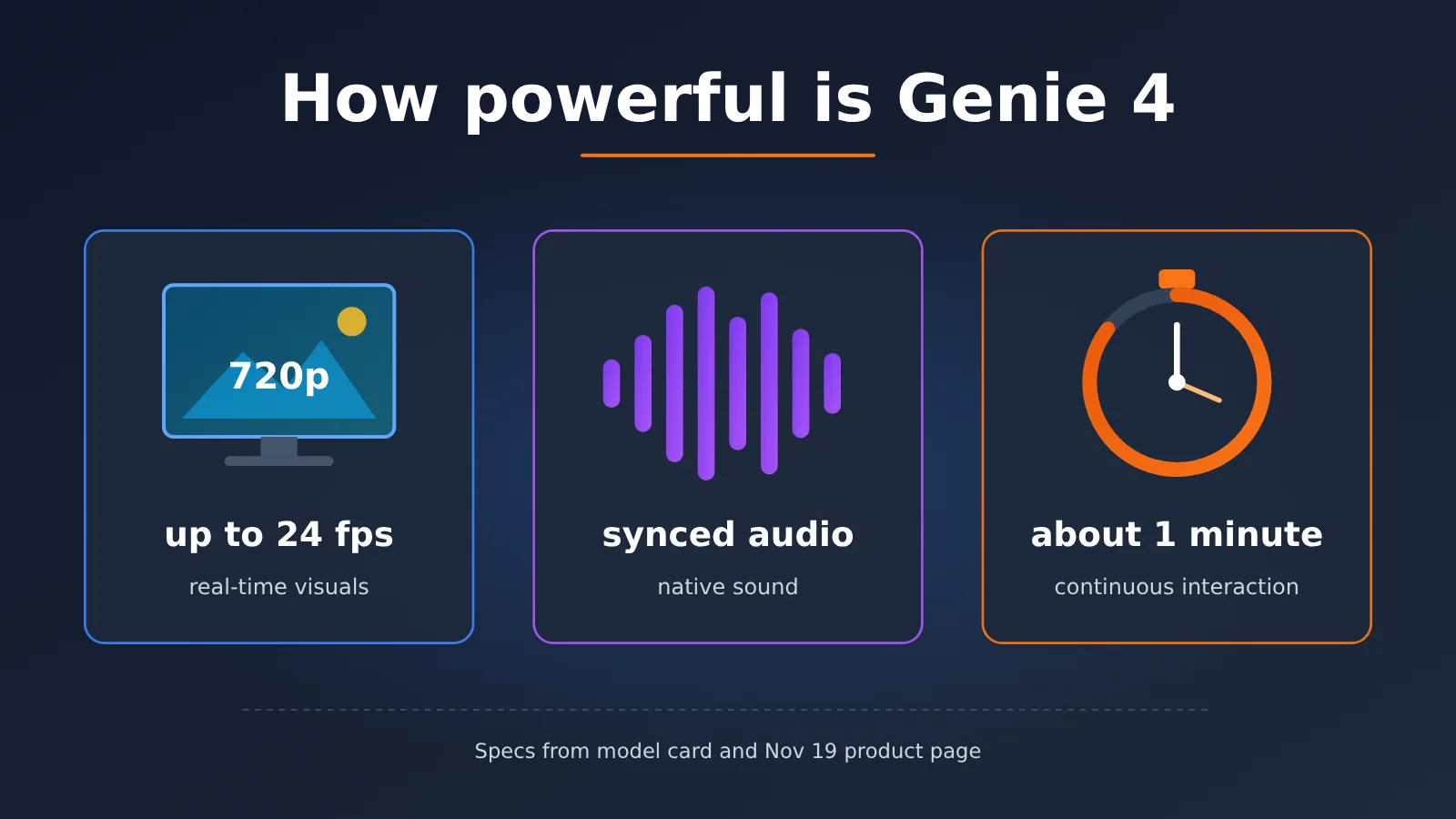
Google DeepMind released the model card for Genie 4 on November 18, 2026, and made it available in Project Genie the same day, offering an interactive world with real-time 720p, up to 24 frames per second, and synchronized audio. Many people’s first reaction after watching the demo is, “That’s impressive.” But the demo video itself can’t answer which specific capability it’s strong in, which items the official materials didn’t provide numbers for, or what you should use it for.
This isn’t a recap of the demo video, nor is it our hands-on test. Below, we only organize what the official documents state: what specs and evaluation dimensions the model card provides, how the product announcement distinguishes Genie 4 from Genie 3, and what six limitations the product page lists. Any scores, win rates, and prices the official materials don’t publish are simply marked “none” in this article — no speculation.
Core value: After reading, you’ll know what Genie 4’s hard specs are, what the evaluation conclusions are good for and what they aren’t, and when to switch to Genie 3 in the selector.
Genie 4 Core Features: What the Official Specs Actually Say
Let’s start with the hard facts you can verify directly from the model card. These are the only reliable basis for judging “how strong” Genie 4 really is — everything else needs to be checked against them.
| Item | How Genie 4 officially describes it | Source |
|---|---|---|
| Output visuals | Real-time 720p, up to 24 frames per second | Model card (November 18) |
| Sound | Synchronized audio, plus conversations that adapt on the spot | Model card (November 18) |
| Input methods | Text, images, keyboard and mouse | Model card (November 18) |
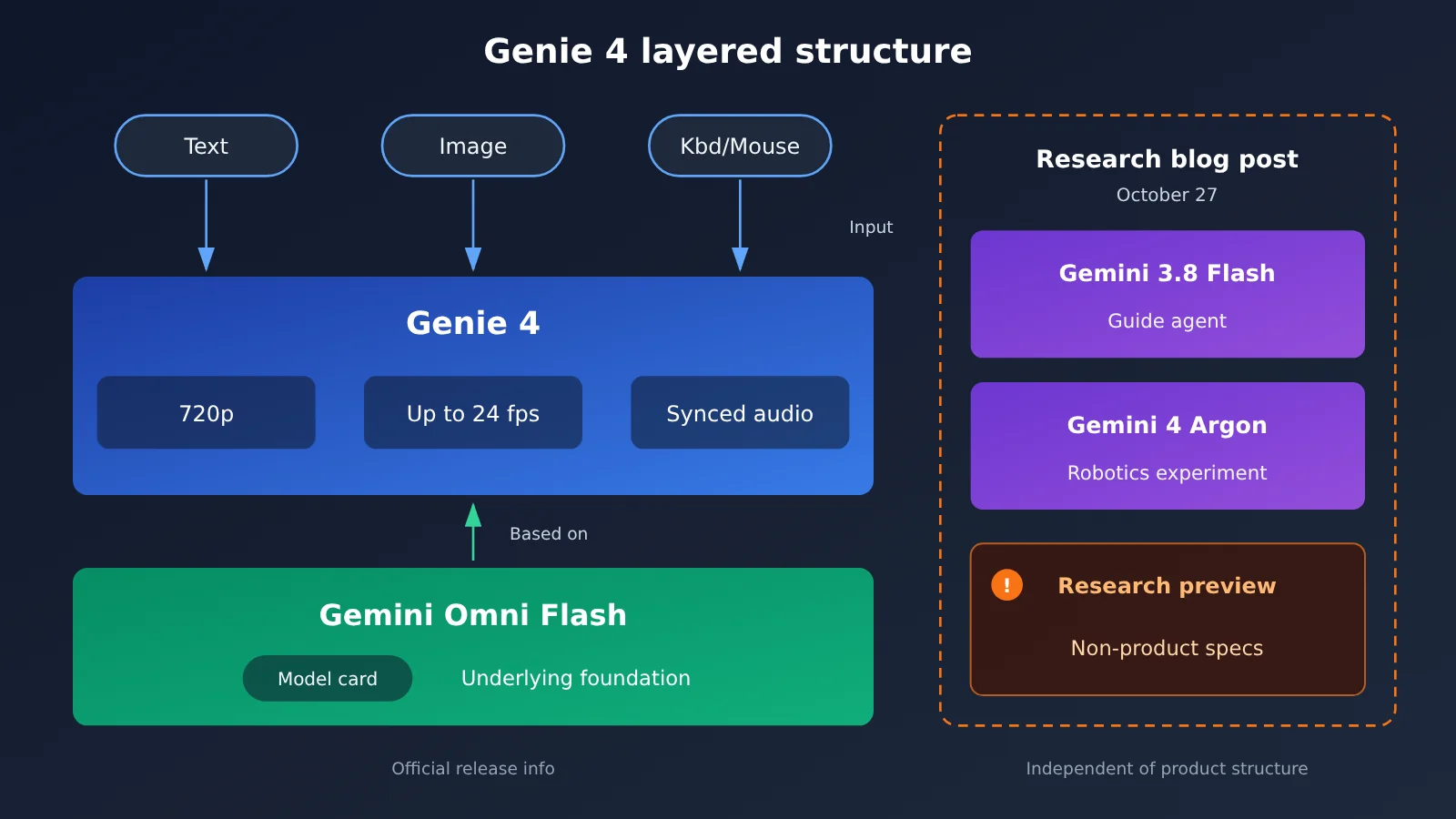
| Underlying model | Built on Gemini Omni Flash; Gemini handles reasoning and real-time steering | Model card (November 18) |
| Continuous interaction duration | Currently around one minute — not long sessions | Product page (opened November 19) |
| How to access it | Project Genie, starting with eligible Google AI Ultra | Product page (opened November 19) |
| Content marking | Both visuals and audio carry SynthID | Product announcement (November 18) |
A Closer Look at Genie 4’s Visual and Audio Specs
Pay attention to three words in the visuals row: real-time, 720p, and up to 24 frames. “Real-time” means the image is generated the moment you move your keyboard or mouse, rather than a pre-rendered video that’s just being played back. “Up to 24 frames” is a ceiling — it doesn’t mean a steady 24 fps at every moment. If you compare its clarity against offline-generated video, 720p may not sound impressive, but what it’s being compared to is an interactive world you can change as you go, and these two kinds of things were never in the same category to begin with.
Sound is the most obvious difference between Genie 4 and Genie 3. According to the November 18 product announcement, Genie 4 is the first to include real-time native audio and conversation, and the model card describes it as “introducing native audio and conversations that adapt on the spot.” That said, the limitations on the product page also note that “real-time audio accuracy is still improving,” so while it’s fair to say the audio keeps up with the visuals, even the official documentation doesn’t promise that every detail lines up perfectly.
The Three Gemini Roles Behind Genie 4
The reference materials mention several Gemini names. They come from different files and play different roles, so they shouldn’t be understood as one combined model:
- Gemini Omni Flash: The model card states that Genie 4 is built on it, making it the underlying foundation.
- Gemini 3.8 Flash: Appears in the October 27 research blog post, where it’s used as a guiding agent. That was the wording from the research preview stage.
- Gemini 4 Argon: Also from the robot example in the research blog post. It breaks down the steps, and then Genie 4 renders the scene of Apollo playing checkers. The official description calls it an experiment, not a public benchmark score.
In addition, the safety evaluation section of the model card mentions Gemini 3.1 Pro and Gemini 3.7 Flash. They are comparison subjects in the frontier safety framework evaluation and have nothing to do with Genie 4’s creative capabilities; I’ll explain them separately later.
Genie 4 Test Data: What the Official Evaluation Says — and What It Doesn’t
This section is called “Test Data,” but let’s be clear upfront: all the results below come from the model card itself, not from our own testing. The official evaluation compared Genie 4 against earlier world models (including Genie 3) using a mix of human evaluation and automated evaluation.
Genie 4’s Official Evaluation Dimensions
| Evaluation Dimension | What It Measures | Are Scores Public? |
|---|---|---|
| Visual Quality and Aesthetics | Image clarity, composition, and overall look | No |
| Environment Realism | Whether scenes, objects, and physics look real | No |
| Audio Quality and Sync | The quality of the sound itself, and whether it matches the visuals | No |
| Responsiveness to Real-Time Control and Text Steering | Whether keyboard/mouse input and text prompts can change the world in time | No |
The conclusion in the model card, verbatim, is: compared with Genie 3, there are significant improvements in photorealism, motion smoothness, and real-time steering, along with native audio and on-the-spot adaptive conversation. That sentence supports “Genie 4 is clearly better than Genie 3 in these areas,” but it comes with no scores, no win rates, no sample sizes, and no test set names.
So when reading this evaluation, keep one boundary in mind: it indicates direction, not magnitude. How big “significant improvement” actually is can’t be verified externally. As of November 19, no public leaderboard has posted a Genie 4 score either, and demo clips floating around online can’t be used as ranking evidence — demos usually cherry-pick the best-performing segments.
How to Read Genie 4’s Safety Evaluation Conclusion
There’s a passage in the model card that’s easy to misread. The official evaluation is based on the frontier safety framework for Gemini 3.1 Pro and Gemini 3.7 Flash, and those two models don’t reach tracked or critical capability levels; the officials’ view is that Genie 4 has no meaningful new capabilities or substantive performance gains relative to them, so it’s unlikely to reach those levels either.
This is a safety-level conclusion, aimed at frontier risk capabilities, not a ranking of image quality or interactive experience. Reading “no new critical capabilities” as “Genie 4 can’t create well” conflates two unrelated things.
Genie 4 Duration Numbers: One Minute or Two — Which Is Right?
There are two claims about duration online, and you need to sort out where each comes from:
| Claim | Source | Date | Used in This Article? |
|---|---|---|---|
| Roughly one minute of continuous interaction | DeepMind product page, limitations entry | Accessed 2026-11-19 | Yes |
| Roughly two minutes, about double the previous generation | Media briefing paraphrase such as TechCrunch | 2026-10-27 | No (outdated briefing) |
| Limitations paragraph of the research blog post | DeepMind research blog | 2026-10-27 | Neither one minute nor two minutes mentioned |
The October 27 research blog post itself is a research preview and doesn’t state a specific duration; “two minutes” comes from media paraphrases of the same day and doesn’t match the “roughly one minute” on the November 19 product page. Following the principle of deferring to the final-state page, this article’s conclusion uses only the product page’s roughly one minute.
Genie 4 vs. Genie 3: Choose by Task
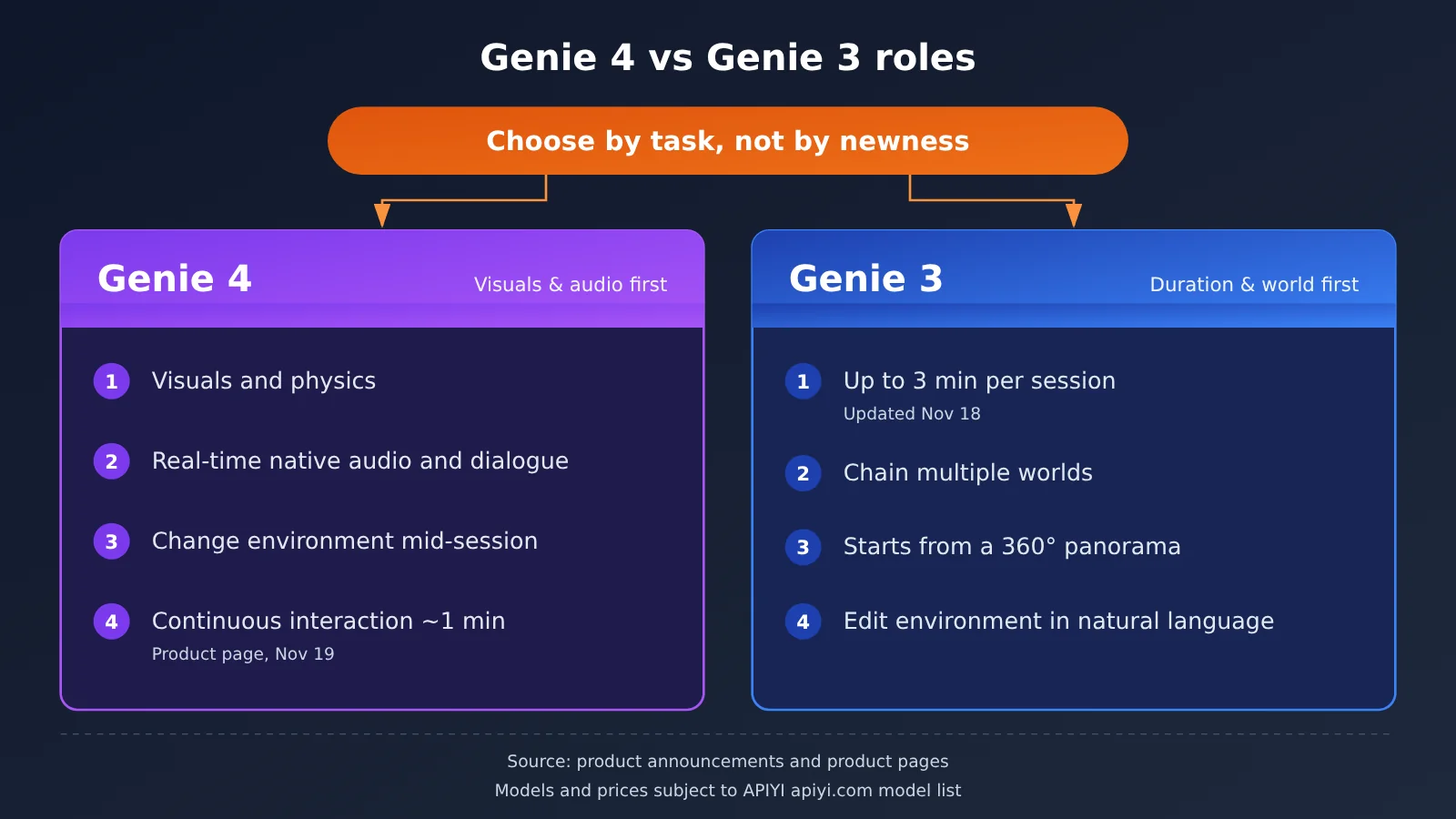
The November 18 product announcement lays out the split between the two generations clearly: Genie 4 delivers the highest image quality, physics, and native audio available today; Genie 3 stays in the selector for people who want longer single sessions or want to start from a panorama. In other words, Google isn’t replacing Genie 3 with Genie 4—it’s letting each handle a different kind of task.
| What you want to do | Better choice | Why |
|---|---|---|
| More realistic visuals, smoother motion | Genie 4 | Model card evaluation findings |
| Real-time sound and live conversation | Genie 4 | Product announcement: first with real-time native audio |
| Change the environment mid-interaction | Genie 4 | Product announcement: changing the environment mid-session is a new capability |
| Longer single session (minutes-long) | Genie 3 | Product announcement: up to 3 minutes per session, up from 60 seconds |
| Start from a 360-degree panorama | Genie 3 | Product announcement: Genie 3 update that day |
| Chain multiple worlds together | Genie 3 | Product announcement: Genie 3 update that day |
| Call via API | No available channel yet | Not listed in the APIYI apiyi.com model catalog |
Genie 4 and Genie 3: Head-to-Head
Genie 3 benchmark analysis: Genie 3 still leads on single-session duration. The November 18 update raised the per-session limit from 60 seconds to up to 3 minutes, and it also supports chaining multiple worlds and starting from a panorama. But it doesn’t have real-time native audio, and its visual realism and real-time steering trail Genie 4. By comparison, Genie 4 is better suited to short scenes that need visuals, physics, and sound to all come together.
Genie 4’s trade-offs: Genie 4 delivers more complete visuals and sound, at the cost of continuous interaction currently lasting about one minute. The issues Google is still working on include camera latency, complex physics interactions, real-time audio accuracy, and long-term scene persistence—these are also the areas you’re most likely to run into in practice.
Genie 4 Models and Pricing: Where APIYI Stands
Speaking of API and pricing, let’s be direct about the current situation: as of 2026-11-19, Genie 4 is not in APIYI’s model catalog or pricing API, and Gemini Omni Flash isn’t listed either. It’s not available yet; we’ll add this model as soon as possible. Models and pricing are subject to the platform’s model list—you can check the latest availability at APIYI apiyi.com.
Right now, the only official way to use it is Project Genie, opening first to eligible Google AI Ultra users. We also won’t pass off another video generation model as a drop-in Genie substitute—interactive world models and offline video generation solve different problems.
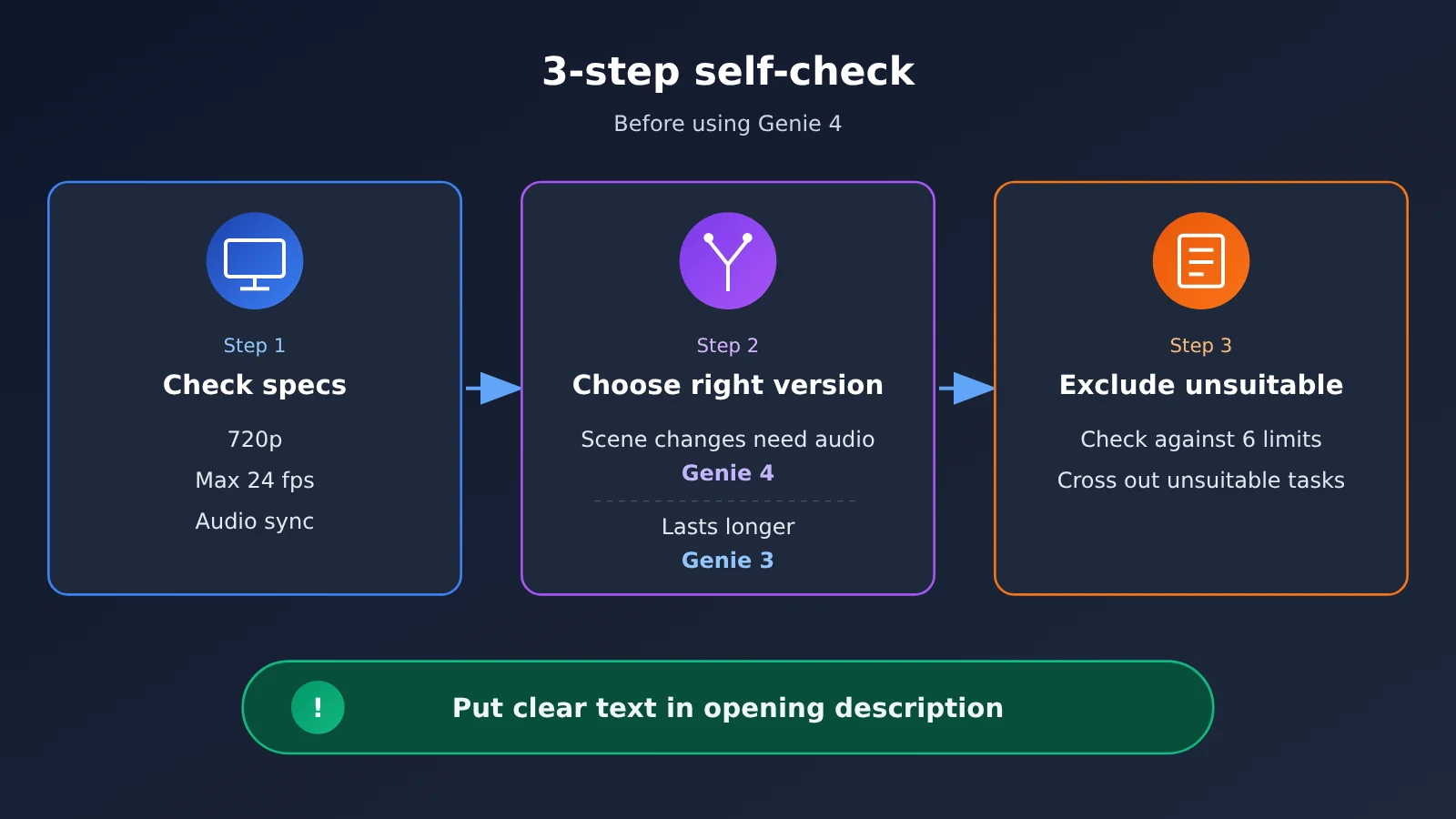
Genie 4 Quick Start: A Three-Step Self-Assessment to See If It’s Right for You
Genie 4 isn’t a product you invoke by writing code, so the “quick start” here is really a self-assessment checklist. Once you’ve got a session, walk through these three steps to quickly figure out whether it’ll work for your project.
Step 1: Check Genie 4’s Output Specs
First, confirm the output you’re seeing matches the official specs:
- Resolution: Is it 720p? If your deliverable requires higher-resolution footage, you’ll need to leave room for post-processing.
- Frame rate: Up to 24 fps. Watch for stutter during fast camera moves — the official docs also list camera lag as an issue they’re still working on.
- Audio sync: Do footsteps, collisions, and dialogue line up with the picture? The product page says real-time audio accuracy is still being improved, so slight misalignment is a known issue.
Step 2: Decide Whether Genie 4 Is for Tweaking a Scene or Going the Distance
Next, ask yourself one question: do you want to “tweak things back and forth within a single scene, with audio,” or “walk longer through a single world”? The former is Genie 4’s strength; for the latter, switch to Genie 3 in the model selector and take advantage of its up-to-3-minute single-session duration and ability to chain multiple worlds together.
Step 3: Use the Six Limitations to Rule Out Work Genie 4 Isn’t Suited For
| Product page limitation (Nov 19) | What it actually means | Work you shouldn’t hand to it |
|---|---|---|
| Visual detail and object permanence drift over time | Objects may change or disappear after you play for a while | Continuous shots that require props to stay consistent throughout |
| Complex interaction among multiple users, multiple independent characters, and a shared environment remains a research problem | Multi-person in-scene interaction is unstable | Multi-person collaboration or scenes with multiple characters interacting |
| It currently can’t perfectly simulate real locations | Recreating real-world places will come out distorted | Work that requires faithfully reproducing real streets or buildings |
| Clear text usually only appears if it’s written into the opening world description | Adding text on the fly mid-session rarely comes out clear | Clear signage that appears mid-scene |
| Continuous interaction is currently around one minute | It’s not for long sessions | Playing continuously for many minutes at a stretch |
| Real-time audio accuracy is still being improved | Audio details may not line up precisely | Work that needs precise lip-sync or sound-effect timing |
The point that “clear text has to be written into the opening world description” actually hints at a practical approach: write signage, slogans, and similar text into the opening description all at once. You can have a text LLM help you draft and polish the opening description first — for example, calling Gemini or Claude through an OpenAI-compatible interface, just set base_url to https://api.apiyi.com/v1, and one API key lets you switch between different models to compare phrasings.
🚀 Quick-start tip: Genie 4 itself can only be used within Project Genie. If you want to polish your opening world description first, you can use the free trial credits for new users at APIYI apiyi.com to have several mainstream text models each draft a version, then pick one and paste it into Genie.
Genie 4: Pros and Cons
Genie 4’s Strengths
- Visuals and motion: The model card notes that photorealism and motion smoothness are significantly improved over Genie 3, and the research blog post gives examples involving aerodynamics and collisions.
- Real-time native audio and dialogue: This is the first time the Genie series comes with real-time sound, which helps most with short scenes that need atmosphere and spoken dialogue.
- Changing the environment mid-session: You can steer with text or actions while playing, and real-time steering is another area the model card specifically calls out as improved.
- Traceable watermarking: Both visuals and audio carry SynthID, making it easy to identify generated content.
Genie 4’s Limitations
- Short duration: About one minute of continuous interaction. When you need a longer single session, switch to Genie 3.
- Long-term consistency: Visual details and object permanence drift; the longer you play, the more you change things, and the further you go, the more obvious it becomes. The workaround is to split a single scene into multiple short sessions.
- Opaque evaluation: There are no public scores, win rates, or sample counts, so you can’t make quantitative comparisons with other models. When choosing a model, you can only go by the official qualitative conclusions plus your own hands-on experience.
- Access barrier: Currently available only to eligible Google AI Ultra users; no API channel for now.
FAQ
Q1: What is Genie 4?
Genie 4 is Google DeepMind’s world model. It generates an interactive world in real time from text, images, and keyboard/mouse input, outputting 720p at up to 24 frames per second with synchronized audio. It’s built on Gemini Omni Flash, with the model card published on November 18, 2026, and made available in Project Genie.
Q2: How is Genie 4 different from Genie 3?
Genie 4 is stronger on visuals, physics, and native real-time audio, and is a good fit for short but polished scenes. Genie 3, after its November 18 update, runs up to 3 minutes per session, supports chaining multiple worlds together, and lets you start from a 360-degree panorama — better for people who want to go longer. Officially, both stay in the selector at the same time, so you just pick whichever fits the task.
Q3: How long can you play Genie 4 continuously? Wasn’t it supposed to be two minutes?
As of the product page opened on November 19, 2026, continuous interaction is currently about one minute. The “two minutes” figure comes from a secondhand media briefing on October 27 and doesn’t match the current product page — it’s outdated information, so this article doesn’t use it.
Q4: Are there any public benchmark scores for Genie 4?
No. The model card describes the dimensions of human and automated evaluation and offers a qualitative conclusion that it improves significantly over Genie 3, but it doesn’t publish scores, win rates, sample counts, or test set names. Demo videos likewise can’t be treated as a ranking.
Q5: Can I call Genie 4 through an API?
Right now the only official entry point is Project Genie. As of November 19, neither the model list nor the pricing endpoint on APIYI apiyi.com includes Genie 4 — it isn’t listed yet, and we’ll get this model up as soon as possible; models and pricing are subject to the platform’s model list. Before it’s listed, you can use the platform’s text models to prepare your opening world description. The API is OpenAI-compatible, so integration costs are very low.
Q6: The model card says there are “no new critical capabilities” — does that mean Genie 4 is nothing special?
No. That statement is a conclusion from the frontier safety framework’s evaluation, meaning Genie 4 doesn’t bring risk capabilities that require extra tracking relative to Gemini 3.1 Pro and Gemini 3.7 Flash. It has nothing to do with image quality or how good the interactive experience is.
Q7: What scenarios is Genie 4 best suited for?
Scenes under a minute that demand visual realism and sound — for example, atmospheric samples of game concepts, interactive snippets with dialogue, or creative experiments that require changing the environment partway through. Projects that need to faithfully reproduce a real location, have multiple people interacting in the same scene, or run long continuous sessions aren’t a good fit at the moment.
Q8: What if I want clear text visible in the scene?
The product page notes that clear text usually only shows up if it’s written into the opening world description. The best approach is to spell out all the signage and slogans in the opening description at once — and you can draft that part by comparing several text models on APIYI apiyi.com.
Genie 4 Key Takeaways
- Genie 4 hard specs: Real-time 720p, up to 24 fps, synchronized audio, with text, image, and keyboard/mouse input.
- Evals give direction, not scores: The model card concludes there’s a significant improvement over Genie 3, but it doesn’t publish scores or win rates.
- Duration per the product page: About one minute of continuous interaction; the two minutes mentioned in the October media briefing is outdated information.
- Genie 4 vs. Genie 3 by task: If you want visuals, physics, and sound, go with Genie 4; if you want a longer single session, go with Genie 3.
- Safety conclusions aren’t capability ratings: “No new critical capabilities” is a safety-level judgment, not a creative ranking.
- API status: Genie 4 isn’t listed on APIYI apiyi.com yet; model names and pricing are subject to the platform’s listing.
Summary
How capable Genie 4 really is comes down to three points:
- Strong on visuals and sound: Real-time 720p visuals at up to 24 fps, plus real-time native audio and dialogue—the first time in the Genie series.
- Weak on duration and consistency: About one minute of continuous interaction; the longer you play, the more details and object permanence tend to drift.
- No public scores: Official evaluations only provide direction—don’t use demo clips as evidence for rankings.
In practice, first run the three-step self-check against the specs, then decide whether you want to change scenes or go longer, and finally use the six limitations to rule out unsuitable tasks. If you need a longer single session, switch back to Genie 3 in the selector.
Before Genie 4 is listed, you can use APIYI apiyi.com to call text models through a unified API and refine your opening world description, so you can put it to use as soon as the model is available.
📚 References
-
Genie 4 model card: output specs, evaluation dimensions, known limitations, and frontier safety assessment
- Link:
deepmind.google/models/model-cards/genie-4/ - Notes: published on November 18, 2026. The specs and evaluation conclusions in this article are based on this source.
- Link:
-
Genie product page: the six limitations and where to get access
- Link:
deepmind.google/models/genie/ - Notes: accessed on November 19, 2026. The “about one minute” figure comes from this page.
- Link:
-
Google blog: Genie 4 launches on Project Genie: the official division of labor between Genie 4 and Genie 3
- Link:
blog.google/innovation-and-ai/models-and-research/google-deepmind/genie-4-now-available-project-genie - Notes: product announcement from November 18, 2026, including the Genie 3 updates shipped that same day.
- Link:
-
DeepMind research blog: Genie 4, a new generation of world simulation: capability overview from the research preview stage
- Link:
deepmind.google/blog/genie-4-a-new-generation-of-world-simulation/ - Notes: published on October 27, 2026. This is a research preview and doesn’t represent product specs.
- Link:
-
APIYI model list: the models and prices currently offered on the platform
- Link:
docs.apiyi.com/models - Notes: this is the authoritative source for whether Genie 4 is available.
- Link:
Author: APIYI technical team
Technical discussion: feel free to reach out to us via the APIYI homepage, and for more resources visit the docs.apiyi.com documentation center.